Managing records in CommandCenter
Records in Zoho CommandCenter are instances of paths and journeys that entered the CommandCenter system either directly through CommandCenter itself or via any connected applications.
Each record in this module represents a path (in the case of Path Finder) or a journey (in the context of Journey Builder)—that may or may not be a customers’ entire path or journey. That is, one record can indicate one customer’s journey or in some cases, there can be two record instances pointing to one customer.
Let’s understand this in depth: A path or journey is attributed to a prospect or a customer by means of Identifiers and as the prospect or customer continue their interaction through various stages, their identifying factors also connect with one another and evolve alongside their interactions—making this path or a journey unique to that respective customer or prospect. If, by any chance, the customer suddenly presents new identifiers mid-journey that are not the same or related to their earlier identifiers, then the path breaks abruptly leading to misconception of the newer path to be of another customer’s. And, this is why it is important to configure identifiers whose values can be connected with each other. You need the identifier values in the past, present, and future stages to have overlapping attributes.
For example: Last name, Full name are two identifying fields whose values will look like Cooper and Adam cooper. If identifier in Stage 1 is presented with only last name and for the subsequent stage, the identifying field value is Adam Cooper, then the system connects the attribution of two stages by the overlapping values (Cooper in Cooper and Cooper in Adam Cooper)
Another possibility of one customer having two or more journeys, is when that customer’s interactions qualifies for an entirely new journey or path configuration. In such cases, the repeating record entries are not really duplicates or redundant—but, rather another intentional participation, captured by the system.

In a nutshell, records are really the paths or journeys observed in your business landscape and ensuring the logical configuration of all the determinants (Identifiers and Signals) will bring you accurate records, which are indicative of the number of paths and journeys taken with your business.
Understanding a record: Structure
The records module is common for both Paths discovered by Path Finder and Journeys created in Journey Builder. Under each tab: Path Finder or Journey, the list of path and journey records are grouped and displayed by the configuration name. The module also comes with an advanced filter.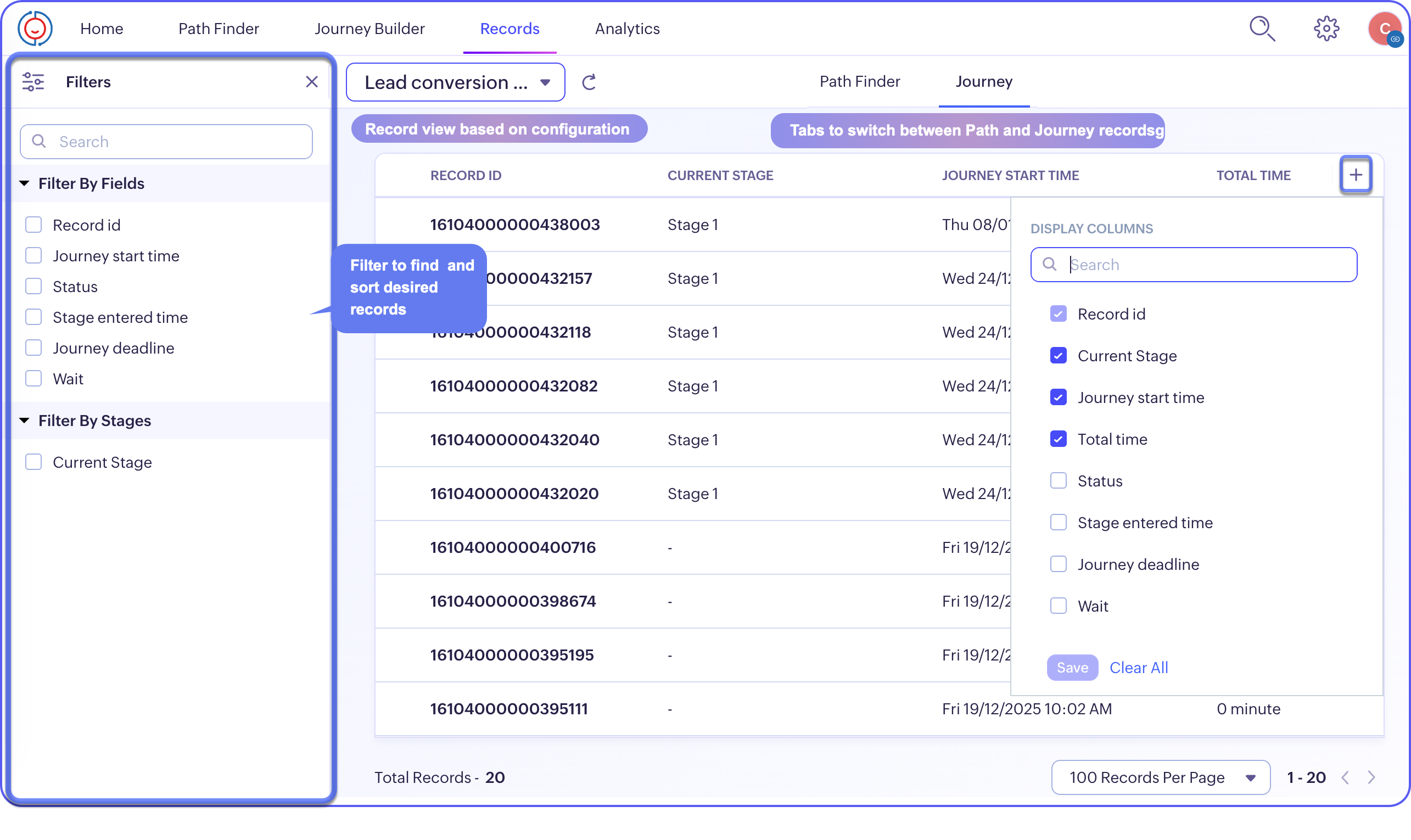
If you want to add, remove, or reorder the columns at display, you can do so by clicking the (+) icon on the column header.
If you want to add, remove, or reorder the columns at display, you can do so by clicking the (+) icon on the column header.
Inside a record
Each record has a string of numbers to identify them among others. You can view the following information from a record:
- The name of the configuration
- Date and time of when the record was created, when it recently entered a stage
- The latest previous stage the record came through and the current stage
- Notes for reference
- Feeds listing the changes and progression as chronological timelines
- Application info showing the which application this entity is currently lodged in, created time, and unique identifiers that pointed prospect or customer to this path or journey
- Involved records display the number of records this particular entry owns in the connected application across different modules. If the record is borne in Zoho CRM, you can click and view on the record in the Zoho CRM application itself.
- And, with toggle to navigate, you can go back and forth the records from the configuration right from this detail page.

Note:
- Feeds capture only configuration- and entity-level changes and/or progression. It will not be capturing the notes added.
- The notes added by multiple users will be listed in the space below with the information as to who added them.