Profile and Account in Zoho CommunitySpaces
Managing your profile
Open my Profile
Your profile helps you personalize how other members see you in the community and lets you review your activity in one place.
- Click your profile picture in the top-right corner.
- Select My Profile from the profile menu.
- Upload your profile picture or add a cover photo on the profile page.
Edit profile details
- Click Edit Profile in the top-right corner of the profile page.
- Update the Name, About Me, Timezone, and Social Links fields.
- Fill in all mandatory fields.
- Click Save.
Your updated profile details will be saved.
Review profile sections
Use the sections in your profile to review your activity and connections across the community.
- Profile shows your profile details at a glance.
- Activities show your timeline.
Use the filters in the left to switch between All Posts, Comments, and Others. - Reactions shows posts you have reacted to.Use the filters on the right side to switch between Community Wall and Your Spaces.
- The Followers section shows members who follow you. You can follow them back from here.
- The Following section shows the people you follow. You can unfollow them at any time.
- The Badges section shows all badges you have received in one place.
View badges and leaderboard details
Back on the profile page, you can view your email address, badges, points, and current level in the leaderboard.
Click a badge to see who awarded it and when.
Click the Points to open the leaderboard details and see the points you earned, the action you received it for, the time you received it, and a graph that tracks your progress.
If you are a host, you will also see an option to export badge details from the Badges section.
Managing your communities and access
Open My Communities
The My Communities option is only available to superhosts and hosts. It helps you review all the communities you belong to and move between them more easily.
- Click your profile picture in the top-right corner.
- Select My Communities from the profile menu.
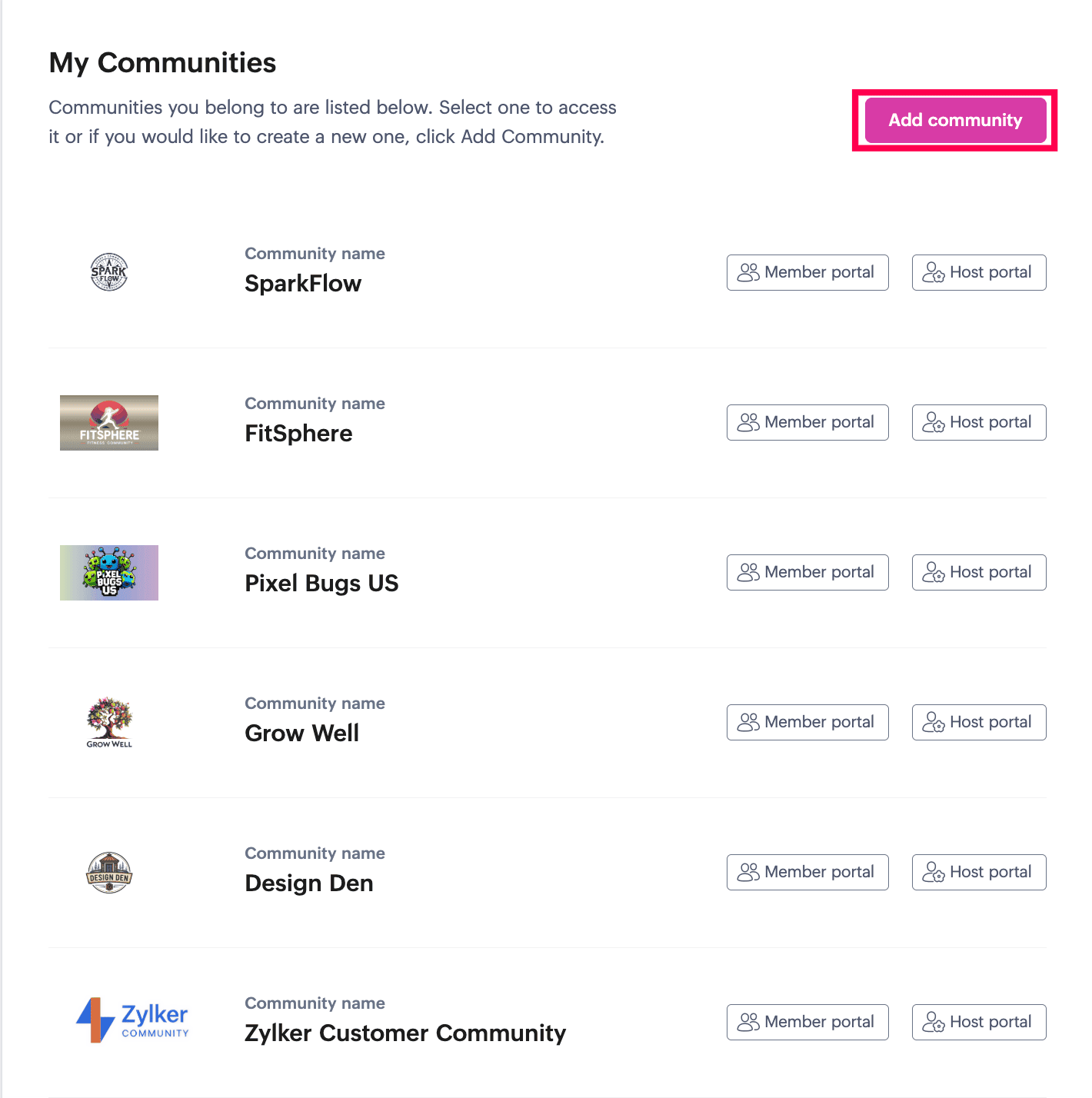
- Review the communities listed on the My Communities page and access any community.
Switch to another community
You can switch between communities directly while working inside one.
- Click the hamburger menu in the top-left corner.
- Select the community you want to open.
Access Host Portal and Member Portal
On the My Communities page, you can choose Host Portal to continue your current host session, or select Member Portal to sign in separately as a member.
As a host, you can also open the member view by using the Member Portal URL at the top right of the community. Use different email addresses when you access the same community as both a host and a member.
Create another community
If you are the Zoho organizational administrator, you will also see Add Community on the My Communities page. Use this option to create and host multiple communities under the same organization.
Changing your password and helping members join on mobile
Change your password
If you are a member, you will see Change Password as part of your account options. Use it to update your login password and keep your account secure.
- Click your profile picture in the top-right corner.
- Select Change Password from the profile menu.
- Enter the CAPTCHA and click Next.
- Enter your last password, if it matches you can continue to sign in, or click Continue to reset password.
- Enter the OTP that is sent to your email address.
- Create and confirm the new password and click Change Password.
Password must contain:
- Between 8 and 250 characters
- At least 1 special character
- At least 1 number
- Both upper and lower case letters
Open Scan QR Code
Use Scan QR Code under the Profile Picture menu when you want to help other members locate the correct community quickly.
When you open it, a QR code appears that you can download, share, or let others scan directly from the native Zoho CommunitySpaces mobile app.
Help members join on mobile
Members can access the community on mobile in two ways:
- Use the native Zoho CommunitySpaces mobile app (for Android and iOS) and scan the QR code.
- Use the community’s white-labeled mobile app, if one is available. In that case, they can access the community directly without scanning a QR code.
Understand how mobile app links are shared
The download links for the native Zoho CommunitySpaces mobile app are shared in the invitation email that users accept when joining the community. If the community uses a white-labeled app, those links can be configured to redirect members to the rebranded mobile app instead.
Sign out safely
- Click your profile picture in the top-right corner.
- Click Sign Out.
Sign out when you finish, especially if you are using a shared device.
Managing My Account
Open My Account as a host
In Zoho CommunitySpaces, the My Account experience is different for hosts and members. Hosts are treated as organizational users and are redirected to the standard Zoho Accounts page to manage their host account.
- Click your profile picture in the top-right corner.
- Select My Account from the profile menu.
Open My Account as a member
As a member, your account is managed through the community’s member portal URL or custom domain. When you open My Account, you are taken to your member account page, where you can manage your account in one place.
- Click your profile picture in the top-right corner.
- Select My Account from the profile menu.
Manage member account settings
Use these sections on the member account page:
- Verify by entering your password
- Profile to update your personal information and manage the email address linked to the account.
- Security to change your password.
- Multi-Factor Authentication to set your preferred MFA modes and recovery options.
- Sessions to review active sessions and sign out of devices you no longer use.
Help menu and switching modes
Open the Help menu
The Help menu gives you quick access to guidance, support, and product feedback options.
Open Help from the bottom right corner of the community.
Use support and feedback options
Use the options in the Help menu based on what you need:
- Request Demo to contact support for an online product walkthrough.
- Start a Tour to take a quick walkthrough of the modules in your community. Click Next to progress or X Skip tour to complete.
- Share Feedback to report a bug, request a feature, ask for clarification, or share appreciation.
- Write to Support to start an email to the support team.
- Record your screen to capture and report critical issues with full context, especially when the problem is hard to explain.
- Download the native Zoho CommunitySpaces android and iOS mobile apps under Stay connected to stay productive.

Note: The Request Demo and Share Feedback options are only available to superhosts and hosts.
Switch between Night Mode and Light Mode
Use Night Mode and Light Mode to change the visual theme of your interface and match your viewing preference.
Need more help?