Introducing Leaderboard

Introducing Leaderboard

Managing one business location is straightforward. Managing ten, fifty, or even hundreds? That’s where clarity disappears.

When multiple locations operate under the same brand or business, understanding which ones are truly performing well online becomes difficult. Reviews pile up. Responses vary. Business information may or may not be updated consistently.

Leaderboard solves this. It ranks your locations based on critical review management signals. With a single glance, you can instantly identify top-performing locations and see their exact scores.

No manual analysis. No spreadsheets. Just clear ranking.
Notes
Note: Leaderboard can be accessed by selecting a Business Group from Home, then selecting Leaderboard from the left menu.


What is Leaderboard?

Leaderboard is a performance-ranking feature designed to measure how well each location manages its online reputation.

A business’s reputation in local search depends heavily on:
  1. The ratings customers leave
  2. The number of reviews received
  3. How consistently reviews are responded to
  4. How quickly responses are sent
  5. How negative feedback is handled
  6. How accurately business information is maintained
Reviews represent real customer experiences. Potential customers rely on them to decide which business to choose. A few unanswered negative reviews or outdated business details can instantly create doubt. Today’s customers are vigilant. They compare. They evaluate. They expect the best.

Leaderboard brings structure to this complexity by ranking locations using measurable reputation signals.
Notes
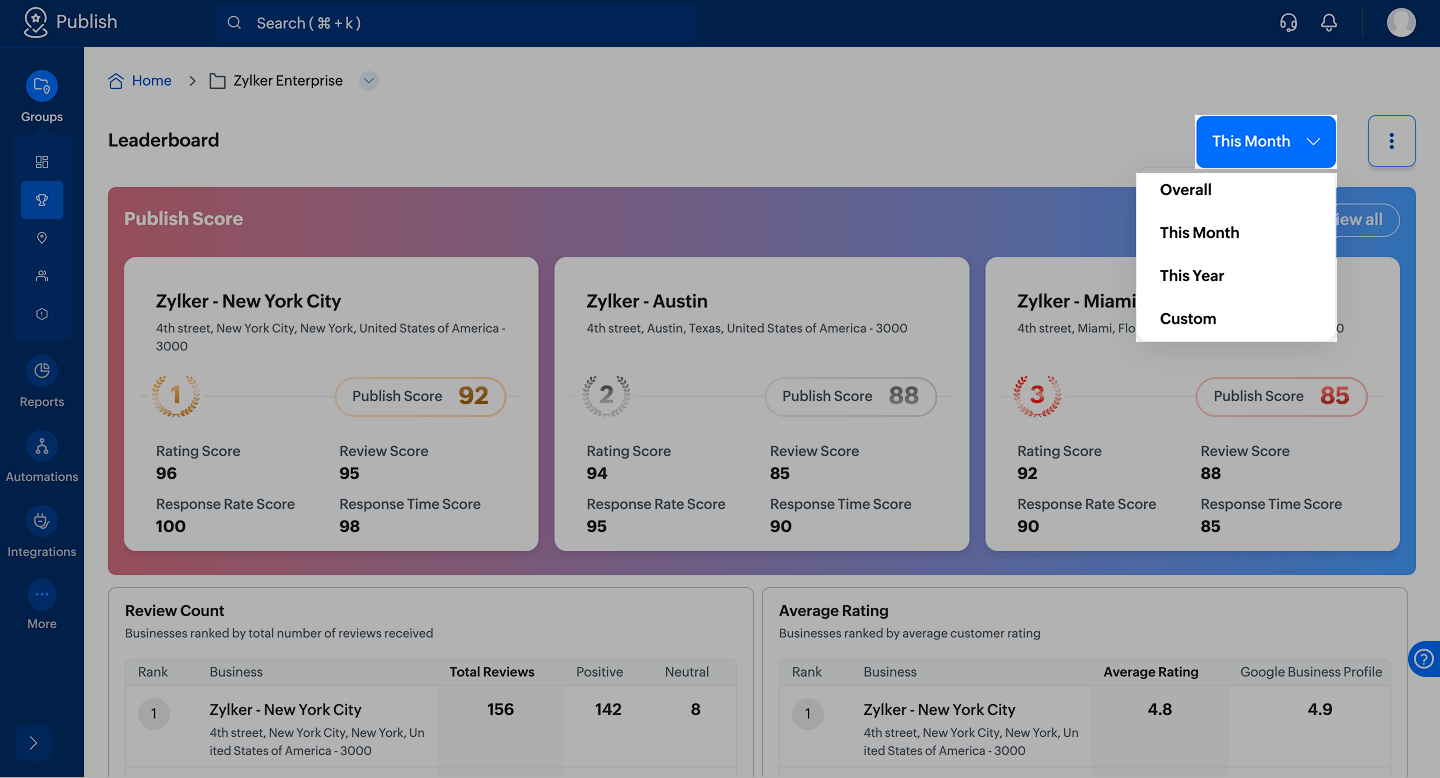
Note: Leaderboard can be viewed for Overall, This Month, This Year, or a Custom date range. Rankings automatically update based on the selected period.

Notes
Note:
Click the  icon to:
  1. Maximize the Leaderboard layout for an expanded view and detailed performance analysis.
  2. Edit the layout by resizing widgets or rearranging their order.
  3. Download the entire Leaderboard, including ranking numbers and widget data, as a CSV file.


Notes
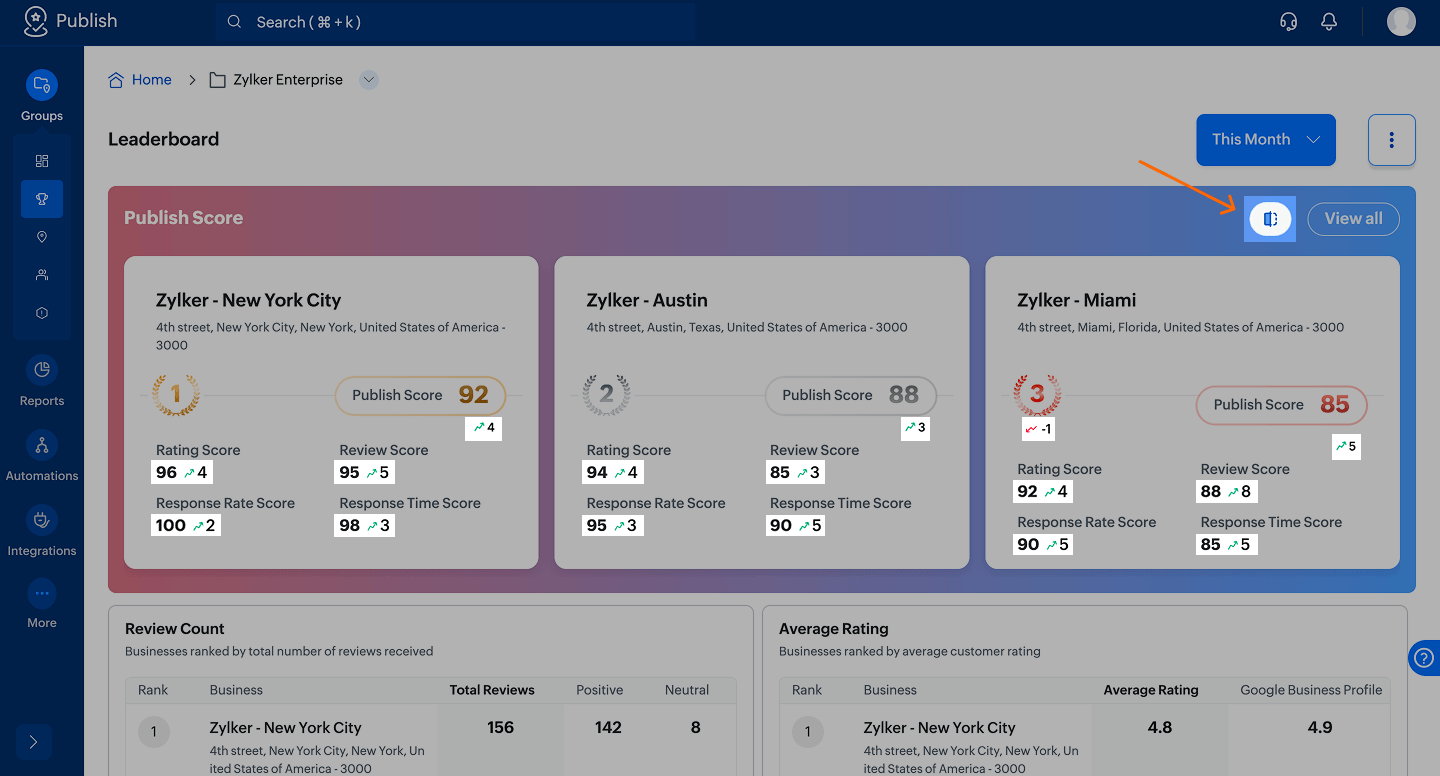
Note: Clicking this  icon compares performance with the previous equivalent period. Differences are visually indicated in green for improvement, and in red for decline.

Notes
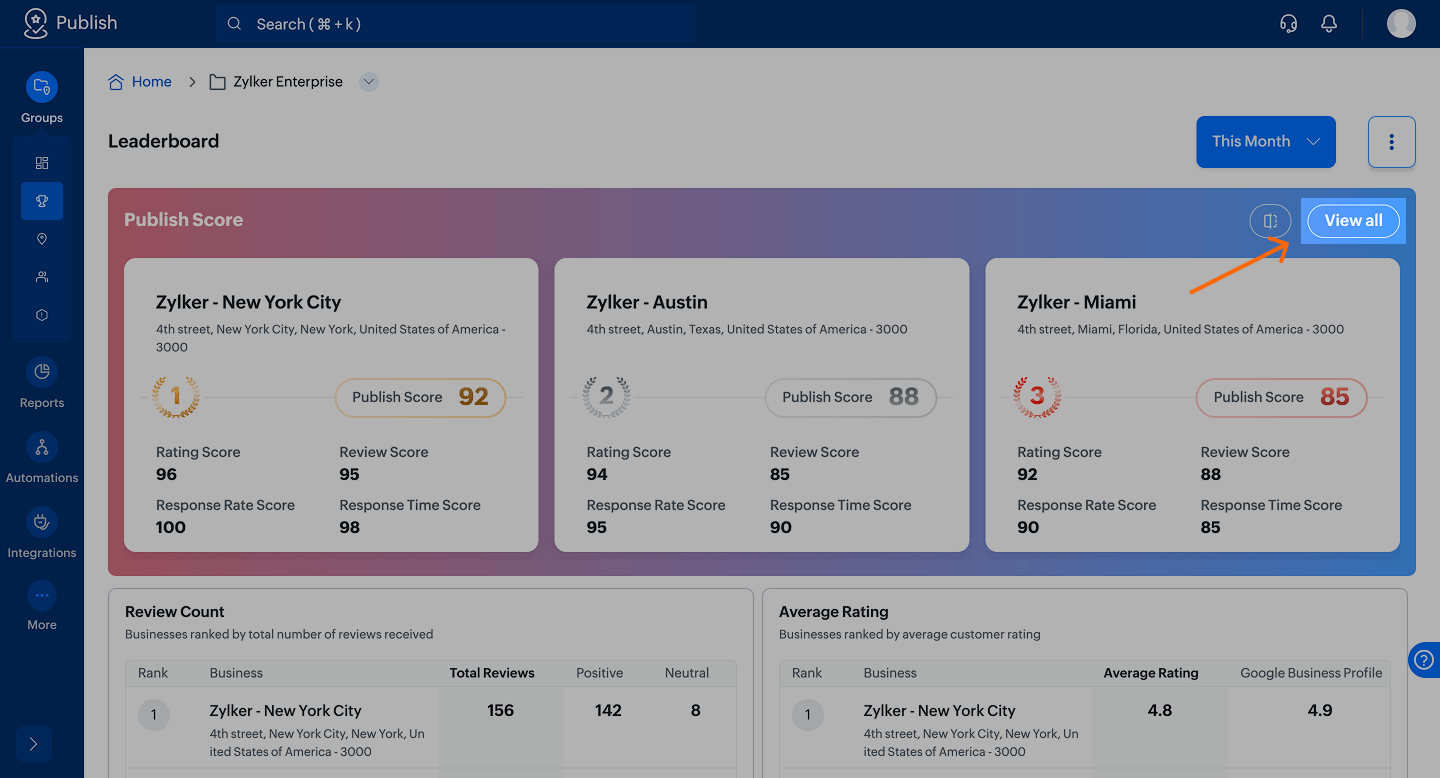
Note: By default, only the top three locations are spotlighted. Click View All to see the complete list of locations below.

What does Leaderboard measure

Leaderboard evaluates each location across multiple performance indicators.

1. Review count

Locations are ranked based on the number of reviews received.

A higher review count may indicate:
  1. Higher customer volume
  2. Stronger review generation practices
  3. Better engagement with customers
It also builds credibility. A 4.5 rating with 500 reviews carries more weight than a 4.5 rating with 10 reviews.


Notes
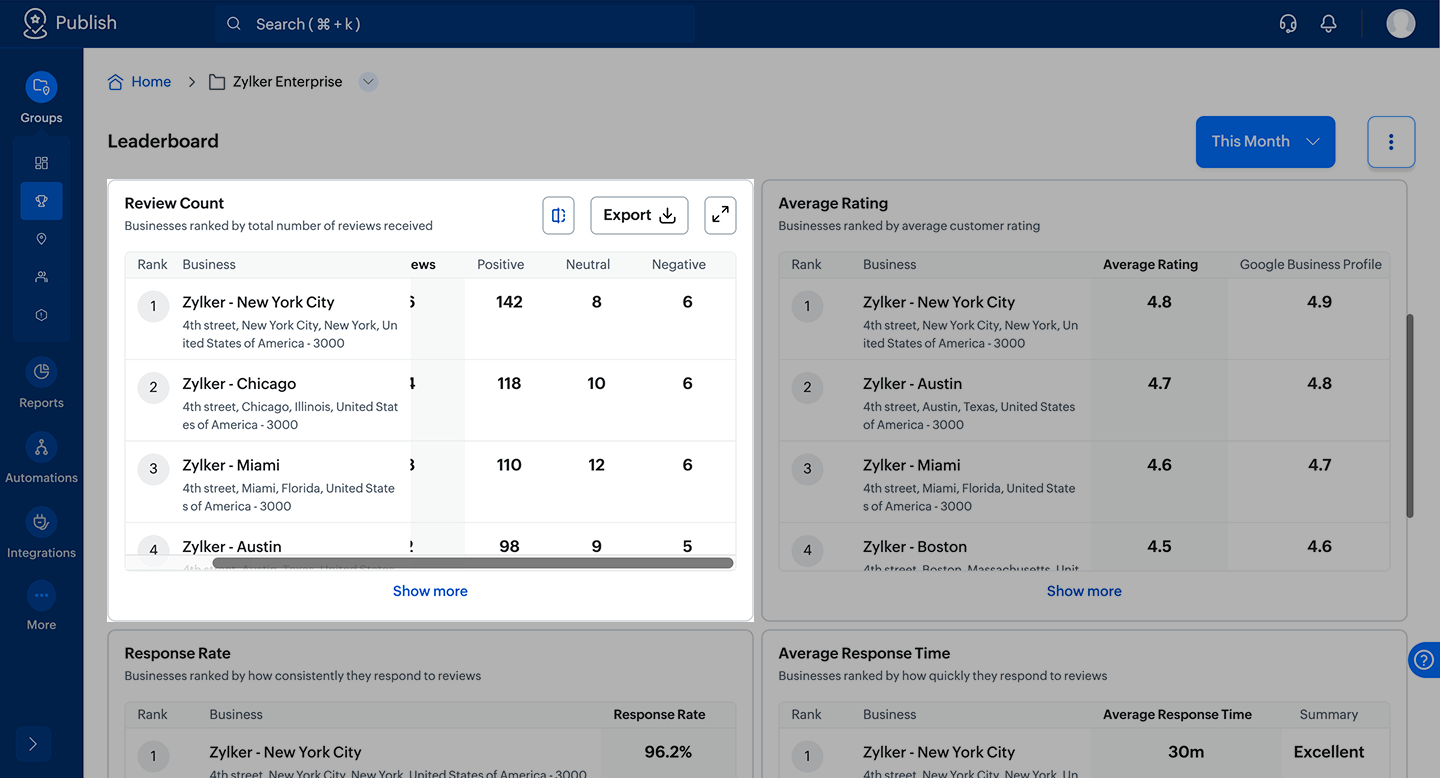
Note: In some widgets, certain details may be hidden on the right side. Scroll right to view the complete data.

Info
Important: Ranking is calculated based on the total number of reviews received in the selected period. If two locations have the same total, ranking is decided by more positive reviews, fewer negative reviews, and then more neutral reviews.
  1. Positive reviews = 5 and 4-star reviews
  2. Neutral = 3-star reviews
  3. Negative = 2 and 1-star reviews

2. Average rating

Locations are ranked based on the ratings customers leave.

Higher ratings indicate stronger customer satisfaction and a positive service experience. This metric gives you a quick view of which locations consistently deliver quality.


Notes
Note:
Hovering over a widget displays three icons that allow you to:
  1. Maximize the widget for focused analysis without distractions.
  2. Compare performance with the previous equivalent time period. Improvements are shown in green, and declines are shown in red.
  3. Export the data for that specific widget.


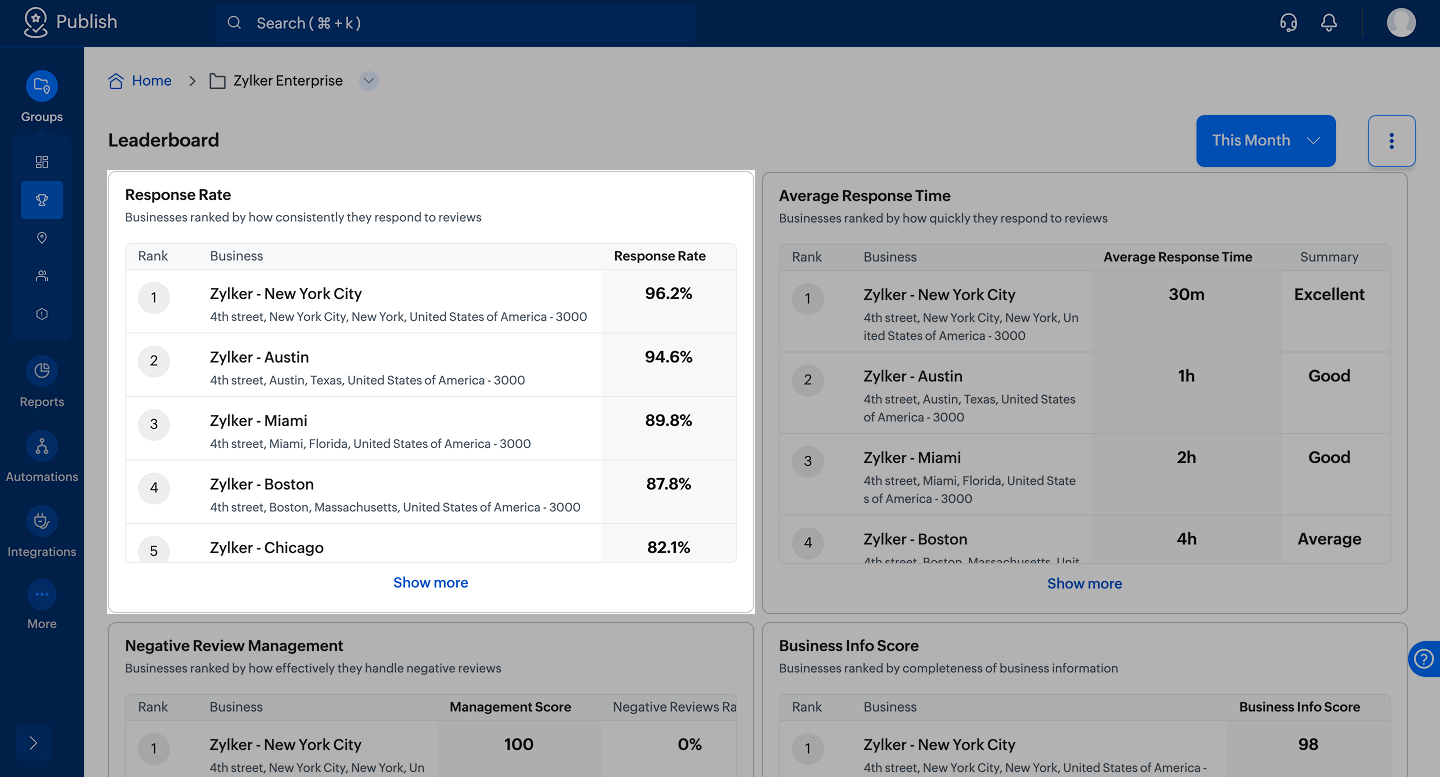
3. Response rate

Locations are ranked based on how consistently they respond to reviews.

Responding to reviews shows:
  1. Active management
  2. Customer care
  3. Brand accountability
Ignoring reviews, especially negative ones, signals neglect. Leaderboard highlights which locations are consistently engaging with customers.

Notes
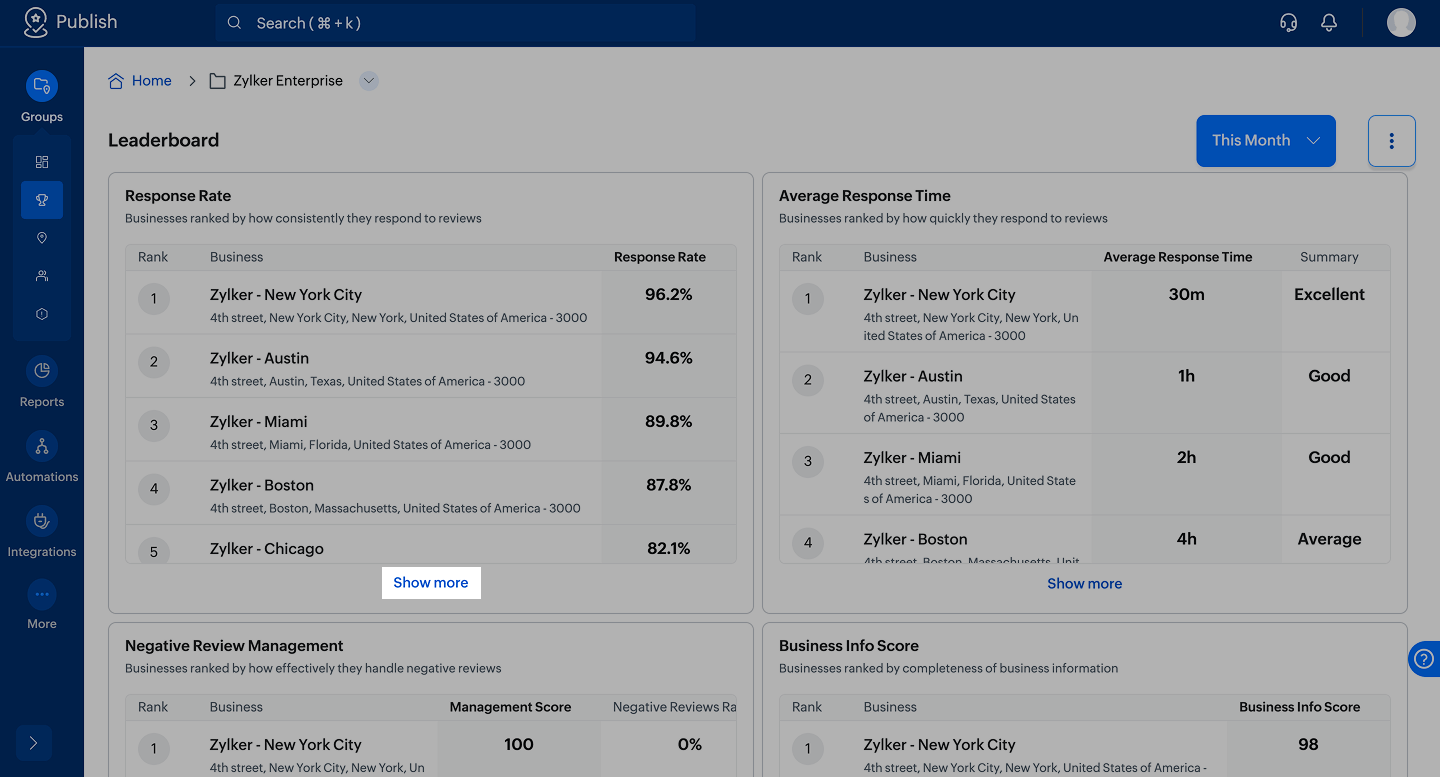
Note: Click Show More within a widget to scroll down and view all locations.

4. Average response time

Locations are ranked based on how quickly they respond to reviews.

Speed communicates professionalism. Even if a problem isn’t resolved immediately, a quick acknowledgment builds trust. Slow responses increase customer frustration and reduce credibility. This metric identifies which locations are proactive versus reactive.


5. Negative review management

Locations are ranked based on the number of negative reviews received (lower the better) and whether those negative reviews are responded to.

Negative reviews are sensitive and highly visible. When handled well, they can actually improve trust. When ignored, they damage perception quickly.

Leaderboard helps you identify:
  1. Locations receiving frequent negative feedback
  2. Locations failing to address customer concerns
  3. Locations effectively managing difficult situations

Info
Important: Ranking is calculated using a Management Score (0–100). The score considers both the percentage of negative reviews and the percentage of negative reviews without replies. Fewer negative reviews and timely responses result in a higher score.

6. Business info score

Locations are ranked based on how complete and updated their business information is, including components such as contact details, categories, description, images, and attributes.

Accurate business information impacts search visibility, customer trust, store visits, and conversion rates. Outdated hours or missing information create friction and confusion.


How Leaderboard helps

Leaderboard gives you clarity across multiple locations by:
  1. Identifying top-performing locations instantly
  2. Highlighting underperforming locations that need attention
  3. Encouraging healthy performance benchmarking
  4. Supporting data-driven reputation improvement
  5. Simplifying performance reporting for leadership
Instead of manually analyzing ratings, responses, and listing updates across every location, you get a structured ranking system.

You don’t just see data; you see performance.

Summary

Online reputation is no longer optional. It directly influences customer decisions.

Leaderboard turns scattered review and listing signals into a clear, ranked performance view across locations. With measurable metrics and instant comparison, you can identify strengths, fix weaknesses, and maintain consistent brand standards across every location.

        Create. Review. Publish.

        Write, edit, collaborate on, and publish documents to different content management platforms.

        Get Started Now


          Access your files securely from anywhere

            Zoho CRM Training Programs

            Learn how to use the best tools for sales force automation and better customer engagement from Zoho's implementation specialists.

            Zoho CRM Training
              Redefine the way you work
              with Zoho Workplace

                Zoho DataPrep Personalized Demo

                If you'd like a personalized walk-through of our data preparation tool, please request a demo and we'll be happy to show you how to get the best out of Zoho DataPrep.

                Zoho CRM Training

                  Create, share, and deliver

                  beautiful slides from anywhere.

                  Get Started Now


                    Zoho Sign now offers specialized one-on-one training for both administrators and developers.

                    BOOK A SESSION


                                Quick LinksWorkflow AutomationData Collection
                                Web FormsEnterpriseOnline Data Collection Tool
                                Embeddable FormsBankingBegin Data Collection
                                Interactive FormsWorkplaceData Collection App
                                CRM FormsCustomer ServiceAccessible Forms
                                Digital FormsMarketingForms for Small Business
                                HTML FormsEducationForms for Enterprise
                                Contact FormsE-commerceForms for any business
                                Lead Generation FormsHealthcareForms for Startups
                                Wordpress FormsCustomer onboardingForms for Small Business
                                No Code FormsConstructionRSVP tool for holidays
                                Free FormsTravelFeatures for Order Forms
                                Prefill FormsNon-Profit

                                Intake FormsLegal
                                Mobile App
                                Form DesignerHR
                                Mobile Forms
                                Card FormsFoodOffline Forms
                                Assign FormsPhotographyMobile Forms Features
                                Translate FormsReal EstateKiosk in Mobile Forms
                                Electronic Forms
                                Drag & drop form builder

                                Notification Emails for FormsAlternativesSecurity & Compliance
                                Holiday FormsGoogle Forms alternative GDPR
                                Form to PDFJotform alternativeHIPAA Forms
                                Email FormsFormstack alternativeEncrypted Forms

                                Wufoo alternativeSecure Forms

                                TypeformWCAG

                                  Zoho FSM Video Tutorials


                                        All-in-one knowledge management and training platform for your employees and customers.

                                                  Create. Review. Publish.

                                                  Write, edit, collaborate on, and publish documents to different content management platforms.

                                                  Get Started Now


                                                                    You are currently viewing the help pages of Qntrl’s earlier version. Click here to view our latest version—Qntrl 3.0's help articles.


                                                                        Manage your brands on social media


                                                                          • Desk Community Learning Series


                                                                          • Digest


                                                                          • Functions


                                                                          • Meetups


                                                                          • Kbase


                                                                          • Resources


                                                                          • Glossary


                                                                          • Desk Marketplace


                                                                          • MVP Corner


                                                                          • Word of the Day


                                                                          • Ask the Experts


                                                                            Zoho Sheet Resources


                                                                                Zoho Forms Resources


                                                                                  Secure your business
                                                                                  communication with Zoho Mail


                                                                                  Mail on the move with
                                                                                  Zoho Mail mobile application

                                                                                    Stay on top of your schedule
                                                                                    at all times


                                                                                    Carry your calendar with you
                                                                                    Anytime, anywhere


                                                                                          Zoho Sign Resources

                                                                                            Sign, Paperless!

                                                                                            Sign and send business documents on the go!

                                                                                            Get Started Now


                                                                                                    Zoho TeamInbox Resources


                                                                                                              Zoho DataPrep Demo

                                                                                                              Get a personalized demo or POC

                                                                                                              REGISTER NOW


                                                                                                                Design. Discuss. Deliver.

                                                                                                                Create visually engaging stories with Zoho Show.

                                                                                                                Get Started Now


                                                                                                                                    • Related Articles

                                                                                                                                    • Introducing Zoho Desk Integration

                                                                                                                                      Handling a large number of reviews can be difficult, especially when responses need to be personalized based on rating or sentiment. If you already use Zoho Desk to manage support tickets, this integration helps you bring reviews into the same ...
                                                                                                                                    • Introducing Zoho CRM Integration

                                                                                                                                      If you manage multiple business locations using Zoho CRM, integrating with Zoho Publish makes it easier to track their performance, monitor online reputation, and stay updated on business information changes. This integration syncs your Google ...
                                                                                                                                    • Introducing Automation in Zoho Publish

                                                                                                                                      Imagine your business is thriving. Customers love what you offer, and reviews keep rolling in. At first, you're thrilled as it’s a clear sign of business growth. However, when the incoming reviews overwhelm you, spending countless hours crafting ...
                                                                                                                                    • What happens when a business is deleted

                                                                                                                                      Deleting a business can affect features where the business is currently being used. The impact varies based on your plan and feature configuration. Feature Trial and Professional Free Automation Continues to work for remaining businesses. No impact. ...
                                                                                                                                    • How to set up Zoho CRM organization with a new module

                                                                                                                                      Note: This article will be applicable if you don't have an CRM module with business details of all locations. Read on to learn how to set up Zoho CRM integration with an existing module. With this integration, you can analyze your Google Business ...
                                                                                                                                      Wherever you are is as good as
                                                                                                                                      your workplace

                                                                                                                                        Resources

                                                                                                                                        Videos

                                                                                                                                        Watch comprehensive videos on features and other important topics that will help you master Zoho CRM.


                                                                                                                                        eBooks

                                                                                                                                        Download free eBooks and access a range of topics to get deeper insight on successfully using Zoho CRM.


                                                                                                                                        Webinars

                                                                                                                                        Sign up for our webinars and learn the Zoho CRM basics, from customization to sales force automation and more.


                                                                                                                                        CRM Tips

                                                                                                                                        Make the most of Zoho CRM with these useful tips.


                                                                                                                                          Zoho Show Resources