Related List
Related lists display information associated with a record within its detail page. Users can access them from the left panel in the record detail page to view related records, function-based results, or widget-based content connected to the selected record.
They provide contextually relevant data from other modules or third-party integrations, displayed directly within a record's detail page. This provides a holistic view of a record by consolidating all relevant information in one place, which improves user experience and decision-making.
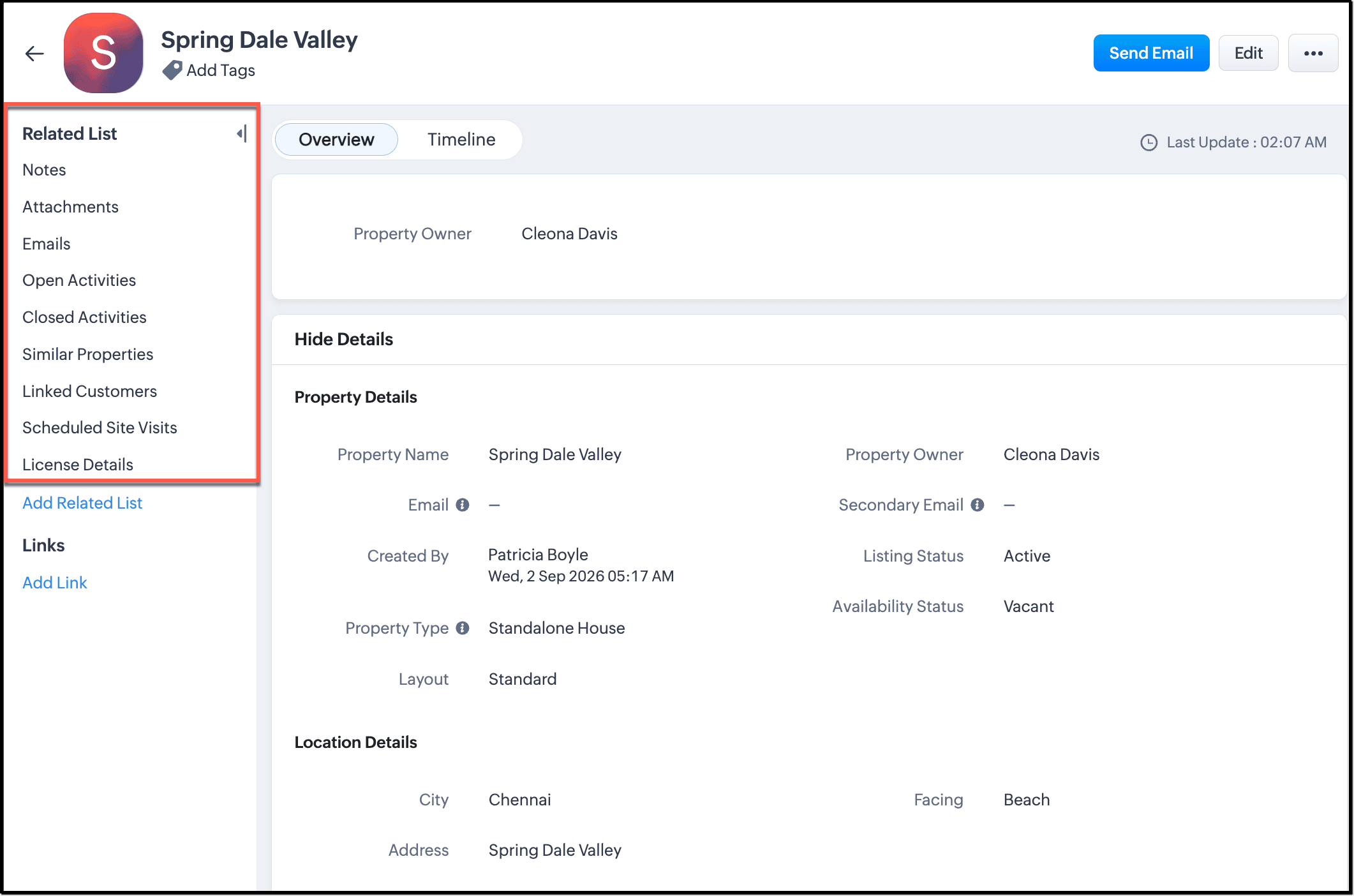
For example, a customer record can include a related list that shows linked deals or scheduled service appointments. A vehicle record can include a related list that displays similar vehicles, warranty details from an external system, or service history. This gives users access to supporting information without moving away from the current record.
In addition to the pre-defined Related Lists available in a module, you can create custom Related Lists in two ways:
- Using a custom Deluge Function
- Embedding a widget into the Related List as an iframe.
Related lists are packagable components in Vertical Studio. When you publish your application, related lists created in the developer console are included in that application version and become available to subscriber orgs during signup or version upgrade, based on packaging behavior.
Where to access and configure related list
- Log into your Developer Console.
- Navigate to Build > Components.
- Open Related Lists.
- Click Add Related List.
- Select the related list type and complete configuration.
- Click Save and Close.
A related list is not a standalone module or a separate page. It is a contextual block inside a parent record.
- It can show records that are already linked to the parent record.
- It can show custom results returned by a Deluge function.
- It can show embedded external or custom interface content through a widget.
For users in a subscriber org, related lists appear as part of the detail view of a record. For developers in the developer console, related lists are configured as reusable components and then delivered through the packaged application.
Relationship-driven related lists
Lookup-based related lists are created automatically when a lookup field connects one module to another. A related list can appear in both connected modules so users can view linked records from either side without additional setup.
Use a linking module when a many-to-many relationship needs its own record-level data. In that pattern, the linking module stores the association and any relationship-specific metadata, while the main modules remain separate.
Related list types and setup
Related list types include lookup-based related lists, function-related lists, and widget-related lists. The type you use depends on the information you want to show in the record detail page.
1. Lookup-based related list
A lookup-based related list is created automatically when a lookup field connects one module to another module. Linked records then appear in the parent record detail page without additional related list setup.
For example, if a lookup is created from Properties to Customers, a related list will be added to both modules: customer-related records in the property record, and property-related records in the customer record.
2. Function-Related List
You can create a Related List using a custom Deluge Function to map a module and display specific data. To create a Related List using function,
To add a function-related list:
- Open Related Lists in the Developer Console.
- Click Add Related List.
- Choose the function-based related list option.
- In the top bar of the code editor, specify the Related List Name.
- Select the Module to which the related list must be mapped.
- Write the Deluge function logic to fetch the required data.
- Format the response so the related list can display the returned values correctly.
- Click Save and Close.
Check the Functions help page for additional guidance and packaging behavior.
Example
Below is a sample Deluge function code to create a Related List named Similar Customers in the Vehicles module. This Related List displays customers who own the same vehicle model as the parent record.
vehicleId = vehicle.get("Vehicles.ID"); vehicleRecord = zoho.crm.getRecordById("Vehicles",vehicleId.toLong()); vehicleName = vehicleRecord.get("Name"); crmResp = zoho.crm.searchRecords("Vehicles","(Name:equals:" + vehicleName + ")",1,10); //info crmResp ; responseXML = ""; rowVal = 0; if(crmResp.size() > 1) { responseXML = responseXML + "<record>"; for each vehicle in crmResp { data = vehicle.get("Vehicle_Contact_1"); contactId = data.get("id"); contactRecord = zoho.crm.getRecordById("Contacts",contactId); contactPhone = contactRecord.get("Phone"); contactName = contactRecord.get("Last_Name"); responseXML = responseXML + "<row cnt='" + rowVal + "'><FL val='Customer Name'>" + contactName + "</FL><FL val='Customer Phone'>" + contactPhone + "</FL></row>"; rowVal = rowVal + 1; } responseXML = responseXML + "</record>"; } else { responseXML = responseXML + "<error>=><message>No other customer has a vehicle with the same model.</message></error>"; } return responseXML; |
3. Widget-Related List
Use a widget-related list when you need to embed custom interface content through an iframe. A widget-related list includes these components:
- Related list name
- Mapped module
- Connected app sandbox URL
- Iframe height
For example, a property record can show an external valuation panel inside a widget-based related list.
To add a widget-related list:
- Open Related Lists in the Developer Console.
- Click Add Related List.
- Choose the widget-based related list option.
- Enter the Related List Name.
- Select the Module to which the related list must be mapped.
- Provide the Connected App Sandbox URL for the widget content.
- Set the required iframe height so the content fits within the related list area.
- Click Save and Close.
A widget-related list can display external applications or custom interface content inside the related list area of the record detail page.
Refer to the Widgets help page for more details.
4. Standard related lists
Standard related lists are built into the module and appear automatically when the module has related data such as notes, attachments, emails, open activities, or closed activities.
Packaged Related Lists
Packaged Related Lists are created in the developer console and deployed to subscriber organizations during signup or through upgrades. Any new Related list that is created in the developer console will be included in the next version of the application.
To know more about packaging, please refer to our guide on Components Packaging in Zoho Vertical Studio.
The following table explains the upgrade behavior of an existing packaged Related List already deployed in the subscriber's organization.
Property | Upgrade Type | Subscriber Modify Access |
Function Related List Name | Upgradable | No |
Widget related list name | Non-upgradable | No |
Function related list module mapping | Non-Upgradable | No |
Widget related list module mapping | Non-Upgradable | No |
Module | Non-editable | No |
Function Code | Upgradable | No |
Connected App
| Upgradable | No |
Publish and version upgrade
Case 1: New subscriber signup
When a new subscriber signs up on the latest published version, all packaged related lists in that version are available in the subscriber org.
Case 2: Existing subscriber upgrades to a newer version
When you publish a newer application version:
- New related lists added in the developer console are delivered during upgrade.
- Function related list name updates are delivered during upgrade.
- Widget related list name updates are not delivered during upgrade.
- Function related list code updates are delivered during upgrade.
- Connected app sandbox URL updates in widget related lists are delivered during upgrade.
- Iframe height updates in widget related lists are delivered during upgrade.
- Module mapping updates are not delivered to existing subscriber orgs.
Case 3: Subscriber-side modification and retention
Subscribers cannot modify packaged related lists at the subscriber end in the validated behavior for this feature.
Changes and impacts
Delete related list
Deleting a related list in the developer console removes that related list from existing subscriber orgs during upgrade. If the related list supports operational workflows, deletion can interrupt support, sales, or service processes.
Use a staged retirement approach. First introduce a replacement related list in one release, communicate migration steps, and delete the older component only after subscriber orgs complete migration validation.

Note
Related list visibility
If a related list is missing in a subscriber org even though it is configured in the developer console, verify the following:
- The related module is enabled in module visibility settings.
- The module is enabled in the pricing plan used by the subscriber org.
- The latest application version is published after visibility or pricing updates.
- The subscriber org is upgraded to the latest published version.
- Profile permissions allow access to the module and related records.
- If the related list is still missing, refer to Module Visibility.
After a lookup field is removed or changed, a related list may continue to appear until configuration changes are fully propagated.
Use this validation sequence:
- Check whether the original lookup or relationship field still exists in layout metadata.
- Confirm that the field is moved to Unused Fields and removed from dependent mappings. After publish, the field cannot be removed completely.
- Republish the application after cleaning up the relationship configuration.
- Upgrade a test subscriber org and verify whether the related list is removed.
- If required, apply a controlled layout update and publish again to refresh related list rendering.