Announcing Agentic AI - Ask Zia!
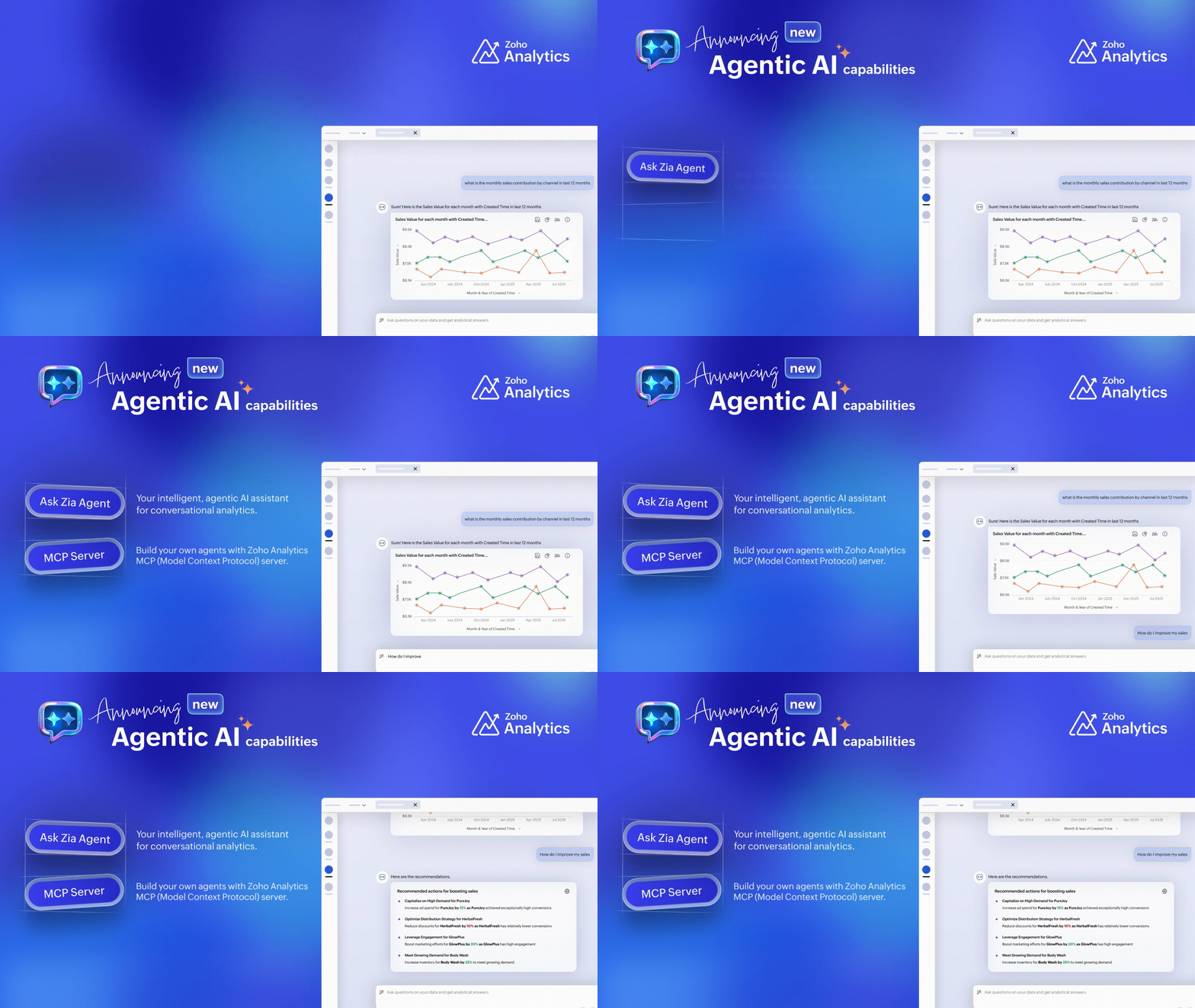
Upholding our commitment to the motto – Analytics for All, Ask Zia, the AI agent (powered by LLMs), empowers users of different personas, such as data engineers, data analysts, and business users, to build and automate data pipelines and get intelligent recommendations and contextual suggestions through natural language prompts.
Ask Zia for Data Engineers
Ask Zia helps data engineers accelerate data preparation and pipeline tasks through natural language prompts.
Build Data Pipelines
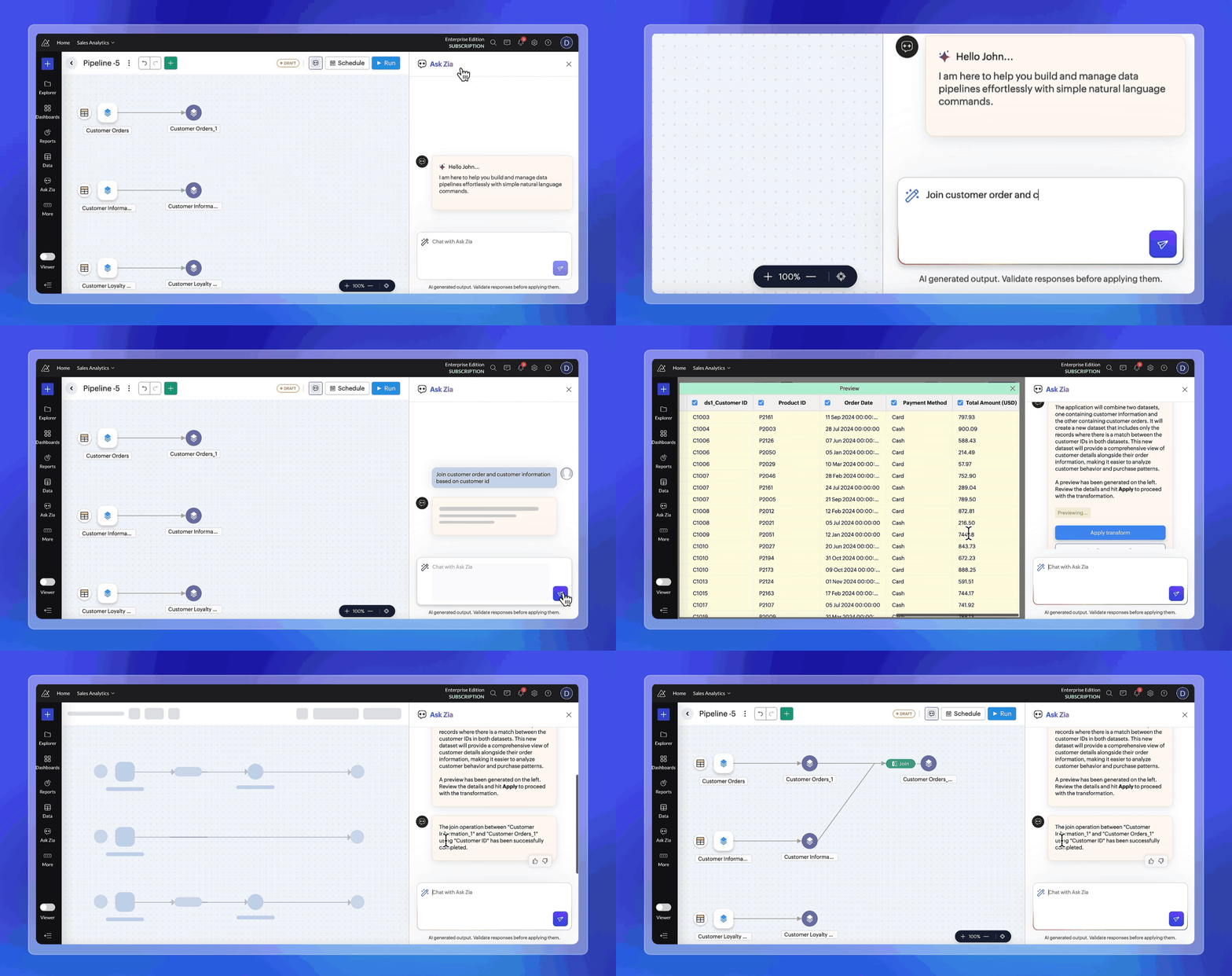
Ask Zia pipeline builder allows you to build, clean, transform, and automate data pipelines using simple, natural language. This streamlines the entire ETL process thereby reducing manual effort.
Transform with Examples
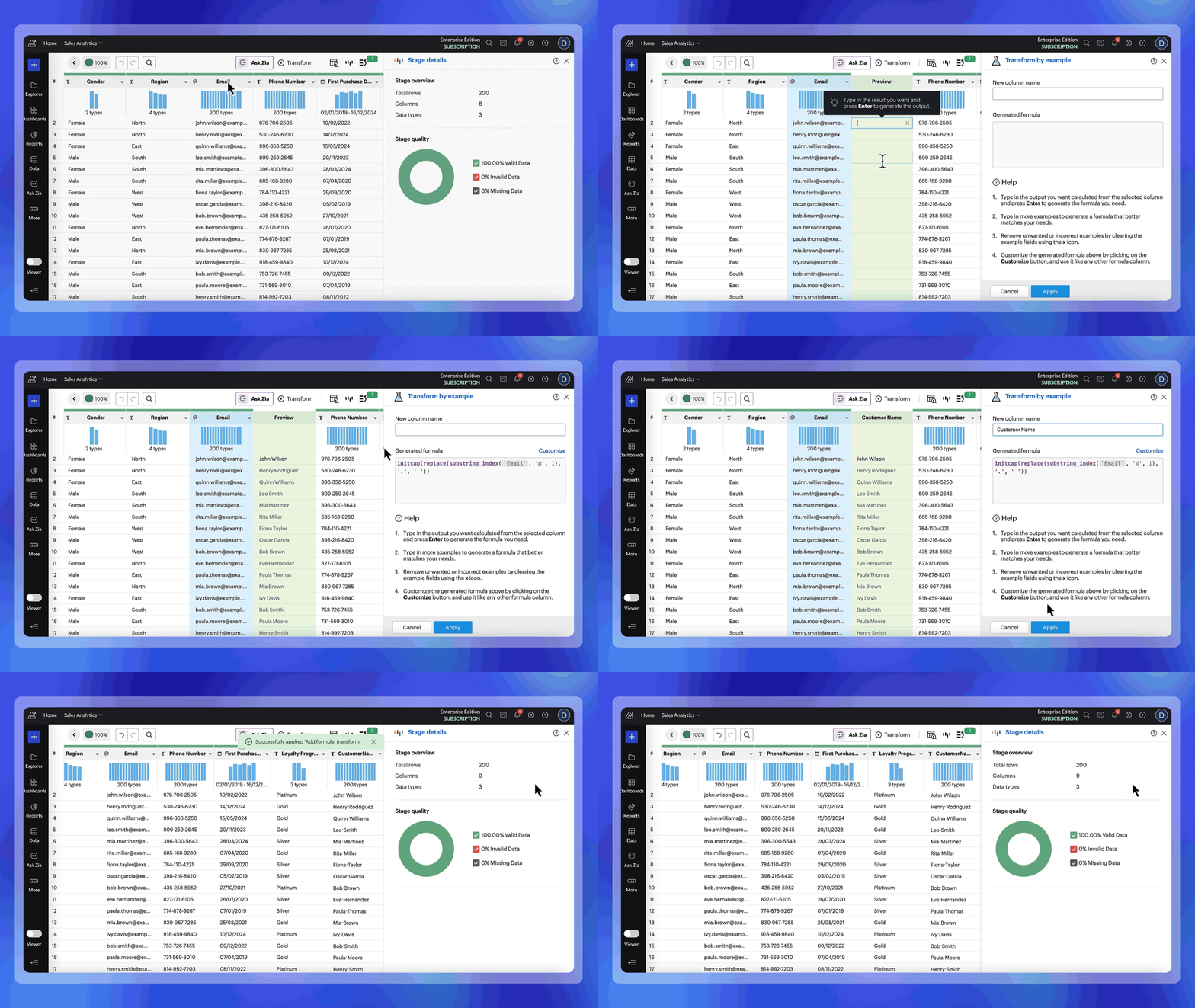
Transform by example easily helps you transform the data in any column to your needs just by providing examples of the output.
Ask Zia for Data Analysts and Business Users
Build reports and dashboards using simple natural language. Get contextual narratives to understand the What and Why behind any scenario.
Smarter Report Creation
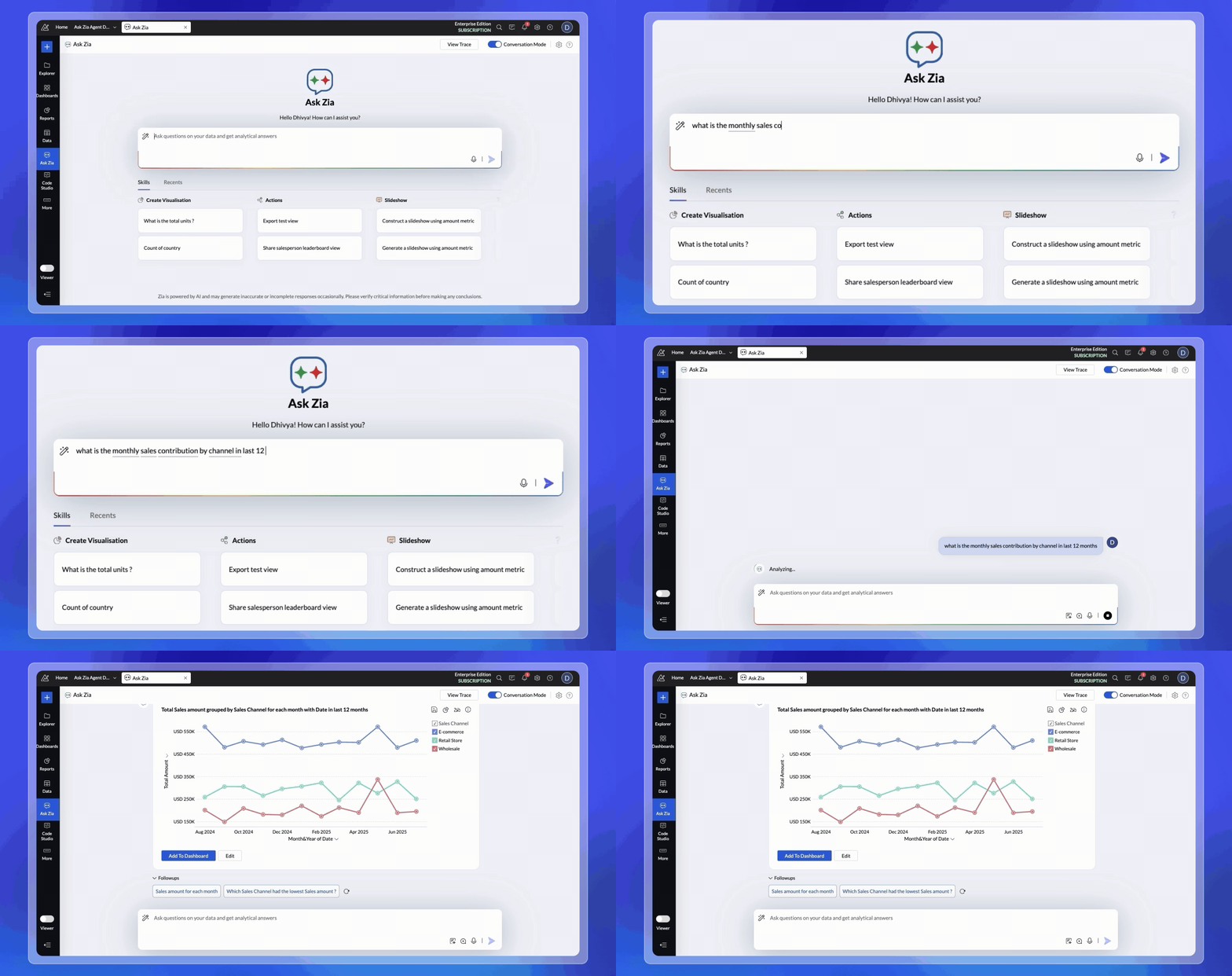
While users have always been able to build reports using Ask Zia, the new LLM-powered enhancements significantly improve the experience. With LLMs now driving report creation, Ask Zia better understands your queries, recommends the most relevant visualizations, and delivers deeper, more meaningful insights.
Dashboard Creation Made Easy
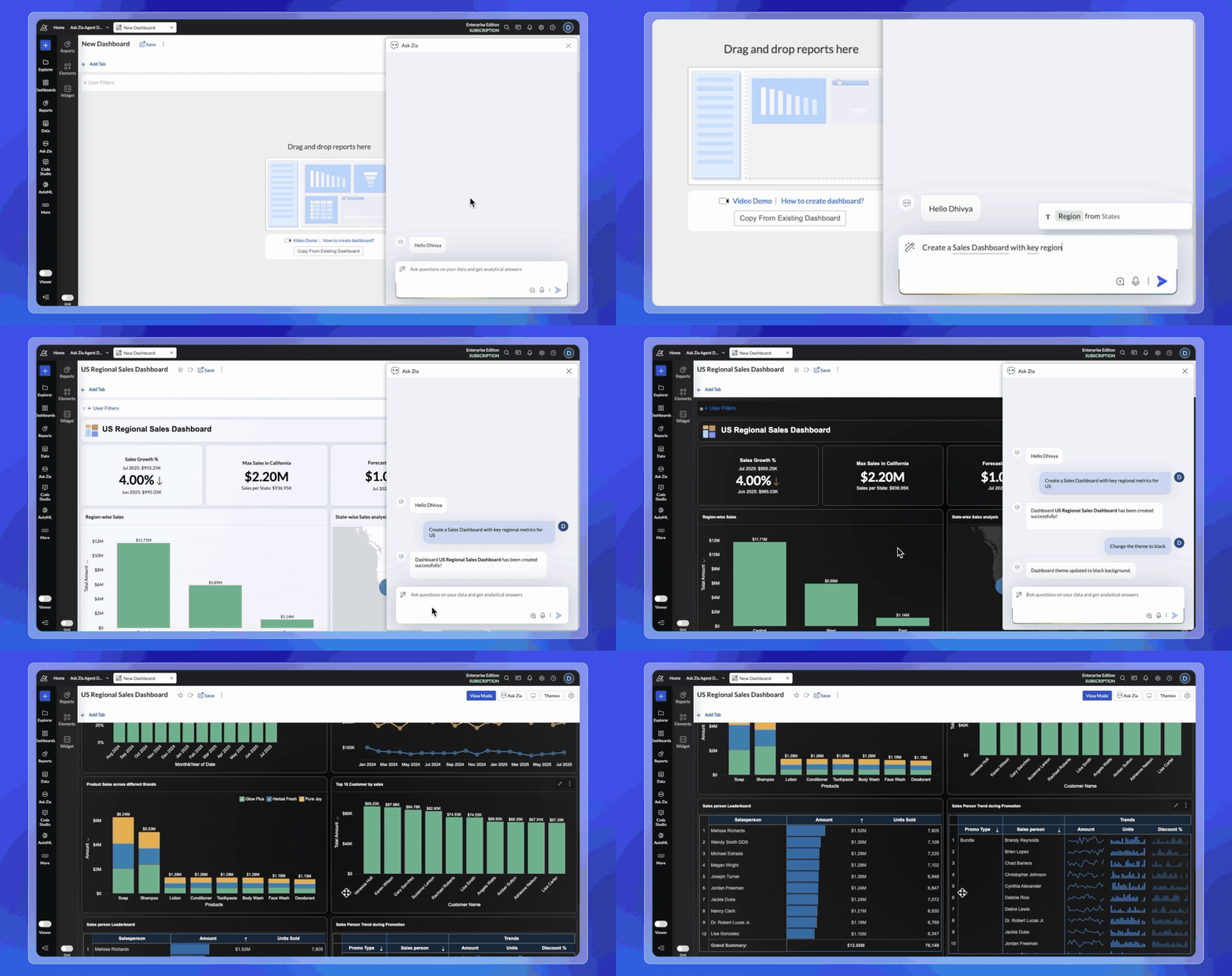
Build fully functional dashboards using natural language prompts. Describe your requirements, and Ask Zia brings together the most relevant reports, applies filters, and arranges them into a customizable dashboard ready to share, explore, and act on.
Get Actionable Insights and Smart Recommendations
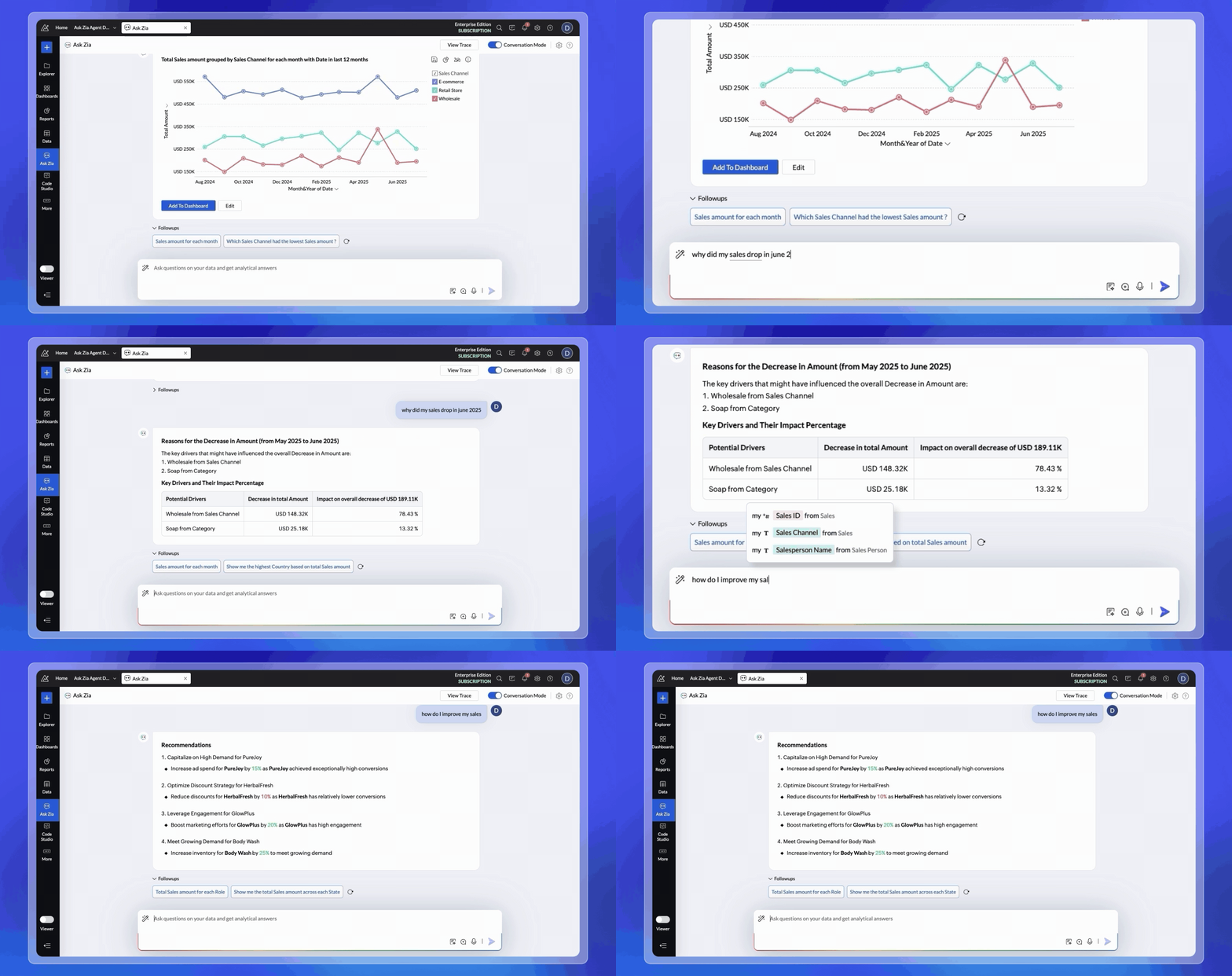
Data analysts and business users no longer need to sift through multiple reports to uncover key insights. While Ask Zia has supported descriptive and predictive insights, it now goes further by offering diagnostic and prescriptive insights, helping you understand why something happened and recommendations for what actions to be taken next. This empowers you to move from insights to action faster.
Create Data Stories Using Slideshow Skills
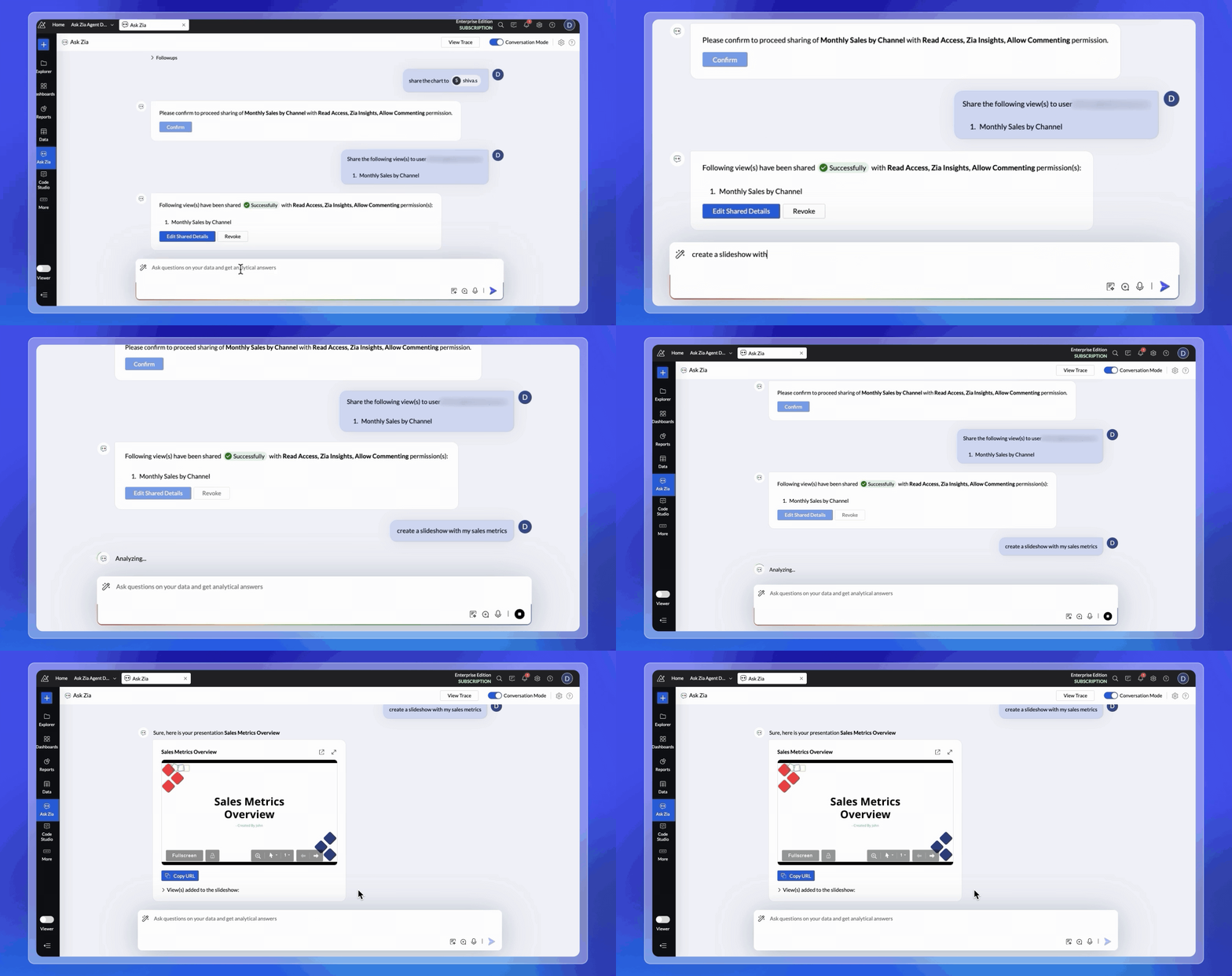
Turn insights into impactful data stories. Create slideshows directly from reports and dashboards. Just use a simple prompt, and Zia will compile key visuals and narratives into a ready-to-present deck, saving you time and effort.
Take Instant Actions
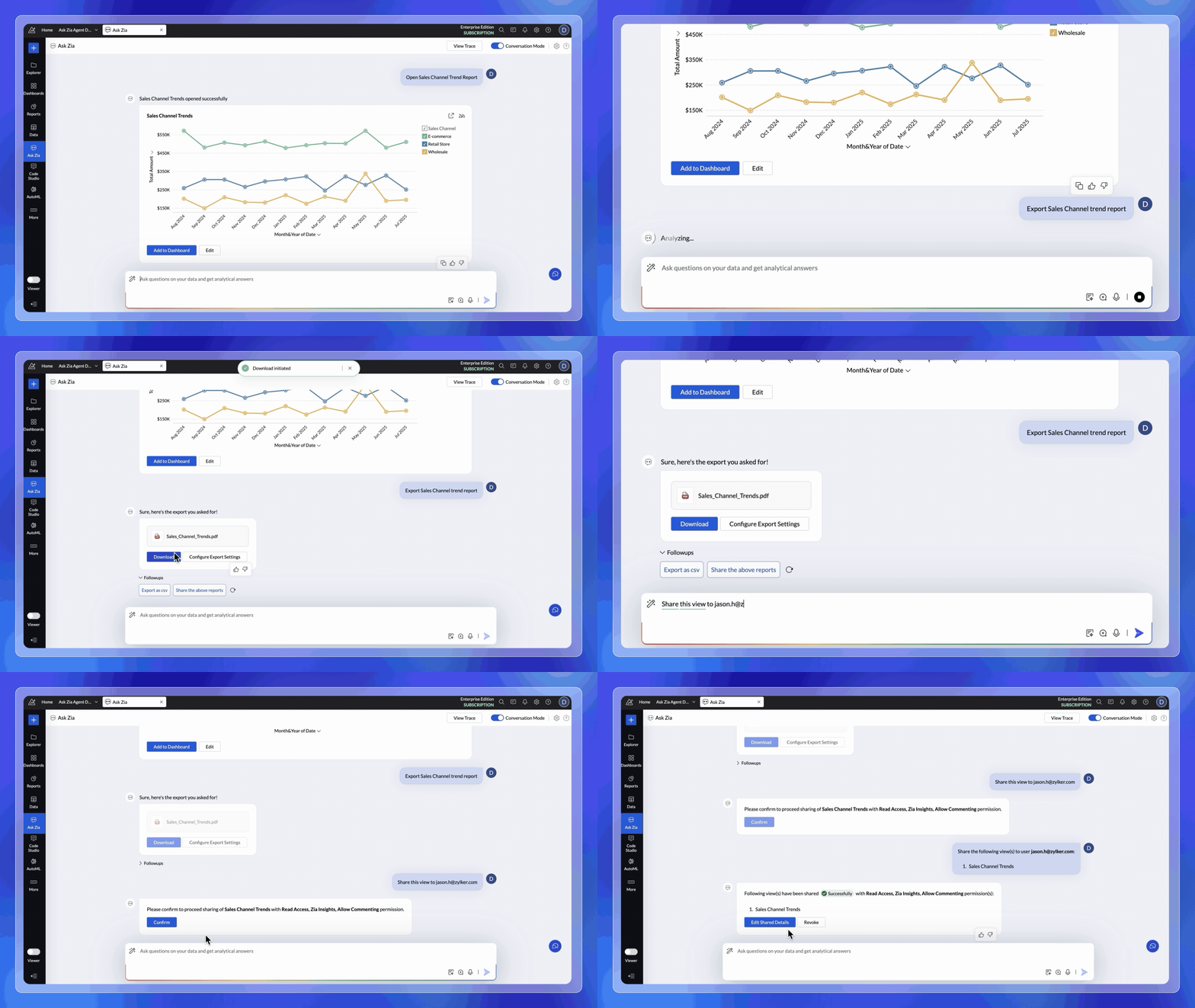
With Action Skills, you can instantly share reports, schedule email deliveries, and export dashboards within the Ask Zia portal without switching tabs.
Embed Ask Zia Anywhere

Embed Ask Zia directly into the applications you work with. Ask questions, explore data, detect patterns or anomalies, and identify the key factors driving the metrics without switching platforms. Ask Zia is context aware, and insights are provided based on the user's role, data context, and access permissions.
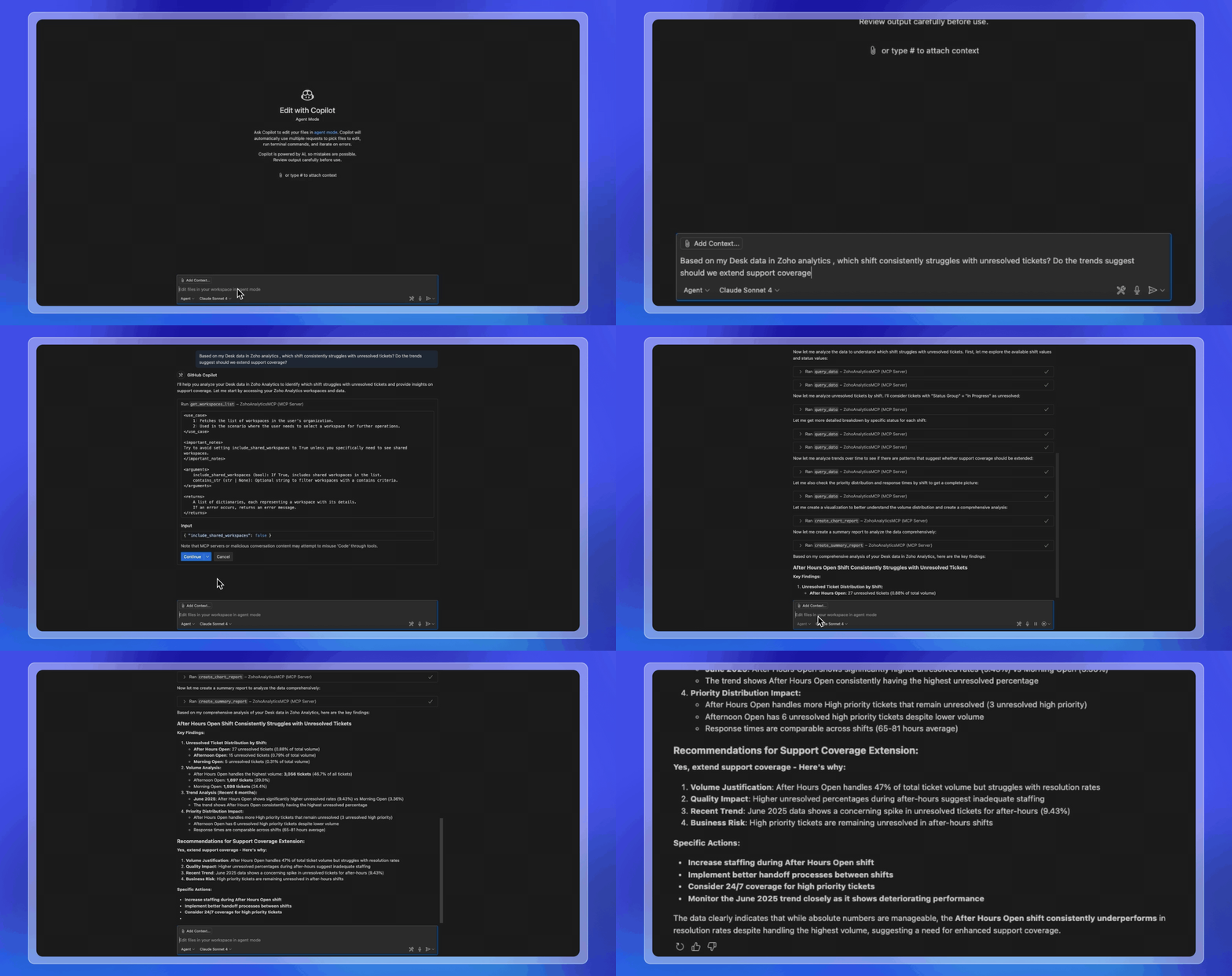
Build Custom Agents with MCP server

Topic Participants
Nisha Angel J
ion8
naman
Sticky Posts
What's New in Zoho Analytics - February 2026
Hello Users! We're back with another round of updates for Zoho Analytics. This month's release focuses on giving you greater flexibility in how you visualize, manage, and act on your data - with new features like custom visualizations, remote MCP server,What's New in Zoho Analytics - January 2026
Hello Users! We are starting the year with a strong lineup of updates, marking the beginning of many improvements planned to enhance your analytics experience. Explore the latest improvements built to boost performance, simplify analysis, and help youWhat's New in Zoho Analytics - November 2025
We're thrilled to announce a significant update focused on expanding your data connectivity, enhancing visualization capabilities, and delivering a more powerful, intuitive, and performant analytics experience. Here’s a look at what’s new. Explore What'sWhat's New in Zoho Analytics - October 2025
Hello Users! We're are back with a fresh set of updates and enhancements to make data analysis faster and more insightful. Take a quick look at what’s new and see how these updates can power up your reports and dashboards. Explore What's New! ExtremeWhat’s New in Zoho Analytics – September 2025
Hello Users!! In this month’s update, we’re raising the bar across multiple touchpoints, from how you bring in data, plan and track projects to how you design and brand your dashboards. We’ve added the all-new Gantt chart for project visualization, expanded
Recent Topics
Integrate Excel or Zoho Sheet functions / calculations to CRM product module
Hello Community, I hope someone more experienced can help me with this question. Our price / payment plan calculations are in an Excel spreadsheet and I would like to use all those functions / calculations in my Products module. So when we send a quoteSync CRM Contacts to USER'S contacts on Office 365
I can see that the O365 sync is transferring contacts backwards and forwards between Zoho CRM and Office365. But it has created a separate address book in Office 365 called "Zoho CRM Contacts". This address book is not used by Office/Outlook's email functionUplifted homepage experience
Editions: All editions. Availability update: 17th February 2026: All editions in the CA and SA DC | JP DC (Free, Standard and Professional editions) 23 February 2026: JP (All Editions) | AU, CN (Free, Standard, Professional editions) 27 February 2026:Logging Out of FSM
I have tried to log out of FSM app of the last person and it will not let me do so. I need to log in to my account.Restoring records from the recycle bin programatically
Background I'm working on a piece of software to automate conversion of Leads into Deals based on order status from my company's website. The process is mostly complete, right now I'm just working on handling a few edge cases to ensure data integrity.Does Zoho Learn integrate with Zoho Connect,People,Workdrive,Project,Desk?
Can we propose Zoho LEarn as a centralised Knowledge Portal tool that can get synched with the other Zoho products and serve as a central Knowledge repository?All new Address Field in Zoho CRM: maintain structured and accurate address inputs
Availability Update: 29 September 2025: It's currently available for all new sign-ups and for existing Zoho CRM orgs which are in the Professional edition exclusively for IN DC users. 2 March 2026: Available to users in all DCs except US and EU DC. LatestCreate static subforms in Zoho CRM: streamline data entry with pre-defined values
Last modified on (9 July, 2025): This feature was available in early access and is currently being rolled out to customers in phases. Currently available for users in the the AU, CA, and SA DCs. It will be enabled for the remaining DCs in the next coupleSalesIQ Identity Update for Logged In Wordpress User
Hey folks, SalesIQ does not automatically detect when a visitor logs in to WordPress and update their identity to match. For example, if a client of ours visits the site and logs in, SalesIQ will not track them correctly by default. The Solution The solutionFeature Request – Conditional Visitor Information Request in Zoho SalesIQ
We would like to request the ability to conditionally ask for visitor details based on the communication channel used in Zoho SalesIQ. Specifically: When a visitor initiates a conversation through the live chat widget on the website, we want to continueAdd zoho calendar to google calendar
Hi I keep seeing instructions on how to sync Zoho CRM calendar with google calendar but no instructions on how to view Zoho calendar in my google calendar.Promote a layout to standard so I can delete one layout
Similar to this and many other topics: https://help.zoho.com/portal/en/community/topic/set-layout-as-standard The problem, every model has a standard layout, which is what we use most of the time... But as the business grows and evolves we may have toWorkdrive on Android - Gallery Photo Backups
Hello, Is there any way of backing up the photos on my android phone directly to a specific folder on Workdrive? Assuming i have the workdrive app installed on the phone in question. EmmaAuto sync Photo storage
Hello I am new to Zoho Workdrive and was wondering if the is a way of automatically syncing photos on my Android phone to my workdrive as want to move away from Google? ThanksIs anyone experience missing functions in the new UI until hard refresh?
The set of functions including search is almost always missing upon loading an app in the new UI. If you refresh, the functions return. (see second screenshot) Anyone else experiencing this?Conversion Rate – Won Deals over Assigned Prospects
Hello, I would like assistance configuring a KPI in Zoho Analytics titled: Objective of the calculation: Number of Won Deals divided by Total number of assigned prospects (not only converted prospects). Important clarification: The denominator must includeNot receiving New Ticket Emails
Hello! The company I work for uses the Zoho ticketing system, however, I've noticed I'm not receiving email notifications when new tickets are published. I have admin rights to see these tickets on Zoho Desk and respond to them, but am not receiving theCan't update a field on a parent form from a child form's On Success workflow
Title: Can't update a field on a parent form from a child form's On Success workflow Hi everyone, I'm building a simple Golf Lesson Tracker app and I'm stuck on what should be a basic operation — updating a number field on a parent form when a child formApprovals in Zoho Creator
Hi, This is Surya, in one of my creator application I have a form called job posting, and I created an approval process for that form. When a user submits that form the record directly adding to that form's report, even it is in the review for approval.Upload from Zoho Creator File Upload field to OpenAI Vector Store
I’ve struggled for quite a while to get this working properly. For a long time we relied on Azure Functions as a workaround to handle file transfers between Zoho Creator and OpenAI Vector Stores. It worked, but added unnecessary infrastructure and complexity.Allow Admin to Configure Report > More Options Button
As an Admin, I want to configure the options of the Report > More Options button to improve UX and reduce Developer overhead. See attached screenshot. Original question posted here: https://help.zoho.com/portal/en/community/topic/modify-standard-repCalendar start time limit
Hi all, Has anyone found a magical way to filter calendar reports to start from, let's say 8:00, and not 0:00? Or at least to auto scroll there like Google Calendar for example?Enable Free External Collaboration on Notecards in Zoho Notebook
Hi Zoho Notebook Team, I would like to suggest a feature enhancement regarding external collaboration in Zoho Notebook. Currently, we can share notes with external users, and they are able to view the content without any issue. However, when these externalEU Problem
Hi all, we've been facing issues with the Europe data center for two days. It's starting to disrupt our daily workflow. Any word on when this will be resolved?How can I clone my website in order to try new templates?
I want to try a new template for my existing Zoho website without the risk of changing the current site or accidentally publishing the wrong template. Therefore I thought a 'clone website'-option should be somewhere, but I can't find it. How do I tryIs it possible to update multiple work items at once?
Hi, Is it possible to update the statuses/release tags of multiple work items at once? I came across this thread that says it's not possible at the moment, but it was related to the Sprints mobile app. Does this feature not exist in the website as well?Custom Module Missing from Roles & Permissions List
Hi Zoho Community, I created a new Custom Module in Zoho Expense. The module is fully built and I can see it in the Module Builder (Settings > Customization > Modules). However, I am unable to deploy this to my users because the module does not appearCustom view inconsistencies
Why is "is not" missing from criteria, along with other comparison operators ??? It makes it almost impossible to build required custom views, I don't want "void" invoices listed & why on earth would "Void" invoices be showing when the criteria includesNeed Customer Item Inward Module along with QC
Need Customer Item Inward Module along with QC 1. Using Transfer Orders hit the item balance sheet 2. Items without inventory it becomes difficult for tracking purpose. 3. Custom Modules become tedious to capture multiple items, item subforms are notZoho CRM Quotes – Subform and PDF/Writer Limitations
Hello, I am encountering the following limitations in Zoho CRM Quotes: Custom product images cannot be uploaded in the subform – the image upload field cannot be added; only the file upload field is available. File upload placeholders cannot be used inApple Messages for Business in Omnichannel communications?
Hello, Apple launched "Apple Messages for Business" but Zoho CRM or Zoho Desk don't appear in the list of possible integrators. Zoho already promotes https://www.zoho.com/crm/omnichannel.html Omni Channel integration, but Apple Messages does not yet appear.Possible to Turn Off Automatic Notifications for Approvals?
Hello, This is another question regarding the approval process. First a bit of background: Each of our accounts is assigned a rank based on potential sales. In Zoho, the account rank field is a drop-down with the 5 rank levels and is located on the accountWill be possible to create a merge mail template for products?
Hi, we would need to create a mail merge template for products (native) module. Will be possibile? or do you have a smart solutions to merge products data with a mail merge? thanks ChrisMaximum incoming email (attachment size) limit
I see that the maximum size of received emails can now be set to 20MB, however I'd still like to see it be larger. It's embarrassing when a client sends me an email with a large attachment and I can't receive it. 50, even 100 MB seems reasonable these[Free Webinar] Learning Table Series - Multi-currency management in Zoho Creator
Hello everyone, We’re excited to invite you to another edition of the Learning Table Series webinar. As you may already know, we've moved to a purpose-based approach in the Learning Table Series this year. Each session now focuses on how a Zoho CreatorOutlook/Hotmail Blocking Zoho SMTP IPs (S3150)
We are currently facing a serious deliverability issue with Zoho SMTP while sending transactional OTP emails for our production application. Emails sent to Outlook / Hotmail addresses are being rejected with the following error: 550 - 5.7.1 Unfortunately,Outlook is blocking incoming mail
Outlook is blocking all emails sent from the Zoho server. ERROR CODE :550 - 5.7.1 Unfortunately, messages from [136.143.169.51] weren't sent. Please contact your Internet service provider since part of their network is on our block list (S3150). It looksLESS_THAN_MIN_OCCURANCE - code 2945
Hi I'm trying to post a customer record to creator API and getting this error message. So cryptic. Can someone please help? Thanks VarunRanking by group in report
Dears, I am new to Zoho Analytics and I would like to ask you guys help to creating a ranking column. Report type: Pivot Matter: I want to create a ranking column on the right of Percentage. This ranking is group by column Type, and ranking by Final Score/Percent.How do I add a project template to a pre-existing project?
Help....How do I add a project template to a pre-existing project? Right now I have to delete the old project, make a new one and add the project template at the time of creating the new project.Next Page