Announcing DataPrep 2.0 Beta!

Being data-driven is an important end goal for all organizations, because when businesses can manage, analyze, and make actionable decisions based on data, they have a competitive advantage.
With that said, how confident are you in making business decisions based on your business data? How clean is your CRM data? Or how much time is spent on manual data cleansing and preparation?
To help you solve these problems, we're pleased to announce the release of the DataPrep 2.0 public beta! With this new version, it's now even easier to build an end-to-end pipeline and have complete control over the quality and movement of your data.
What's new in 2.0?

Visual pipeline builder
The all-new pipeline canvas lets you design a seamless end-to-end data flow. Earlier, you were limited to working with a single dataset at a time—but now data can be fetched from multiple sources, more than one dataset can be prepared and used simultaneously, and the data can be exported to multiple destinations. This helps businesses visualize data flows better, simplify complex workflows, and work with data with more confidence.
Unified scheduling of end-to-end pipelines
A massive upgrade has been made to our scheduling feature. In DataPrep 1.0, the sources and destinations had separate schedules which had to be manually managed by staggering the schedule timing, which was hard. But with 2.0, the scheduling can now be set up at the pipeline level. A single unified schedule can be used to manage imports, processing, and exports for all sources and destinations within the pipeline.
Monitor jobs with ease
With automated pipelines, data transfer happens around the clock. Sometimes, there can be issues with fetching data, and the data transfer can fail. But with jobs, you can easily monitor failed jobs with granular details and identify the points of failure. This ensures your organization doesn't miss out on any valuable data.
Comprehensive version history
Maintain a complete audit trail with version history. Working with data can be challenging; but with the help of this feature, you can easily track changes and run experiments to get more out of your data. Not happy with your experimental changes to data? Easily switch back to the previously published version with the click of a button.
Backfill your data effortlessly
There can be outages in the data pipeline, this can be due to source or destination failure, changes in the data or model requiring changes in the preparation steps, and can take a while to be restored. However there is no easy way to catch up on processing the data during the outage, to solve this we are now introducing the Backfill feature. The backfill feature can be used to fetch data and simulate a scheduled process for a selected period of time. For example, if there was an outage of 2 days on a pipeline that was setup to run every hour. With backfill, you can now create a configuration to process all that data by simulating the schedule process for the missed two days, this will create 48 new jobs that will run in sequence and process the missed data for two days.
Efficient row processing with incremental fetch
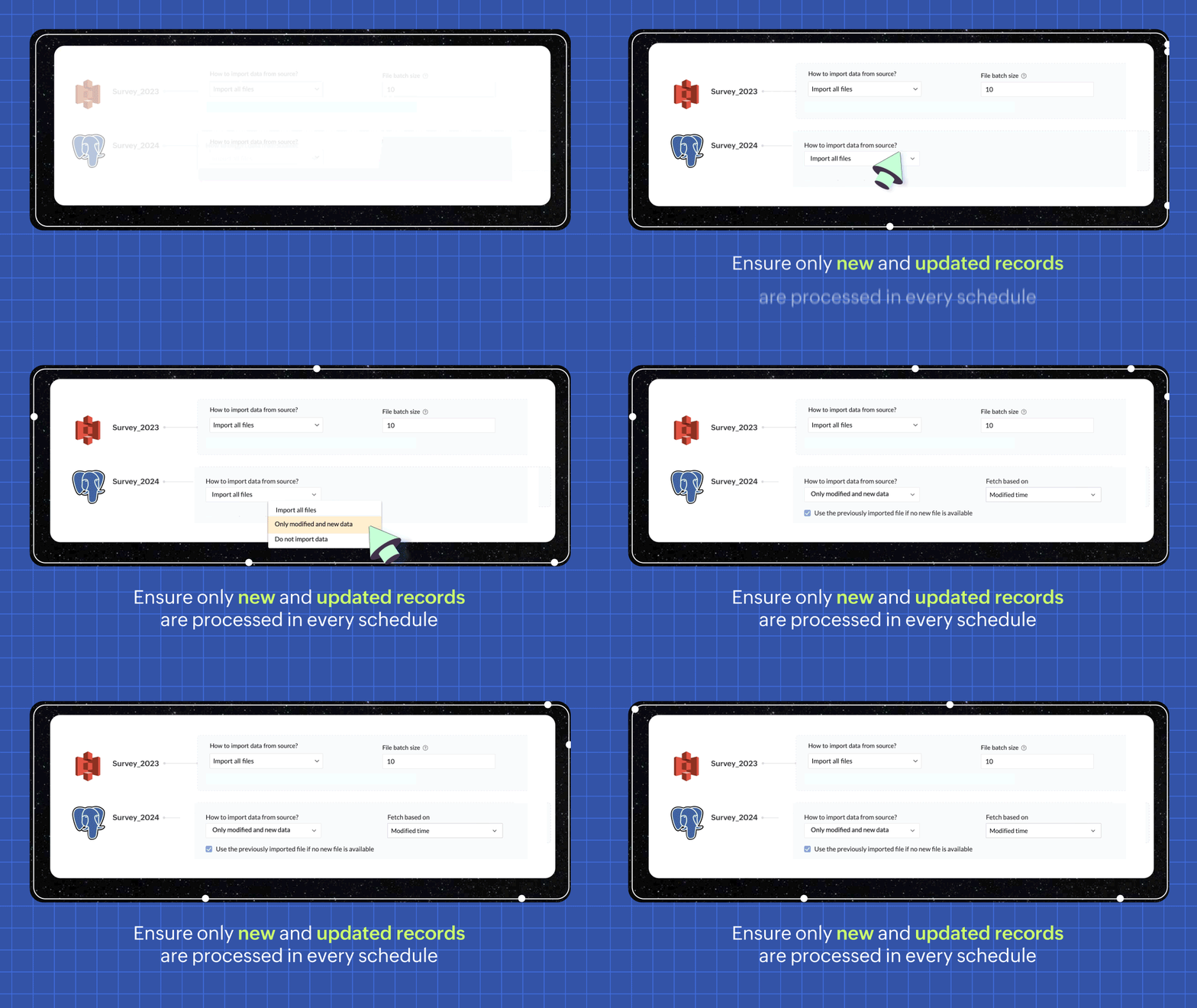
In every scheduled run, choosing the incremental fetch option fetches only the new and updated data from the source for processing. This was available for few sources in 1.0, but we're expanding the support to all data sources in 2.0. Incremental fetch job runs faster, compared to full fetch as only the newly added rows are processed, also making it more cost effective.
Transforms made simple with OpenAI
Our new transforms, powered by OpenAI, help generate complex formulas based on logic written in simple English or transform data based on the sample output given. This simplifies the data preparation process and makes Zoho DataPrep more accessible, even for organizations that don't have a dedicated data analyst team.

Create instant pipelines with templates
We built DataPrep with a vision of helping businesses, big or small, have better access to all their business data—but we understand that the data game can be tricky when you're starting out.
To keep our vision alive and to help everyone start using their business data better, we've built a template gallery based on various business use cases that can easily be used to create a pipeline architecture. Just click on the template to add the formula instantly and transforms needed for the data workflow.
You can also save your own data pipelines as templates to make recreating pipelines easier or to apply the data pipeline over a different set of data. You can also share the data pipelines with your organisation or export them as files to share across different organisations.

New dashboard showcasing your pipeline status
Our new and improved dashboard shows the status of all your pipelines instantly. Easily monitor your scheduled runs, identify failed jobs, and ensure your data is up-to-date in your system.

Make data movement easier with other business applications
We are expanding the list of data connectors supported in Zoho DataPrep and as a start we have released the Zoho Creator integration.

Migrating data into Zoho Creator, as well as seamlessly moving data between various modules within your custom Creator app, has been made easy with DataPrep.
As more organizations are adopting SaaS products in their tech stack, in order to make data more available, we're opening up integrations with HubSpot, Salesforce, and SurveyMonkey, as well as many more Zoho products, in the next couple of months. Stay tuned for more data connectors in Zoho DataPrep!
Can't wait to try DataPrep 2.0?
All our existing customers can access the Beta version right from within their DataPrep home page. The Beta is not available for Zoho One users yet, but if you want to try out the Beta on a standalone account, contact us at customersuccess@zohodataprep.com
Zoho DataPrep is designed to make data preparation and movement easy. With DataPrep 2.0, we have completely revamped our product with the new pipeline builder, unified schedules, pipeline templates and universal incremental fetch that lets you easily manage complex data preparation jobs and data movement. We've also included 50+ other updates to help you clean, prepare, and monitor your business data effortlessly.
Check out all updates in 2.0
Check out all updates in 2.0
Topic Participants
Viswanath Subramani SS
Ben Norman
SaaSguru
Sticky Posts
Announcement: Zoho DataPrep to Deprecate Password-Only Authentication for Snowflake Connections on July 31, 2025
As part of our ongoing commitment to security and in alignment with Snowflake's pledge to the Cybersecurity and Infrastructure Security Agency (CISA) Secure by Design initiative, Zoho DataPrep will no longer support single-factor password authentication.Announcement: Zoho DataPrep 1.0 will be deprecated on April 15, 2026
We'd like to inform you that the Zoho DataPrep 1.0 version will be officially deprecated as of April 15, 2026. This aligns with our efforts to streamline and improve your overall experience with Zoho DataPrep 2.0 which was released in Sep 2024 . To ensureAnnouncement: Migrate your workspaces to Zoho DataPrep 2.0
Zoho DataPrep 2.0 was recently launched with exciting new updates to the platform. You can read more about the new updates in the previous announcement. To take full advantage of the new data pipeline features, migrate your existing workspaces from theAnnouncing Zoho DataPrep 2.0: An AI-Powered Data Management Platform
Originally launched in 2021, Zoho DataPrep started as an efficient self-service data preparation solution. We are excited to launch our new version 2.0, with significant enhancements to our platform to help you manage your end-to-end data needs with theAnnouncing DataPrep 2.0 Beta!
Being data-driven is an important end goal for all organizations, because when businesses can manage, analyze, and make actionable decisions based on data, they have a competitive advantage. With that said, how confident are you in making business decisions
Recent Topics
Setting checkbox value on template in Sign from Creator
Good day, Please help me understand how do I set a tick from a checkbox in Creator into a checkbox on a Sign template. Below is the only values on the Sign template and the code from Creator, "field_boolean_data": {}, "field_date_data": {}, "field_radio_data":Zoho Projects - Unread Comment Icon
Hi Projects Team, It would be great if there was a notification I con on the comments icon so it's easy to see which tasks have new comments. Something like a red circle with a number of unread comments would be great. Thanks for considering my feedZoho Projects - Update Feed via API
Hi Projects Team, Please consider adding an API to allow update and retrieval of messages to the Feed. Thank youAutomated log-out/session end
I'm concerned about security of our data. Is it possible to set an automatic time-out for user sessions on Zoho CRM, after a certain period of inactivity or when the session reaches a certain duration (12 hours perhaps)?Subform auto populate values
Hi Team, I’m trying to retrieve values from Zoho People using API functions and dynamically populate them into a subform. For example, I’ve created a form with several fields that users will fill out. Based on their input, I need to fetch records fromWhat is New in CRM Functions?
What is New in CRM Functions? Hello everyone! We're delighted to share that Functions in Zoho CRM have had a few upgrades that would happen in phases. Phase 1 An all new built-in editor for better user experience and ease of use. ETA: In a couple of days.Gantt Chart - Zoho Analytics
Are there any plans to add Gantt Charts capabilities to Zoho Analytics?WhatsApp Calling Integration via Zoho Desk
Dear Zoho Desk Team, I would like to request a feature that allows users to call WhatsApp numbers directly via Zoho Desk. This integration would enable sending and receiving calls to and from WhatsApp numbers over the internet, without the need for traditionalIdentify long running sync jobs/tables
My sync process causes strain on my production database and I'd love some tools/alerts to help me identify which tables are taking the longest. The current screen only shows 3 tables at a time and truncates the last fetch time so that it is very cumbersomeTemporarily rate limited due to IP reputation.
We have suddenly started receiving the following Mail Delivery Status Notification: Diagnostic-Code: 4.7.650 The mail server [136.143.184.12] has been temporarily rate limited due to IP reputation. For e-mail delivery information, see https://aka.ms/postmasterAssociate emails from both primary and secondary contacts to deal
We need to associate emails from multiple contacts to a deal. Please advise how this can be achieved. At present, only emails from primary contacts can be associated. ThanksNew integration: Zoho Sign for Zoho Projects
Hey there! We’re excited to announce the brand-new Zoho Sign integration for Zoho Projects! With this integration, users can now send documents for signatures, track their progress, and manage approvals—all without leaving Zoho Projects. This bridgesUpdate to attachment display in ticket threads
This enhancement will provide faster access for support teams and end-users, significantly boosting productivity for everyone. Get ready for a more efficient and satisfying experience! Immediate benefits Faster ticket rendering reduces wait times andNarrative 15: Blueprint - Automate, guide, and transform your support processes
Behind the scenes of a successful ticketing system: BTS Series Narrative 15: Blueprint - Automate, guide, and transform your support processes Even organizations that deliver quality products and services can face low customer satisfaction when theirDifferent MRP / Pricing for same product but different batches
We often face the following situations where MRP of a particular product changes on every purchase and hence we have to charge the customer accordingly. This can't be solved by Batch tracking as of now so far as I understand Zoho. How do you manage it as of now?ZOHO BOOKS - RECEIVING MORE ITEMS THAN ORDERED
Hello, When trying to enter a vendor's bill that contains items with bigger quantity than ordered in the PO (it happens quite often) - The system would not let us save the bill and show this error: "Quantity recorded cannot be more than quantity ordered."Refresh frequency
Dear Zoho Team, I really, truly appreciate that Zoho Books gets frequent updates. As a matter of fact this is how a good SaaS company should stay on top. However, I feel that I have to hit refresh almost every day. This was exciting at the beginning butRefund
My plan expired today, and I updated my payment details with a new credit card. At the same time, I wanted to downgrade, but the system wouldn’t allow the downgrade until the payment details were updated. As a result, I was charged for the same plan beforeCalling Function via REST API with API Key gives 401 using Zoho Developer
Hi, I created a couple of functions using the one month trial of Enterprise edition, which I was able to call using the API Key method from Postman and from an external site. Now that my trial has expired, I have created the same functions in the DeveloperError due to - 'Internal Exception' when uploading Sign-generated PDF file to workdrive via Deluge in Zoho CRM
Hi I wasnt getting this error a few days ago and my code had not changed, so I'm wondering if there's a Zoho bug somewhere? I am downloading a PDF file from a Zoho Sign url using invokeurl and then uploading it to a Workdrive folder using zoho.workdrive.uploadFile.Embed CRM record images in email templates
I have email templates that I want to embed dynamic images in their body - not as an attachment. For the context, the image is a QR code individual to each contact. So there are couple of challenges for which I think there is no solution in CRM: 1/ IAssign multiple departments to multiple helpcenters
Hi there! I have a reseller company for a software and I'm using Zoho Desk as my helpcenter and ticket management system. The software is great and I would like to make a suggestion! With multi-branding activated, your departments that visible in helpZoho Desk Training
Hello, We've had Zoho desk for a while now, but we run into issues occasionally, and I was wondering if there was a customer who currently uses it and really enjoys the functionality, that would be wiling to chat with us?PO Based Advance payment to Vendor
We recommend to introduce a provision at PO to make advance payment to vendors and auto apply that advance paid later at the time of Vendor Bill submission for that PO. This will help us track PO-wise Total Payments.How to get Quickbooks Desktop Info into Zoho?
Our team has used Quickbooks desktop for years and is looking at switching to Zoho books in 2026. I want to bring all old sales history over since we use Zoho CRM. I can export Item sales history and generic sales orders from Quickbooks desktop. How doZeptoMail API Request
We tried to send mail using ZeptoMail using Django. Following is my payload {'from': {'address': 'abc@abc.com'}, 'to': [{'email_address': {'address': 'xyz@xyz.in', 'name': 'Bhavik'}}], 'subject': 'Report Name', 'htmlbody': '<p>Test</p>'} Following isMass import of documents into Zoho Writer
I'm using Google's word processor at the moment but feel that Zoho does a better job (on the online apps market). Iwant to move my documents (about 50-70) to Zoho but it seems to me that I have to import them seperately. Is it already possible to upload several documents at a time or is this a forthcoming feature? Cheers Rolli :?:Add home page or dashboard in CRM customer portal
is it possible to add home page or dashboard in CRM customer portal?User Tips: How to change the the label display name of a system defined field
Most users know how to change field label names via Settings > Modules & Fields but if you want to change the name of a system defined field you can’t as there is no “edit properties” option. However with a simple hack you can edit any system definedZoho CRM Community Digest - October 2025 | Part 1
Hello Everyone! Here's a quick recap of first two weeks of October! Product Updates: Zoho CRM Android App Update: Surveys, Blueprints, and Smarter Mobile Features! Zoho CRM’s Android app just got a useful upgrade. You can now share records, upload yourAutomate onboarding emails with CRM Workflow and Accounts module
We’re a B2B SaaS company selling to public-sector organisations. Each organisation is stored as an Account in Zoho CRM, and each organisation typically has multiple associated Contacts. Our backend syncs product-usage data (setup status, user activity,Important update: Enhanced security measures for account operations in Zoho Cliq
Greetings from the Zoho Cliq team! We’d like to share an important security update that has an influence on some admin actions such as password reset, MFA reset, and MFA backup code generation. What’s changing? With our latest security enhancements, theseSales Receipts Duplicating when I run reports why and how do we rectify this and any other report if this happens
find attached extract of my reportNo Functional Autosave or Manual Save Button
Application : Zoho Notebook So I wanted to try Zoho Notebook(On Ubuntu) as an application, I installed the application and went solving my LeetCode problems visually(Drawing mode), at one point the app just stopped saving anything... Every time I triedEnterprise subscription support
My organization sells subscription services to enterprise customers, which is a different model from the consumer subscription model that Zoho Billing has been designed to support and I beleve this capability should be added. An enterprise subscriptionIssue with Creator's IF logic
Hi, I found the following code produces unexpected results: if(-1.0 < 0.0000000) { info "True"; } else { info "False"; } if(-1.0 < 0.000000) { info "True"; } else { info "False"; } The output returned is: False True However, theNeed option to send Package PDF in shipment email (Shipment PDF is missing Lot info)
Is there any way to automatically attach the Package PDF instead of (or alongside) the Shipment PDF in the notification emails? We really need this feature because the default Shipment PDF creates a blind spot for our customers. It does not display Batch/Lotzoho creator view is not present in the workspace and blank reports
Hi Support, Users who have "write" permissions keep getting this error for all of our embedded reports all of a sudden. See screen shot below: Meanwhile, my developer permissions account sees a blank screen in view and edit mode as shown in the screenshotsCustomize portal email template
Can i fetch only first name of the user in portal email template instead of the below code Hi ${User.FULL_NAME}Can't we let users decide which options they'd like to add at embed widget?
It seems embed widget DOES NOT offer a feature, where users can choose options upon subscribing plans. What Zoho has instead, is that admins have to manually create plan with options. How come no one in Zoho dev team never raised issue about usabilityNext Page