Meet the new Zoho Analytics: The Agentic Analytics platform

Every major release of Zoho Analytics has changed what you can do with data. This one changes who does the work.
The new Zoho Analytics 2026 Release (7.0) collapses that chain. Zoho Analytics is now an agentic analytics platform, with AI agents that understand your business context and take on the work. They analyze your data deeply, build dashboards, and recommend what to do next, while you stay in control of every step.
With 50+ new features and enhancements across the analytics workflow, here is everything that is new.

Note:
- Features marked Preview are part of this release and will be rolling out progressively across all users and locations, in the coming weeks.
- Plan availability is shown as a tag beside each feature.
Agentic analytics with Ask Zia
Ask Zia, your super agent, now orchestrates six specialized agents across your analytics workflow. Ask a question or describe a task, and Ask Zia hands it to the right agent, in the chat or right where you do the work, such as Query Tables and Code Studio.
Analyze data All plans
Ask questions in plain language and uncover descriptive, diagnostic, and prescriptive insights. The Analysis Agent summarizes trends and outcomes from your workspace data, identifies the factors behind changes, recommends what to do next, and creates reports on request.
Build dashboards All plans
Describe your goal and get a complete dashboard with relevant charts and insights. The Visualization Agent also creates reports and widgets, and edits existing dashboards, including layouts.
Prepare data Premium and above
Describe what you need, and the Data Prep Agent builds pipelines to clean, transform, and enrich your data. Your data is ready for analysis in less time.
Create metrics and formulas All plans
Describe the metric you need in plain language, and the Formula Agent writes the formula column or aggregate formula behind it.
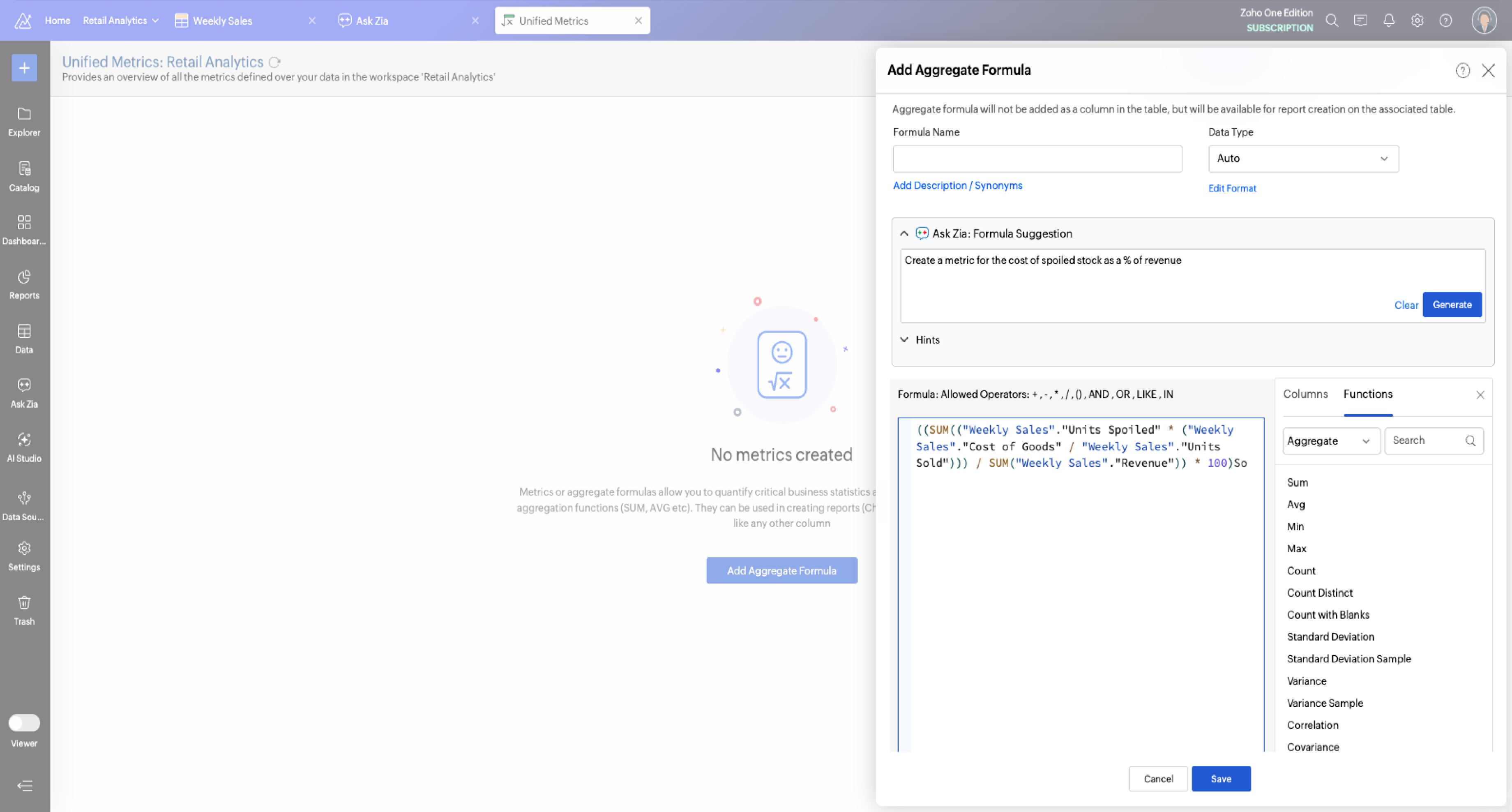
Write SQL All plans
Describe the data you need, and the SQL Agent writes a ready-to-run query table and explains each clause. Review the changes before you accept them, then ask for refinements, fixes, or optimizations in the same chat.
Write Python code Premium and above
Describe the model or transformation you want, and the DSML Coding Agent generates the Python in Code Studio, then explains, optimizes, and fixes bugs for you. It covers classification, regression, forecasting, and custom ML models.
Retain context with history and memory
Ask Zia remembers. It retains your past conversations, learns from them, and when you resume, it answers with that context already in mind, so you never have to repeat yourself.
Choose your LLM All plans
Run Ask Zia on Zoho LLM, or connect to OpenAI models. The Zoho Key System (ZKS) provides free AI credits, in all plans, to use the agentic features. Top up credits as add-ons when required. You can also integrate your own OpenAI model through Bring your own key (BYOK).
Manage AI in one place
GenAI Configuration is now Manage AI. Enable agents and AI features, choose the AI vendor for each, control who can use them, and track credit usage, all from one page available to the Account Admin.
Build Your Own Agents
Custom Data Agents turn your business objectives into coordinated analytical work. Define agents around your goals, analytical requirements, and operational workflows, or start with ready-made ones for common business domains.
Design custom agents Premium and above
In Zia Agent Studio, build each agent with its own instructions and model. Choose the tables, semantic model, and knowledge it can use. Equip it with tools or an MCP server so it can act beyond analysis. Version and deploy it when ready.
Start with pre-built agents Preview Premium and above
Pick a pre-built agent for your domain, connect it to your data, and it is ready to answer.
Ask questions in dashboard context Preview All plans
Keep every answer focused on the data that matters. With Dashboard Context, Ask Zia answers directly against the data and insights in the dashboard you are viewing.
Set the context for trusted AI
AI is only as reliable as the context behind it. Capture how your business is structured, describe what your data means, define your business metrics, and provide instructions for trusted outcomes. Define this context once and reuse it across Ask Zia and your custom agents.
Represent Your Business with Ontology Preview
Give AI a clear map of how your business is structured. Model your core business entities and define how they relate to one another. Together, they form the foundation AI uses to understand your business.
Define and standardize with the semantic layer Preview
Build a business glossary AI can rely on. A Semantic Model captures descriptions, synonyms, instructions, and standard metric definitions for your data, and you can create more than one to suit different teams or use cases.
Give Ask Zia your business context Preview
Point Ask Zia to a Semantic Model. It then answers using your business definitions and metrics instead of raw table and column names. Every response stays consistent with the context you defined.
Ground custom agents in context Preview
Give each custom agent the business context it needs. Attach a semantic model of your choice, and the agent works with trusted definitions and metrics in every task.
Intelligence everywhere with headless BI
Take Zoho Analytics beyond its own interface. MCP, REST APIs, and a command-line tool let you work with your data from AI assistants, agents, applications, and scripts.
Remote hosted MCP Server All plans
Let AI assistants and agents do more in Zoho Analytics. The Zoho Analytics MCP Server is now available as a remote hosted MCP server in Zoho MCP, with tools to create or edit dashboards and reports, folder management, edit formulas and query tables and many more.
Claude Connector and Plugins All plans
Use the Zoho Analytics Connector in Claude to query workspaces and build data visualizations in plain conversation. With the new Zoho Analytics Agent Plugin in Claude, you can create or edit dashboards, edit formulas, manage folders in workspaces, and more.
New tools in the MCP Server All plans
The Zoho Analytics MCP Server now lets you do more with your workspace. You can update reports, view report metadata, manage aggregate and custom formulas, create and edit lookup relationships between tables, and more.
Zoho Analytics CLI Preview All plans
Access Zoho Analytics through command line interface. The CLI supports the full range of analytics functions, so you can script and automate analytics workflows from your terminal.
Extending REST APIs capabilities All plans
55+ new REST APIs extend what you can build and manage programmatically. Here are a few of the things you can do with them:
- Reports and Dashboards: create and update dashboards, create new report types
- Tags: create and manage tags in workspaces
- Custom Roles: create, update, and delete custom roles
- Data Alerts: create, update, and enable or disable data alerts
- Linked Workspaces: link or unlink two workspaces, list the linked workspaces in your organization, and push reports and updates from one workspace to another
- Backup and Restore: start a workspace backup, download it, view backup versions, and restore
Customize your white label portal
Give your portal a look that is fully your own. In the CSS Editor, set the color scheme, typography, logos, and icons, and rearrange the left navigation. A new Manage Users page in Organization Settings lets you add users in bulk, manage their MFA, and control their status from one place.
Governed AI and Data administration
Keep analytics secure and accountable as it grows. Test changes before they go live, trace every asset, control who sees what, and audit how AI is used.
Manage every asset with the Catalog Preview
See all your assets, including data, reports, dashboards, agents, and users, in a single explorer. The Catalog helps you find them fast with Zia-powered search, filters, and tags, and check data quality at a glance. Use data lineage to visualize data flow and dependencies, so impact analysis is part of every change.
AI Observability
Every agent session is traceable. AI Observability records every session and execution, and breaks each run into steps, from prompt generation to LLM calls and tool runs. For every step, it shows the model used, the tokens and credits consumed, and the time taken.
Deploy changes in stages with Sandbox Premium and above
Build and test changes in a separate stage, then promote them to production when they are ready. Deployment Management tracks every change, logs each deployment, and keeps a version history. If something goes wrong, restore an earlier version of production.
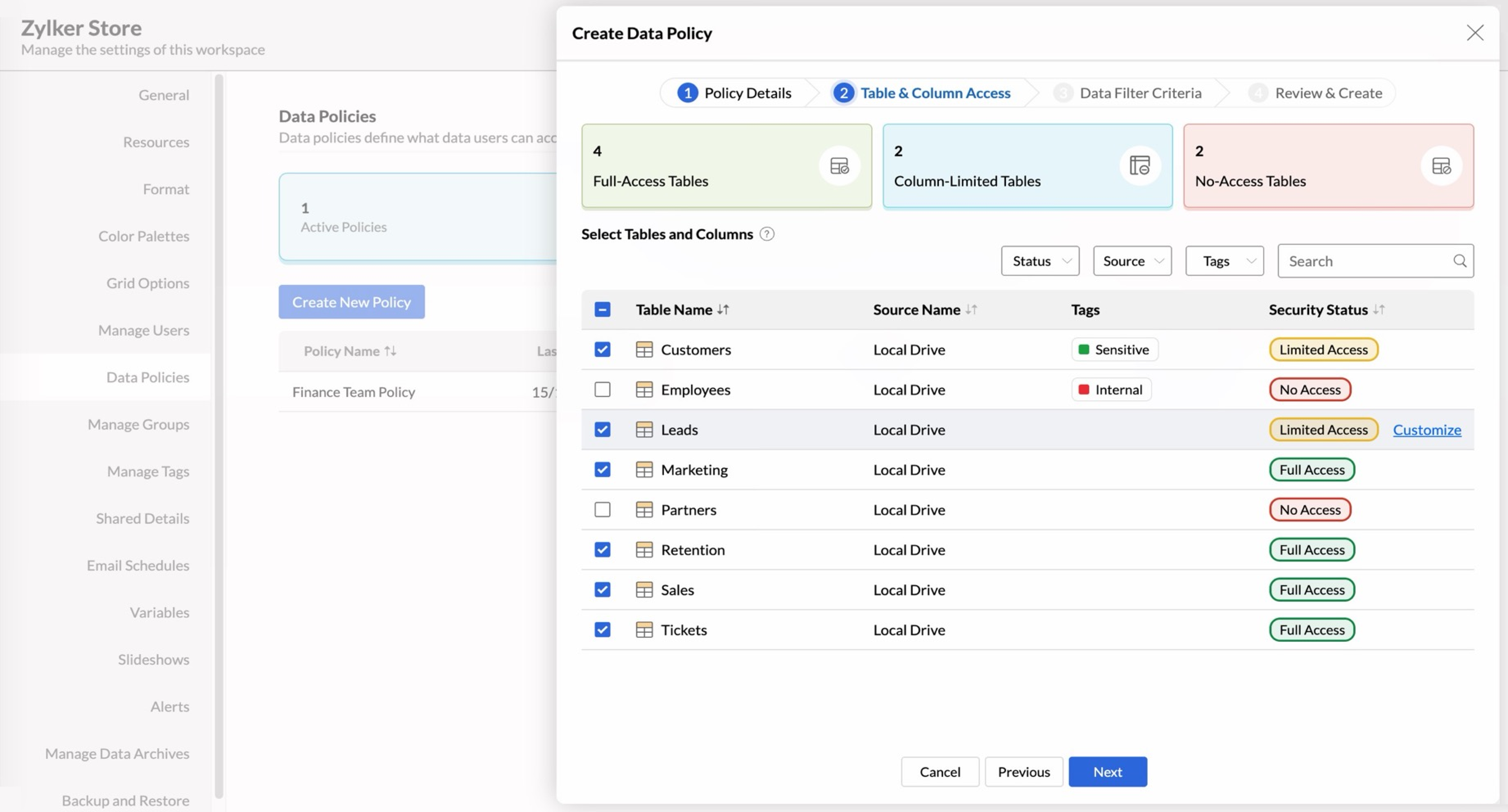
Control data access with policies Preview All paid plans
Give workspace admins centralized control over who sees what. Define a Data Policy once and assign it to the users who need it. It sets full, column-limited, or no access for each table and adds row-level filters, so restrictions hold consistently across reports and dashboards.
Search across your workspaces All plans
The revamped global search finds reports, dashboards, tables, and other assets across all your workspaces, using metadata such as owner, tags, and column names.
Strengthen your data foundation
Every insight starts from complete, reliable data. This release adds new business apps, databases, file types, and streaming sources, with more ways to bring your data in.
Connect more business apps Any paid plan
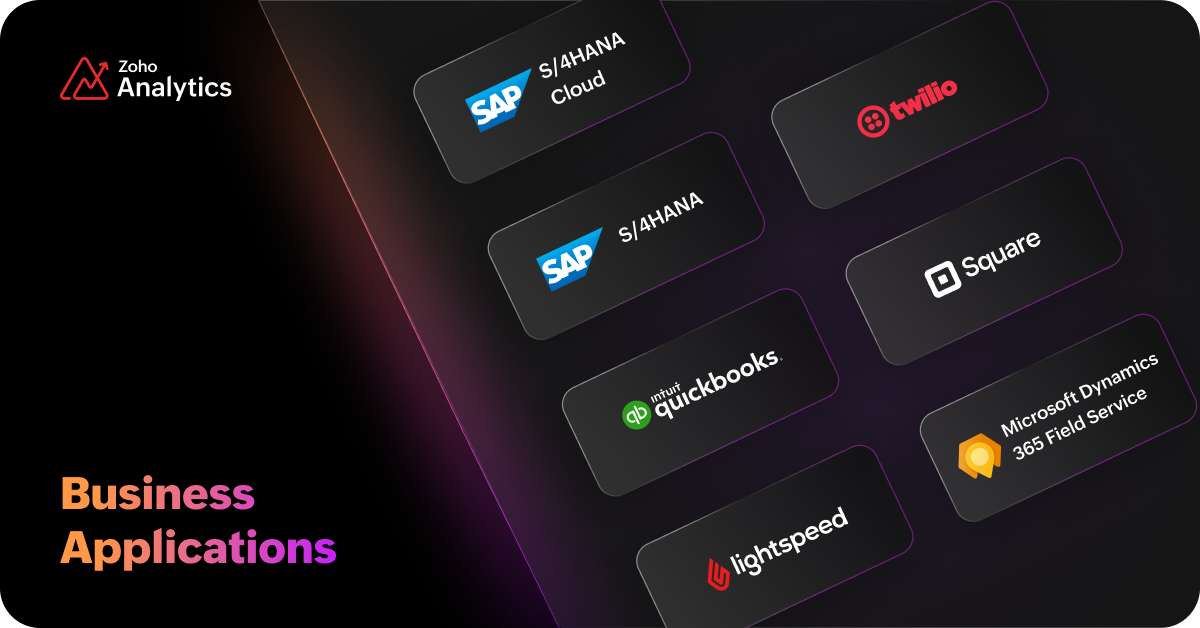
- Twilio
- Square POS
- Lightspeed POS
- QuickBooks IES
- SAP S/4HANA Cloud
- SAP S/4HANA On-Premise
Sync Zoho Projects in real time Enterprise
The Zoho Projects connector now supports real-time sync, so your project data reaches Zoho Analytics the moment it changes. It is included with Zoho Projects Ultimate edition and available as an add-on for other editions.
Add more databases Any paid plan
New database sources and connection options:
- New Database Sources: Supabase, Amazon DocumentDB, and AlloyDB
- Google BigQuery: Added Service account as new authentication method.
Live connect Premium and above
- Live connect support for Teradata.
- You can now create Query tables over live connect data. Learn more
Import more file types and feeds All plans
More ways to bring data files into Zoho Analytics:
- PDF: import data from PDF files across many sources.
- Local file: Import multiple files from a folder in one go.
- Intranet now supports the following file types: XLS, HTML, statistical, Avro, and Parquet files, and OData feeds. Learn more
- Databridge support in FTP: Pull files from FTP servers through Databridge, so files hosted inside your network can be imported on a schedule. Learn more
- OData: OAuth 2 is now supported as an authentication type.
Keep streaming history and add more sources Premium and above
What’s new in stream analytics:
- Historical data: store streaming data in a historical table and analyze it alongside live data.
- Retention period: set how long streaming data is kept, from 30 minutes to 24 hours
- New Sources: Google Pub/Sub, Kafka, PubNub and Amazon SNS
Blend live and synced data Premium and above
Data blending now works across live-connect and periodically synced data. You can blend data by defining lookups or by creating query tables across these sources.
Send pipeline output to existing tables Preview Premium and above
Point a data pipeline at a table you already have, and its output lands there. Reports and dashboards built on that table pick up the new data with no rework.
Trigger workflows from imports All plans
Use the result of a data import as a workflow trigger: success, failure, or partial success. A failed sync can alert your team, and a successful one can start the next step in your connected apps.
Enterprise reporting and visualization
Present data the way your audience needs to see it. Pixel perfect reports, new chart types, custom visuals, dashboard theme gallery and many more capabilities, to give you more ways to tell the story behind your numbers.
Deliver pixel-perfect reports Preview
Design boardroom-ready reports with complete control over every design element. Deliver personalized business reports in different formats, to stakeholders at scale, with scheduled bursting.
Build your own visuals Enterprise
When built-in charts aren’t enough, design exactly what you need. Code Custom Visualization in JavaScript, or generate them through MCP and APIs using AI assistants.
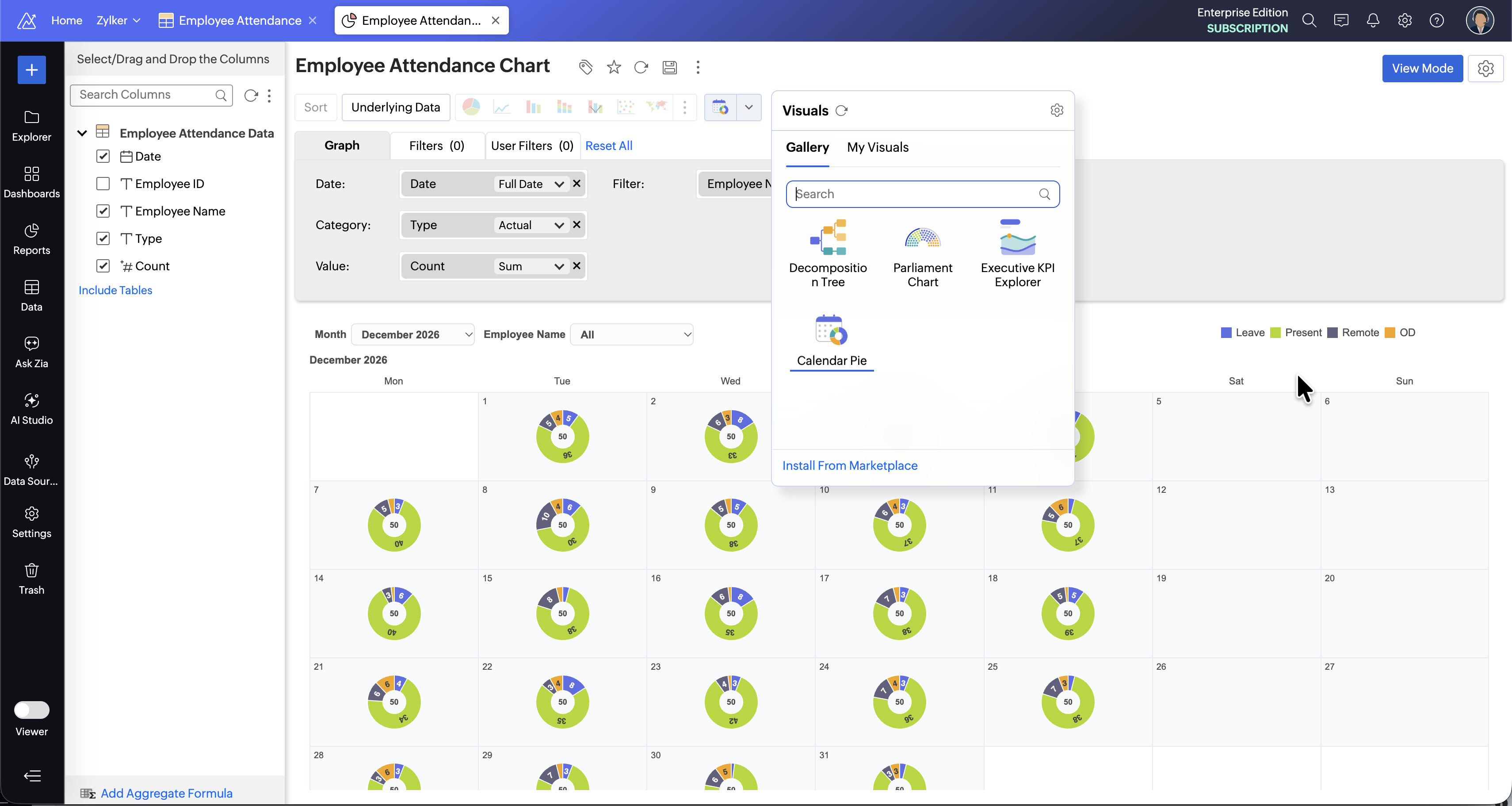
Pick visuals from the Gallery Preview All plans
The Custom Visuals Gallery offers a curated set of ready-to-use custom visuals from Zoho Analytics. Pick the one you need and add it to your reports and dashboards.
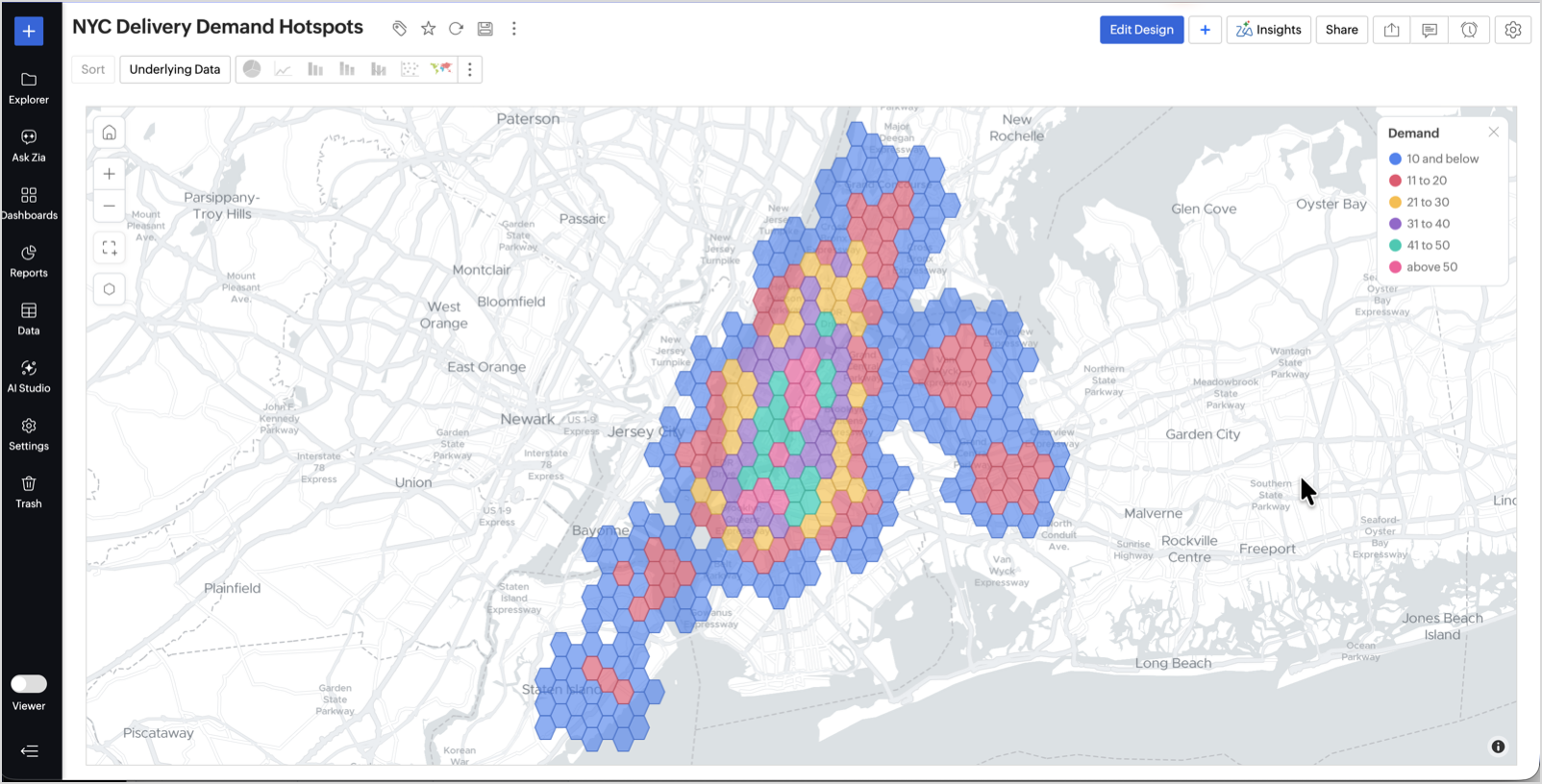
Map location patterns with spatial binning Preview All plans
Turn dense location data into a readable map. Spatial binning groups nearby points into cells and colors each cell by count or value, so patterns show at a glance.
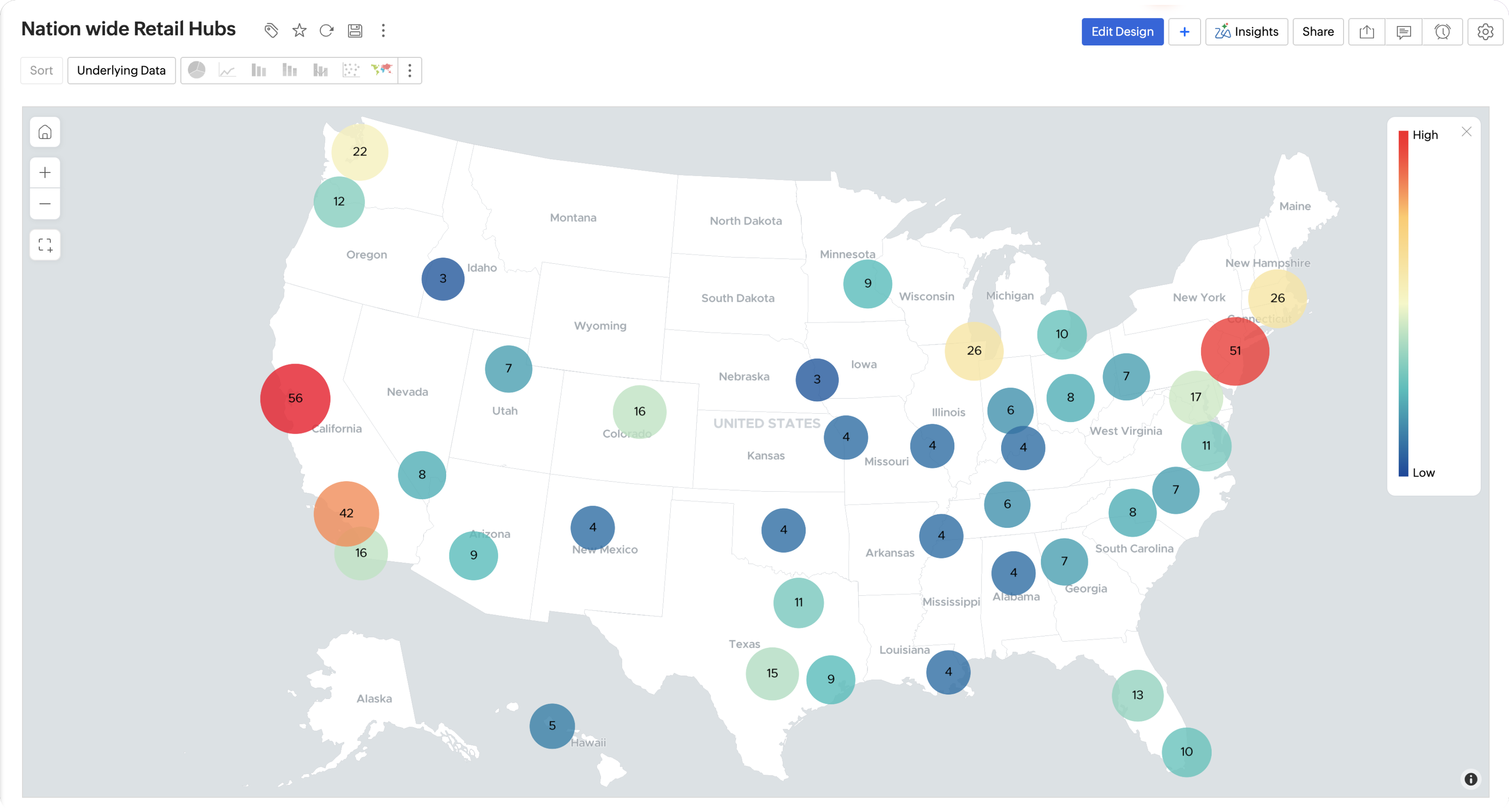
Cluster locations on a map All plans
The new Cluster map chart groups nearby markers into clusters that expand as you zoom in. Thousands of locations stay readable at any level.
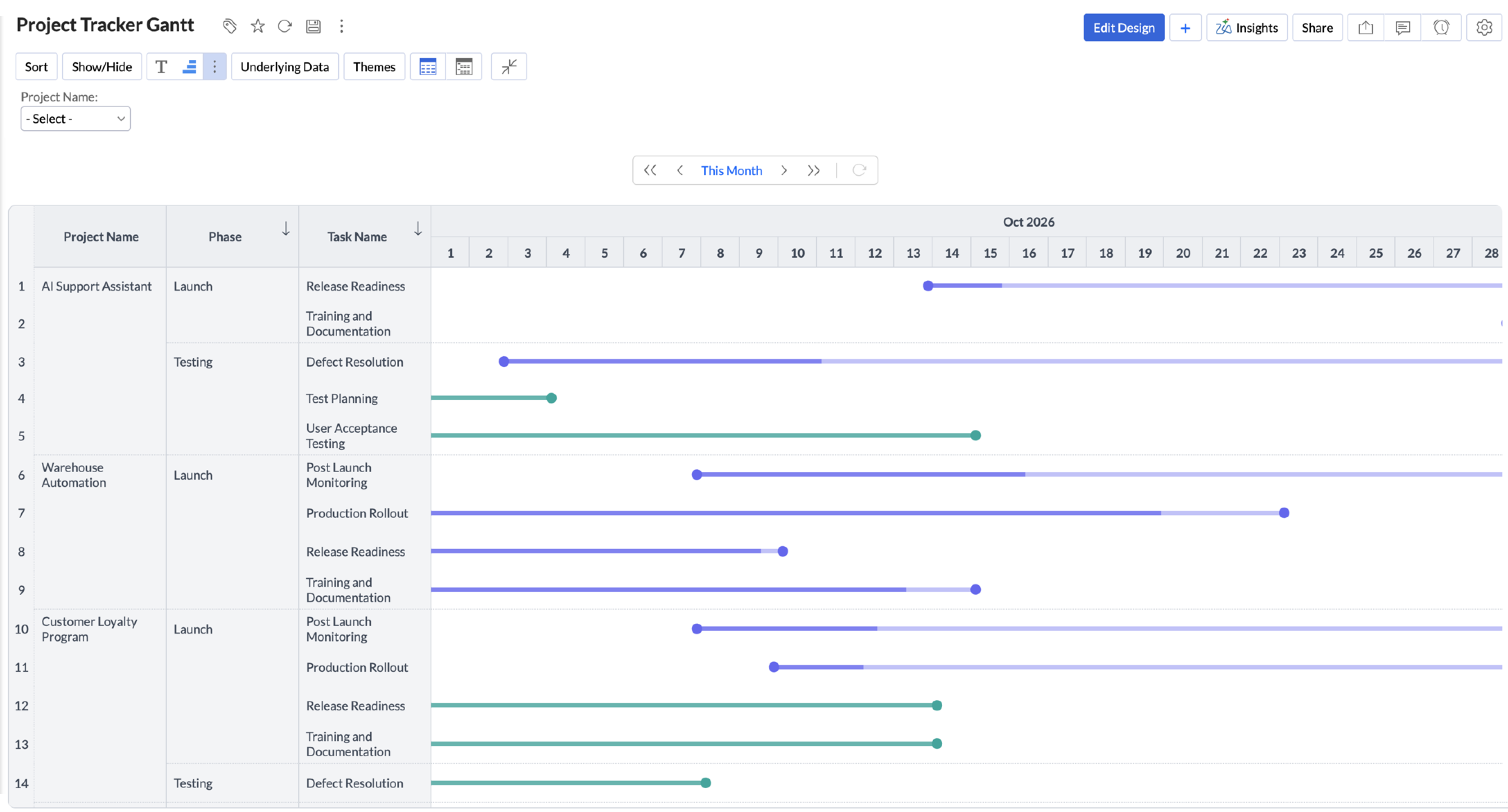
Plan timelines in pivot views All plans
Pivot views now support Gantt bars, so you can show start and end dates for tasks, orders, or projects right inside the pivot.
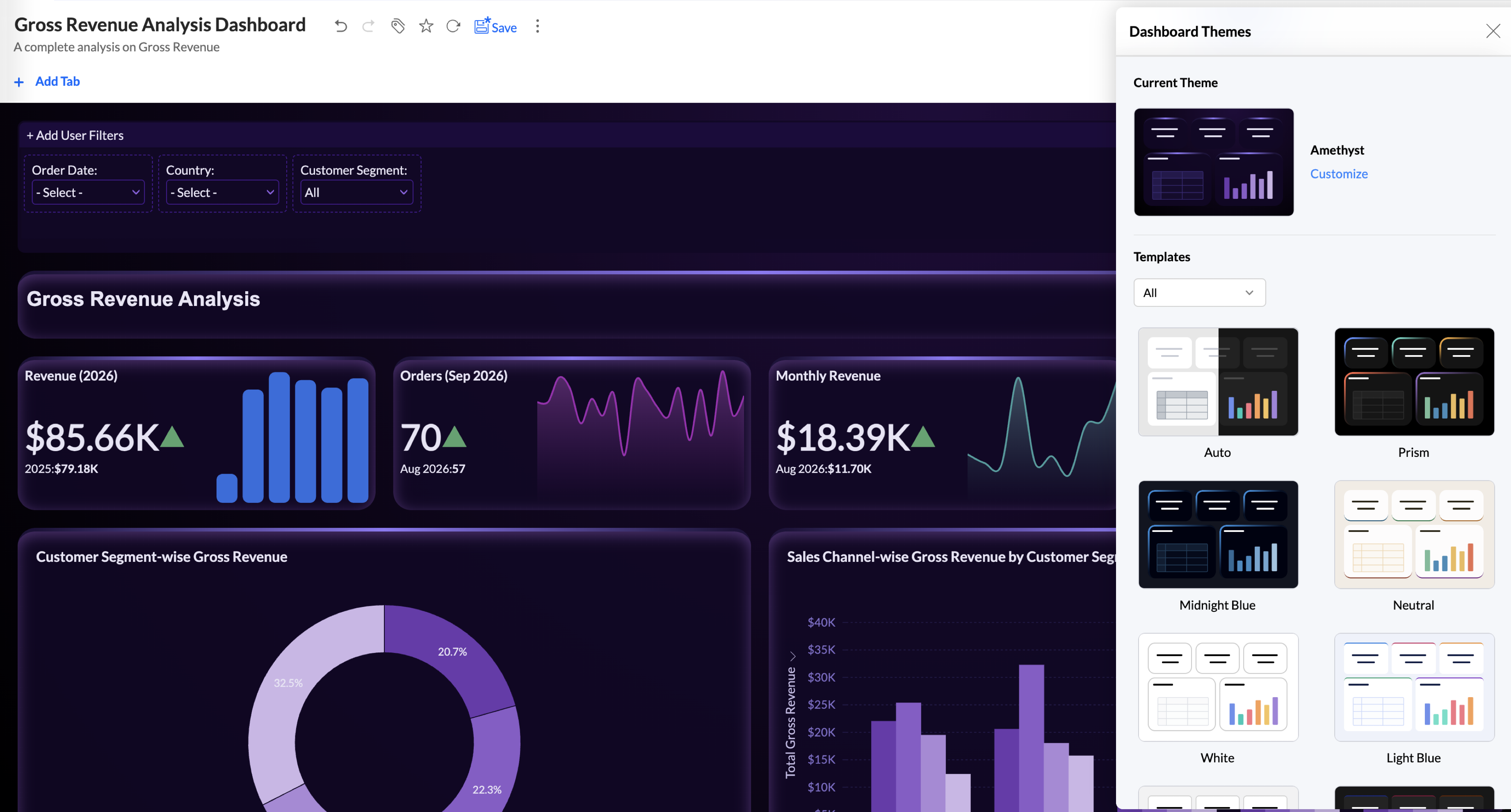
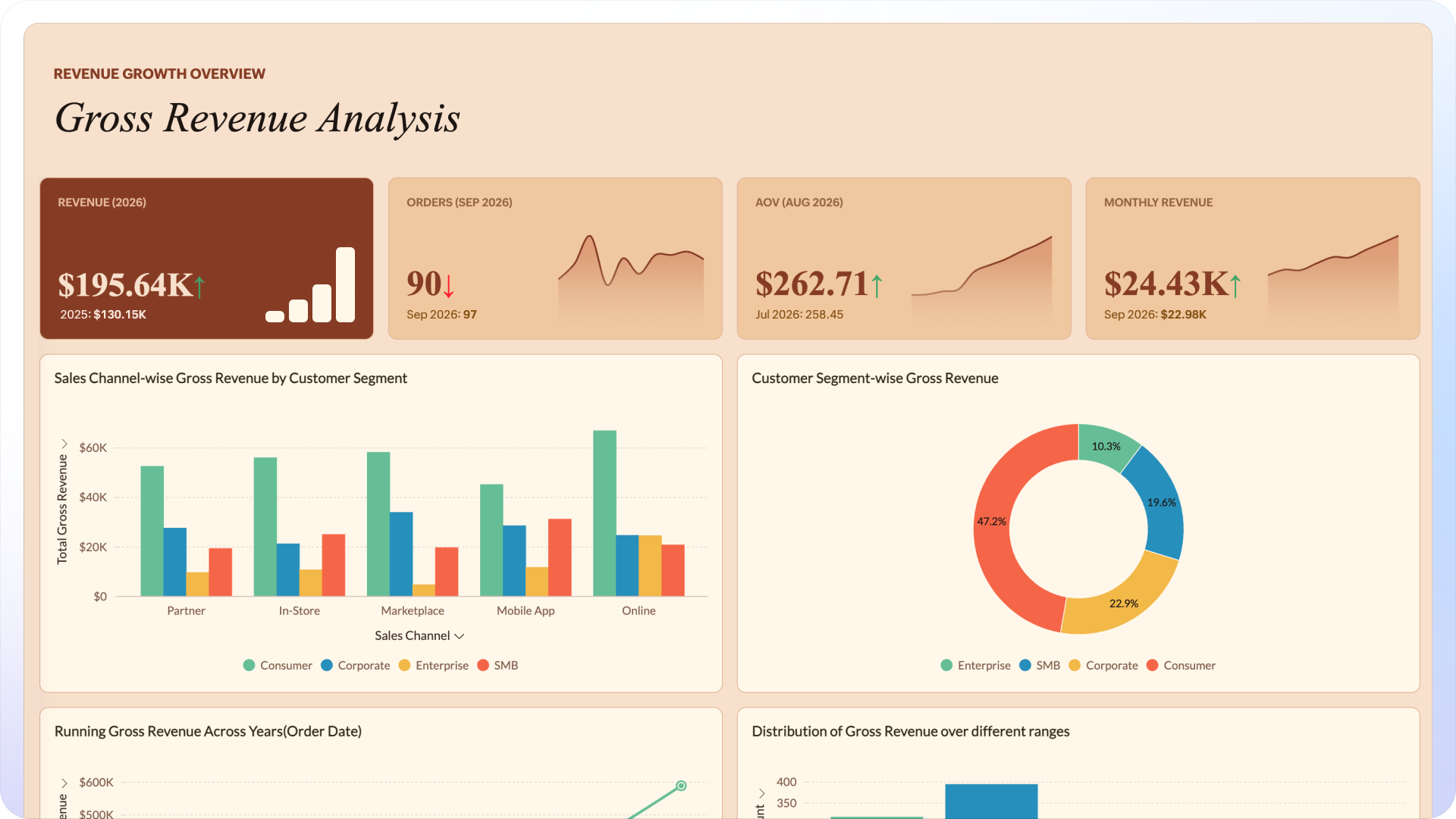
Style dashboards with themes and layouts All plans
Style a dashboard in one step with the new theme gallery: 50+ preset themes that combine backgrounds, card styles, and color palettes, plus layout presets to arrange your widgets.
Show trends in KPI widgets All plans
KPI widgets can now carry a sparkline as a line, area, or bar, so a single widget shows the current value and how it got there.
Undo and redo dashboard edits All plans
Experiment freely while building dashboards. Undo and redo step you back through edits and forward again, so a wrong move never costs you the layout.
Position user filters Preview All plans
Place user filters on the left, right, or top of a dashboard, and adjust their dimensions to fit the layout.
Scenario Analysis and Correlation Matrix in Predictive AI
Move from what happened to what could happen next. Scenario modeling, correlation analysis, and new forecasting models take your analysis further without leaving your reports.
Model what-if scenarios Preview All plans
Define scenarios using multiple adjustment criteria, and change values on the fly to see how results shift. Scenario analysis lets you compare outcomes side by side before you commit to a decision.
Measure how variables move together Preview All plans
Use the correlation matrix to see which metrics rise and fall together. Compare one variable against many (single-set) or several against each other (multi-set).
Forecast with external drivers PreviewAll plans
Forecasting in reports now includes the ARIMAX model, which uses external variables to improve the forecast.
VARX forecasting in pivot views All plans
Pivot views now support VARX forecasting. Project several related metrics together, with external drivers factored in, right inside the pivot.
Zia Insights
Zia Insights digs deeper this release, explaining more kinds of change in your reports and dashboards.
Diagnose a change from any data point Premium and above
Spot a sudden rise or dip, and ask why from the data point itself. Zia Insights explains what caused the change, with key driver and contribution analysis of the factors behind it.
Explain gaps in percentage metrics Preview Premium and above
Diagnostic insights extend to percentage metrics. Gap analysis explains the difference between two values of a percentage metric and shows which factors account for it.
Export dashboards with pinned insights Preview Premium and above
Pin the insights that matter to your dashboard, and they travel with it. Dashboard export includes pinned Zia Insights, so the explanation behind the numbers reaches everyone who receives the file.
Go deep with AI in DSML Studio
Data scientists get more to work with in DSML Studio, with more ways to build, bring in, and run models.
Explore Data with Jupyter Notebooks Preview Premium and above
Give data scientists room to explore. Jupyter Notebooks in Zoho Analytics combine code, models, results, and notes in one flexible workspace for data science.

Bring your own models with PMML Premium and above
Deploy ML models built in external tools to work in Zoho Analytics. Import them in PMML, an industry-standard format, then deploy them on your data and schedule predictions, with no retraining or code rewrites.
Sharpen time series forecasts Premium and above
Forecast any time series metric in AutoML, with gaps in the data filled automatically. Add related metrics and external drivers as influencing factors to sharpen the forecast.
Detect anomalies in AutoML Preview Premium and above
Anomaly detection comes to AutoML. Build a model that flags unusual patterns as new data arrives.
Pay for what you use with DSML credits Premium and above
The DSML add-on moves from a postpaid to a prepaid credit model. DSML credits are consumed per minute of compute, based on the compute size you choose when you train or schedule a model, and you can top up as usage grows.
Mobile Apps
The Zoho Analytics mobile apps are redesigned for the latest platform standards, and the agents come along.
Experience the redesigned mobile apps
The iOS app adopts Liquid Glass, and the Android app moves to Material 3, so both feel native to the latest versions of their platforms, with refreshed navigation and controls throughout. Learn more
Analysis Agent comes to mobile
Descriptive and diagnostic analysis is now in your pocket. Ask Zia in the mobile app answers what happened and why from your workspace data, powered by the same Analysis Agent as on the web.
AI credits
Agents and AI features run on credits, so you can start without any setup and scale when you need to.
Get free AI credits in every plan
Every plan includes monthly Zoho LLM credits. Paid plans also get a one-time pool of AI credits, which both Zoho LLM and external AI vendors such as OpenAI can use, valid for 180 days. For heavier usage, add-on credits renew every month. The Credit Usage tab in Manage AI shows where every credit goes.
What's changing
A few things look or work differently when you sign in. Here is what to expect.
- GenAI Configuration is now Manage AI. Agents, AI features, AI vendors, access control, and credit usage are all managed from this page. Learn more
- Create with AI, or build it yourself. The Create (+) menu now opens with two tabs. With AI lists the tasks an agent can take on, from analyzing data and writing SQL to preparing data, building dashboards, writing code, and creating a custom agent. Build holds the options for creating assets yourself.
- Ask Zia, Explorer, and Catalog are now workspace tabs. Switch between chatting with your data, browsing your views, and exploring the workspace catalog from the top of every workspace.
- AI Studio joins the left navigation. It brings Zia Agent Studio, Code Studio, AutoML, and Notebooks together under one menu.
- AI usage runs on AI credits. Agents and AI features consume AI credits through the Zoho Key System unless you bring your own OpenAI key. Learn more
- The DSML add-on moves from postpaid to prepaid DSML credits, consumed per minute of compute based on the compute size you choose. Learn more
- White label settings are reorganized under Organization Settings, with a Manage Users section for portal users.
- Data Sources has moved. It is no longer a left navigation item of its own. Click Data in the left navigation and select Data Sources to manage and sync your sources.
Resources
| Resource | What you will find |
|---|---|
| FAQs | Answers to common questions about the release |
| Webinars | Sessions that walk through the new features |
| Help documentation | Step-by-step help for every Zoho Analytics feature |
That wraps up what's new in Release 2026 of Zoho Analytics. Explore the features, and tell us what you think in the comments below or write to support@zohoanalytics.com. Happy analyzing!
Topic Participants
Pradeepkumar R
Sakis Oikonomou
Pradeepkumar R
reports
Rakesh Ramkumar B
Sticky Posts
Meet the new Zoho Analytics: The Agentic Analytics platform
Every major release of Zoho Analytics has changed what you can do with data. This one changes who does the work. For years, analytics meant a chain of hands. The engineer shaped the data, the analyst wrote the query, the designer built the dashboard,[Virtual launch event] Experience the agentic analytics platform | A sneak peek into Zoho Analytics 7.0
AI and agents are reshaping how businesses operate, and teams that can act on contextual, real-time intelligence are the ones best placed to adapt. Analytics platforms are evolving fast to meet that need. Join us for a live walkthrough of Zoho AnalyticsWhat's New in Zoho Analytics - August 2026
Hello Users! This month puts you in control of how your analytics moves: promote content safely between workspaces with Deployment Management, govern data access and sign-in more precisely, and make your forecasts smarter with external drivers. There'sWhat's New in Zoho Analytics - June 2026
Hello Users! This month is about meeting your data wherever it lives: reaching it from AI assistants, bringing it in from more sources, and keeping it flowing with less manual effort. Here's what's new across Ask Zia and AI, data import, integrations,What's New in Zoho Analytics - February 2026
Hello Users! We're back with another round of updates for Zoho Analytics. This month's release focuses on giving you greater flexibility in how you visualize, manage, and act on your data - with new features like custom visualizations, remote MCP server,
Recent Topics
Decoupling Email Sending from Storage in CRM & Email Storage Add-on Purchases
Hello everyone, We are excited to announce the rollout of the second phase of our email storage management, designed around a simple principle: your business communication should never be disrupted by storage limits. We've decoupled email sending fromConvert Number into Ordinal
Hello Developers, Here is the solution for converting the Number into Ordinal. For Example: This Idea can be used when lets say you are creating the Dashboard where you are showing upcoming celebrations like work Anniversary for you HRMS Application.Closing the Loop: Why Lookup Asymmetry is Harming Data Integrity in Creator
TL;DR: Lookup fields allow users to add new related records inline via the "+" icon, but there's no equivalent ability to edit an existing related record without navigating away and losing form context. Adding a native "Edit" icon—with automatic User"Allow New Entries" button for lookup field enhancement
Hi, When using the "Allow New Entries" option for a lookup field it is sometimes necessary to default certain fields in the related form based on field values in the current form. Would it be possible to add an option to set field values in the Field Properties of the lookup when "Allow New Entries" is selected? This would insure data integrity. Thanks, Damien Cregan Hire an ExpertHow to merge duplicate products?
merge duplicate productsEmail-Data Synchronization with Zoho Analytics
Hello everyone, Thanks to Chad and everyone who shared their feedback. We're excited to announce support for email data synchronization with Zoho Analytics. We have been working hard to bring this highly requested feature to life, and we'd like to walkFeature Request: Soft validation – Alert with Continue/Cancel on form submission
I'd like to propose a soft validation option for Zoho Creator forms. This would be an alert on submission that the user can either continue past or cancel. Today the alert can only cancel. The request has come up in the community for over 15 years (WhatCustomer portal: recommended way to scope lookup fields to the logged-in client?
Hi all, I'm building a customer portal on Creator for our clients (we're a esting lab, so each client has their own sites, contacts and jobs). Planning stage, so I'd rather get the approach right before I build it. The portal forms need several lookupAttachment icon on Meetings and Calls
Hi all One of these meetings has an attachment on it....but which one? Who knows...... Can I ask that if there is an attachment on a meeting, on the Closed Activities it shows an attachment icon? Would make it easier to know we haven't missed something.more native app support for linux
Dear zoho,pls build additional apps like zoho valt,zoho sheets,zoho show,zoho authenticator apps for linux ,because more and more people are increasing switching to linux this days,Kaizen #229: Email-Deal Associations in Zoho CRM
Hi All, Welcome back to another week of Kaizen! Emails are a core channel for customer communication in any CRM system. In Zoho CRM, emails can be associated with records across multiple modules. In this post, we will focus on email associations withThis user is not allowed to add in Zoho. Please contact support-as@zohocorp.com for further details
Hello, Just signed up to ZOHO on a friend's recommendation. Got the TXT part (verified my domain), but whenever I try to add ANY user, I get the error: This user is not allowed to add in Zoho. Please contact support-as@zohocorp.com for further details I have emailed as well and writing here as well because when I searched, I saw many people faced the same issue and instead of email, they got a faster response here. My domain is: raisingreaderspk . com Hope this can be resolved. Thank youSalesInbox attach e-mail to deal
Hello, I have setup and started using the SalesInbox feature in Zoho. I could not figure how to attach an e-mail to a deal in the SalesInbox. Our company is dealing with a lot of partners, and I will for example receive in the same day 5 e-mails from the same contacts but that should be associated with 5 different deals, how would I go about that? At the moment, it seems that the only solution is to use the Outlook Plugin in Outlook to attach those e-mails.Problem with currency field in Zoho CRM
Hi Guys Zoho Books has a feature in currency fields that automatically converts decimal numbers with commas ( , ) to period format ( . ) when pasting them. For example: R$ 2,50 --> R$ 2.50 Is this behavior available in Zoho CRM? I couldn't find any configurationEmail-Data Synchronization with Zoho Analytics
Hello, Enterprise Support Community! We're excited to announce the availability of Email Data Synchronization with Zoho Analytics! This highly requested enhancement allows you to sync email data from Zoho CRM into Zoho Analytics, making it easier to analyzeAction Required: Allowlist New IP Ranges for the EU Data Center
Dear Users, We are adding new IP ranges for the Zoho Analytics EU data center (https://analytics.zoho.eu). These ranges will come into effect in the last week of December 2026. If you connect Zoho Analytics to cloud databases (both Live Connect and Import),Workflows failing / fields not updating by function or action
Any one else having issues like this? All was working fine last week, now all of a sudden the system doesn't like 3 fields in one of my (most important) forms, and won't update these by workflow / deluge / action. Only by manually editing, or bulk edits.Mass Update Option for Changing Work Order Owner
Hello FSM Team/Mr. Abid, We would like to inquire if there is an option to mass update or bulk change the Owner of Work Orders in Zoho FSM. Current Situation: At the moment, the Owner of a Work Order can only be changed individually, which becomes time-consumingZoho Projects - Auto Populate Project on Project Invoices
Hi Projects team, I noticed that when creating an invoice from a Project in Zoho Projects, the project is not selected on the invoice. Is this something which you would consider as a feature request? It seems silly that when you create an invoice fromCloud to cloud folder migration from Sharepoint to Workdrive
I am aware of OneDrive migration: https://help.zoho.com/portal/en/kb/workdrive/migrations/microsoft/articles/migrate-from-onedrive-to-zoho-workdrive#Whats_migrated would this cover a Sharepoint migration meaning I can move a whole Sharepoint (team) folderDYK 16: Set Approval Rules for Timesheet
Did you know you can decide who approves timesheets based on criteria? Yes, enable Time log or Timesheet approval from Set up to create approval rules that govern their approval processes. Approval rules for Time logs and Timesheet help avoid errors inWhatsApp Business Calling API
Dear Zoho SalesIQ Team, I would like to request a feature that allows users to call WhatsApp numbers directly via Zoho SalesIQ. This integration would enable sending and receiving calls to and from WhatsApp numbers over the internet, without the needEuropäische Zeichen: Komma "," anstatt Punkt "." möglich?
In alle Betragsfelder müssen wir mit dem Punkt "." die Beträge erfassen wie 123.34 EUR. Das müssen wir nur in Zoho so machen, weil in anderen Applikationen wird in "Europa" mit dem Komma 123,34 EUR gearbeitet. Das Datumsformat kann kann in Books eingestelltIntroducing Seek Profile & Seek Ad Sync in Zoho Recruit
Hiring on SEEK usually means working in two places. You check a candidate's SEEK Profile in one tab to confirm their work history and credentials, then switch back to Zoho Recruit to move them forward. When you post a new role, you rebuild the ad forZoho Bookings 1.0 is being retired – Switch to Bookings 2.0 by December 2, 2026
Hello everyone! Zoho Bookings 2.0 was launched on April 17, 2025, introducing a simpler, workspace-based interface for managing appointments and scheduling activities. As part of the transition to the new version, Zoho Bookings 1.0 is being retired. If[Webinar] AI-powered writing and automation in Zoho Writer
Live webinar on November 12, 2026 | Time: 2 PM IST | 2 PM EST Hi, When organizations create documents, they often start from scratch. Then they need to proofread and translate them. Doing all of this manually takes time, and errors and hard-to-read writingFeature Request - Ability to Customise Contact Info Card on Ticket Details View
Hi Desk Team, I've added a "Contact Priority" and "Account Prioirty" field and it would be very useful to agents if they could see that information in the Contact Info card on the Ticket Details view. It would be great if we could choose some fields toChatGPT Plugin / MCP Server auth error
Hi all I'm trying to connect the ChatGPT plugin for Zoho CRM but after username stage of the auth process, I get this error from the URL https://mcp.zoho.eu/mcp-client/ {"error_description":"Invalid request url, Request is not as per defined in oauthCriteria-based follow-ups , and additional email response signals in Cadences
Hello all, We've got a couple of updates for Cadences. Until now, the next follow-up in a Cadence was triggered based on the response to the previous follow-up. With this update, when the previous step is a call or a task, you can now also trigger theIntroducing Vibe in CRM: Turn Your Ideas to Live Experience
Hello Partners! AI is changing the way we work and build things every day. Everyone is using AI to build widgets and front-end apps, turning their ideas and requirements into working experiences faster than ever. Imagine simply describing what you wantCan Zoho CRM Emails be used in Zoho Analytics in any capacity?
We're wanting to display details about Lead Activity in regular reports through Zoho Analytics but we're having difficulty integrating Emails at all. We'd like to be able to note when an email is received and when it is sent somewhere other than justShow discounted amount on sales order / invoice against MRP when using Price List
Zoho has this great feature of having different Price Lists. The only thing missing perhaps is that MRP isn't shown when a price list is selected and discounted amount isn't shown on Sales Order / Invoice. This simple feature could be a great tool forTitle: How Are You Managing Sales Order Stock Allocation, Backorders, and Purchase Orders for Multiple Sales Orders in Zoho Inventory?
Title: How Are You Managing Sales Order Stock Allocation, Backorders, and Purchase Orders for Multiple Sales Orders in Zoho Inventory? Hi Zoho Community, We are using Zoho Inventory under our Zoho One subscription, and we are facing challenges with managingZoho CRM mobile updates: Display field settings, query support for kiosks, quick navigation button, and more
Hello everyone, We've made a few updates to the Zoho CRM mobile app to enhance your mobile CRM experience and efficiency. Here's a quick look at what's new: Display field customization (Android) Query support in Kiosk (Android) Quick navigation buttonZoho Inventory – Stock Allocation and Warehouse ManagementAs we implement Zoho One in our organization, we are currently facing a challenge with stock allocation and warehouse management. While the wa
As we implement Zoho One in our organization, we are currently facing a challenge with stock allocation and warehouse management. While the warehouse management part can be handled in Zoho Inventory, our main requirement is the customer-wise stock allocationZoho Desk MCP doesn't expose all functions
Hello, I'd like to be able to draft (rather than send) ticket replies using Claude Cowork. However, the Zoho Desk MCP doesn't currently offer that, despite it being available in the API (https://desk.zoho.com/DeskAPIDocument#Threads#Threads_DraftEmailReply).Total Outstanding via Whatsapp?
Is there a way to Send an automated WhatsApp message to all the customers (for whom outstanding is above 0) on daily basis from Zoho Books directly??Important update regarding public wikis
Hello everyone, We would like to share an important update regarding public access to wikis created under the Zoho Wiki Free plan. Public access was initially available as part of the Zoho Wiki Free plan. Over time, to improve and optimize our services,【開催報告】大阪 Zoho ユーザー交流会 2026 NEXUS|少人数でマーケティング・営業を回すZoho×AI活用
Zoho ユーザーの皆さん、こんにちは。 ゾーホージャパンの中野です。 11月12日(木)、AP大阪にて「大阪 Zoho ユーザー交流会 2026 NEXUS」を開催しました。 今回は、ZohoとAIを活用して、少人数でもマーケティング・営業・顧客対応を回していくための実践例を中心にご紹介しました。 ご登壇いただいた小園さん、アダルシさん、そしてご参加いただいた皆さん、ありがとうございました! ユーザー活用事例 聞き直さない、追いかけない、思い出さない 〜ZohoとAIで一人営業を回す方法〜 登壇者:株式会社ジーニアスウェブHiding old CRM Contacts in Desk
I have an issue with contacts in Desk. We sync contacts from CRM with DESK and we have old contacts, eg staff members that have left businesses. The issue is when adding a ticket (most of our tickets are raised over the phone), staff sometimes pickNext Page