Automating Attendance Tracking with Zoho Cliq Developer Platform

Automating Attendance Tracking with Zoho Cliq Developer Platform

I wish remote work were permanently mandated so we could join work calls from a movie theatre or even while skydiving! But wait, it's time to wake up! The alarm has snoozed twice, and your team has already logged on for the day.


Keeping tabs on attendance shouldn't feel like guiding a flock of rebellious sheep. Hence, let's automate check-in and check-out notifications using the Zoho Cliq Platform Schedulers and the Zoho People API, eliminating the guesswork in attendance management and reducing the risk of errors associated with manual monitoring.

How does this solution benefit a business?

  1. Real-time reminders reduce instances of ghost check-ins and ensure accurate recording of everyone's logged hours.
  2. Essential for attendance tracking, payroll accuracy, compliance with labour laws, and audits.
  3. The entire team stays informed, fostering a cohesive workflow that eliminates the need for micromanagement.      
Pre-requisites:  

Before beginning to script the code below, we must create a connection in Cliq with Zoho People. Once a connection is created and connected, you can use it in Deluge integration tasks and invoke URL scripts to access data from the required service.

Create a Zoho People default connection with any unique name with the scopes - ZohoPeople.Attendance.ALL , ZohoPeople.forms.ALL and ZohoPeople.leave.ALL

ⓘ Document for reference : Connections in Cliq 


How to obtain or locate the channel unique name in Cliq?

  • Navigate to the top right corner of the channel and locate the three dots. Click it.

  • In the menu that appears, select "Channel info" and a pop-up will open, displaying detailed channel information.

Hover over the "Connectors" section and click it. Under "API Parameters," you will find the Channel ID and unique name.
We need to create two schedulers, specifically one for check-in and another for check-out.
  1. After a successful login in Cliq, hover to the top right corner and click your profile. Post clicking, navigate to Bots & Tools > Schedulers.
  2. On the right, click the "Create Scheduler" button.
  3. To learn more about schedulers and their purposes, refer to the Introduction to Schedulers.
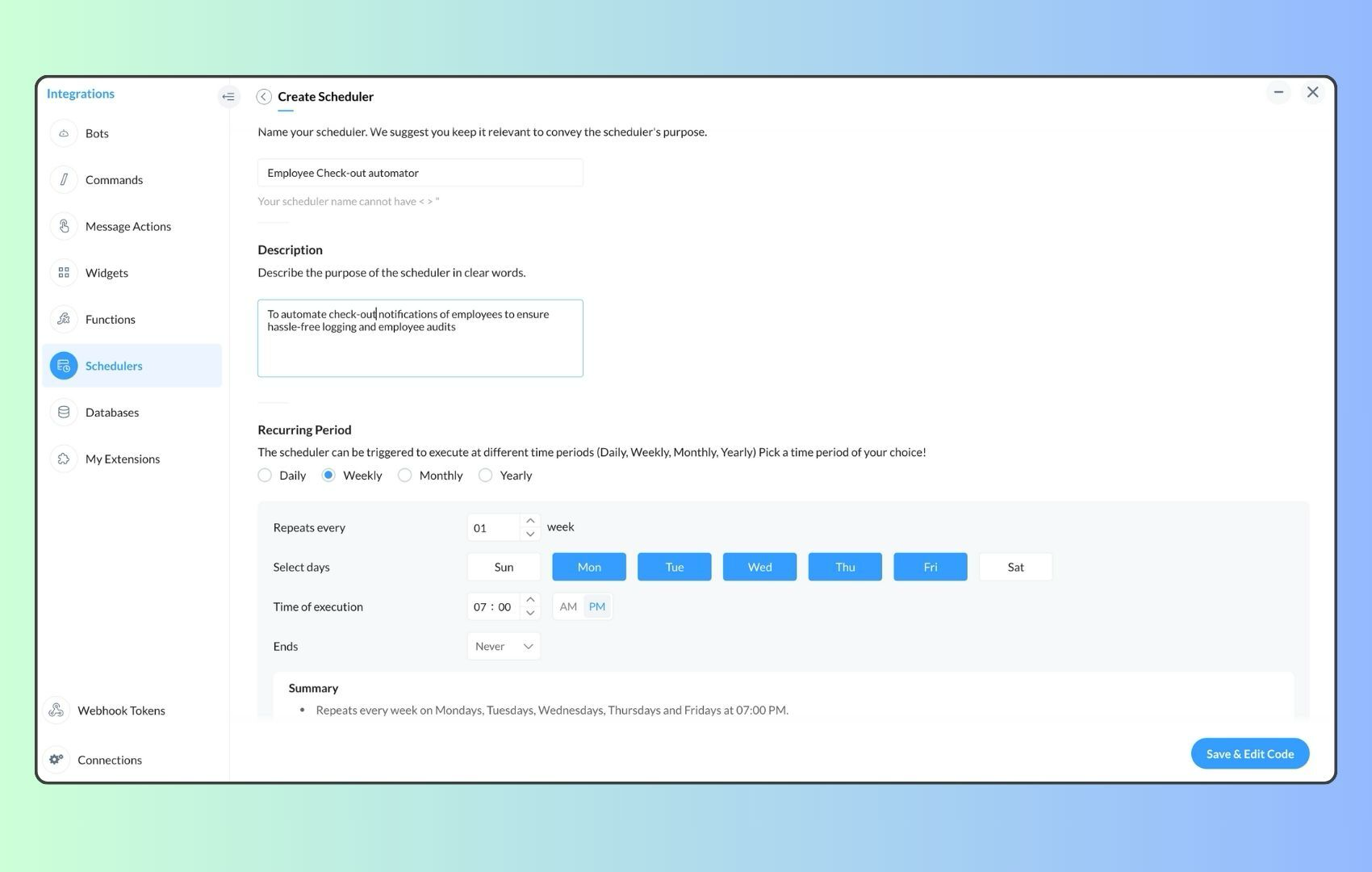
  4. Create a scheduler using your preferred name. Specify the following details: the scheduler name and a description.  

  1. For the recurring period, choose the type "Weekly." Select Monday through Friday and set the time of execution to 11 AM or any other time that aligns with your company's check-in time, or customise the recurring period based on your specific use case.
  2. Finally, click "Save & edit code" and paste the following code.
  1. currentDate = zoho.currentdate;
  2. currentDateString = currentDate.toString("dd-MMM-yyyy");
  3. fromIndex = 1;
  4. toIndex = 200;
  5. // Get all active users
  6. users = zoho.people.getRecords("employee",fromIndex,toIndex,{},"{CONNECTION_LINK_NAME}");
  7. usersList = List();
  8. usersList.addAll(users);
  9. iterations = {1,2,3,4,5,6,7,8,9,10,11,12,13,14,15,16,17,18,19,20,21,22,23,24,25};
  10. // Get All Employees ( 4000 MAX )
  11. if(users.size() == 200)
  12. {
  13. for each  iteration in iterations
  14. {
  15. fromIndex = fromIndex + toIndex;
  16. toIndex = toIndex + 200;
  17. users = zoho.people.getRecords("employee",fromIndex,toIndex,{},"{CONNECTION_LINK_NAME}");
  18. if(users.size() > 0 && users.size() == 200)
  19. {
  20. usersList.addAll(users);
  21. }
  22. else if(users.size() > 0 && users.size() < 200)
  23. {
  24. usersList.addAll(users);
  25. break;
  26. }
  27. else
  28. {
  29. break;
  30. }
  31. }
  32. }
  33.  
  34. // Get all the employees checkedin from the morning.
  35. getAttendenceEntries = invokeurl
  36. [
  37. url :"https://people.zoho.com/api/attendance/fetchLatestAttEntries?duration=240"
  38. type :GET
  39. connection:"{CONNECTION_LINK_NAME}"
  40. ];
  41. latestAttendanceRecords = getAttendenceEntries.get("response").get("result");
  42. checkedInUsers = List();
  43. for each  userRecord in latestAttendanceRecords
  44. {
  45. checkedInEmployeeEmail = userRecord.get("emailId");
  46. checkedInUsers.add(checkedInEmployeeEmail);
  47. }
  48.  
  49. // Get all the employees who applied for leave both approved and pending ( Remove PENDING to exclude only the leave approved employees )
  50. leaveApprovedEmployees = invokeurl
  51. [
  52. url :"https://people.zoho.com/api/v2/leavetracker/leaves/records?from=" + currentDateString + "&to=" + currentDateString + "&dateFormat=dd-MMM-yyyy&approvalStatus=[APPROVED,PENDING]"
  53. type :GET
  54. connection:"{CONNECTION_LINK_NAME}"
  55. ];
  56. info  leaveApprovedEmployees;
  57. leaveApprovedEmployeesList = List();
  58. for each  member in leaveApprovedEmployees.get("records")
  59. {
  60. leaveApprovedEmployeesList.add(member.get("EmployeeId"));
  61. }
  62. info leaveApprovedEmployeesList;
  63.  
  64.  
  65. // Add the users to yet to checkin list if they are not checked from the morning and not applied for leave
  66. usersYetToCheckIn = list();
  67. for each  user in usersList
  68. {
  69. employeeEmail = user.get("EmailID");
  70. employeeId = user.get("EmployeeID");
  71.     employeeStatus = user.get("Employeestatus");
  72. if(!checkedInUsers.contains(employeeEmail) && !leaveApprovedEmployeesList.contains(employeeId) && employeeStatus.equals("Active"))
  73. {
  74. usersYetToCheckIn.add(employeeEmail);
  75. }
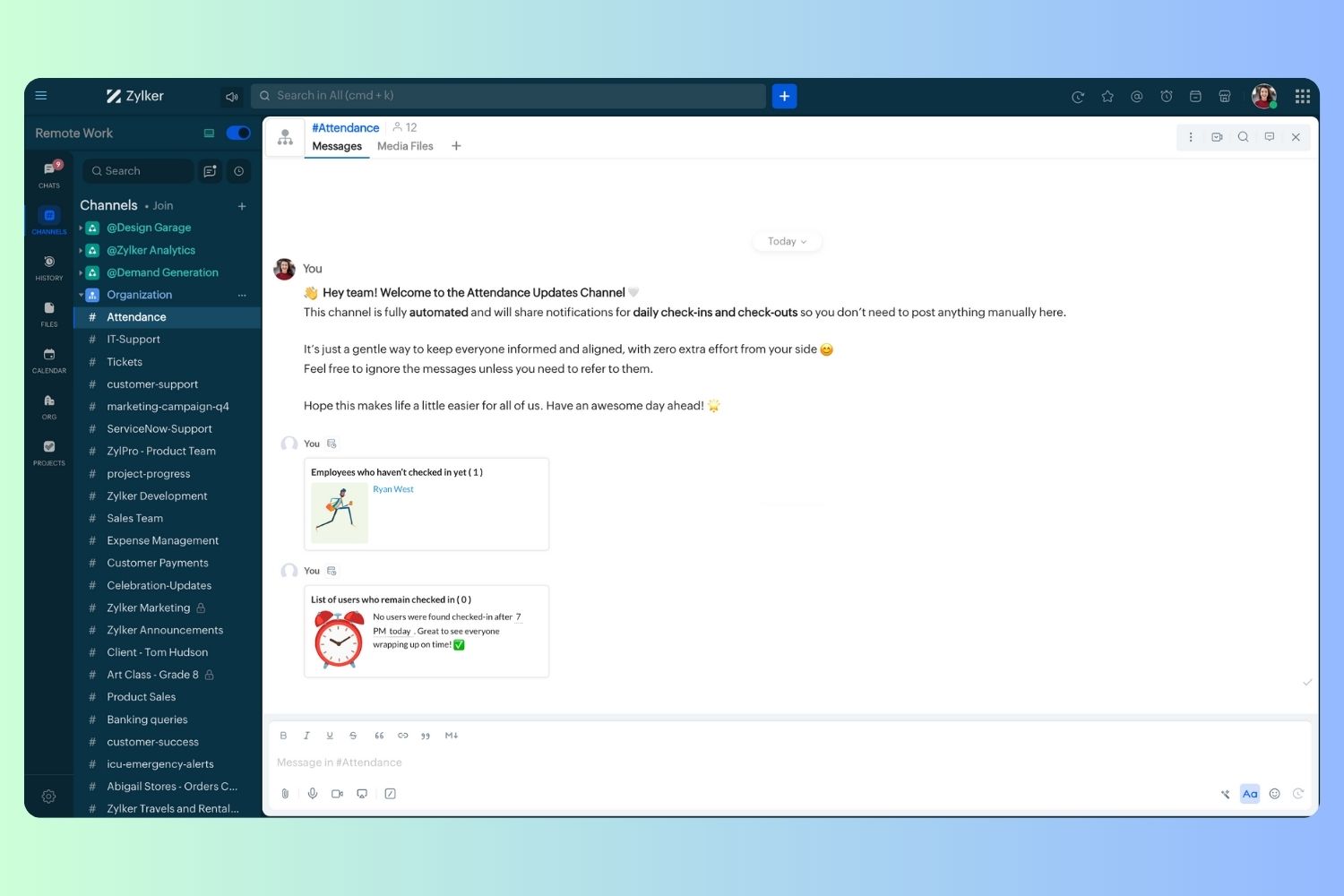
  76. }
  77.  
  78. // Mention the list of users in the channel.
  79. if(usersYetToCheckIn.size() == 0)
  80. {
  81. info "No users were found yet to checked-in at 11 PM today. Great to see everyone wrapping in on time! ✅";
  82. }
  83. else
  84. {
  85. usersYetToCheckInString = "";
  86. for each  user in usersYetToCheckIn
  87. {
  88. usersYetToCheckInString = usersYetToCheckInString + "[" + user + "](mail:" + user + ") \n";
  89. }
  90. usersYetToCheckInString = usersYetToCheckInString.subString(0,usersYetToCheckInString.length() - 2);
  91. response = Map();
  92. card = Map();
  93. card.put("title","Employees who haven’t checked in yet ( " + usersYetToCheckIn.size() + " )");
  94. card.put("thumbnail","https://i.pinimg.com/originals/85/e9/f3/85e9f3f5ac31fc5aab586e208297f43d.gif");
  95. card.put("theme","modern-inline");
  96. response.put("card",card);
  97. response.put("text",usersYetToCheckInString);
  98. info zoho.cliq.postToChannel("{CHANNEL_UNIQUE_NAME}",response);
  99. }

  1. Now, let's follow the same steps and create a scheduler for checkout reminders. Under the recurring period, choose the type as "Weekly." Select Monday through Friday and set the time of execution to 7 PM or any other time that aligns with your company's checkout time, or customise the recurring period based on your specific use case.
  2. Click "Save & edit code" and paste the following code.
  1. attendanceResponse = invokeurl
  2. [
  3. url :"https://people.zoho.com/api/attendance/fetchLatestAttEntries?duration=600"
  4. type :GET
  5. connection:"{CONNECTION_LINK_NAME}"
  6. ];
  7. info attendanceResponse;
  8. todayDate = zoho.currenttime.toString("YYYY-MM-dd");
  9. latestAttendanceRecords = attendanceResponse.get("response").get("result");
  10. usersWithoutCheckout = list();
  11. if(latestAttendanceRecords.size() > 0)
  12. {
  13. for each  userRecord in latestAttendanceRecords
  14. {
  15. userEmail = userRecord.get("emailId");
  16. dailyEntries = userRecord.get("entries");
  17. for each  dailyEntry in dailyEntries
  18. {
  19. if(dailyEntry.containsKey(todayDate))
  20. {
  21. todayEntryDetails = dailyEntry.get(todayDate);
  22. attendanceLogs = todayEntryDetails.get("attEntries");
  23. for each  logEntry in attendanceLogs
  24. {
  25. if(!logEntry.containsKey("checkOutTime"))
  26. {
  27. usersWithoutCheckout.add("{@" + userEmail + "}");
  28. }
  29. }
  30. }
  31. }
  32. }
  33. }
  34. usersWithoutCheckoutString = usersWithoutCheckout.toString("\n");
  35. if(usersWithoutCheckoutString.trim().length() == 0){
  36. usersWithoutCheckoutString = "No users were found checked-in after 7 PM today. Great to see everyone wrapping up on time! ✅";
  37. }
  38. response = Map();
  39. card = Map();
  40. card.put("title","List of users who remain checked in ( " + usersWithoutCheckout.size() + " )");
  41. card.put("thumbnail","https://media.tenor.com/Hd8nLZZTPRYAAAAi/alarm-clock-alarm.gif");
  42. card.put("theme","modern-inline");
  43. response.put("card",card);
  44. response.put("text",usersWithoutCheckoutString);
  45. info zoho.cliq.postToChannel("{CHANNEL_UNIQUE_NAME}",response);

Wrapping up and checking out for the day, hopefully

Whether you're from HR, tired of chasing attendance logs, or an enthusiastic team lead trying to increase your team's visibility and adjust workload accordingly, Cliq Platform's schedulers are essential and ensure that accurate tracking is consistent and compliance is maintained. Additionally, this would be scalable to handle organizations of any size.

If attendance tracking is a binge-watchable series, what plot twist would these reminders add to your team's script? Let us know in the comments below!

    • Sticky Posts

    • Automate attendance tracking with Zoho Cliq Developer Platform

      I wish remote work were permanently mandated so we could join work calls from a movie theatre or even while skydiving! But wait, it's time to wake up! The alarm has snoozed twice, and your team has already logged on for the day. Keeping tabs on attendance
    • Automating Employee Birthday Notifications in Zoho Cliq

      Have you ever missed a birthday and felt like the office Grinch? Fear not, the Cliq Developer Platform has got your back! With Zoho Cliq's Schedulers, you can be the office party-cipant who never forgets a single cake, balloon, or awkward rendition of
    • Customer payment alerts in Zoho Cliq

      For businesses that depend on cash flow, payment updates are essential for operational decision-making and go beyond simple accounting entries. The sales team needs to be notified when invoices are cleared so that upcoming orders can be released. In contrast,
    • Accelerate Github code reviews with Zoho Cliq Platform's link handlers

      Code reviews are critical, and they can get buried in conversations or lost when using multiple tools. With the Cliq Platform's link handlers, let's transform shared Github pull request links into interactive, real-time code reviews on channels. Share
    • App Spotlight : PagerDuty for Zoho Cliq

      App Spotlight brings you hand-picked apps to enhance the power of your Zoho apps and tools. Visit the Zoho Marketplace to explore all of our apps, integrations, and extensions. In today's fast-paced world, seizing every moment is essential for operational
      • Recent Topics

      • Security Enhancements | Migrate to the Updated Policies

        Hello everyone, Zoho Directory's security policies have been updated and reorganized into three new policies with features that enhance the overall organization security. These policies provide a stronger and more secure sign-in methods and improve the
      • Bring Zoho Shifts Capabilities into Zoho People Shift Module

        Hello Zoho People Product Team, After a deep review of the Zoho People Shift module and a direct comparison with Zoho Shifts, we would like to raise a feature request and serious concern regarding the current state of shift management in Zoho People.
      • Zoho Commerce - How To Change Blog Published Date and Author

        Hi Commerce Team, I'm discussing a project with a client who wants to move from Woo Commerce / Wordpress to Zoho Commerce. They have around 620 blog posts which will need to be migrated. I am now aware of the blog import feature and I have run some tests.
      • Don't Allow Customer to Edit Values After Submitting Ticket

        After a customer submits a ticket through the customer portal, they can go into the ticket and see some of the values from the questions they answered in the sidebar. Currently, a customer can edit these values even after they submitted them. This makes no sense. We ask very specific questions that we don't want customers to later change! Please disable the ability for customers to edit the values to their submission questions in the portal. Screenshot attached.
      • using the client script based on the look up filed i wnat to fetch the record details like service number , service rate

        based on selected service look up field iwant to fetch the service serial number in the serice form how i achive using client script also how i get the current date in the date field in the on load of the form
      • Quick Create needs Client Script support

        As per the title. We need client scripts to apply at a Quick Create level. We enforce logic on the form to ensure data quality, automate field values, etc. However, all this is lost when a user attempts a "Quick Create". It is disappointing because, from
      • How to block a WhatsApp user for sending spam

        Is there a way to block those whatsapp users that just come to play and annoy our service, they also spam us. We have a waba service with sales iq
      • Inquiry regarding auto-save behavior for Zoho Sign Embedded Sending

        Dear Zoho Support Team, I am currently integrating Zoho Sign's Embedded Sending functionality using iframes on my website. I would like to know if there is a way to ensure that the document state (including any added fields) is automatically saved as
      • Introducing Connected Records to bring business context to every aspect of your work in Zoho CRM for Everyone

        Hello Everyone, We are excited to unveil phase one of a powerful enhancement to CRM for Everyone - Connected Records, available only in CRM's Nextgen UI. With CRM for Everyone, businesses can onboard all customer-facing teams onto the CRM platform to
      • Automation#17: Auto-Create Tasks in Zoho Projects Upon Ticket Creation in Zoho Desk

        Hello Everyone, This edition delivers the solution to automatically create a task in Zoho Projects when a ticket is created in Zoho Desk. Zylker Resorts uses Zoho Desk for bookings and handling guest requests. Zylker resorts outsources cab bookings to
      • Automation#20 : Auto-Add Ticket Tags based on Keywords

        Hello Everyone! Welcome to unveiling custom functions on our Community series. This week's post lets you add tags to your tickets automatically based on the keywords in the ticket subject and the ticket thread. Discover how this custom function helps
      • Automation#21: Track Ticket Transfers Across Departments

        Hello Everyone! With Halloween just around the corner, we'd like to let you know the Zoho Desk team is always there to sweep away your customer service troubles! This week, we’re excited to introduce a custom function that tracks tickets moved between
      • Automate attendance tracking with Zoho Cliq Developer Platform

        I wish remote work were permanently mandated so we could join work calls from a movie theatre or even while skydiving! But wait, it's time to wake up! The alarm has snoozed twice, and your team has already logged on for the day. Keeping tabs on attendance
      • Reusable Custom Functions Across Department Workflows

        Dear Zoho Desk Team, We appreciate the powerful workflow automation capabilities in Zoho Desk, particularly the ability to create and use custom functions within workflows. However, we have encountered a limitation that impacts efficiency and maintainability.
      • Email Integration - Zoho CRM - OAuth and IMAP

        Hello, We are attempting to integrate our Microsoft 365 email with Zoho CRM. We are using the documentation at Email Configuration for IMAP and POP3 (zoho.com) We use Microsoft 365 and per their recommendations (and requirements) for secure email we have
      • Uplifted homepage experience

        Hello everyone, Creating your homepage is now much easier, more visual, and more impactful. Until now, your homepage allowed you to display custom views, widgets, analytic components, and Kiosk. With the following improvements, the homepage is now a smarter,
      • Homepage not assignable to group

      • MS Teams for daily call operations

        Hello all, Our most anticipated and crucial update is finally here! Organizations using Microsoft Teams phone system can now integrate it effectively with Zoho CRM for tasks like dialling numbers and logging calls. We are enhancing our MS Teams functionality
      • Automation#22 Track Ticket Duration at Specific Status

        Hello Everyone! Welcome back to the Community Learning Series! Today, we explore how Zylker Techfix, a gadget servicing firm, boosted productivity by tracking the time spent at a particular ticket status in Zoho Desk. Zylker Techfix customized Zoho Desk’s
      • Automation#23: Automate Guided Conversations in Zoho Desk with Business Hours

        Hello Everyone, This week's edition introduces a custom function designed to automate Guided Conversations in Zoho Desk, based on your business hours. With this feature, you can align the bot's behavior with your business schedule, ensuring a smooth and
      • Address changes in quote form

        When entering a quote, the first piece of information required is the Account, which properly populates the billing and shipping address fields. Then I use the lookup function to select a contact, and when I do, the billing and shipping addresses are
      • Automation#24: Auto-Update custom field from Accounts to Tickets

        Hello Everyone! Welcome back to the Community Learning Series! This episode dives into how Zylker Techfix streamlines account-related ticket references. Previously, employees had to manually check account details to retrieve specific customer information,
      • Automation#31: Automate Splitting Names for New Contact Records

        Hello Everyone, This week, we present to you a custom function, which allows you to split the first and last names from the user's email ID based on the separator used in the ID. Having grown into a large firm, Zylker Techfix aims to optimize its processes,
      • The same Contact associated to multiple Companies - Deals

        Hi, I would like to know if there is an option to associate the same contact with multiple companies (two or more) deals, using the same contact details for all. This is because we have contacts who are linked to different companies or branches of the
      • local file csv import problem

        The issue occurs when I upload a CSV file via Databridge. In the preview, everything looks correct — the values are in the proper columns. However, after clicking Import, the first column becomes empty, and the values from that column appear in a new
      • Kaizen #227 : Client Script Support for List Page (Canvas)

        Hello everyone! Welcome to another week of Kaizen. In today's post lets see how Client Script can be used in Canvas List Page to mask sensitive information from specific roles and add colors to Canvas List Page records based on custom criteria.This use
      • Implement Date-Time-Based Triggers in Zoho Desk

        Dear Zoho Desk Support Team, We are writing to request a new feature that would allow for the creation of workflows triggered by specific date-time conditions. Currently, Zoho Desk does not provide native support for date-time-based triggers, limiting
      • Automation#25: Move Tickets to Unassigned When the Owner Is Offline

        Hello Everyone, Welcome to this week's Community Series! 'Tis the holiday season—a time when work often takes a brief pause. The holiday spirit is in full swing at Zylker Techfix too, with employees taking some well-deserved time off. During this period,
      • Analytics <-> Invoice Connection DELETED by Zoho

        Hi All, I am reaching out today because of a big issue we have at the moment with Zoho Analytics and Zoho Invoice. Our organization relies on Zoho Analytics for most of our reporting (operationnal teams). A few days ago we observed a sync issue with the
      • Automation#27: Retain Ticket Owner on Moved Tickets

        Hello Everyone! This week, we present to you a custom function that retains the ticket owner when a ticket is moved from one department to another. Here’s more to help you understand the custom function: At Zylker Techfix, Alex, the Support Engineer manages
      • Automation#28 Notify Agents on Article Expiry

        Hello Everyone! This week, we’re bringing you a feature that notifies your team when articles in the Knowledge Base are set to expire to keep your content relevant and helpful for customers. The Zoho Desk's Knowledge Base is an asset for customers to
      • Automation#29 Retain ticket status on moved tickets

        Hello Everyone, Hear out Zylker Techfix’s Success Story on Smoother Ticket Transitions! Zylker Techfix, a gadget servicing firm committed to quick repairs and timely deliveries, faced a challenge when ticket statuses changed automatically while moving
      • encountering an error when attempting to associate an email with a Deal using the Zoho CRM extension in Zoho Mail.

        When I click "Yes, associate," the system displays an "Oops!! Something went wrong" error message. I have attached a screenshot of the issue for reference.
      • Automation#32:Auto Add New Portal Users to the Help Center User Groups

        Hello Everyone, Introducing a custom function that automates the process of adding new portal users to Help Center user groups, making user management effortless! By default, Zoho Desk allows you to assign new portal users to groups manually. But with
      • Using email "importance" as workflow-criteria

        I'd like to set up a workflow that triggers if an incoming email has been flagged as "high importance" but I'm not seeing any way to do that. Hopefully I'm just missing something obvious...?
      • Automation#34 : Automate Email threading for Ticket notification

        Hello Everyone, It's been a while since we've presented an automation. However, our community has been buzzing with ideas, use cases, and discussions with our community experts and Ask the Experts session. So, here we are again, presenting an automation
      • Automation#35 : Auto-Add Comments under the Owner's Name in Tickets via Macros

        Hello Everyone, This week's custom function provides simple steps to configure a Macro for adding comments to tickets with the name of the Comment owner. When managing tickets, you can use the Comment feature to communicate internally with your team and
      • Automation#36: Auto-create time-entry after performing the Blueprint transition

        Hello Everyone, This week’s edition focuses on configuring a custom function within Zoho Desk to streamline time tracking within the Blueprint. In this case, we create a custom field, and request the agent to enter the spending time within the single
      • Automation#33: Automate Splitting Names for Existing Contact Records

        An organized directory – who doesn't love one? Previously, we explored how to split contact names into First Name and Last Name for new contacts in Zoho Desk. But what about existing contacts already in your database? This week, we bring you a custom
      • About Meetings (Events module)

        I was working on an automation to cancel appointments in zoho flow , and in our case, we're using the Meetings module (which is called Events in API terms). But while working with it, I'm wondering what information I can display in the image where the
      • Next Page