Automation#23: Automate Guided Conversations in Zoho Desk with Business Hours

Automation#23: Automate Guided Conversations in Zoho Desk with Business Hours


Hello Everyone, 
This week's edition introduces a custom function designed to automate Guided Conversations in Zoho Desk, based on your business hours. With this feature, you can align the bot's behavior with your business schedule, ensuring a smooth and professional customer experience.

Self-service platforms are now a cornerstone of effective customer service, improving productivity for both customers and support agents. With the evolving nature of customer support, self-
service has become indispensable. It saves time and provides quick access to solutions, empowering customers to address their concerns efficiently.

Zoho Desk's Guided Conversations serves as a robust self-service tool, offering Tier-1 solutions to customers through an intuitive interface. For more complex or escalated queries, the bot seamlessly connects customers to a live agent, ensuring both self-service and human assistance for effective issue resolution.
However, businesses often have non-working hours, such as weekends or holidays, when agents are unavailable. In such cases, configuring your Guided Conversations based on your business hours is essential. During non-working hours, the bot can:
  1. Notify customers that your business is currently closed, along with your operating hours.
  2. Provide an option for customers to submit a ticket, ensuring their query is addressed promptly during working hours.Configure your Guided Conversations today and streamline your customer support process!

How to incorporate this custom function within your GC flow?
1. Go to Setup (S) >> Self-Service >> Guided Conversation. 
2. Choose the Department and click on Create Flow
(If you would like to add this to your existing flow, click on the ellipsis icon under Published Flows and click on the Edit button.)
3. Select the channels, give a Name and Description, and click Next. 
4. Click on the + icon, add the Webhook block, under Perform Actions
5. Enter the Block name as Business Hours, Choose Get under Method
NotesNote: In the Business Hours URL, replace .com with .in/.eu/.ca/.sa based on your DC

How to fetch the Business Hour Id? 
6.1 To fetch the Business Id, Go to Setup (S) >> Organization >> Business Hours.  
6.2 Click on the Business Hours configured within your Zoho Desk Account. Go to the URL of the specific Business Hours, and you can fetch the business Id from the URL.
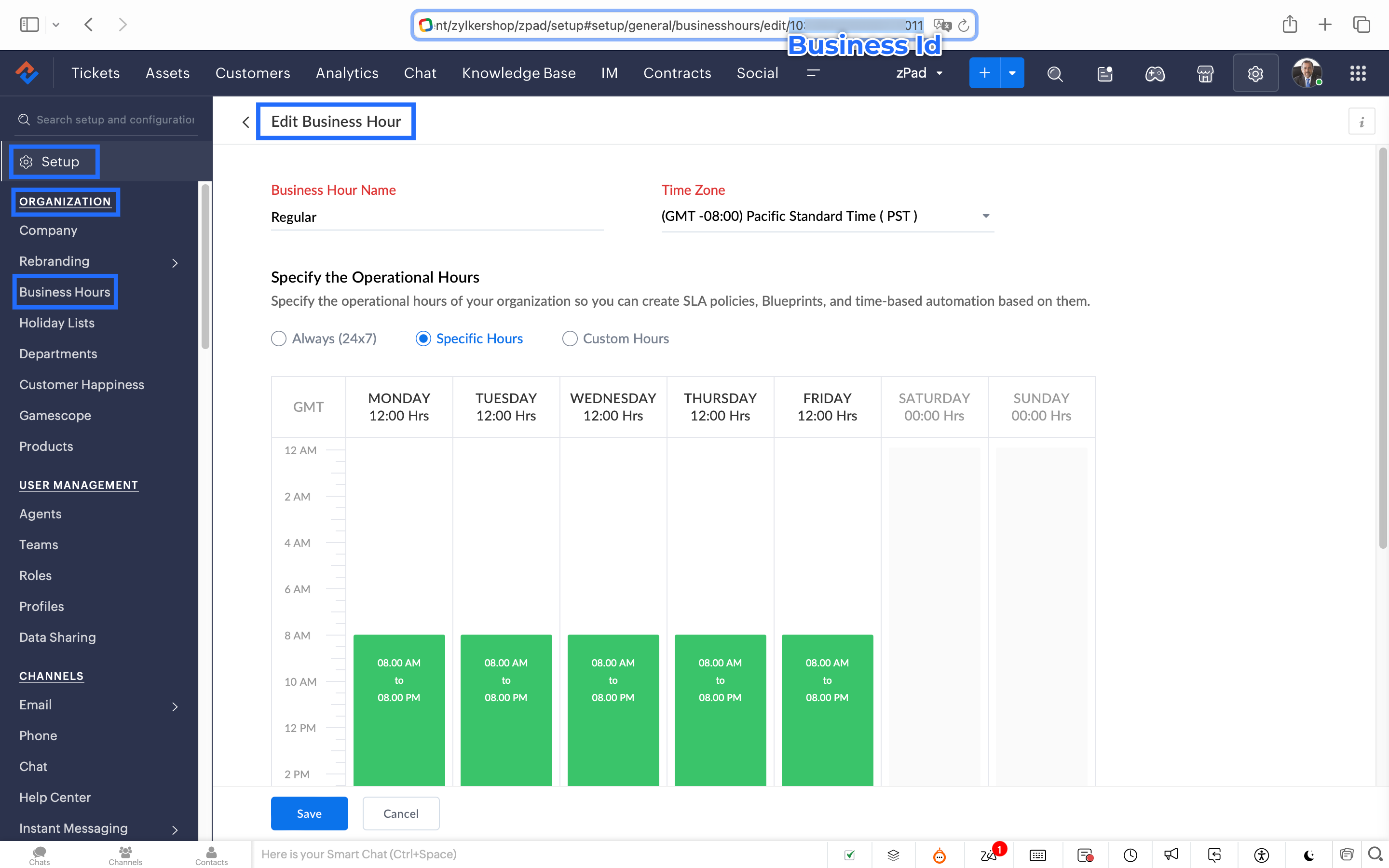

7. After entering the URL, do not make changes to the Query Params and Headers. 
8. Under Connections, click on Add
To Create a connection
      8.1 Click Create Connection.
      8.2 Select Zoho Desk under Default Services.
      8.3 Give a connection name (let's say configureBusiness Hours).
      8.4 Disable the toggle for User Credentials of Login User.
      8.5 Under Scope, choose the below scope values:
               Desk.settings.READ
      8.6 Click Create and Connect.
      8.7 Click Connect and click Accept.
Connection is created successfully.


 9. After creating the connection, click on Refresh and then click on the drop down arrow and select the connection (configureBusiness Hours) created.
10. Click on the gear icon in the Formatter option and paste the below code in the Deluge window: 
  1. dayMAp = {"SUNDAY","MONDAY","TUESDAY","WEDNESDAY","THURSDAY","FRIDAY","SATURDAY"};
  2. businessTimes = response.get("businessTimes");
  3. timez = response.get("timeZone").get("id");
  4. response = Collection();
  5. createdTime = zoho.currenttime.toString("yyyy-MM-dd HH:mm:ss",timez).toDateTime();
  6. createdDay = createdTime.getDay();
  7. //get this from above created time
  8. createdHour = createdTime.getHour();
  9. //get this from above created time
  10. createdMinute = createdTime.getMinutes();
  11. //get this from above created time
  12. createdWeekDay = createdTime.getDayOfWeek();
  13. //get this from above created time
  14. createdWeekDay = dayMAp.get(createdWeekDay - 1);
  15. for each  businessTime in businessTimes
  16. {

  17. if(businessTime.get("day") == createdWeekDay)

  18. {

  19. businessTimeStartHour = businessTime.get("startTime").getPrefix(":").toLong();

  20. businessTimeEndHour = businessTime.get("endTime").getPrefix(":").toLong();

  21. businessTimeStartMinute = businessTime.get("startTime").getSuffix(":").toLong();

  22. businessTimeEndMinute = businessTime.get("endTime").getSuffix(":").toLong();

  23. if((createdHour > businessTimeStartHour || createdHour == businessTimeStartHour && createdMinute >= businessTimeStartMinute) && (createdHour < businessTimeEndHour || createdHour == businessTimeEndHour && createdMinute <= businessTimeEndMinute))

  24. {

  25. response.insert({"status":"true"});

  26. }

  27. else

  28. {

  29. response.insert({"status":"false"});

  30. }

  31. }
  32. }
  33. return response.get(0).get("status");

11. Click Save after pasting the code. 
12. Click on the gear icon in the Response icon
12.1 Click on the gear icon on the Status Code
12.2 Give Status Code as 200, Flow Variables as status, Response Value as /
12.3 Let the Type be single element and the Data Type be String. Click Save. Click Save for the Response List with the updated status. 
13. Disable the toggle for the Multi Path
14. Choose a Request timeout if required. This sets a response waiting time from the server. 
15. Set the Error message if required to display in case waiting time exceeds the response time. 
16. Click Save

This is the configuration for setting the business hours through a custom function. 

17. After the Webhook, click on the + icon and add the Fork block under the Perform Actions


18. Give the Block Name  as Check, Enter Path list : name it as Check. 
Under Criteria 1, click on the drop-down arrow, and enter choose Status under Block variables, from the drop-down menu.  Choose operation: contains and give the value : True

19. Do not add an else path. 
20. Click Save

In the Fork block, under Check, you can add the Transfer to agent block from the Zoho Desk Blocks. Under Else, you can add a text icon/ info card stating you are out of business hours. 
Notes
Note: This custom function does not include the Holiday Lists configured within Zoho Desk. 
You can seamlessly integrate this Guided Conversation flow into your self-service platform to ensure you never miss a customer, even during non-working hours. Keep your customer support running smoothly!

See you next week!
Regards,
Lydia | Zoho Desk

    • Sticky Posts

    • Register for Zoho Desk Beta Community

      With the start of the year, we have decided to take a small step in making the life of our customers a little easier. We now have easy access to all our upcoming features and a faster way to request for beta access. We open betas for some of our features
    • Share your Zoho Desk story with us!

      Tell us how you use Zoho Desk for your business and inspire others with your story. Be it a simple workflow rule that helps you navigate complex processes or a macro that saves your team a lot of time; share it here and help the community learn and grow with shared knowledge. 
    • Tip #1: Learn to pick the right channels

      Mail, live chat, telephony, social media, web forms—there are so many support channels out there. Trying to pick the right channels to offer your customers can get pretty confusing. Emails are most useful when the customer wants to put things on record. However, escalated or complicated issues should not be resolved over email because it's slow and impersonal.  When you need immediate responses, live chat is more suitable. It's also quick and convenient, so it's the go-to channel for small issues. 
    • Welcome to Zoho Desk Community - Say hello here!

      Hello everyone! Though we have been here for a while, it’s time to formally establish the Zoho Desk Community; we’re really happy to have you all here! This can be the place where you take a moment to introduce yourself to the rest of the community. We’d love to hear all about you, what you do, what company or industry you work for, how you use Zoho Desk and anything else that you will like to share! Here’s a little about me. I am Chinmayee. I have been associated with Zoho since 2014. I joined here
    • Webinar 1: Blueprint for Customer Service

      With the launch of a host of new features in Zoho Desk, we thought it’ll be great to have a few webinars to help our customers make the most of them. We’re starting off with our most talked about feature, Blueprint in Zoho Desk. You can register for the Blueprint webinar here: The webinar will be delivered by our in-house product experts. This is a good opportunity to ask questions to our experts and understand how Blueprint can help you automate your service processes. We look forward to seeing
      • Recent Topics

      • Make CAMPAIGNS email look as simple as possible

        Hi there I'm trying to make my Campaigns email look as much like a normal email as possible. I'm a bit stuck with the "justification" of the email email block. Can I LEFT JUSTIFY the "whole email" to make it look "normal"? (Please see screenshot attached)
      • [Webinar] Top 10 Most Used Zoho Analytics Features in 2025

        Zoho Analytics has evolved significantly over the past year. Discover the most widely adopted features in Zoho Analytics in 2025, based on real customer usage patterns, best practices, and high-impact use cases. Learn how leading teams are turning data
      • Sorry! we encountered some problems while sending your campaign. It will be sent automatically once we are ready. We apologize for the delay caused.

        Hello. Lately we are having problems with some campaigns, which show us this error message. Sorry! we encountered some problems while sending your campaign. It will be sent automatically once we are ready. We apologize for the delay caused. We can't find
      • Can I remove or divert certain contacts from an active Campaigns workflow?

        I have created a workflow in Zoho Campaigns, which sends different emails, once contacts have been added to a mailing list. To choose which email to send to the contacts, there are conditions, which divert contacts based on their company type and their company size. There was a subsection of this workflow, where company size wasn't selected correctly, and some contacts have been sent down the wrong path and received the wrong email. The workflow contains a reminder loop and a further series of emails.
      • Customizing Helpcenter texts

        I’m customizing the Zoho Desk Help Center and I’d like to change the wording of the standard widgets – for example, the text in the “Submit Ticket” banner that appears in the footer, or other built-in widget labels and messages. So far, I haven’t found
      • File Upload field automatically replaces spaces with underscores – support experience

        Hi everyone, I want to share my recent experience regarding the File Upload field behavior in Zoho Creator and my interaction with the Zoho support team. When a user uploads a file, the system automatically renames the document by replacing spaces in
      • How to map fields from Zoho Recruit to Zoho People

        I've got these fields from my Job Offer that I'm trying to map to the Work information fields in Zoho People, but they arent showing up. For example, how do I get the department name field (in the job post) to map to the work information field in Zoho
      • UTM in zoho campaigns

        Helloo everybody!!! Someone know how IF ZOHO CAMPAIGNS has UTM for tracking the url of any campaigns. thank u
      • Full Context of Zoho CRM Records for Zia in Zoho Desk for efficient AI Usage

        Hello everyone, I have a question regarding the use of Zia in Zoho Desk in combination with CRM data. Is it possible to automatically feed the complete context of a CRM record into Zia, so that it can generate automated and highly accurate responses for
      • Knowledge base printing

        I saw a posting about printing the knowledge base as I was looking for the answer, but we would like the ability to print out the entire knowledge base with a click, keeping the same organization format.   Bonus would include an index of keywords and
      • Search not working!

        I have items in my notebook tagged but when I search for a tag nothing comes up! Any fix for this?
      • Zoho Books | Product updates | January 2026

        Hello users, We’ve rolled out new features and enhancements in Zoho Books. From e-filing Form 1099 directly with the IRS to corporation tax support, explore the updates designed to enhance your bookkeeping experience. E-File Form 1099 Directly With the
      • Updates for Zoho Campaigns: Merge tag, footer, and autoresponder migration

        Hello everyone, We'd like to inform you of some upcoming changes with regard to Zoho Campaigns. We understand that change can be difficult, but we're dedicated to ensuring a smooth transition while keeping you all informed and engaged throughout the process.
      • File Upload field not showing in workflow

        Hi, I have added a field on Zoho CRM. I want to use it in a workflow where that particular field is updated based on another field, however it is not showing up in the field list to select it in the workflow. Why is this please?
      • Drag 'n' Drop Fields to a Sub-Form and "Move Field To" Option

        Hi, I would like to be able to move fields from the Main Page to a Sub-Form or from a Sub-Form to either the Main Page or another Sub-Form. Today if you change the design you have to delete and recreate every field, not just move them. Would be nice to
      • How do i integrate google analytics to Zoho Campaigns?

        Looking to track Zoho Traffic from email Current topic is outdated
      • How do teams manage meeting follow-ups across Zoho tools?

        We’re using Zoho tools for collaboration and tracking, but managing meeting notes, action items, and follow-ups across teams is still challenging. Curious how others are handling this within Zoho workflows. Are there best practices or integrations that
      • Adding a Deal to and Existing Contact

        I want to easily add a Deal to an existing Contact. If I click on New Deal on the Contact page this currently this is what happens: All of the mandatory field (and other field) information exists within the Contact. Is there a simple way for it to automatically
      • Zoho Sprint Backlog View, filter by item status

        Hello, In Zoho Sprints, it would be great to be able filter out specific items in the Backlog based on their status. We would like to track items that were Removed from our backlog without seeing them constantly in the Backlog view, as this view should
      • Customize Colors used on graphs and charts according to users desire.

        It would be great if we could customize the graph's colors as we see fit. I hate that yellow is always the default color!
      • Let us view and export the full price books data from CRM

        I quote out of CRM, some of my clients have specialised pricing for specific products - therefore we use Price Books to manage these special prices. I can only see the breakdown of the products listed in the price book and the specialised pricing for
      • Mejoras urgentes para ZOHO MEETING

        Tengo unos meses usando Zoho Meeting. En general, es buena, pero hay cosas vitales que no logra cumplir con mínima calidad. 1) Calidad de audio y video: urge mejoras. Audio con retraso, imagen borrosa, mal recorte de silueta con fondos virtuales. Además,
      • Multiple header in the quote table???

        Hello, Is it possible in Zoho CRM to add multiple headers or sections within the Quote product table, so that when the quote is printed it shows separate sections (for example “Products” and “Services”)? To clarify, I’m asking because: This does not appear
      • Saving sent email campaign as PDF

        I'm looking to add all campaigns sent to an archive folder in sharepoint. Is there anyway to accomplish this in Zoho Flow ? I'm falling at the first hurdle ... can I automatically save a sent campaign as a PDF to a folder location ?
      • Exporting All Custom Functions in ZohoCRM

        Hello, All I've been looking for a way to keep about 30 functions that I have written in Zoho CRM updated in my own repository to use elsewhere in other instances. A github integration would be great, but a way to export all custom functions or any way
      • How can Data Enrichment be automatically triggered when a new Lead is created in Zoho CRM?

        Hi, I have a pipeline where a Lead is created automatically through the Zoho API and I've been trying to look for a way to automatically apply Data Enrichment on this created lead. 1) I did not find any way to do this through the Zoho API; it seems like
      • Conditional Layouts On Multi Select Field

        How we can use Conditional Layouts On Multi Select Field field? Please help.
      • Appreciation to Qntrl Support Team

        We are writing this topic to appreciate the outstanding level of support from Qntrl Team. We have been using Qntrl since 2022 after shifting from another similar platform. Since we joined Qntrl, the team has shown a high level of professionalism, support,
      • How can I hide "My Requests" and "Marketplace" icon from the side menu

        Hello everybody, We recently started using the new Zoho CRM for Everyone. How can I hide "My Requests" and "Marketplace" from the side menu? We don't use these features at the moment, and I couldn't find a way to disable or remove them. Best regards,
      • Whatsapp Integration on Zoho Campaign

        Team: Can the messages from Zoho Campaign delivered through Whatsapp... now customers no longer are active on email, but the entire campaign module is email based.... when will it be available on whatsapp.... are there any thirdparty providers who can
      • Quotes Approval

        Hey all, Could you please help in the following: When creating quotes, how to configure it in a way, that its approval would work according to the quoted items description, not according to quote information. In my case, the quote should be sent to approval
      • Mandatory Field - but only at conversion

        Hello! We use Zoho CRM and there are times where the "Lead Created Date & Time" field isn't populated into a "Contractor" (Account is the default phrase i believe). Most of my lead tracking is based on reading the Lead Created field above, so it's important
      • Different Task Layouts for Subtasks

        I was wondering how it would be possible for a subtask to have a different task layout to the parent task.
      • Enable Free External Collaboration on Notecards in Zoho Notebook

        Hi Zoho Notebook Team, I would like to suggest a feature enhancement regarding external collaboration in Zoho Notebook. Currently, we can share notes with external users, and they are able to view the content without any issue. However, when these external
      • Using data fields in Zoho Show presentations to extract key numbers from Zia insights based on a report created

        Is it possible to use data fields in Zoho Show presentations along with Zoho Analytics to extract key numbers from Zia insights based on a report created? For example, using this text below: (note that the numbers in bold would be from Zia Insights) Revenue
      • Free webinar: AI-powered agreement management with Zoho Sign

        Hi there! Does preparing an agreement feel like more work than actually signing it? You're definitely not alone. Between drafting the document, managing revisions, securing internal approvals, and rereading clauses to make sure everything still reflects
      • WhatsApp Channels in Zoho Campaigns

        Now that Meta has opened WhatsApp Channels globally, will you add it to Zoho Campaigns? It's another top channel for marketing communications as email and SMS. Thanks.
      • CRM For Everyone - Bring Back Settings Tile View

        I've been using CRM for Everyone since it was in early access and I just can't stand the single list settings menu down the left-hand side. It takes so much longer to find the setting I need. Please give users the option to make the old sytle tile view
      • Lets have Dynamics 365 integration with Zohobooks

        Lets have Dynamics 365 integration with Zohobooks
      • Add notes in spreadsheet view

        It would be great if we could Add/edit notes in the spreadsheet view of contacts/leads. This would enable my sales teams to greatly increase their number of calls. Also viewing the most recent note in the Contact module would also be helpful.
      • Next Page