Collaboration transparente au sein de Zoho Projects

Collaboration transparente au sein de Zoho Projects


Les projets dépendent certes de votre budget, mais ils dépendent encore plus de vos collaborateurs. Plus précisément, les projets dépendent d'une collaboration efficace. Dans cet article nous allons découvrir les différentes manières dont Zoho Projects vous permet de collaborer en toute transparence.

A partir des flux

Le flux est un système automatisé qui alimente les activités dans vos projets. Semblable à un flux Facebook ou Instagram, vous recevrez des mises à jour chaque fois que les utilisateurs effectuent des activités dans les projets auxquels vous êtes associé.
Par exemple : vous gérez une équipe et vous avez de multiples tâches à accomplir au quotidien. Le suivi des activités n'est pas toujours facile lorsque vous gérez une équipe. À ce niveau, vous pouvez avoir besoin d'une interface qui affiche les dernières mises à jour des membres de votre équipe avec des détails tels que, qui a fait quoi. La fonctionnalité "Flux" vous aide à gérer ces notifications. Vous pouvez vérifier les dernières actions liées aux listes de tâches, aux jalons, aux forums, aux projets et aux tâches ou problèmes auxquels vous êtes associé.

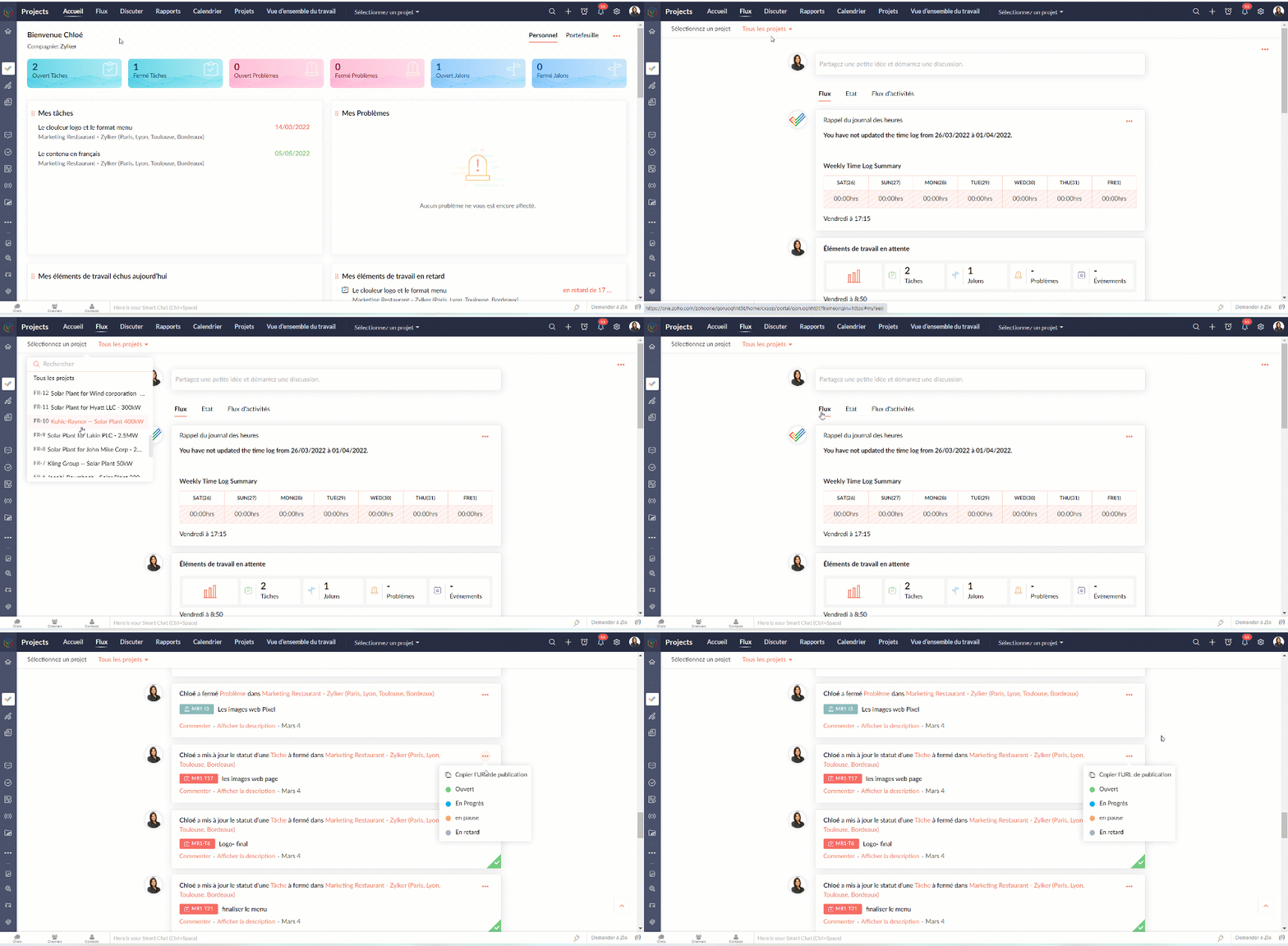
Accéder aux flux

  • Vous pouvez accéder aux flux pour l'ensemble des projets ou même pour un projet particulier depuis l’onglet "Flux"
  • Partagez vos avis depuis l'onglet "Commenter", au besoin.
  • Vous pouvez également modifier le statut d'une tâche à partir de cette page.

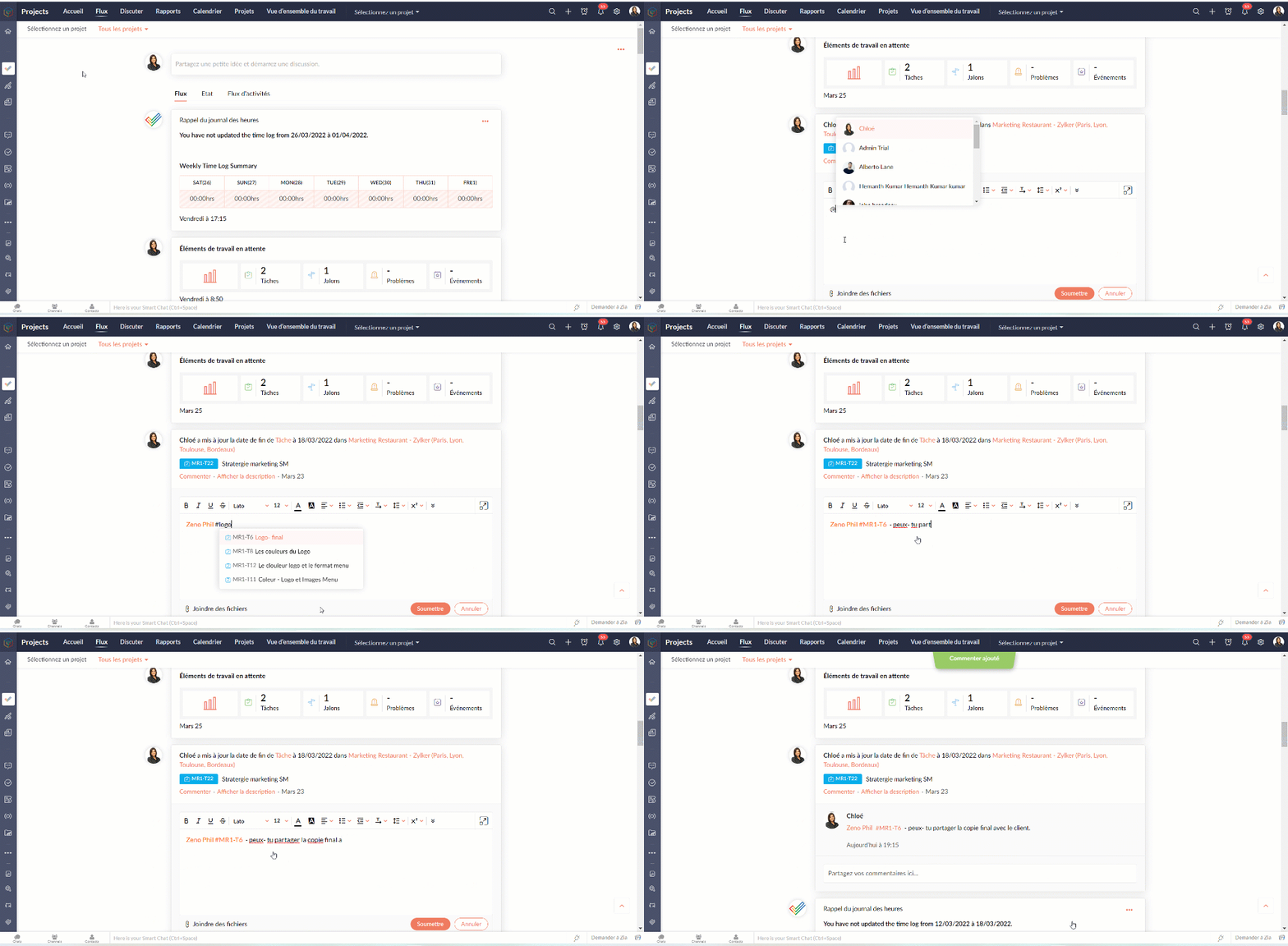
Ajouter un commentaire aux flux

  • Partagez rapidement une mise à jour ou une information au moyen du statut.
  • Saisissez @ pour afficher la liste de sélection des utilisateurs.
  • Saisissez # pour afficher la liste de sélection de la tâche ou du problème.


Avantages

  • Mettez les utilisateurs au courant des informations importantes.
  • Facilitez la communication et la collaboration contextuelles.
  • Mentionnez les tâches et les problèmes en taguant l'utilisateur particulier pour aider à comprendre le contexte.

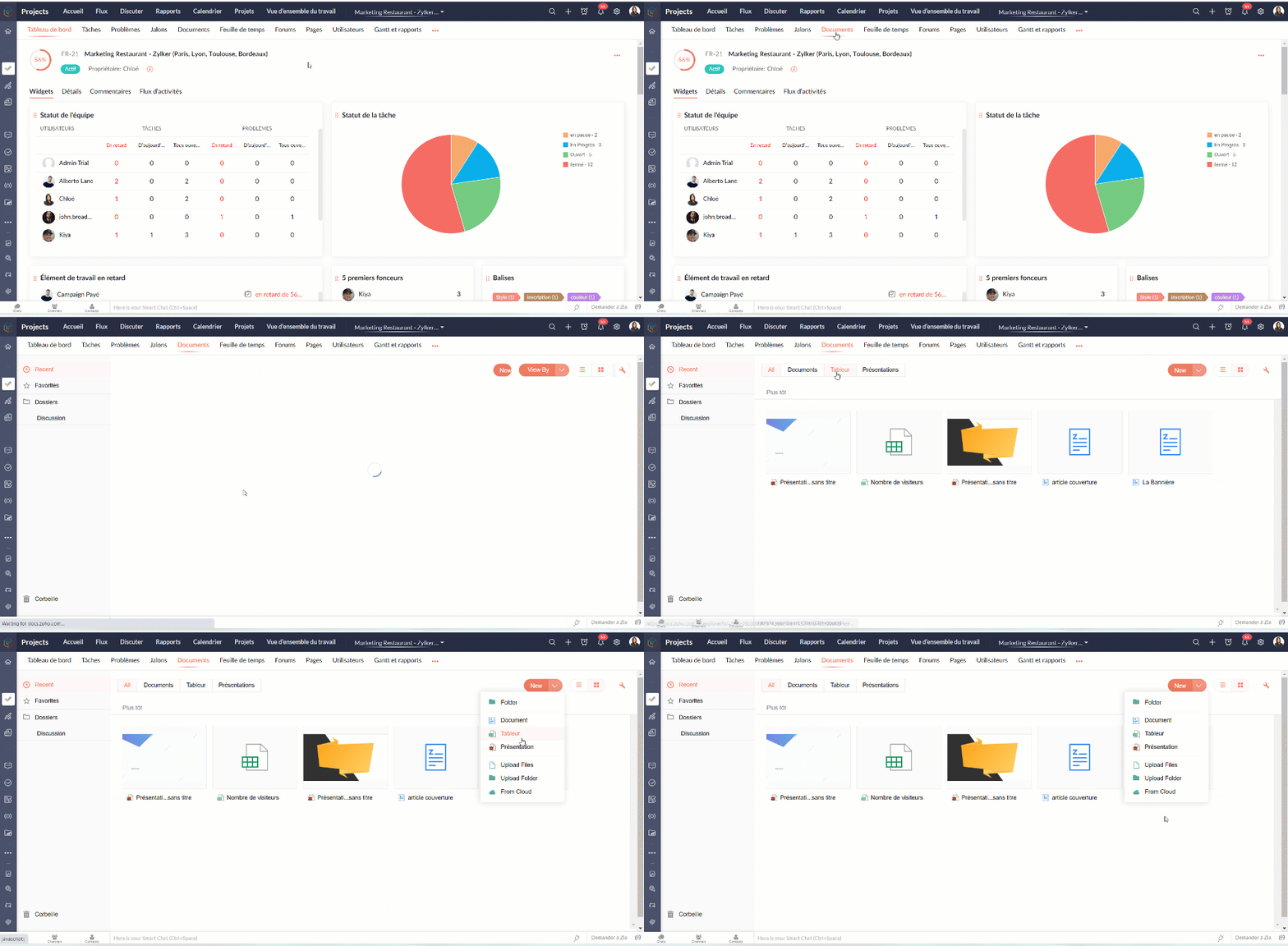
A partir des documents

La gestion des documents est l'un des aspects fondamentaux de la gestion d'un projet. Sans une bonne gestion des documents, les processus peuvent ne pas être documentés, les projets peuvent manquer de direction et les employés peuvent avoir des difficultés pour achever leur travail quotidien.
Zoho Projects vous permet de créer, d'organiser et de collaborer sur des documents à partir de son interface, créant ainsi un référentiel unique pour tous les documents liés à un projet. Il vous permet de télécharger des fichiers à partir du bureau ou même le stockage cloud ainsi que tout format de fichier tel que, *.jpg, *.png, *.doc, *.docx, *.ppt, *.xls, *.csv, *.mpeg, *.zip, *.wmv, etc. Seul le propriétaire du portail et les utilisateurs ayant le profil "Admin" peuvent partager des fichiers dans ou hors de Zoho Projects.

A partir des forums

Si votre équipe doit communiquer en dehors du bureau ou avec un grand nombre de personnes, un forum est la solution idéale. Avec un forum interactif en ligne, vous pouvez publier un sujet, discuter d'idées essentielles et aider à conserver les connaissances en un lieu central. Tout projet entraîne des discussions, et le module Forum sert de répertoire central pour toutes les discussions menées au cours du développement du projet.

Avantages

  • Améliorez la prise de décision en accédant à des connaissances pertinentes.
  • Interagissez avec les membres de l'équipe, même dispersés.
  • Faites remonter les bugs critiques et obtenez des solutions instantanées de la part d'experts.
  • Exploitez les connaissances, les compétences et les idées de votre équipe en un seul endroit.

Commencer un forum discussion

  • À partir de l'onglet forum sous un projet particulier, vous lancez une discussion forum.
  • Zoho Projects fournit trois type de discussions;
            Message permanent : Le message est toujours visible en haut de la page.
            Annonce : La notification du message est envoyée à tous les utilisateurs du projet
            Q&R : Posez une question et discutez avec les utilisateurs de votre projet
  • L’indicateur des messages vous permet de définir les personnes qui pourront participer à la discussion; internes (uniquement pour les utilisateurs du projet) ou externes (pour les utilisateurs du projet et du client).

A partir des pages

Zoho Projects permet aux utilisateurs de créer des pages qui permettent aux entreprises d'améliorer le flux d'informations au sein de leur organisation. Il offre aux équipes de projet et aux entreprises la possibilité d'accéder à des outils de collaboration à l'aide d'une simple connexion Internet et d'un simple navigateur Web. Créez une source d'informations avec des pages que vous pouvez organiser et gérer efficacement en un seul endroit. Vous pouvez lier, réorganiser et étiqueter les pages, ce qui facilite la navigation.

Avantages

  • Gestion du contenu grâce à un accès simple à la rédaction qui encourage la participation de nombreux utilisateurs.
  • Faciliter la communication entre les personnes et améliorer le partage des connaissances entre les groupes.
  • Rassembler des connaissances à partir de diverses sources, par le biais de documents, de flux de contenu depuis d'autres sites Web.
  • Contrôle de version facile à gérer avec des privilèges d'accès.

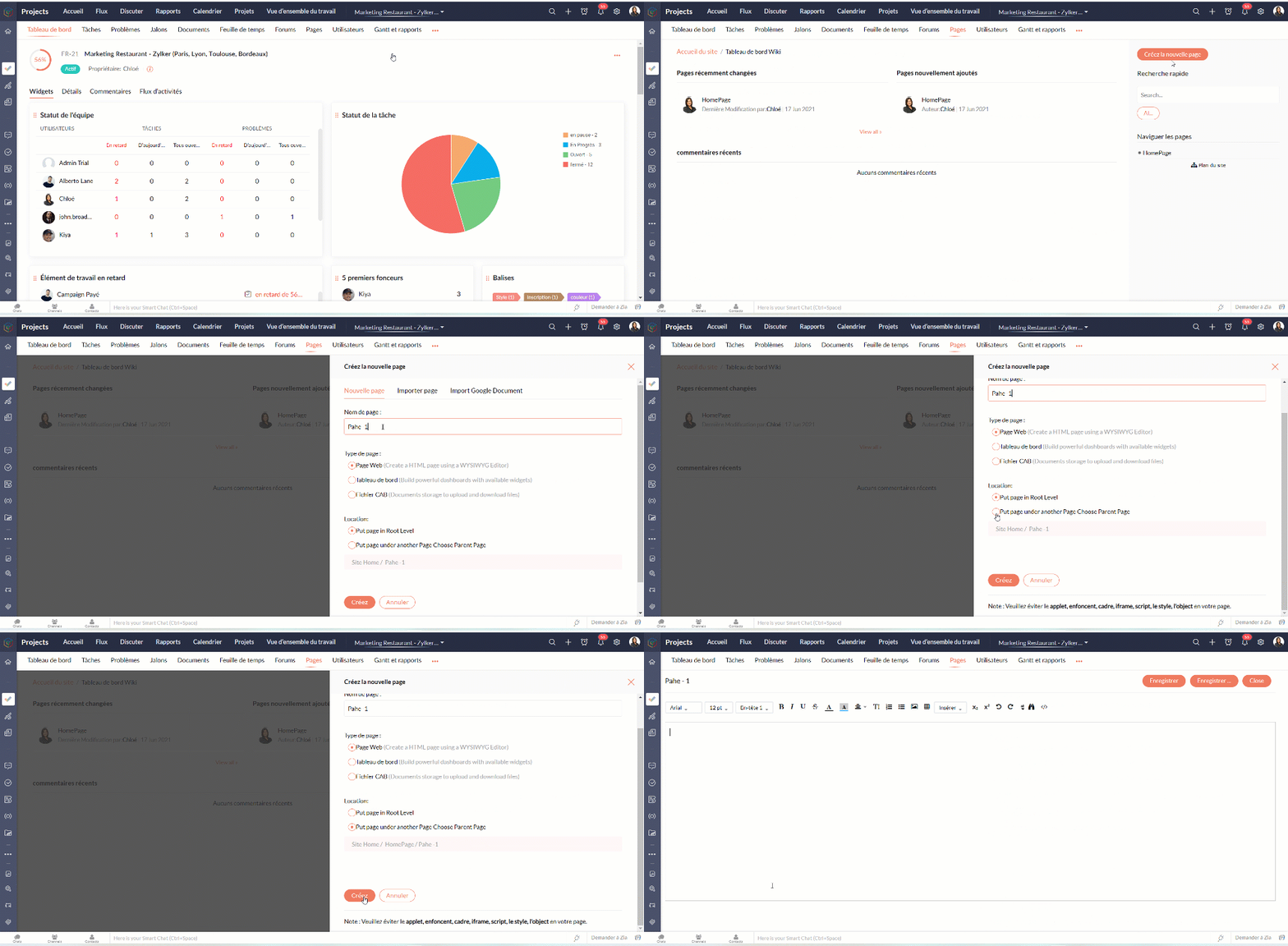
Créer une page

  • Sélectionnez un projet dans l'onglet "Projets" et le sous- onglet "Pages"
  • Cliquez sur "Créer la nouvelle page". Vous pouvez soit créer une nouvelle page Web, soit importer une page de votre bureau ou importer un document Google.
  • Entrez un nom de page.
  • Sélectionnez un type de page.
  • Sélectionnez l'emplacement.
            Placez la page au niveau racine : cela crée une page principale.
            Placez la page sous une autre page. Choisissez la page principale : ceci crée unepage sous une page principale.
  • Cliquez sur "Créer".

  • Vous pouvez également ajouter vos avis depuis l'onglet " Commentaire".
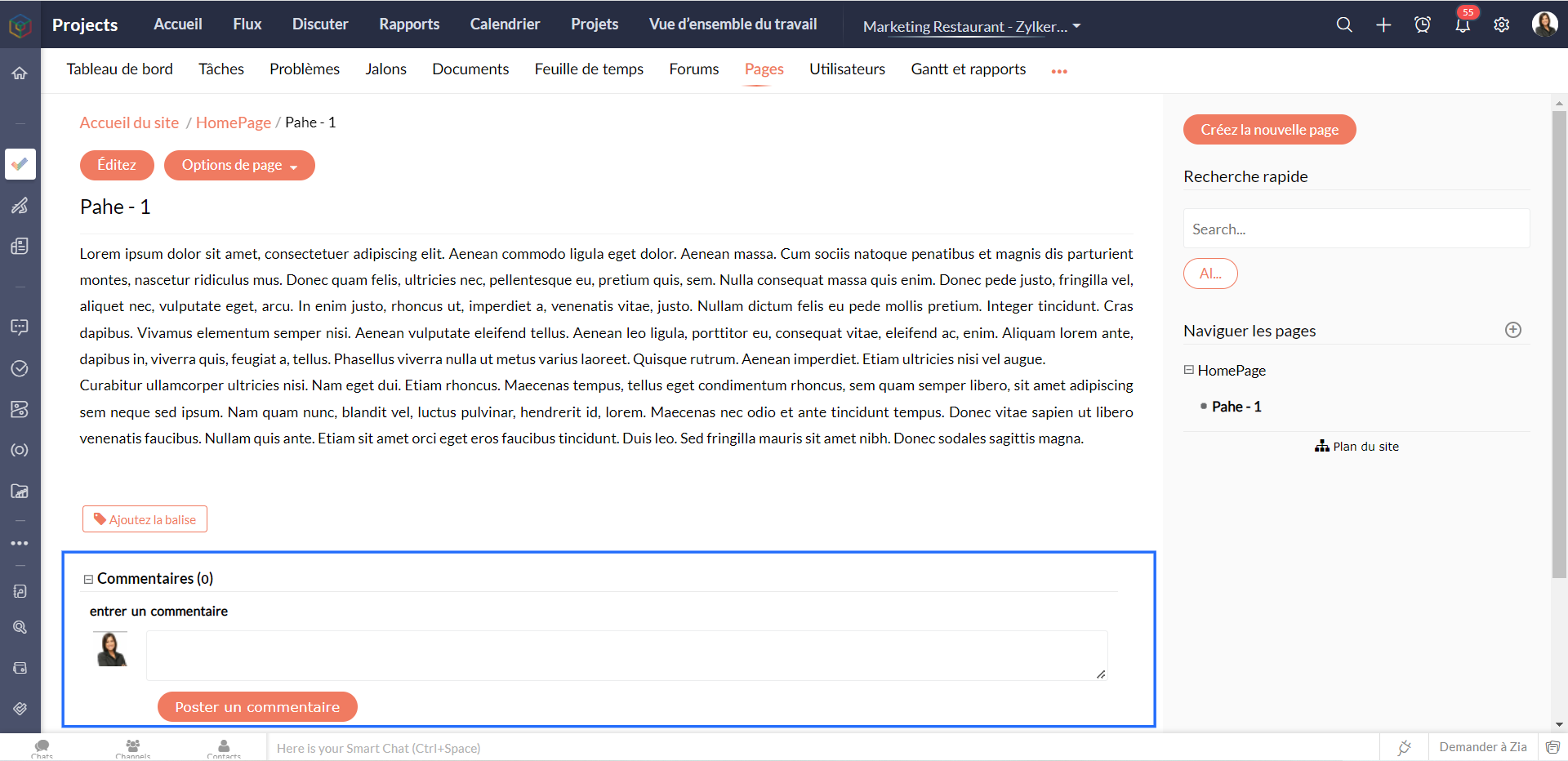
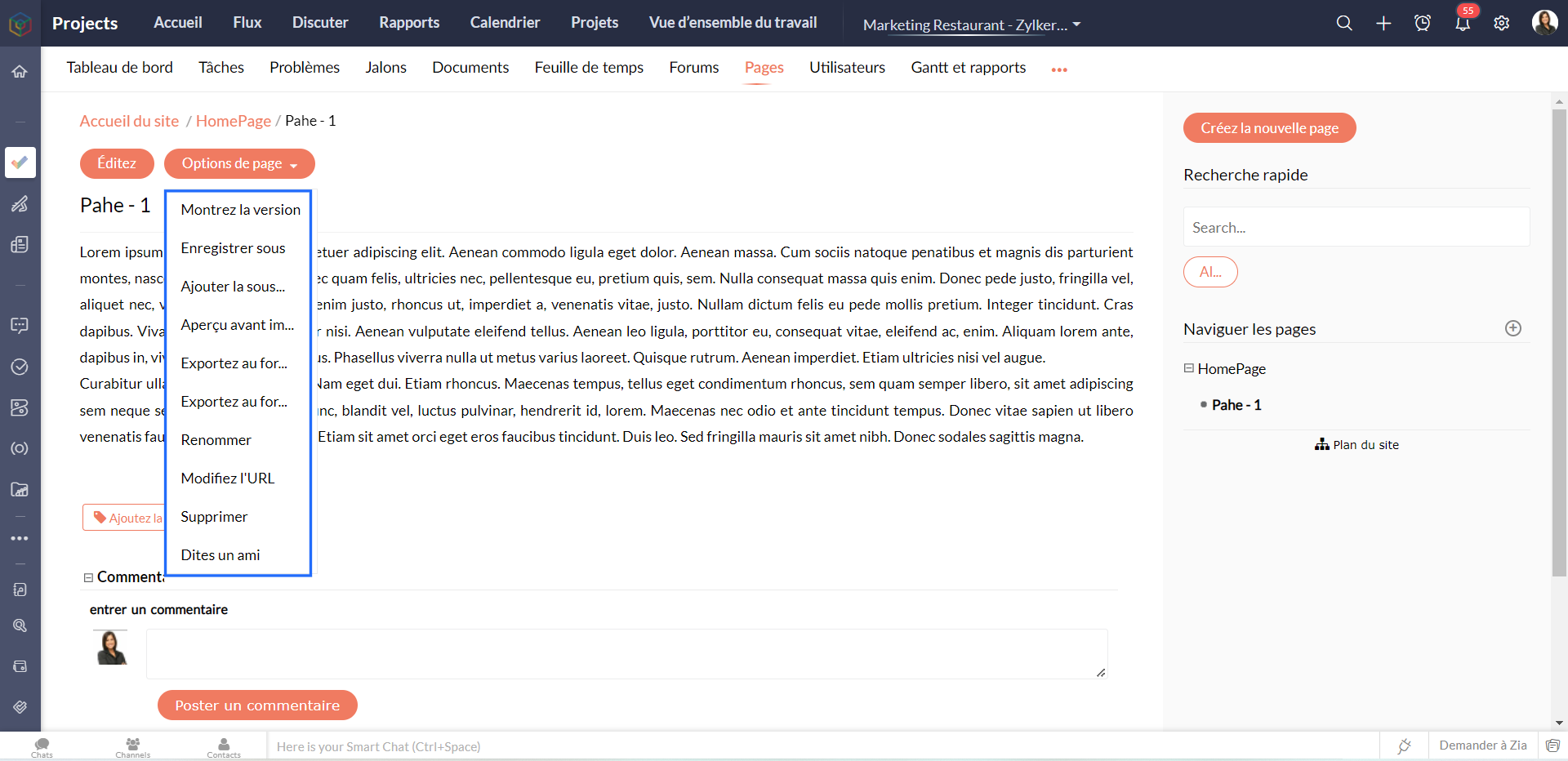
  • À partir du bouton "Options de la page", vous pouvez également publier des sous-pages.
  • L'onglet "Plan du site" permet de construire des hiérarchies de pages dans un dossier. Seuls les administrateurs peuvent réorganiser les pages du plan du site.

A partir des conversations

Zoho Projects vous permet de dialoguer avec les utilisateurs du portail à tout moment. Créez des sujets, discutez et prenez des décisions plus rapidement grâce aux salons de discussion de Zoho Projects. Commencez à interagir avec vos collègues sur différents sujets. Vous pouvez créer un chat privé ou public en fonction des besoins de votre entreprise, tout cela à partir de l'onglet "Discuter".
(IMG)

A partir des notifications

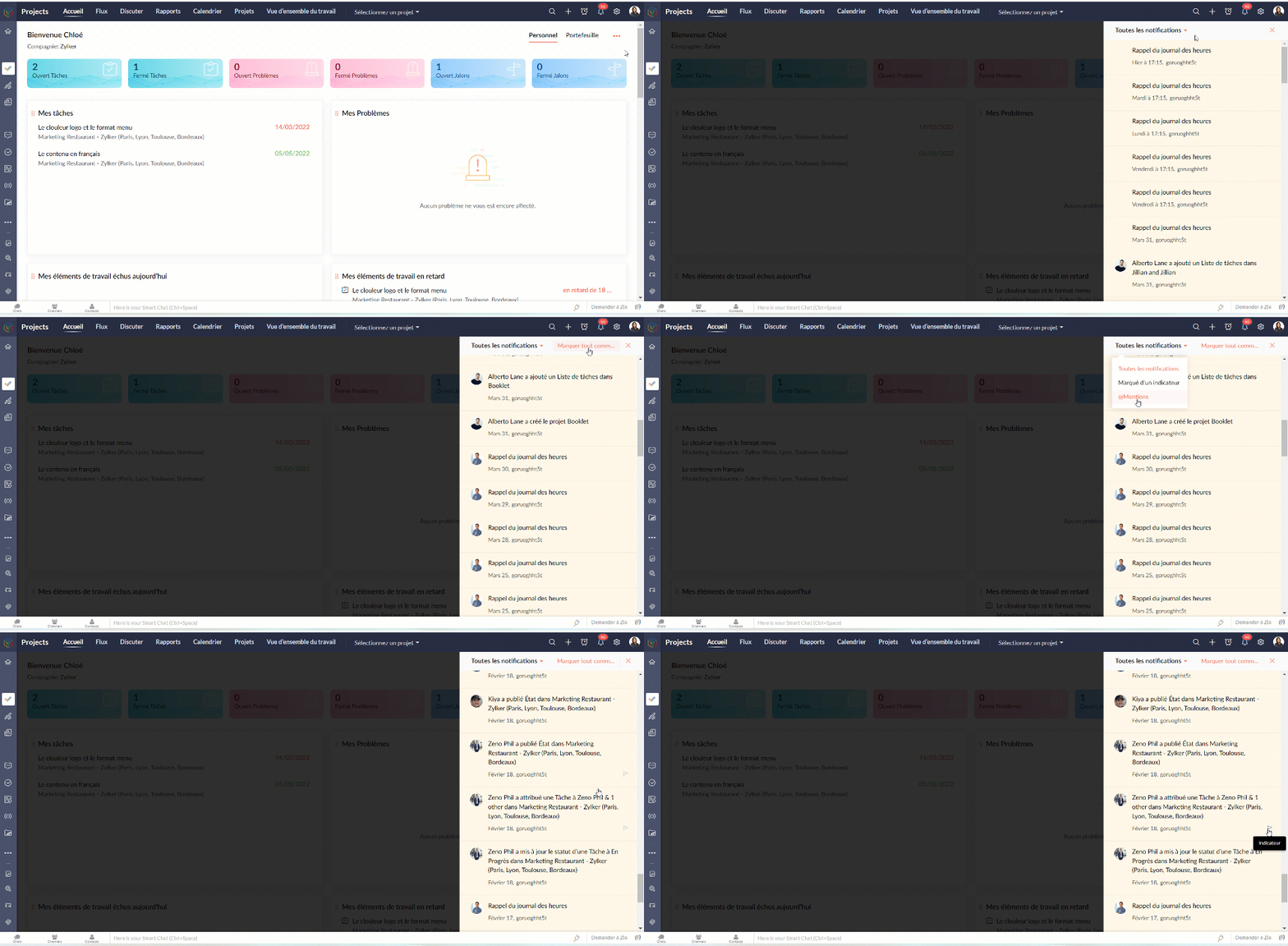
Les notifications vous aident à rester à jour dans l'avancement d'un projet. Cliquez sur l’icône "Cloche" et affichez les dernières mises à jour du projet. Vous pouvez également naviguer vers un élément de travail spécifique à partir du panneau de notification lui-même.

Avantages

  • Visualiser les mises à jour à partir d'un seul endroit.
  • Accéder aux modules directement à partir du panneau de notification.
  • Ajouter des commentaires aux mises à jour
  • Signaler les notifications.
  • Afficher les notifications signalées et les @mentions dans les notifications.

L'équipe Zoho France

    • Sticky Posts

    • Collaboration sans faille avec Zoho One

      Bonjour à tous, Dans cet article nous allons voir comment Zoho One permet une collaboration à différents niveaux .       La façon dont nous travaillons évolue. À mesure que les entreprises se mondialisent, la plupart des activités sont menées en équipe.
      • Recent Topics

      • Ticket Stages Report

        From data to decisions: A deep dive into ticketing system reports Ticket stages refer to the series of transitions from the moment a support ticket is created until it is closed. It moves through various stages based on the actions taken at each preceding
      • 【参加無料】今年最後のZoho ユーザー交流会|東京・大阪・名古屋で開催! 活用事例&ユーザー同士の情報交換

        ユーザーの皆さま、こんにちは。コミュニティチームの中野です。 11月に東京、大阪、名古屋の3都市でZoho ユーザー交流会を開催します! 毎回ご好評いただいている本イベントでは、実際の Zohoユーザーによるリアルな活用事例の共有や 参加者同士でノウハウを交換し合うグループワークを予定しています。 「他社の活用を参考にしたい」「Zoho をもっと使いこなしたい」方にぴったりの場です。 初参加の方もぜひお気軽にご参加ください! ーーーーーーーーーーーーーーーーーーーーーーーーーーーーーーーーーーーーー
      • Slow Performance on desk.zoho.com. 11/3/2025

        I’m not seeing any active service alerts for desk.zoho.com, but everyone on our account is currently experiencing very slow load times when opening or navigating tickets. We’ve already tried the standard troubleshooting steps — clearing cache and cookies,
      • Enhance Sign CRM integration

        Hello all, I'm working on a custom Deluge script to enhance the integration between Zoho CRM and Sign by using a writer merge template for additional flexibility. I want to replicate the post-sign document integration that exists between CRM and Sign
      • March 15, 2023: Zoho Docs is discontinued

        As of today (March 15, 2023) Zoho Docs is discontinued for all users. We would like to thank our customers for trusting us for so many years! Going forward, we're confident you'll enjoy using Zoho WorkDrive for all your advanced file management and collaboration
      • Create View to See Tickets Closed within the last 3 days

        I'm trying to create a view in Zoho Desk that shows me "recently closed ticket," which I will define as tickets closed in the last 3 days. I want this view to update so that whenever I click to view it is recalculates and shows me tickets closed within
      • Canvas View in Zoho Recruit

        Is it possible or would it be possible to have the new 'Canvas View' in Zoho Recruit?
      • Allow Multiple usage units to items while adding them to sales/purchase transactions

        The usage unit of items added in zoho books are static right now and can not be changed. But certain items are received or sold in multiple usage units. One example is fabric. It can be bought in Meters, inches, kgs or other units. Another example would
      • Will I Get a Refund If I Downgrade Zoho Mail?

        Hello, We upgraded an email account for our new employee. However, the employee left after one month, and now I've reduced the number of Zoho Mail users from 7 to 6. Can we get a refund for the remaining portion of our annual payment?
      • Introducing Profile Summary: Faster Candidate Insights with Zia

        We’re excited to launch Profile Summary, a powerful new feature in Zoho Recruit that transforms how you review candidate profiles. What used to take minutes of resume scanning can now be assessed in seconds—thanks to Zia. A Quick Example Say you’re hiring
      • How to copy value from a single line field into a picklist field within a module's subform?

        Hello there, I have a single line field in a module's subform. I would like the value in the field to automatically update a picklist field within the same subform (both have items with the same names). Is this possible via function? Unfortunately, workflows
      • Send Whatsapp message from Whatsapp template with custom variables

        Hi, I'm trying to do some basic integration for sending WhatsApp messages from Zoho CRM using Zoho Desk whatsapp templates. When creating new whatsapp template in Zoho Desk we can choose ticket related fields as variables but it's not clear how to use
      • Recurring Events Not Appearing in "My Events" and therefore not syncing with Google Apps

        We use the Google Sync functionality for our events, and it appears to have been working fine except: I've created a set of recurring events that I noticed were missing from my Google Apps calendar. Upon further research, it appears this is occurring
      • Dissociate account from contact

        Hello, When I make the call through the API to "Dissociate account from contact" using, /api/v1/contacts/**integer**/accounts/**integer**/dissociate I get this response back, 422Unprocessable Entity (WebDAV) (RFC 4918) { "errorCode": "INVALID_DATA", "message":
      • Zoho Desk and Zoho People Integration - is it possible in order to alert whether an agent is available

        Hi, We use Zoho People for our employees to log absence (Paid Time Off etc). I was wondering if it was possible that this information can be shared in to Zoho Desk, so that when allocating a ticket to an agent, if they are on leave there is an onscreen
      • Add Save button to Expense form

        A save button would be very helpful on the expense form. Currently there is a Save and Close button. When we want to itemize an expense, this option would be very helpful. For example, if we have a hotel expense that also has room service, which is a
      • Change Currency symbol

        I would like to change the way our currency displays when printed on quotes, invoices and purchase orders. Currently, we have Australian Dollars AUD as our Home Currency. The only two symbol choices available for this currency are "AU $" or "AUD". I would
      • Call transcrition working for ringcentral?

        I don't see anything about what telephony providers can be used. The Zoho support person A said that RingCentral isn't supported. Zoho support person B said that it works, just make sure the call recording link works. Excellent instructions here: Call
      • How to Send Email from within a custom module (with or without an email template)

        It is possible to send an email from the Deals module. However, I can't find a way to send an email from any of our custom modules. I have tried adding an email field to the modules (even though we don't really want one or need it there). That doesn't
      • All new Address Field in Zoho CRM: maintain structured and accurate address inputs

        The address field will be available exclusively for IN DC users. We'll keep you updated on the DC-specific rollout soon. It's currently available for all new sign-ups and for existing Zoho CRM orgs which are in the Professional edition. Managing addresses
      • Zoho Inventory - Managing Items With Multiple Suppliers

        Hi community, I'm working on a project at the moment for a car parts wholesale business. Each Item (part) has its own original manufacturer part number (sometimes more than one part number for the same item). When purchasing parts from 3rd party suppliers,
      • Empowered Custom Views: Cross-Module Criteria Now Supported in Zoho CRM

        Hello everyone, We’re excited to introduce cross-module criteria support in custom views! Custom views provide personalized perspectives on your data and that you can save for future use. You can share these views with all users or specific individuals
      • Zoho Creator customer portal limitation | Zoho One

        I'm asking you all for any feedback as to the logic or reasoning behind drastically limiting portal users when Zoho already meters based on number of records. I'm a single-seat, Zoho One Enterprise license holder. If my portal users are going to add records, wouldn't that increase revenue for Zoho as that is how Creator is monetized? Why limit my customer portal to only THREE external users when more users would equate to more records being entered into the database?!? (See help ticket reply below.)
      • Super Admin Logging in as another User

        How can a Super Admin login as another user. For example, I have a sales rep that is having issues with their Accounts and I want to view their Zoho Account with out having to do a GTM and sharing screens. Moderation Update (8th Aug 2025): We are working
      • Bug tracking

        Hi, does anyone know how to track errors during picking or packing? This way I can keep track and see how to improve and prevent errors in this area.
      • Retainer invoice in Zoho Finance modlue

        Hello, Is there a way of creating retainer invoices in the Zoho Finance module? If not can I request this is considered for future updates please.
      • Is it really true that I can't set the default 'deposit to' account in 2025?

        I've been using Books for 7 years and the default account has never been a problem. I usually manually reconcile invoices and have never had a thought about which account. It has always been my account. However, I recently noticed that for the past 4
      • How do I see the total leads during a certain period?

        I understand I can get the count of leads and potentials but the total number of leads in a certain period should be equal to Leads+potentials because when we convert a lead it gets moved to potentials and no longer exists there. is there a way i could
      • Unable to Add Asset to Work Order Due to Different Contact and Company

        Hello Zoho Team, I’m facing an issue in our environment related to asset linking in Work Orders. Here’s the situation: When our engineers go for field activities, they initially create the Work Order using the salesperson’s contact details. After completing
      • Where is the Global Search field?

        I am looking for an alternative to SF.com. Zoho CRM seems to be work fine, and be customizable in terms of the fields and reports. But there's one big thing missing and it's going to prevent us from using it: there's no global search box at the top of
      • API 500 Error

        Hello amazing ZOHO Projects Community, I get this message. How can we solve this? { "error": { "status_code": "500", "method": "GET", "instance": "/api/v3/portal/2010147XXXX/projects/2679160000003XXXX/timesheet", "title": "INTERNAL_SERVER_ERROR", "error_type":
      • In place field editing for candidates

        Wondering about any insight/best practices for efficiently updating candidate records while reviewing them in a Job Opening pipeline. We can do in-field editing (e.g. update job title or City) only when we have the full candidate record open, however
      • Audio/video quality issues with Zoho Meeting – Any roadmap for improvement?

        Hi Zoho Team, We’ve been using Zoho Meeting for both internal and external meetings, and unfortunately, the experience has been consistently poor. The video and audio quality are so unreliable that it often renders meetings ineffective—especially with
      • Default tax type for mileage?

        Where we are, mileage includes a government tax. Is there any way to set a default tax for the Personal Car Mileage category of expense? (Or any other way?)
      • Analytics Portal

        I have the "standard plan" and want to explore the portal option; I activated the 15-day trial but do not see the pricing for the add-on. How can I get the price under "Upgrade add-ons." Thanks Rudy
      • The Social Wall: October 2025

        Hello everyone, As we head toward the end of the year, we’re bringing you a few updates to help give your social media efforts a strong finish. This month, we’re rolling out new enhancements across both the web and mobile app. Post Preview Have you ever
      • Show price book list price

        When using price books, once you add products to the price book in the Products related list you can display the Unit price which is the default list price; however, there is no option to show the price book list price. To see the price book list price
      • Zoho CRM - Scheduled Reports Which Contain Chart

        Hi Zoho CRM Team, I'm requesting that the Report Export and Scheduling feature be enhanced to include a chart, if one has been created on a report. At the moment I have a report which shows Sales This Week by Deal Owner and a pie chart at the top of the
      • Cliq File Upload

        While uploading large file like 500MB, it takes time, that fines. But if you resize window or move window in other screen, that uploading disappears. After upload complete & sent it will be visible
      • Resizing a Record Template Background Inage

        Hi everyone, I have an issue which I can't seem to resolve: Basically, I'm designing a record template in certificate form. I've specified A5 landscape. I've set my background image the same dimensions with total pixels at 443,520. Whatever I try, when
      • Next Page