Creating a Gmail integration using custom connectors
Hello everyone!
Greetings from Deluge. Following up on our series aimed at exploring the capabilities of Deluge, today we'll take an in-depth look into the Deluge custom connections that can be created across Zoho services.
Deluge boasts an extensive range of over 260 built-in integrations spanning more than 35 Zoho services. These integrations streamline data access and modification with these services, from a single point in Zoho, without having to toggle between services. However, we understand that the needs of our users vary widely, and sometimes existing integrations may not cover every scenario.
That's where custom connections come in. Think of them as the Swiss Army Knife of integrations, enabling connections with hundreds of services—such as Gmail and Outlook—and seamlessly integrating them with your favorite Zoho services. With custom connections, you have the power to build your own integrations with virtually any third-party service and tailor them to meet your requirements. Moreover, since the custom connections use the OAuth 2.0 authentication mechanism, you're getting best-in-class security while integrating with third-party services.
What are connections?
Before we dive into the details of custom connectors, let's take a glimpse at what connections are in Deluge. Connections are a means to connect your Zoho account and any third-party accounts you wish to integrate with. Once a connection is created and connected, you can use it in Deluge integration tasks or invokeURL scripts to perform REST operations on the target service from the required Zoho service. For more information, visit our Connections help doc.
Use case
Assume the sales team of an organization uses Zoho CRM for managing leads, customer retention, and customer acquisition, and uses Gmail for communication purposes, like following up with potential clients via email. While the system works as is, it's time-consuming and prone to error, so an integration between Gmail and Zoho CRM is necessary to improve efficiency.
A custom connection to your Google account will enable you to sync your Zoho CRM and Google accounts, allowing you to perform actions related to your Google account from Zoho CRM. For example, you can invoke the connection using the invokeURL task in Zoho CRM and send an email to your leads from your Gmail address.
Steps to configure the Google custom connection
Configuration video
Configuration steps
Creating Google OAuth credentials
- Visit https://console.cloud.google.com/.
- Click the dropdown and choose the required project.

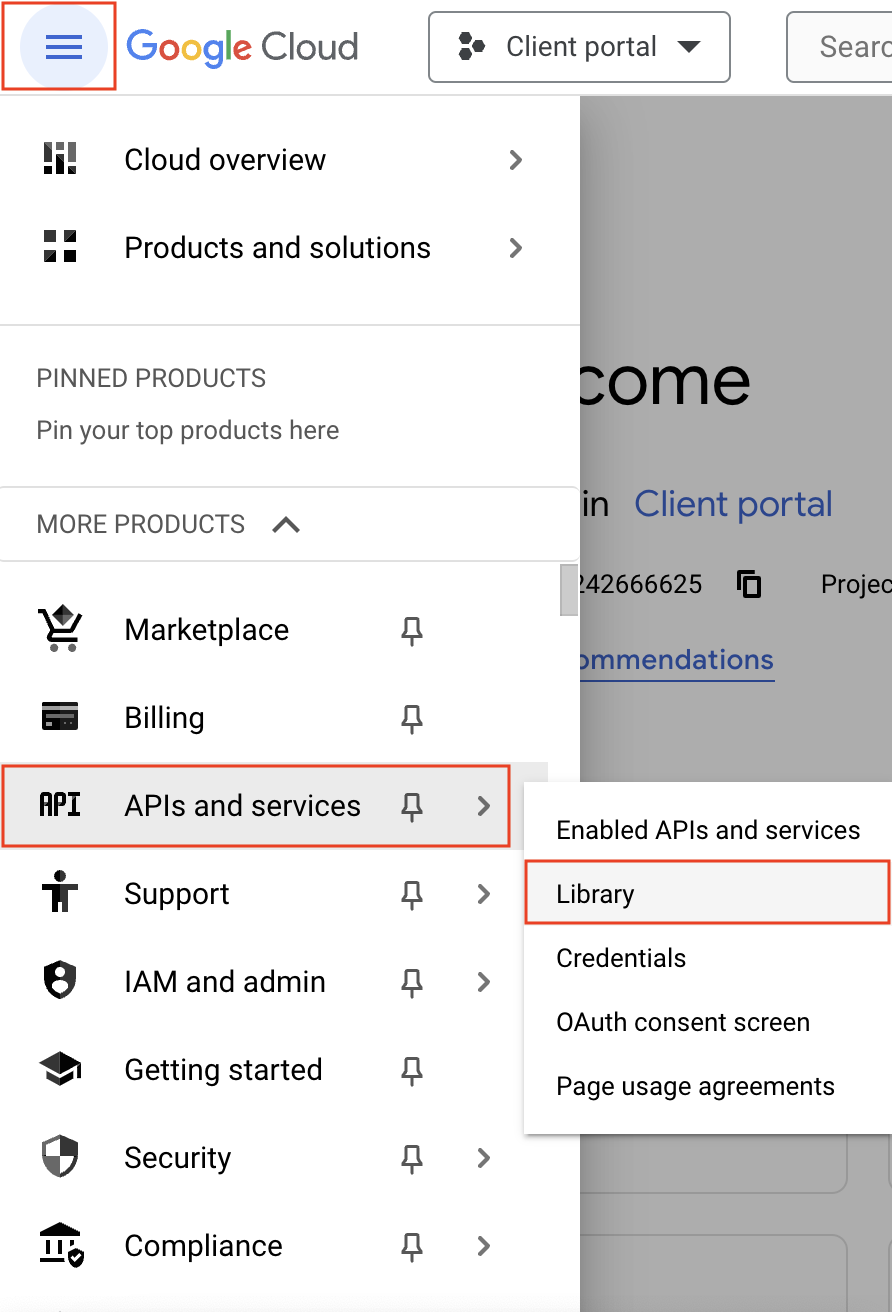
- Navigate to the hamburger menu on the left and click APIs and services -> Library.
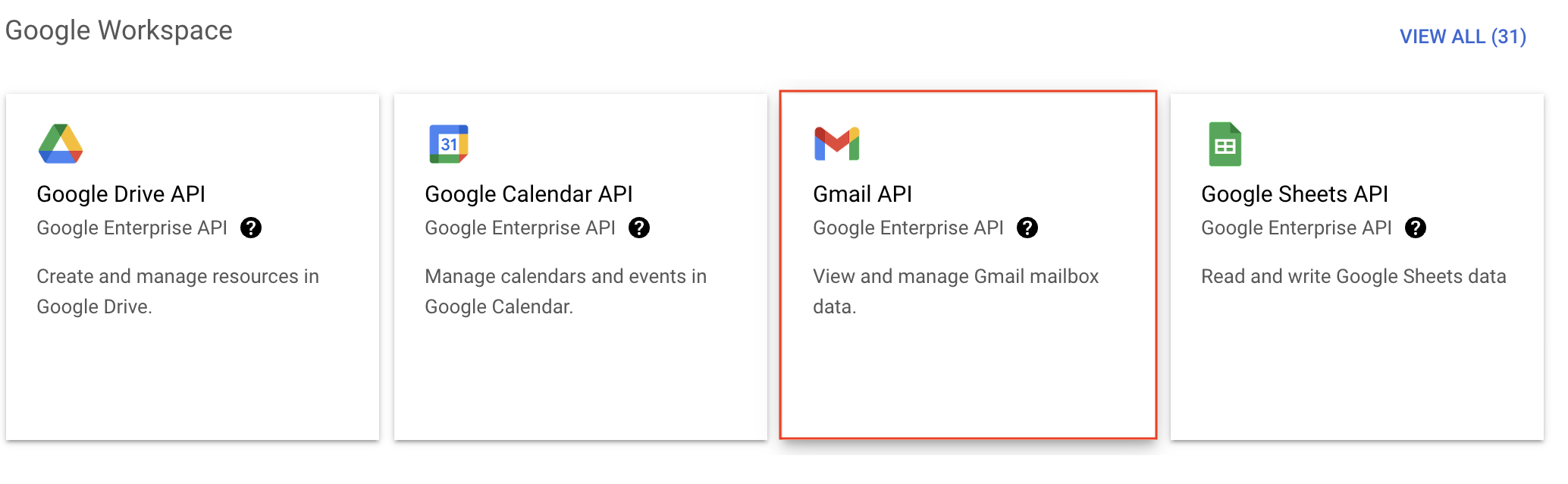
- You'll be taken to the API library page. Navigate to the Google Workspace section and click Gmail API.
- Next, click Enable on the Gmail API product details page.
- In order to use this API, you'll need to create credentials. Click CREATE CREDENTIALS.

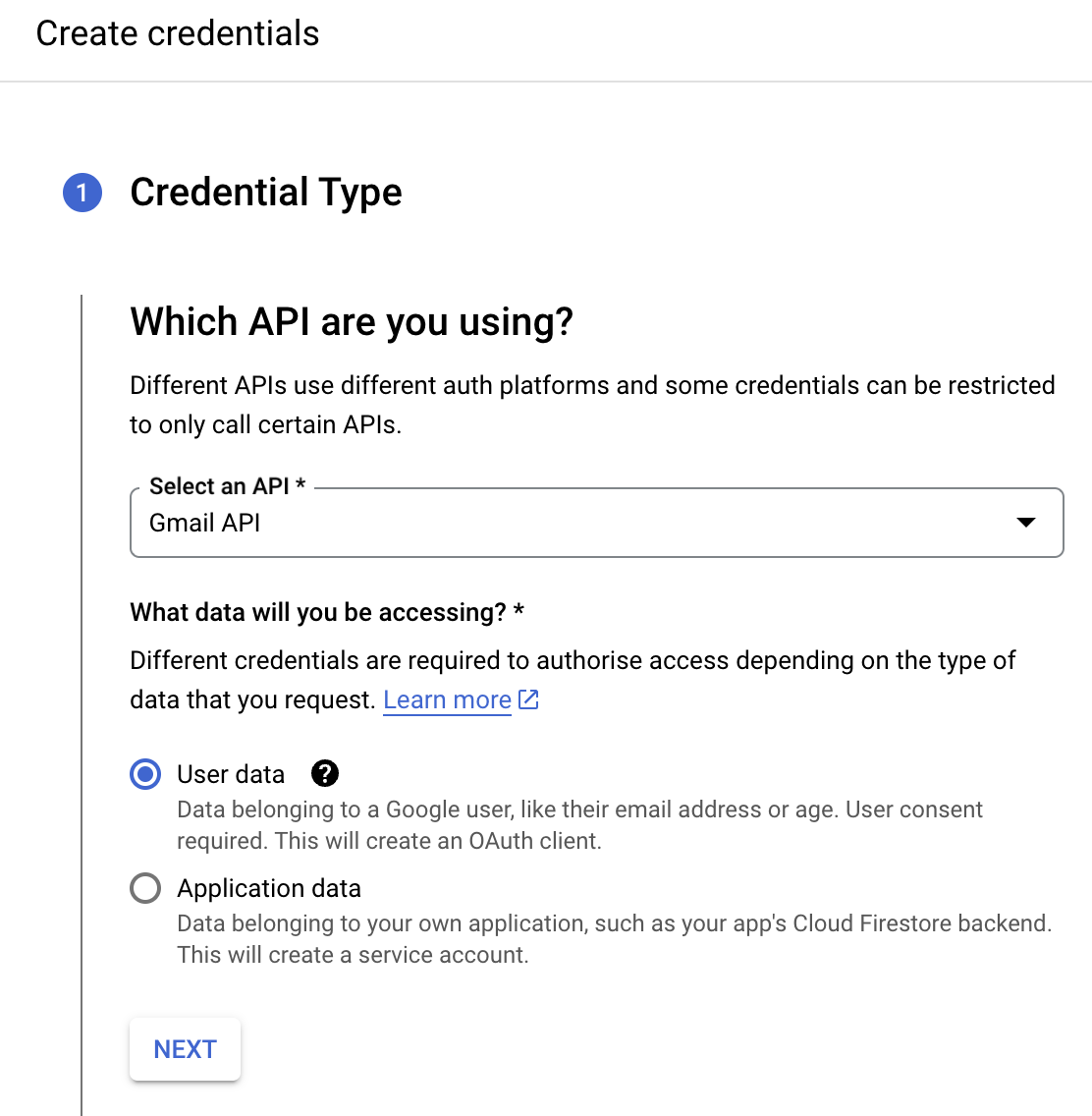
- On the Create credentials page, choose Gmail API in the Select an API dropdown and User Data under the What data will you be accessing? section. Click Next.
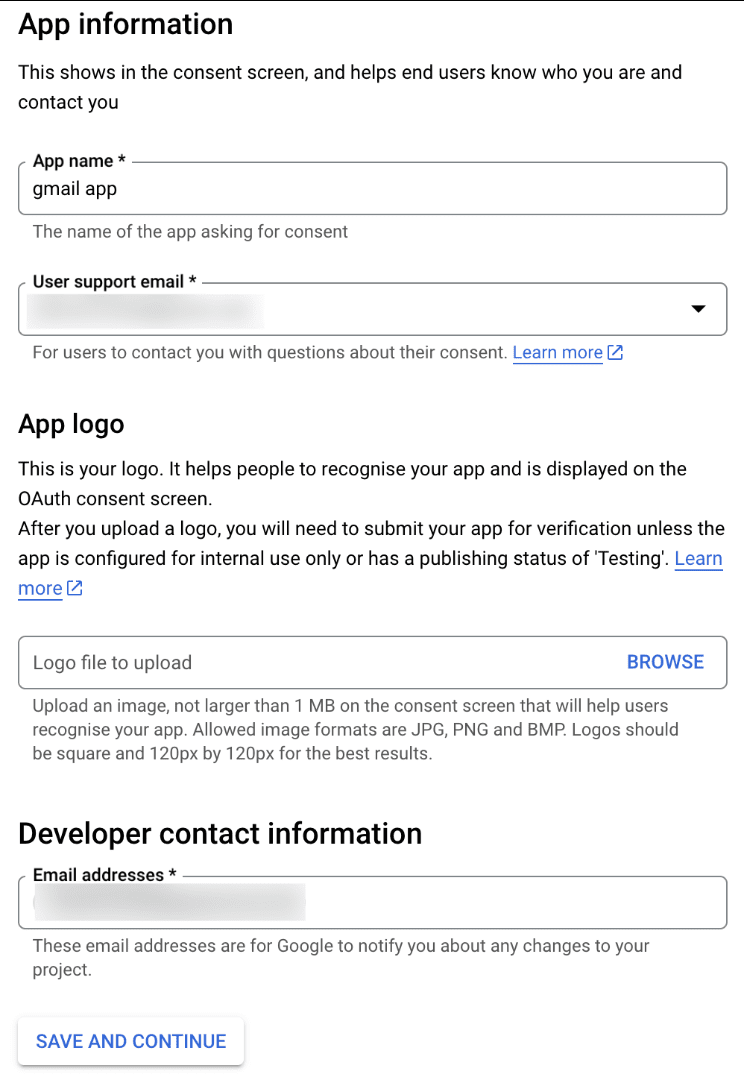
- Next, on the OAuth consent screen, enter the App name, User support email, and Developer contact email address. Then click Save and Continue.
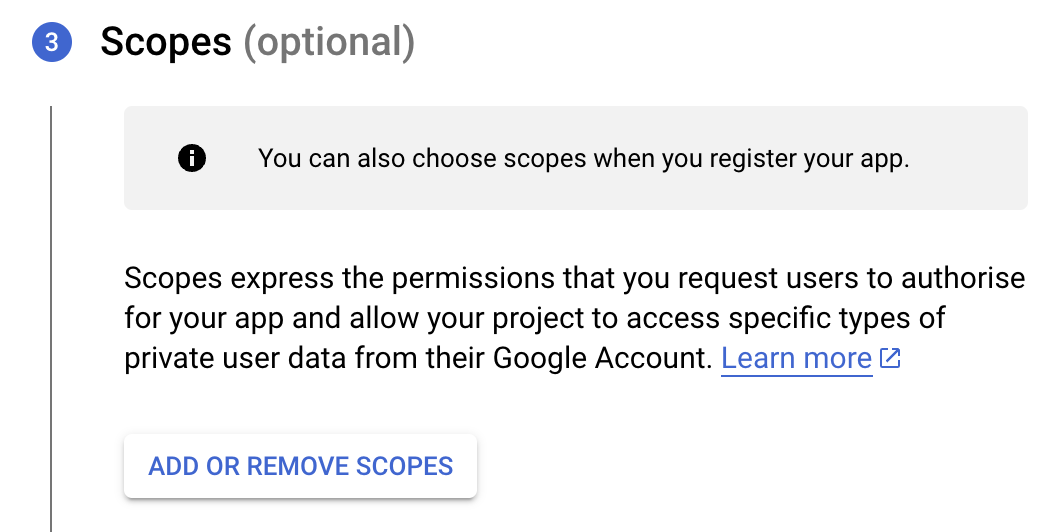
- Next, under the Scopes section, click the ADD OR REMOVE SCOPES button.
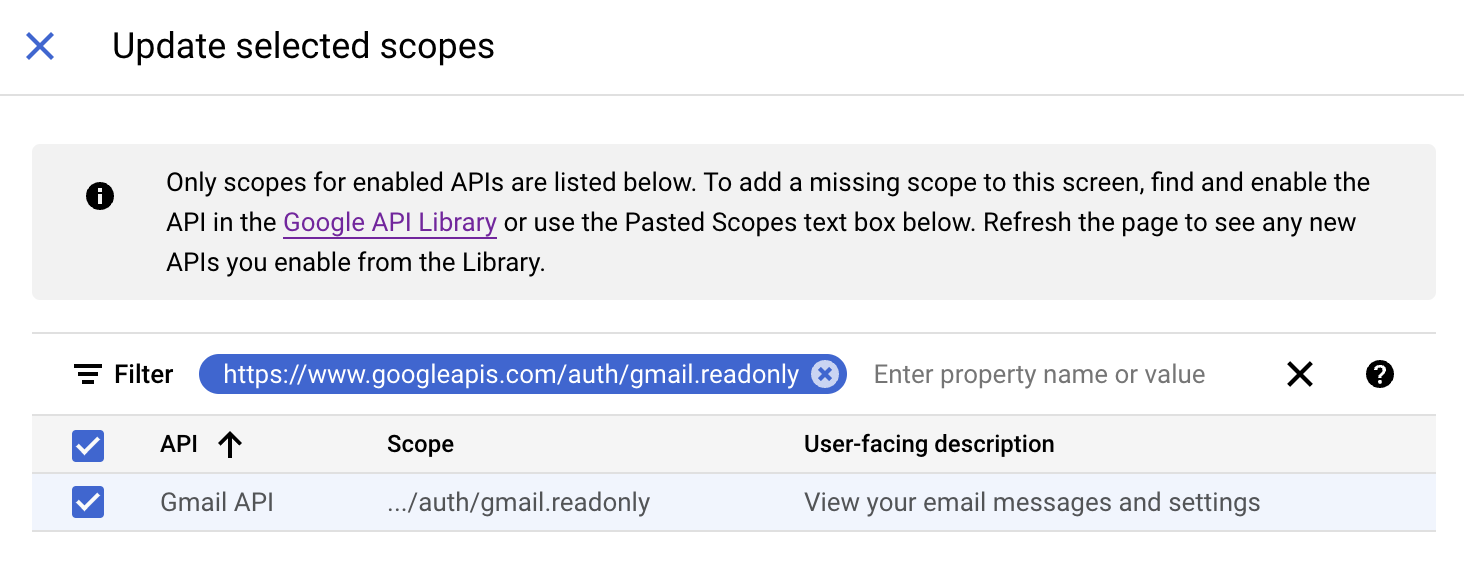
- In the Update selected scopes pane, search and select the gmail.readonly scope. Click Update, and then click Save and continue.
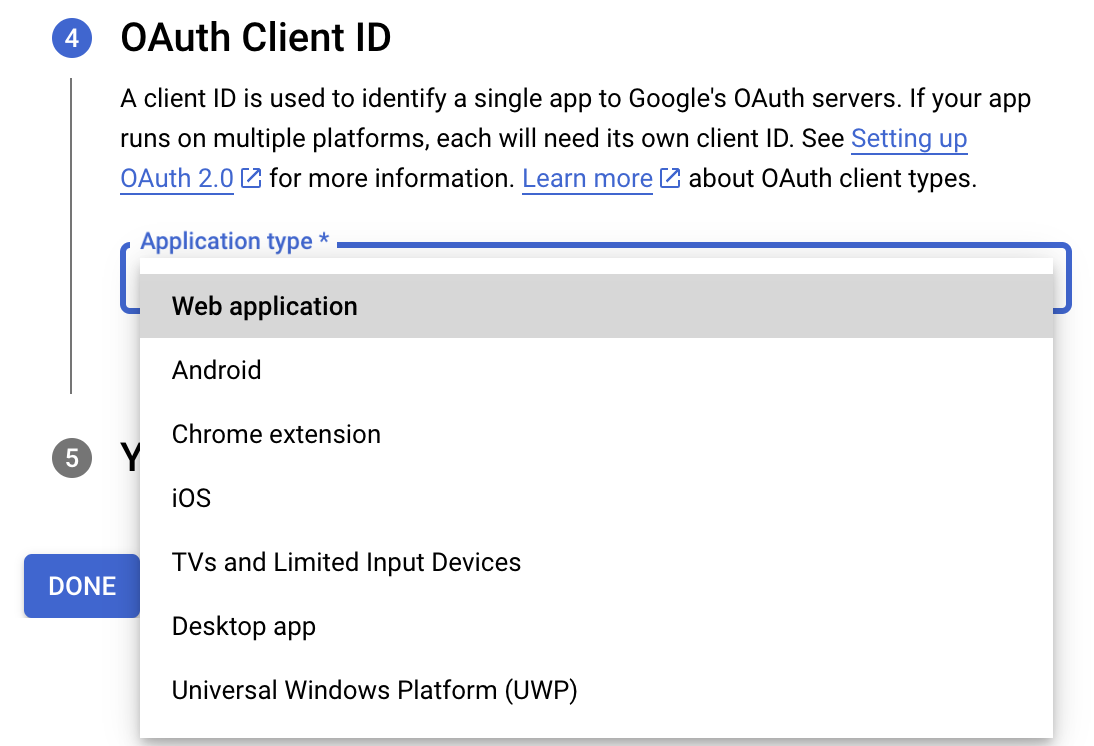
- Now, under the OAuth Client ID section, choose Web application in the Application type dropdown. Then name your app.
- Enter https://deluge.zoho.com/delugeauth/callback as the Authorized redirect URI.
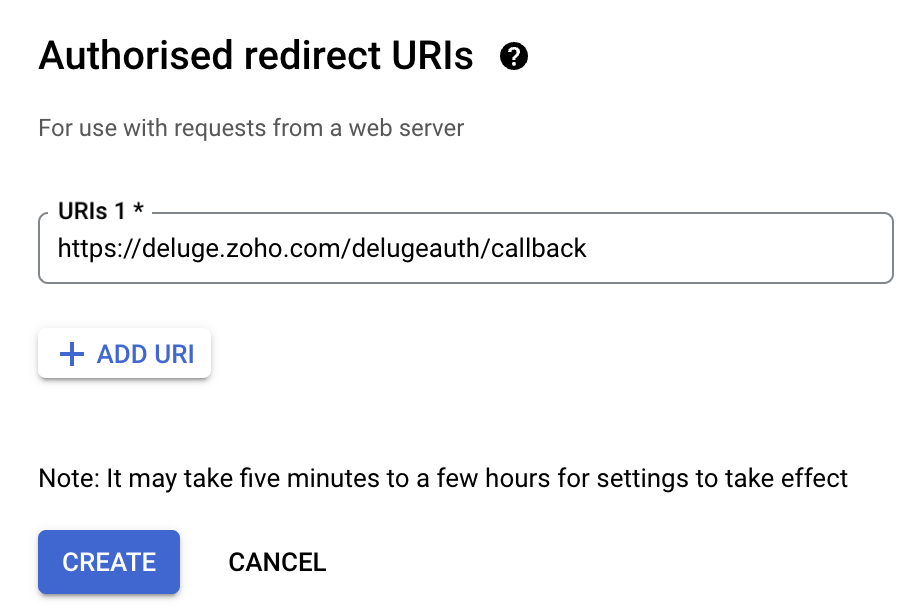
- Click Create and download your credentials. This Client ID and others will be required later, while creating a connection in Zoho CRM.
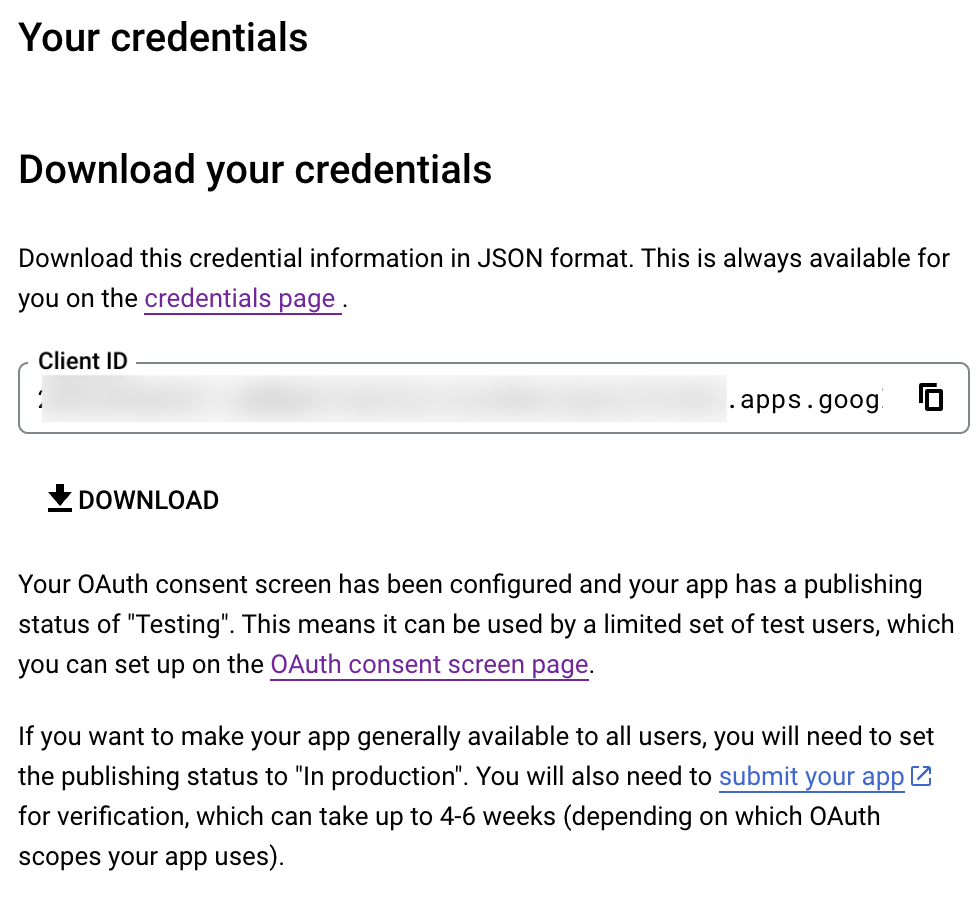
- Navigate to the OAuth consent screen and click Add users under Test users. Enter the user's email address and click Save.
Creating a custom connector for Gmail
- Now the action shifts to Zoho CRM. Navigate to crm.zoho.com -> Settings -> Connections.
- Choose Custom Services and click Create Service.
- On the Create Service screen, choose OAuth 2.0 as the Authentication type and Header as the Parameter.
- Enter the Client ID, Client Secret, and Authorize URL generated from Google as shown in step 12 above.
Tip: Having the Offline access type will allow your application to refresh tokens even when the user is not actively using the application. - Then enter https://oauth2.googleapis.com/token as the Access token URL and Refresh token URL.
- Specify the necessary scopes like read and create, etc. and then click Create Service.
- On the next page, click Create Connection. Give the connection name and choose the scopes. Then click Create and Connect.
- Finally, authenticate the connection on the Google accounts page. Your custom connection will be created, and the two services can be integrated!
Now that the connection between Zoho CRM and Gmail has been established, you can use the invokeURL task to access and modify data in Gmail using the different APIs.
Sample
You can use the below code in invokeURL task to get the latest emails from Gmail.

userId = "emailaddress@gmail.com";
get_gmail = invokeurl
[
url: "https://gmail.googleapis.com/gmail/v1/users/"+userId+"/messages"
type: GET
connection : "connectionname"
];
messageID = get_gmail.get("messages").get(0).get("id");
get_gmail_withID = invokeurl
[
url: "https://gmail.googleapis.com/gmail/v1/users/"+userId+"/messages/"+messageID
type: GET
connection : "connectionname"
];
Content_of_the_mail = get_gmail_withID.get("snippet");
info "Mail Content : " + Content_of_the_mail;
gmail_values = get_gmail_withID.get("payload").get("headers");
for each headers in gmail_values
{
if ( headers.get("name") == "Subject" )
{
info "Subject of the Mail : " + headers.get("value");
}
if ( headers.get("name") == "From" )
{
info "From Address : " + headers.get("value");
}
}
get_gmail = invokeurl
[
url: "https://gmail.googleapis.com/gmail/v1/users/"+userId+"/messages"
type: GET
connection : "connectionname"
];
messageID = get_gmail.get("messages").get(0).get("id");
get_gmail_withID = invokeurl
[
url: "https://gmail.googleapis.com/gmail/v1/users/"+userId+"/messages/"+messageID
type: GET
connection : "connectionname"
];
Content_of_the_mail = get_gmail_withID.get("snippet");
info "Mail Content : " + Content_of_the_mail;
gmail_values = get_gmail_withID.get("payload").get("headers");
for each headers in gmail_values
{
if ( headers.get("name") == "Subject" )
{
info "Subject of the Mail : " + headers.get("value");
}
if ( headers.get("name") == "From" )
{
info "From Address : " + headers.get("value");
}
}
References
----
And that's a wrap for today! We hope you found this post informative and start using custom connections to experience the full capabilities of Deluge and Zoho.
Kindly let us know if you have any questions, feedback, or suggestions in the comments, or write to us at support@zohodeluge.com!
Regards,
The Deluge Team
Topic Participants
Ashwin Vishal R
Kaushal
Anand M B
Recent Topics
Page variable not receiving URL parameter in Creator 6 HTML snippet Deluge — Canada DC
I have a Creator 6 app on Canada DC. I'm trying to pass a URL parameter to an HTML snippet page via Deluge but the variable always returns empty. Setup: Page: MYC_Meeting_Tool Page variable declared: submission_id, type Text Page Script tab contains:Zoho Campaigns API endpoint for contact details
there is some REST API support for Zoho Campaigns, however, I am not able to find an endpoint for "get contact details". in particular, I'd like to access contact's subscription status and also their topic. ideally there is all profile available includingMigrating Documentation from Notion to Zoho Help Centre
Hi there, We have a large chunk of documentation that currently sits on Notion. However, we are eager to move this into our Zoho Help Centre/Knowledge Base. What is the most efficient way of achieving this?Can't add attachment on email template
The attachment does show up. This is my template. Hi ${Cases.Assigned Programmers}, Please be reminded about the following task that has been assigned to you. Subject : ${Cases.Subject} Description : ${Cases.Description} Ticket # : ${Cases.Request Id}Custom CSS for Zoho CRM Team Bookings embeded widget
Hello, we are adding Zoho CRM Team Bookings (crm.zoho.com) in our public website. We know that we can change Theme Color, Font Color and Background Color: Zoho CRM Booking Styling But is it possible to change other CSS attributes e.g. Font Family, likeStandard practice rerun updated deluge function over existing recordes
Hi folks, we have a function which is triggered via webhook from a third-party solution which then calls another api with a contact-id and gets a json payload back and then parses that data to custom fields in our CRM to the record id. As requirementsSpecifying time increments on a Date/Time field
Hi all, Im using a Date/Time field in my CRM module. At the moment the increments are 30 minutes. How can I change these to be 15 minutes? ThanksSort by Project Name?
How the heck do you sort by project name in the task list views??? Seems like this should be a no-brainer?Maximum limit of bank accounts
I'm currently setting up Zoho Books in order to migrate at the start of our next financial year (April) and while adding bank accounts I've tried to add a second account from the same bank and receive an error about the maximum limit of bank accounts.Account and Email and Password
I'm signing up as a Partner so I can move my website clients across to a separate email server from their current cPanel one.. So I have a Zoho account and then I moved one of my emails across to that account to test the import process... So the questionZoho Sprints iOS and Android app update: Global view. Screen capture control, file encryption, tags enhancement(iOS)
Hello everyone! We are excited to introduce new features in the latest version(v2.1) of the Zoho Sprints iOS app update. Let’s take a quick look at what’s new. 1. Global view Global view brings all your project items into one centralised space. You canCreating Restaurant Inventory Management on Zoho
Hi, We run a small cloud kitchen and are interested to use Zoho for Inventory and Composite Item tracking for our food served and supplied procured to make food items. Our model is basically like subway where the customer can choose breads, veggies,Price Managment
I have been in discussions with Zoho for some time and not getting what I need. Maybe someone can help explain the logic behind this for me as I fail to understand. When creating an item, you input a sales rate and purchase rate. These rates are justHow do I create an update to the Cost Price from landed costs?
Hi fellow Zoho Inventory battlers, I am new to Zoho inventory and was completely baffled to find that the cost price of products does not update when a new purchase order is received. The cost price is just made up numbers I start with when the productonly 100 entry download entries in Zoho Form
Is there a way to download more than 100 entries in a form at a time? It is capped (unless I am not doing the export correctly). This is very frustrating as I want to make sure I don't miss a record when downloading data. Thanks!Zoho FSM Premium Edition is Here
As your field service operations grow, so do the complexities — managing large distributed teams, keeping sensitive data secure, generating the right reports at the right time, and ensuring every technician dispatched is the right fit for the job. TheSeeking a WhatsApp Business App (not API) Zoho CRM integration
We have a business need to integrated WhatsApp Business App (not API) into Zoho CRM to centrally manage communications between our Sales team and Leads & Contact. Is there a reputable integration available for this scenario of ours? Core features we wouldAuto-sync field of lookup value
This feature has been requested many times in the discussion Field of Lookup Announcement and this post aims to track it separately. At the moment the value of a 'field of lookup' is a snapshot but once the parent lookup field is updated the values diverge.How are other Books users integrating crypto and digital assets into Books?
If my company owns some digital assets I would want those to exist in Books as assets, and also be able to change the value as needed when generating reports. My company would also be receiving payment in cryptocurrencies and may sell at the time of paymentLets Talk Recruit: Key takeaways from our India community meetups
Welcome back to Let's Talk Recruit — the series where we bring you real stories, product insights, and community highlights from the world of recruitment. Our last post covered how Resume Harvester can take the follow-up out of hiring. This edition isUnable to create new finance account in Zoho Books Android app due to missing account number field.
Free plan I have enabled a setting via the website requiring unique account codes to be specified for all accounts. When using the android app, go to expenses, new expense, select account, new account. Promoted to enter the Account name and description.How to Fetch data from Sales Order and Insert into Purchase Order with Deluge
Hello, I am wanting to write a Deluge script that would take the shipping address on a Sales Order and upon conversion to a Sales Order automatically insert it into that corresponding PO. I am new to Deluge but understand that it has great capabilities.Google Drive shared folder
My deluge script has stopped working, no longer collecting files from Google Drive - have these connections finally been deprecated ?? They seem to be active but errors occur when updating them ?Zoho Desk: Mobile Updates | Q1 2026
Hello everyone, Greetings! As we gear up for the end of Q1, we are excited to share a quick journey into all that released in the first quarter of 2026. We have brought in a few enhancements in the mobile apps that improve overall user experience andCRM x WorkDrive: We're rolling out the WorkDrive-powered file storage experience for existing users
Release plan: Gradual rollout to customers without file storage add-ons, in this order: 1. Standalone CRM 2. CRM Plus and Zoho One DCs: All | Editions: All Available now for: - Standalone CRM accounts in Free and Standard editions without file storageAdditional Address - Company Name
It would be very helpful to have a "Company Name" field in the Additional Address shipping section. In a situation where you drop-ship orders to a different address or different company entirely, it may be necessary to list the company name of the receiver. I understand that the Attention field can be used for that purpose, but that's not really the intended purpose of that field.Zoho Payroll's Kuwait, Oman, Qatar, Bahrain and Canada edition is available in Zoho One
Great news for Zoho One users! Zoho Payroll has expanded to five new regions: Kuwait, Oman, Qatar, Bahrain, and Canada. And the best part? These new editions are fully integrated with Zoho One, just like our existing editions in India, the UAE, SaudiDoes Zoho Creator support multilingual translation for user-entered data?
I understand that Zoho Creator provides localization support for UI elements such as field labels and static text. I would like to know: Does Zoho Creator support automatic translation of user-entered data (for example, form inputs or stored records)Upload field on tasks module
Hello, Why I cannot add an upload field to a Task? Or maybe when creating the task make attachements visible, so you can add an attachement while creating the task? Looking forward to your response! Moderation Update: The Canvas detail view for the TasksWhatsApp phone number migration
Hi @Gowri V and @Pheranda Nongpiur, Thanks for implementing the promised enhancements to the integration between Zoho CRM and WhatsApp. The previous discussion has been locked, so I'm opening this new one. I am copying below a specificHow to let club members update their own profile data
Our club has about 200 members. We keep names, addresses, phones, emails, payment records, etc. for each, recently migrated to Creator. Once a year I send email to each member to confirm or correct their info on file with us, as well as ask for paymentDocument retention in Zoho Sign
Document management doesn’t end at signing. It extends to how long you retain agreements—and how securely you dispose of them. With the document retention option in Zoho Sign, you can define structured, policy-driven timelines for managing completed documents.Sales Allowed Beyond Available Stock and Payment Recorded Without Restriction
Hi, While testing in Zoho Inventory, I noticed that a sales order can be created with a quantity exceeding the available stock in the selected warehouse. In my case: Available stock: 5 units Ordered quantity: 6 units Despite this: I was able to convertDeleting, Adding and Changing a Zoho Books Entry
Zoho Books Community & Support, If a bulk upload of entries were added to an account, what is the process to: - Delete an entry - Change the amount of an entry - Is there a means to manually add an entry other than upload?Zoho CRM - Feature Request - Analytics Components Group By Week Alternative Formats
On the Zoho CRM Analytics Components, please consider adding an option to allow group by week format to be changed to other formats such as Week Commencing or Week Ending dates, rather than the current Week Number. This would provide improved usabilityThe Social Playbook March edition: Myth vs Facts
We’ve all heard a lot of myths growing up. Some sound convincing, some feel believable, and over time they start to feel like facts. But the truth is, a myth is still a myth until it’s backed by real facts. Marketing is no different. Over time, many ideasUpdating Analytical Fields Data
Dear Zoho team, I'm having an issue with the recently added fields in both Analytical Desk and Analytical. How can I generate the data in Analytical when new fields are added? https://analytics.zoho.com/workspace/2436819000000007005/edit/24368190000Marketing Tip #26: Optimize product images for SEO
Product images can do more than make your store look good. They can also help customers discover your products through search. Since search engines can’t "see" images, they rely on text signals to understand what an image is about. Two small actions makeWhat's New in Zoho Analytics - February 2026
Hello Users! We're back with another round of updates for Zoho Analytics. This month's release focuses on giving you greater flexibility in how you visualize, manage, and act on your data - with new features like custom visualizations, remote MCP server,Clone a Module??
I am giong to repurpose the Vendors module but would like to have a separate but very similar module for another group of contacts called Buyers. I have already repurposed Contacts to Sellers. Is it possible to clone (make a duplicate) module of VendorsNext Page