CRM gets location smart with the all new Map View: visualize records, locate records within any radius, and more

CRM gets location smart with the all new Map View: visualize records, locate records within any radius, and more

Hello all,

We've introduced a new way to work with location data in Zoho CRM: the Map View. Instead of scrolling through endless lists, your records now appear as pins on a map.

Built on top of the all-new address field and powered by Mappls (MapMyIndia), the Map View turns your records into an interactive map for smarter planning, faster visits, and better field execution.

Why Map View?

Until now, even if addresses were stored in Zoho CRM, users had to search through lists manually or run broad filters to find location insights. There was no quick way to spot nearby leads, contacts, or other opportunities while traveling, or to plan visits efficiently.

Map View solves this by plotting records on an interactive map based on the coordinates available in the address field. You can zoom in, filter for records within a radius, sort by distance, and launch navigation—all without leaving the module.


You can enable Map View via Setup > Modules and Fields > Preferences

Once enabled, Map View appears in the module's view selector.

What will this update offer?

1. Create, plot, and manage records with geographic coordinates
Map View plots every record with coordinates as a pin on the map. A quick glance shows you exactly where your customers, leads, or deals are. 

Records without coordinates appear in the left pane, ready for updates.

You can add or correct coordinates in multiple ways, each designed to save time and improve accuracy:

  • Type with auto-suggestions
    Start entering an address and select from the suggestions provided. The system captures the complete address along with the coordinates in your address field, reducing the occurrence of typos and misplaced pins.
  • Drop a pin on the map
    In cases when the exact address is unclear or unavailable, you can mark the correct spot directly, ensuring the record reflects the actual location without manual entry.
  • Import pre-mapped data
    When large sets of records already contain latitude and longitude, importing them ensures pins are placed correctly at scale, avoiding the need for future manual updates.
  • Update through APIs
    Integrations can keep coordinates in sync with external systems. This prevents mismatches and ensures map data remains reliable over time.

You can also move a pin to update only the geo-coordinates instead of the entire address. 

These controls keep both the visual map and the address field aligned, and reduce the need for users to manually rearrange pins later.

2. Apply nearby filters and sort by distance

Custom views and smart filters now include a "nearby" condition that helps narrow down records based on proximity. You can instantly focus on the records that matter most.

Simply choose your reference location and then set a radius (preset or custom).

You can choose the reference point in different ways:

  • Current device location
    Use your live position to see which records are closest while you're on the move—say, when you're traveling between meetings and client visits. This makes it easy to fit in additional visits without backtracking.
  • Typed address
    Enter a specific location to filter around. This is useful for planning ahead from the office or targeting records near a branch, warehouse, or event venue.
  • Point on the map
    Select any location directly on the map and set a radius. This provides flexibility in targeting areas without formal street addresses, like localities or industrial zones.

When a nearby filter is applied, a radius circle appears on the map, and a distance column is added in the list view. You can also choose to display this distance on map pin cards. These details help prioritize visits, deliveries, or follow-ups based on how far records are from your chosen point.

3. Customize the view for quick decisions

You can decide which fields are shown both in the left pane and on the map pins. This ensures the most useful information is always visible at a glance.

  • Left pane highlights
    Along with the primary field, you can choose two additional fields. This makes it easier to scan records in the list to spot deal value, industry, or upcoming activities without opening each record.
  • Map pin card details
    Each pin can display one field from the layout. Showing a critical value directly on the map—such as deal size—helps you decide which locations to prioritize during a route.
  • Clustering records at the same address
    If you have multiple records at the same address—like clients from the same company or businesses located at the same IT park—they'll be clustered into a single pin. Upon clicking on the clustered pin, you can see the list of available contacts (or records). 

New map view in mobile apps

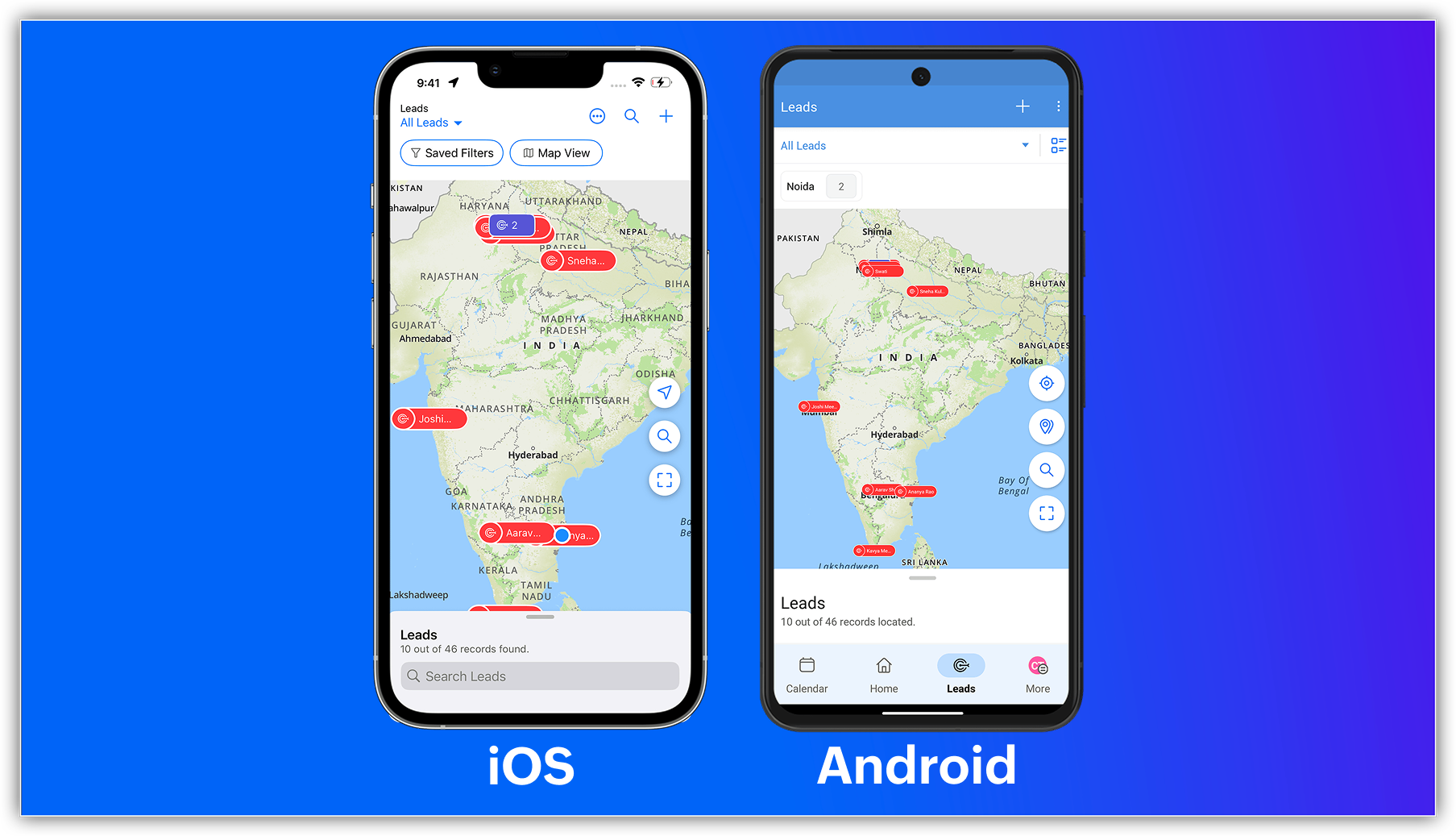
The capabilities of Zoho CRM's all-new address field and map view aren't just limited to your web app; they're now supported in the mobile app as well.

Previously, you could use the Near Me mobile feature in the map view, which uses Google Maps (Android and iOS) or Apple Maps (iOS) to show records within a 100 KM radius of your current location or a custom location.


With the latest enhancements, you can now access the Mappls-powered map view in Zoho CRM's mobile app. Simply enable the map view and address suggestions for the address field in the web app, and turn on the in-app map view from the app's map settings.


Once enabled, you can:

    • View your record's location as a pin on the map.
    • Group pins (available for Android).
    • See location suggestions while searching.
Alert

Feature availability and limits

    • Editions supported: All paid editions.
    • Modules supported: Any module with at least one address field.
    • Availability: Only the IN DC. 
That's all for this enhancement. Please share your feedback in the comments below.


Thanks,
Nizamuddin
NotesP.S. Map View is currently available for users in the IN DC.

      • Recent Topics

      • Early Preview for an Upcoming Enhancement to Zoho One - App Adoption and Feature Discovery

        Hello, Enterprise Support Community, We're excited to give you an early sneak peak at an upcoming enhancement to the Zoho One platform: new App Adoption & Feature Discovery components, designed to help our customers adopt the right tools to enhance their
      • Can I add Conditional merge tags on my Templates?

        Hi I was wondering if I can use Conditional Mail Merge tags inside my Email templates/Quotes etc within the CRM? In spanish and in our business we use gender and academic degree salutations , ie: Dr., Dra., Sr., Srta., so the beginning of an email / letter
      • You cannot send this email campaign as it doesn't have any eligible contacts in the selected mailing list. You can try adding contacts or choose other mailing lists.

        please help
      • Add Days In Stage to Filter Options for Pipeline

        We use the days in stage to see how long a ticket has been in a certain stage. But there is no option to see this via filters. eg if i wanted to see how many tickets over 5 days in a stage, there no way to do this. Currently we have to export a report
      • Integration problem between zoho crm and zoho forms for an update in zcrm, with two mapped custom fields

        Hello everyone, I need to correct an existing integration between Zoho CRM and Zoho Forms: the use case is that a user needs to send an email to a contact, who will click on a button in this email, redirecting to a Zoho Forms. The contact can update or
      • Purchase Order Quantity Validation Not Enforced During Bill Approval

        Hello Team, I would like to report a potential issue in the Purchase Order to Bill workflow. Steps to reproduce: Create a Purchase Order for an item with Quantity = 100. Approve/sign the Purchase Order. Convert the Purchase Order into a Bill. Change the
      • How do I add multiple contacts in a deal

        How do I add multiple contacts in a deal
      • Blueprint Not Triggering When Lead Status Is Updated by Workflow (IndiaMART Integration)

        I have set up a blueprint that triggers when a lead’s status is “New Lead.” Our CRM is integrated with IndiaMART, and when leads are created from IndiaMART, their Lead Status is initially set to None. To handle this, I created a workflow that automatically
      • Add multiple users to a task

        When I´m assigning a task it is almost always related to more than one person. Practical situation: When a client request some improvement the related department opens the task with the situation and people related to it as the client itself, the salesman
      • The 3.1 biggest problems with Kiosk right now

        I can see a lot of promise in Kiosk, but it currently has limited functionality that makes it a bit of an ugly duckling. It's great at some things, but woeful at others, meaning people must rely on multiple tools within CRM for their business processes.
      • Zoho Webinar not sending calendar entry into Outlook or other calendars

        Dear All, I am using Zoho Webinar for last few months and noted that when a attendee registers at the webinar link he gets an email will intimating his registration and link to webinar. He also get few file ( for Outlook, Google calendar etc) which he
      • Deleted User Emails

        I need to delete a user as I need to re-use their license, but I'd like to keep all their emails that are attached to various contacts in the CRM. Their emails are hosted externally on an M365 license. Anyone any idea how best to engineer this? TIA
      • Ticket Status

        HI, Any idea on how to create other options for this header??? I want to add an "Ordered" status. Its under "tickets" in Overview, I need a new status created (see second picture)
      • Turning off the recorded welcome in Zoho Webinar

        Is there a way to turn off the recorded voice that comes up at the beginning of every webinar session? It devalues the experience for attendees from feedback, interrupting their connection with our brand and delaying webinar start unnecessarily.
      • Client Script | Update - Client Script Support For Custom Buttons

        Hello everyone! We are excited to announce one of the most requested features - Client Script support for Custom Buttons. This enhancement lets you run custom logic on button actions, giving you greater flexibility and control over your user interactions.
      • Save embed widget personalizations

        Ok, Zoho, Great work on providing PRICING TABLES via the embed widget. Thanks so much. This changed the game for me Only one slight problem....I can't seem to save my widget settings. I'm still building my products and plans but I'm testing how they look
      • Problem with UTM Parameters: Zoho Forms - Zoho Desk Integration

        Hi Zoho Support Team, I want to automatically capture UTM Parameters from my website URLs and pass it from Zoho Forms into Zoho Desk. I have activated the UTM tracking feature. I've integrated the UTM Tracking code in my website footer on all pages. I've
      • Team folder not created when creating project using zoho flow

        When I try to automate project creation using zoho flow, and I have enabled workdrive integration to automatically create team folders to attach to the project, this only works when I create a new project through the UI. But I am trying to automate project
      • Zoho CRM upload files error

        Since today, we have been experiencing issues with uploading photos to opportunities. The message indicates that the storage is full, but as far as I can see, there is still plenty of space available. Could there be an issue or a bug?
      • Add an option to deactivate Zoho Meeting "Welcome" message

        My request is to provide an option to deactivate the annoying Zoho Meeting "Welcome" voice when participants join meetings... or remove it all together. First impressions count, especially with new clients. This notification reminds me of the AOL "You've
      • Service line items

        Hello Latha, Could you please let me know the maximum number of service line items that can be added to a single work order? Thanks, Chethiya.
      • SalesIQ > My Chat sort by Unread or Follow-up

        Hi Zoho SalesIQ Team, I would like to submit a feature request regarding the My Chat > Sorting in the SalesIQ UnRead Follow-up Conversation tags Thank you for considering. Best regards, CJ
      • Record sharing for Activities modules in CRM

        Hello everyone, We've got a few quick enhancements to what we covered in this previous announcement: record sharing is now available for Activities modules. 1. Sharing Tasks, Meetings, and Calls Until now, activity records could only be shared indirectly
      • SalesIQ : How to disable "Idle chat handling" ?

        Hello SalesIQ Team. SalesIQ, How to disable "Idle chat handling" ? I would like to disable the option “Automatically close chats that have been idle for a specified amount of time.”
      • How do I create an update to the Cost Price from landed costs?

        Hi fellow Zoho Inventory battlers, I am new to Zoho inventory and was completely baffled to find that the cost price of products does not update when a new purchase order is received. The cost price is just made up numbers I start with when the product
      • Function and workflow to create customer payment and send receipt

         I am attempting to set up a workflow/custom function for the automatic creation of a customer payment and sending the email receipt, but am receiving the error "Improper Statement Error might be due to missing ';' at end of the line or incomplete expression" I've been over everything several times and cannot see where the error is (code is copied into the attached document).  I haven't used custom functions before with Deluge, so it's very likely something very simple, or I've completely mucked
      • Smart Alerts: Protect users with configurable email alerts

        Email-based threats are becoming harder to identify and manage. Administrators need proactive ways to protect users from phishing, fraud, and policy violations. Standard filters can block emails, but blocking alone isn't always the most effective response.
      • Facturation électronique 2026 - obligation dès le 1er septembre 2026

        Bonjour, Je me permets de réagir à divers posts publiés ici et là concernant le projet de E-Invoicing, dans le cadre de la facturation électronique prévue très prochainement. Dans le cadre du passage à la facturation électronique pour les entreprises,
      • Power up Zoho CRM with project intelligence

        Dear user, You're probably one of those businesses using your CRM as a single source of truth. It's where sales, project execution, and finance teams go to analyze past decisions and formulate future strategies. But what happens when project data is either
      • Print multiple uploaded images in an HTML snippet in a Page

        I have a Form: Job_Preparation It stores details of each new item that must be built by the fabricators in our workshop. The form has a field: Documents I upload 4 image files to the Documents field. I want to print a sheet for our workshop staff with
      • "Track Inventory for this item" is forced checked by default for goods items (eTims issue?)

        Hello, Since connecting our Zoho books to eTims (Kenya) the "Track Inventory for this item" is forced checked by default (eTims issue?) in the Item creation page for any type of goods. So when purchasing anything that the company does not intend to sale,
      • Its 2022, can our customers log into CRM on their mobiles? Zoho Response: Maybe Later

        I am a long time Zoho CRM user. I have just started using the client portal feature. On the plus side I have found it very fast and very easy (for someone used to the CRM config) to set up a subset of module views that make a potentially extremely useful
      • Why can't we choose Fixed Asset account for Purchased Items? (eTims issue?)

        Hello, When the company purchase items not for sale and not supposed to be in the inventory stock, like equipment for operational use, there is no way to access the Fixed Asset accounts in the drop down list. Is that an eTims limitation again? Or something
      • Zoho Team Inbox - roadmap

        Hi, would be good to understand the Teaminbox roadmap, in particular: 1. API / Zoho Deluge connections. We have a process where the each email needs to be either tagged or assigned daily. It would be great if we could automate a 5pm alert for any exemptions
      • SalesIQ Integration with LINE: API Rate Limit Issue and Pre-Chat Flow Concerns

        Hello SalesIQ Developer Team. I have investigated the issue and found that the LINE Rate Limit is being consumed unusually quickly. LINE API free usage limit: 300 messages per month per brand. This limit will be reached within the first few days. 1. LINE
      • Free webinar! Sign documents across borders: AES, QES, ID verification

        Hello all, Signing paperwork across geographies sounds simple, until critical questions around legality, security, and compliance pop up. Join our upcoming webinar to see how Zoho Sign helps businesses worldwide sign documents with confidence. Agenda:
      • Add field "Expected Availability Date" to Purchase Orders

        Hi there. We drop ship and 'make to order' whereby we backorder sales order items directly with factories for manufacturing. One of the leading questions from Customers is "when is the order ready". Currently there is an 'Expected Delivery Date', which
      • Related list view for Assets

        We first set up all our parent assets in FSM and now we are adding child assets which are the parts for the parent assets. When under the customer related list, since it only displays 5 rows of data, I have to click through many assets to locate the parent
      • How To Invoice Immediately for Future Subscription

        Hi, When a new subscription is created that has a future start date, Zoho Subscriptions does not invoice the customer until the start date of the subscription. Is there a way to immediately invoice the customer as soon as the subscription is created,
      • Problem with the blueprint flow.

        Scenario: 3 departments in a single environment: A-B-C agents from department 1 D-E-F agents from department 2 G-H agents from department 3 Since we've been using Zohodesk (2023), agents can assign tickets to the correct department using the blueprint
      • Next Page