[Early Access] Voice of the Customer (VoC) for Zoho CRM

[Early Access] Voice of the Customer (VoC) for Zoho CRM

Happy new year, everyone!
We have an exciting addition to our suite of features and would like to introduce you to VoC (Voice of the Customer) for Zoho CRM, powered by Zia.
 
2023 is definitely the best time to be a customer with rapid innovations and advancements in the field of CX. Brands these days lose customers within minutes if they refuse to pay attention to what they're saying. The right VoC tool can help you stay on top of your CX game!
 
VoC for Zoho CRM offers insights into your customers' needs and sentiments which can translate into effective problem redressal, better planning and increased revenue.It also provides context from your CRM data and helps you get a clear picture of what your customers feel or expect from the product/service. While the end goal of VoC may look like just running customer satisfaction polls, it's not merely the act of putting out these surveys. Launching and carrying out customer satisfaction polls won't help a business truly understand their customers. The end goal of VoC is much deeper— it is about listening to your customers and valuing their thoughts, and using these insights for your business to thrive.

 
Use case
For example, an electronics store that sells laptops and mobiles also provides servicing of these products. The customer and product details are stored in CRM. They regularly send out surveys to gather customer feedback on the products and services. Additionally, they have a separate customer support team to help resolve challenges with products. The company notices a drop in their revenue in spite of the offers and discounts they've rolled out. Manually studying customer purchase patterns and collating feedback from multiple communication channels will cost a business valuable time that can be invested to develop the business further. The answer to this problem lies in automating such processes with better visualization of data within a centralized platform. VoC for Zoho CRM aims to digest customer information and make these results available for users in a single place to grasp information quickly and make goal-oriented as well as contextually-rich modifications to business plans and processes. 

How to use VoC?
VoC for Zoho CRM can be activated under "Zia", located on the settings page within CRM.
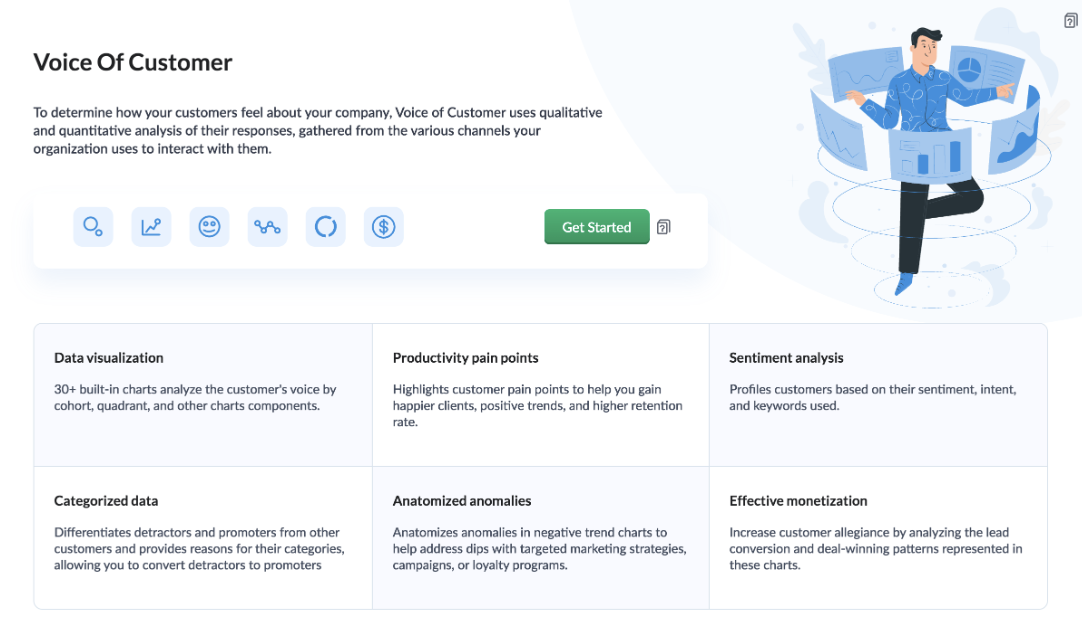
 
Once you click the 'Get Started' button, the activation page opens. Click 'Activate'.
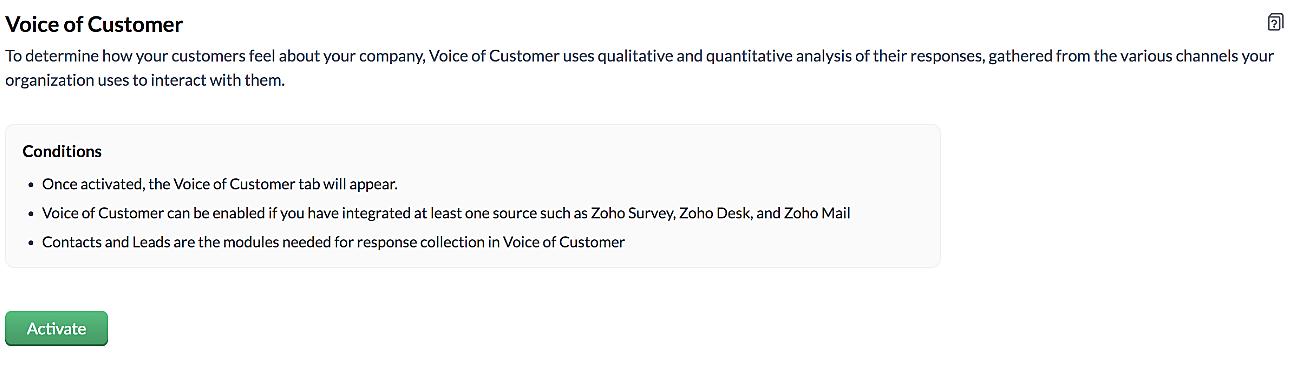
 
VoC for Zoho CRM is trained to conduct sentiment and intent analysis, keyword extraction, emotion & root cause analysis, customer trend analysis and predictions. It presents several accurate dashboards within your CRM account that showcase customer opinions on your business, competitor activity and sentiment, as well as the customer emotion behind emails, surveys and customer feedback.
 
Let us take a look at different dashboards that can help the management identify the root cause of inconsistencies in results and chalk out next steps to resolve them quickly. 
 
The Sentiment-based Profile Analysis
The Sentiment Dial Analysis chart provides you with an overall picture of the customer sentiment shared across multiple communication channels such as surveys, emails, and customer ratings.
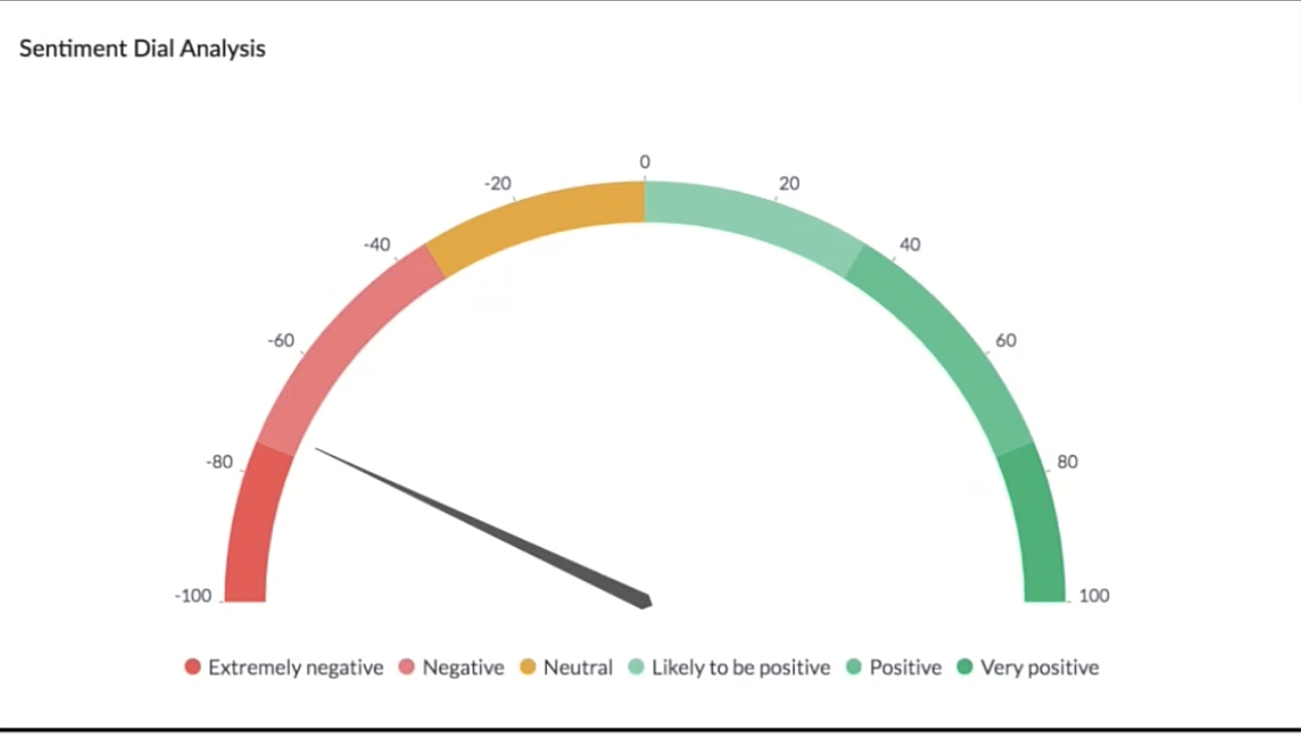
The dial chart shows that the overall sentiment expressed by the customers is on the negative end. This analysis incorporates the feedback from Desk, Survey and CRM emails. With a conservative approach that doesn't incorporate  VoC, this requires a separate team to gather the feedback, digest it and incorporate it into business activities. 
 
Even though this dial chart gives you a fair idea of the customers' views, the management needs more clarity on where the problem lies to increase customer satisfaction.
 
The frequently occurring keywords by sentiment narrow down the customer views expressed.
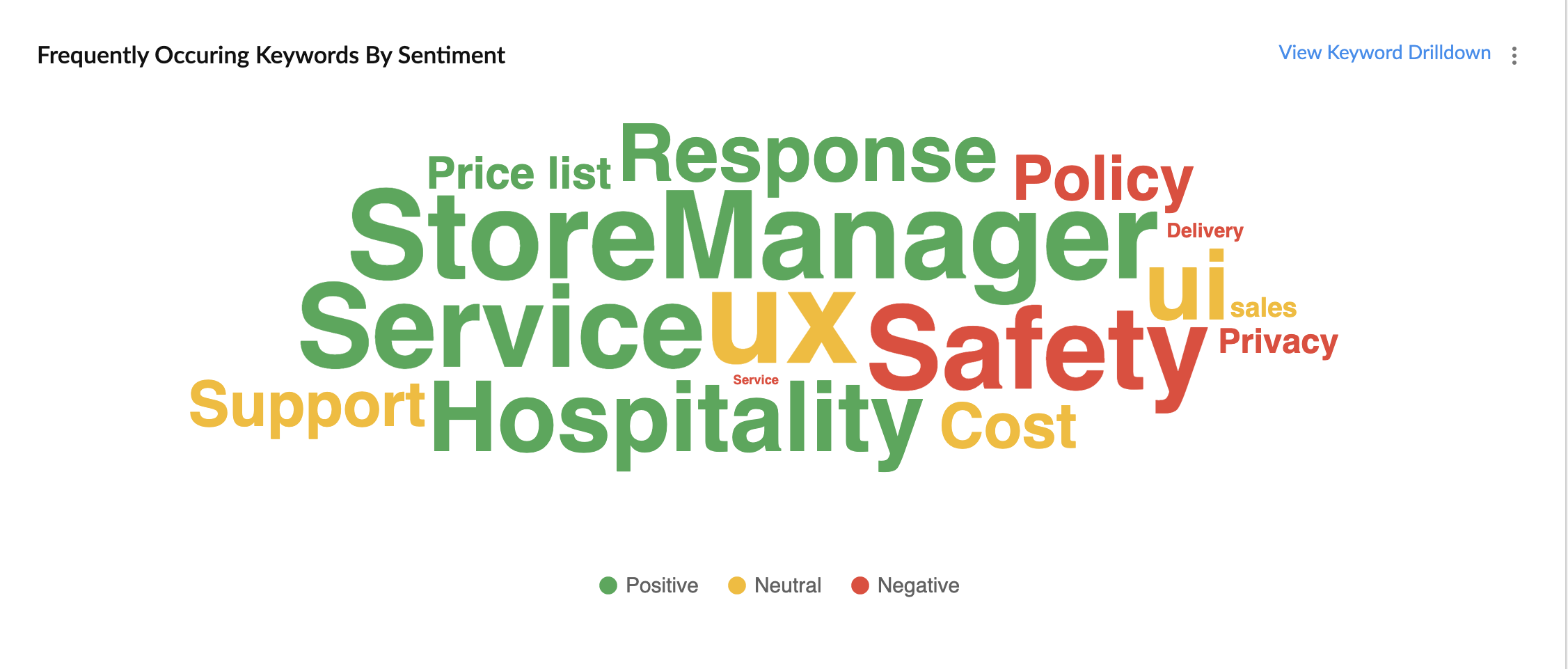
In the image above, the words in green have been used in a positive connotation by the customers. We can infer that customers are happy with the service, hospitality and price list. Whereas, delivery, policy and safety haven't been our strongholds. Therefore, we can now focus on improving our delivery, safety and privacy policies.
 
A drill down of the number of customers and channels from where their feedback has been gathered can also be viewed a table.
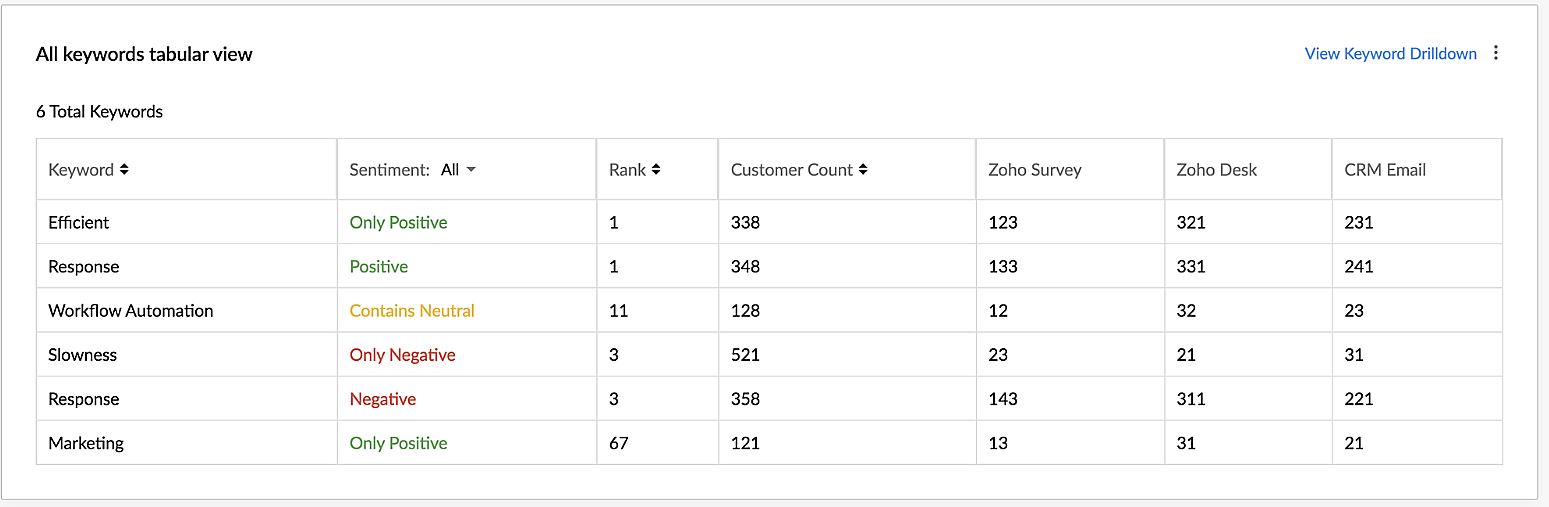
VoC for Zoho CRM helps you derive powerful insights on customer opinions and sentiment by processing data in minutes from several communication channels without burdening your team.

Response-based sentiment analysis
VoC for Zoho CRM captures the underlying emotion and intent behind customer responses and categorizes them by sentiment, intent, medium and revenue based on a particular timeframe.
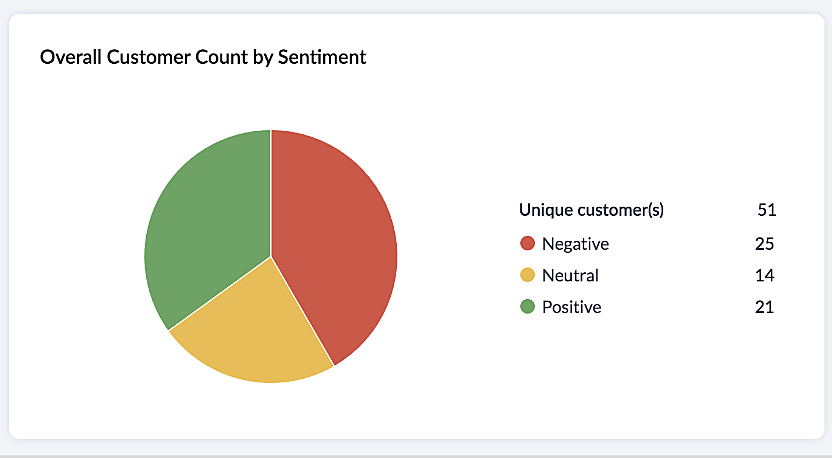
This chart paints an overall picture of the positive, neutral, and negative feedback count based on the responses gathered via surveys and customer rating.
 
The Sentiment Cohort chart, a variation of the above, showcases the customer feedback with respect to the timeframe.
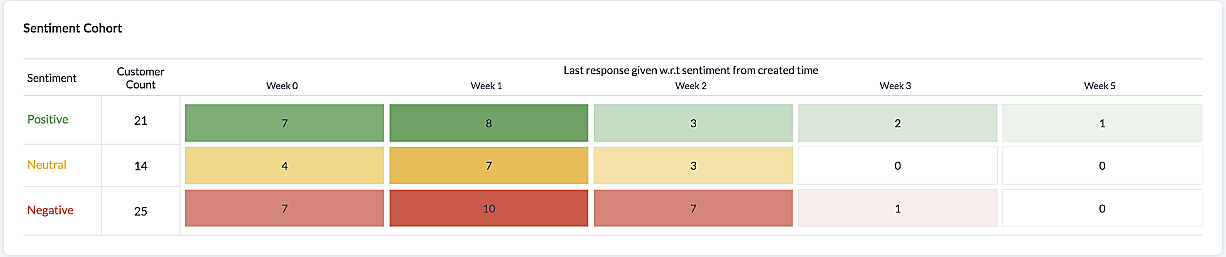
There are a few more dashboards that VoC offers to extract insights from - Competitor analysis, Cross-sell Analytics and Survey comparison.
 
Competitor Analysis
Staying on par with our competitors is an important aspect of customer satisfaction and retention. VoC helps in this regard by offering prominent insights. If the deal closure rate has come down after the mention of the competitor, we can focus on our offerings against our competitors'.
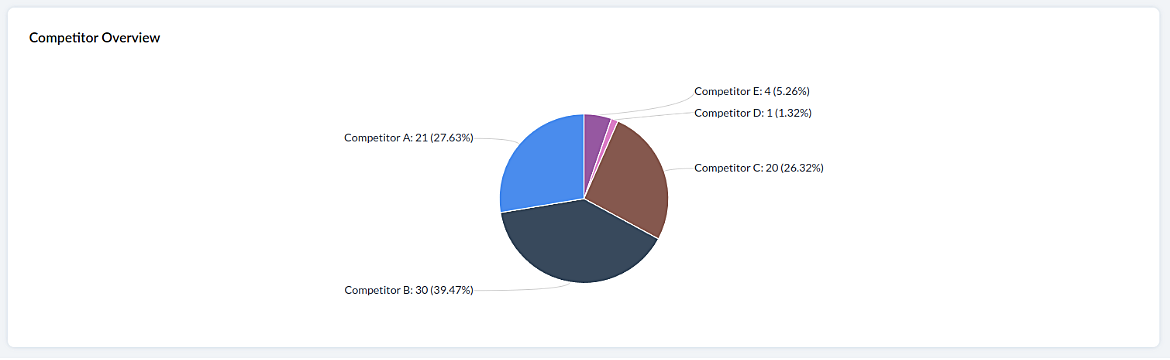
 
Cross-sell Analytics
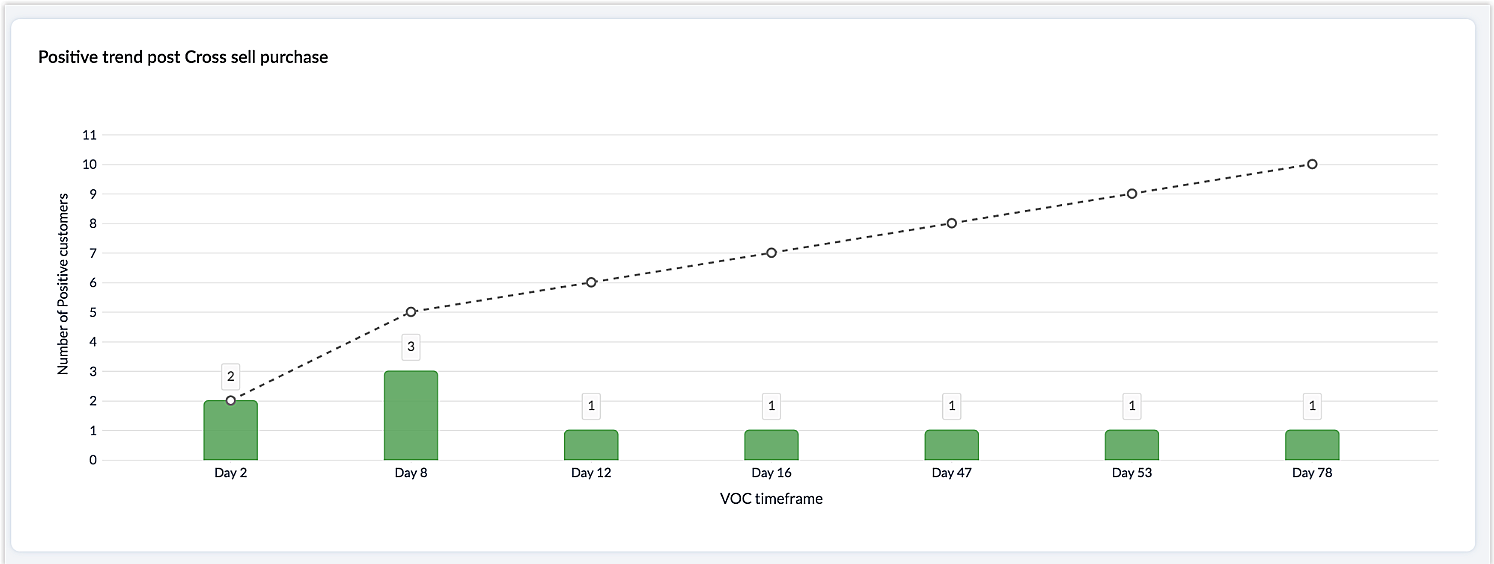
Cross-sell Analytics in VoC is designed to measure the effectiveness of cross-selling efforts. Zia studies the feedback after a cross-sell initiative is made and whether it is positive or negative. Depending on the feedback collected, it predicts the right product/service.
 
Survey comparison
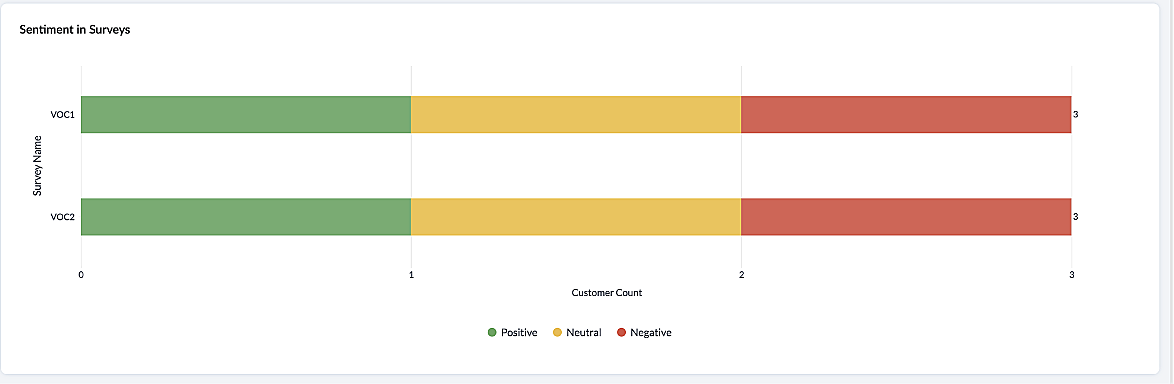
These dashboards come in handy when you want to evaluate your marketing efforts. If the customer feedback for an email offer is positive, you can plan your marketing strategies based on it. You can also improve your product/services based on survey responses.
 
 
Listed below are the different charts that VoC supports -
1. Pie chart and donut chart
2. Line graph
3. Bar graph—single, multi, stacked
4. Cohort
5. Quadrant
6. Waterfall
7. Gauge chart/ Dial chart
8. Anomaly dashboards
9. Word-cloud and Table
 
Please click here to watch a video about  VoC for Zoho CRM to gain a deeper understanding of the feature.
 
Prerequisites/Notes:
 
  1. VoC insights are available for surveys, customer rating and emails, using Zoho Survey, Zoho Desk and Email integration (IMAP) respectively.
  2. Zia Competitor Alert should be configured for the competitor analysis dashboard. Additionally, Zia Recommendation needs to be configured for the cross-sell analytics dashboard.
  3. All insights are a result of processing historical data. Collection of relevant data will be initiated upon activation of VoC and we will be processing this data over a period  of three months.
  4. Currently only admin profile users can view the VoC tab.
 
 
Pricing
VoC will be available for Zoho CRM to begin with. This will be a priced offering. The final pricing and editions supported will be announced during the time of public release.
 
What's in the roadmap
a) Option to customize  dashboards and charts
b) Identify our vanishing customers and declining products
c) Evaluating strategies to attain a target
d) Feedback Summaries, and much more.
 
Please click here to get early access to VoC for Zoho CRM. We would love to hear your feedback and can't wait for you all to try this.
 
Note: 
Early Access for customers: The Early Access to VoC is provided only for organizations with a license count greater than or equal to 20.

      • Recent Topics

      • Total Saving in POS Screen

        Displaying the Total Saving in POS Screen, while adding the items before before recording the payment. Customer wish to know this total savings before making the payment (i.e., before recording the payment). Currently we can able to view this total saving
      • How to skip weekends and public holidays in a scheduled workflow using Deluge in Zoho Creator?

        Hi, I have a scheduled workflow in Zoho Creator that runs daily at a fixed time. I want it to execute only on working days skipping weekends and public holidays. Could anyone please help me with how to achieve this?
      • Building extensions #1: Creating, testing, and editing extensions for Zoho Sprints using Sigma Cloud Editor

        Hello all! We're delighted to announce the beginning of a new series called Building extensions for Zoho Sprints. Our primary goal for this series is to educate developers on the process of creating extensions for Zoho Sprints and guide them through the
      • How to use Picklist values language in email templates

        Hello, I'm using multi-language in Zoho CRM and I've prepared separate email templates for each language. My question: how do I make sure the picklist field values in each template are rendered in the language that matches the template itself? This is
      • Is it possible to create a meeting in Zoho Crm which automatically creates a Google Meet link?

        We are using Google's own "Zoho CRM for Google" integration and also Zoho's "Google Apps Sync" tools, but none of them provide us with the ability to create a meeting in Zoho CRM that then adds a Google Meet link into the meeting. Is this something that
      • Built-in Date Functions in Zoho Analytics Query Tables

        I have a doubt about whether Zoho Analytics Query Tables provide built-in functions for start date, end date, and the current month
      • Zoho Analytics: Clarification on Email Schedule Limits in Basic Plan

        Hi Team, I have a question regarding the email scheduling limits in the Zoho Analytics Basic Plan. The plan shows that I can create 4 email schedules. However, I understand that schedule consumption is calculated based on recipients (i.e., 1 schedule
      • Urgent Security Feature Request – Add MFA to Zoho Projects Client Portal Hello Zoho Projects Team,

        Hello Zoho Projects Team, We hope you are doing well. We would like to submit an urgent security enhancement request regarding the Zoho Projects Client Portal. At this time, as far as we are aware, there is no Multi-Factor Authentication (MFA) available
      • Set Custom Icon for Custom Modules in new Zoho CRM UI

      • Standardize your booking forms with Centralized Customer Form

        We’re excited to introduce Centralized Customer Form, a new way to manage and standardize how customer information is collected across your event types. With this feature, you can define a common set of booking form fields once and apply them across your
      • Zoho Mail app update: Accessing Delegated Mailbox.

        Hello everyone! You can now access the delegated mailbox from within the iOS version of the Zoho Mail app. To access the delegated mailbox: Open the Zoho Mail app. Go on to the 'Email' module. Tap the profile picture. Choose the delegated mailbox Please
      • Cross Module Filtering – Use Fields from Lookup modules in Custom Views criteria and Advanced Filters

        Hello everyone, Zoho CRM now enables you to achieve deeper filtering of records in a module, using fields of a lookup, thereby enhancing your data management experience manifold. This filtering based on lookup module fields is now available in advanced
      • Ignroe_filtrers and drill through

        I have two charts, where one is connected to the other using drill-through. The issue is with the second chart (the drill-through target). It contains an aggregation formula that uses the ignore_filters function. Under normal conditions, the formula works
      • Introducing SlyteUI : From Idea to a Working Interface in Minutes

        Hello everyone! Are you spending hours building basic UIs? Does even the smallest customization feel like a major task? CRM customization should feel intuitive and straightforward, not time consuming or exhausting. SlyteUI makes this possible by simplifying
      • Super Admin Logging in as another User

        How can a Super Admin login as another user. For example, I have a sales rep that is having issues with their Accounts and I want to view their Zoho Account with out having to do a GTM and sharing screens. Moderation Update (8th Aug 2025): We are working
      • Publishing an Application with a Student Account

        Dear Zoho Creator Team, I hope this message finds you well. I would like to know if I can publish the application I built using my Zoho Creator account, which is currently a student account. If it is possible, could you please guide me on how to go about
      • Workflows being applied and the Large unwanted popup

        When a workflow is being applied do to an action, then the Agent is left with a large Window asking if they would like the see the changes this workflow did. Is there any way to disable this prompt from appearing?
      • What's New in Zoho Billing | March 2026

        March is here with a fresh wave of updates to Zoho Billing. From making compliance easier, reporting more flexible, to making day-to-day workflows smoother across the board. Here's everything that's new this month. Introducing Usage-Based Billing Reports
      • How to add a filter

        Hi Team, How can I set a filter like excel, instead of adding a new button.
      • A POS solution to complete the business solution for SME businesses

        For such a long time one aspect of SME business completely ignored has been a suitable POS solution native to Zoho and integrated with all the usual and necessary applications such as Inventory, Books, Commerce and CRM. The first and generally only option
      • Zoho Form not synching with Zoho CRM in CRM email template

        I have in the past successfully created an email template that has access to a Zoho Form in the url link to Forms in the email template. I am in the Contact Module of the CRM and I have created a Form for contacts and mapped the two. I am using the upsert
      • Schedule Timeout 5 minutes vs. stated 15 minutes

        I am running into a function run timeout error after 5 minutes for my schedules. The Functions - Limits documents states it should be 15 minutes: Functions - Limits | Online Help - Zoho CRM. What should it actually be? Due to the 5 minute timeout, I'm
      • Coupon Codes and Cancelling Subscriptions

        We have two Zoho One organizations, one we use for dev/testing. In Zoho Billing when we cancel a subscription, we are getting two different behaviors with regards to coupons. In one environment, the coupon is removed upon cancellation. In the other, the
      • Zoho Books | Product updates | April 2026

        Hello users, Welcome to our April 2026 product updates roundup! Highlights include profit margin for sales transactions, insights in reports, recording deposits from undeposited funds in banking, and faster production workflows with improved assembly
      • Journal Entries Do Not Show Multiple Entries to the Same Account

        Another basic accounting function that Books ... Accountants sometimes write journal entries, debiting and/or crediting the same account in the same entry. This is due to the need to record specific activity in an account when we pull reports especially
      • Email Opt Out Question

        Has the problem where if a customer is emailed opt out prevents you sending standard emails? For me this feature is simply to stop any email marketing and should not block people from receiving emails via Zoho mobile, which makes no sense.
      • Bulk Writer Export

        Pardon me if this has already been discussed (I can't find anything about it in these forums and my last attempt to start a thread seems to have failed). Is it possible to export more than one document at once? I would be really great to be able to burn OpenOffice.Org files of all my Zoho documents once a month to a CDR. If that feature is available/were created, this would be my main word processor. Without being able to do my own bulk backups I'm leery to count on Zoho's servers (which are robust
      • Sites API

        Is there a Sites API and if so where can we find documentation
      • Extracting phone number from variable

        Hi. I've created a flow between Calendly and Zoho CRM. So when someone schedules a meeting in Calendly, there is a lead created in Zoho CRM. However, I am not able to fill in the phone number field in Zoho CRM, because the phone number is included in
      • I can't fetch Calendly Fields

        Hello, I have set up a flow to connect Calendly with Zoho CRM, A few days ago I have mentioned that I should update the Calendly app connection and I have done, After Calendly has been updated I have some issues such as Event location missing I can map
      • Edit a previous reconciliation

        I realized that during my March bank reconciliation, I chose the wrong check to reconcile (they were for the same amount on the same date, I just chose the wrong check to reconcile). So now, the incorrect check is showing as un-reconciled. Is there any way I can edit a previous reconciliation (this is 7 months ago) so I can adjust the check that was reconciled? The amounts are exactly the same and it won't change my ending balance.
      • What's new in Zoho Social - Q1 recap

        Hello everyone, We’ve rolled out a bunch of updates in Q1, and we’re excited to walk you through them. To help you explore these features in detail, we’re hosting a Q1 recap webinar where we’ll show you how to make the most of each update. Q1 recap webinar
      • Ignore Auto Sales Order number generation not working

        Hi, My Flow has broken and I'm no longer able to use the Ignore auto number generation function and instead use the field that came from the trigger (via Jotform) when creating a new Sales Order in Books. Any suggestions how to fix this?
      • Vendor bills cannot be assigned to a customer or a customer project?

        I'm confused on how to handle outsourced contractor expenses on a customer project.  Between my business and the contractor, the invoice they send me fits obviously into Zoho Books as a Bill. However, I need to be able record those expenses to the client
      • Anyone using Books to track Project Profitability? If so, I could use some guidance

        Hello Zoho Community. I am a recent subscriber to Zoho, and its part of an ongoing evaluation.  My company (and my clients) have extensive project-tracking needs.  The Projects module seems to be good from a project management standpoint, but I am perplexed
      • Introducing parent-child ticketing in Zoho Desk [Early access]

        Hello Zoho Desk users! We have introduced the parent-child ticketing system to help customer service teams ensure efficient resolution of issues involving multiple, related tickets. You can now combine repetitive and interconnected tickets into parent-child
      • Problem in usage zoho

        Difficulty to submit the from in my training to handle ticket on your free trial
      • In-House, Non-Billable Projects

        I use Zoho Projects solely for in-house projects with fixed cost budgets.  Only bills and expenses need to be charged against the budget.  There are no customers to be billed or invoices to be created. How can such a non-billable project be set up?   As
      • [Webinar] What's New in Zoho Analytics: Q1, 2026

        To all the data enthusiasts out there, we're back again with another power-packed webinar in the What's New series! This last quarter was marked by exciting new features and product updates focused on offering you top-notch solutions. With new data connectors,
      • Ask The Expert: Deep Dive into Zoho CRM, Desk, SalesIQ, and Campaigns!

        Are you using Zoho to power your sales, support, and marketing, and have questions about configuration, automation, or best practices? We have great news: the “Ask The Expert” session is coming to the Zoho Benelux Community! This session is specifically
      • Next Page