Enhancement: Pre-buffer

Enhancement: Pre-buffer

Hello Bookings Community,


Greetings from the Bookings Team!


We're delighted to announce one of the most-awaited features, Pre-buffer, which allows you to add buffer time before the appointment time.


What is buffer time?

Buffer time is additional time added to the appointment duration, either before or after the appointment. It can be used to ensure that you have enough time to prepare or get ready for the next appointment. Pre-buffer refers specifically to the buffer time added before the appointment, and post-buffer is for after the appointment.


How has buffer time worked so far in Bookings?

  • Until now, you've been able to include buffer time when setting up a new service, and it was added after the appointment time.
  • If appointments were created as calendar events, the buffer time was blocked along with the appointment time by default.


How will buffer time work from now on?

  • Beginning 08-Dec-2023, you can add a buffer time before and after the appointment time.
  • If the appointment is created as a calendar event, you have the option to choose whether to block buffer time along with it or not.


Learn how to implement buffer time


While adding a new service, you can tick the Add buffer time checkbox. Then, add the time duration for Pre-buffer and Post-buffer.


When the customer books an appointment, slots will be made available calculating the buffer time and appointment duration. For instance, if a service is created with an appointment duration of 30 minutes, a pre-buffer of 15 minutes, and a post-buffer of 15 minutes, the time slot will only be offered if a total duration of one hour is available for the staff (i.e., pre-buffer + appointment duration + post-buffer).


Once the appointment is booked, staff can view the buffer time from the Appointment Summary and Calendar View.


Block buffer time in calendar events

In Bookings, the availability of a staff member for an appointment is decided by including the buffer time. But, there can be situations where a staff member's exact availability is needed in external calendars. This can be useful if the staff member has to attend meetings apart from the appointments in Bookings. You can then choose to block buffer time in your calendar events along with the appointment time.  


Notifications

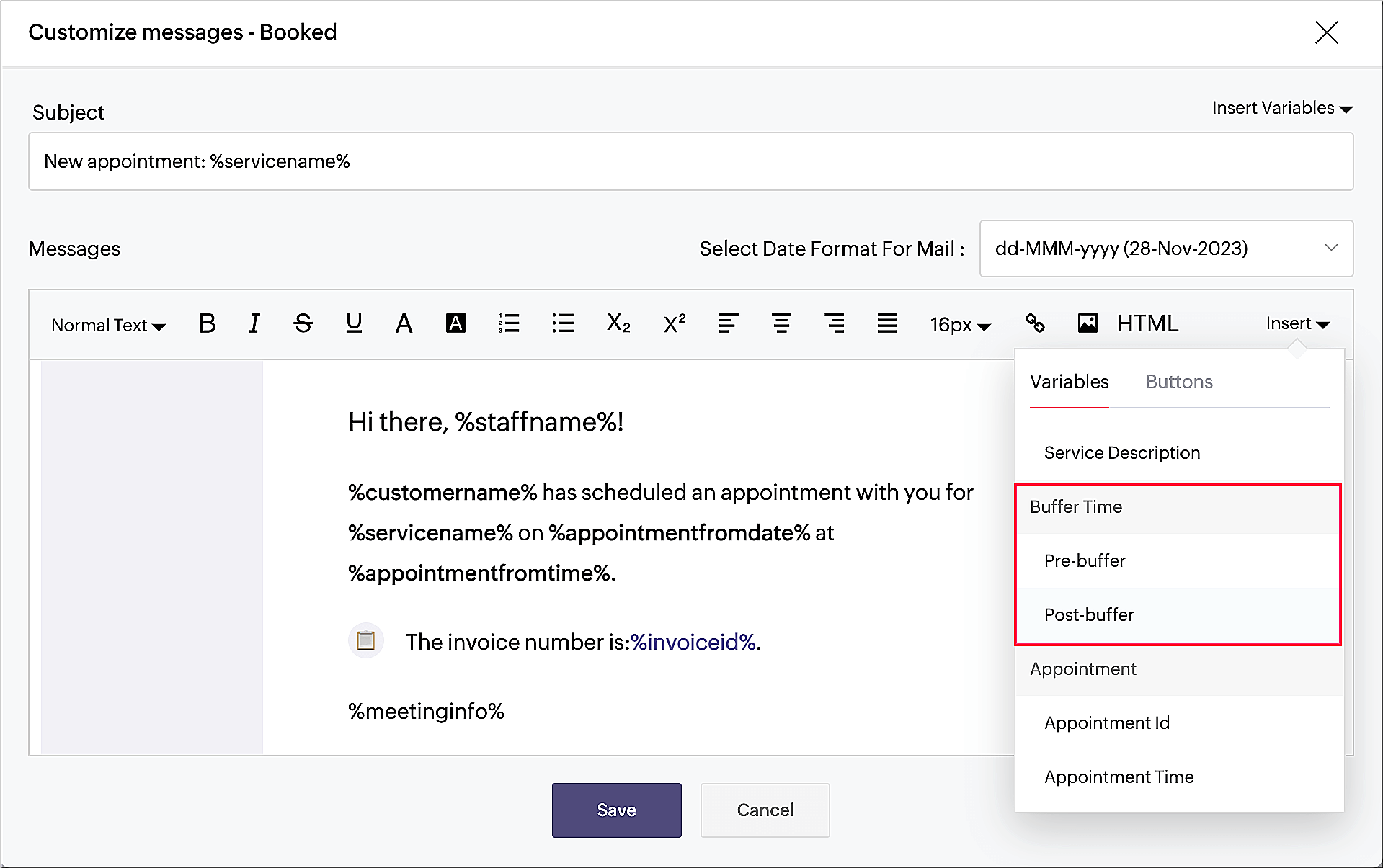
You can include the pre_buffer and post_buffer variables in the email and SMS notification templates for your staff.


Please note that your customers will not be aware of this buffer time, but if the buffer time is added to calendar events, then the customer can view this additional time in their calendar invite.  


Help documentation

Explore our extensive help document designed to provide a thorough understanding of buffer time.


We value your feedback and are constantly working to improve and innovate based on your needs. Please don't hesitate to share your thoughts or questions with us at support@zohobookings.com or in the comments section below.


Thanks,

The Zoho Bookings Team


    • Sticky Posts

    • New feature: Invite additional guests for your bookings

      Hello everyone, Greetings from Zoho Bookings! We are happy to announce the much-awaited feature Guest Invite, which enhances your booking experience like never before. This feature allows additional participants to be invited for the bookings to make
    • 📣📣 Zoho Bookings Schedulathon 2025 is here!

      Hey Zoho Bookings fam, We're excited to invite you to our first-ever hackathon: Yes, Zoho Bookings Schedulathon 2025 is live now. This is a virtual event and you can participate anywhere from the world. Businesses should be able to set up meetings from
    • 📣 [Webinar] Spikra shows how businesses leverage Zoho Bookings to increase revenue

      [Webinar] Spikra shows how businesses leverage Zoho Bookings to increase revenue Hi all, Service-based businesses need to be on top of their client experience game to stay ahead. Spikra, one of our Advanced Zoho Partners, has been helping businesses deliver
    • 📣📣 Zoho Bookings - Feature Roadmap 2024

      Hi Everyone, Thank you for all the support you have been showing Zoho Bookings. We had a fabulous 2023, with a bunch of new features and over 60K new users. In 2024, our prime focus will be on user experience, and we have a few vital features coming in
    • Attention: Important updates to the payment gateway integrations

      Greetings from the Zoho Bookings team! We have a few important updates to the payment gateway integrations that allow you to collect online payments for your appointments. The following payment gateways will be updated, and we encourage you to make the
      • Recent Topics

      • Zoho Mail and SalesInbox doesn't link to CRM record using Reply-To

        Hi, I've just set up SalesInbox, with the intention of using it for sales enquiries (instead of Desk, which I have been using until now). I've noticed that, unlike Desk, SalesInbox only uses the 'From' email address to attempt to link to a CRM contact
      • Service line items

        Hello Latha, Could you please let me know the maximum number of service line items that can be added to a single work order? Thanks, Chethiya.
      • Subforms and automation

        If a user updates a field how do we create an automation etc. We have a field for returned parts and i want to get an email when that field is ticked. How please as Zoho tells me no automation on subforms. The Reason- Why having waited for ever for FSM
      • Poor Search Results on Zoho CRM

        The search on Zoho CRM is quite poor. Salesforce has now published a new search, when will get this on Zoho? https://help.salesforce.com/s/articleView?id=data.c360_a_hybridsearch_index.htm&type=5
      • How to use filters on all products page? Or even a category page?

        Hello, I am trying to create some filters so users can use filters to find products they are looking for. So what i am trying is to create a filter according to price lets say. So if i define it this way i am expecting to see this filter option on category
      • Capture Last check-in date & days since

        I have two custom fields on my Account form, these are "Date of Last Check-In" and "Days Since Last Contact" Using a custom function how can I pull the date from the last check-in and display it in the field "Date of Last Check-In"? and then also display the number of days since last check-in in the "Days SInce Last Contact" field? I tried following a couple of examples but got myself into a bit of a muddle!
      • Pasted Images not being embedded in custom mail

        Hi, I'm making a custom report by email based on commentaries. I have the email ready, all working great except for images that are being pasted in the commentaries. Zoho deals with them as temp images and so it requires authentication to view them, something
      • AI Bot and Advanced Automation for WhatsApp

        Most small businesses "live" on WhatsApp, and while Bigin’s current integration is helpful, users need more automation to keep up with volume. We are requesting features based on our customer Feedbacks AI Bot: For auto-replying to FAQs. Keyword Triggers:
      • Bigin, more powerful than ever on iOS 26, iPadOS 26, macOS Tahoe, and watchOS 26.

        Hot on the heels of Apple’s latest OS updates, we’ve rolled out several enhancements and features designed to help you get the most from your Apple devices. Enjoy a refined user experience with smoother navigation and a more content-focused Liquid Glass
      • Select CRM Custom Module in Zoho Creator

        I have a custom module added in Zoho CRM that I would like to link in Zoho creator.  When I add the Zoho CRM field it does not show the new module.  Is this possible?  Do i need to change something in CRM to make it accesible in Creator?
      • Zoho CRM Quotes – Subform and PDF/Writer Limitations

        Hello, I am encountering the following limitations in Zoho CRM Quotes: Custom product images cannot be uploaded in the subform – the image upload field cannot be added; only the file upload field is available. File upload placeholders cannot be used in
      • Introducing Workqueue: your all-in-one view to manage daily work

        Hello all, We’re excited to introduce a major productivity boost to your CRM experience: Workqueue, a dynamic, all-in-one workspace that brings every important sales activity, approval, and follow-up right to your fingertips. What is Workqueue? Sales
      • Archiving Contacts

        How do I archive a list of contacts, or individual contacts?
      • Every time an event is updated, all participants receive an update email. How can I deactivate this?

        Every time an event is updated in Zoho CRM (e.g. change description, link to Lead) every participant of this meeting gets an update email. Another customer noticed this problem years ago in the Japanese community: https://help.zoho.com/portal/ja/community/topic/any-time-an-event-is-updated-on-zohocrm-calendar-it-sends-multiple-invites-to-the-participants-how-do-i-stop-that-from-happening
      • 3/18 オンライン勉強会のお知らせ Zoho ワークアウト (無料)

        ユーザーの皆さま、こんにちは。コミュニティチームの中野です。 3月開催のZoho ワークアウトの開催が決定しましたのでご案内します。 今回はZoomにて、オンライン開催します。 ▶︎参加登録はこちら(無料) https://us02web.zoom.us/meeting/register/BoNTN7zYR8OvOPGShqBY0A ━━━━━━━━━━━━━━━━━━━━━━━━ Zoho ワークアウトとは? Zoho ユーザー同士で交流しながら、サービスに関する疑問や不明点の解消を目指すイベントです。
      • Zoho Sheet for Desktop

        Does Zoho plans to develop a Desktop version of Sheet that installs on the computer like was done with Writer?
      • Conversion Rate – Won Deals over Assigned Prospects

        Hello, I would like assistance configuring a KPI in Zoho Analytics titled: Objective of the calculation: Number of Won Deals divided by Total number of assigned prospects (not only converted prospects). Important clarification: The denominator must include
      • Perfomance Management - Zoho People

        Hi team, I am looking for performance management data such as KRA, goals, feedback, appraisals, etc., in Zoho Analytics. However, I am unable to find these metrics while editing the setup. Could you please confirm whether these fields are available in
      • Feature Request – Conditional Visitor Information Request in Zoho SalesIQ

        We would like to request the ability to conditionally ask for visitor details based on the communication channel used in Zoho SalesIQ. Specifically: When a visitor initiates a conversation through the live chat widget on the website, we want to continue
      • Apple Messages for Business in Omnichannel communications?

        Hello, Apple launched "Apple Messages for Business" but Zoho CRM or Zoho Desk don't appear in the list of possible integrators. Zoho already promotes https://www.zoho.com/crm/omnichannel.html Omni Channel integration, but Apple Messages does not yet appear.
      • Admin asked me for Backend Details when I wanted to verify my ZeptoMail Account

        Please provide the backend details where you will be adding the SMTP/API information of ZeptoMail Who knows what this means?
      • Cliq iOS can't see shared screen

        Hello, I had this morning a video call with a colleague. She is using Cliq Desktop MacOS and wanted to share her screen with me. I'm on iPad. I noticed, while she shared her screen, I could only see her video, but not the shared screen... Does Cliq iOS is able to display shared screen, or is it somewhere else to be found ? Regards
      • ZOHO.CRM.UI.Record.open not working properly

        I have a Zoho CRM Widget and in it I have a block where it will open the blocks Meeting like below block.addEventListener("click", () => { ZOHO.CRM.UI.Record.open({ Entity: "Events", RecordID: meeting.id }).catch(err => { console.error("Open record failed:",
      • 【Zoho CRM】通貨機能のアップデート:為替レートの自動更新やデータ更新オプションなど

        ユーザーの皆さま、こんにちは。コミュニティチームの藤澤です。 今回は「Zoho CRM アップデート情報」の中から通貨機能のアップデートをご紹介します。 CRMの複数通貨機能を使うと、地域ごとに通貨を管理し、顧客の現地通貨で記録したデータを自国通貨に自動換算して分析やレポートに活用できます。 従来は、為替レートを管理者が手動で定期更新する必要があり、各データには作成時点のレートが固定されるため、その後の市場変動は反映されませんでした。 本記事では、この問題を解消する「為替レートの自動更新」をはじめ、さまざまな新機能をご紹介します。
      • Can we add zoho sign to a custom module?

        i understand out of the box it works with 8 modules. is it possible to add it to a custom module?
      • This domain is not allowed to add in Zoho. Please contact support-as@zohocorp.com for further details

      • Selected date present employees roster

        =CHOOSECOLS(FILTER(A2:E5;(INDEX(C2:E5;0;MATCH(VALUE(B8);INDEX(VALUE(C1:E1));0))<>"OFF")*(INDEX(C2:E5;0;MATCH(VALUE(B8);INDEX(VALUE(C1:E1));0))<>"EL"));1;2;2+MATCH(VALUE(B8);INDEX(VALUE(C1:E1));0)) This way sheet looks l
      • Credit Card Terminal for Zoho Books

        Hello, Instead of punching the credit card number manually for customer payment, do you have a third-party hardware credit card reader that works with Braintree? Thank You
      • Filtering in Help Center

        Hi, our ticket system is based on a set of structured status categories. The customer must be able to filter by these status. How can we add "Status" as filter to the help center. In the same moment we do not need filters e.g. as "channel". How can we
      • On Edit Validation Blueprint

        Hello, I have a notes field and a signature field. When the Approve button is clicked, the Signature field will appear and must be filled in. When the Reject button is clicked, the Notes field will appear and must be filled in. Question: Blueprint will
      • Google Fonts Integration in Pagesense Popup Editor

        Hello Zoho Pagesense Team, We hope you're doing well. We’d like to submit a feature request to enhance Zoho Pagesense’s popup editor with Google Fonts support. Current Limitation: Currently, Pagesense offers a limited set of default fonts. Google Fonts
      • Increase Round Robin Scheduler Frequency in Zoho Desk

        Dear Zoho Desk Team, We hope this message finds you well. We would like to request an enhancement to the Round Robin Scheduler in Zoho Desk to better address ticket assignment efficiency. Current Behavior At present, the Round Robin Scheduler operates
      • Can multiple agents be assigned to one ticket on purpose?

        Is it possible to assign one ticket to two or more agents at a time? I would like the option to have multiple people working on one ticket so that the same ticket is viewable for those agents on their list of pending tickets. Is something like this currently
      • Where is the settings option in zoho writer?

        hi, my zoho writer on windows has menu fonts too large. where do i find the settings to change this option? my screen resolution is correct and other apps/softwares in windows have no issues. regards
      • Zoho CRM Case Notes - Share to Customer

        Hi team does anyone know the Api to set a note, against a case, to shared with customer? i cant seem to find it  cheers 
      • When Does WorkDrive integrate with Books?

        When Does WorkDrive integrate with Books?
      • CRM gets location smart with the all new Map View: visualize records, locate records within any radius, and more

        Hello all, We've introduced a new way to work with location data in Zoho CRM: the Map View. Instead of scrolling through endless lists, your records now appear as pins on a map. Built on top of the all-new address field and powered by Mappls (MapMyIndia),
      • Synching changes to Stripe when changes are made in Zoho Billing

        We have a situation where we have merged customers in Zoho BIlling and then found out later that the payment in Stripe was not updated and still associated with the old customer record. The card gets updated and billed, but that payment is still associated
      • Zoho Sign Not Delivering

        I have sent several contracts out via Zoho Sign.   They do not seem to be getting delivered.  I had one person receive it, but the others have not.   I had one person tell me they sent it back to me and never got it and doesn't show as signed.  I've sent
      • Update latitude & longitude address field API

        How do I update the coordinates of an address field from a widget? I can't modify the latitude and longitude of the address field. I think the problem is how I'm writing formdata variable. zoho_init.then(function (data) { var queryParams = ZOHO.CREATOR.UTIL.getQueryParams();
      • Next Page