Function #50: Send Mass emails to your customers
Function #50: Send Mass emails to your customers


Hello everyone, and welcome back to our series!

We have reached a milestone of 50 Functions, which means that we have automated 50 different tasks in Zoho Books.

Every Friday, we have shared a nifty function aimed at either automating a task or streamlining a process in Zoho Books. Continuing with our tradition, we're particularly thrilled today to share the 50th function in our series.

Businesses often need to send bulk emails to their customers to convey important information. Whether it's about sharing promotional offers, newsletters, updates on products or services, or any other relevant content, bulk emailing is the preferred method for efficient communication. To facilitate this action in Zoho Books, you can make use of a Custom Button. With just a click, you can effortlessly send emails to all active customers in your Zoho Books organization.

Prerequisites: 

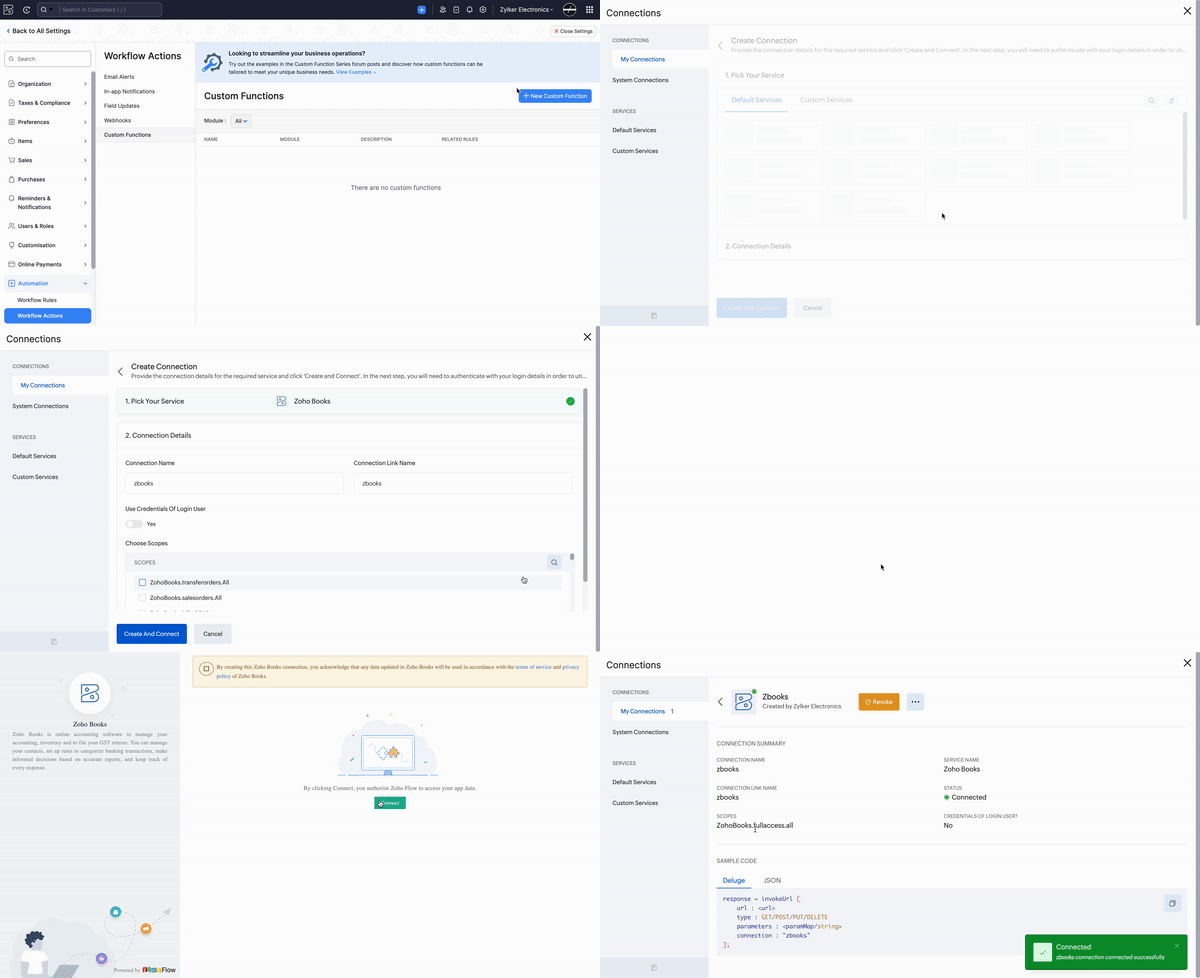
1. Create a Connection named "zbooks" to successfully execute the scheduler. You can watch the GIF attached below to know how to create the connection.
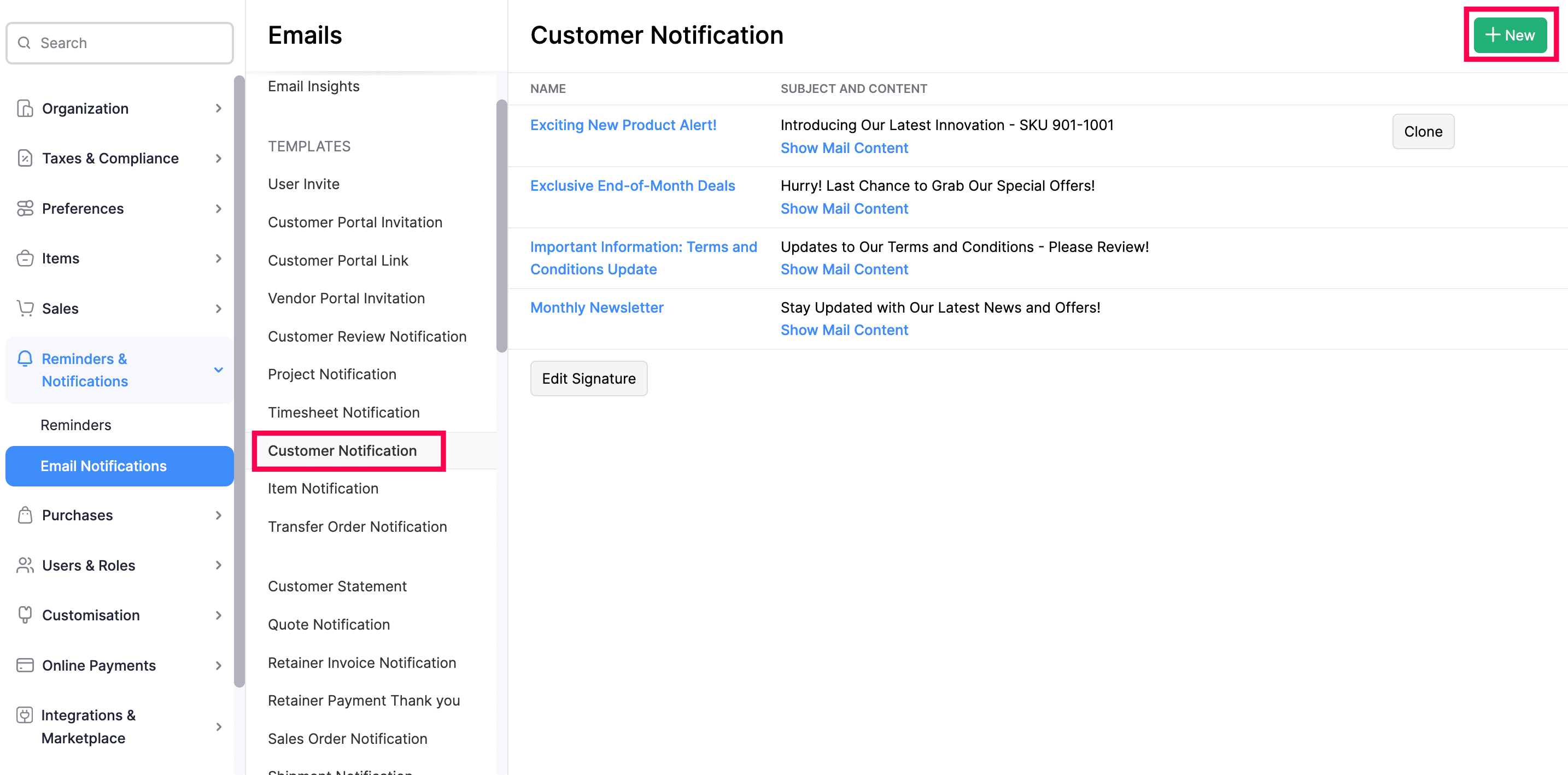

2. Add "Customer Notification" email templates tailored to specific purposes (i.e.) create templates for different occasions like Product launches, Discounts, Month-end offers, and so on. When clicking the Custom Button, you will have the option to input the name of the template to be used. 


Custom Button:

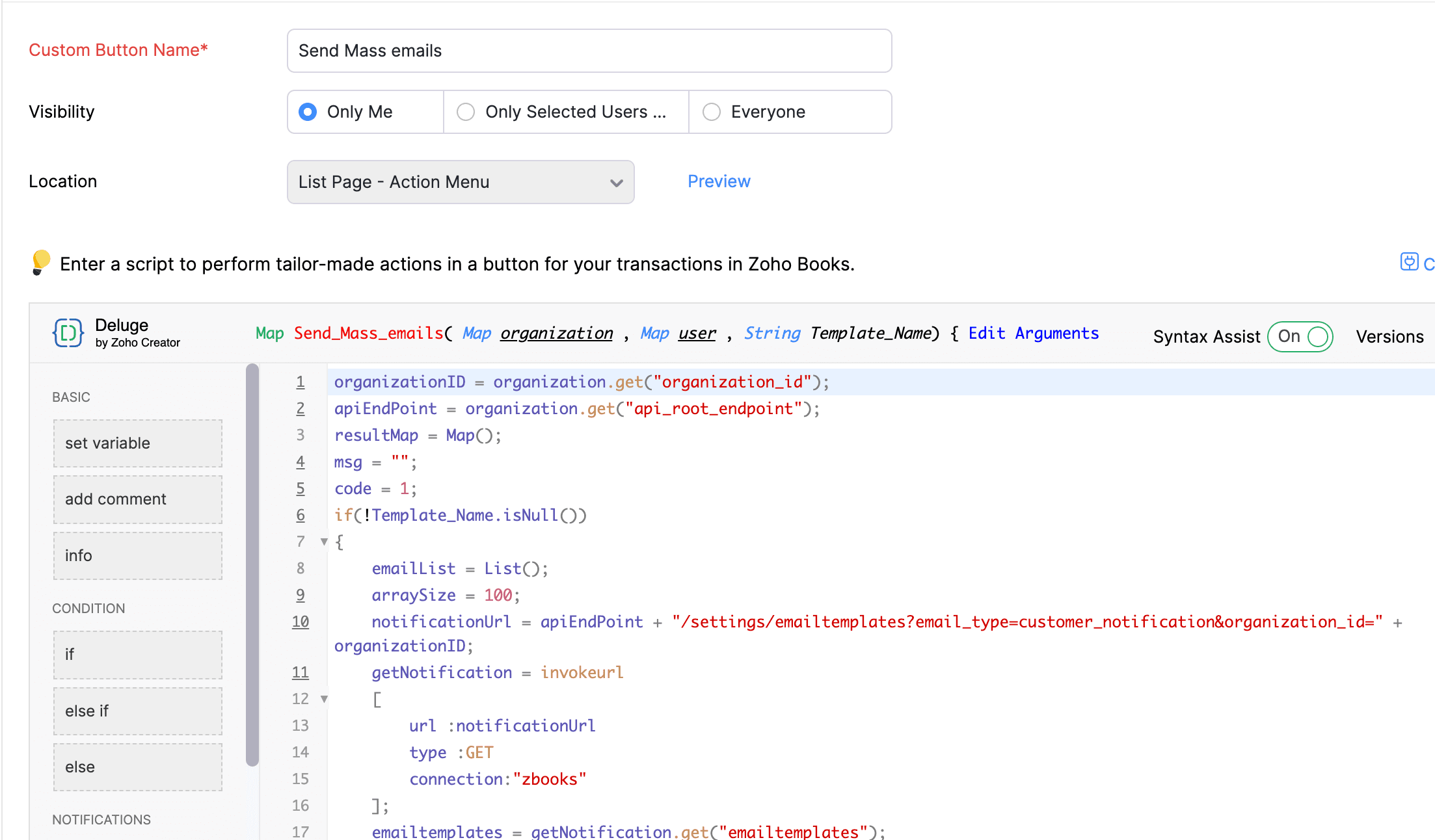
Go to Settings -> Preferences -> Customers and Vendors -> Custom Buttons -> Click +New and Choose "New Custom Button". Populate the details as mentioned below:

1. Name - Give a suitable name (e.g., Send Mass emails).
2. Visibility - Select the option that aligns with your preference for granting users access to the custom button.
3. Location - Choose "List Page - Action Menu".

Once done, add the script from this GitHub link -> Click "Edit Arguments" > Input the Param name as "Template_Name" and Param type as "String" -> Save. 

Note: Input only "Template_Name" as the Param name. 
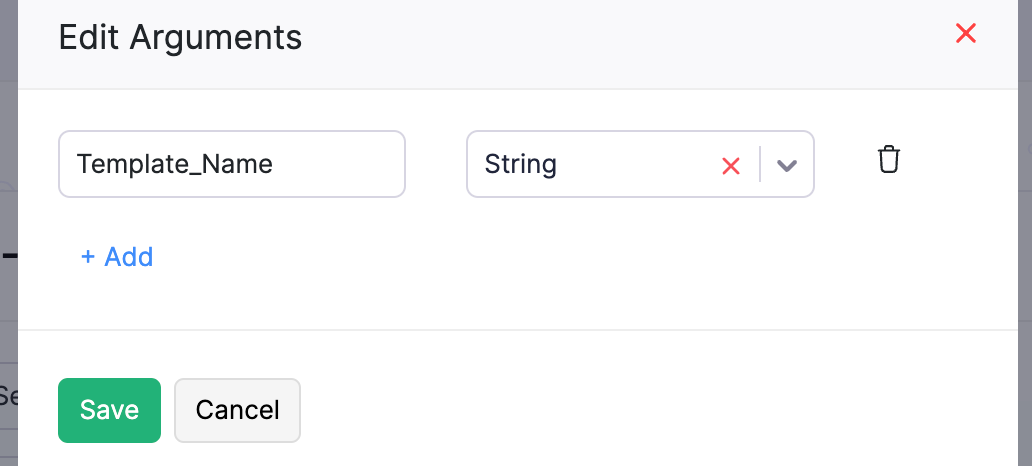


Here's how to access the button:

Go to Sales -> Customers -> Click on the button "Send Mass emails" -> Input the name of the email template that should be used -> Click "Proceed". The emails will now be sent to the primary email address of your customers.
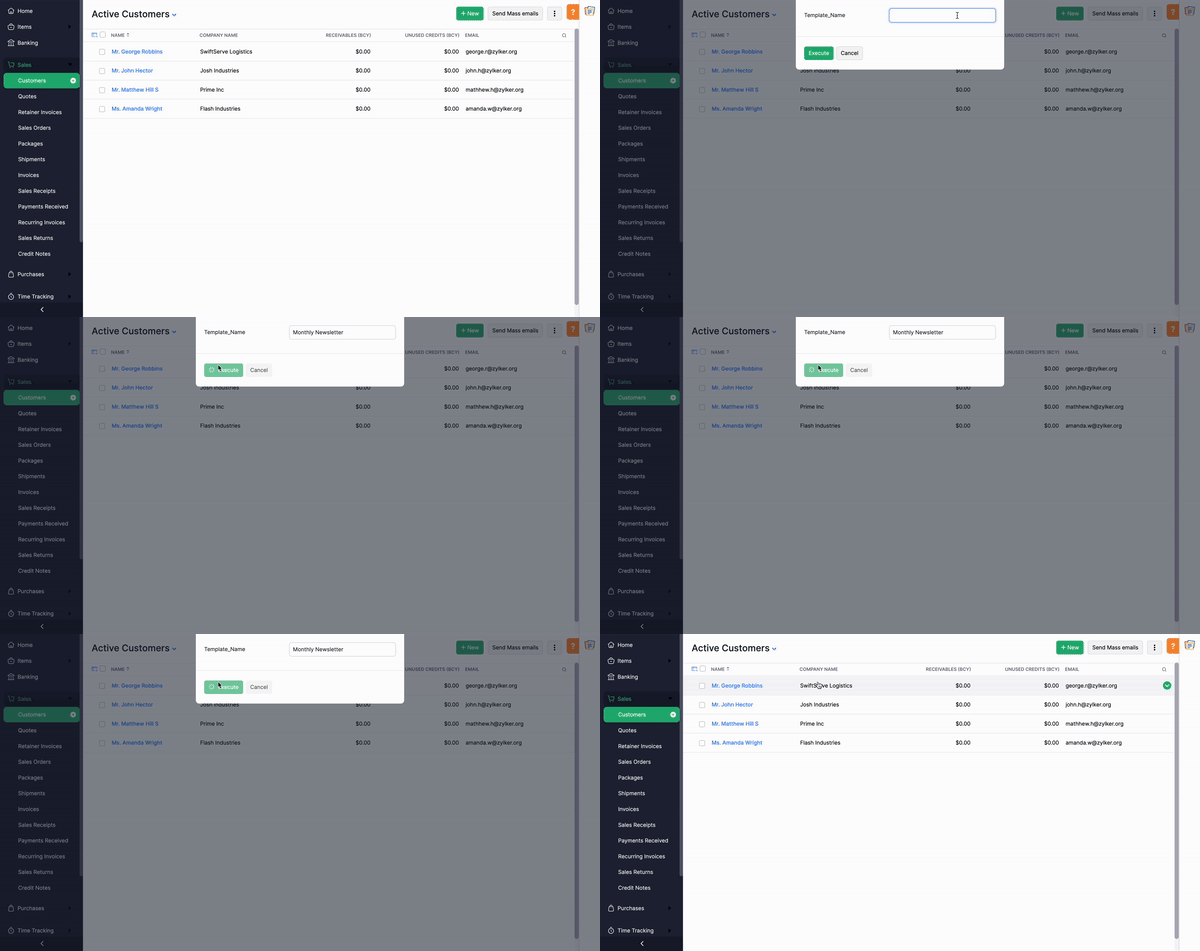


Sending emails to your customers directly from Zoho Books has now become easier with this Custom Button. Share your thoughts on when you plan to utilize this button in the comments below. If you require assistance in customizing the button's functionality to better suit your needs, don't hesitate to reach out to our support team at support[at]zohobooks[dot]com. We're here to help you. 

If you're new here, use this link to access the list of functions we have shared so far. You're just a click away from discovering the multitude of capabilities offered by Custom Functions in Zoho Books!

Regards,
Shireen Farhana
Zoho Books

      • Recent Topics

      • Remove my video

        Hi, How can I remove my video so that I don't have to see myself. It's weird so I always remove my own video from what I see but cannot find this feature here. Thanks!
      • Client Script: Any plans to add support for multi-select field with onChange

        Client Script is fantastic and the documentation lists multiselect form fields as unsupported. Just wondering if there are any plans to make this a supported field. https://www.zoho.com/crm/developer/docs/client-script/client-script-events.html 2. Field
      • How can I export all Deluge code across the application?

        I’m working on a application with multiple forms, reports, and HTML views, where Deluge scripts are used across workflows, field actions, and custom functions. Is there a way to export all Deluge scripts into a single file for easier search?
      • Zoho Campaigns API endpoint for contact details

        there is some REST API support for Zoho Campaigns, however, I am not able to find an endpoint for "get contact details".  in particular, I'd like to access contact's subscription status and also their topic. ideally there is all profile available including
      • Feature Reqeust - Include MPN In Selectable FIelds

        I have noticed that the MPN is not available to show in the list view of Items. Please consider adding it as EAN, UPC and ISBN are all available, so it doesn't make much sense to exclude this similar option. Thanks for considering my feedback.
      • Experience effortless record management in CRM For Everyone with the all-new Grid View!

        Hello Everyone, Hope you are well! As part of our ongoing series of feature announcements for Zoho CRM For Everyone, we’re excited to bring you another type of module view : Grid View. In addition to Kanban view, List view, Canvas view, Chart view and
      • Windows Desktop Application for Bigin

        I'm finding the need for a standalone Bigin desktop app for Windows users. Most of my daily work is done through a browser, so I often have several open tabs while working with customers and checking product information, etc. With Bigin currently only
      • How to see Statement Details Shown in Unclassified Transactions in All Transactions?

        All, The list of Unclassified Transactions show the Statement Details and Descriptions. What is the method to see that column in the All Transactions list? -Thanks!
      • Introducing Rollup summary in Zoho CRM

        ------------------------------------------Moderated on 5th July'23---------------------------------------------- Rollup summary is now available for all organizations in all the DCs. Hello All, We hope you're well! We're here with an exciting update that
      • Incoming email replies not automatically associating with Deals/Opportunities - Is this possible in Zoho CRM?

        Hello Zoho Community, I'm running a travel agency (B2B and B2C) and we've been struggling with what seems like a basic functionality that we cannot get to work properly. Our use case: We send emails to suppliers (hotels, transportation companies) and
      • Set another Layout as Standard

        We created a few layouts and we want to set another one to standard:
      • Duplicate Leads Concerns with Round Robin and Lead Approval Process

        It is great to have the Duplicate Lead Approval Process, there are a few issues with the process that I would greatly appreciate taken consideration in enhancing. It appears that A Lead comes in Lead owner assigned by the Round Robin Check for Duplicate,
      • All new Address Field in Zoho CRM: maintain structured and accurate address inputs

        Availability Update: 29 September 2025: It's currently available for all new sign-ups and for existing Zoho CRM orgs which are in the Professional edition exclusively for IN DC users. 2 March 2026: Available to users in all DCs except US and EU DC. 24
      • Salesforceに添付ファイルを格納したい

        お世話になっております。 Salesforceに添付ファイルを格納したく、カスタムオブジェクトに連携し、 「ファイルのアップロード」項目を設けました。 実際、エラーもなく送信出来たのですが、実際生成されたカスタムオブジェクトのレコードを見ると、どこにも添付ファイルがありません。仕様として、この添付ファイルはSalesforceのどこに格納されるのでしょうか? 今回作りたいフォームは、複数の書類を添付するため、Zohoformのファイルアップロード項目「本人確認書類」「源泉徴収票」などの項目を、Salesforce側にも設けた「本人確認書類」「源泉徴収票」という各項目にURLリンクとして紐づけたいと思っておりました。
      • Ask the Experts 27: Onboarding and managing support reps

        Hello everyone, We are back with our Ask the Experts (ATE) series for 2026. This year, we bring experts to help you address customer support challenges using Zoho Desk. For our first ATE, we are getting into the human side of customer support. "Every
      • Re: Application Architecture in Zoho Creator — A Platform-Specific Deep Dive

        A recent community post on application architecture made some excellent points about planning architecture early in Zoho Creator projects. The core message is right — Creator applications have a habit of growing organically into maintenance nightmares,
      • Ticket Merge Error

      • Setting GC session variable programatically in a website

        Hi! Is there a way now to programatically set session variables from a website for a Guided Conversations? The current available methods are dependent on react-native.
      • Zoho CRM Queries Now Support Databases and Cloud Data Sources

        Hello everyone! We're thrilled to announce a major enhancement to the Queries feature in Zoho CRM! Queries now support a broader range of external data sources, allowing you to fetch live data and combine it with CRM records, all using a unified query
      • Knowledge Base article lists

        Is it possible to adjust the number of articles that are visible under a category of the Knowledge Base portal? Currently it looks like by default it populates about 5 articles before it puts the "more" option at the bottom. Looking to see if I can extend
      • Discrepancy in Contracts with Fields list/Layout

        The Support Plan field on the layout isn't in the fields list. What am I missing?
      • Questions Regarding Helpdesk & SalesIQ Customization and Email Setup

        Hello, I hope you’re doing well. I have a few questions regarding Helpdesk and SalesIQ: Can the emails sent to customers via helpdesk tickets be fully customized — including signature, subject line, and other elements? Also, is it possible to send these
      • Zoho writer unable to merge documents to PDF with basic fonts in Hebrew or fonts from my computer

        I created several forms that will be merged into PDF files through Zoho Writer and I am unable to receive the PDF in the basic fonts of the Hebrew language or in the fonts I have on my computer. The writer exports to PDF an exchange font that looks very
      • Migrating all workflows to another Zoho account

        We are going to transfer into another company, and we are going to get new emails and new Zoho accounts. Is there a way to migrate (or save in some sort of external file) all presets and settings that we have on this account? That includes primarily workflows,
      • Edit The Newsletter

        There doesn't seem to be the ability add a title and a caption below the button. Can this be done?
      • Additional Address - Company Name

        It would be very helpful to have a "Company Name" field in the Additional Address shipping section.  In a situation where you drop-ship orders to a different address or different company entirely, it may be necessary to list the company name of the receiver. I understand that the Attention field can be used for that purpose, but that's not really the intended purpose of that field.
      • Unable to Delete Items – No Visible Transactions but Error “Items which are a part of other transactions cannot be deleted…”

        Hello Community, We are using Zoho Inventory for our business and encountered a persistent issue that is preventing us from deleting certain items. The message shown is: “Items which are a part of other transactions cannot be deleted. Instead, mark them
      • Keyboard UX for Assemblies

        The new Assembly module has a counter-intuitive behavior that ought to be corrected. When an Assembly is ready to be entered, there are two options given, the blue-highlighted "Assemble" and the gray "Save as Draft". This correctly implies that the normal
      • landed cost-need help with different currency under the same bill

        I’m having trouble recording landed costs in Zoho Inventory/Books. My purchase order is in CNY, but the landed cost (freight) I pay is in USD. Zoho forces everything under the same bill to use one currency, so I can’t enter the landed cost in its actual
      • Improved Functionality PO Bill SO Invoice

        Hello, I need to enter over 100 items, it's frustrating to scroll a few item rows and wait for more to load, then scroll again. It would be nice to have buttons that scroll to the top or bottom with one click. Furthermore, these items I'm adding are VAT
      • I would like to request a new feature or setting for SalesIQ.

        Hello Zoho Team, I would like to request a new feature or setting for SalesIQ. Currently, when a user opens our contact widget and clicks on the "Chat with us" option, it opens a standard chat window that remains empty until either the user types a message
      • Sincronizar eventos de Bigin en Zoho Calendar (Zoho Mail)

        Hola Me gustaría poder sincronizar mi Calendario de Zoho (Mail) con los eventos de Bigin. No veo la opción disponible.
      • In Zoho inventory Converting sales return to cerdit note from using Api from Creator Error details: {"code":-1,"message":"Invalid Sales Return ID."}

        In Zoho inventory Converting sales return to cerdit note from using Api from Creator Error details: {"code":-1,"message":"Invalid Sales Return ID."} this is button Function used in the Creator map Inventory.Create_Credit_note(int CRE_ID) { return_value
      • Realtime Translations of Video via OnAir

        It would be an amazing feature to have a drop down selector in the On Air video area for attendees to select a language to convert the original language to.
      • Zia should track how customer relationships evolve over time

        Here's a feature idea that I've been thinking about The Problem Zia is great at analyzing individual interactions email sentiment, call transcription, best time to contact. But here's what it can't do: tell you how a relationship has evolved over time.
      • Two-factor authentication (2FA) Log-in Problems

        The Two-factor authentication (2FA) Login on my passwords doesn't match , so it wont accept login I'm down to my last backup code.
      • First Name in Mail

        While sending a mail/message to the user, I want only the first name to be displayed—for example: “Hi John” instead of the full name using "Hi ${Name_Field}"
      • Assign emails to lead

        I have some contacts who refers leads but there is no away to manually assign emails to lead.   
      • Built-in Date Functions in Zoho Analytics Query Tables

        I have a doubt about whether Zoho Analytics Query Tables provide built-in functions for start date, end date, and the current month
      • FSM integration with Books

        Hi, I have spent a few months working with FSM and have come across a critical gap in the functionality, which I find almost shocking....either that, or I am an idiot. The lack of bi-directional sync between Books and FSM on Sales Orders/ Work Orders
      • Next Page