Implement Regex in Layout and Validation rules

Implement Regex in Layout and Validation rules

Hello all,


We are excited to announce that users can now implement Regular Expressions (Regex) in our layout and validation rules. This new functionality allows for more flexible rules to be created when designing and validating forms.

What is Regex? 

Regex is a pattern-matching language that is used to match and search text based on specific patterns or rules. With this new functionality, you can create rules that require specific patterns to be followed in input fields, such as phone numbers, email addresses, and more. This not only helps ensure accurate data collection but also saves time and effort in the data processing.


Here are some of the benefits of using regex

  1. Increased Efficiency: Using Regex can save you more time when searching for specific patterns in a large amount of data.
  2. Improved accuracy: Regex allows you to specify exactly what you are looking for, reducing the possibility of missing or misidentifying the data.
  3. Great Reusability: Once you have created a regex pattern, you can reuse the same pattern in different contexts.

Regex in layout rules

By using regex in layout rules, you can now define a pattern for a primary field value and determine how the data should be formatted. This can be useful in determining the form behavior based on the format of the data given and eliminates the need to create several multiple criteria. 


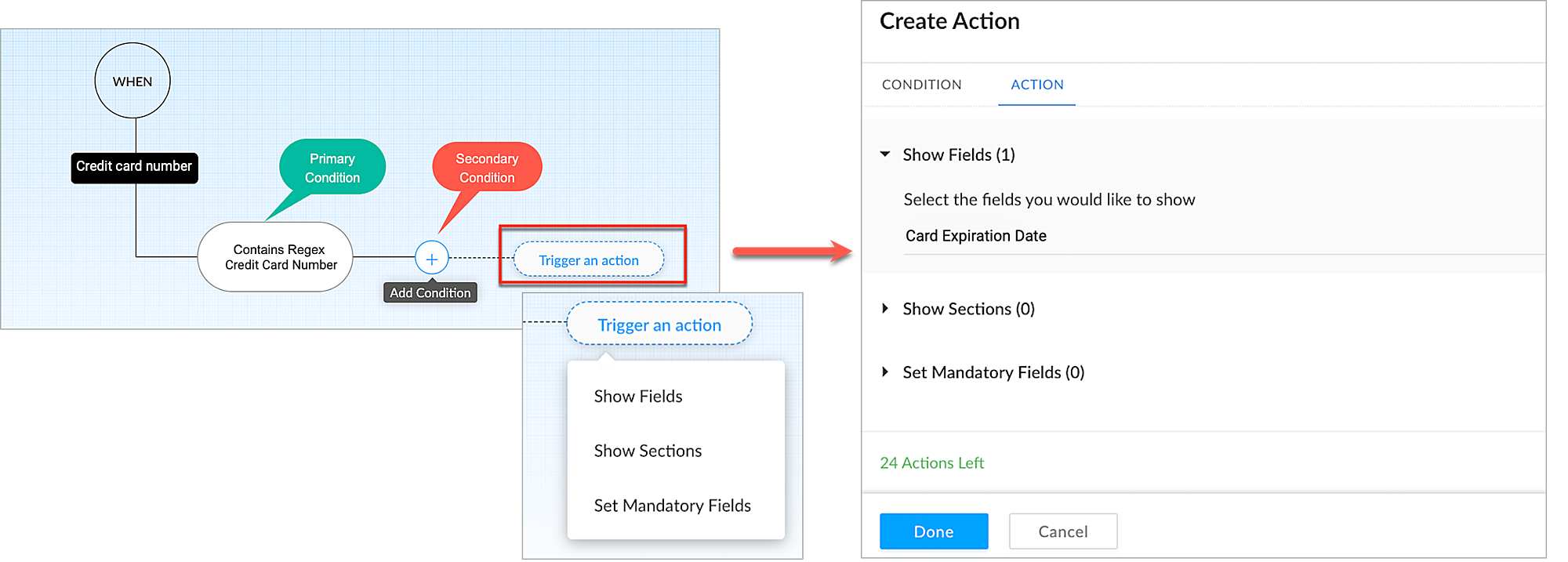
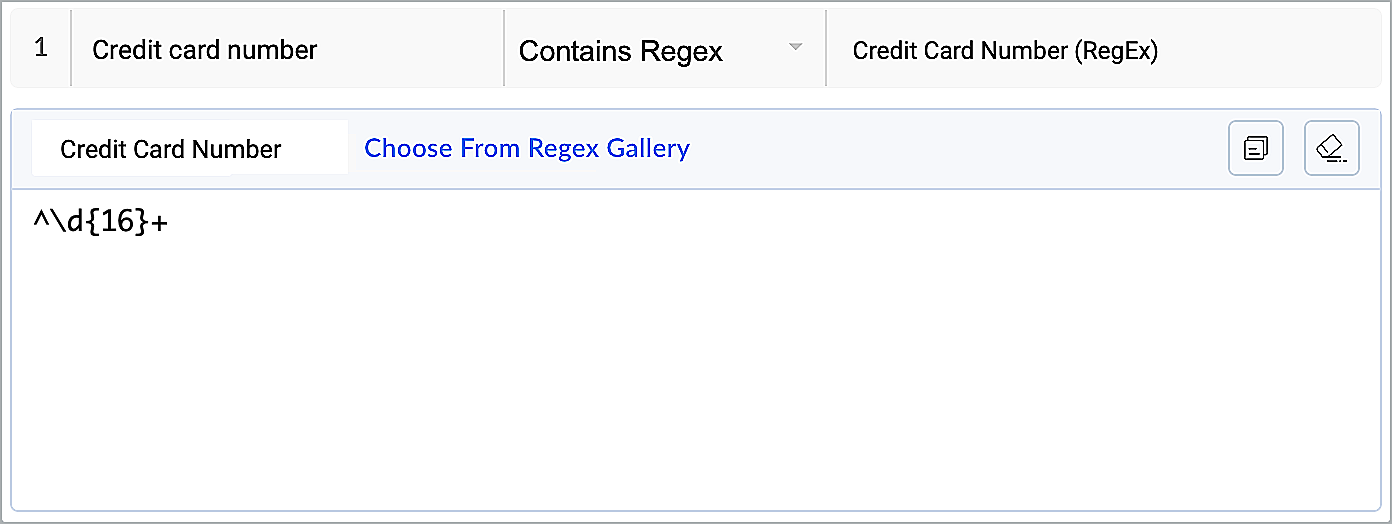
For example, let's say you have a checkout form layout where users can enter their credit card information. One of the fields is for the credit card number, which must be a valid 16-digit number. You want to display a second field for the user's card expiration date only if they have entered a valid credit card number. 


In such a case, you can create a layout rule using the regex criteria (Such as Card number + Matches Regex + Credit Card Number). This would check whether the user's input for the credit card number field matches the regex pattern. If it does, it would then display the expiration date field. 


Regex in validation rules 

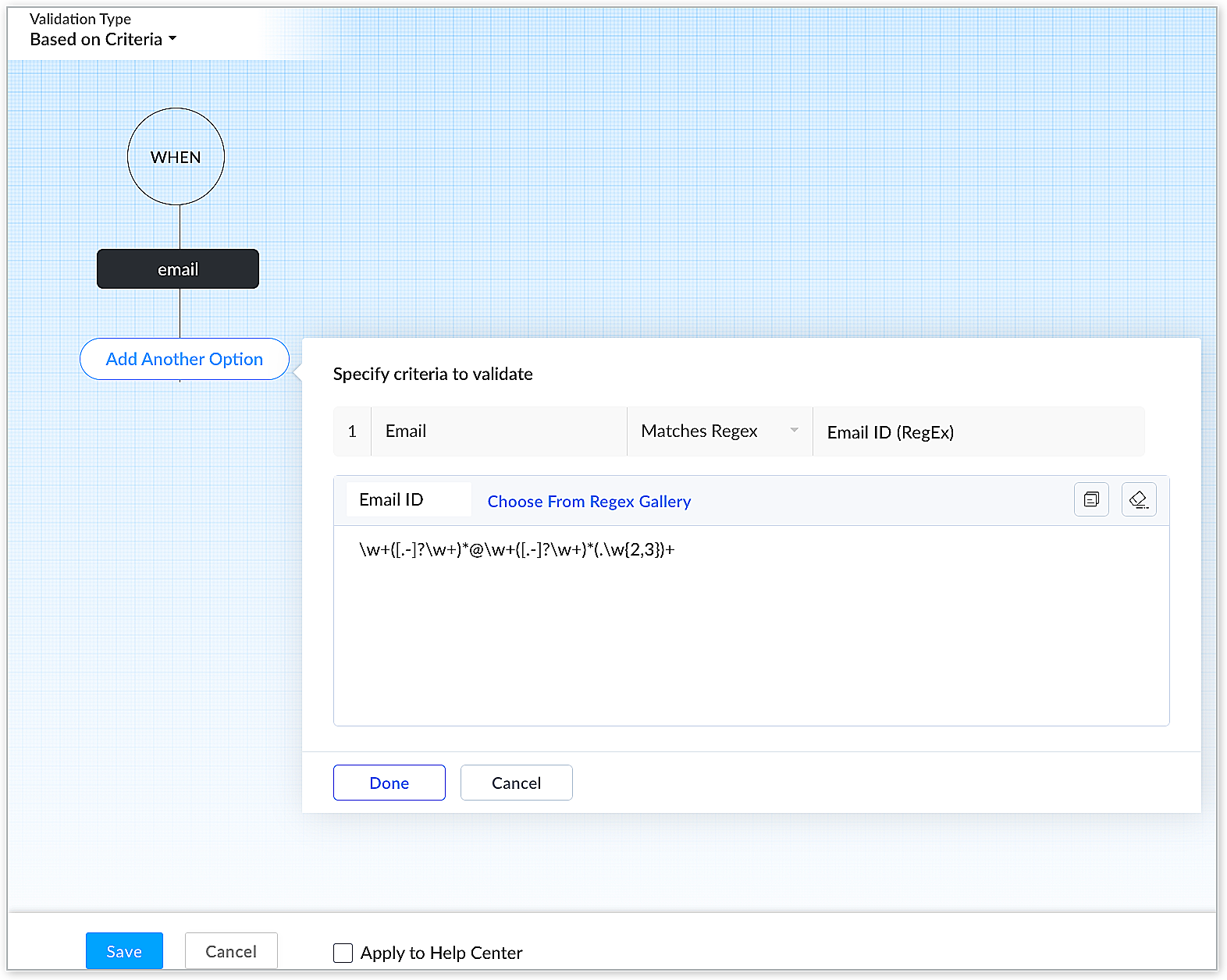
By using regex in validation rules, you can ensure that an end user's input matches a specific format, and reject any input that does not match this pattern. This can be useful in ensuring that only valid input is accepted and preventing errors or security vulnerabilities that could result from accepting invalid input. For example, you can create a validation rule using regex to validate whether an end user enters an email address in a specific format.


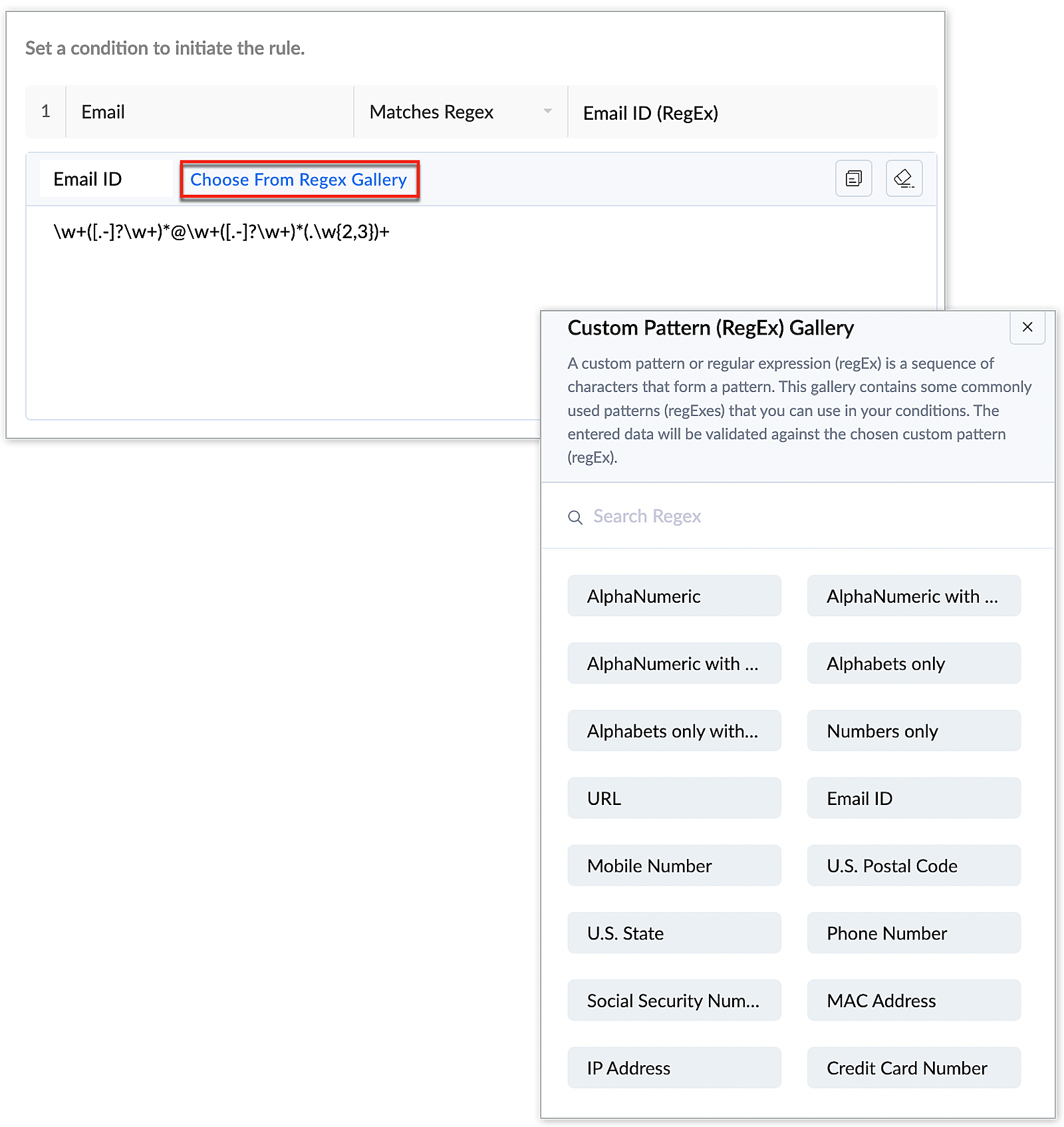
While defining the Regex criteria, you can either manually create a custom regex pattern or choose a desired pattern from the regex gallery.


To know more about the full potential and detailed implementation steps of Regex, refer to our help article -> Regex in Layout and Validation Rules.


The introduction of Regex in our platform expands the capabilities of our layout and validation rules and opens up new possibilities for customizing forms. 


We welcome all our users to tryout this new functionality and provide us with feedback on your experience. As always, we strive to improve our platform continually and provide our users with the best possible experience.


Thank you for your continued support!


Have a great day!

Regards,

Varsha P | Zoho Desk - User education


    • Sticky Posts

    • 2024 Email Authentication Standards: Elevating Security with Google and Yahoo

      In contemporary email communication, email authentication plays a pivotal role in mitigating email fraud, spam, and phishing attacks. Brace yourself for a new level of security. Starting February 2024, Gmail and Yahoo will be implementing robust email
    • Using Agent Email Address as From Address

      Currently, while replying to a ticket, it is possible for agents to choose their own email addresses as 'from' addresses. Although we built this just for that little extra flexibility, in hindsight, it hasn't figured much in conventional usage.  Almost all businesses prefer that responses to their customers' tickets be sent from the common support/service email address and NOT from those of individual agents. During personal interactions at events, some of you have even made passing mentions about
    • Edit and Delete options in Comments

      A lot of teams have been using ticket comments extensively to collaborate everyday. Notification Center further improved this experience by bringing real-time updates. As we continue to build more improvements to this experience, we've shipped a small-yet-important
    • Webinar 2: Supercharged customer support for growing business

      Join us for this webinar and learn how to step up your support game using a real-time communication platform to generate happier, more successful customers. In this live webinar, we will will discuss the importance of SalesIQ for your support team and how it can help you:  Understand your customers better and their journeys to proactively support and engage them even before they ask for help.  Integrating real time conversations into Zoho Desk’s Support, providing a conversational customer service
    • Customize Colors of your Customer Self Service Portal

      You asked for it. We heard you. We're happy to roll out the most sought after feature request, Customizing the Colors of your Customer Self-service Portal. Now you can set the color of your customer portal to mimic your company's web site, so that your customers visiting the portal will not feel alienated by the default theme.  Go ahead and configure the color of the header, tabs, fonts and background according to your needs. You can either choose between default color themes like Blue, Grey, Green
      • Recent Topics

      • Enable integration of CRM CPQ functionality for ZohoOne customers using Zoho Finance application

        Hi there. I can't believe I'm needing to launch this idea as I would have thought this was a little obvious. Following a number of conversations with the technical team it's become evident that the CPQ functionality within CRM cannot integrate with Zoho
      • Mail Merge in Zoho Desk

        Hello Team, Do we have an option of mail merge within Zoho Desk like we have in Zoho CRM? We have a requirement to generate some pdf file in the form of mail merge doc from the ticket.
      • Ignore Auto Sales Order number generation not working

        Hi, My Flow has broken and I'm no longer able to use the Ignore auto number generation function and instead use the field that came from the trigger (via Jotform) when creating a new Sales Order in Books. Any suggestions how to fix this?
      • Re-Apply SLA When Ticket Reopened from Closed Status?

        If you have an SLA applied, timers are deactivated when going to "On Hold" status type and reactivated when going back to an Open status type. What we discovered is when a customer replies to a closed case and it reopens, the SLA is not applied and timers
      • Coupon Codes and Cancelling Subscriptions

        We have two Zoho One organizations, one we use for dev/testing. In Zoho Billing when we cancel a subscription, we are getting two different behaviors with regards to coupons. In one environment, the coupon is removed upon cancellation. In the other, the
      • How to set custom Sales Order numbers

        I am trying to create Sales Orders with data from Jotform submissions. Auto number generation is disabled within Books. Whereas the flow Input recognizes the number (40732 in this example), the Output does not. How can I fix this? I'd like the number
      • WhatsApp Calling Integration via Zoho Desk

        Dear Zoho Desk Team, I would like to request a feature that allows users to call WhatsApp numbers directly via Zoho Desk. This integration would enable sending and receiving calls to and from WhatsApp numbers over the internet, without the need for traditional
      • Copy Creator file field to CRM file field.

        Hello, I am trying to transfer the content of a Zoho Creator record afer form submission to a new CRM deal record with a deluge form worklfow. I am trying to see of I can transfer the files fields. creationMap = Map(); if(Revendeur == "IEL Technologie
      • Introducing SlyteUI : From Idea to a Working Interface in Minutes

        Hello everyone! Are you spending hours building basic UIs? Does even the smallest customization feel like a major task? CRM customization should feel intuitive and straightforward, not time consuming or exhausting. SlyteUI makes this possible by simplifying
      • How to install Widget in inventory module

        Hi, I am trying to install a app into Sales Order Module related list, however there is no button allow me to do that. May I ask how to install widget to inventory module related list?
      • Sync Task Status from Zoho Projects to Zoho Desk

        Hi Zoho Desk Team, Hope you’re doing well. We’re actively using the Zoho Desk–Zoho Projects integration, which helps our support and project teams stay aligned. However, we noticed that when we change a task’s status in Zoho Projects, the change is not
      • Discussion Forum Categories and Forums

        I'm prepping for a forum roll out and found that there isn't a lot of granularity of permissions on the forum level.  It would be nice to see the settings from the category level of the forum available at the forum level, so you can assign who can post
      • Is there a way to sync Tags between CRM and Campaigns/Marketing Hub?

        I wonder if there is a way to synch the tags between CRM and Marketing-Hub / Campaigns?
      • Host not reachable when sending

        For few partner that I send regular emails now got error and they don't receive emails Temporary failure fam-xxx.hr/185.xx.xx.xxx Host not reachable. Have more than 20 mails in https://mailadmin.zoho.eu/cpanel/home.do#mailSettings/retryEmail please
      • Negative Quantity on an Invoice

        I need to be able to put a negative quantity on an invoice in books and inventory. Example, customer is buying part A, which has a removeable part, part B. Customer wants Part C which replaces Part B. We swap them for the customer. On an invoice we should
      • Button Duplication when emails forwarded or replied

        When I create a new email template in campaigns and send it out it looks fine to all the users, however if that email is then on forwarded or replied to then all buttons within the email duplicate.  See below The one on the left is the original one.
      • Super Admin Logging in as another User

        How can a Super Admin login as another user. For example, I have a sales rep that is having issues with their Accounts and I want to view their Zoho Account with out having to do a GTM and sharing screens. Moderation Update (8th Aug 2025): We are working
      • What's New in Zoho POS - March 2026

        Hello everyone, Welcome to Zoho POS’s monthly updates, where we share our latest feature updates, enhancements, events, and more. Let’s take a look at how March went. Zoho POS Android app with Arabic and RTL Support for Saudi Arabia We have launched the
      • Zoho Projects Android and iOS app update: Custom modules

        Hello everyone! We are excited to introduce the custom modules within the Zoho projects mobile app. Custom modules allow you to define your own entities with relevant fields, enabling you to capture and manage information specific to your workflows beyond
      • Zoho Projects iOS app update: Flag type(Internal/ External) information in Task list header

        Hello everyone! We have now included the Flag(Internal/ External) type information on the Task list header within the Tasks listing screen of the Zoho Projects iOS app. This enhancement enables you to distinguish between the internal and external tasks
      • How to close an estimate ?

        Hello, I have created estimates, and converted them to invoices to get 50% payment. Now I have 2 cases where the estimate stills shows status partially invoiced, however: 1. for one of them, project stopped half way, so the remaining part will never be
      • Will Zoho Search work with Zoho Learn

        Currently, Zoho Search only works with Zoho Wiki which will be phased out.  Moving forward, will Zoho Search be enabled for Zoho Learn? Thanks.
      • No possibility to make acknowledgement checkbox be not preselected and mandatory

        There is functionality available to enable a checkbox for the acknowledgment of the user confirming that the lesson has been completely read and understood. Currently, it is pre-selected but not mandatory. This leads to learners simply ignoring it. The
      • Ability to modify what displays in calendar invite?

        I am a long time calendly user and want to make the switch to bookings.  I understand that there is not currently a meets/hangouts integration, is one on the roadmap? Is there anyway I can modify the calendar invite to include the meet link?  I can add it to the emails no problem, but I would also like it to display on their calendar.  Is there some work around I can do to get it on the calendar?  Also am I able to modify the calendar event title?
      • since the new interface of ZOHO writer can't turn of automatic reminder option for merge documents

        Since the new interface of ZOHO writer I have this problem. I have a large set of templates that I use to send documents to ZOHO Sign. But now in all those templates the box for Sending reminders is ticked, which i don't want. But even if I untick the
      • Global "Search" in FSM

        I'm missing the global Search function like in CRM. This should save us a lot of time. We don't now upfront if the customer is a Contact or a Company. So now we have to guess in what module to start a search/filter. Also looking up an address, phone number,
      • Set Default Status of Assembly to "Assembled" When Entered in UI

        I've just discovered the new "confirmed" status of Assemblies within Inventory. While I understand the intent of this (allowing for manufacturing planning and raw material stock allocation), it was initially confusing to me when manually entering some
      • Announcing Zoho Sheet desktop app for macOS and Windows (Beta)

        Hello Sheet users, We know you’ve been waiting for this one. It has always been the top priority on our roadmap to provide a single native desktop app for macOS and Windows that works both online and offline. Today, we are excited to announce that the
      • Automation#17: Auto-Create Tasks in Zoho Projects Upon Ticket Creation in Zoho Desk

        Hello Everyone, This edition delivers the solution to automatically create a task in Zoho Projects when a ticket is created in Zoho Desk. Zylker Resorts uses Zoho Desk for bookings and handling guest requests. Zylker resorts outsources cab bookings to
      • Unable to Access /crm/v7/taxes – OAuth Scope Mismatch in Zoho CRM API

        I am currently integrating Zoho CRM (v7 API) with our system and I need clarification regarding the Taxes API and OAuth scopes. Context: We are creating Quotes via the API (/crm/v7/Quotes) Each quote contains line items with taxes (e.g., TVA 19%, 10%,
      • Reading emails sent from Zoho

        Hi there, How do I view an email sent from Zoho, for example an email which contains an estimate? I can see there is a tab in the screen for that estimate which is labelled 'Emails' and I can see a summary of the email sent listed there, but I cannot
      • Search API filter/sort ignores comment-triggered modifiedTime updates

        Summary When a comment is added to a Call or Account, the parent record's modifiedTime is correctly bumped. This bumped value is visible in: GET /api/v1/calls/{id} ✅ GET /api/v1/calls/search without a filter ✅ — the record's response body shows the new
      • Can't View Project Names in Mobile App

        I can't view project names on PO's in the app, nor can I add that as a viewable PDF field in inventory on the computer. I've attached screenshots showing that in the mobile version whether you are on the PO, editing the PO, or viewing the PO line items,
      • Looking for other Zoho users in Canada

        I would like to find other users in Canada to share ideas and suggestions. To see if you are experiencing same issues re HST/taxes, banking, etc.
      • Zoho Books' 2025 Wrapped

        Before we turn the page to a new year, it’s time to revisit the updates that made financial management simpler and more intuitive. This annual roundup brings together the most impactful features and enhancements we delivered in 2025, offering a clear
      • Intergrating multi location Square account with Zoho Books

        Hi, I have one Square account but has multiple locations. I would like to integrate that account and show aggregated sales in zoho books. How can I do that? thanks.
      • Columns with no data still displayed despite "Show missing values" disabled

        I have a table with missing data, but columns are still being displayed even though the "Show missing values" option is disabled. The table contains 3 columns split across 12 months. I suspect the issue is caused by one of the columns using an aggregation
      • What's New in Zoho Inventory | January - March 2026

        Hello users, The first quarter of 2026 has been dynamic! We’ve shipped a powerful set of updates in Zoho Inventory to enhance item control, improve warehouse efficiency, expand integration and reporting capabilities. From a unified item creation experience
      • Business Day Logic Update: More Accurate Scheduling for Your Workflows

        Hello everyone, We’re improving how business-day calculations work in workflows, especially when triggers happen on weekends. This update ensures that offsets like +0, +1, and +2 business days behave exactly as intended, giving you clearer and more predictable
      • No DINAR (Serbia) in currency list

        There is no Serbian Dinar listed in the currency list. Dinar is available in Books, Inventory, CRM, FSM. Please make it available in Desk as well. Without it, the integration with other apps is not possible.
      • Next Page