Introducing AWS authentication for connections in Deluge

Introducing AWS authentication for connections in Deluge

Hello everyone,

We're incredibly excited to announce the all-new AWS authentication for connections in Deluge! This highly anticipated feature simplifies connecting to Amazon Web Services, opening up a world of possibilities and allowing you to seamlessly integrate your Zoho apps with the power and scalability of the AWS cloud.

What does this mean for you? 

This new integration empowers you to connect and access AWS services like S3 directly from within Deluge. This eliminates the need for third-party tools to achieve a connection between Zoho and AWS. It also allows you to harness AWS's scalability for handling massive datasets while utilizing Deluge's power for complex transformations.

How does it work? 

AWS is now offered as a custom connector in Deluge. This AWS connection utilizes Signature Version 4 authentication, the most up-to-date and secure method for authenticating requests to AWS services. It offers several key advantages that help protect your AWS credentials and prevent unauthorized access.

Availability 

The new AWS authentication for connections is available across all Zoho services that support Deluge connections. This means you can use it within your existing Zoho applications, be it CRM, Books, Mail, or others, to unlock new possibilities.

Creating an AWS connection 


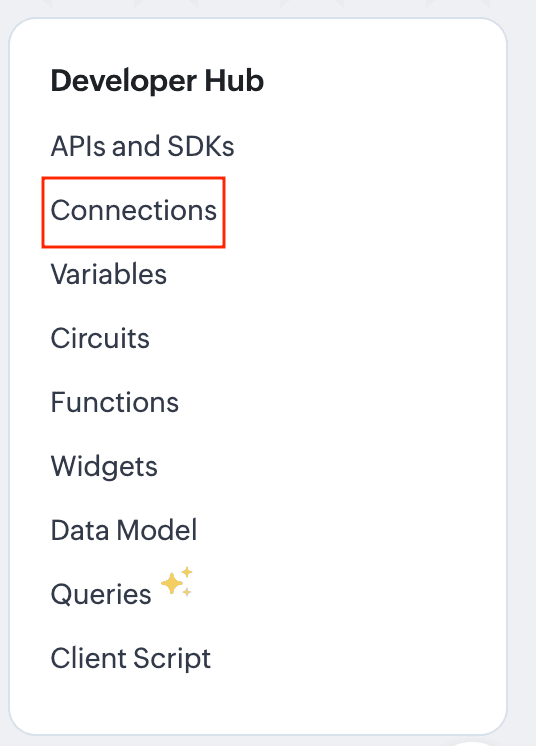
  1. Navigate to the Connections section of the desired Zoho service. For this example, we'll use Zoho CRM. For Zoho CRM, you can access it under Settings -> Developer Hub -> Connections.
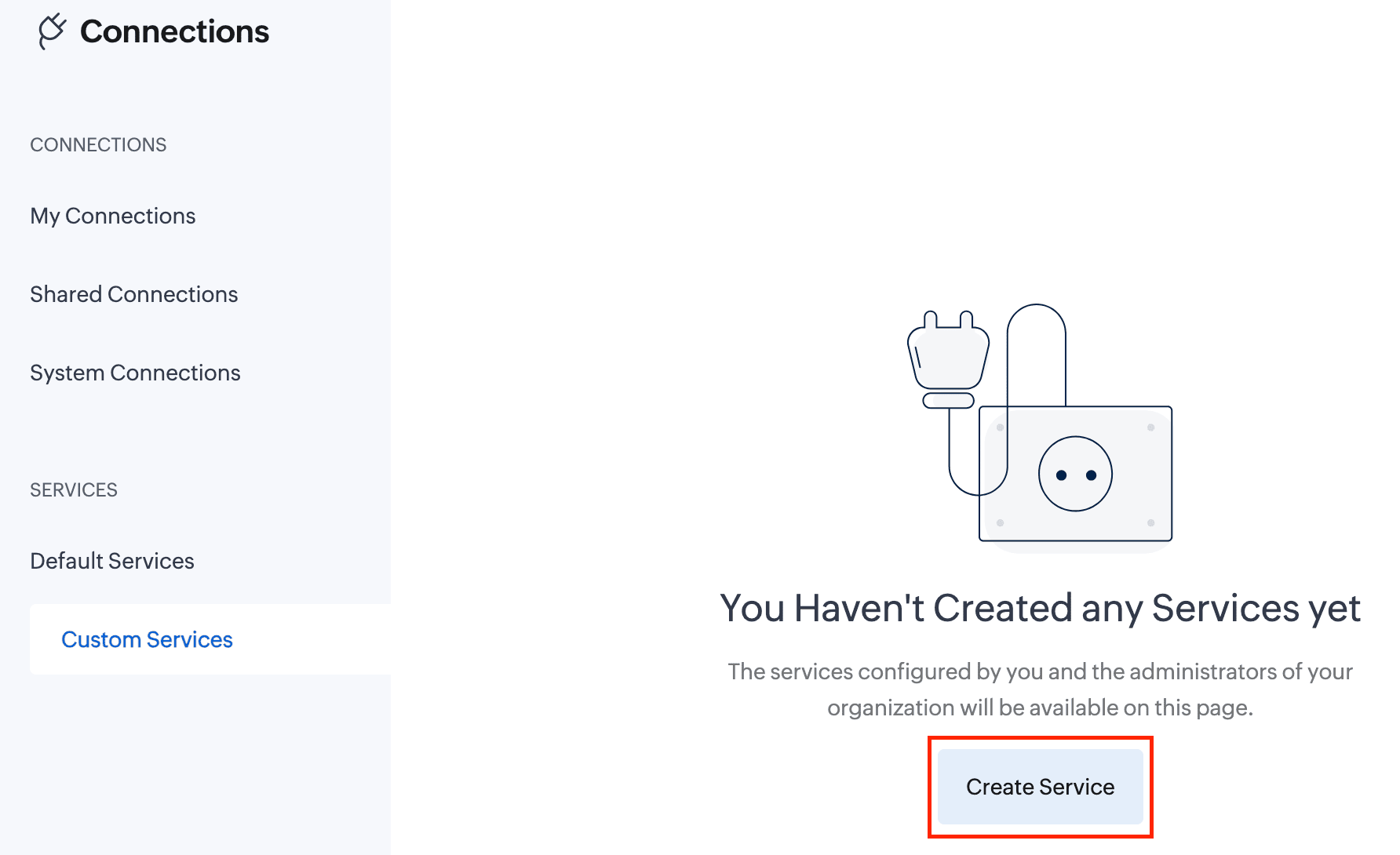
  2. In the Connections section, go to Custom Services and click the Create Service button.
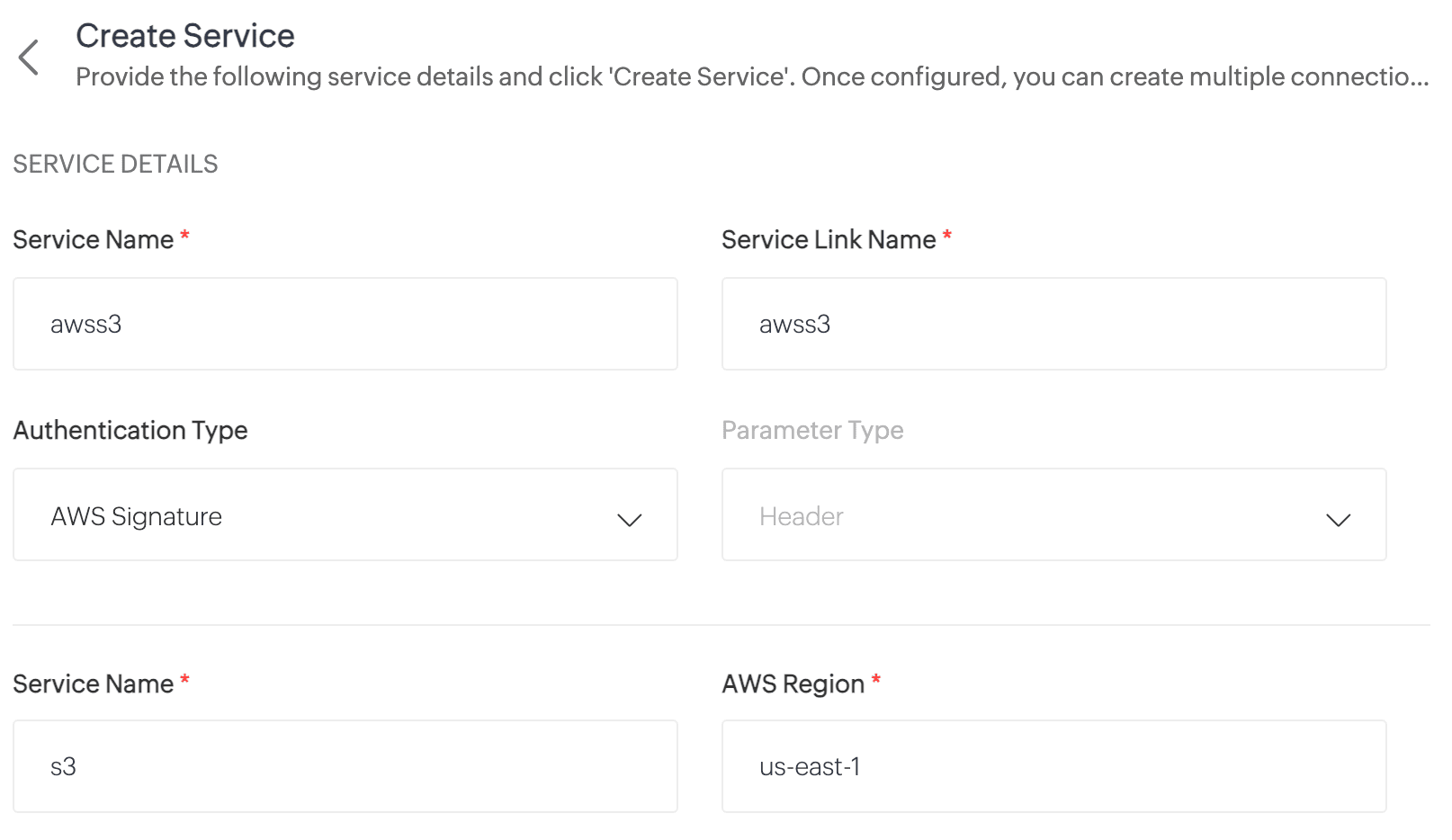
  3. On the Create Service page, enter the following details:
    Service Name: awss3 //Custom connector name
    Service Link Name: awss3
    Authentication Type: AWS Signature
    Service Name: s3 //Amazon service name
    AWS Region: Enter your AWS region. To find your AWS region, log in to your AWS account and navigate to Console -> S3 -> General Purpose Buckets. Locate your storage buckets and copy the AWS region (e.g., us-east-1) displayed next to the required bucket.
  4. Click Create Service. The AWS S3 custom service will now be created.
  5. Now, navigate to My Connections and click Create Connection.
  6. On the Create Connection page, go to Custom Services under Pick Your Service and select awss3.
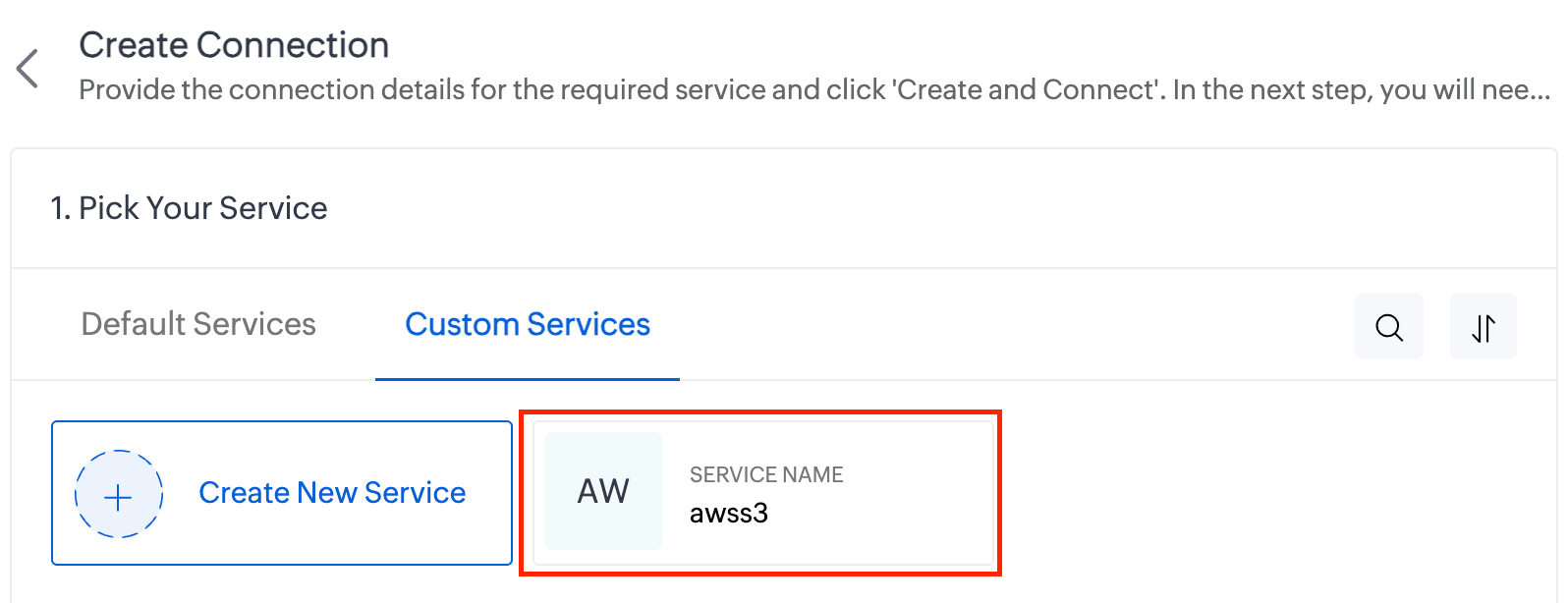
  7. Enter the Connection Name and Connection Link Name. Then click Create and Connect.
  8. You'll be redirected to the AWS authorization page, where you'll need to enter your Access Key and Secret Key.
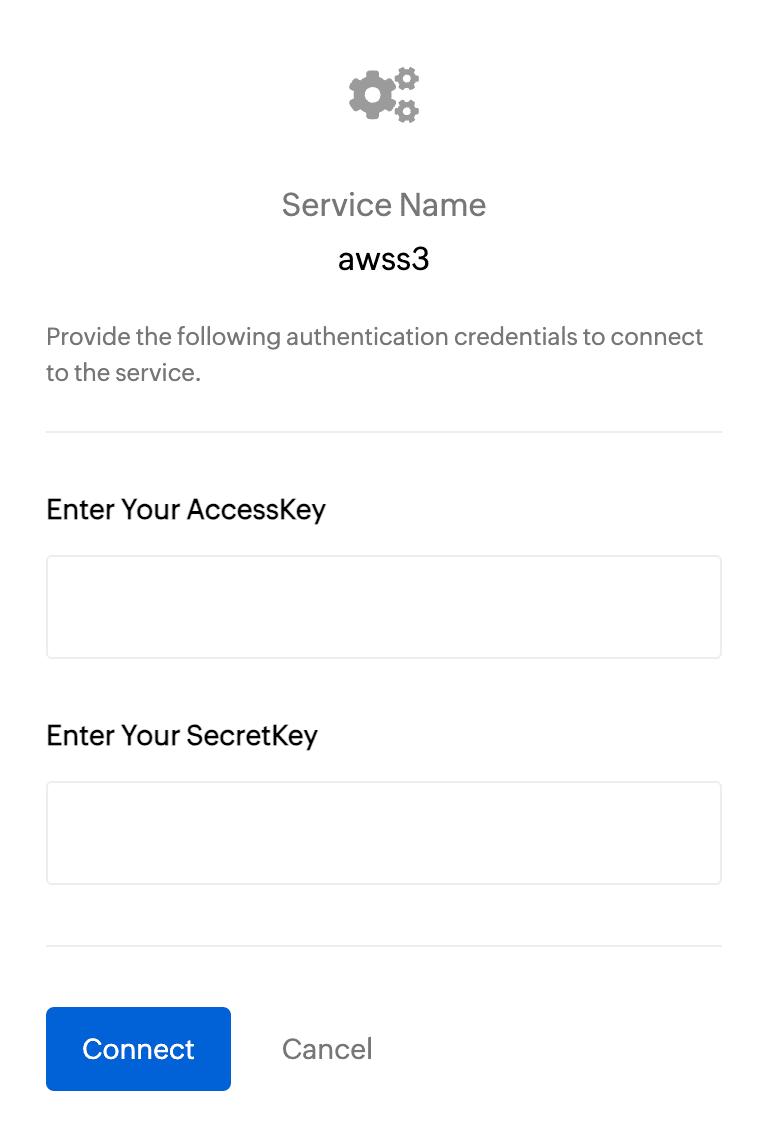
    To get the Access Key and Secret Key:
    1. Log in to your AWS account and navigate to IAM.
    2. In the left pane, under Access Management, click Users.
    3. Select the required user from the list.
    4. On the User Details page, go to the Security Credentials section.
    5. Under Access Keys, click Create Access Key.
    6. On the next page, choose Command Line Interface (CLI) as the use case and click Next.
    7. Click Create Access Key.
    8. Copy the Access Key and Secret Key, then paste them into the respective fields on the AWS authorization page.
    9. Finally, click Connect.
  9. Your AWS connection has now been successfully created!

Working with AWS connections

Now you can utilize this AWS connection to integrate with AWS services and perform various actions, such as storing and retrieving data from Amazon S3. This connection can be leveraged across Zoho services (such as functions) to automate your data workflows.

For example, let's create a function to upload a file to AWS S3:
  1. Create a new function. Name the function and choose the appropriate type.
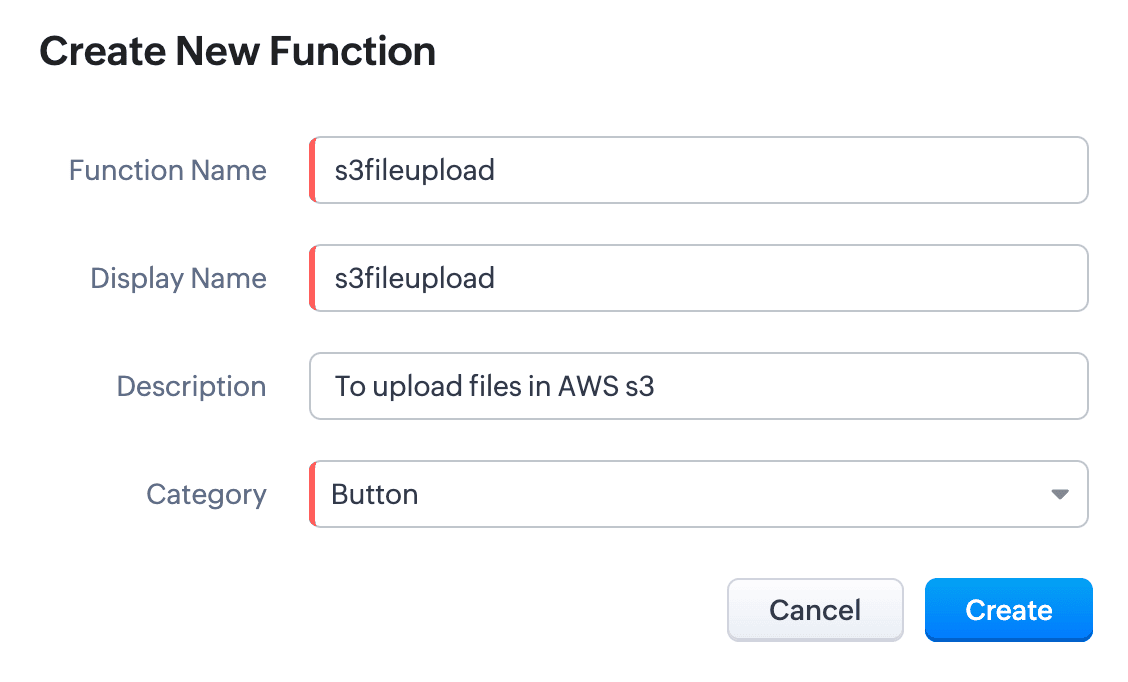
  2. Write the required scripts in the Deluge editor.
    Here's a sample script which fetches a file from a given URL and uploads it to an AWS S3 bucket using the configured AWS connection:
    Quote
    fileResponse = invokeUrl
    [
    url:"https://filesamples.com/samples/document/txt/sample1.txt"
    type: GET
    ];
    file = tofile(fileResponse,"sample1.txt");

    // Upload the file to AWS S3
    awsResponse = invokeUrl
    [
    "https://<your-bucket-name>.s3.amazonaws.com/<file-name>" // Replace with your bucket name and file name
    type: PUT
    parameters:file
    content-Type : "application/octet-stream"
    connection: "awss3" // Use the AWS connection created earlier
    detailed:true
    ];

    // Log the response
    info awsResponse;
  3. Execute the function by clicking the Save and Execute button.
  4. Switch to your AWS account, go to Console -> S3 -> General Purpose Buckets, and select the required bucket.
  5. You’ll see the sample file from the script listed under the Objects section. Every successful execution results in the file being uploaded to the bucket

Use cases 

  • Zoho CRM: You can automatically back up important customer documents from Zoho CRM to AWS S3. For instance, when a new file (e.g., contracts, proposals) is uploaded to a CRM record, a Deluge function can be triggered to fetch and store the file in S3 storage.
  • Zoho Books: You can store and retrieve invoices from Zoho Books to AWS S3. When an invoice is generated, a Deluge function fetches the PDF and uploads it to an S3 bucket. This can act as centralized space for all your invoices.
 
We have comprehensive documentation covering everything you need to know about Deluge connections. For more information, visit our Deluge Connections help doc.

Note: Please be aware that Zoho Creator has its own Connections feature, and we are working to bring AWS connections to Creator soon.

That’s all from us on the AWS connector! We hope you find it valuable and make the most of it across Zoho services. Give it a try, explore its possibilities, and let us know your thoughts.

And if you need any assistance, don’t hesitate to reach out to us. We’re always happy to help.

Regards,
The Deluge Team
    • Sticky Posts

    • Function #41: Sync Associated Subforms!

      Welcome back everyone! The last custom function showed how to update a Contact with Product details from it's Related list in Deals. This week, let's look at a function that lets you update subform records in two modules simultaneously when one of them is updated. Business scenario Let's look at how subform helps in an education institution that has deployed Zoho CRM. National Public School, Austin (made up, of course!) has set up Zoho CRM and it follows the same relationship pattern of "Students",
      • Recent Topics

      • Zoho Campaigns API endpoint for contact details

        there is some REST API support for Zoho Campaigns, however, I am not able to find an endpoint for "get contact details".  in particular, I'd like to access contact's subscription status and also their topic. ideally there is all profile available including
      • Specifying time increments on a Date/Time field

        Hi all, Im using a Date/Time field in my CRM module. At the moment the increments are 30 minutes. How can I change these to be 15 minutes? Thanks
      • Nimble enhancements to WhatsApp for Business integration in Zoho CRM: Enjoy context and clarity in business messaging

        Dear Customers, We hope you're well! WhatsApp for business is a renowned business messaging platform that takes your business closer to your customers; it gives your business the power of personalized outreach. Using the WhatsApp for Business integration
      • Sort by Project Name?

        How the heck do you sort by project name in the task list views??? Seems like this should be a no-brainer?
      • Maximum limit of bank accounts

        I'm currently setting up Zoho Books in order to migrate at the start of our next financial year (April) and while adding bank accounts I've tried to add a second account from the same bank and receive an error about the maximum limit of bank accounts.
      • Account and Email and Password

        I'm signing up as a Partner so I can move my website clients across to a separate email server from their current cPanel one.. So I have a Zoho account and then I moved one of my emails across to that account to test the import process... So the question
      • Zoho Sprints iOS and Android app update: Global view. Screen capture control, file encryption, tags enhancement(iOS)

        Hello everyone! We are excited to introduce new features in the latest version(v2.1) of the Zoho Sprints iOS app update. Let’s take a quick look at what’s new. 1. Global view Global view brings all your project items into one centralised space. You can
      • Creating Restaurant Inventory Management on Zoho

        Hi,  We run a small cloud kitchen and are interested to use Zoho for Inventory and Composite Item tracking for our food served and supplied procured to make food items.  Our model is basically like subway where the customer can choose breads, veggies,
      • Price Managment

        I have been in discussions with Zoho for some time and not getting what I need. Maybe someone can help explain the logic behind this for me as I fail to understand. When creating an item, you input a sales rate and purchase rate. These rates are just
      • How do I create an update to the Cost Price from landed costs?

        Hi fellow Zoho Inventory battlers, I am new to Zoho inventory and was completely baffled to find that the cost price of products does not update when a new purchase order is received. The cost price is just made up numbers I start with when the product
      • only 100 entry download entries in Zoho Form

        Is there a way to download more than 100 entries in a form at a time? It is capped (unless I am not doing the export correctly). This is very frustrating as I want to make sure I don't miss a record when downloading data. Thanks!
      • Zoho FSM Premium Edition is Here

        As your field service operations grow, so do the complexities — managing large distributed teams, keeping sensitive data secure, generating the right reports at the right time, and ensuring every technician dispatched is the right fit for the job. The
      • Seeking a WhatsApp Business App (not API) Zoho CRM integration

        We have a business need to integrated WhatsApp Business App (not API) into Zoho CRM to centrally manage communications between our Sales team and Leads & Contact. Is there a reputable integration available for this scenario of ours? Core features we would
      • Zoho Recruit mailserver get blocked by Microsoft!

        Hi, We have experienced this issue twice now, where Zoho Recruit outbound IP addresses are being blocked by Microsoft. We are confident that Microsoft is the blocking party, as all outbound emails to candidates with @hotmail.com, @live.com, and @outlook.com
      • Auto-sync field of lookup value

        This feature has been requested many times in the discussion Field of Lookup Announcement and this post aims to track it separately. At the moment the value of a 'field of lookup' is a snapshot but once the parent lookup field is updated the values diverge.
      • How are other Books users integrating crypto and digital assets into Books?

        If my company owns some digital assets I would want those to exist in Books as assets, and also be able to change the value as needed when generating reports. My company would also be receiving payment in cryptocurrencies and may sell at the time of payment
      • Lets Talk Recruit: Key takeaways from our India community meetups

        Welcome back to Let's Talk Recruit — the series where we bring you real stories, product insights, and community highlights from the world of recruitment. Our last post covered how Resume Harvester can take the follow-up out of hiring. This edition is
      • Edit a previous reconciliation

        I realized that during my March bank reconciliation, I chose the wrong check to reconcile (they were for the same amount on the same date, I just chose the wrong check to reconcile). So now, the incorrect check is showing as un-reconciled. Is there any way I can edit a previous reconciliation (this is 7 months ago) so I can adjust the check that was reconciled? The amounts are exactly the same and it won't change my ending balance.
      • Approval Workflow for Purchase Orders Abrir

        The requirement is , that all purchase orders greater than or equal to 5000 go through an approval process from certain people, but within books I only see that the approvers can be by levels or any approver but we cannot enter a rule like these. Can
      • Unable to create new finance account in Zoho Books Android app due to missing account number field.

        Free plan I have enabled a setting via the website requiring unique account codes to be specified for all accounts. When using the android app, go to expenses, new expense, select account, new account. Promoted to enter the Account name and description.
      • How to Fetch data from Sales Order and Insert into Purchase Order with Deluge

        Hello, I am wanting to write a Deluge script that would take the shipping address on a Sales Order and upon conversion to a Sales Order automatically insert it into that corresponding PO. I am new to Deluge but understand that it has great capabilities.
      • Google Drive shared folder

        My deluge script has stopped working, no longer collecting files from Google Drive - have these connections finally been deprecated ?? They seem to be active but errors occur when updating them ?
      • Can't add attachment on email template

        The attachment does show up. This is my template. Hi ${Cases.Assigned Programmers}, Please be reminded about the following task that has been assigned to you. Subject : ${Cases.Subject} Description : ${Cases.Description} Ticket # : ${Cases.Request Id}
      • Zoho Desk: Mobile Updates | Q1 2026

        Hello everyone, Greetings! As we gear up for the end of Q1, we are excited to share a quick journey into all that released in the first quarter of 2026. We have brought in a few enhancements in the mobile apps that improve overall user experience and
      • CRM x WorkDrive: We're rolling out the WorkDrive-powered file storage experience for existing users

        Release plan: Gradual rollout to customers without file storage add-ons, in this order: 1. Standalone CRM 2. CRM Plus and Zoho One DCs: All | Editions: All Available now for: - Standalone CRM accounts in Free and Standard editions without file storage
      • Additional Address - Company Name

        It would be very helpful to have a "Company Name" field in the Additional Address shipping section.  In a situation where you drop-ship orders to a different address or different company entirely, it may be necessary to list the company name of the receiver. I understand that the Attention field can be used for that purpose, but that's not really the intended purpose of that field.
      • All new Address Field in Zoho CRM: maintain structured and accurate address inputs

        Availability Update: 29 September 2025: It's currently available for all new sign-ups and for existing Zoho CRM orgs which are in the Professional edition exclusively for IN DC users. 2 March 2026: Available to users in all DCs except US and EU DC. 24
      • Zoho Payroll's Kuwait, Oman, Qatar, Bahrain and Canada edition is available in Zoho One

        Great news for Zoho One users! Zoho Payroll has expanded to five new regions: Kuwait, Oman, Qatar, Bahrain, and Canada. And the best part? These new editions are fully integrated with Zoho One, just like our existing editions in India, the UAE, Saudi
      • Does Zoho Creator support multilingual translation for user-entered data?

        I understand that Zoho Creator provides localization support for UI elements such as field labels and static text. I would like to know: Does Zoho Creator support automatic translation of user-entered data (for example, form inputs or stored records)
      • Upload field on tasks module

        Hello, Why I cannot add an upload field to a Task? Or maybe when creating the task make attachements visible, so you can add an attachement while creating the task? Looking forward to your response!
      • WhatsApp phone number migration

        Hi @Gowri V and @Pheranda Nongpiur, Thanks for implementing the promised enhancements to the integration between Zoho CRM and WhatsApp. The previous discussion has been locked, so I'm opening this new one. I am copying below a specific
      • How to let club members update their own profile data

        Our club has about 200 members. We keep names, addresses, phones, emails, payment records, etc. for each, recently migrated to Creator. Once a year I send email to each member to confirm or correct their info on file with us, as well as ask for payment
      • Document retention in Zoho Sign

        Document management doesn’t end at signing. It extends to how long you retain agreements—and how securely you dispose of them. With the document retention option in Zoho Sign, you can define structured, policy-driven timelines for managing completed documents.
      • Sales Allowed Beyond Available Stock and Payment Recorded Without Restriction

        Hi, While testing in Zoho Inventory, I noticed that a sales order can be created with a quantity exceeding the available stock in the selected warehouse. In my case: Available stock: 5 units Ordered quantity: 6 units Despite this: I was able to convert
      • Deleting, Adding and Changing a Zoho Books Entry

        Zoho Books Community & Support, If a bulk upload of entries were added to an account, what is the process to: - Delete an entry - Change the amount of an entry - Is there a means to manually add an entry other than upload?
      • Zoho Commerce in multiple languages

        When will you be able to offer Zoho Commerce in more languages? We sell in multiple markets and want to be able to offer a local version of our webshop. What does the roadmap look like?
      • Zoho CRM - Feature Request - Analytics Components Group By Week Alternative Formats

        On the Zoho CRM Analytics Components, please consider adding an option to allow group by week format to be changed to other formats such as Week Commencing or Week Ending dates, rather than the current Week Number. This would provide improved usability
      • The Social Playbook March edition: Myth vs Facts

        We’ve all heard a lot of myths growing up. Some sound convincing, some feel believable, and over time they start to feel like facts. But the truth is, a myth is still a myth until it’s backed by real facts. Marketing is no different. Over time, many ideas
      • Updating Analytical Fields Data

        Dear Zoho team, I'm having an issue with the recently added fields in both Analytical Desk and Analytical. How can I generate the data in Analytical when new fields are added? https://analytics.zoho.com/workspace/2436819000000007005/edit/24368190000
      • Marketing Tip #26: Optimize product images for SEO

        Product images can do more than make your store look good. They can also help customers discover your products through search. Since search engines can’t "see" images, they rely on text signals to understand what an image is about. Two small actions make
      • Next Page