Introducing Bot Filtering for Accurate Email Campaign Analytics

Introducing Bot Filtering for Accurate Email Campaign Analytics


Alert
Update : This feature has been revamped. For the most current information and improved functionalities, please visit the updated version here.


Dear Marketers,


We're excited to announce a new feature designed to enhance the accuracy of your email campaign analytics: bot filtering. This feature helps you filter out bot-generated opens and clicks, ensuring your campaign reports reflect genuine recipient engagement.


What are bot clicks? 

Bot clicks are actions performed by automated software, not humans. These programs often scan emails for security threats like viruses or malicious links. As a result, they can inflate your engagement metrics by showing multiple clicks from a single contact, even if no one actually interacted with the email.


Why bot filtering matters 

Bot-generated activity can distort your campaign performance metrics. Our bot filtering feature helps you eliminate this noise, providing a more accurate picture of your audience's engagement.


Key features of bot filtering

  • Easy toggle: Enable or disable bot filtering with a simple switch in Settings > General Settings.

  • Accurate reporting: When enabled, bot filtering automatically excludes bot activity from your campaign reports, offering clearer insights.

  • Transparency: A visual indicator in your reports shows whether bot filtering is active, ensuring full transparency in your data analysis.


How it works

Default setting: Bot filtering is initially turned off to include all opens and clicks in your reports.

By leveraging bot filtering, you can gain a more accurate understanding of your email campaign performance and make data-driven decisions with confidence. 


NotesNote: To provide more granular insights, we're incorporating detailed bot data into our email campaign reporting. This will empower users to monitor performance closely and take informed actions.Due to the simultaneous development of report handling improvements, we have revised the anticipated release date. You can expect this release to go live by Jan 2025.


Here's how to enable the bot filtering option in Zoho Marketing Automation.

Step 1: Bot filtering option

Locate the Bot Filter link under Settings > General settings.
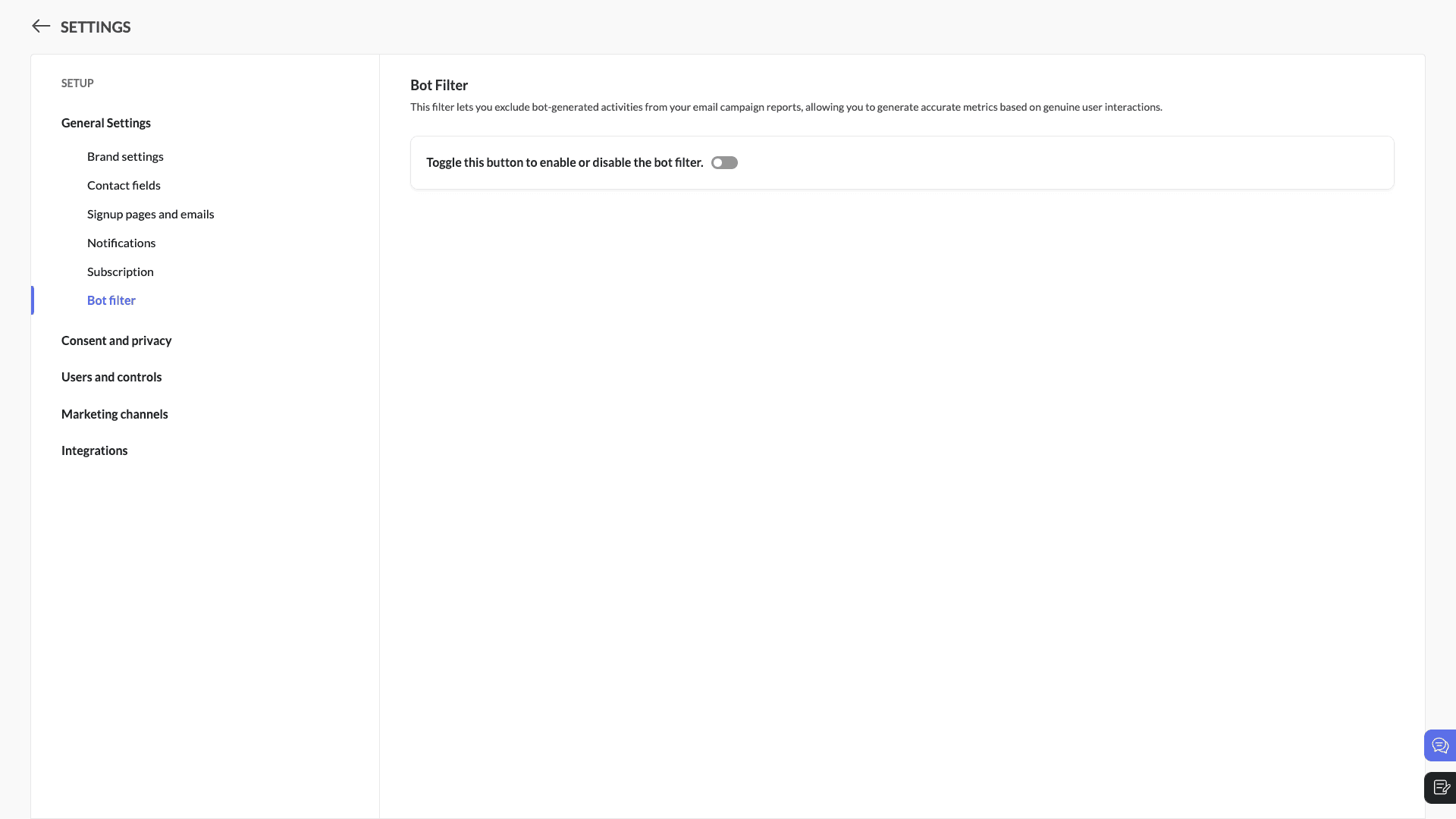


Step 2: Toggle the bot filtering option
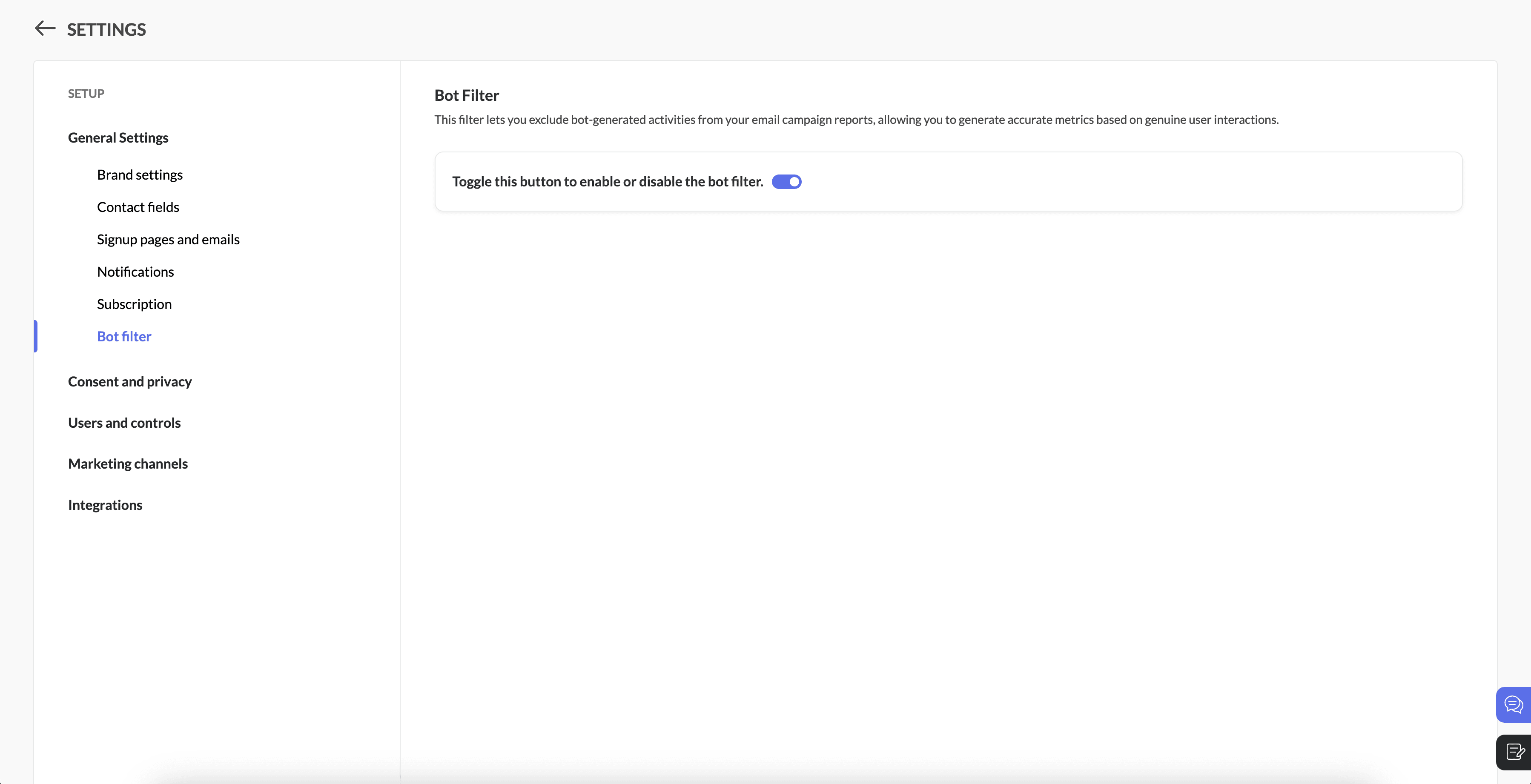
In the Bot Filter setting, click the bot filtering toggle to enable the feature.


When you enable this option, a pop-up will appear to confirm your decision. Click enable to activate this feature, which will be applicable to all upcoming campaigns.

Step 3: Enable/disable the option

Filter enabled: If the bot filter setting is enabled, all bot opens/clicks will be excluded from email campaign reports and overall reports.

Filter disabled: If the bot filter setting is disabled, all bot opens/clicks will be included in email campaign reports and overall reports.
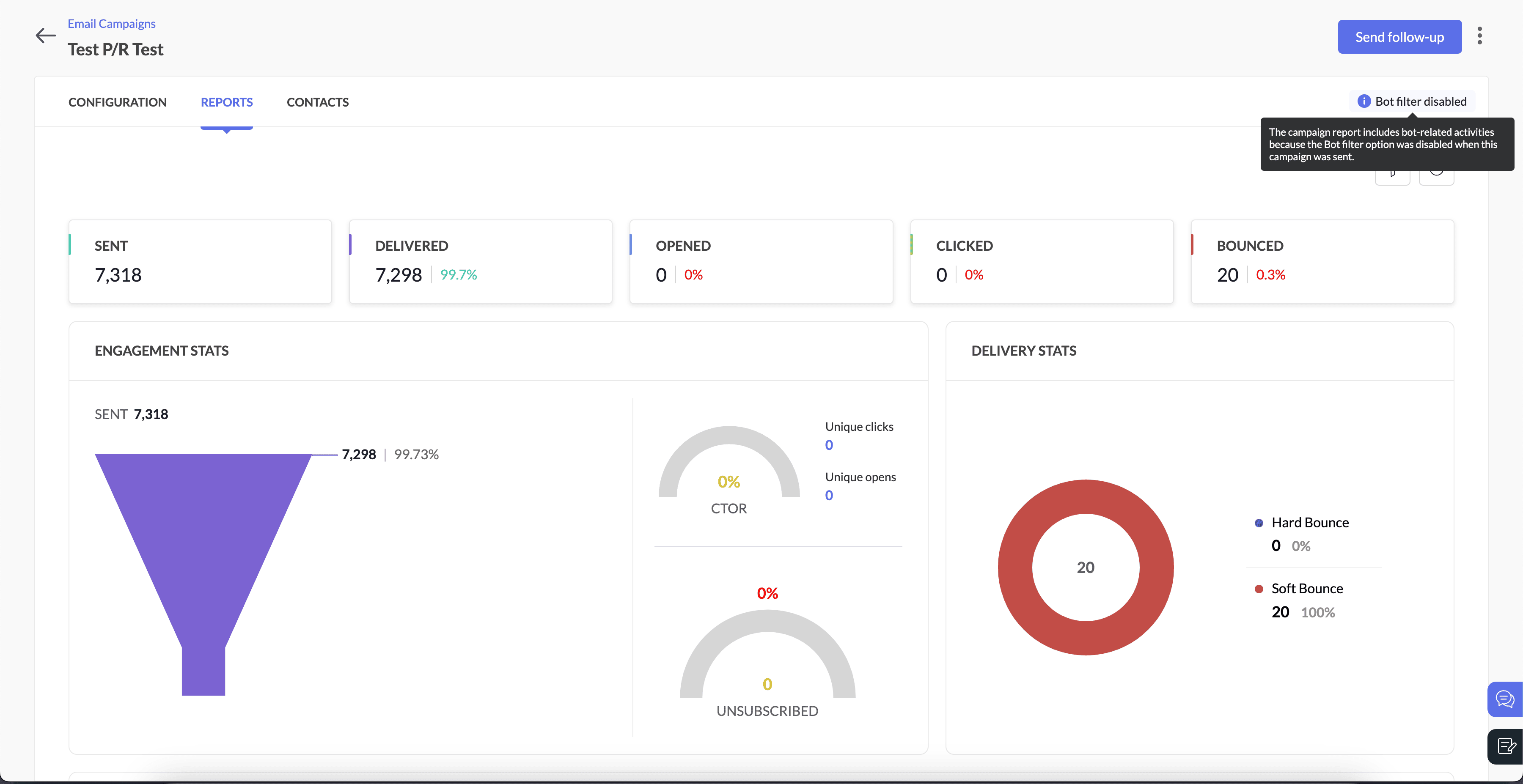

Here's how you can see it in the campaign reports, When the bot filter setting is disabled 


When the bot filter setting is enabled


Info
Note
  • Open rates may decrease when the bot filter is enabled.

  • Follow-up actions, such as journeys and response action components, will not be triggered by bot interactions.

  • Campaigns that have already been sent or are in progress will not be affected by new changes. We'll roll this update out in two weeks, and after that, users might notice an increase in opens and clicks, as the bot filter will be disabled by default.

  • We'll examine the bot settings when sending the campaign.

  • Please note that Apple Mail Privacy Protection (MPP) opens are not currently filtered in this update.  We are working on a solution to handle Apple MPP opens and will provide another update soon.

For example, if a user disables bot filtering before sending a campaign but re-enables it afterward, the email campaign report will still reflect bot-related activities. This occurs because the settings were disabled at the time the campaign was sent

Bot filter option when campaign was sent

Bot filter option after the campaign was sent

Bot-related activities in campaign reports

Enabled

Disabled

Excluded

Disabled

Enabled

Included


Step 5: Pop-up confirmation to disable bot filtering
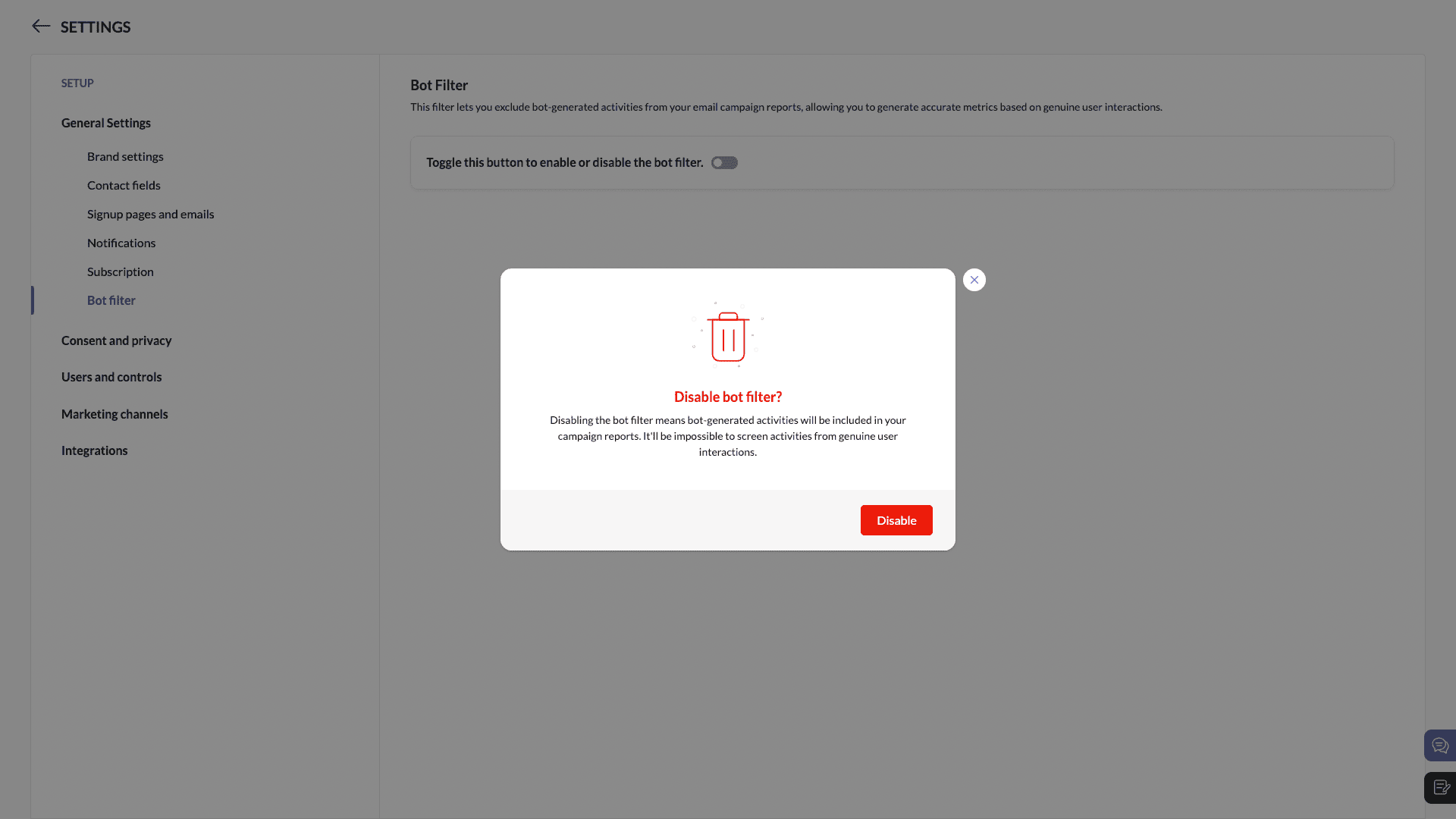
You'll see a pop-up while disabling bot filtering.


We're here to help

As always, our support team is ready to assist you with any questions you may have about bot filtering or any other feature in Zoho Marketing Automation.

We're confident that bot filtering will provide you with more reliable insights and enable better decision-making and more optimal marketing strategies.

Happy marketing!

Best regards
Zoho Marketing Automation Team

    • Sticky Posts

    • Marketer’s Space - Automating CRM Actions with Journeys – Part 2

      Hello marketers! Welcome back to another post in Marketer’s Space. In our previous post, we explored how CRM actions in Journeys help marketing and sales teams work together by nurturing CRM leads and pushing only engaged prospects back to sales. If you
    • Introducing automation and utility conversations in WhatsApp marketing

      We’re excited to announce the addition of two new features to our WhatsApp integration: Automation and Utility conversations. These enhancements will allow you to streamline your marketing efforts and engage with your customers more effectively by automating
    • Tip of the week 02 - The art of 'seeing' your leads

      What's the last page that your lead visited before signing up for your brand? What was the page that first convinced your lead to explore more about you? Where are your leads coming in from? Well, these are some perennial questions today's marketers live upon. And, knowing the answers to these questions is crucial, considering the vitality of leads in every business. In the journey of finding lead opportunities, it's important to understand that every detail about a lead is useful. While the channels
    • Zoho Marketing Automation Update: Topics, Contacts, and List Management

      At Zoho Marketing Automation, our highest priority is making it easier for you to use our product to accomplish your business goals. With that in mind, we are updating three of our pivotal features: Topic, Contacts, and List Management.   These existing
    • Important: Zoho MarketingHub is now Zoho Marketing Automation

      Hello Everyone,   We hope you all are doing well. We'd like to notify you that we have rebranded Zoho MarketingHub to Zoho Marketing Automation. We'll discontinue using the term "MarketingHub" from May 26, 2021. However, there will be no changes in the
      • Recent Topics

      • Custom view inconsistencies

        Why is "is not" missing from criteria, along with other comparison operators ??? It makes it almost impossible to build required custom views, I don't want "void" invoices listed & why on earth would "Void" invoices be showing when the criteria includes
      • Pivot Report Formula - using a today() variable

        Is it possible for me to use a value of today() in a formula on a pivot table? I'm trying to identify where the end date of a project is greater than the current date if("10. Projects (Zoho Projects).End Date" > today(), 'Yes', 'No') I get the error that
      • What's New in Zoho POS - February 2026

        Hello everyone, Welcome to Zoho POS’s monthly updates, where we share our latest feature updates, enhancements, events, and more. Let’s take a look at how February went. Purchase and sell items on different units We have introduced a unit conversion functionality
      • You cannot send this campaign as there is no contact in the selected mailing list.

        We have synced contact lists and sent campaigns just fine prior to today.  Now no matter what list I upload when I go to send the campaign it gives an error "You cannot send this campaign as there is no contact in the selected mailing list." And now it
      • Cannot connect IMAP to outlook

        Hello I have followed the instructions to connect my zoho account to Outlook IMAP but get this message: Session Id: bba118fb-151c-824f-9512-3ad1e91b109d Timestamp: 1708976566964 Error code: INVALIDCREDENTIALS INTERACTIONREQUIRED I'm using the exact configeration
      • Department Overview by Modified Time

        We are trying to create visuals to show the work our agents do in Zoho Desk. Using Zoho Analytics how can we create a Department Overview per modified time and not ticket created time? In order for us to get an accurate view of the work our agents are
      • Where is the settings option in zoho writer?

        hi, my zoho writer on windows has menu fonts too large. where do i find the settings to change this option? my screen resolution is correct and other apps/softwares in windows have no issues. regards
      • Enhance Sign CRM integration

        Hello all, I'm working on a custom Deluge script to enhance the integration between Zoho CRM and Sign by using a writer merge template for additional flexibility. I want to replicate the post-sign document integration that exists between CRM and Sign
      • Zoho Workdrive download was block by security software

        Hi Team, Recently workdrive download was blocked by huorong security. Could you please advise how to put zoho workdrive as white list? every time we put "*.zohoexternal.com" or "workdrive.zohoexternal.com", the warning msg will still pop in next dow
      • Choosing a portal option and the "Unified customer portal"?

        I am trialling Zoho to replace various existing systems, one of which is a customer portal. Our portal allows clients to add and edit bookings, complete forms, manage their subscriptions and edit some CRM info. I am trying to understand how I might best
      • General feedback

        I think Zoho is at the moment (potentially) the best, or perhaps the only, real online solution, for business, and not just business. Surely the only one that has all the features that I need (and I've probably tried everything, at least all that has a cost-free option). It has still got lots of bugs and imperfect features, so I do hope it keeps developing and becomes a really professional platform. Lots of people (including me) want to use such one platform for all scheduling/mail/note-taking...
      • How to add SSL to Short URL custom domain?

        Hi, I've added a custom domain the the URL Shortener Domains. It's creating the short URL fine, but when clicking through, firstly I get an SSL warning, then a 400 Bad Request warning.
      • Single Portal for Multiple Apps

        Hello, I'm just getting started with Zoho and I'm very overwhelmed. I am currently using the free trial of Zoho One, but if I can figure it out, I intend to upgrade to the paid version. Zoho One, of course, gives me  access to an entire suite of services/applications. One of the things I'd like to do is have a single place for clients (customers?) to log in and view current projects, invoices, contact information, etc. A single login for my clients. A single portal. I've come across documentation
      • Antispam validation failed for your domain in Accounts

        I tried adding a domain to zeptomail.zoho.com, but the “add domain” operation failed. The front‑end error reads: “Domain could not be added. Please contact support@zeptomail.com.” The back‑end API returned: ``` { "error": { "code": "TM_3601", "details":
      • Define your custom business logic in Zoho Projects

        Every organization has a defined way of executing projects. There are clear expectations around how tasks should move, when projects should progress, and which actions require validation. When these rules are consistently followed, projects remain structured
      • Cancelled appointments still block out timeslot

        I haven't had to test this before, but I've just found a problem. I had an appointment in a certain timeslot, and that appointment was cancelled. However, Bookings won't let another appointment be booked in that slot - it makes that time unavailable until
      • Preventing Group Emails From Being Sent to Group Member Personal Mail

        We have a group setup for a public facing email address. We have streams turned on for this group. Right now when an email is sent to this group email it hits the group stream and also sends a copy of the email to all group members. We'd like to disable
      • Unusual activity detected from this IP. Please try again after some time.

        Hello Zoho admin and IT team We are a registered website in Eloctronic services and we been trying to add our users to the zoho system but this issue faced us ,, hope you unlocked us please.
      • On Edit Validation Blueprint

        Hello, I have a notes field and a signature field. When the Approve button is clicked, the Signature field will appear and must be filled in. When the Reject button is clicked, the Notes field will appear and must be filled in. Question: Blueprint will
      • ¿Puedo migrar mi sitio desde WordPress a Zoho? ¿Zoho admite herramientas con código personalizado?

        ¡Hola comunidad! Estoy evaluando la posibilidad de migrar mi sitio web https://calculadoradenotas.cl/ desde WordPress a una solución Zoho, y tengo algunas dudas técnicas que espero puedan aclararme. Mi sitio no es solo informativo: es una herramienta
      • How do I link my invoice to an estimate?

        There has been instances where I have created estimates, however, invoices for the same estimate were created independently. The status of these estimates hasn't converted to 'invoiced'. 
      • Zoho Books (and other finance suite apps) - Retrospective Linking of Invoice and Sales Orders to Quotes.

        In some cases, Quotes and Invoies may be created sperately instead of using the convert feature. In this feature request I am asking for the Finance Suite team to consider adding a lookup field to reference the quote on Invoices and Sales Orders, or some
      • Impossible to import Journal from Freshbooks

        I have been trying to import journals from Freshbooks since August 30th. Every time I try to import, I get an error message. I have already made sure every row has a date. First it was saying the account and notes had unexpected input and that every debit/credit
      • Zoho Payroll's USA and KSA editions are available in Zoho One!

        Greetings! We’re excited to share that Zoho Payroll, currently available only in India and the UAE, is now introducing the KSA (Kingdom of Saudi Arabia) edition and the USA (United States of America) edition, and these editions are now available in Zoho
      • Peppol: Accept Bill (Belgium)

        Hi, This topic might help you if you're facing the same in Belgium. We are facing an issue while accepting a supplier bill received by Peppol in Zoho Books. There is a popup with an error message: This bill acceptance could not be completed, so it was
      • CRM x WorkDrive: We're rolling out the WorkDrive-powered file storage experience for existing users

        Release plan: Gradual rollout to customers without file storage add-ons, in this order: 1. Standalone CRM 2. CRM Plus and Zoho One DCs: All | Editions: All Available now for: - Standalone CRM accounts in Free and Standard editions without file storage
      • Manage Every Customer Conversation from Every Channel inside Zoho SalesIQ

        Your customers message you from everywhere. But are you really able to track, manage, and follow through on every conversation, without missing anything? With interactions coming in from websites, mobile apps, and messaging platforms like WhatsApp and
      • Subheaders for Sections in forms

        Currently, every form section has a field name, which one can choose to show/hide to the end user. It would be great if there was an option to show a SUB-HEADER in addition to a header. It would be useful for explaining to the end user what the section
      • Convert invoice from zoho to xml with all details

        How to convert an Invoice to XML format with all details
      • Prevent subform editing on a module's detail's page

        Hi everyone, We would like to prevent any editing of the subform data in the : Create page Edit page Details page (as subform editing is now allowed by the recent UX update) We are able to prevent editing by making the subform fields read only in the
      • Export Invoices to XML file

        Namaste! ZOHO suite of Apps is awesome and we as Partner, would like to use and implement the app´s from the Financial suite like ZOHO Invoice, but, in Portugal, we can only use certified Invoice Software and for this reason, we need to develop/customize on top of ZOHO Invoice to create an XML file with specific information and after this, go to the government and certified the software. As soon as we have for example, ZOHO CRM integrated with ZOHO Invoice up and running, our business opportunities
      • Refresh frequency

        Dear Zoho Team, I really, truly appreciate that Zoho Books gets frequent updates. As a matter of fact this is how a good SaaS company should stay on top. However, I feel that I have to hit refresh almost every day. This was exciting at the beginning but
      • Zoho Books | Product updates | January 2026

        Hello users, We’ve rolled out new features and enhancements in Zoho Books. From e-filing Form 1099 directly with the IRS to corporation tax support, explore the updates designed to enhance your bookkeeping experience. E-File Form 1099 Directly With the
      • Weekly Tips : Save Time with Saved Search

        Let's assume your work requires you to regularly check emails from important clients that have attachments and were sent within a specific time period. Instead of entering the same conditions every time—like sender, date range, and attachments included—you
      • Bring real app analytics into Zoho Creator apps with Zoho Apptics

        We’re kicking off the year with a release we’ve been looking forward to for a long time. After being in the works for a while, Zoho Creator and Zoho Apptics are now officially integrated, bringing in-depth product analytics directly into the Zoho Creator
      • Discontinuing Zoho Showtime service on May 30, 2026

        Hello everyone, As a follow-up to our earlier announcement, we’d like to share an important update regarding Zoho ShowTime’s discontinuation timeline. Zoho ShowTime, our online training platform, reached its end of life on December 31, 2025, and its services
      • emailing estimates

        Shows up in the customer mail logs as sent but nobody is receiving them, even when I send them to myself I don't get them ??? Something wrong with the mail server or my end ?
      • Ability to CC on a mass email

        Ability to CC someone on a mass email.
      • No background for video recordings, no playback speed, can't even playback longer recordings - have to download…

        Hi. We utilize heavily video messages on Slack, but wanted to migrate to Cliq with Zoho One, however very basic yet very frequently used feature is missing: backgrounds for video recordings and playback speed. We were not happy with Slack's 5 minute limits
      • Bookings duration - days

        Hi team, Is there any way to setup services/bookings that span multiple days? I am using Zoho Bookings for meeting room bookings. Clients may wish to book a room for more than one day, for up to a month.  If not, is there a plan to allow services to be setup with durations of Days as well as hours and minutes? Many thanks, Anna.
      • Next Page