Introducing Budget Board in Zoho Marketing Plus

Introducing Budget Board in Zoho Marketing Plus

Hey everyone,

Marketing Plus enables marketers to collaborate more effectively and manage their marketing efforts, from campaign planning to execution to performance measurement—all on one platform.
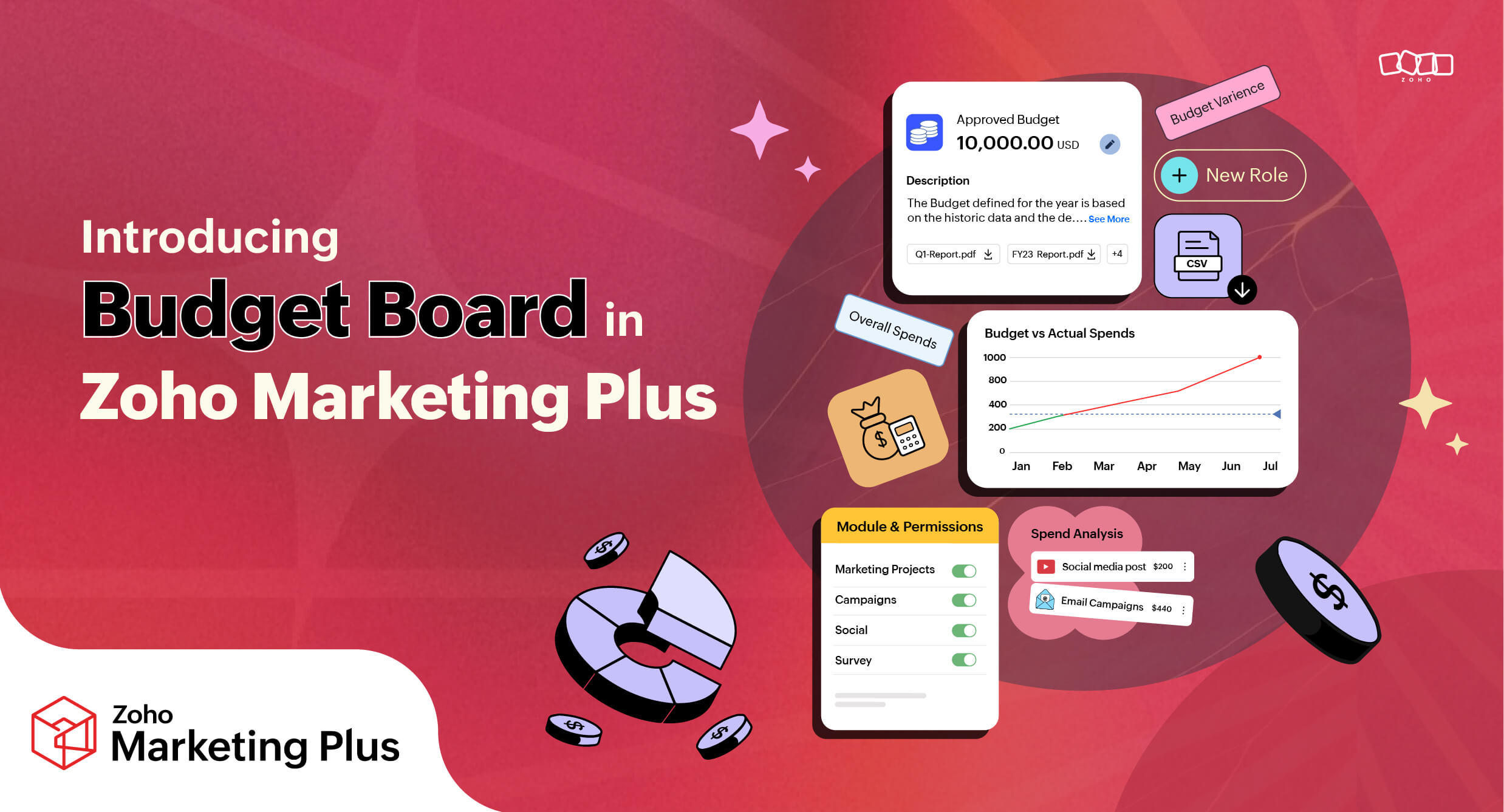
One of the most challenging yet critical tasks for marketing teams is to plan their marketing budget and accurately track all their expenditures. Maintaining proper records of all these marketing expenses in a centralized place is itself a challenge. But what if there were a better way to manage all the marketing expenses in one place?


What is Budget Board? 

Budget Board is a space for marketing teams to plan their marketing budgets, add and track marketing expenditures, and make data-driven decisions.

Marketing teams can strategize budget planning for their different brands and delve into detailed time-based allocations, including yearly, quarterly, or monthly plans for different brands.

They can also plan marketing budgets based on different marketing projects, such as a mobile app promotion or a new product launch, and manage the spending for various marketing activities like email campaigns, paid ads, and events.

Why is a marketing budget planning tool important? 

Most marketing teams manage their marketing expenses across multiple spreadsheets and often end up losing track of them. While there are budgeting and expense management tools available in the market, they aren't designed specifically to suit the needs of marketers, nor are they connected to the platforms where actual marketing activities are executed. This often results in one or more of the following problems:
  • The marketing team may end up spending more than the allocated budget.
  • They may be uncertain about how their marketing money is being used.
  • They may lack access to deeper insights, such as geographical marketing expenses, objective-based marketing expenses, activity-based expenses, and others, which hinders marketers' abilities to make data-driven decisions. 
We built Budget Board to address this problem and to help marketing teams plan their budgets, log all their expenses, and categorize them. Budget Board also provides a warning when spending exceeds the allocated budget, ensuring you always stay on track.

How does Budget Board work? 

Let's look at a detailed example:

Step 1: The marketing head determines and allocates a budget for the brand and its different marketing projects.

Step 2: Aware of their allocated budgets, team members can then strategize their marketing activities accordingly.

For instance, if the marketing head has allocated a net budget of $50,000 for a mobile app promotion project and the marketing team conducts multiple activities, such as event marketing and running paid advertisements online, the expenses could be added to the system as follows:

Project: Mobile app promotion
  • Activity 1: Trade show
  • Expense Name: Venue rental
  • Expenses: $15,000

  • Activity 2: Paid ads
  • Expense Name: Adwords
  • Expenses: $2,000


The system stores the data and automatically categorizes all the added expenses.

Additionally, marketers can also upload documents such as invoices or receipts for each expense.

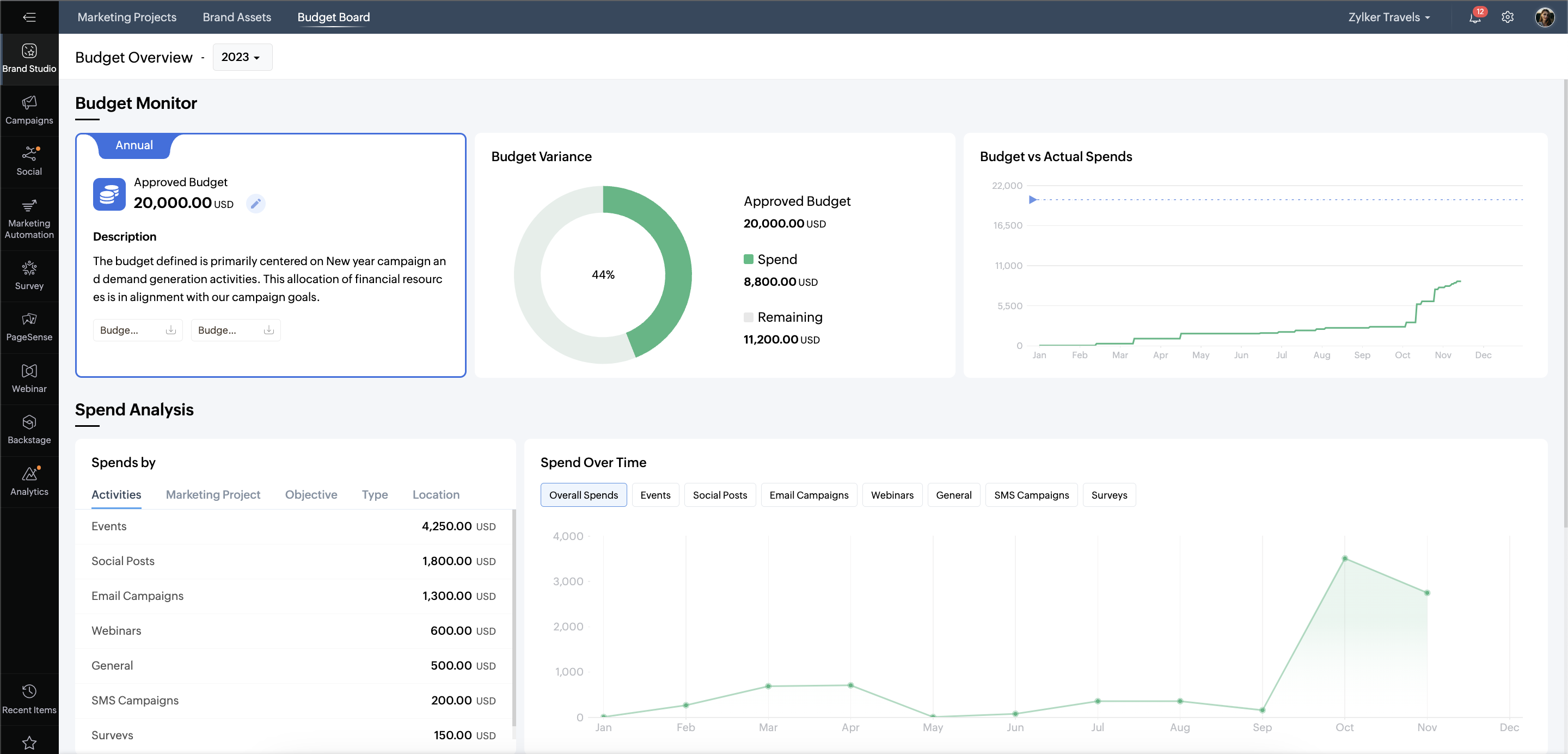
Step 4: At any given time, you can access a comprehensive view of your marketing expenditures through various views and gain all the information you need in few clicks.


We hope this has significant benefits for marketing teams who are looking to manage their marketing expenses more effectively. 

Please read the help document for more information on how you can use budget board for your business. 

Feel free to share any questions, suggestions, or feedback in the comments.

      • Recent Topics

      • All new Address Field in Zoho CRM: maintain structured and accurate address inputs

        Availability Update: 29 September 2025: It's currently available for all new sign-ups and for existing Zoho CRM orgs which are in the Professional edition exclusively for IN DC users. 2 March 2026: Available to users in all DCs except US and EU DC. 24
      • API - Available Stock Definitions

        Okay, Zoho team... your copywriters fell down on the job for this one :) I think these warrant a bit more explanation as to what they include and what they don't.
      • Feature Request: Add Sort by Cell Color and Text Color functionality

        Hello Zoho Sheet Development Team, I am writing to suggest a feature enhancement for Zoho Sheet. Currently, the platform supports "Filter by Color," which is incredibly useful. However, there is no native option to "Sort by Color" (by cell fill or text
      • Calendar Year View?

        Is there a way I can view the calendar in year view? Maybe create a page with a view like this?
      • Razorpay + Zoho Billing + Zoho Books Integration

        Please help us set up this integration.
      • Proyecto SII

        Buenas tardes amigos de zoho. en mi empresa vamos a implementar el proyecto de emisión de facturas SII pero para poder hacerlo hay que subir un xml, estoy intentando automatizar este proceso pero no se como convertir la factura que retorna books a xml
      • Automate Workflows at the Subform Level

        Hello, Enterprise Support Community! We are excited to introduce an enhancement to Workflow Rules that gives you more control over automation within your records. Previously, Workflow Rules could only be configured at the module level, which meant changes
      • Custom module - change from autonumber to name

        I fear I know the answer to this already, but thought I'd ask the question. I created a custom module and instead of having a name as being the primary field, I changed it to an auto-number. I didn't realise that all searches would only show this reference.
      • What is wrong with this sendmail message?

        I keep getting improper statement errors on the message, but I cannot see a problem. Also, if the message is much longer the whole message turns black instead of being coloured yellow, red and blue. client = Clients[ID == input.Client_Lookup]; sendmail
      • sales IQ issue on website

        i integrated the zoho sales IQ code on the website but it is comming in distroted form i am sharing the screenshot below the website is bulit in wix platform
      • Zoho Creator - Install app from Gallery takes too long

        I'm trying to install the 'Volunteer Portal' from the app Gallery of Zoho Creator. It has been busy installing the app for over 2 hours now. It might be okay, but how long is something like that supposed to take? I never installed anything from that Gallery
      • Automate customer follow-ups with Sequences in Bigin

        Greetings, We hope you're all doing well! We're happy to announce a new feature that we've added to Bigin. Following up with every lead at the right time can be challenging, especially when your team is managing multiple conversations across emails, calls,
      • How can I load a network into the cliq desktop app?

        I have both the standard cliq log in for my org and I am part of a cliq network. In the browser I can choose which I log in to. However, in teh desktop app if I log in it will alwasy load my org's cliq. Can I switch this to the network I have create
      • 4.7.500 Server busy. Please try again later from [136.143.188.52]. (S77719) [SJ1PEPF00001CE2.namprd05.prod.outlook.com 2026-09-04T11:42:24.261Z 08DF0918255760D6]

        4.7.500 Server busy. Please try again later from [136.143.188.52]. (S77719) [SJ1PEPF00001CE2.namprd05.prod.outlook.com 2026-09-04T11:42:24.261Z 08DF0918255760D6]
      • Set Up Google Tag Manager for Your Zoho Recruit Career Site

        Understanding how candidates interact with your career site can help you improve their experience and make better decisions about your recruitment process. With the new Google Tag Manager (GTM) integration in Zoho Recruit, you can connect your career
      • Gmail users think they've replied to invite when they havent.

        Hi, I think there's an issue when inviting gmail users to a zoho calendar event. Basically, when an invite from zoho calendar is received by a gmail user, gmail has this functionality where it will render "yes/no/maybe" buttons that, when clicked, they
      • Translated country names in Address field not sorted alphabetically

        Hello. I have a form with an address field that includes the country dropdown. The primary form language is English (as is the Zoho Forms account language). The form has been translated into German from the form's Settings > Translation functionality.
      • Zoho Commerce Microstore to bypass customer portal on spesific items

        Hi everyone, I’m currently testing the Microstore feature in Zoho Commerce and trying to understand how it behaves with access restrictions. My goal is the following: Even though the customer portal is enabled (and the main store requires users to sign
      • Calendar Attachments in iOS Mail App

        It appears that viewing or accessing attachments to a calendar event is not possible in the iOS mail app. Is this correct? The ability to view calendar attachments in the mobile app is vital for me. Is this just a setting I'm missing somewhere?
      • Grey border on inserted Sheet on Write document

        When inserting a Sheet on a Write document, it show an ugly gray border. How to get rid of it?
      • Send workflow alerts as a single mass email to all recipients

        Managing workflow notifications becomes easier when everyone needs visibility into who received an alert. With this enhancement, workflow email alerts can now be sent as a single email to all recipients, giving recipients visibility into the other users
      • Kaizen #253 : Custom Validation for Blueprint to Enforce Mandatory File Uploads and File Extension Compliance Using Client Script

        Welcome to another exciting Kaizen post on Client Script! Have you ever wanted more control over what gets uploaded to a File or Image field in Zoho CRM, like restricting file types, validating file names, or showing a custom error before an inappropriate
      • WORK DRIVE CUSTOMIZATION

        WORK DRIVE CUSTOMIZATION Create folder for every Case by “Contact Name “in Work Drive under Associate Deals Folder Directory: User Work Drive Accounts: Route Directory Associate Cases Case Name, Case Number Client Upload- Shared with contact (for collaboration)
      • How do I migrate from Office 365 to Zoho Mail?

        Check out Advik Email Migration Wizard, this software is specially developed to move mailboxes from Office 365 to Zoho Webmail. In addition you can migrate from Gmail, Yahoo, Rediffmail and 80+ webmail servers to ZOHO MAIL. Isn't it amazing? This is an all in one email migration solution. Steps to export emails from Office 365 to Zoho Webmail are as follows; Run Advik Email Migration Tool in your system. Select Office 365 as source and enter its login credentials. Select mailbox folders and choose
      • 【続々公開】Zoholics Japan 2026 セッション情報を更新しました!

        ユーザーの皆さま、こんにちは! Zoholics Japan 2026のセッション情報を続々と公開しています! 今年は3つのトラックで、Zohoの最新情報やAI活用、製品アップデート、 活用事例など、多彩なセッションをお届けします。 現在公開中のセッション(一部) ・Zoho CRM 製品アップデート ・Zoho CRM Plus 製品アップデート ・Zoho Community セッション ・Zoho Desk セッション ・中堅・成長企業の人事DX ~AI時代に何から始めるべきか?~ ・Zoho
      • Zoho Forms integration Google Sheets

        Hi, quick one. I wonder if you can help. I have a Zoho Form integrated to a Google Sheet. The fields are showing across the top, but no records are there. I have checked in Zoho Forms to see if there have been any failed integrations, but there are none.
      • What's New in Zoho POS - August 2026

        Hello everyone, Welcome to Zoho POS’s monthly update, where we share our latest feature updates, enhancements, events, and more. This month, we’re taking a closer look at our new Loyalty Program functionality and exploring how it can help your business.
      • Zoho ERP | Product updates | June 2026

        Hello users, We launched Zoho ERP on January 23, and since then, our goal has been to help businesses streamline and manage their operations with greater efficiency, flexibility, and control. Since the launch, we've continued to enhance the platform every
      • 3 numbers after comma in discount field

        Hi, i need to make discount like: ex. 34,345% it's possible? Thank you.
      • ZOHO Campaigns in ZOHO Analytics - Campaigns vs Contacts Table

        There seems to be information in the Zoho Campaigns table such as Unique Opens and Unique Clicks that can't be found in the Campaigns vs Contacts table where only Opens and Clicks are shown on a per contact level. Is there a way to bring Unique Opens
      • Canva Integration

        Hello! As many marketing departments are streamlining their teams, many have begun utilizing Canva for all design mockups and approvals prior to its integration into Marketing automation software. While Zoho Social has this integration already accomplished,
      • Default Country list suggestions on CRM is different then on Book; how do/did others address this?

        So I already have a support ticket in for this and waiting for a response but figured I'd ask the community also to see if others experienced the same problems and/or how they went about addressing it because sometimes I feel like I'm going crazy with
      • Vehicle Tracking

        we have GPS devices that installed on our vehicles, and we would like to know if it's possible to  get vehicle live location data from the GPS device To Zoho Creator App.   Thank You
      • Check out the new Checkbox in Zoho Sheet

        Checkbox, the simple GUI widget that lets you choose between two mutually exclusive options i.e Yes or No, is now in Zoho Sheet. Having made it across the web, Checkbox is familiar but is still elusive to most spreadsheet software. Special developer ribbons, macros and all other complexities to add a checkbox to a spreadsheet? Not in Zoho Sheet. How to add Checkbox to Zoho Sheet? Adding a Checkbox in Zoho Sheet is simple. Select a cell/range and choose "Checkbox" in "Input Controls" under the Format
      • Custom Calendar View for a Custom Module in Zoho CRM

        Hello everyone, I’m looking to create a calendar view (monthly grid, similar to Google Calendar) for a custom module in Zoho CRM, based on a date field within that module. The goal is to have a highly customized visual layout — colors depending on the
      • Enhancements related to emails

        Dear All, We hope you're well! We talked about the new email configuration in our previous announcement. In line with that, we're here with a few enhancements related to emails in Zoho CRM to improve how users view their emails and attachments from within
      • Project Change Orders and Additions

        We are in the process of migrating from QuickBooks Online to Zoho Books. We have Zoho One and like the ability to sync all of our data across everything. And I like that projects work in a way that's less dumb than QuickBooks. I'm trying to figure out
      • How Can I Recover My Website After the August Spam Update?

        Hi everyone, My website was hit quite badly during the August spam update 2026, and I'm trying to understand what I should do to recover it. My traffic and search visibility have dropped, but I'm not sure what exactly caused the problem. I have already
      • Assembly Reporting in Composite Item View - Add 'Per-Unit Cost' Column

        When a user in the UI goes to a Composite Item, looks under Transactions, and selects Assemblies, the screen below is shown. This is all good information, but one piece of very important data is missing... the per-unit cost. I realize that for those on
      • Zoho Deluge Outage

        Hello Enterprise Support Community, We wanted to make you aware that we are currently experiencing an outage affecting Zoho Deluge. Our developers are actively investigating the issue and working to restore service as quickly as possible. We apologize
      • Next Page