Create static subforms in Zoho CRM: streamline data entry with pre-defined values

Create static subforms in Zoho CRM: streamline data entry with pre-defined values

Alert
Last modified on (9 July, 2025):
  • This feature was available in early access and is currently being rolled out to customers in phases. 
  • Currently available for users in the the AU, CA, and SA DCs.
  • It will be enabled for the remaining DCs in the next couple of weeks.

Info
Update (26th September 2025):
This feature is now enabled for all the users in the US DC.

Hello everyone,

Traditionally, Zoho CRM's subform capabilities have enabled users to dynamically add, edit, and manage additional data linked to their main records. However, until now, all subform fields were subject to data entry or updates, both on the record's page and through the API.

What's new?

We're excited to introduce the static subform option, designed to offer a more controlled and consistent approach to data entry in Zoho CRM. Administrators can now pre-define certain fields and the exact number of rows in a subform.

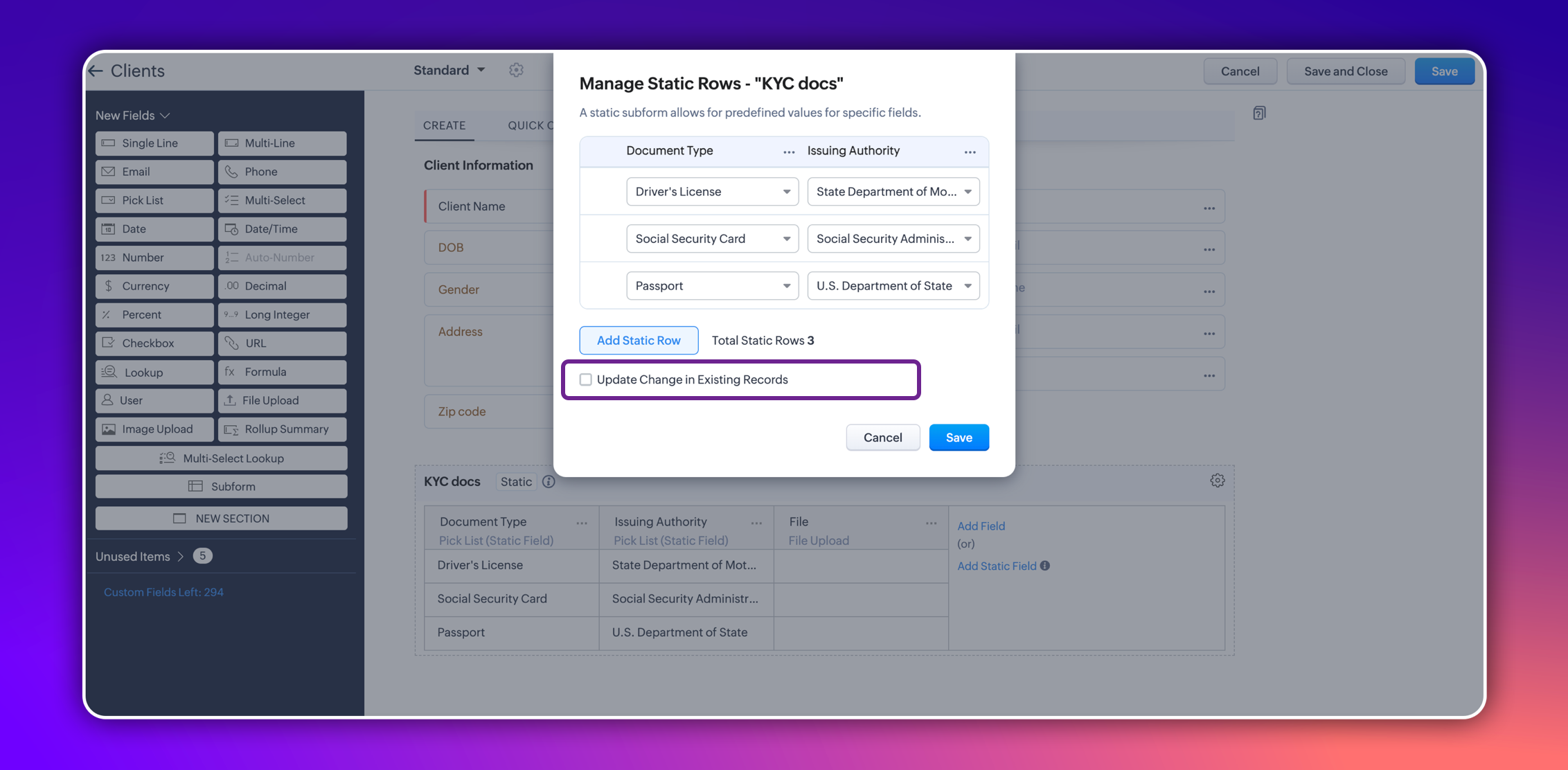
In certain scenarios, a subform should maintain a fixed number of rows with fixed values across all records. For example, a subform could be set up to include specific columns consistently, such as "Document Type" and "Issuing Authority." The rows for these columns could remain constant and feature values like "Driver's License," "Social Security Card," and "Passport" for "Document Type," and "State Department of Motor Vehicles," "Social Security Administration," and "U.S. Department of State" for "Issuing Authority." Unlike a standard subform, where users can dynamically add or remove rows, a static subform ensures these rows are consistent across all records.


This ensures consistency and eliminates the need for users to manually enter or maintain these rows in each record, thereby saving time.

How does static subform address this need?

Static subforms enable administrators to define specific fields and a fixed number of rows within a subform.

For example, consider the aforementioned use case of a client's details in KYC records, which might always consist of documents like a driver's license, passport, and social security card. Other fields within the subform may vary, which allows for customization as needed when creating or editing records.


Consider job applications, for example. With static subforms, HR departments can standardize the collection of essential documents such as resumes/CVs, educational certificates, and proofs of residence. This ensures that every applicant's profile is complete and consistent, making the data management process more efficient and reliable.


This approach not only streamlines the application process but also ensures companies receive thorough and consistent candidate profiles.

Key highlights
  • Administrators can easily set up a static subforms by configuring rows with static values.
  • Admins have the option to automatically update all existing record entries with static values while mapping the static values in the configuration pop-up.


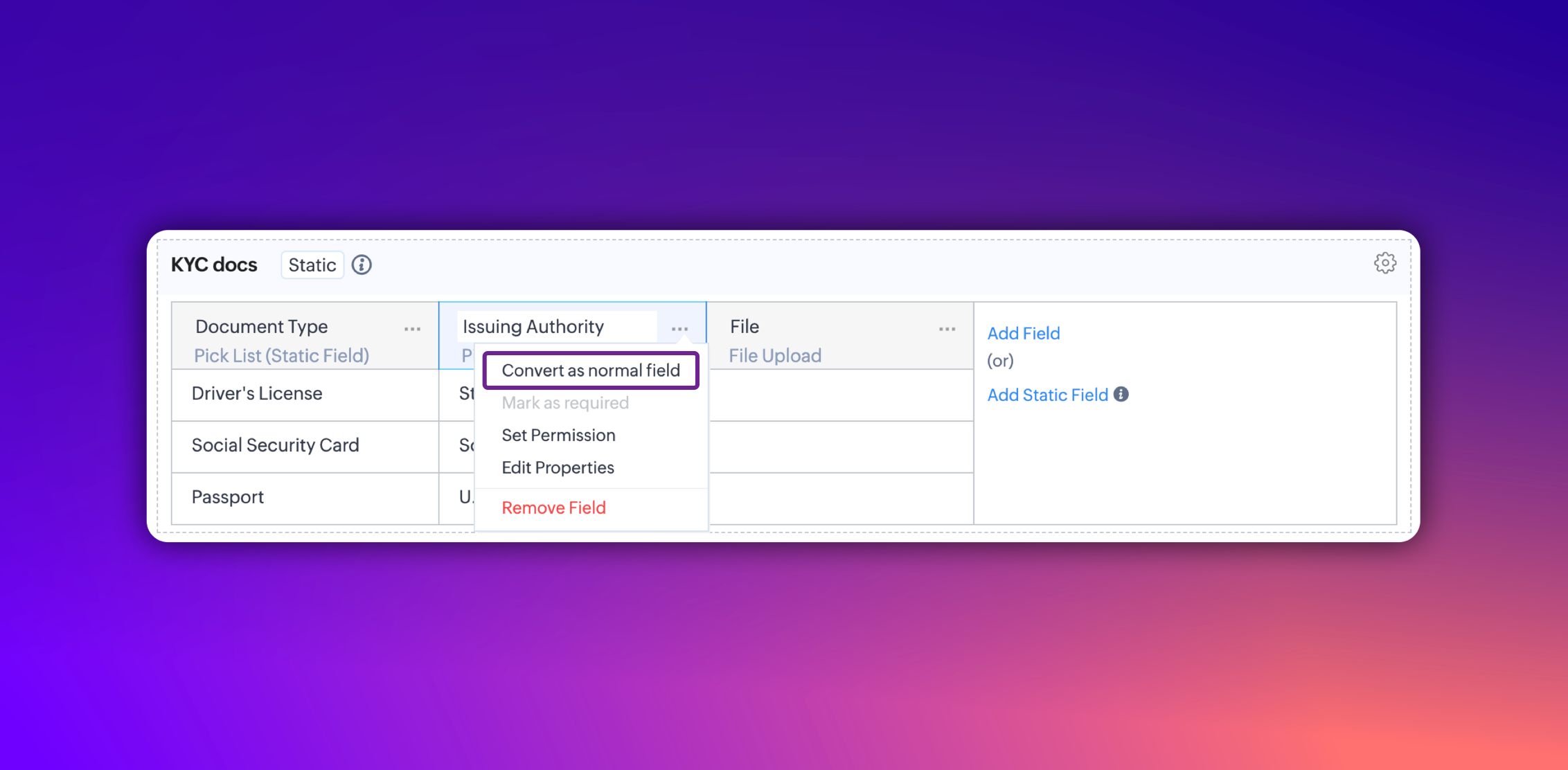
  • Additionally, you can convert a static subform field into a normal field at any point. However, it's not possible to convert a normal subform into static subform.

Notes
Notes:
  • These fields are static across all the layouts in a module and synced across all associated records.
  • Changes will be applied to all existing records only if the admin checks the option to update existing records in the static value mapping pop-up.
  • Transforming regular subform fields into static fields is not possible.
  • Once a subform is designated as static, its type cannot be changed.
  • Static subform feature is currently available only in web. They're unavailable on mobile devices and for API versions below 5.1.

Thanks,
Nizamuddin

      • Recent Topics

      • Please can the open tasks be shown in each customer account at the top.

        Hi there This has happened before, where the open tasks are no longer visible at the top of the page for each customer in the CRM. They have gone missing previously and were reinstated when I asked so I think it's just after an update that this feature
      • Why can't we change the Account type from an Expense to an Asset?

        Like the question. Why in QuickBooks for example if I mistakenly created an account as an expenses and I already captured information in those accounts, I can just change the account type from expense to asset
      • Zoho Books emails suddenly going to Spam since 11 Nov 2025 (Gmail + now Outlook) — anyone else?

        Hi everyone, We migrated to Zoho Books in July 2025 and everything worked fine until 11 Nov 2025. Since then, Zoho Books system emails are landing in customers’ Spam (first Gmail, and now we’re seeing Outlook/Office 365 also starting to spam them). Impacted
      • Default Tagging on API-generated Transactions

        If one assigns tags to an Item or Customer, those tags get auto-populated in each line item of an Invoice or Sales Order when one creates those documents. However, if one creates the Sales Order or Invoice via the API (either directly coding or using
      • How do you print a refund check to customer?

        Maybe this is a dumb question, but how does anyone print a refund check to a customer? We cant find anywhere to either just print a check and pick a customer, or where to do so from a credit note.
      • Data Import | Zoho Analytics Custom Query Window Size

        Please increase the window size for the Custom Query Data Import. It's impossible to work with such a small query window.
      • Company Multiple Branch/ Location Accounting

        Hi All, anyone know whether company can maintain their multiple Branch Accounting in Zoho  Books. It will be chart of Accounts & Master Data will be same but different report available as per per Branch. Thanks & regards, Vivek +91 9766906737
      • Zoho Books Invoices Templates

        It would be really helpful to have more advanced features to customise the invoice templates in Zoho Books. Especially I´m thinking of the spacing of the different parts of the invoice (Address line etc.). If you have a sender and receiver address in
      • Passing the CRM

        Hi, I am hoping someone can help. I have a zoho form that has a CRM lookup field. I was hoping to send this to my publicly to clients via a text message and the form then attaches the signed form back to the custom module. This work absolutely fine when
      • Zoho Tracking Image location

        So we've been having an issue with tracking email opens. Specifically in Gmail. Our emails are not that long either, maybe 4 sections of image/250 characters of text/button per section.  But all my test accounts I used via Gmail we're showing opens. But then come to find out the tracking image is at the very bottom of the email. So If the message is clipped (It always just clips our social icons on the bottom) and the user doesn't click the show more button it never tracks the open.  Looking at other
      • Support for Developing Zoho Recruit Extensions via Zoho Sigma

        Hi, I’m interested in building an extension for Zoho Recruit using Zoho Sigma. However, when I navigate to Sigma and attempt to create a new extension (via the "New Extension" option), Zoho Recruit does not appear as a listed service—only options like
      • Email Administrators! Join our tips & troubleshooting series

        Greetings to all the admins out there! This announcement is exclusively for you. As we step into the New Year, we’re excited to start a dedicated series of admin-specific tips curated to support you. These posts will help you overcome everyday challenges
      • Notes badge as a quick action in the list view

        Hello all, We are introducing the Notes badge in the list view of all modules as a quick action you can perform for each record, in addition to the existing Activity badge. With this enhancement, users will have quick visibility into the notes associated
      • Deprecation of the Zoho OAuth connector

        Hello everyone, At Zoho, we continuously evaluate our integrations to ensure they meet the highest standards of security, reliability, and compliance. As part of these ongoing efforts, we've made the decision to deprecate the Zoho OAuth default connector
      • Personalize your booking pages with Custom CSS

        Greetings from the Zoho Bookings team! We’re introducing Custom CSS for Zoho Bookings, designed to give you complete control over the look and feel of your booking pages. With this new feature, you can upload your own CSS file to customize colors, fonts,
      • Free Webinar : Unlock AI driven business insights with Zoho Inventory + Zoho Analytics

        Are you tired of switching between apps and exporting data to build customized reports? Say hello to smarter & streamlined insights! Join us for this exclusive webinar where we explore the power of the Zoho Inventory–Zoho Analytics integration. Learn
      • No OR Filter for Views with a Related Modules Criteria

        We would like to create a Deal View where the User can see all their deals. For that, we would need an OR to connect the criteria. One of the Fields is a "multiselect User", these (Related Modules Criteria) can only be Filter with an AND. Even between
      • Creating a Chart from a Report

        In Zoho Analytics, is it possible to create a chart from a Pivot View report? We are looking to use Zoho Analytics to replace Excel for Sales reports and would like to be able to show both the table and the chart together.
      • Import Function: ONLY update empty fields

        When setting up an import from a spreadsheet to CRM, there is a checkbox "Don't update empty values for existing contacts" (see screenshot below). While I see some limited benefit from this functionality, I think there should also be an "ONLY update empty
      • Sales IQ Chat Widget is Only Displaying Last Name

        Can anyone suggest why the widget is only displaying "last name"?! We have the latest version of the wordpress plugin installed. Thanks Thanks!
      • Free Webinar: Zoho Sign for Zoho Projects: Automate tasks and approvals with e-signatures

        Hi there! Handling multiple projects at once? Zoho Projects is your solution for automated and streamlined project management, and with the Zoho Sign extension, you can sign, send, and manage digital paperwork directly from your project workspace. Join
      • Begin the year with best practices in the Zoho Desk mobile app : Part 2

        In focus: Optimizing collaboration and supervision Let's begin 2026 with Part 2 of our tips series on driving your ticketing operations at your fingertips. In Part 1, we explored streamlining operations within tickets. This helped individuals at Omniserve
      • Process checklist in CRM

        Hi We've created a new sales process that I'm mapping into the CRM - issue I have is that some of the tasks / milestones I would like to capture require very simple tick box responses but there are quite a few under a variety of sub categories so I don't
      • Can we disable add to cart in Zoho Commerce?

        Hello, Our sales happen on the phone. During the call the customer is directed to our website to inspect the products together with the sales rep. So we need a way to present our inventory. I figured Zoho Commerce is a good fit for this use case. However we would have to disable the possibility to purchase products in the shop. Is that possible? Sunny regards, Artjom
      • Holidays - Cannot Enter Two Holidays on Same Day

        I have a fairly common setup, where part-time employees receive 1/2 day's pay on a holiday and full-time employees receive a full day's pay. Historically, I've been able to accommodate this by entering two separate holidays, one that covers full-time
      • Zoho DataPrep and File Pattern configuration

        I'm using Zoho data prep to ingest data from One Drive into Zoho Analytics... The pipeline is super simple but I can't any way to get all the files that I need. Basically I need to bring all the files with a certain pattern and for that I'm using a regex
      • Adding a new section to the related details sidebar when creating a new ticket.

        Hello, I was wondering if you can add a new section to the related details sidebar when creating a new ticket. I was wanting to have it to where it also shows the account information related to the contact chosen as well. This is the section I am referring
      • JWT Token authentication problem that sometimes generates infinite redirect loops

        Description : Nous proposons un bouton sur notre plateforme permettant de rediriger l'utilisateur vers le portail ZohoDesk via un jeton JWT pour une authentification transparente. Cependant, il arrive que certains utilisateurs soient pris dans une boucle
      • Zoho desk desktop application

        does zoho desk has a destop applicaion?
      • No funcionan correctamente el calculo de las horas laborales para informe de tickets

        Hola, estoy intentando sacar estadísticas de tiempo de primera respuesta y resolución en horario laboral de mis tickets, pero el calculo de horas en horario laboral no funciona correctamente cree los horarios con los feriados : Ajusté los acuerdos de
      • How do I bulk archive my projects in ZOHO projects

        Hi, I want to archive 50 Projects in one go. Can you please help me out , How can I do this? Thanks kapil
      • Introducing Dedicated Modules for Plans, Addons, and Coupons in Zoho Billing

        We’ve enhanced the way you manage Plans, Addons, and Coupons in Zoho Billing. Previously, all three grouped together under Subscription Items. Now, each one has its own dedicated module, giving you a cleaner and more intuitive experience. This update
      • ZOHO Work Drive Back Up

        I am looking for a ZOHO Work Drive backup solution. Something that is cloud based. There's lots of these kinds of options for Google Drive and other providers, but I have not seen anything for WorkDrive. Any suggestions?
      • ZOHO Reports - Filter Logic?

        Hi, I need a way to apply filter logics such as ((1 AND 2) OR 3). All I can see as of now is a way to enter different AND filters in the respective filter column. But how can I add an OR filter? Any advice would be highly appreciated. Mark
      • Scanned Doc - selecting Item overwrites Rate

        I have a Vendor Invoice which was uploaded to Documents. I select Add To > New Bill. The OCR is actually quite good, but it is reading an Item Description instead of an Item Number. I remove the description and select the correct Item Number... and it
      • Recruit API search

        Hi all, Attempting to call the search api endpoint from Postman using the word element as mentioned in api docs Search Records - APIs | Online Help - Zoho Recruit When making the call to /v2/Candidates/search?word=Saudi receive response of { "code": "MANDATORY_NOT_FOUND",
      • Manage control over Microsoft Office 365 integrations with profile-based sync permissions

        Greetings all, Previously, all users in Zoho CRM had access to enable Microsoft integrations (Calendar, Contacts, and Tasks) in their accounts, regardless of their profile type. Users with administrator profiles can now manage profile-based permissions
      • Saving reading position + Keep screen on

        While Zoho Notebook is excellent for saving and annotating articles, its utility is severely limited by the lack of reading progress synchronization. On the Android app, if a user exits a long note after reading 50%, the app fails to save the position.
      • Zoho LandingPage is integrated with Zoho One!

        Greetings to the Zoho One users out there! We're delighted to let you know that Zoho LandingPage is available in Zoho One too! With Zoho LandingPage, you can host custom-made landing pages, and persuade the visitors to dive deeper by making further clicks,
      • Android app sync problem - multiple devices have same problem

        Hello, I am having a problem with synchronization in the Android app. When I create a drawing, the data does not sync correctly—only a blank note is created without the drawing. I tested this on multiple devices, including phones and tablets, and the
      • Next Page