Introducing Zoho's own SMS gateway
Introducing Zoho's own SMS gateway


We're thrilled to announce the launch of our own SMS gateway feature within Zoho Marketing Automation! This new feature enables seamless SMS campaign management alongside your email marketing initiatives, providing a more integrated and efficient way to reach your audience.

Our SMS gateway currently supports Canada, India, and the US. For other countries, we continue to offer integrations with third-party services to ensure you can still run successful SMS campaigns globally.

In addition to this exciting development, we've implemented several enhancements to optimize your overall user experience.

Our latest updates aim to broaden the scope of our product and cater to businesses invested in both email and SMS marketing strategies. Here's how Zoho Marketing Automation is evolving to meet your needs.

What is an SMS gateway? 

An SMS gateway essentially acts as a bridge between your marketing platform and mobile networks. When you send an SMS campaign through a platform with its own gateway, messages travel directly from the platform to the recipient's phone without the involvement of a third party.

Here's why it matters:

  • Manage all your marketing effortsincluding SMS campaignsfrom a single platform to eliminate the need to juggle multiple tools or logins.

  • Improve your user experience by making it easier to create, track, and analyze the effectiveness of your SMS campaigns.

Power your SMS marketing with Zoho Marketing Automation

Zoho Marketing Automation enables its users to manage multiple channels, including email, SMS, and WhatsApp, all within a single platform. With SMS marketing, users can easily tailor their campaigns, deliver them at optimal times, and track their performance.

Here's a quick walkthrough of the features we offer:
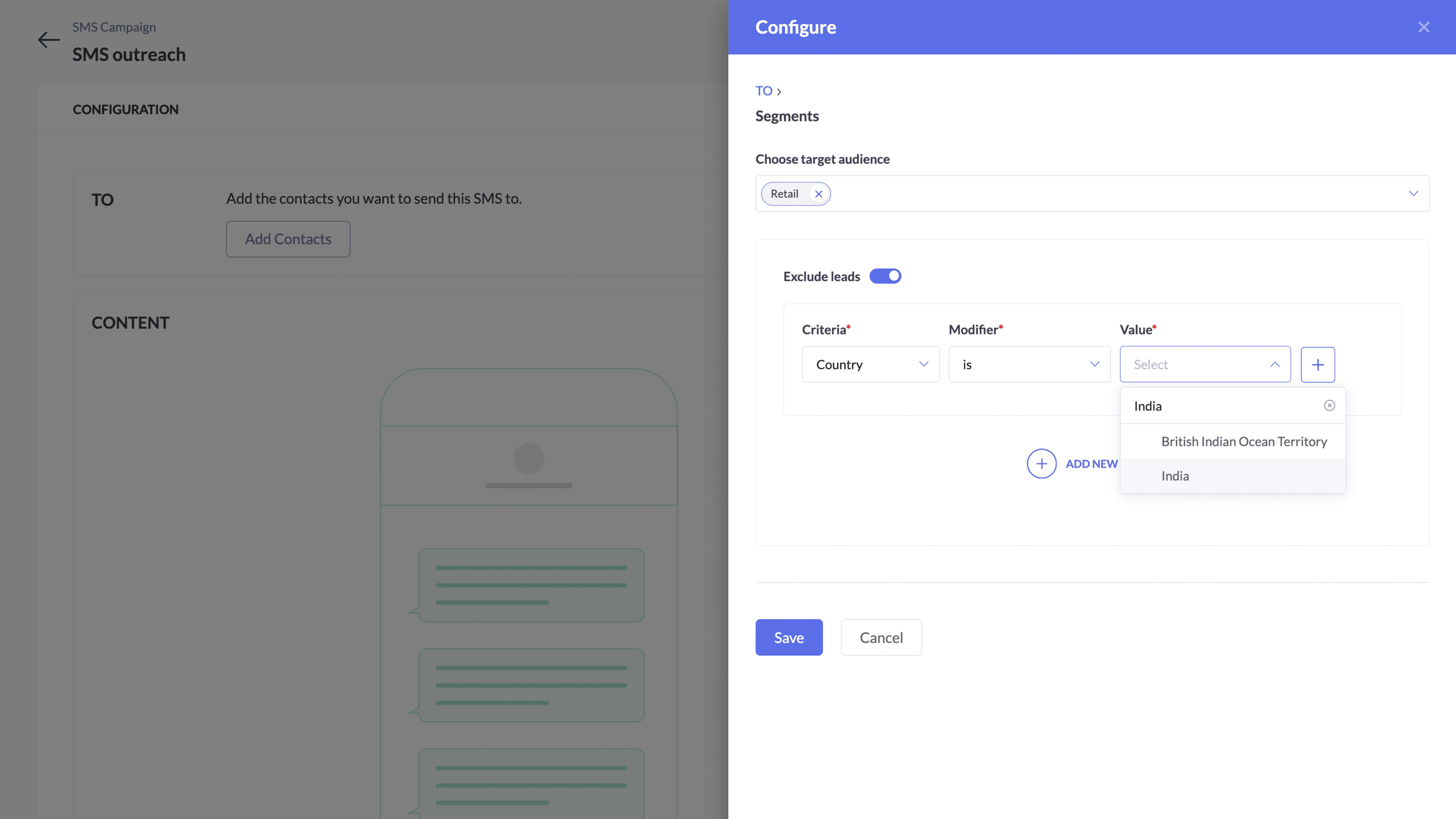
Targeted SMS marketing: Organize your contacts into segments and send them hyper-personalized SMS campaigns.


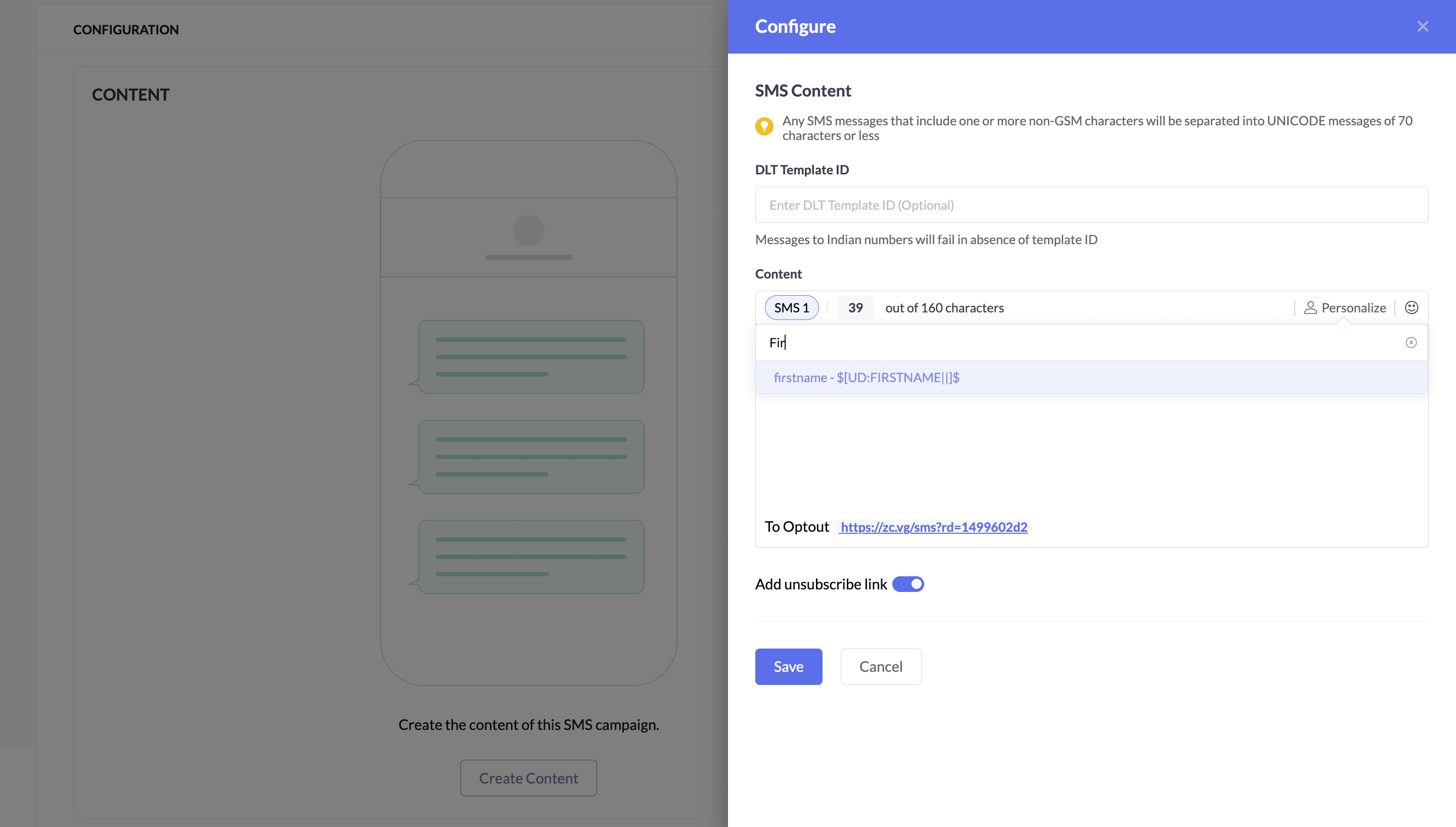
Personalization: Leverage merge tags to design personalized SMS campaigns that build brand trust, enhanced with emojis for humor and links for a dynamic, interactive experience.


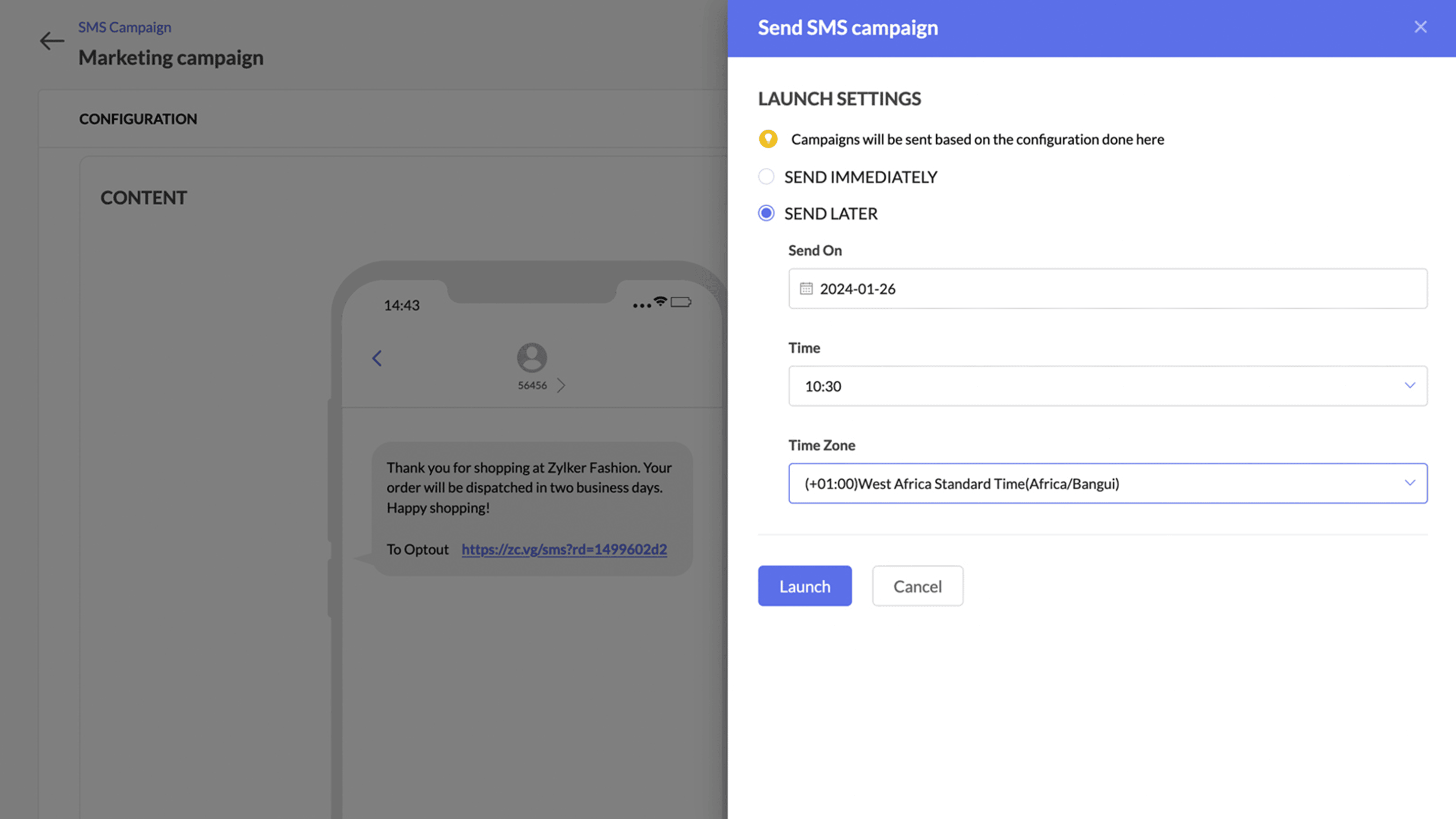
Deliver at the optimal time: Schedule messages to your audience and reach them at the right time to maximize the engagement of your SMS campaigns.


Diverse campaigns: Send appointment notes, event reminders, product launches, flash sale notifications effortlessly, and much more.


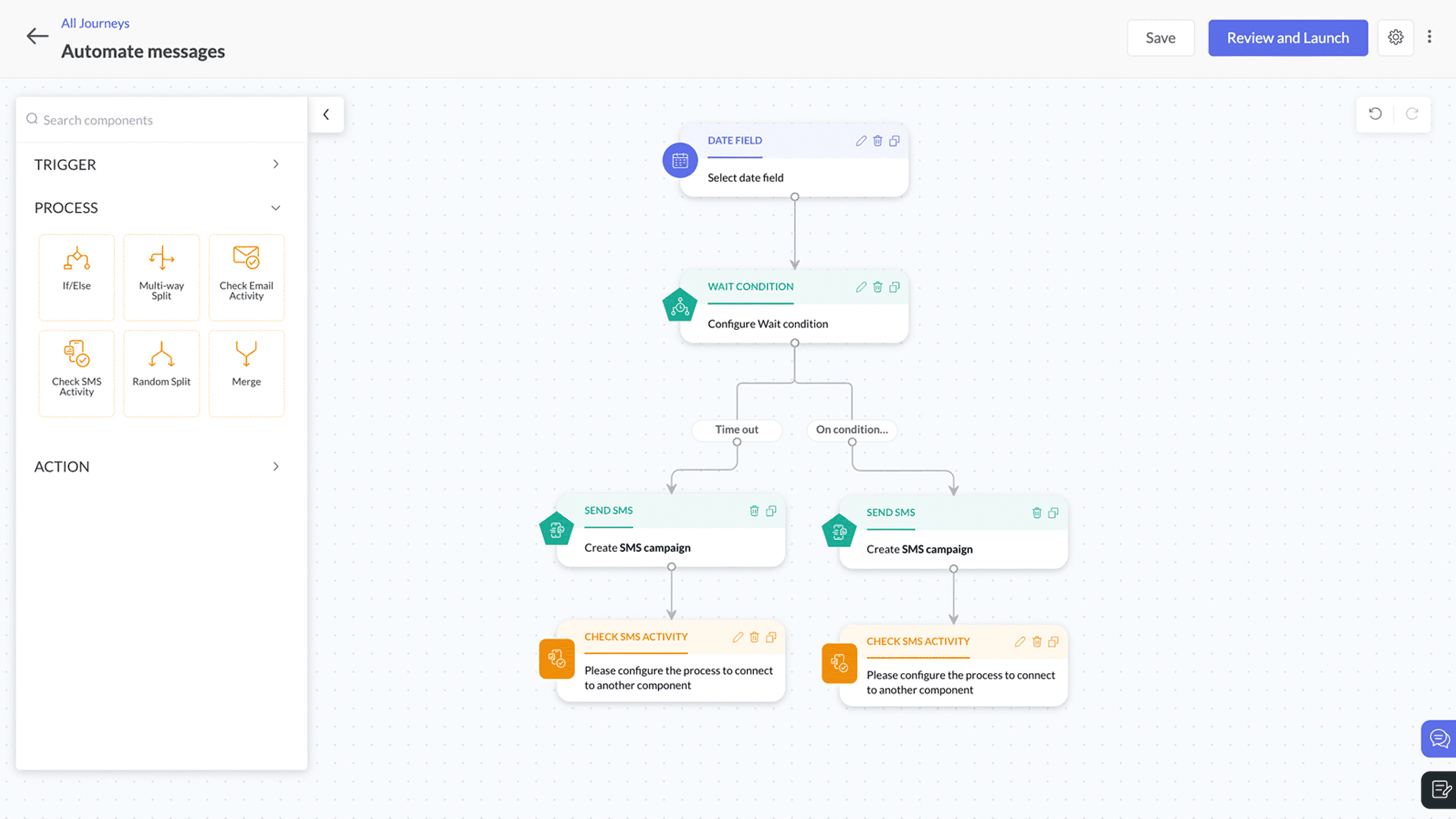
Automation: Instantly send SMS messages to leads based on their real-time actions and engage in hyper-sensitive promotions.


These updates underscore our commitment to providing a seamless and integrated marketing automation experience to empower businesses to engage their audiences effectively across multiple channels.

Contact numbers will be mapped to the mobile number field

Your contacts' numbers are crucial for running successful SMS campaigns. To ensure there's a single dedicated place to store and retrieve contact numbers, we've set the mobile number as the default field. This means users don't have to select a phone number during the SMS creation process.

Before: Multiple marketers import contact numbers into Zoho Marketing Automation, each using a different custom field without a standard field name. During every SMS creation process, they have to select each phone number manually.

Now: With the default mobile number field, all marketers store contact numbers in a single default field, making it much easier to identify and retrieve contact numbers.

Also, Zoho Marketing Automation ensures that email recipients have complete control over accepting or rejecting email campaigns through the unsubscribe option.

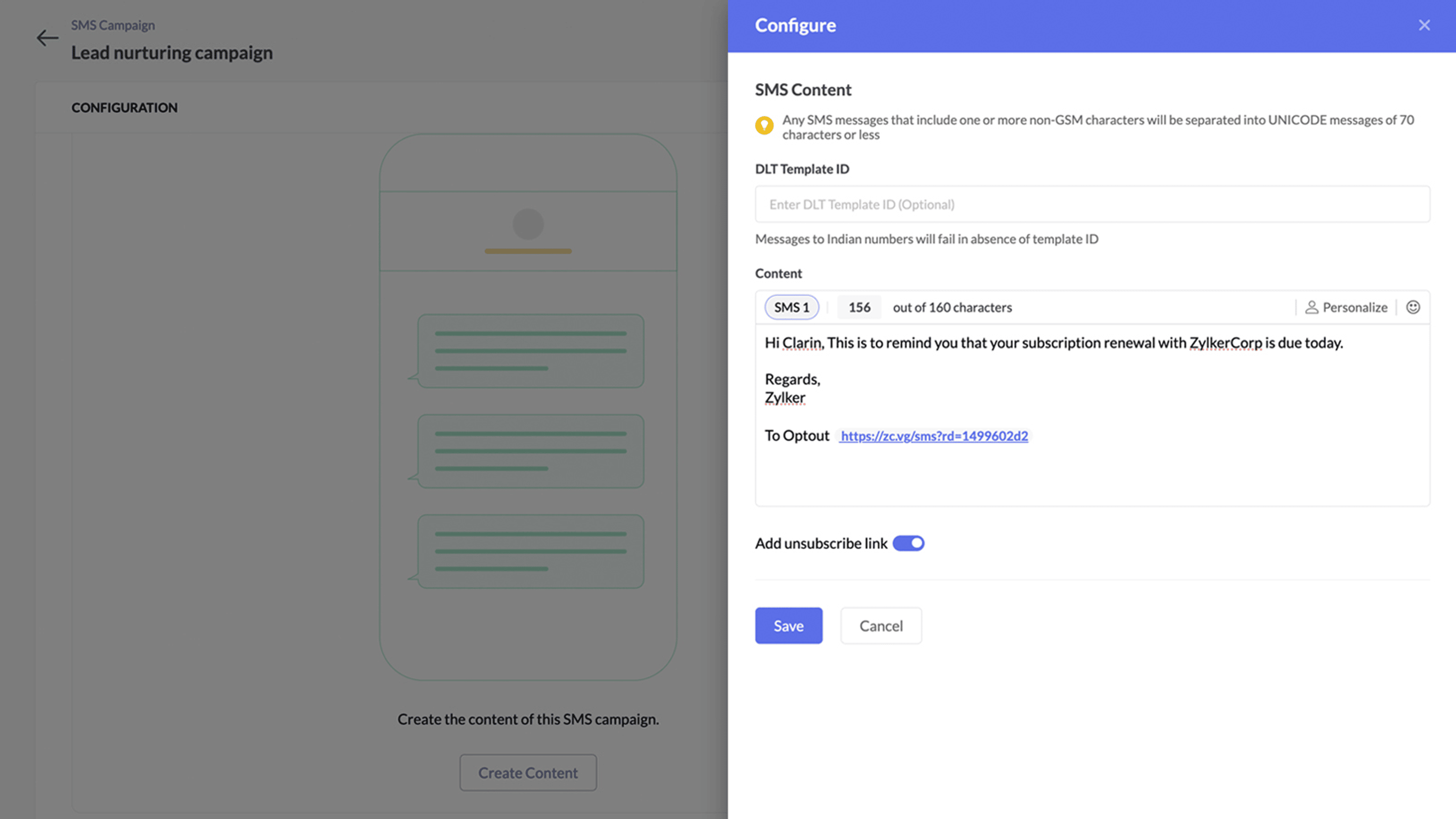
We’ve implemented similar best practices in the SMS campaign process with the introduction of an unsubscribe option for SMS messages. With this, contacts can easily opt out of receiving SMS communications. By adding an unsubscribe link to SMS campaigns, marketers can identify contacts who are not interested in their campaigns and send targeted messages only to those who are interested.

What's new with this gateway?

At Zoho, we're committed to upholding data integrity and complying with all regulations. To solidify this commitment, we adhere to 10DLC standards in the US and Canada and DLT standards in India when introducing our own SMS gateway. This enhances Zoho Marketing Automation by improving your marketing campaigns, maintaining a good reputation with your contacts, and strengthening customer engagement.

This system ensures businesses sending mass SMS messages use approved long codes, improves deliverability rates, and ensures your messages reach your intended audience.

Benefits of 10DLC registration

  • Registered long codes are less likely to be blocked by carriers.

  • Sending messages from verified numbers builds trust with customers.

  • 10DLC ensures users adhere to best practices for SMS marketing.


Top benefits of switching to Zoho's own SMS gateway

  • Instantly setup campaigns without any additional integration.

  • Superfast delivery.

  • Automate SMS communications using journeys with real-time action based triggers.

  • Cost-effective messaging

  • Detailed reporting with campaign metrics and credit-to-cost analysis

  • Supports latest compliance - 10 DLC and DLT


SMS pricing will be an add-on pricing model and will be available on all the subscription plans. You can see the detailed pricing over here.

Level up your marketing!


    • Sticky Posts

    • How to Add Users to your Organization in ZohoMail?

      A better clarity so you can create other users to start using Zoho Mail. You can directly Add Users from the Control Panel to your Organization. You can invite users with the existing email address. If the person (user) already uses ZohoCRM, then you can import users from Zoho CRM. You can also import them using a .csv file. (if you are planning to add them in Bulk)  In this topic, We will be discussing on how to Add and Invite users only.  The Import options are self explanatory. ____________________________________________________________________________________________________________
      • Recent Topics

      • Duplicate Leads Concerns with Round Robin and Lead Approval Process

        It is great to have the Duplicate Lead Approval Process,  there are a few issues with the process that I would greatly appreciate taken consideration in enhancing. It appears that A Lead comes in Lead owner assigned by the Round Robin Check for Duplicate, If the lead is a Duplicate the Lead owner gets an email of a duplicate needs approval email assign to the approval process      This causes problems, The duplicate approval process is done by a different level person, they do not get the email notification
      • Dashboard target enhancements

        Often individuals in IT are creating dashboards for their sales team. The ability to create a single dashboard that can be used by multiple people is key. A components for a dashboard have the ability to filter by logged in user which is great. However
      • How to update "Lead Status" to more than 100 records

        Hello Zoho CRM, How do I update "Lead Status" to more than 100 records at once? To give you a background, these leads were uploaded or Imported at once but the lead status record was incorrectly chosen. So since there was a way to quickly add records in the system no matter how many they are, we are also wondering if there is a quicker way to update these records to the correct "Lead Status". I hope our concern makes sense and that there will be a fix for it. All the best, Jonathan
      • Finding rhythm through poetry

        Poetry has long been a powerful form of expression, discovery, and reflection. For many, it is a way to pen down their thoughts and experiences. The "poetic license" allows writers to shape their words with rhythm and flow. This year, on World Poetry
      • Bring your own credentials (BYOC) for connections in Zoho Creator

        Hello everyone, We're excited to announce an important step forward in how integrations and authentications work in Zoho Creator. Zoho Creator is a versatile platform for integrations, enabling you to connect with thousands of third-party services using
      • CRM x WorkDrive: File storage for new CRM signups is now powered by WorkDrive

        Availability Editions: All DCs: All Release plan: Released for new signups in all DCs. It will be enabled for existing users in a phased manner in the upcoming months. Help documentation: Documents in Zoho CRM Manage folders in Documents tab Manage files
      • Project Management Bulletin: March, 2026

        We are passionate about equipping our users with efficient solutions that help them run their businesses successfully. Our collective efforts over the past 2 years have culminated in the launch of Sprints 3.0— built with reliable features, impactful integrations,
      • Composite items inside of composite items; bill of materials needed

        Hi Zoho and Everyone, I am evaluating whether Zoho Inventory will work for my small business. I grow and harvest herbs and spices but also get from wholesalers. I use all these items to make herbal teas, but also sell them as individual items on my Shopify store and Etsy. I discovered the composite item bundling and am wondering if I could get some assistance since there is no bill of materials: Our herbal company's best selling tea is a sleepytime tea. Sleepytime Tea can be purchased in three weights
      • Automation Series: Sync Task Status with Zoho Desk Tickets

        In Zoho Projects, you can automatically close and reopen an associated Zoho Desk ticket when the status of a task is changed. This syncs the current state of the task with the support ticket without manual updates. For instance, a support team handling
      • Auto-Generate Line Numbers in Item Table Using HTML & CSS Counters (Zoho Books & Zoho Inventory Custom Templates)

        <div> <style> /* Start counter from 0 inside tbody */ tbody#lineitem { counter-reset: rowNumber; } /* Increment counter for each row */ tbody#lineitem tr { counter-increment: rowNumber; } /* Show counter value in first column */ tbody#lineitem tr td:first-child::before
      • Does zoho inventory need Enterprise or Premium subsrciption to make Widgets.

        We have Zoho One Enterprise and yet we can't create widgets on inventory.
      • Introducing Radio Buttons and Numeric Range Sliders in Zoho CRM

        Release update: Currently out for CN, JP, AU and CA DCs (Free and standard editions). For other DCs, this will be released by mid-March. Hello everyone, We are pleased to share with you that Zoho CRM's Layout Editor now includes two new field formats—
      • New UI for Writer - Disappointed

        I've been enjoying Zoho Writer as a new user for about 6 months, and I really like it. One of my favorite things about it is the menu bar, which you can hide or leave out while still seeing most of your page because it is off to the left. I think this
      • Zoho CAMPAIGNS working hours

        Hi I use Campaigns Automation workflows to automate follow-ups to my Leads. I discovered this weekend that emails are being sent out on Sundays. How do I limit my Campaigns outgoing emails to business working hours? This is very important! Thanks, D
      • Depositing funds to account

        Hello, I have been using Quickbooks for many years but am considering moving to Zoho Books so I am currently running through various workflows and am working on the Invoicing aspect. In QB, the process is to create an invoice, receive payment and then
      • Create Receipt of a Donation (not a sale)

        We are a non-profit organization that receives general donations. How do I create a receipt of payment for the donor and categorize the payment as a Gift? I tried the method of creating an invoice; however that automatically created a "Sales" transaction
      • Function #2: Create a Deal in Zoho CRM when an Estimate is created in Zoho Books

        For those who use Zoho CRM integrated with Zoho Books, here's a nifty function that helps you optimize your sales process by adding a Deal in Zoho CRM whenever an estimate is created in Zoho Books. Custom Function: To create the custom function, go to
      • New Custom View -Sorting the Custom fields

        While creating a New Custom View in invoice , Customers, Bills ,expense etc , the sorting of custom fields are not available , a query function "order by / sort by  " may also be included in  Define new criteria module  which will be more beneficial to
      • Grouping Undeposited Funds to Move to other accounts

        In the bank option it would be nice to check what transactions in undeposited funds I want to move to other accounts. Then while checking this it can accumulate totals and created whats essentially a deposit slip. Once the transaction is moved it should
      • Sync your CRM Tasks with Zoho Projects

        Zoho Projects integration with Zoho CRM helps you manage your tasks more efficiently. You can create all project related activities right inside your CRM using this integration. Create new portal or associate an existing portal, add projects to the portal,
      • Zoho CRM strips whitespace in text fields

        When editing field text with multiple spaces: CRM - both UI and API trim / compress the whitespace to a single space when saving: Is this known / expected / documented behaviour?
      • WorkDrive API returning empty response even after placing file in Team Folder

        Hi everyone, I am trying to fetch a file from Zoho WorkDrive using a Deluge standalone function in Zoho People. The API call executes successfully using a configured connection, but the response is coming back empty. I have verified the following: The
      • Custom Button makes scroll bar go down in report

        I have a report with a Custom button called Completed. A colleague mentionned to me that when he pressed this custom button it scrolled down the page which is annoying since he want to stay at the same space on the repoort. There is no reload linked to
      • Quickbooks Integrations Stopped Working

        All of our Quickbooks integrations have stopped working. I am checking in to see if: a) this is a known issue b) if anyone else is having this issue. As usual, Zoho support is unavailable.
      • sync two zoho crm

        Hello everyone. Is it possible to sync 2 zoho crm? what would be the easiest way? I am thinking of Flow. I have a Custom Module that I would like to share with my client. We both use zoho crm. Regards.
      • CRM x WorkDrive: We're rolling out the WorkDrive-powered file storage experience for existing users

        Release plan: Gradual rollout to customers without file storage add-ons, in this order: 1. Standalone CRM 2. CRM Plus and Zoho One DCs: All | Editions: All Available now for: - Standalone CRM accounts in Free and Standard editions without file storage
      • Incorrect Functioning of Time Logs API (Version 3)

        We need to fetch the list of time logs for each task for our company internal usage. We are trying to achieve it by using the next endpoint: https://projects.zoho.com/api-docs#bulk-time-logs#get-all-project-time-logs Firstly, in the documentation the
      • Zoho CRM Queries Now Support Databases and Cloud Data Sources

        Hello everyone! We're thrilled to announce a major enhancement to the Queries feature in Zoho CRM! Queries now support a broader range of external data sources, allowing you to fetch live data and combine it with CRM records, all using a unified query
      • Salesforceに添付ファイルを格納したい

        お世話になっております。 Salesforceに添付ファイルを格納したく、カスタムオブジェクトに連携し、 「ファイルのアップロード」項目を設けました。 実際、エラーもなく送信出来たのですが、実際生成されたカスタムオブジェクトのレコードを見ると、どこにも添付ファイルがありません。仕様として、この添付ファイルはSalesforceのどこに格納されるのでしょうか? 今回作りたいフォームは、複数の書類を添付するため、Zohoformのファイルアップロード項目「本人確認書類」「源泉徴収票」などの項目を、Salesforce側にも設けた「本人確認書類」「源泉徴収票」という各項目にURLリンクとして紐づけたいと思っておりました。
      • Dynamic image in form works in the app but not on the customer portal.

        img = frm_Fichas[ID == input.Nombre].Foto; imgno = Nophoto[ID2 = 1].Image; if(len(img) > 1) { img = img.replaceAll("/sharedBy/appLinkName/",zoho.appuri); img = img.replaceAll("viewLinkName","Fichas_de_personal_public"); img = img.replaceAll("fieldName","Foto");
      • Is it possible to retrieve function (Deluge) code from Zoho CRM externally?

        Hi Everyone, Is it possible to fetch or retrieve the Deluge function code from Zoho CRM using an external method (API or any other approach)? I would like to know if there is any way to access or extract the function script outside of Zoho CRM, or if
      • Uplifted homepage experience

        Editions: All editions. Availability update: 17th February 2026: All editions in the CA and SA DC | JP DC (Free, Standard and Professional editions) 23 February 2026: JP (All Editions) | AU, CN (Free, Standard, Professional editions) 27 February 2026:
      • Darshan Hiranandani : How many participants can join a Zoho Meeting at once?

        Hi everyone, I'm Darshan Hiranandani, trying to find out the maximum number of participants that can join a Zoho Meeting at once. Has anyone here used Zoho Meeting for larger groups and can share their experience or knowledge about the participant limit?
      • Where is the scheduled report in New UI?

        Hi Team, Seems there is not such a field in New UI, hence I have to switch to old UI to handle request..
      • Approval Workflow for Purchase Orders Abrir

        The requirement is , that all purchase orders greater than or equal to 5000 go through an approval process from certain people, but within books I only see that the approvers can be by levels or any approver but we cannot enter a rule like these. Can
      • WeTravel + Zoho CRM Integration - Has Anyone Built a Connector or Extension?

        Hi all, I'm exploring options for integrating Zoho CRM with WeTravel (booking & payment platform for tour operators). Zapier seems to be the common method but seems limited. I'm wondering if anyone in the community has developed a more comprehensive solution,
      • Option in pipeline deal to select which hotel or branch or store if client has more than one local store

        Hi, I would like to know if there is an option in the deal pipeline to select which hotel, branch, or store a deal is related to—if the company has more than one location. For example, I have a client that owns several hotels under the same company, and
      • Undo article like/dislike

        It seems to be not possible to undo your like/dislike for an article. Would be great if you can. Kind regards, Helen
      • Nested notebooks

        Dear Sir/Madam, I would like to know if it is possible to nest notebooks. It would be very helpful when there are too many, as it would improve organization. Thank you for your response. Best regards.
      • Tax in Quote

        Each row item in a quote has a tax value. At the total numbers at the bottom, there is also a Tax entry. If you select tax in both of the (line item, and the total), the tax doubles. My assumption is that the Tax total should be totalling the tax from
      • Next Page