iOS 18 is here! Discover the enhanced Bigin app with iOS 18, iPadOS 18 and macOS Sequoia.

iOS 18 is here! Discover the enhanced Bigin app with iOS 18, iPadOS 18 and macOS Sequoia.

Hello, everyone!

We are excited to be back with new features and enhancements for the Bigin app. Let us take a look at the new iOS 18 and iPadOS 18 features. The following is the list of features covered in this update:
  1. Control widgets.
  2. New app icons.
  3. In app translation.
  4. Contact provider.
  5. Lock screen camera capture.
  6. Limited contact access.
  7. Semantic Spotlight search.
  8. Floating tab bar in iPad.
  9. Pencil Pro actions for iPad.
  10. Compatible with macOS Sequoia.
Control widgets
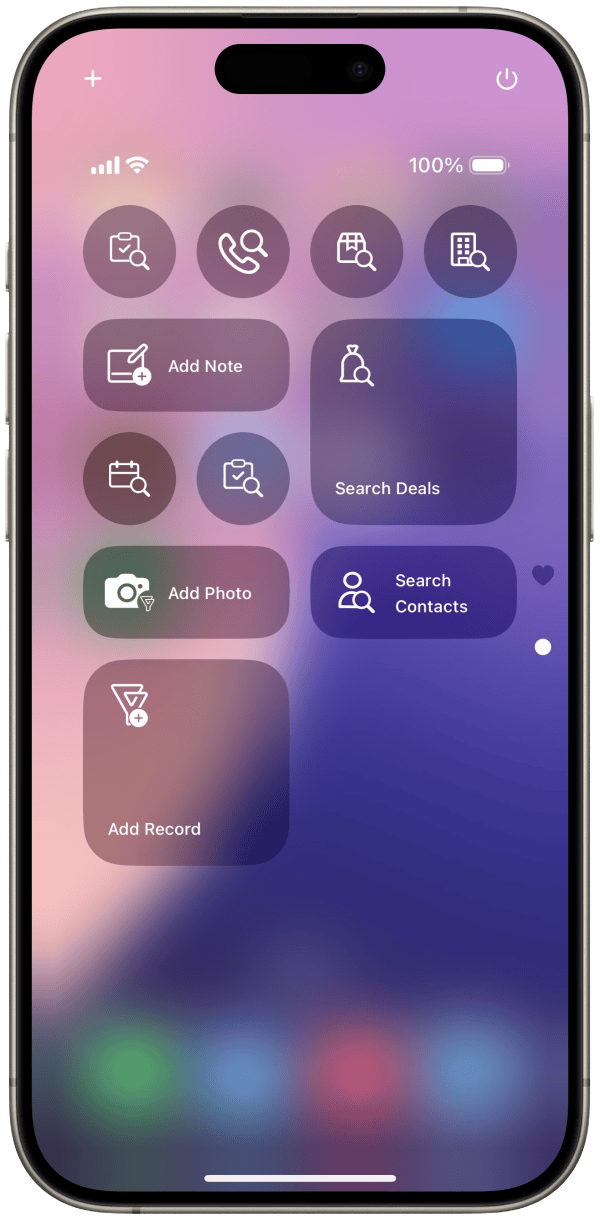
We have introduced Bigin control widgets on the Control Center. Using these control widgets, you can now create new records, search existing ones, add files and notes to the records in Bigin. You can also resize and position the widgets according to your preference.


New app icons
We have added a new app icon for the Bigin app. You can now have full control over the size and tint of the app icon, thus ensuring that it complements your layout and wallpaper. 


In app Translation
Bigin app supports translation for content in emails. The translation icon will appear only if the content is in a language different from the app's default language. A total of 21 languages are supported for translation. Translated content can also be copied.


The translation option is also available for conversation of the records that are created using the Email-In topping. The translated content of the conversation can also be posted as a comment.


Contact Provider
Bigin contacts can be shared with the device and it can be accessed as a separate list in the Contacts app. 
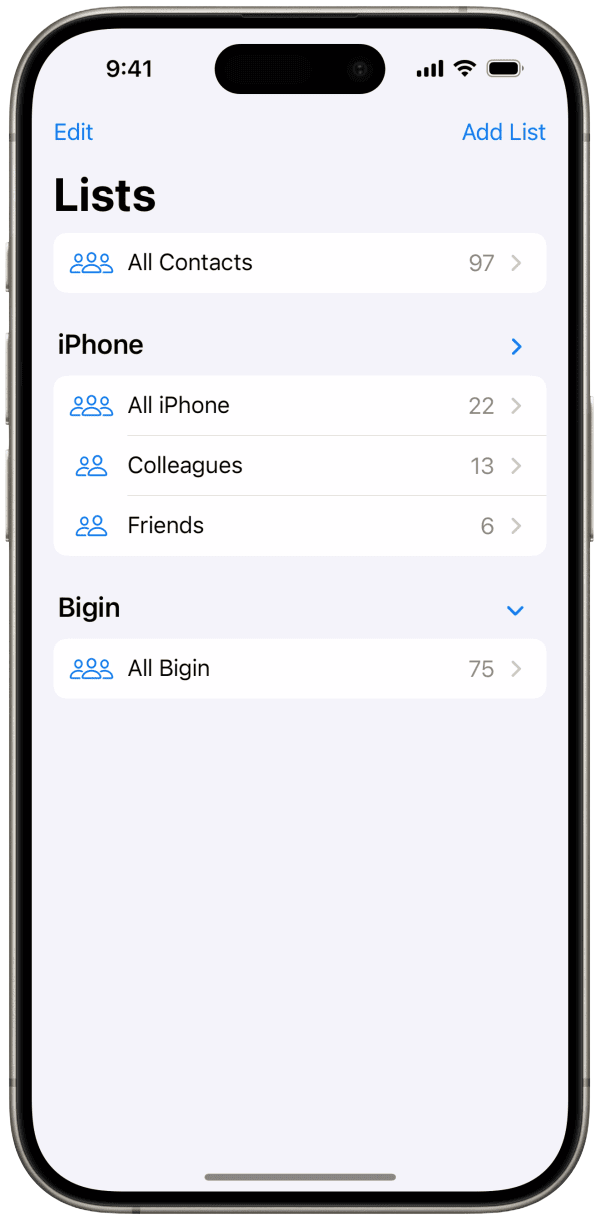


How to enable Contact Provider?
The contact provider can be enabled in any of the following three methods:

In the Contact Module: Go on to the Contacts module within the Bigin app> tap the more options(ellipsis icon) menu and select 'Enable Contact Provider'.

In App Settings: Go on to the settings module and enable the 'Contact Provider' option on the Bigin app settings.

In Phone Settings: Enable the Contact Provider by navigating to device Settings > Apps > Contacts > Providers > enable the toggle for the Bigin app.

Locked Camera Capture
The 'Add Photos' control widget on the lock screen acts as a locked camera capture tool. You can use this widget to take photos even when your device is locked. These photos can be attached to Bigin records later. In the widget view, you have the option to preview photos. You can also rename and delete photos taken during that session.


When there are photos taken via the lock screen widget, a banner will appear in the record list within the app. This banner indicates the presence of lock screen photos. Tapping the banner will open a photo list UI with options to select, delete, or rename the photos. You can choose the photos you need and attach them to a record. The banner will remain visible until all lock screen photos have been processed, either by being attached to records or deleted. The preview image in the banner will display the first two images from the drafts list view.


Limited Contacts Access
We have introduced an option for you to limit the device contacts access with the Bigin app. Now, Bigin will only have access to the device contacts that you choose to share.
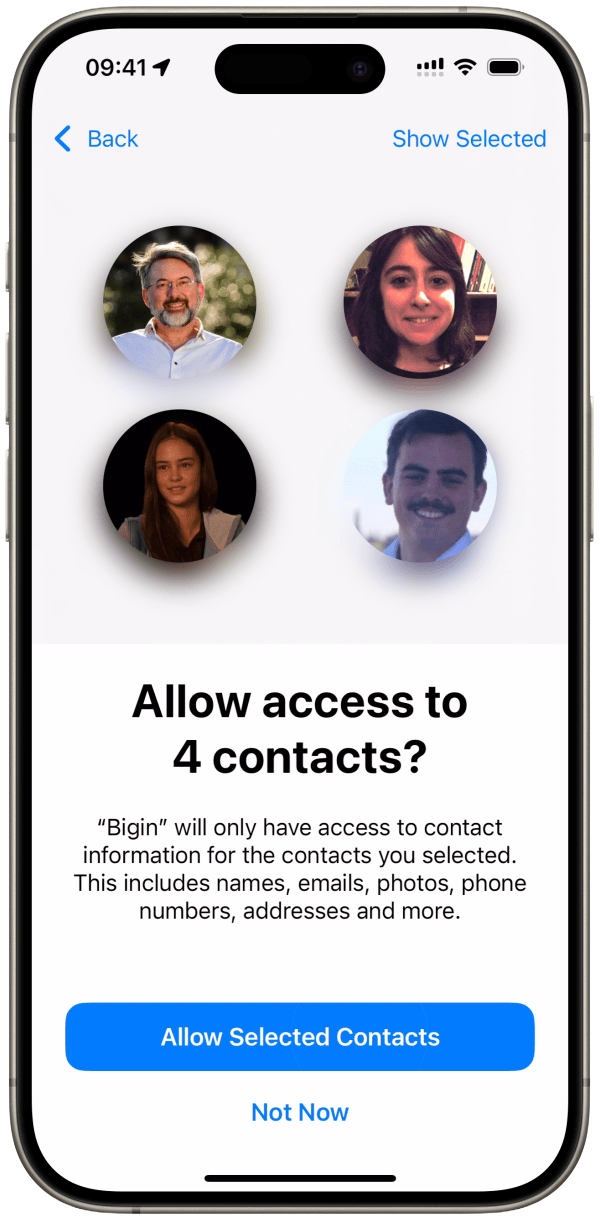


When Bigin is granted limited contact access, an informational banner will appear in the Import Contacts and Email Recipient's sections, with a 'Manage' option. Clicking the 'Manage' option will open the system UI and allows you to update Bigin's contact access settings. The device's contact list in the Import Contacts and Email Recipient's sections will be updated automatically whenever you modify your contact access via the 'Manage' option.


Semantic spotlight search
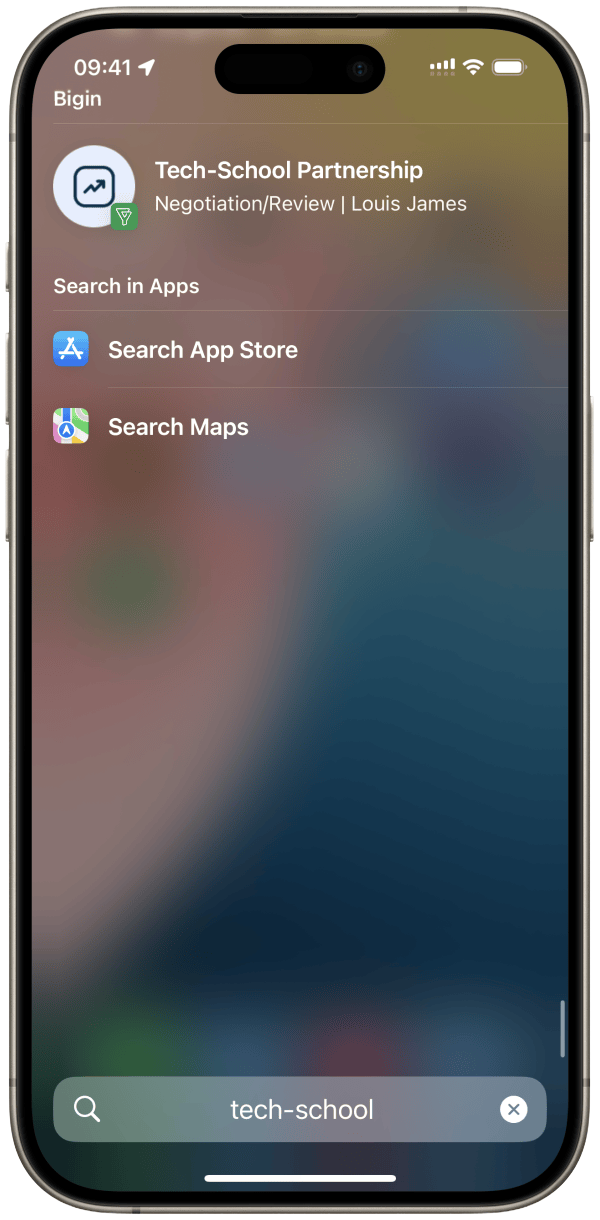
Pipeline records can be searched through Spotlight Search without launching the app. Simply click on the result in Spotlight to navigate directly to the detail view of the record.


Floating tab bar in iPad
In iPadOS 18, the bottom tab bar has been repositioned above the navigation bar. You can now reorder and remove items in the elevated tab bar.

Note: The changes in the tab bar order will not affect the sidebar or the bottom tab bar.


Pencil Pro actions
We are expanding the scope of what you can do with your Apple Pencil. You can add new records and search for existing ones, access all the tasks and calls scheduled for the day, and more, by simply squeezing your pencil.

You can also undo what you have written with a quick double tap. This feature is applicable in text fields within forms, emails, and notes.


Bigin in macOS Sequoia
Bigin is now compatible with macOS Sequoia devices.


Don't have the app yet? Download Bigin now directly from the App Store or using the link given below:

Feel free to explore the features and write to us at bigin@zohomobile.com anytime you need any assistance. You can also submit feedback within the app(go on to app settings > select 'Help & Support' > Submit Feedback). We will be happy to assist you.

Until next time,
Sneha


      • Recent Topics

      • CRM: hosting a single html file in Zoho and displaying it as a widget

        I have seen that CRM offers the option of uploading a web project to Zoho itself and displaying it as a widget in CRM. The instructions then talk about setting a development environment with Node and developing an application to upload to Zoho. But I
      • Weekly Tips : Make collaboration effortless with Whiteboard in Zoho Mail

        Working with your team often means switching between emails, notes, and other applications just to explain an idea. Maybe you are trying to sketch a layout, plan a workflow, or quickly brainstorm ideas—with text alone, things can get confusing. So how
      • Formula field number of days between 2 dates

        Hi, I want to have a formula field which calculates the following: IF EndDate < TODAY and Oproep is true (this is a checkbox field) than EndDate - StartDate, otherwise TODAY - StartDate It should calculate the number of days How can I write this for
      • Zoho CRM for Everyone's NextGen UI Gets an Upgrade

        Hello Everyone We've made improvements to Zoho CRM for Everyone's Nextgen UI. These changes are the result of valuable feedback from you where we’ve focused on improving usability, providing wider screen space, and making navigation smoother so everything
      • search and Smart Bar both missing in Mail

        One of the users on my account does not have the search bar at the top right or the Smart Bar at the bottom left of the desktop Mail app. Any ideas how to get those back?
      • What's New in Zoho Analytics - November 2025

        We're thrilled to announce a significant update focused on expanding your data connectivity, enhancing visualization capabilities, and delivering a more powerful, intuitive, and performant analytics experience. Here’s a look at what’s new. Explore What's
      • ZOHO reporting DKIM entries are not configured, when they have been configured and verified by 3rd parties

        Why is ZOHO reporting to my organisation users the following: "The DKIM entries in your domain's DNS records are not configured. Please contact your administrator for configuring DKIM to ensure optimal RSVP invite delivery." When I have configured the
      • Manage Bookings directly from Zoho Mail

        Greetings from the Zoho Bookings team! We’re introducing the new Zoho Bookings extension for Zoho Mail, designed to help you view appointments, copy time slots and share booking links without leaving your inbox. This integration brings scheduling right
      • My notes from the past 2 months have disappeared

        Hola, necesito ayuda urgente. Hoy, al iniciar sesión en mi Zoho Notebook como todos los días, me llevé una gran sorpresa al descubrir que todas mis notas de los últimos dos meses habían desaparecido. Estas notas son muy importantes para mí, ya que uso
      • How can I load a network into the cliq desktop app?

        I have both the standard cliq log in for my org and I am part of a cliq network. In the browser I can choose which I log in to. However, in teh desktop app if I log in it will alwasy load my org's cliq. Can I switch this to the network I have create
      • Ability to modify what displays in calendar invite?

        I am a long time calendly user and want to make the switch to bookings.  I understand that there is not currently a meets/hangouts integration, is one on the roadmap? Is there anyway I can modify the calendar invite to include the meet link?  I can add it to the emails no problem, but I would also like it to display on their calendar.  Is there some work around I can do to get it on the calendar?  Also am I able to modify the calendar event title?
      • Issue with Booking Confirmation Page Not Displaying, Leading to Customer Anxiety and Unnecessary Support Calls

        I am writing to express my growing concern regarding the confirmation process in Zoho Bookings, particularly the inconsistent display of the confirmation page after a successful payment. As a mobile service provider, I rely on Zoho Bookings platform for
      • Is it possible to turn off all capabilities for a customer to schedule, reschedule or cancel an appointment?

        Is it possible to turn off all capabilities for a customer to schedule, reschedule or cancel an appointment? I would like to set it up so only staff can schedule appointments. Is this possible?
      • Is there a way to generate a virtual meeting for a group service in Zoho Bookings?

        Are virtual meetings not supported for group services/meetings? I have integrated Zoom with one-on-one services, but I need a way to create an online group meeting. Thanks
      • Tracking Snippet not working in Zoho Marketing Automation!

        First off, the fact that you have to wait about 12-24 hours for every response is terrible. How are we supposed to conduct business? Second, we have been trying for several days to get the Tracking Code Snippet in marketing automation to work, to no avail.
      • Introducing VeriFactu Support in Zoho Books

        Hello users, Spain has introduced the VeriFactu system under Real Decreto 1007/2023 to ensure integrity, traceability, and anti-fraud compliance in e-invoicing. Starting January 1, 2026, all B2B invoices must be reported to Agencia Estatal de Administración
      • Where we can change the icon in social preview

        Hi, we changed our logo, and the image that appear in preview (ex : when we post a appointment link somewhere) is still our old logo. I did change our logo in the org setting. https://bookings.zoho.com/app/#/home/dashboard/settings/basic-info?clview=false
      • Zoho Bookings changes Lead Source

        Hi. i would like to know if there's a way for Zoho Bookings to not change the lead source when booking a lead for an appointment as the lead source will be used in a report. Scenario: Lead source: Website after booking an appointment Lead source: Zoho Bookings Thanks. Dan
      • Need to set workflow or journey wait time (time delay) in minutes, not hours

        Minimum wait time for both Campaigns workflows and Marketing Automation journeys is one hour. I need one or the other to be set to several minutes (fraction of the hour). I tried to solve this by entering a fraction but the wait time data type is an integer
      • Suggestion: Associating Assets with Company in Zoho FSM

        Hello Team, I would like to share an idea based on practical experience. Currently, all assets in the Zoho FSM Asset module are linked to a specific contact person. I would like to know if it is possible to associate assets with a company instead. This
      • Zoho Inventory / Finance Suite - Extend Visibility of File Names on Attachment Fields

        Hi Inventory / Finance Suite team, I noticed recently that when you add an attachment field to a module in Inventory, only the first 8 characters of the file name are visible on the details view. 8 characters is not a useful amount and there is plenty
      • AI Interview Insights: Turn Recorded Interviews into Quick Transcripts & Summaries

        Evaluating interviews shouldn’t require replaying long recordings or taking manual notes. With AI Interview Insights, you can now review complete transcripts and AI-generated summaries of your One-way (Recorded) interviews right inside Zoho Recruit. This
      • Many Notes Becoming Unusable

        Hello. The Notebook app is becoming unusable. I'm getting odd-looking results from my searches. Some of the notes, after clicking on them, show an update button that does absolutely nothing. Not sure what has happened, but it would be nice to get this
      • Kaizen #218: Actions APIs - Field Updates

        Hello all!! Welcome back to a fresh Kaizen week. In the previous weeks, we covered Workflow Rules APIs, Actions APIs - Email Notification APIs, and Tasks Update APIs. This week, we will continue with another Actions API - the Field Update API in Zoho
      • How Contract Types and Templates Form the Backbone of Zoho Contracts

        Every contract in Zoho Contracts starts with two essential elements: Contract Type and Template. These are not just administrative steps. They define how every contract in your organization is created, governed, and managed over time. Let us look at the
      • E-Invoicing in Belgium with Zoho Books

        Starting January 1, 2026, Belgium is introducing mandatory electronic invoices (e-invoicing) for all B2B transactions between VAT-registered businesses. This means that invoices and credits notes must be exchanged in a prescribed digital format. How E-Invoicing
      • Zoho Books Finance Modules Not Accessible in Zoho CRM Mobile App

        We have integrated Zoho CRM with Zoho Books using the Zoho Finance Suite integration. In the CRM web version, we can see the Finance modules (Estimates/Quotes, Invoices, Sales Orders, Items, Payments) and are able to create invoices and quotes directly
      • Greek character in Deluxe script

        Hi, We have been using a script since 2022 which replaces characters in Greek contact names using replaceAll. Since this morning, all the Greek characters used in the script have turned to question marks. I tried retyping the characters, copy-pasting
      • CRM Related list table in Zoho analytics

        In Zoho Analytics, where can I view the tables created from zoho crm related lists? For example, in my Zoho CRM setup, I have added the Product module as a related list in the Lead module, and also the Lead module as a related list in the Product module.
      • Zoho Flow Credits

        Hi , I would like to ask the reason why every time I added plus credit but few days later I will return back to default? (as below I add credit to 3000 but today It change back to 1000) Most important is, when the credit fully used, not any reminder to
      • Connecting zoho creator to zoho writer to send prefilled documents

        i will paste the worflow below // Get user's submitted data from the form userSalary = input.Current_Salary; userCIBIL = input.CIBIL_Score; userEmail = input.Email; userName = input.Name; // You need to get the Document ID from the URL of your Zoho Writer
      • Zoho Creator to Zoho Writer for prefilled documents...

        In response to the question about connecting Zoho Creator to Zoho Writer for prefilled documents, I wanted to share a working implementation that demonstrates how to use the record_id parameter with the Zoho Writer Merge API. This allows Writer to automatically
      • Managing functions

        Can someone let me know if there are any plans to improve the features for managing functions in CRM? I have lots of functions and finding them is hard. The search only works on the function name and the filter only works on function type. I have created
      • Introducing our latest privacy enhancement - Hiding email IDs in Zoho Cliq Networks

        Hello everyone, Zoho Cliq Networks offers a powerful collaboration platform that allows businesses to create dedicated digital workspaces for external vendors, partners, or individuals you want to communicate with professionally without adding them to
      • zoho performance

        OVERALL CONFIGURATION OF ZOHO PERFORMANCE Quarterly performance review Self rating and scoring Manager rating and scoring
      • Zoho Social API for generating draft posts from a third-party app ?

        Hello everyone, I hope you are all well. I have a question regarding Zoho Social. I am developing an application that generates social media posts, and I would like to be able to incorporate a feature that allows saving these posts as drafts in Zoho Social.
      • When will it be possible to edit Subform records via either views or tabular reports?

        Hey there, data maintenance often requires mass update of quite a lot of records. While this is a piece of cake via either List view or Zoho sheet view, the same cannot be carried out for subform records yet. When one of the two options will be made available?
      • Onboarding

        Hello Team, Im yuktha working as HR at Ossisto Technologies. We are currently utilizing zoho for onboarding candidate. right now facing issue with onboarding Attaching the screenshots for your reference
      • Move attachments from one module to another with Deluge

        I have created a button that works just like the convert button for my custom modules. I would like this custom function to move any attachments in this record to the new module. I can't seem to find any documentation on how this can be accomplished.
      • Archiving Contacts

        How do I archive a list of contacts, or individual contacts?
      • Next Page