Kaizen #142: How to Navigate to Another Page in Zoho CRM using Client Script

Kaizen #142: How to Navigate to Another Page in Zoho CRM using Client Script

 
Hello everyone!

Welcome back to another exciting Kaizen post. In this post, let us see how you can you navigate to different Pages using Client Script. 


In this Kaizen post,
  1. Need to Navigate to different Pages
  2. Client Script ZDKs related to navigation
         A. navigateTo()
         B. navigation_data
  3. Use Case
  4. Solution
  5. Summary
  6. Related Links


1. Need to Navigate to different Module's Pages in Zoho CRM

Often navigation between Module pages is required for improved user experience and streamlined workflows. Seamless transitions between related modules ensure quick access to relevant data and actions, enhancing productivity. For example, whenever the status of Account is updated to "Deal Creation", you can open the Deal Create Page. 

2. ZDKs to navigate to different pages

A. navigateTo()

Using this ZDK method, you can open any modules' detail/create/clone/edit page in a new tab or in same tab. Here is the syntax.
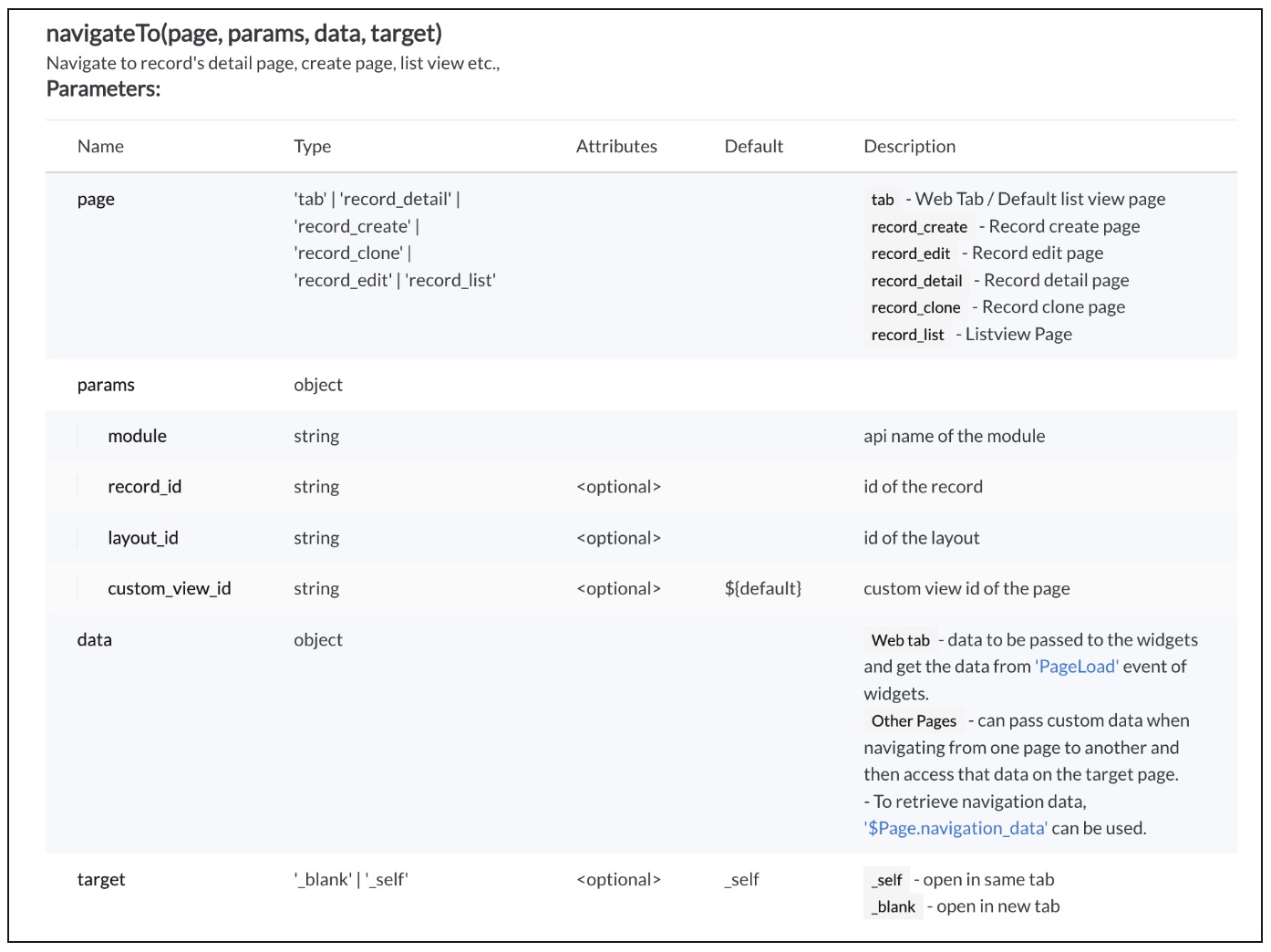


Click here to know more details.

B. navigation_data

Using The Constant , $Page.navigation_data, you can get the data passed from navigateTo() method.
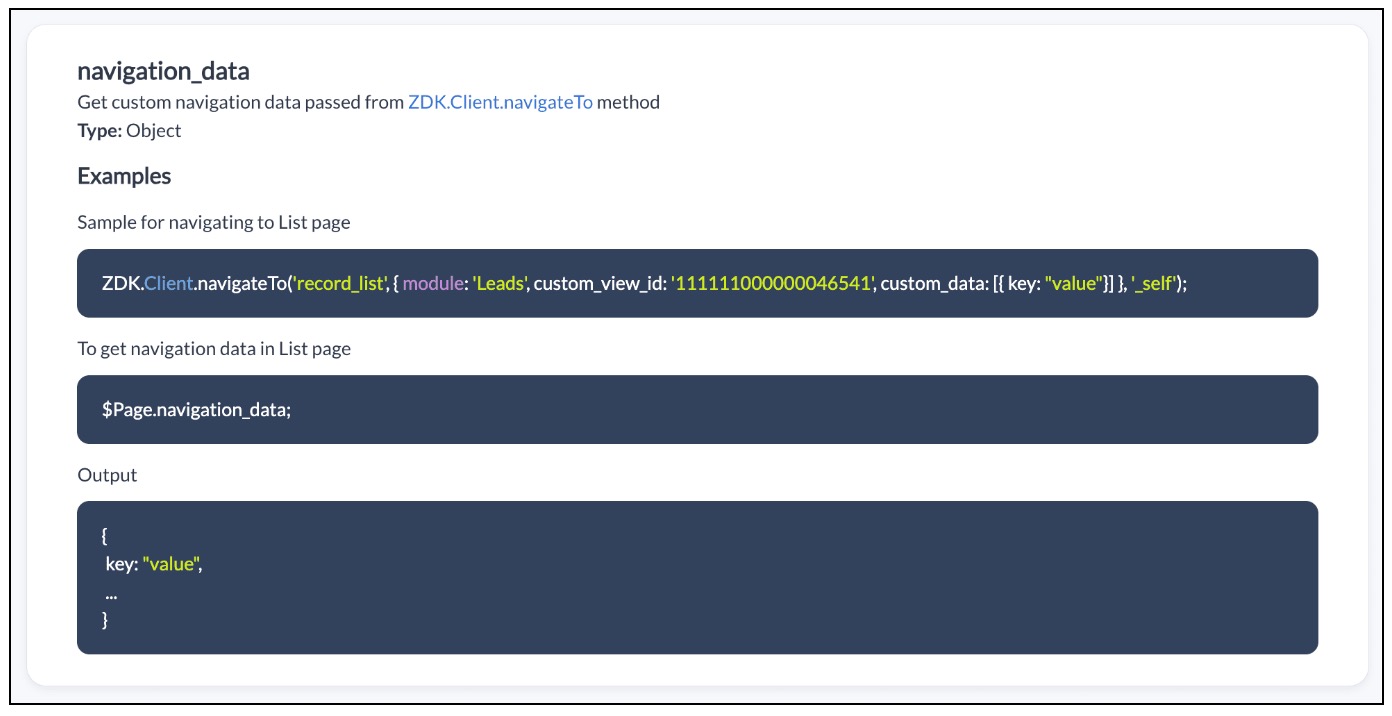


Click here to know more details.

3. Use Case

Zylker is a manufacturing organisation uses Zoho CRM. The admin wants to automatically open the Deal Create Page whenever the status in the Detail Page of Account is "Deal Creation". Also Deal Create Page should have the "Account Name"  prefilled from the Detail Page of Account record."

4. Solution

If the user updates the status to "Deal Creation" in Accounts module you need get confirmation from the user and  open a new Deal Create Page automatically with Account Name prefilled. 

To accomplish this using Client Script, you need to create two Client Scripts. 

A. Client Script for Accounts Module
B. Client Script for Deals Module

A. Client Script for Accounts Module

Create a Client Script for Detail Page of "Accounts" module with the following details and click "Next". To know more about Creating Client Script, click here.
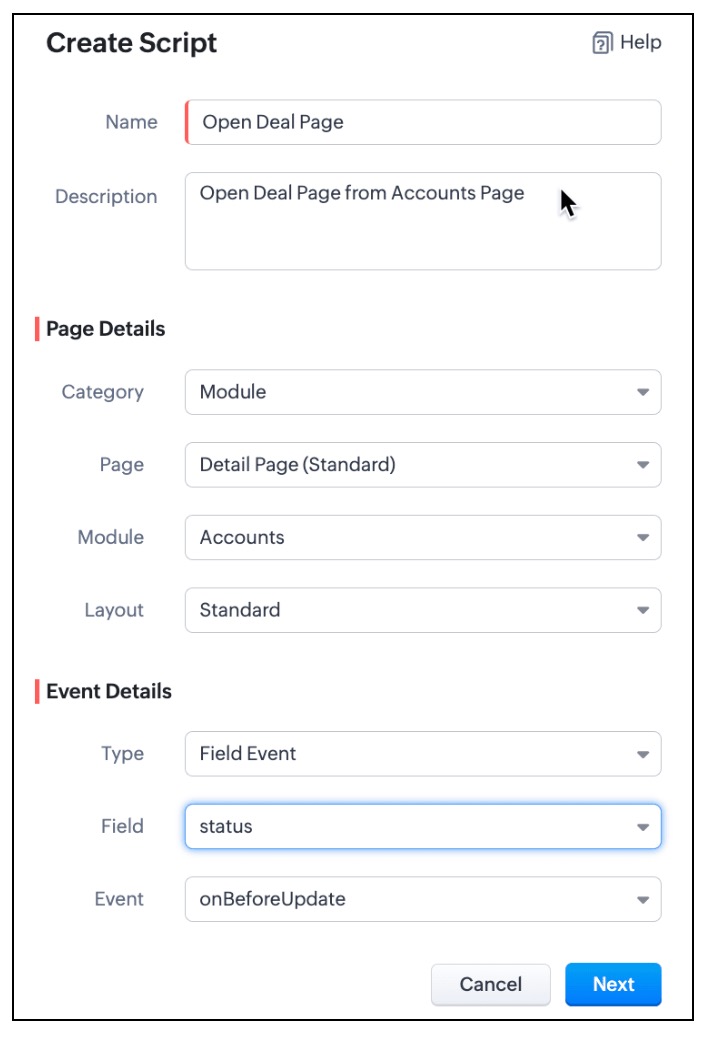

  • In the Client Script IDE, enter the below script and click Save.
  1. var a_name = ZDK.Page.getField("Account_Name").getValue();
  2. var rec_id = $Page.record_id;
  3. if (value == "Deal Creation")
  4. {
  5.     var resp=ZDK.Client.showConfirmation("Do you want to update the status as Deal Creation?");
  6.     if (resp)
  7.     {
  8.         var rec = $Page.record;
  9.         var rec_id = $Page.record_id;
  10.         rec.status = "Deal Creation";
  11.         var response = ZDK.Apps.CRM.Accounts.updateById(rec, rec_id);
  12.         log(response);
  13.  ZDK.Client.navigateTo('record_create', { module: 'Deals', custom_data: {data: a_name,data_id :$Page.record_id}}, '_blank')
  14.     }
  15. }

  • Whenever the status is updated to "Deal Creation" , you can show a Confirmation box using showConfirmation() asking whether the user wants to update the status as "Deal Creation"
  • Then, update the current record's status using updateById(). You can use the $Page, to get the current record id.
  • Then using  navigateTo() method you can open the Deal Create Page from Account Detail Page.
  • As per the following syntax, you should pass the required parameters, which includes the data needed for the Client Script on Deal Page. In this case the data being passed is the Account Name and Id.
  • Syntax : navigateTo(page, params, data, target)
    • page :  record_create denotes that you want to open Create Page.
    • params :  You need to mention the name of the module for which the Create Page has to be opened. In this case it is "Deals". You can also mention the layout_id and record_id in params. For more details, click here.
    • data : "custom_data" hold the data that you want to pass to the Deals Page.
    • target: You can open the page in same tab or in a different tab using "_self" and "_blank" respectively.
B. Client Script for Deals Module

Now, create another Client Script for "Deals" module with the following details and click "Next".
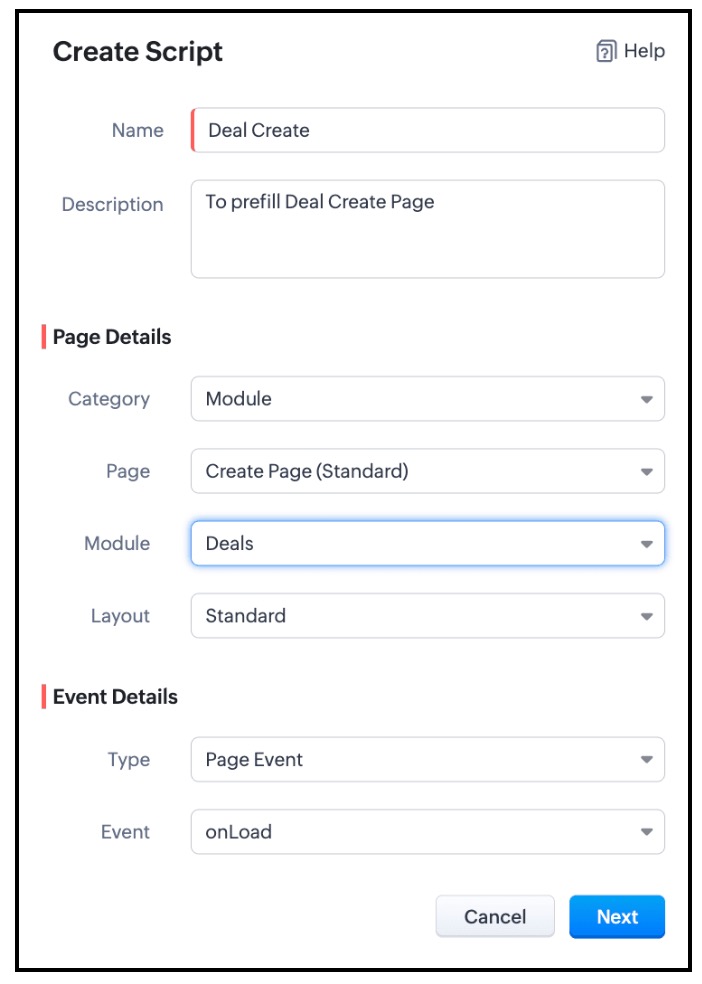


In the Client Script IDE, add the following script and click "Save"

  1. var a = $Page.navigation_data;
  2. if (a!=null);
  3. {
  4. var field_obj1 = ZDK.Page.getField('Account_Name');
  5. field_obj1.setValue({ "id":a.data_id , "name":a.data });
  6. }

To get the data passed in Account Detail Page, you need to use "$Page.navigation_data". In this script you can use setValue() and mention the id and name of "Account Name". As Account Name is a lookup field, you should mention the Id of the Account along with the Account Name.

Here is how the Client Script Works.
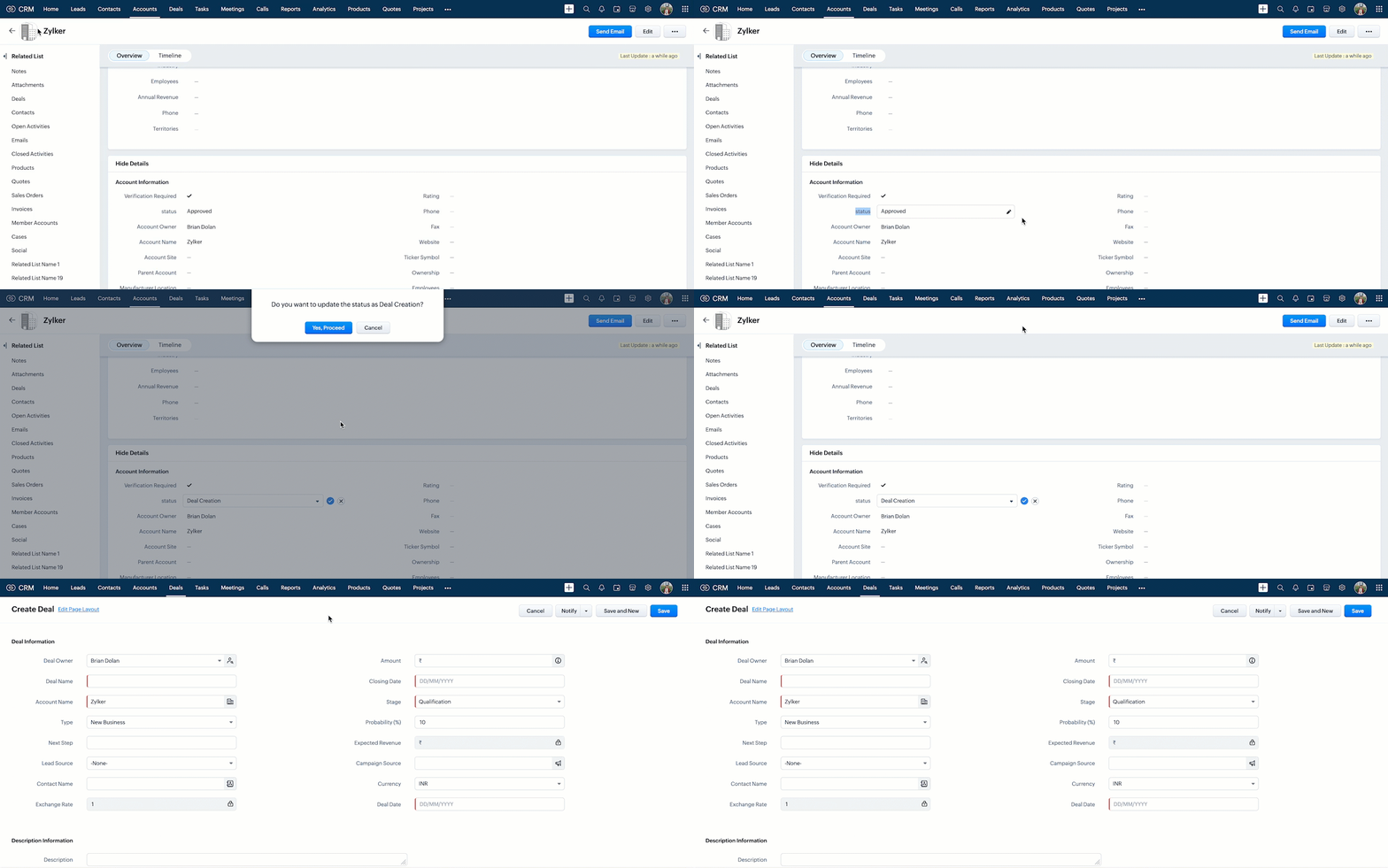

Click here to know more details.

Notes
Note:

You can open any external URL using Client Script in a new tab using openURL().
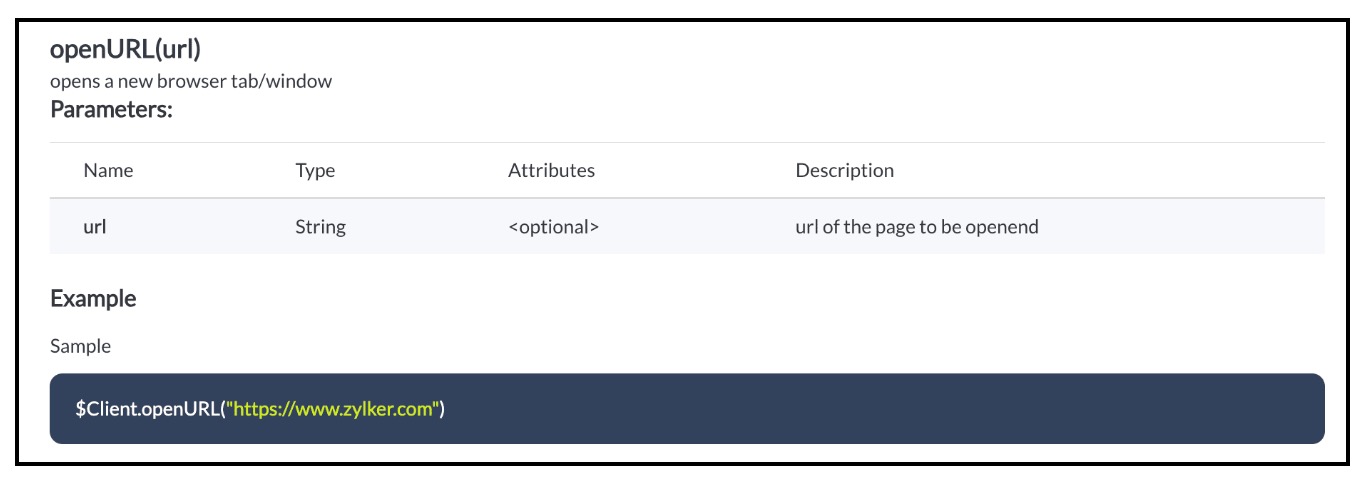
Notes

Click here to know more details.

5. Summary :

In this post we have discussed,
  • How to pass data from one page to the other using Client Script.
  • How to perform actions after a record is updated.
  • How to update a record using Client Script without clicking on Save button.
  • How to open external URLs using Client Script.
-------------------------------------------------------------------------------------------------------------------

6. Related Links :


-------------------------------------------------------------------------------------------------------------------

Previous Post: Kaizen #141 - Zoho CRM's API Collection in Postman     |     Kaizen Collection: Home
Alert
Join us for our upcoming Zoho CRM Developer Series: Zoho CRM APIs, where you can explore more about Zoho CRM APIs. Register Now!  


    • Sticky Posts

    • Kaizen #198: Using Client Script for Custom Validation in Blueprint

      Nearing 200th Kaizen Post – 1 More to the Big Two-Oh-Oh! Do you have any questions, suggestions, or topics you would like us to cover in future posts? Your insights and suggestions help us shape future content and make this series better for everyone.
    • Kaizen #226: Using ZRC in Client Script

      Hello everyone! Welcome to another week of Kaizen. In today's post, lets see what is ZRC (Zoho Request Client) and how we can use ZRC methods in Client Script to get inputs from a Salesperson and update the Lead status with a single button click. In this
    • Kaizen #222 - Client Script Support for Notes Related List

      Hello everyone! Welcome to another week of Kaizen. The final Kaizen post of the year 2025 is here! With the new Client Script support for the Notes Related List, you can validate, enrich, and manage notes across modules. In this post, we’ll explore how
    • Kaizen #217 - Actions APIs : Tasks

      Welcome to another week of Kaizen! In last week's post we discussed Email Notifications APIs which act as the link between your Workflow automations and you. We have discussed how Zylker Cloud Services uses Email Notifications API in their custom dashboard.
    • Kaizen #216 - Actions APIs : Email Notifications

      Welcome to another week of Kaizen! For the last three weeks, we have been discussing Zylker's workflows. We successfully updated a dormant workflow, built a new one from the ground up and more. But our work is not finished—these automated processes are
      • Recent Topics

      • Automation Series: Assign Subsequent Task Owner on Completion

        When a project progresses, tasks get piled up over time. As new tasks are created, tracking ownership and assigning them can become time consuming. In a pharmaceutical manufacturing unit, the procurement phase involves a set of tasks such as raw material
      • In-House, Non-Billable Projects

        I use Zoho Projects solely for in-house projects with fixed cost budgets.  Only bills and expenses need to be charged against the budget.  There are no customers to be billed or invoices to be created. How can such a non-billable project be set up?   As
      • [Webinar] What's New in Zoho Analytics: Q1, 2026

        To all the data enthusiasts out there, we're back again with another power-packed webinar in the What's New series! This last quarter was marked by exciting new features and product updates focused on offering you top-notch solutions. With new data connectors,
      • Ask The Expert: Deep Dive into Zoho CRM, Desk, SalesIQ, and Campaigns!

        Are you using Zoho to power your sales, support, and marketing, and have questions about configuration, automation, or best practices? We have great news: the “Ask The Expert” session is coming to the Zoho Benelux Community! This session is specifically
      • Introducing parent-child ticketing in Zoho Desk [Early access]

        Hello Zoho Desk users! We have introduced the parent-child ticketing system to help customer service teams ensure efficient resolution of issues involving multiple, related tickets. You can now combine repetitive and interconnected tickets into parent-child
      • Workflows being applied and the Large unwanted popup

        When a workflow is being applied do to an action, then the Agent is left with a large Window asking if they would like the see the changes this workflow did. Is there any way to disable this prompt from appearing?
      • Users I've shared the sheet with cannot use the Custom Functions

        Hi, I have a Zoho Sheet worksheet that I shared to 2 colleagues, giving them full access: In that worksheet, I created a button with a custom Deluge function and it works flawlessly for me: For those I shared the worksheet to, when they click the button,
      • Limiting the form - Zoho People

        Hi Team, I would like to limit the number of form/request submissions for employees within a given month. For example, if an employee has already submitted 3 requests in the current month, they should not be allowed to submit any further requests. An
      • Zoho Analytics: Clarification on Email Schedule Limits in Basic Plan

        Hi Team, I have a question regarding the email scheduling limits in the Zoho Analytics Basic Plan. The plan shows that I can create 4 email schedules. However, I understand that schedule consumption is calculated based on recipients (i.e., 1 schedule
      • Zoho Books | Product updates | April 2026

        Hello users, Welcome to our April 2026 product updates roundup! Highlights include profit margin for sales transactions, insights in reports, recording deposits from undeposited funds in banking, and faster production workflows with improved assembly
      • Zoho Form not synching with Zoho CRM in CRM email template

        I have in the past successfully created an email template that has access to a Zoho Form in the url link to Forms in the email template. I am in the Contact Module of the CRM and I have created a Form for contacts and mapped the two. I am using the upsert
      • Standardize your booking forms with Centralized Customer Form

        We’re excited to introduce Centralized Customer Form, a new way to manage and standardize how customer information is collected across your event types. With this feature, you can define a common set of booking form fields once and apply them across your
      • Zoho Creator In-App Notification

        Hi Team, I have implemented an in-app notification using code, as it required some customization. I followed the example in the link below: https://www.zoho.com/deluge/help/pushnotify-using-deluge.html#Example I have a couple of questions regarding this
      • Add Flexible Recurrence Options for Meeting Scheduling in Zoho Cliq (e.g., Every 2 Weeks)

        Hello Zoho Cliq Team, We hope you are doing well. Currently, when scheduling a meeting inside Zoho Cliq, the recurrence options are limited to Daily, Weekly, Monthly, and Yearly. There is no ability to set a meeting to occur every X weeks — for example,
      • Announcing Zoho Sheet desktop app for macOS and Windows (Beta)

        Hello Sheet users, We know you’ve been waiting for this one. It has always been the top priority on our roadmap to provide a single native desktop app for macOS and Windows that works both online and offline. Today, we are excited to announce that the
      • In App Auto Refresh/Update Features

        Hi,    I am trying to use Zoho Creator for Restaurant management. While using the android apps, I reliased the apps would not auto refresh if there is new entries i.e new kitchen order ticket (KOT) from other users.   The apps does received notification but would not auto refresh, users required to refresh the apps manually in order to see the new KOT in the apps.    I am wondering why this features is not implemented? Or is this feature being considered to be implemented in the future? With the
      • Unable to Log In to FSM Mobile App

        Hello FSM Team, We are encountering an issue when logging in to the FSM mobile app. When entering the user email, the system shows the error: “This account does not exist.” However, the same user is able to log in successfully via web (fsm.zoho.com).
      • Clarification on “Change Owner” vs Dispatcher Role in Work Orders

        Hi Mr. Abid, Good day! We would like to understand the purpose and correct usage of the “Change Owner” option in the Work Order module. As we noticed, there is an option to Change Owner in the Work Order. At the same time, there is also a separate field/role
      • New Income Tax Act 2025 and Rules 2026 for India (Effective 1 April 2026)

        Hello everyone, The Income Tax Act 2025 came into effect from 1 April 2026. This new law replaces the old Income Tax Act of 1961. Along with the new Act, the Income Tax Rules 2026 have also been released by the government. These updates bring practical
      • Facturation électronique 2026 - obligation dès le 1er septembre 2026

        Bonjour, Je me permets de réagir à divers posts publiés ici et là concernant le projet de E-Invoicing, dans le cadre de la facturation électronique prévue très prochainement. Dans le cadre du passage à la facturation électronique pour les entreprises,
      • How can I delete a user profile created ?

        I can't delete custom profiles created. Why ?
      • Search API filter/sort ignores comment-triggered modifiedTime updates

        Summary When a comment is added to a Call or Account, the parent record's modifiedTime is correctly bumped. This bumped value is visible in: GET /api/v1/calls/{id} ✅ GET /api/v1/calls/search without a filter ✅ — the record's response body shows the new
      • ZOHO Cadence

        Can you edit when a cadence is set to enroll? For instance, I currently have it set up to enroll three days after a new record is created that fits the custom view criteria; however, I would like to change it to enroll immediately. I do not see where
      • Automate the file import step

        Hello everyone, I have a Sales - 'Account' category, and currently import the file to update it as follows: Import Accounts - From File - Update existing Accounts only - select and match the field the CRM. Since we have been using Microsoft 365 SharePoint.
      • Introducing SlyteUI : From Idea to a Working Interface in Minutes

        Hello everyone! Are you spending hours building basic UIs? Does even the smallest customization feel like a major task? CRM customization should feel intuitive and straightforward, not time consuming or exhausting. SlyteUI makes this possible by simplifying
      • What's New in Zoho Billing | March 2026

        March is here with a fresh wave of updates to Zoho Billing. From making compliance easier, reporting more flexible, to making day-to-day workflows smoother across the board. Here's everything that's new this month. Introducing Usage-Based Billing Reports
      • Dynamic Multi-Staff Selection for Ad-Hoc Bookings

        Summary Allow customers or internal schedulers to select specific staff members at the time of booking, with Zoho Bookings automatically surfacing only the time slots where all selected members are simultaneously available. Current Behaviour Zoho Bookings
      • How Can I Clear Deleted Members and Free Up Their Storage?

        Can we remove these deleted members and free up their storage?
      • Zoho Books Create Invoice API

        I am creating zoho invoices via the API.  Now that zoho has released sub-accounts, i'd like to create invoices and link them to sub-accounts within "sales" account.   For example; my chart of accounts looks like this; Sales ->Website Sales    ->Campaign Sales ->Offline Sales However, when I try to pass these accounts to the API, I receive an error that only Bank accounts can be passed with the create invoice.  
      • Multiselect lookup in subform

        It would be SO SO useful if subforms could support a multiselect look up field! Is this in the works??
      • Ability to Set Text Direction for Individual Cells in Zoho Sheet

        Dear Zoho Sheet Team, We hope you are doing well. We would like to request an enhancement in Zoho Sheet that allows users to set the text direction (right-to-left or left-to-right) for individual cells, similar to what is available in Google Sheets. Use
      • Problem in usage zoho

        Difficulty to submit the from in my training to handle ticket on your free trial
      • Contact not saved after editing

        Hi. I discovered a couple of problems with Zoho contact. (1) BUG. Contact is not saved after editing. If you edit an existing contact by putting a bracket in one of the fields you get the message "Contact updated successfully" but nothing is saved. All updates (including the other fields) are lost. Steps to reproduce. Go to an existing contact and change the first name to "Robert (Bob)". (2) In the phone number fields you can only save numeric data (0 to 9). This seems an unneccessary restriction.
      • Zoho Mail Android app update: UI revamp

        Hello everyone! We are excited to share that the first phase of the Zoho Mail Android UI revamp is now live. In this update, we have redesigned navigation bar at the bottom to quickly access the Email, Calendar, Contacts, and Settings modules. Also, the
      • Opt-out from mailing list means can't email at all??

        It seems that if a contact unsubscribes from a mailing list the only way to email them is to uncheck the email opt-out box first, then re-check after the email has been sent. I've been through a chat with support and they confirmed this. This seems bizarre.
      • Email Opt Out Question

        Has the problem where if a customer is emailed opt out prevents you sending standard emails? For me this feature is simply to stop any email marketing and should not block people from receiving emails via Zoho mobile, which makes no sense.
      • Items Landed Cost and Profit?

        Hello, we recently went live with Zoho Inventory, and I have a question about the Landed Cost feature. The FAQ reads: "Tracking the landed cost helps determine the overall cost incurred in procuring the product. This, in turn, helps you to decide the
      • Bank Feeds

        Since Friday my bank feeds wont work. I have refreshed feeds, deactivate and reactivate and nothing is working
      • Show backordered items on packing slip

        Is it possible to show a column on the Packing Slip that shows number of backordered items when a PO is only partially filled? I would also like to see the Backordered column appear on POs after you receive items if you didn't get ALL of the items or partial amounts of items. And lastly, it would be nice to have the option of turning on the Backordered column for invoices if you only invoice for a partial order. -Tom
      • Newby Questions

        Q1. The top bar of Zoho Books has a "Search in Banking (/) " field. What is the proper use of this text box? - Searching for Amazon for example has no results but there are transactions. - Is the search case sensitive? - Are regular expressions allowed?
      • Next Page