Kaizen #172 - Leveraging the 'crmAPIResponse' Object in Queries

Hello everyone!
Welcome back to another week of Kaizen!
We released the Queries feature sometime back and hope you have tried it out.
A little gist about this feature before we move on to our post.
Zoho CRM's Queries feature enables dynamic data retrieval from both CRM modules and external services, facilitating seamless integration and informed decision-making.
Key Components
- Sources: Pre-configured sources like Modules and COQL are available, with the option to add custom sources via REST APIs.
- Queries: Fetch data by selecting modules, writing COQL statements, or specifying REST API endpoints, headers, and parameters.
- Variables: Incorporate variables in criteria, COQL statements, and endpoints to pass dynamic values during execution.
- Schema: Auto-generated schemas define the structure of query responses, with editable paths, field types, and labels for customization.
- Serializer: Utilize JavaScript to manipulate and customize query responses, ensuring data is in the desired format for further processing.
Types of Queries
- Modules: Retrieve records by selecting specific modules and fields, applying conditions to filter data as needed.
- COQL (CRM Object Query Language): Write SQL-like queries to fetch data, supporting complex operations like joins and aggregations.
- REST API: Fetch data from external services by specifying endpoints, headers, parameters, and connections.
With the Queries feature, you can efficiently access and display relevant data within Zoho CRM, enhancing workflow efficiency and decision-making capabilities.
A little insight into Functions before we dive into today's Kaizen!
Functions, Queries, you get the connection, right? Read on!
Many of us use Functions in Zoho CRM extensively to perform our business logic and customize the way things work in Zoho CRM. You can use Functions in blueprints, workflows, Circuits etc.
Let's say you have a function that gets the employee records from the Employees module. Technically, the function executes an API call or an integration task, and gives a response.
The response can be a string or map(JSON), depending on how the function is written and where it is used. Since functions can be used in many places, the same response format may not be the right one to be used in a circuit or a workflow.
This is where the genie 'crmAPIResponse' object comes into picture!
The power of the 'crmAPIResponse' object
The crmAPIResponse object to be returned in the CRM function should encapsulate the response in a way that it can be used in Queries, Circuit, workflow etc. The details needed are encapsulated as a map. It should include details like crmStatusCode, status, message, body in order to construct the desired format for handling data and customizing the error handling logic.
Let's consider the following example function where we use the getRecordByID integration task.
The response of the integration task contains all the fields in that module, but we want only certain parts of the response JSON and also add custom error messages, to be used in other components like Queries, Circuits, etc,.
Here is the code.
{ leadId = "3652397000018025772"; // Replace with a valid Lead ID // Initialize customAPIResponse map customAPIResponse = map(); // Fetch lead details crmResponse = zoho.crm.getRecordById("Leads", leadId); // Log the raw response for debugging info "CRM API Raw Response: " + crmResponse; // Validate and process the response to include only the required fields if (crmResponse != null && crmResponse.containsKey("id")) { // Extract required fields filteredData = map(); filteredData.put("id", crmResponse.get("id")); filteredData.put("Last_Name", crmResponse.get("Last_Name")); filteredData.put("Email", crmResponse.get("Email")); customAPIResponse.put("crmStatusCode", 200); customAPIResponse.put("status", "success"); customAPIResponse.put("message", "Lead data retrieved successfully."); customAPIResponse.put("body", filteredData); // Include only filtered data } else { customAPIResponse.put("crmStatusCode", null); customAPIResponse.put("status", "error"); customAPIResponse.put("message", "Invalid or null response from Zoho CRM API."); customAPIResponse.put("body", null); } // Return the customAPIResponse return {"crmAPIResponse": customAPIResponse}; } |
Here, you can see that we have parsed the response of the integration task to get the Last_Name, Email, and record ID using the crmResponse.get("field_API_name") statement and constructed the customAPIresponse object using the customAPIResponse.put("key", "value") statement.
The statement return {"crmAPIResponse": customAPIResponse}; returns the response body as depicted in the previous statements.
Response to the info "CRM API Raw Response: " + crmResponse; statement
"CRM API Raw Response: {"Owner":{"name":"Patricia Boyle","id":"3652397000000186017","email":"p.boyle@zylker.com"},"$field_states":null,..}}} |
Response of the return {"crmAPIResponse": customAPIResponse}; statement
{ "crmAPIResponse": { "crmStatusCode": 200, "status": "success", "message": "Lead data retrieved successfully.", "body": { "id": "3652397000018025772", "Last_Name": "Math", "Email": "math@gmail.com" } } } |
Error response
{ "crmAPIResponse": { "crmStatusCode": null, "status": "error", "message": "Invalid or null response from Zoho CRM API.", "body": null } } |
You can see that we have used the crmAPIResponse object to get only the required keys from the response and constructed a much simpler response.
Refer to our help page on Response Object for more details.
Finally, to today's Kaizen!
We've established that you can use the crmAPIResponse object to construct responses in a way that's suitable to be consumed at another place like a circuit or a workflow.
We also know that Queries allows you to have sources of the REST API type to fetch data from various sources. This means that you can have a standalone function that is enabled as a REST API as a source in Queries.
Let's see an example.
There is a simple function that uses the getRecords integration task to get the records from the Employees module.
I have used the crmAPIresponse object to construct a response as shown in the following code.
string standalone.getRecords() { result = zoho.crm.getRecords("Employees"); response = Map(); response.put("status_code",200); response.put("body",{"code":"success","details":result,"message":"function executed successfully"}); return {"crmAPIResponse":response}; } |
The response of this function is a string in the crmAPIResponse object as shown in this image.
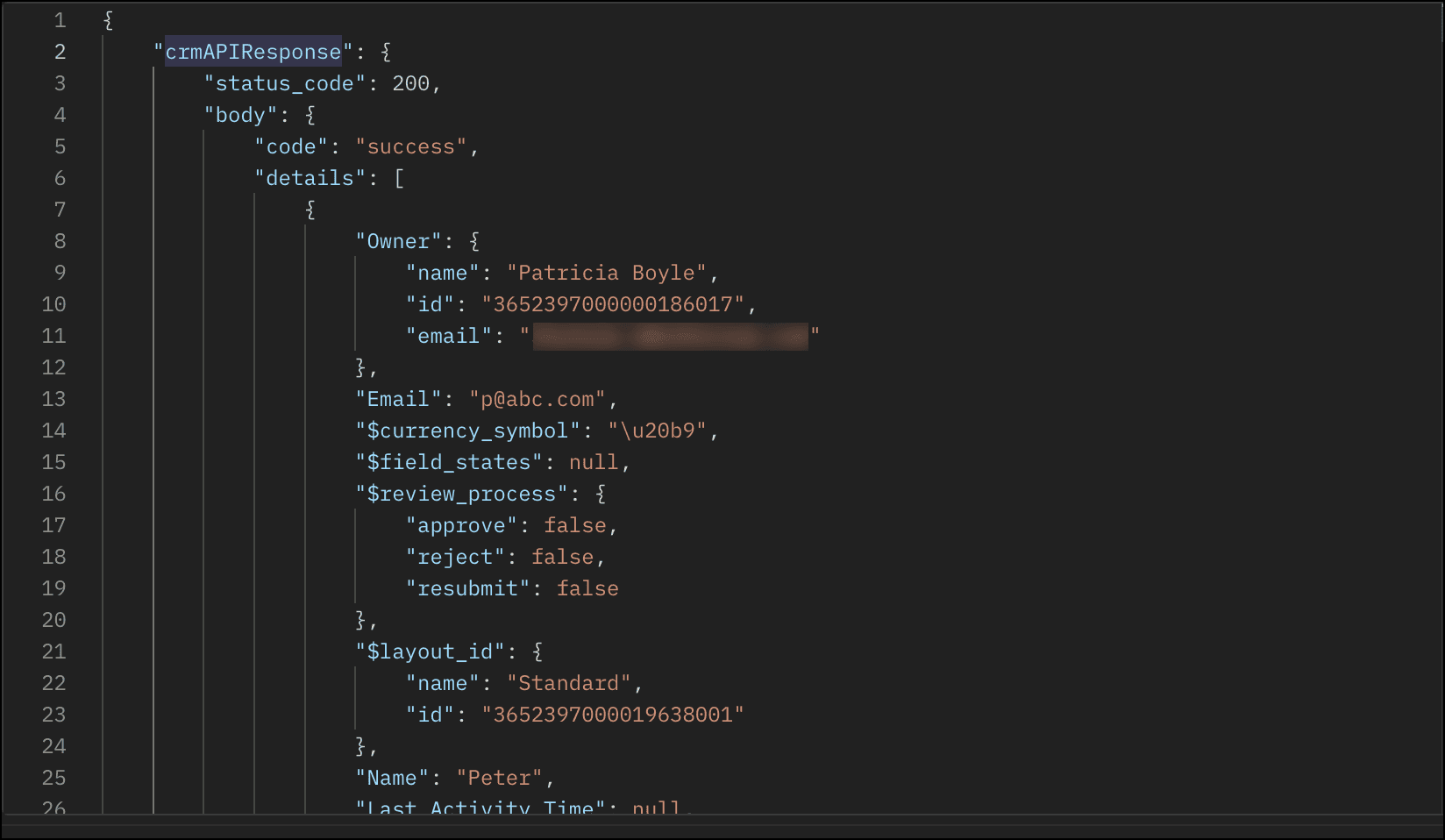
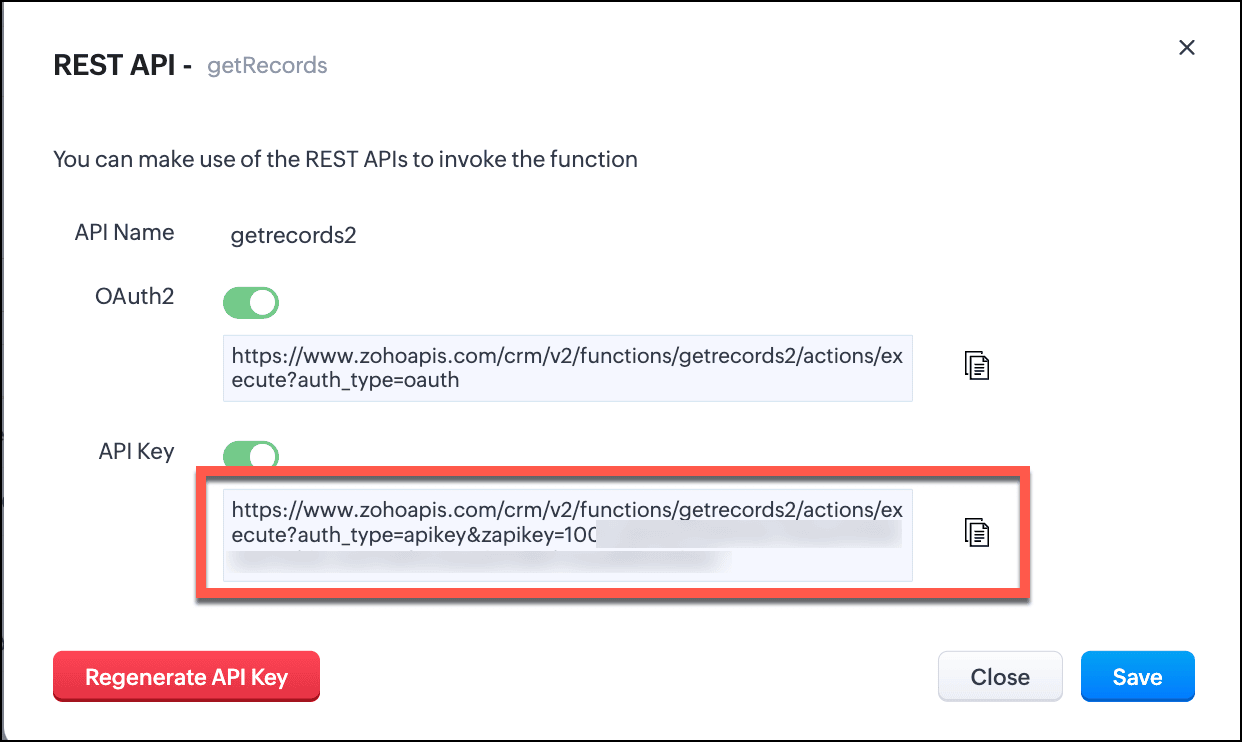
- Save this function and enable REST API.
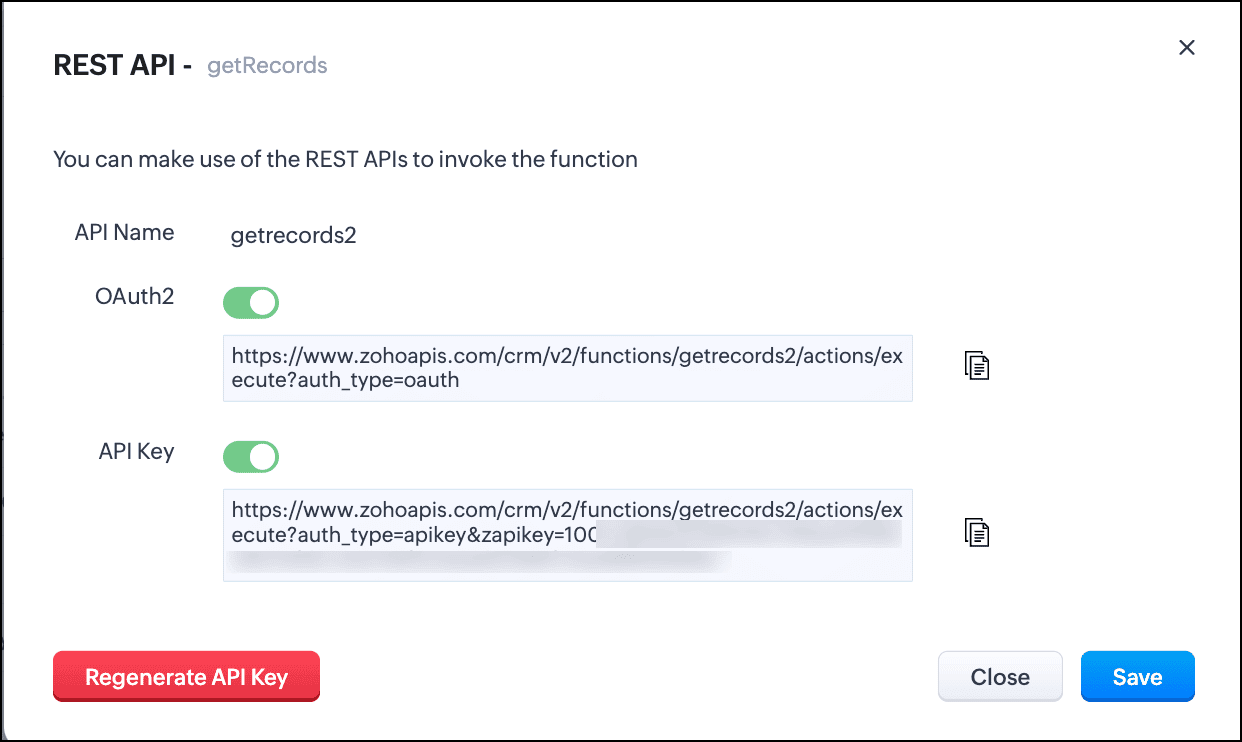
- You can see that the domain is https://www.zohoapis.com. To be able to use this in a Query, register this domain in Trusted Domain.
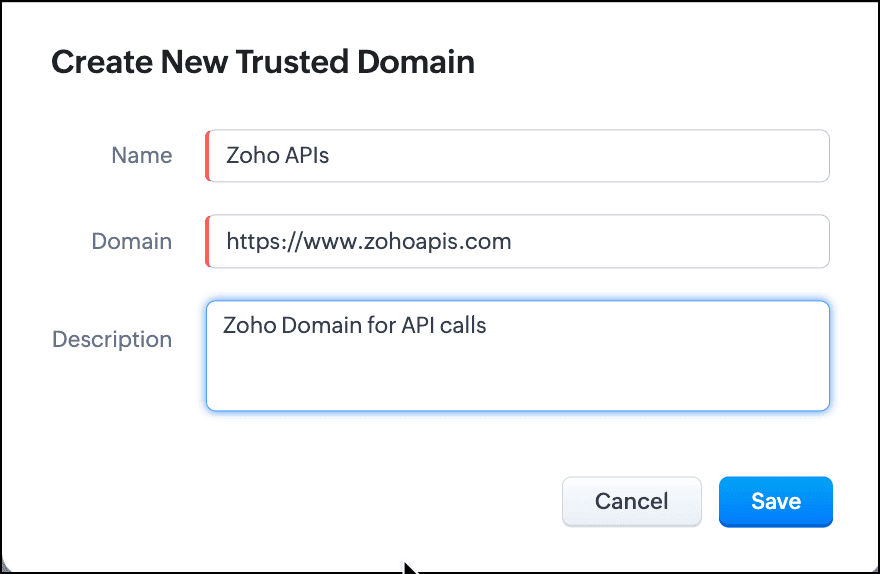
- To create a REST API type source, you must add the source. Go to Setup > Developer Hub > Queries > Sources tab.
- Click Add Source and give the details like the name, base URL, headers, and parameters under the Information section.
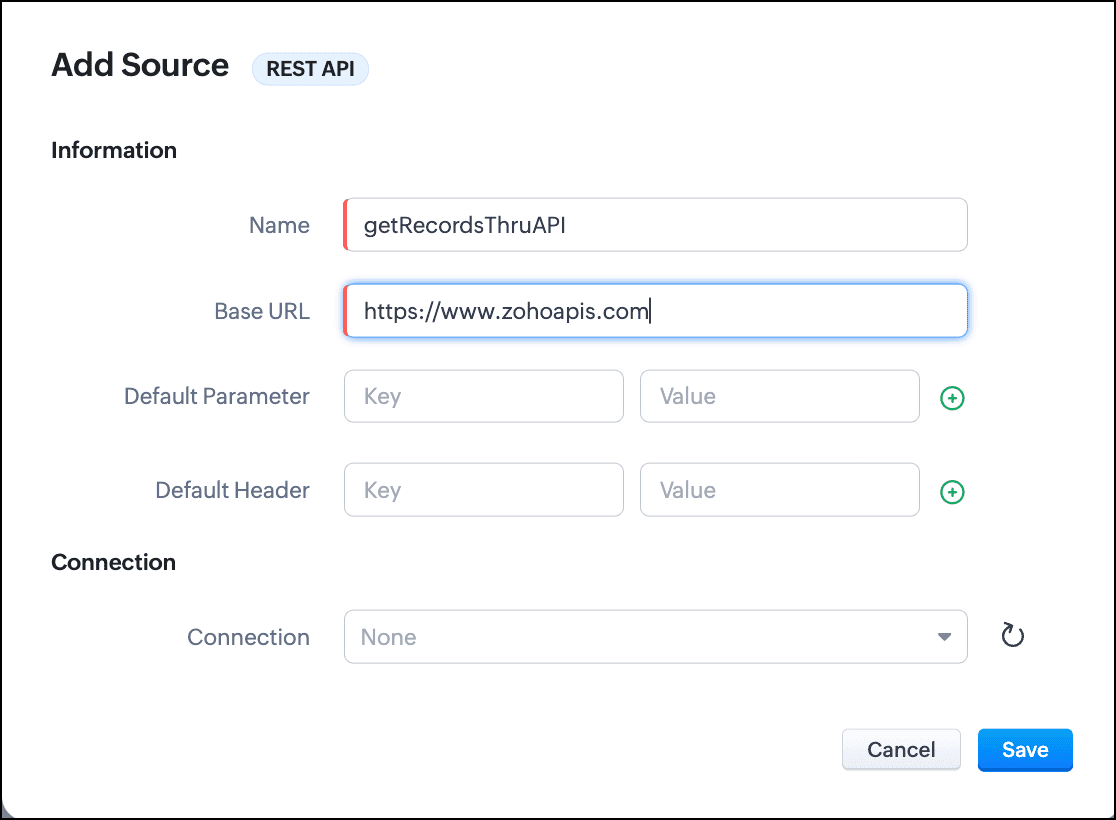
- Click Save.
- Go to the Queries tab and click Add Query.
- For Source, choose the source you just added.
- Under Information, enter the name, API name of the query.
- For the endpoint, enter the API Key URL of the function.
- Enter the parameter name and values in the Parameter field.
- Click Add Serializer if you want to serialize the response. In this example, I have serialized the response to include only the Name, Email, and Position fields in the output. The result contains the 'body' object that we returned in the crmAPIResponse object of the function.

- Click Save to save the serialization.
- Click Next to view the schema of the query. Make changes as required.
- Save the query.
You can now use this query in Canvas or associate it with Kiosk to solve your business needs.
Let us see how the crmAPIResponse object in the function affects the response of the query.
Query with the function without crmAPIResponse:
Let's consider that the function getRecords() does not use the crmAPIResponse object. In that case, the function returns a response that is a string. This response string cannot be serialized or used elsewhere.
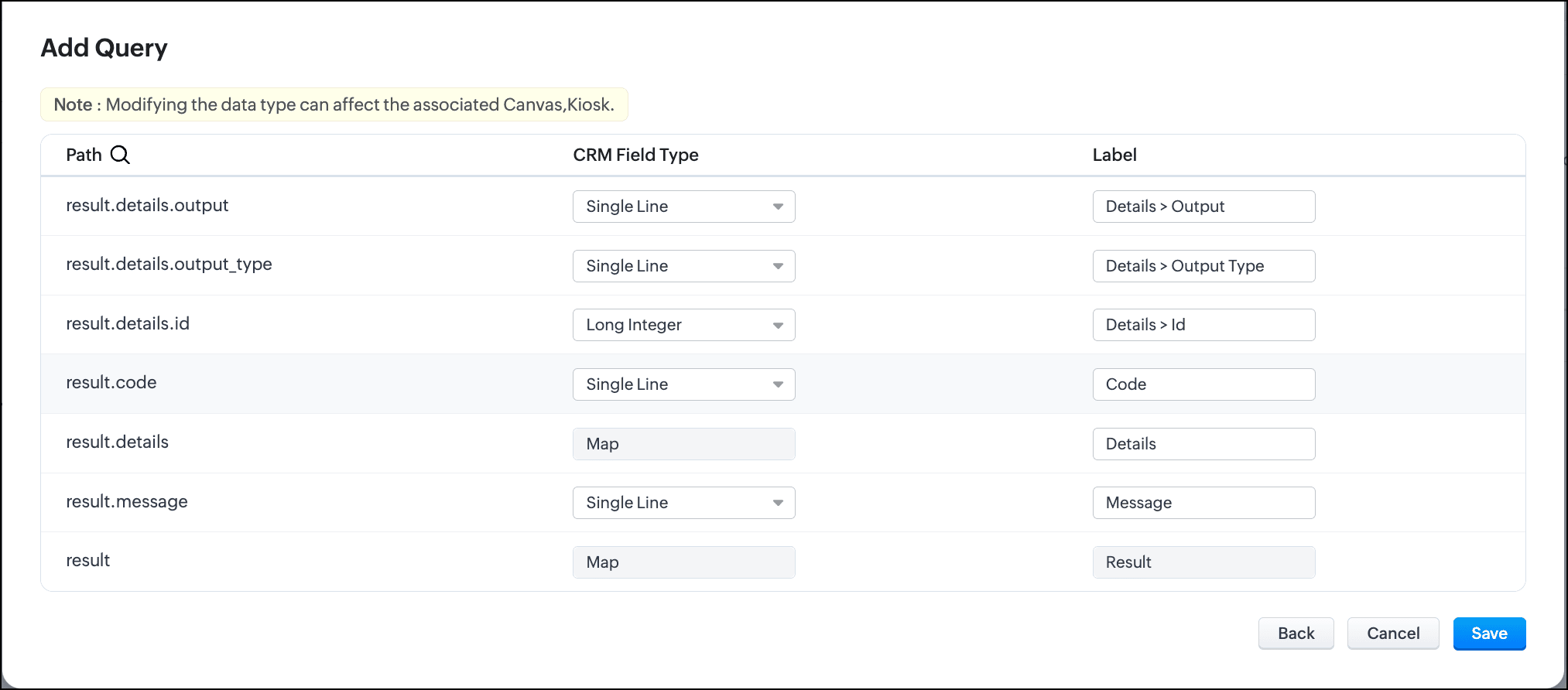
Schema of the query without crmAPIResponse:
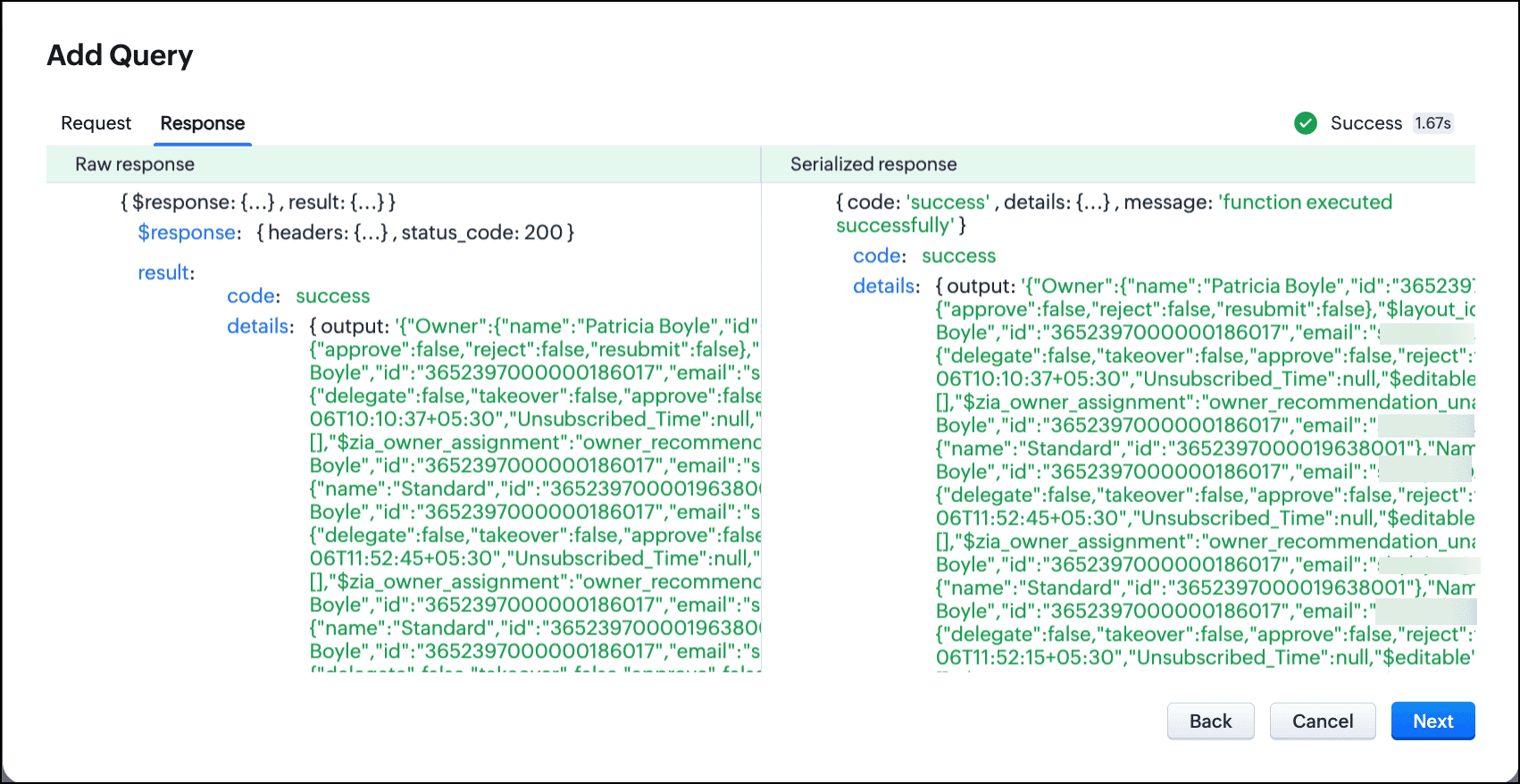
Query with the function with crmAPIResponse and serialization:
The same getRecords() function that uses the crmAPIResponse object allows you to construct the response as JSON. You can serialize this response easily and use it in a circuit, query, workflow etc.

You can see here that the response is now a JSON.
Schema of the query with crmAPIResponse:

In conclusion, you can use the crmAPIResponse object in Functions to construct the desired response and use the REST API-enabled function as a source in Queries.
Leveraging the advantage of the crmAPIResponse object in functions and using it in Queries increases the prospect of solving many more business cases easily and customize more efficiently.
We hope you liked this post and found it useful. Let us know your thoughts in the comments.
If you'd like us to cover any other topic in this series, feel free to comment or reach us at support@zohocrm.com.
Cheers!
------------------------------------------------------------------------------------------------------------------------------------------------

More enhancements in the COQL API are now live in Zoho CRM API Version 7. Check out the V7 Changelog for detailed information on these updates.

See Also
Topic Participants
Shylaja S
Zsolt Simon self-employed
Sticky Posts
Kaizen #198: Using Client Script for Custom Validation in Blueprint
Nearing 200th Kaizen Post – 1 More to the Big Two-Oh-Oh! Do you have any questions, suggestions, or topics you would like us to cover in future posts? Your insights and suggestions help us shape future content and make this series better for everyone.Kaizen #226: Using ZRC in Client Script
Hello everyone! Welcome to another week of Kaizen. In today's post, lets see what is ZRC (Zoho Request Client) and how we can use ZRC methods in Client Script to get inputs from a Salesperson and update the Lead status with a single button click. In thisKaizen #222 - Client Script Support for Notes Related List
Hello everyone! Welcome to another week of Kaizen. The final Kaizen post of the year 2025 is here! With the new Client Script support for the Notes Related List, you can validate, enrich, and manage notes across modules. In this post, we’ll explore howKaizen #217 - Actions APIs : Tasks
Welcome to another week of Kaizen! In last week's post we discussed Email Notifications APIs which act as the link between your Workflow automations and you. We have discussed how Zylker Cloud Services uses Email Notifications API in their custom dashboard.Kaizen #216 - Actions APIs : Email Notifications
Welcome to another week of Kaizen! For the last three weeks, we have been discussing Zylker's workflows. We successfully updated a dormant workflow, built a new one from the ground up and more. But our work is not finished—these automated processes are
Recent Topics
scope for phonebridge in CRM and phonebridge API documentation
Hi I cannot find the scope to be used for phonebridge in CRM API V2 calls. I am getting OAUTH_SCOPE_MISMATCH for scope group ZohoCRM.modules.ALL,ZohoCRM.setttings.ALL Also I am not able to locate the documentation for the same, All I have is phonebridgeJob Alerts for Candidates
hi All, I have 2 questions relating to sharing job details with candidates. 1. is there a way to notify candidates that meet certain criteria of current jobs available? eg. I run a candidate search, and identify 50 candidates that might be suitable. CanZoho Wiki or new Zoho Learn
We are currently evaluating if we should move off confluence. At present in Confluence we have multiple levels within our documentation but with learn it looks like you can only have Space - Manual - Chapter Is it possible to have levels below Chapter? Also the same question for the existing wiki, can I have more sub-levels?Fix image at bottom of a page fot automatic proposal creation
I'm working on a proposal document to automate our proposal creation process. So far it works fine, but I experience some problems with an image I want to have fixed at the bottom of the page AND above the footer. This section of the document consistsCan't scroll the page down unless I refresh the page
Hello, This issue has been going on with me and a lot of other users in my organization, we can't scroll down! the scrolling side bar doesn't appear and scrolling down through mouse or keyboard keys doesn't work, it seems that the page just ends in thePrice List
II want to restrict the items to display in sales, quote, etc for which custom rates are added in price list. How I can do the same in Zoho booksLet’s Talk Recruit: Still switching tabs to source?
Welcome back to the Let’s Talk Recruit series. Let’s talk about how you actually source talent. Do you open multiple job boards every single time a role opens? Run the same keyword searches you ran yesterday? Download, upload, rename, and then do it againKaizen #231 - Embedding Zoho Desk Tickets in Zoho CRM
Hello, CRM Wizards! This week, let us enhance cross-team visibility between Zoho CRM and Zoho Desk. We will use the Zoho Request Client inside a Related List widget to display open Zoho Desk tickets directly within the Contact record in Zoho CRM. ThisIntroducing Job Alerts
Keeping candidates engaged beyond their first application is one of the most consistent hiring challenges. Many interested candidates simply do not revisit career sites regularly, which can result in missed opportunities and reduced re-applications. ToTask status - completed - other options
I have a dumb question I know i can make custom statuses for the tasks - but is there anyway to make additional "completed" statuses like for instance if i have a task "call back customer" and i leave a vm for them to call back marking it "completed -Bank feed integration First Abu Dhabi Bank (FAB) to Zoho? (UAE)
Hello everyone, Is First Abu Dhabi Bank in the list of banks available for bank feed integration with Zoho Books? Thank you.How to Export Filtered List of Contacts?
This seems like it should be simple, but I'm stymied. I'm trying to export a filtered list of my Contacts for analysis in a spreadsheet. The use case is that I'm an ecom business based in the US. The bulk of our customers are individuals stored as Contacts.Quick Create needs Client Script support
As per the title. We need client scripts to apply at a Quick Create level. We enforce logic on the form to ensure data quality, automate field values, etc. However, all this is lost when a user attempts a "Quick Create". It is disappointing because, fromcan we add product images in Zoho CRM Quote PDF template?
I want to create a quotation format in Zoho CRM similar to the attached PDF, where each product is displayed in a table with rpoduct image I need the product image to appear inside the line items section of the quote. However, while checking the QuoteDoes Zoho Writer have Dropdowns
I want to add a drop down field in Zoho writer. Is this possible?Users Lookup
It would be extremely convenient to have a lookup field whose type is Users. There are many instances where we need to relate certain actions to users. Furthermore, in our company the candidate sourcer might not be the one who's creating the profile (done by an admin). Please do consider adding this essential feature in the future. Thank youConnecting Multiple WooCommerce Stores to a Single Zoho Marketing Automation Account
Is it possible to connect multiple WooCommerce stores to a single Zoho Marketing Automation account?Service Title in Service Report Template Builder
I am currently working on the Service Report Template Builder in Zoho FSM. I have created three separate service report templates for different workflows: Preventive Maintenance Report Requested Service Report Installation Report My issue is that I cannotUpdate: New Security Admin Role
Hello Zoho Directory Admins! This post is to highlight the recent role and permission changes introduced as part of the security enhancements. Previously, Helpdesk Admins had the security permissions and were responsible for managing the security configurationsClient Script | Update #14 - Client Script Support for Quick Create
Hello Everyone! We are back with another exciting and highly awaited update in Client Script! Over the past months, many of you shared your insights and requests, asking for the power to extend Client Script functionality to Quick Create forms. This capabilityI'd like to suggest a feature enhancement for SalesIQ that would greatly improve the user experience across different channels.
Hello Zoho Team, Current Limitation: When I enable the pre-chat form under Brands > Flow Controls to collect the visitor’s name and email, it gets applied globally across all channels, including WhatsApp, Messenger, and Instagram. This doesn't quite alignThe Social Playbook - February edition: Why moment marketing works (and how brands use it)
Imagine the final season of your favorite series is about to drop. Your entire feed is talking about it. Trailers everywhere. Fan theories. Hype at 100%. Now your go-to burger place launches a limited-edition meal box themed around that series—customPDF Attachment Option for Service Reports
Hello Team, I would like to check with you all if there is an option to attach PDF documents to the service reports. When I try to attach a file, the system only allows the following formats: JPEG, JPG, and PNG. Could you please confirm whether PDF attachmentsCliq Bots - Post message to a bot using the command line!
If you had read our post on how to post a message to a channel in a simple one-line command, then this sure is a piece of cake for you guys! For those of you, who are reading this for the first time, don't worry! Just read on. This post is all about how【Zoho CRM】営業日のロジックに関するアップデート
ユーザーの皆さま、こんにちは。コミュニティチームの中野です。 今回は「Zoho CRM アップデート情報」の中から、営業日のロジックに関するアップデートをご紹介します。 本アップデートにより、ワークフローにおける営業日の計算方法が改善されました。 週末などの非営業日にワークフローのトリガーが発生した場合でも、 「+0」「+1」「+2 営業日」といった設定が、意図どおりに正確に動作するようになりました。 営業日に基づくワークフローでは、日付項目を基準に「何営業日後に処理を実行するか」を指定します。Merged cells are unmerging automatically
Hello, I have been using Zoho sheets from last 1 year. But from last week facing a issue in merged cells. While editing all merged cells in a sheet became unmerged. I merged it again, but it again unmerged. In my half an hour work I have to do this 3-4Just want email and office for personal use
I am unclear as how to how I would have just a personal email (already do have it and love it) and get to use docs, notebook, workdrive etc. In other words mostly everything I had a google. I find gocs can be free with 5gb and so can mail with 5gb. AreUnable to change the "credentials of login user" option when creating a connection
I want to create a new Desk connection where the parameter to use 'credentials of login user' is set to YES. I'm able to create a new connection but am never given the option to change this parameter. Is this a restriction of my user profile, and if so,Show backordered items on packing slip
Is it possible to show a column on the Packing Slip that shows number of backordered items when a PO is only partially filled? I would also like to see the Backordered column appear on POs after you receive items if you didn't get ALL of the items or partial amounts of items. And lastly, it would be nice to have the option of turning on the Backordered column for invoices if you only invoice for a partial order. -TomZoho CRM Community Digest - January 2026 | Part 1
The new year is already in motion, and the Zoho CRM Community has been buzzing with steady updates and thoughtful conversations. In this edition, we’ve pulled together the key product enhancements, Kaizen learnings, and helpful discussions from the firstZoho CRM Feature Requests - SMS and Emails to Custom Modules & Time Zone Form Field
TLDR: Add Date/Time/Timezone form field, and be able to turn off auto timezone feature. Allow for Zoho Voices CRM SMS Extension to be able to be added to custom modules, and cases. Create a feature that tracks emails by tracking the email chain, ratherBMO bank connection not working with either Yodlee or Plaid
Been experiencing this issue for almost a month now. Anyone else?Introducing Bigin's Add-in for Microsoft Outlook
Hello Everyone, Email is an important way to communicate with customers and prospects. If you use Outlook.com for emails and Bigin as your CRM, the Outlook Add-in helps you connect them easily so you can see your Bigin contact details right inside Outlook.com.Ask the Expert – Zoho One Admin Track : une session dédiée aux administrateurs Zoho One
Vous administrez Zoho One et vous vous posez des questions sur la configuration, la gestion des utilisateurs, la sécurité ou encore l’optimisation de votre back-office ? Bonne nouvelle : une session Ask the Expert – Zoho One Admin Track arrive bientôt,How to Associate Zoho Projects in Zoho CRM
Hi I need script for associating projects in zoho projects to particular Account in zoho CRM side. It can be done manually but I need the automation for this process. There are no api regarding associating a project in zoho crm account. Need assistanceAdd Claude in Zoho Cliq
Let’s add a real AI assistant powered by Claude to your workspace this week, that your team can chat with, ask questions, and act on conversations to run AI actions on. This guide walks you through exactly how to do it, step by step, with all the codeNeed to set workflow or journey wait time (time delay) in minutes, not hours
Minimum wait time for both Campaigns workflows and Marketing Automation journeys is one hour. I need one or the other to be set to several minutes (fraction of the hour). I tried to solve this by entering a fraction but the wait time data type is an integerZoho Books - France
L’équipe de Zoho France reçoit régulièrement des questions sur la conformité de ses applications de finances (Zoho Books/ Zoho Invoice) pour le marché français. Voici quelques points pour clarifier la question : Zoho Books est un logiciel de comptabilitéNew in Office Integrator: Download documents as password-protected PDFs
Hi users, We're excited to introduce password-protected PDF as a download option in Zoho Office Integrator's document editor. This allows you to securely share confidential information from within your web app. Highlights of the password-protected PDFSales IQ - Zobot en multilangue
Bonjour, J'ai un Zobot installé sur mon site depuis longtemps. J'ai ajouté plusieurs langues, dans la configuration et dans le générateur de bot sans code Pourtant, le Chat continue à s'afficher en Francais. Comment enclencher le multilangue en frontNext Page