Kaizen #187 - Building a Timer and Worklog Widget (Part 1)

Howdy Tech Wizards!
Welcome back to a fresh week of Kaizen!
This time, we are diving into a two-part series where you will learn how to build a Timer and Worklog Widget for Zoho CRM. This widget helps track active work time and log multitasking sessions using Zoho CRM APIs, Client Script, Functions, and Workflows.
Why It Matters?
Zoho CRM effectively captures stage/status transitions, like tracking when a case moves from Open to In Progress or On Hold. However, in dynamic work environments, employees juggle multiple work items and engage in impromptu tasks or conversations.
Let’s take the On Hold status as an example.
While it can be used to indicate pauses in progress, it does not always align with real-world workflows. Consider these scenarios:
Not all interruptions justify a status change
Moving the case to On Hold for every minor detour (to clarify something with a colleague or respond to another emergency work item) would be impractical and could lead to under reporting actual work hours. Over time, this untracked effort adds up, creating a gap in visibility.
Frequent status changes may dilute their meaning
In many teams, On Hold signifies a legitimate blocker like waiting on customer input or an external dependency. Using it frequently to reflect quick shifts in attention could compromise that clarity.
A timer widget solves this by:
- Capturing hands-on work items.
- Logging context switches (unrelated tasks) with descriptive entries.
- Feeding structured entries into a custom module for reporting and subform sync.
Business Scenario: IT Service Desk & Ticket Resolution
A tech support team uses the Cases module to resolve customer issues. Some tickets are straightforward; others require follow-ups, escalations, or cross-team coordination. While CRM timestamps (like stage transitions or picklist tracking) track when changes happen, they do not reflect how long someone actively worked on a case.
This Timer Widget can be the ultimate solution to track down the active time spent on each case through out the day.
What are we Building?
By the end of this two-part guide, you will know how to:
- Build a timer widget to track time per task or any CRM record.
- Log work sessions into a custom module every time the timer is started/stopped.
- Automatically populate a subform in the corresponding record module using workflows and Deluge functions.
- Leverage the Reports module to analyze work patterns, SLA adherence, and productivity trends.
In Part I, we will focus on:
-> Building and configuring the Timer Widget.
-> Capturing each timed session as a record in a custom module.
Prerequisites
1. Create a Custom Module
Create a custom module named Timer Entries to log work details and generate reports from the Reports module. A new record will be added to this module each time a timer is started.
Set up the following custom fields in the Timer Entries module:
Custom Fields | Data Type |
Start Time | DateTime |
End Time | DateTime |
Total Duration (in mins.) | Formula DateBetween(${Timer Entries.Start Time},${Timer Entries.End Time},'Minutes') |
Related to Case | Lookup to Cases module |
Work Description | Multi Line |

2. Add a custom picklist option
Add a custom picklist option called In Progress to the Status picklist field in the Cases module for precisely identifying the status of the cases.
Follow this Add/Remove Picklist Values help section for more details.

3. Setup Custom Views for Contextual Filtering
To streamline the widget experience and ensure users only see relevant records to associate while tracking time, set up two smart custom views—one in the Cases module and another in the Timer Entries module.
Active Cases View (Cases Module)
Create a custom view in the Cases module to list only the active tickets the logged-in user is working on. Use the following criteria tips:
- Use the Status field to filter records with values like In Progress, On Hold, or Escalated.
- Use the Case Owner field to show records that are assigned only to the currently logged-in user.
This view powers the drop-down inside the widget where users select the case they want to start the timer for.
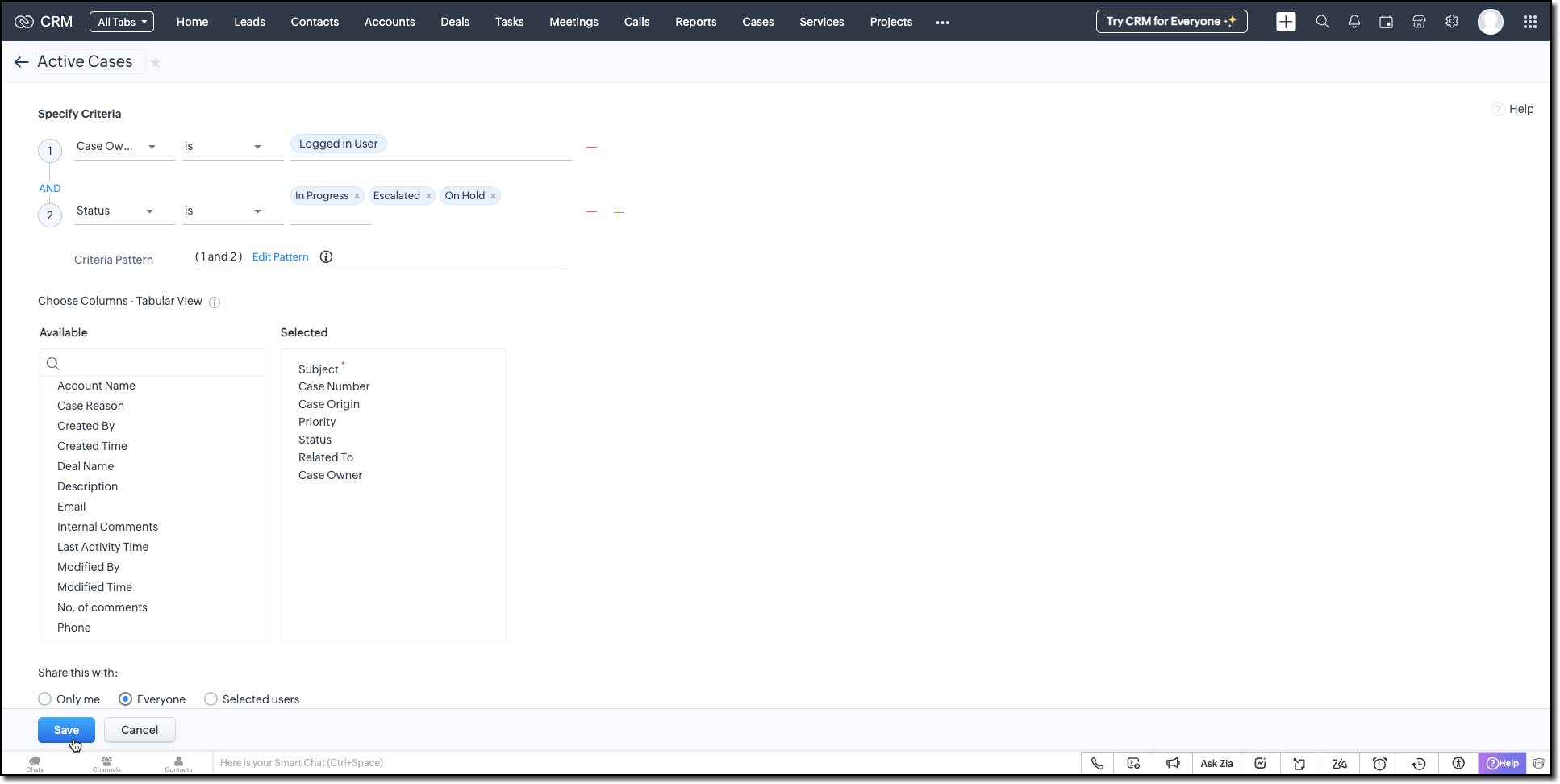
Active Timers View (Timer Entries Module)
Set up a second custom view in the Timer Entries module to track entries where the timer has been started but not yet stopped. These represent active timers. Use the following logic for criteria:
- The End Time field is empty (i.e., timer still running).
- Timer Entry owner field matches the logged-in user.
This view is used internally by the widget to detect if a timer is already running and update the same entry once the timer is stopped.
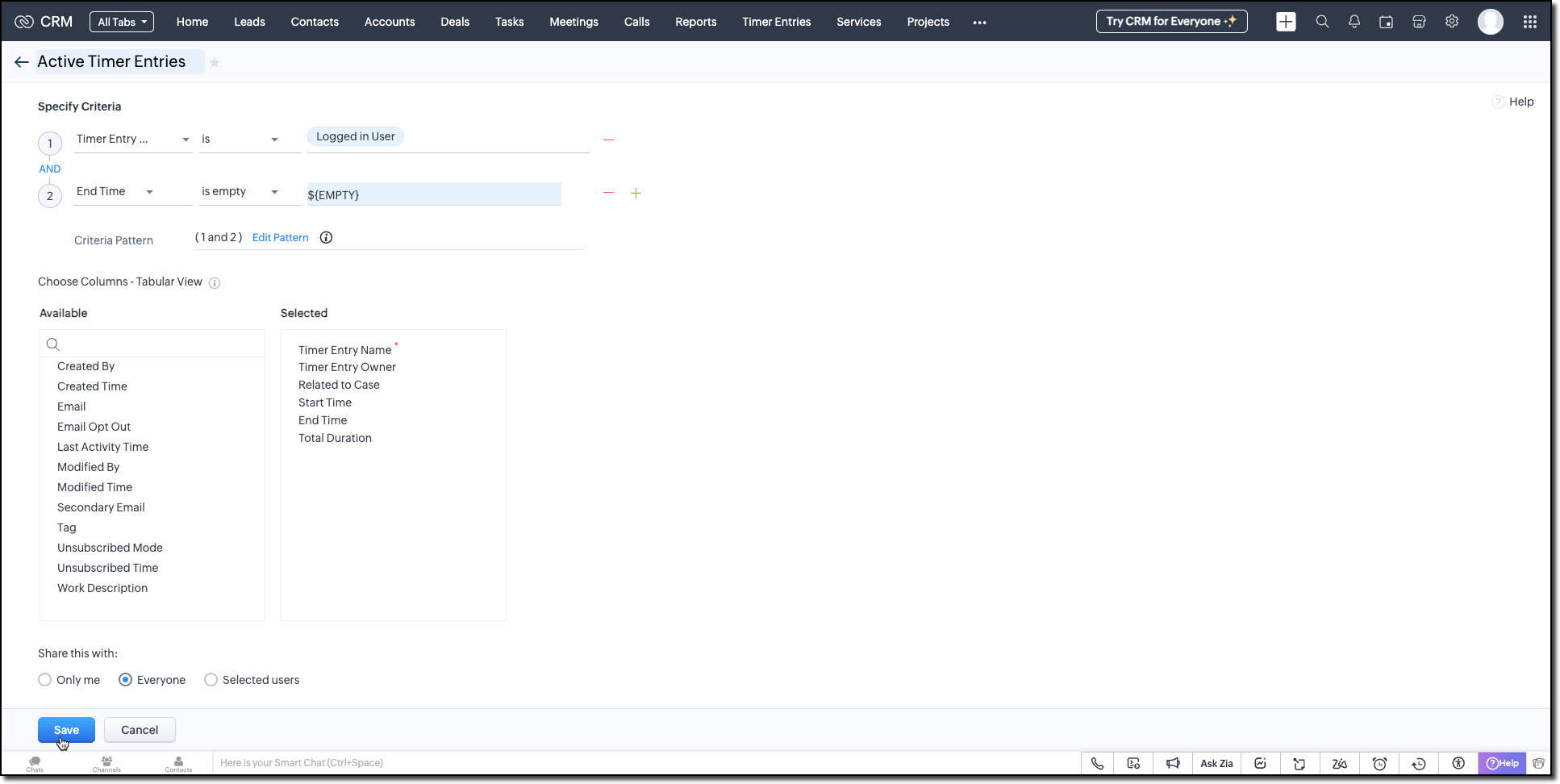
Follow the Managing List View help page and use the specifications shown in the following image.
Building the Timer Widget
Step -1: Review Basics
Refer to our earlier Kaizen on CLI Installation, Creating a Widget Project, and Internal hosting of the same.
Step 2 - Develop the Widget
After initializing your widget project using CLI, implement the timer logic:
Fetching Active Cases
On page load, the populateRecordsDropdown function initiates a Get Records API call to the Cases module, using the Active Cases custom view ID. This fetches all active case records assigned to the logged-in user.
These records are then listed in a dropdown, allowing users to quickly select the relevant case they are about to work on.
async function populateRecordsDropdown() { const recordsDropdown = document.getElementById("moduleRecords"); recordsDropdown.innerHTML = ""; try { const recordsResponse = await ZOHO.CRM.API.getAllRecords({ Entity: casesModule, cvid: casesCVID, per_page: 10 }); if (recordsResponse.data && recordsResponse.data.length > 0) { recordsResponse.data.forEach(record => { const option = document.createElement("option"); option.value = record.id; option.textContent = record.Subject || "Unnamed Record"; recordsDropdown.appendChild(option); }); } else { const placeholderOption = document.createElement("option"); placeholderOption.value = ""; placeholderOption.textContent = "No records found"; placeholderOption.disabled = true; placeholderOption.selected = true; recordsDropdown.appendChild(placeholderOption); } } catch (error) { console.error("Error fetching records:", error); } } |
Starting the Timer and Creating an Entry
Once the user starts the timer, The createRecord function triggers a Create Record API call to log the session in the Timer Entries custom module. The record captures the start time and the related case and description (if provided).
Even if no details are entered or case is selected, a timer entry is still created with the start time. This ensures that spontaneous work sessions are tracked and not lost.
async function createRecord(startTime) { try { const workDescription = document.getElementById("workDescription").value; const selectedRecordId = document.getElementById("moduleRecords").value; const selectedRecordText = document.getElementById("moduleRecords").options[ document.getElementById("moduleRecords").selectedIndex ].text; const data = { Start_Time: startTime, Owner: currentUserId, Work_Description: workDescription, Related_to_Case: selectedRecordId, Name: selectedRecordText }; const response = await ZOHO.CRM.API.insertRecord({ Entity: timerModule, APIData: data }); console.log("Start time recorded successfully"); } catch (error) { console.error("Error creating record:", error); } } |
Stopping the Timer and Updating the Entry
When the timer is stopped, the widget uses the Active Timer Entry custom view to locate the most recent Timer Entry record created by the logged-in user that does not have an end time.
The updateRecord is then triggered to update that active entry using the Update Record API call. It updates the End time of the session and the related case, descriptions, if it was not already provided when the timer was started.
async function updateRecord(endTime) { try { const workDescription = document.getElementById("workDescription").value; const selectedRecordId = document.getElementById("moduleRecords").value; const response = await ZOHO.CRM.API.getAllRecords({ Entity: timerModule, cvid: timerEntriesCVID, per_page: 1 }); const latestRecord = response.data[0]; if (latestRecord) { const recordId = latestRecord.id; const data = { id: recordId, End_Time: endTime, Work_Description: workDescription, Related_to_Case: selectedRecordId }; await ZOHO.CRM.API.updateRecord({ Entity: timerModule, APIData: data, RecordID: recordId }); console.log("End time updated successfully"); } } catch (error) { console.error("Error updating record:", error); } } |
Step 3 - Validate and Pack the Widget
- Follow the steps given in the Widget help page to validate and package the widget.
- Go to Zoho CRM > Setup > Developer Hub > Widgets and click Create New Widget.
- Fill in the required details as shown in this image and ensure to select Button as the widget type.

Step 4 - Associate it with Flyout
- Go to Setup > Developer Space > Client Script. Click New Script.
- Enter a name and description for the script. Choose Command type in Category.

- Create a Flyout and render a widget within it using its details like the API name of the widget, title, size, and animation type. You can get the Widget API name from the widget's detail page.
let allowedUserEmails = []; allowedUserEmails.push('user1_email_address'); allowedUserEmails.push('user2_email_address'); allowedUserEmails.push('user3_email_address'); let currentUserEmail = $Crm.user.email; if (allowedUserEmails.indexOf(currentUserEmail) == -1) { ZDK.Client.showMessage('Command access resticted', { type: 'error' }); return false; } ZDK.Client.createFlyout('myFlyout', {header: 'Timer', animation_type: 4, height: '600px', width: '500px', top: '10px', left: '10px', bottom: '10px', right: '10px' }); ZDK.Client.getFlyout('myFlyout').open({ api_name: 'Timer', type: 'widget' }); return true; |
Refer to Creating a Client Script help page for more details.
Try It Out!
A complete working code sample of this widget is attached to this post.
Now, let us see how this Timer widget works:
1. Start the Timer
Open the widget and select an active case from the dropdown. As soon as you start the timer, a new record will be automatically created in the Timer Entries module to capture the session.

2. Stop the Timer
When the task is complete, provide a description of the work you have done and stop the timer. The same Timer Entry record (created when the timer was started) will be updated automatically with the end time and your work description.
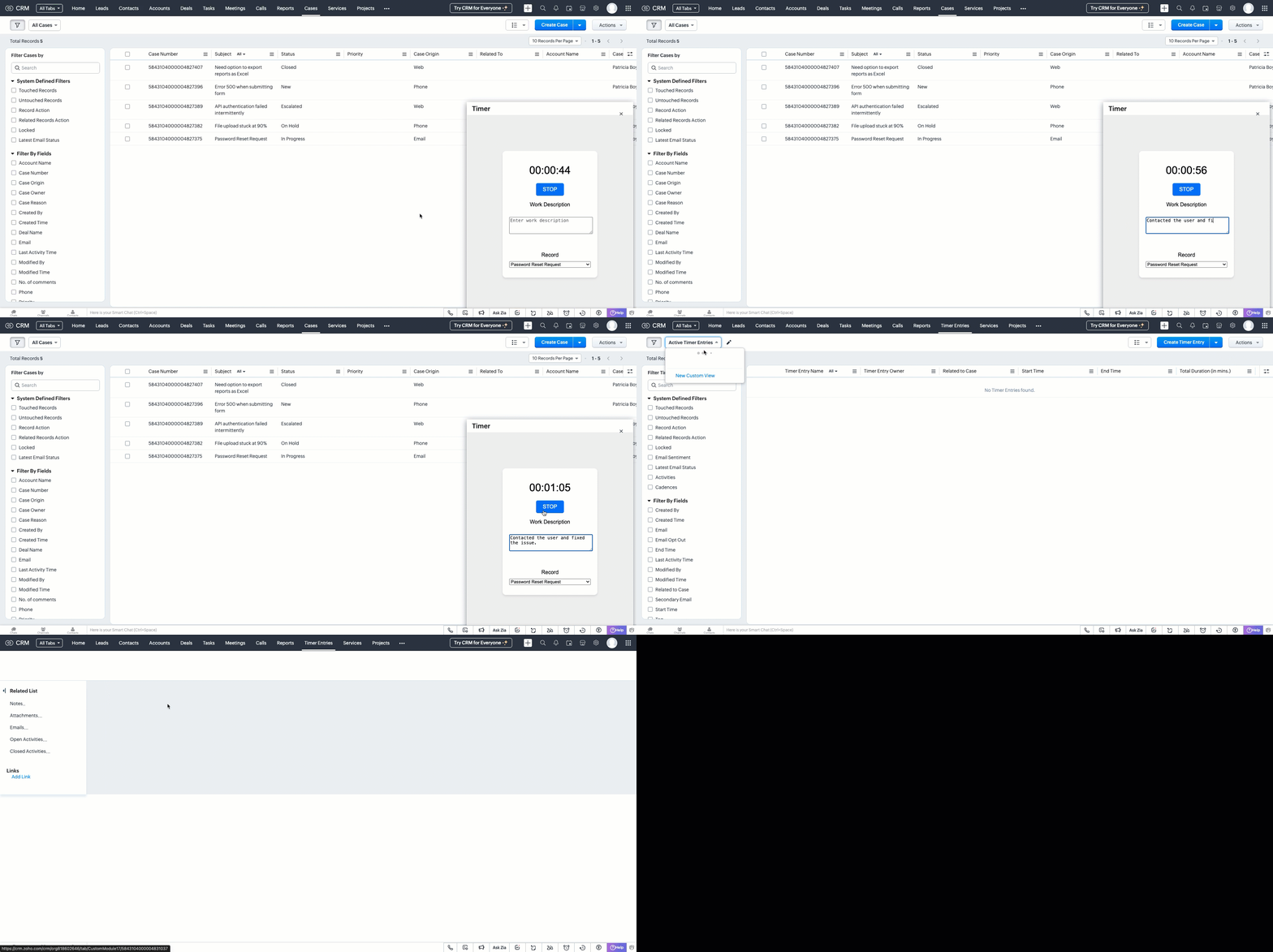
This forms the foundation for accurate time tracking at the record level.
In Part 2, we will show how to:
-> Use a workflow and Deluge function to transfer these entries into the Work Log subform inside the relevant Cases record.
-> Use CRM Reports to slice and dice work time for better SLA and productivity insights.
In the meantime, would you like us to address any of your pain-points or have a topic to discuss? Let us know in the comments or reach out to us via support@zohocrm.com.
Until next time, Happy Coding!
-----------------------------------------------------------------------------------------------------------------
Related Reading
- Custom Fields - Working with Custom Fields and Working with Picklist Field
- Widget - An Overview, CLI Installation, Working with Widgets, JS SDKs, Mobile Compatibility of Widgets and Kaizens
- Core APIs - GET Records, POST Records and UPDATE Records
- Client Script - An Overview, Creating a Client Script, Best Practices and Troubleshooting
-----------------------------------------------------------------------------------------------------------------

Previous Kaizen: Client Script Support for Subforms | Kaizen Collection: Directory
Topic Participants
Kiruthiga G
Sticky Posts
Kaizen #198: Using Client Script for Custom Validation in Blueprint
Nearing 200th Kaizen Post – 1 More to the Big Two-Oh-Oh! Do you have any questions, suggestions, or topics you would like us to cover in future posts? Your insights and suggestions help us shape future content and make this series better for everyone.Kaizen #226: Using ZRC in Client Script
Hello everyone! Welcome to another week of Kaizen. In today's post, lets see what is ZRC (Zoho Request Client) and how we can use ZRC methods in Client Script to get inputs from a Salesperson and update the Lead status with a single button click. In thisKaizen #222 - Client Script Support for Notes Related List
Hello everyone! Welcome to another week of Kaizen. The final Kaizen post of the year 2025 is here! With the new Client Script support for the Notes Related List, you can validate, enrich, and manage notes across modules. In this post, we’ll explore howKaizen #217 - Actions APIs : Tasks
Welcome to another week of Kaizen! In last week's post we discussed Email Notifications APIs which act as the link between your Workflow automations and you. We have discussed how Zylker Cloud Services uses Email Notifications API in their custom dashboard.Kaizen #216 - Actions APIs : Email Notifications
Welcome to another week of Kaizen! For the last three weeks, we have been discussing Zylker's workflows. We successfully updated a dormant workflow, built a new one from the ground up and more. But our work is not finished—these automated processes are
Recent Topics
The improved portal experience: Introducing the template view for inventory modules, enhanced configurations, and PDF export support
Availability: Open for all DCs. Editions: All Hello everyone, You can now achieve a seamless, brand-aligned portal experience with our enhanced configuration options and the new template view for inventory modules. Your clients will now be able to viewZoho Analytics Bulk Api Import json Data
HI, I’m trying to bulk-update rows in Zoho Analytics, and below are the request and response details. I’d like to understand the required parameters for constructing a bulk API request to import or update data in a table using Deluge. Any guidance onProject Management Bulletin: December, 2025
The holiday cheer is in the air and it’s time to reflect on the year that was. At Zoho PM Suite, we've been working behind the scenes on something huge and exciting all year and now we are almost ready—with just a bit of confetti—for our grand releaseInventory batch details
Hi there, I'm trying to get the batch details of an item, here's what I've done so far. I've sent cUrl request to the below endpoint and I get a successful response. Within in the response I find the "warehouses" property which correctly lists all theAuto check out after shift complete
i'm just stuck here right now, i wanna know how to do this thing, now tell me, how can i configure a custom function that runs after complete shift time if employee forget to check-out ?How to create a flow that creates tickets automaticaly everyday based on specific times
Hi guys Does anyone know how to create a flow that will create tickets automaticaly in ZOHO Desk when a certain time is reached. Im havin a hard time configuring a flow that will create tickets automaticaly everyday during specific hours of the day ForZOHO FLOW - ZOHO CREATOR - ZOHO WRITER : Get Related records
Bonjour, J'ai besoin que vous m'ajoutiez la solution "Get related Records" dans la liste de choix de zoho creator (sous Zoho flow). En effet, j'ai besoin de récupérer les champs d'un sous formulaire pour l'ajouter à l'impression de mon document. MerWill zoho thrive be integrated with Zoho Books?
titleConnecting email for each department in ZohoDesk
Hi! Could someone help me to go through connecting emails for each department?How do I trigger a Flow based on a campaign response?
Is there a way to trgiider a Zoho Flow based upon a lead opening an email sent via Zoho Campaigns? I see that the data is recorded in the 'Campaigns' section of Zoho CRM under 'Member Status' and I want to trgigger a flow based upon that record changing.All Zoho Flows are filtered
My two flows operate perfectly when I run them as a test, but when they're activated each run ends with a status of neither success, nor fail, but filtered. I haven't set up any filters. I don't see where to turn off filters. When I test run on a sequenceCreating Multiple Items on Sales Order
Hi, I’m trying to automate some processes using Zoho Flow, specifically the creation of sales orders in my Zoho Inventory. However, Zoho Flow's Create Sales Order function can only add one item. I would like to include multiple items in a single salesProblem Connection from Zoho Flow and Gravity Form
I obtained my API key from Gravity Forms via WordPress. However, when I enter my Zoho Flow, it states: Gravity Forms says, 'You are not authorised to access the API." I tried recreating a new API key, but it is still not working.Eventbrite Email Field in Zoho Flow Returns "Info Requested" Instead of Actual Email
Hi Zoho team, I'm using Zoho Flow to connect Eventbrite with Zoho CRM. My goal is to automatically add event attendees as leads in Zoho CRM. I’ve set up the flow and mapped the ${trigger.profile_email}} field to the Email field in CRM. However, I'm running"Invalid value passed for Product ID" Error in Zoho Flow "Create Sales Order" Node
Hello Zoho Community, I’m facing an issue with Zoho Flow while trying to create a sales order in Zoho Inventory using the "Create Sales Order" node. Here’s a detailed explanation of my setup and the problem: What I’m Trying to Achieve I’m building anAssociating Project with an Account via Flow
I'm using flow to create a Project based on a Deal status update using flow. The fields exist to pass the Account Name through properly, but when you view the Projects module in a CRM Account Record it doesn't automatically associate the new Project RecordHow to follow up a member in a meeting?
Hello, I make weekly meeting online with a lot of people. I want(I've been using calendly to do it). I want to do a follow-up to it. I want to send messages via Zoho-flow to all the member that participated in the meeting. How can I do it?Setting Delays in Invoice Reminder Flow
I am currently working on a flow that sends reminders for unpaid invoices. The flow is designed to delay actions until specific intervals before the due date: A reminder should be sent 7 days before the due date. A second reminder should be sent 3 daysGet Sales Orders Related to Inventory Item
Dear Team, I'm just wondering if there is a way to get a list of all Sales Orders related to a specific Inventory Item. I did search all articles but couldn't find any article that could help.Endpoint Central Cloud Asset Update from Fresh Service
All, Does anyone use the asset management feature in Fresh Service? I'd like some help on building a flow to update asset attributes in Endpoint Central Cloud based off of an update to that same asset in Fresh Service. The trigger is "asset is updated"Zoho Flow Export to Deluge
It would be great to take a user built zoho flow and export the entire flow as a deluge script including having multiple connected applications (showing the API connections and webhooks) and different functionality in the other applications interactingAction Iteration/Loop using Zoho Flow
Trying to use Zoho Flow for automating following Context - A zoho form entry which has image upload field with upto 5 images setting and files are saved into Workdrive. After form is submitted need to create folder based on some fields and move filesZoho Flow - Unable to evaluate formatDate with Zoho Invoice Date Field for Calendar Integration
Hello Community, I'm trying to automate the creation of all-day events in Zoho Calendar whenever a new invoice is created in Zoho Invoice. I'm using Zoho Flow for this automation. My Goal: When an invoice is created with a specific "Event Date," I wantZoho Inventory Sales Order Items
I'm trying to build automation using Zoho Flow to add items to a Sales Order. In the automation options for both "create sales order" and "update sales order", The item ID is required. However, when I update the Sales Order, it's just replacing the itemPermissions for Azure Devops connection
I am trying to set up a connection with our Azure DevOps org but it keeps giving me this error. On Azure I should be able to have admin-level access to everything. Can you please point me to which permission this is checking for so I can enable it?My IMAP mail suddenly stopped working
On my iPhone and iPad, IMAP stopped working for my Zoho account with the error "User name or password incorrect" and "Invalid credentials failure" however I was able to access via web with the same credentials. Also stopped working on Apple Mail client.Confused by the distiction between matched and categorized when reconciling a bank statement an how to
I used to use quickbooks. In quickbooks, it was possible to use the check writing feature to add an expense that was on the bank statement that did not go through the AP and check writing process. I would write a check, assign it a number like etf (forNot Receiving OTP • https://voters.eci.gov.in/home/family
Hello Customer, Greetings from Zoho Mail. Upon a detailed review of our delivery logs, we can confirm that other Zoho Mail users are successfully receiving OTP emails from eci.gov.in. However, in your specific case, it appears that the OTP emails areWorkDrive for Excel Add on
Dear Sir/Madam Have installed Workdrive for Microsoft add on But unable to view the same added in ExcelSplitting Transactions in Zoho Books
I have read in past forum posts that the ability to split bank transactions would likely be implemented - it's definitely a typical accounting program feature. I'm new to Zoho and thought I'd found nirvana until I realized this feature doesn't seem toZoho Calendar s’enrichit avec une intégration à Zoho People et Zoho Cliq
Les journées de travail ne se déroulent jamais exactement comme prévu. Une conversation informelle devient une séance d’échange d'idées, une absence modifie un planning, et votre agenda se retrouve vite décalé par rapport à la réalité. Chez Zoho Calendar,Holidays
Hi; For defining Holidays, you need to add logic to handle the year as well as the month & day. We need to be able to enter Holidays for the next year. I need to add a holiday for January 2, 2017, but I can't until January 1st, which is a Sunday and weZoho public comments are confusing and unnecessary
Hi, we use zoho desk and have issues with public comments. We started using them because the "Reply" option just seemed very clumsy because of the following reasons: - the top "Reply" button starts what seems to be a regular email, showing the entireZoho API - ticket creation - Validation failed for the condition : Ticket Status Info should not be empty
Hi ! I'm trying to create ticket through Zoho API, and I'm getting a 422 response : "Validation failed for the condition : Ticket Status Info should not be empty" My request looks like this : curl --location 'https://desk.zoho.eu/api/v1/tickets' \ --headerDeleting unwanted ticket replies
Hello, In a Zoho Desk Ticket thread, sometimes one of the recipients has auto-reply activated. This creates a new message in the Ticket thread that not only pollutes the thread, but most importantly cannot be replied properly because usually auto-reply e-mails don't do "reply all", so the other recipients are not included. I want to delete such a message in the Ticket thread. I searched the help of Zoho Desk, but only found a way to mark as Spam (https://help.zoho.com/portal/kb/articles/marking-support-tickets-as-spam)System-generated support email added in CC on “Reply All”
Hi, I recently set up Zoho Desk for a client and we are trying to prevent the Zoho Desk system-generated support email address (not the mailbox used as the department’s "From address") from being automatically added in CC when agents use “Reply All” onConvenience Fees
I use Zoho Invoice for invoicing my billboard customers. I have a few customers that want to pay using credit cards and ACH. As a result, I have integrated an Online Payment Gateway (Stripe) for these customers. I currently charge these customers a "Convenience Fee" of 3% for using this service as I typically only take checks as payment (and the gateway charges 2.9% + $0.30 per transaction). I do this by creating a separate line item on the invoice and adding 3% to it. I would like to offerHTML Tags added to Reports with Notes
Recently Zoho added the ability to markup text within notes. That way, users can change font size, colors, etc. It's a great change. However, since the change, reports that include a column for "Note Content" are printing HTML tags within the report.Restrict Payment Methods
Allow us to restrict certain payment methods specific for each customer.Emails Getting Delay Error Messages - Status: 451
Hi. Hoping someone can help. I've been using Zoho for over a year now with no problems at all. Today, the majority of my emails I send out or reply to are getting this error: This message was created automatically by mail delivery system. THIS IS A WARNING MESSAGE ONLY. YOU DO NOT NEED TO RESEND YOUR MESSAGE. The original message was received at Sun, 22 Dec 2019 18:20:19 -0800 from wazza@amninjas.com [wazza@amninjas.com] ----- The following addresses had fatal errors ----- [Status: ERROR, Address:Next Page