Kaizen #202 - Answering Your Questions | Testing and Using REST APIs in Widgets

Kaizen #202 - Answering Your Questions | Testing and Using REST APIs in Widgets


Hello Developers!

Welcome back to a fresh week of Kaizen! 

Thank you for your active participation in sharing feedback and queries for the 200th milestone. This week, we will look at the following queries related to widget:
  • Widget Testing 
  • Using REST API in Canvas Widgets: Make HTTP calls in widgets (e.g., to external tax or product APIs)
Here are the queries that we have already answered for you from this milestone:
  1. Kaizen #200 - Answering Your Questions | Token generation using the Python SDK
  2. Kaizen #201 - Answering Your Questions | Webhooks, Functions, and Schedules

Widget Testing

One of the queries we received was simply stated
Quote
Widget Testing
 without any specific context. Since the user has not provided detailed input, we are assuming this is about how to test a widget during development.

You can test your Zoho CRM widget locally using the Zoho CLI. Run the following command from the root directory of your widget project:

zet run

This launches the widget on a local server where you can validate the UI and functionality before pushing it live.
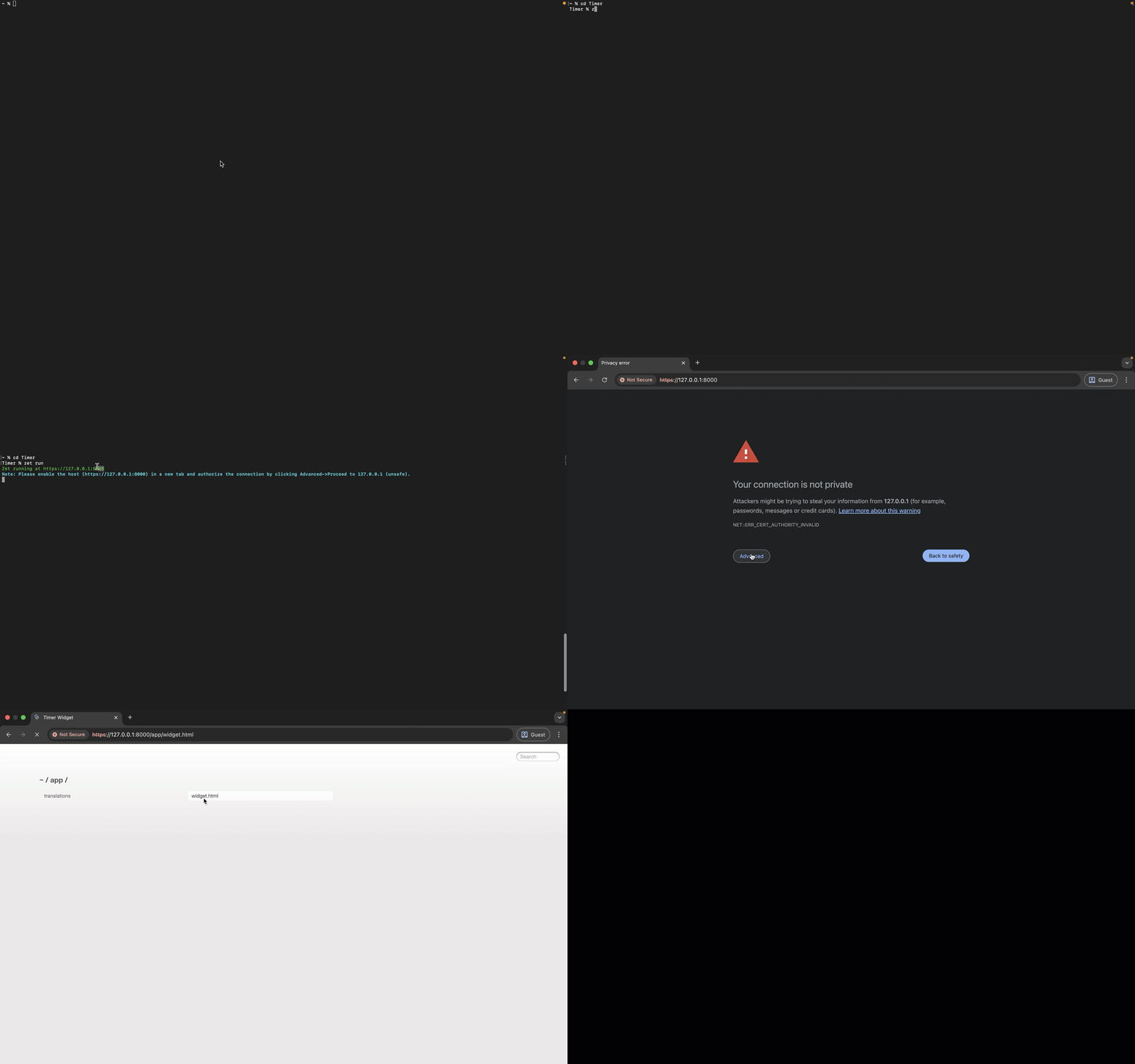

Since the localhost connection opens in a new tab and is not private, you will need to manually authorize it. 

Click Advanced, then choose Proceed to 127.0.0.1 (unsafe) to continue. 

Notes
Note

If your widget needs to access data from your Zoho CRM organization, such as fetching or updating records, it must be deployed within a Zoho CRM iframe. To do this, you should upload the widget through the Zoho CRM Widgets setup page.

We recommend using the sandbox environment in such cases before deploying the widget to your production environment.

Making HTTP Calls from Widget

Following is a query we received from a user:
Quote
Using REST API in Canvas Widgets: Make HTTP calls in widgets (e.g., to external tax or product APIs)
Yes. You can make HTTP requests to external services from any type of Zoho CRM widget using the ZOHO.CRM.HTTP object from the Widget JS SDK.

Canvas Widget - What's Supported? 

Though full widget support within Canvas is on our roadmap, currently, you can invoke widgets from a Canvas view using Client Script. This lets you render widgets inside fly-outs or pop-ups. Here is a quick start guide on how you can achieve it:

Create a Widget

1. Create a widget project and code your logic using Zoho CLI as explained in our widget help page.

2. In Zoho CRM Developer Hub, create a new widget and set the type as Button.


Create a Client Script

3. Navigate to Client Scripts in Developer Hub and click New Script.

4. You can create your script either in the Modules or Commands category based on your use case. 

For assistance, refer to the step-by-step guide on Creating Client Script and Commands.


In the Category Details section, ensure to select Canvas as the page type. Canvas views are supported in the following page contexts: List, Detail, Create, and Clone. 

Choose the one that aligns with where your widget needs to appear.


5. Here is the sample script to render widget in a pop-up. 

ZDK.Client.openPopup({
api_name: 'Canvas_Widget',
type: 'widget',
animation_type: 4, 
height: '450px',
width: '450px',
},
{
data: 'sample data to be passed to "PageLoad" event of widget'
}); 

Here is the sample script to render widget in a fly-out. 

ZDK.Client.createFlyout('myFlyout', { 
animation_type: 4, 
height: '600px', 
width: '500px'
}
);
ZDK.Client.getFlyout('myFlyout').open({ api_name: 'Canvas_Widget', type: 'widget' });

For detailed guidance, check out our Client API documentation on Pop-up and Fly-out.

You can also check out the Kaizen #99 on Rendering Widgets using Client Script for a detailed guide based on a real-time use case. 

Using REST APIs from External Applications

The ZOHO.CRM.HTTP object enables you to make secure API calls directly from the Zoho CRM widget. It acts as a proxy, routing requests through Zoho servers, which eliminates the need for external applications to support CORS.

While this SDK is primarily used for integrating third-party services, it also supports Zoho CRM API calls. This provides you with greater flexibility to:
  • Customize header and parameter structures
  • Maintain a consistent calling pattern for both internal and external APIs within the widget.
Here is a basic syntax of the SDK:

ZOHO.CRM.HTTP.<method>({
  url: "<request-url>",
  headers: {
       // Request headers as Key-value pairs
    "Authorization": "Bearer <token>" // example
  },
  params: {
    // Request params as Key-value pairs

   "ids": "1234567890" // example
  },
  body: "<stringified JSON>", // Required for POST, PUT and PATCH
})
.then(function(response) {
  console.log("Response:", response);
});

Supported Methods
  • ZOHO.CRM.HTTP.get({ ... })
  • ZOHO.CRM.HTTP.post({ ... })
  • ZOHO.CRM.HTTP.put({ ... })
  • ZOHO.CRM.HTTP.patch({ ... })
  • ZOHO.CRM.HTTP.delete({ ... })
For more detail check out the HTTP method section of JS SDK help page.

Samples using Zoho CRM Contact Roles API

Let us explore a complete CRUD (Create, Read, Update, Delete) example using Zoho CRM’s Contact Roles API.

These structures have to be used within the JS function where you are executing your code logic. 

POST Contact Roles


// Prepare the API request
        var request = {
          url: "https://www.zohoapis.com/crm/v8/Contacts/roles",
          headers: {
            Authorization: "Zoho-oauthtoken 1000.XXXXXXXXXXXXXXXXXXX265bcf20e4"
          },
          body: {
            "contact_roles": [
              {
                "name": "Sales Lead",
                "sequence_number": 1
              }
            ]
          }
        };
         // Make API call 
        ZOHO.CRM.HTTP.post(request).then(function(data) {
          console.log(data);
 })

GET Contact Roles


// Prepare the API request
var request = {
          url: "https://www.zohoapis.com/crm/v8/Contacts/roles",
          headers: {
            Authorization: "Zoho-oauthtoken 1000.XXXXXXXXXXXXXXXXXXX265bcf20e4"
          }
        };
        // Make API call 
        ZOHO.CRM.HTTP.get(request)
          .then(function(response) {
 console.log(response);
})

UPDATE Contact Roles

// Prepare the API request
        var request = {
          headers: {
            Authorization: "Zoho-oauthtoken 1000.XXXXXXXXXXXXXXXXXXX265bcf20e4"
          },
          body: {
            "contact_roles": [
              {
                "name": "Evaluator",
                "id": "5545974000000006871"
              }
            ]
          }
        };
        // Make API call 
        ZOHO.CRM.HTTP.put(request).then(function(data) {
          console.log(data);
 })

DELETE Contact Roles


// Prepare the API request
        var request = {
          params: {
            ids: "5545974000002617002"
          },
          headers: {
            Authorization: "Zoho-oauthtoken 1000.XXXXXXXXXXXXXXXXXXX265bcf20e4"
          }
        };
        // Make API call 
        ZOHO.CRM.HTTP.delete(request).then(function(data) {
          console.log(data);
 })

We hope you found this post useful. 

Let us know if you have any questions in the comments or drop us an email at support@zohocrm.com.

Cheers!

------------------------------------------------------------------------------------------------------------------------

Related Reading


------------------------------------------------------------------------------------------------------------------------
    • Sticky Posts

    • Announcing the new SKILL.md for Zoho CRM and the updated OAS repository!

      We are introducing a new zoho-crm skill to make working with Zoho CRM Developer tools (like APIs, functions, widgets, client scripts, queries etc) easier and faster, with the help of AI in your preferred AI harness like Claude Code, Codex, Cursor, VSCode
    • Kaizen #261 : Using Zoho CRM Skill to generate complex COQL queries

      Hello everyone, In the previous Kaizen posts, we introduced the zoho-crm SKILL.md and discussed how it can help you when you are working with Zoho CRM APIs and Client Script. In this Kaizen, we will focus on using the Zoho CRM `SKILL.md` with GitHub Copilot
    • Kaizen #256 - Build an Arrival Readiness Web Tab in Zoho CRM

      Hi everyone! Welcome back to the Kaizen series! In the post, we discuss a use case in hospitality industry: how an Arrival Readiness web tab widget can be used to let reception staff identify and resolve issues before arrival of guests. Use case In the
    • Kaizen #198: Using Client Script for Custom Validation in Blueprint

      Nearing 200th Kaizen Post – 1 More to the Big Two-Oh-Oh! Do you have any questions, suggestions, or topics you would like us to cover in future posts? Your insights and suggestions help us shape future content and make this series better for everyone.
    • Kaizen #226: Using ZRC in Client Script

      Hello everyone! Welcome to another week of Kaizen. In today's post, lets see what is ZRC (Zoho Request Client) and how we can use ZRC methods in Client Script to get inputs from a Salesperson and update the Lead status with a single button click. In this
      • Recent Topics

      • API - Bank Accounts | Reconciliation Discrepancy

        Unless I'm reading it wrong, the documentation for the Bank Reconciliations API is inconsistent with itself. https://www.zoho.com/books/api/v3/bank-accounts/#create-a-bank-reconciliation The text definition says that the transaction_id should be a string,
      • Customer Statement Showing Incorrect Negative Balance Due to Unused Advance

        Dear Zoho Support Team, We are facing an issue with the Customer Statement in Zoho Invoice related to customer advances/mobilization advances. The issue is that when a customer has made an advance payment that has not yet been fully utilized against invoices,
      • Employment Contract / HRMS Documents - Zoho People

        How do I create customized HR documents for disbursal from Zoho People ? Example, say offer letters ? appointment letters ? Memos ? We want to be able to preset these in one or ther other form and issue them to employees who are in Zoho People.
      • Mobile authentication for Zoho Creator portals

        Note: This feature was previously available in beta for IN data center users on request. It is now generally available for all users in the IN and US data centers on paid plans of Zoho Creator. Currently, it will be available only for Indian (+91) mobile
      • HOw to disable or block OTP login on browser.

        Hi Support, One of my employee tried & successfully logged in via OTP login mode on his mobile device even though user does'nt have login password . As per our company policy we don't allow user to login on any other device. This feature is available
      • Change email address

        I would like to change the email address to info@gogetherenterprises.com
      • Free Methods to Convert PST to MBOX on Mac & Windows

        Converting PST files to MBOX is often needed when moving Outlook mailbox data to email clients such as Thunderbird, Apple Mail, or other MBOX-supported applications. The process can be different on Windows and macOS, and free methods may involve several
      • Enhanced audit trail in Zoho Creator

        Hello everyone, We're pleased to announce that the Audit Trail feature has been significantly enhanced by expanding its scope to give you a more complete picture of activity across your applications. What was once a simple record-and-report log is now
      • Allocating inventory to specific SO's

        Is there a way that allocate inventory to a specific sales order? For example, let's say we have 90 items in stock. Customer 1 orders 100 items. This allocates all 90 items to their order, and they have a back order for the remaining 10 items which could
      • Zoho Sheet as KB Document

        It would be nice if Zia Agents could take Zoho Sheets as part of the knowledge base. The use case here is that it's infinitely easier for humans to maintain a spreadsheet table than any .md / TAML / JSON document. For situations where humans are responsible
      • Introducing native agents: Configure your CRM with natural language

        Hello all, Configuring your CRM just got a lot faster. We're introducing native agents into Zoho CRM that configure your settings using natural language. Instead of navigating multiple screens, describe what you need and the agent builds it for you. What's
      • Transferring CRM Templates

        I have two different scenarios for transferring the CRM template and would like to know if it is possible to do for either.   1.  When designing my CRM template, I created all the fields in the Leads module.  I have not duplicated all of the fields (or their positions on the page) in other modules like the Contacts, Potentials, Accounts, etc.  Once I get my Leads template designed the way I want, I would like to copy the fields and their page positions to the other modules.  Is it possible to do
      • Is it possible to clone my Lead module layout to Customer and Potential layouts?

        I've customized all fields and their order for Leads module and I would like to know if I'm able to clone those fields into another modules, only to avoid repeated work. Awaiting.
      • URGENT: Stalled DC Migration >72 Hours - Records Locked [Ticket #: 167813877

        The DC migration was started on 1st October at 6 pm and we were informed migration period as 48 hours but even after more than 72 hours, the migration seems still in progress. We sent two emails to check the status but no responses. We need the migration
      • Error AS101 when adding new email alias

        Hi, I am trying to add apple@(mydomain).com The error AS101 is shown while I try to add the alias.
      • Account not Active For any support or queries, kindly contact support@zohomail.com

        HI! I am trying to sign up to Zoho Mail which is not working. All I can see is the following error message, " Please help me. Account not Active For any support or queries, kindly contact support@zohomail.com"
      • How can I add a Custom Field (or Customer_name) to a picklist?

        Our workflow is Shopify-->SO -->Picklist-->Package-->Shipment. We would like to have the Picklist template to include a custom field "Customer_Notes" (we have created this field already). This way we get alerted when a customer has notes on their account.
      • Introducing Zoho Commerce 2.0 — It's more than just selling!

        Hello! We are proud to launch Zoho Commerce 2.0, a reimagination of how online businesses look, feel, and function. This launch is both timely and symbolic, as we reaffirm our commitment to empowering small and medium enterprises with powerful, yet simple-to-use
      • Zoho Thrive connection to off-line purchases

        Is it possible for Zoho thrive to connect to subscriptions or Books and pull purchase data from clients who purchase off-line or maybe through a different sales department where items are not listed on a website for sale? Say I have a customer that signed
      • Payroll Options

        Would like to see a payroll service implemented; Maybe not a true payroll but at least the ability of tracking payments to employees without making them a vendor. please help. Thanks. I didn't find the right solution from the internet. References: https://zohofinance.uservoice.com/forums/283818-zoho-books
      • Esta dirección de correo electrónico ya se encuentra en uso en otra organización... agregar usuarios

        Buenos dias , tengo este problema a la hora de agregar usuarios mi dominio es implementos.com.pe
      • How to setup noreply@ example.com

        How do I setup noreply@example.com so the mail never gets delivered. I currently have a catchall setup aswell.
      • How do you associate multiple contacts to a deal in the mobile app?

        When opening a deal in the mobile app, only one customer shows as the contact. How can we add multiple contacts on our mobile device?
      • Zoho Books Support

        Dear Team, Zoho Books offers a demo before you purchase zoho books. But after that when he actually purchases the product he has to rely on toll free number or help documents. But this might get frustrated in the initial period. Specially in initial period.
      • Linking Multi-UOM Barcodes to Products in Zoho Books

        Greetings, I'm using Zoho Books for retail shop and I'm running into a bit of a challenge with products that have multiple Units of Measurement (UOMs) and corresponding barcodes. For example, I sell cigarettes both as individual packets and in cartons
      • Best practices for importing phone numbers

        I've recently found a problem with my phone provider, integrated with Zoho CRM, where a phone number that starts with 00 instead of + won't work. The problem has no solution: they tell me to replace all 00 with + I've always preferred using 00 instead
      • Has anybody managed to do ANYTHING with Zoho CRM Zia Agents?

        I have 'hired' a few agents from the 'store', and also built the super simplest Agent I could think of (retrieve the email address for a given Contact), and none of them work. I get errors like "LLM Inference failed" even from the store Agents (e.g. "Search
      • custom function

        I want to send a request following the webhook pattern with Endpoint Type Intranet, I received a Zoho access response from Daniel. Please advise on how to implement invokeUrl with Endpoint Type Intranet and a probe
      • ERROR CODE :554 - Your access to this mail system has been rejected due to poor reputation of a domain used in message transfer

        This message was created automatically by mail delivery software. A message that you sent could not be delivered to one or more of its recipients. This is a permanent error. *****, ERROR CODE :554 - Your access to this mail system has been rejected due
      • Announcing the new SKILL.md for Zoho CRM and the updated OAS repository!

        We are introducing a new zoho-crm skill to make working with Zoho CRM Developer tools (like APIs, functions, widgets, client scripts, queries etc) easier and faster, with the help of AI in your preferred AI harness like Claude Code, Codex, Cursor, VSCode
      • Function #46: Auto generate list of lapsed customers using Custom Button

        Hello everyone, and welcome back to our series! Customer retention is one of the key factors that impact the long-term success and sustainability of a business. High customer retention rates indicate satisfied customers, quality products or services,
      • Lookups and Custom Modules

        I created a Custom Module that I'm calling "Item Purchasing Group". This module will store information for groups of Items that must be purchased together (including minimum overall quantities and/or values, etc.). This will have a one-to-many relationship
      • Zoho Writer for Android - Headings

        Hello Zoho team, I have created structured doc with headings in writer web version on pc. Then I have opened it in my phone. Write is crashing while used function: menu "three dots", Document Navigation, Headings. Zoho Writer for Android 6.1.4 Samsung
      • Can't connect to POP and SMTP over VPN

        I use Thunderbird to access Zoho Mail via POP and SMTP. I have configured an app-specific password for Thunderbird to use. Everything is properly configured and works correctly — until I enable my VPN. I'm using a paid commercial VPN service (Mullvad).
      • Ask the Experts: Five-hour live Q&A session with Zoho WorkDrive product experts

        Have questions about WorkDrive 5.0? Let’s talk! We recently launched Zoho WorkDrive 5.0, packed with powerful updates to help your team work smarter, stay secure, and get more value from your business content. From content-centric workflows and AI-powered
      • Possible to reorder Pipelines position?

        I have multiple Pipelines and want to reorder their positions, so that in the Deals module record for the Pipeline field, I have them ordered in a certain way. Is there a way to reorder the position of the Pipelines without deleting existing Pipelines
      • Pleas unblock E-Mail-Adress service@montana-energie.de / kontakt@montana-energie.de

        Dear Zoho Support, Could you please unblock service@montana-energie.de / kontakt@montana-energie.de which belongs to a regular customer with whom we are having frequent business-related conversations. Thank you very much in advance, Erdem Kar homewise
      • Unable to preview attachments using Apple Safari on Mac

        When attempting to preview an image attachment in Zoho desk the image will fail to load and present a "missing" icon in the middle of the display.  This is using Safari 14.0.3 on macOS Big Sur 11.2.3.
      • Kaizen #262 - Using Zoho CRM Skill to build Queries

        Hello everyone! Welcome back to another edition of the Kaizen series, where we uncover powerful ways to extend and customize Zoho CRM. In the previous Kaizens, we explored how the zoho-crm skill can help developers work with Zoho CRM APIs, Client Scripts
      • 【10/30福岡】他社はZoho CRM×AIをどう使う? 営業に役立つ実践デモ&事例解説|10〜12月のイベント予定も!

        ユーザーの皆様、こんにちは! ゾーホージャパンの中野です。 10月30日(金)の福岡ユーザー交流会では、CRM×AIのデモ / 事例紹介と、 Zoho社員によるAIエージェントの解説を通じて、自社での活用を考えるヒントをお届けします。 ■ 福岡で学べる・話せる3つのこと ① CRM×AIで、営業の仕事はどう変わる? 株式会社etikaの宮村佳祐さんが、具体的な連携デモをご紹介します。 ・提案中の商談に、参考になる過去の類似受注案件を表示 ・打ち合わせの文字起こしをCRMに自動連携し、項目を更新 ・取引先のニュースを集約し、営業担当者へお知らせ
      • Next Page