Map Dependency Fields in Zoho CRM using APIs

Map Dependency Fields in Zoho CRM using APIs


Hi Everyone!!

Welcome back to another week of Kaizen series!

Over the past few weeks, we have been addressing your questions and feedback shared through our Kaizen 200th feedback form. Thank you for your continued engagement and thoughtful queries. We truly enjoy helping users solve real challenges through these Kaizen series.

This week, we will explore the Map Dependency Fields in Zoho CRM, and how you can configure and manage them using Zoho CRM APIs.

Map dependency fields with a use case

In Zoho CRM, dependency fields are also called picklist dependencies. They create a relationship between two picklist fields. A controlling field is the parent field, and a dependent field is the child field. The option chosen in the parent field decides which options should be shown in the child field. Helps you to make easy data entry and maintain cleaner with only relevant options.

In many businesses, one field’s options depend on another. For example, if your support team tracks Issue Type and Sub-Issue, showing all sub-issues at once lets users select incorrect options. A user might accidentally choose Payment Failed under Login Issue. This results in incorrect data selection and makes confusion in records.

Dependency fields solve this problem by creating a parent-child relationship between two picklist fields.

Let us consider the Support Cases module, where two picklist fields are already created:
  1. Parent Field - Issue Type: The value chosen here determines which options appear in the dependent field.
  2. Child Field - Sub-Issue: The available options change dynamically based on the selected value in the parent field.
Below table shows the picklist fields along with their respective options.

                            Issue Type

                                   Sub-Issue 

Login Issue

Forgot Password, Account Locked, 2FA Not Working
Payment Issue

Credit Card Declined, Refund Not Received, Double Charge

Feature Request

New Integration, UI Enhancement, Report Customization

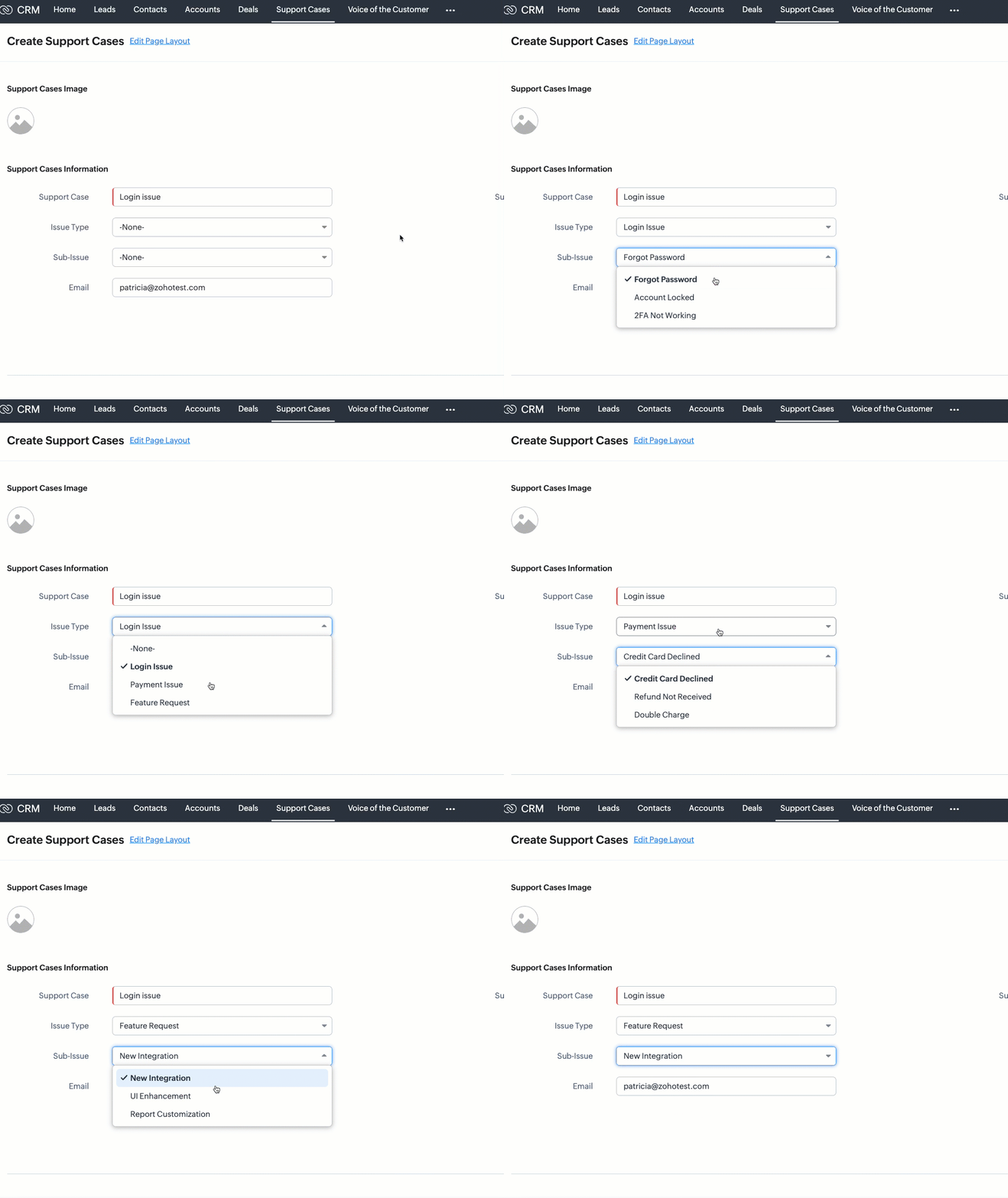
By mapping these fields, CRM users see only the Sub-Issue values relevant to the selected Issue Type.

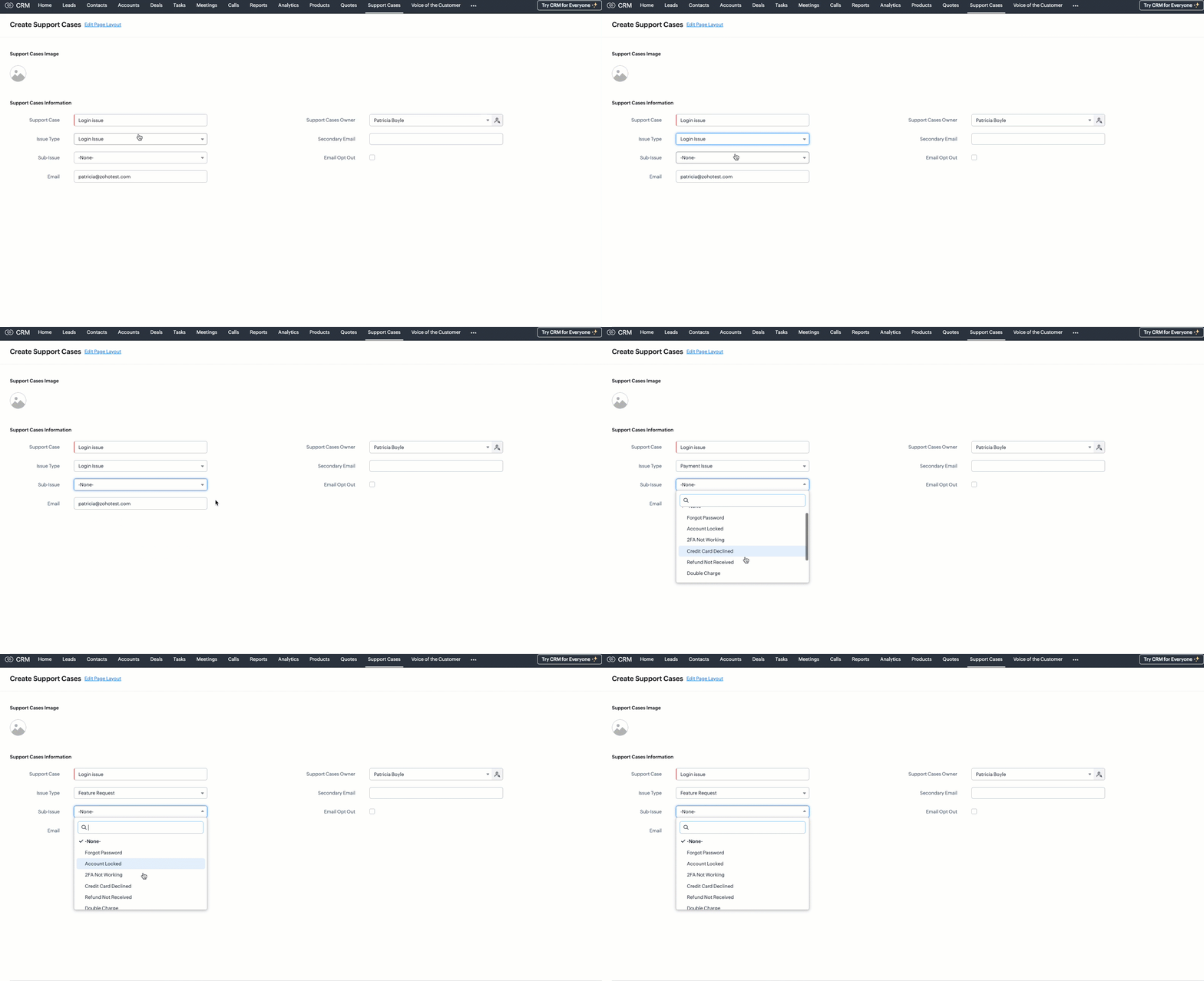
Without map dependency

Without configuring a map dependency, the Sub-Issue picklist would always display all available options - regardless of the selected Issue Type. For example, users might see options like Forgot Password, Double Charge, and Report Customization all at once. This can easily confuse users and lead to incorrect selections, such as choosing Double Charge under Login Issue.

With map dependency

With mapping dependencies, you can guide users to make correct selections by showing only the relevant options in the child field based on the option selected in the parent field.

Mapping picklist options in UI

You can map picklist field options directly from the Zoho CRM user interface.
Follow these steps:
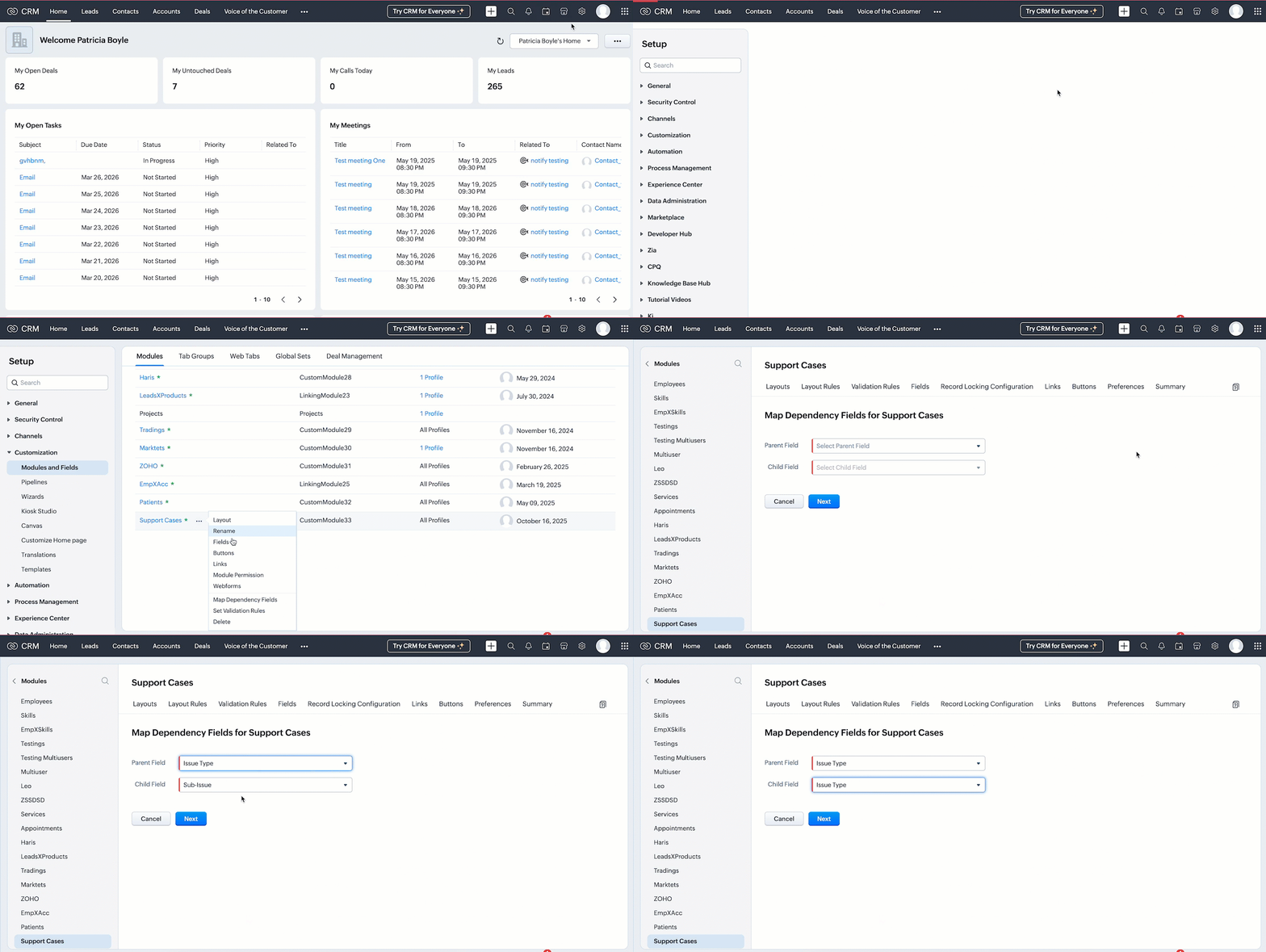
  1. Go to SetupCustomizationModules and Fields.
  2. Select the desired module. In this case, Support Cases.
  3. Click the (more) icon next to the module name.
  4. Select Map Dependency Fields.
  5. On the Map Dependency Fields page, click the New button to create a new dependency.
  6. Choose the Parent Field and Child Field you want to map.
  7. Click Next button.


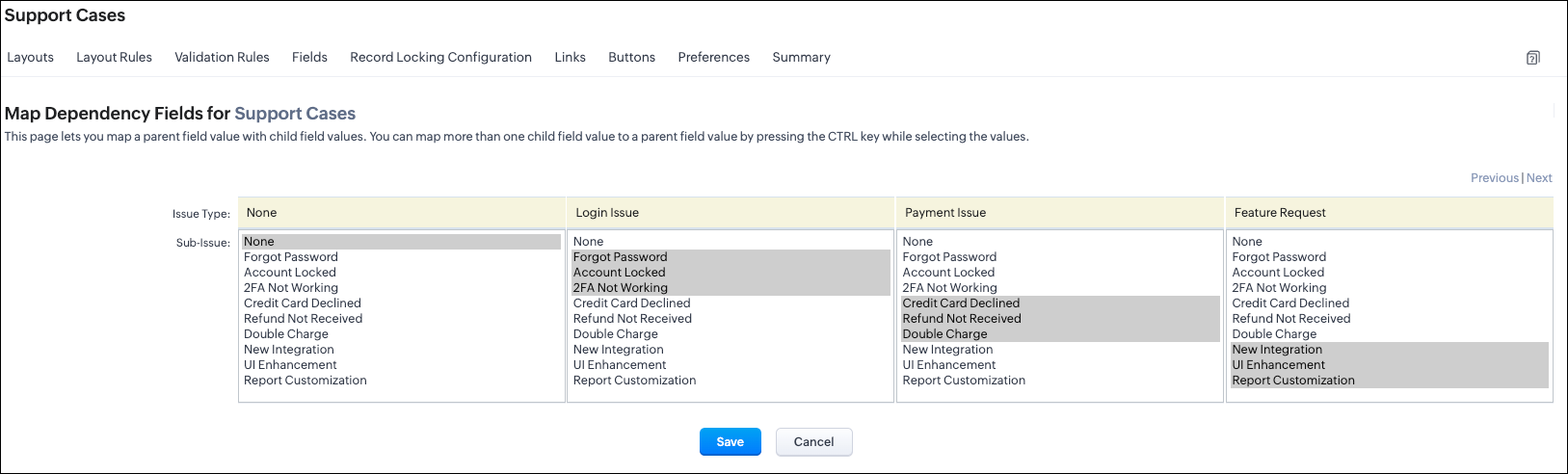
      8. Add option mappings to define which child field options should be shown based on the option selected in the parent field, then Save your configuration.

UI options mapping view

Mapping picklist options via API

Before mapping the options, you must need the following APIs :
  1. Modules Metadata API - To know the API name of the module.
    1. Endpoint: GET - /settings/modules
    2. Here, the API name of the Support Cases module is Support_Cases.
  2. Layouts Metadata API - Since dependencies are layout-specific, this API helps you identify the layout ID and all the available picklist fields for mapping. It also provides detailed metadata such as the layout ID, field IDs, and the corresponding picklist value IDs.
    1. Endpoint: GET /settings/layouts?module=Support_Cases

Create Dependency using the POST Map Dependency

Request URL:  {{api-domain}}/crm/v8/settings/layouts/5725767000007972011/map_dependency?module=Support_Cases

Request Method: POST

Input JSON
Each object in the map_dependency array requires a parent field, a child field, and a pick_list_values array that maps each parent option to its relevant child options.


{

    "map_dependency": [ //Array that contains one or more dependency mappings

        {

            "parent": { // Mandatory - Represents the parent picklist

                "api_name": "Issue_Type", //Mandatory - API name of the parent field

                "id": "5725767000007985243" // Mandatory - Unique ID of the parent picklist

            },

            "pick_list_values": [  //Mandatory - List of parent picklist values and their corresponding child mappings

                {

                    "display_value": "-None-",

                    "maps": [

                        {

                            "display_value": "-None-",

                            "actual_value": "-None-",

                            "id": "5725767000007985204"

                        }

                    ],

                    "actual_value": "-None-",

                    "id": "5725767000007985249"

                },

                {

                    "display_value": "Login Issue",

                    "maps": [

                        {

                            "display_value": "Forgot Password", //Label shown in the UI for the parent value

                            "actual_value": "Forgot Password", //Actual stored value of the parent picklist option

                            "id": "5725767000007985185" //Mandatory - Unique ID of the parent picklist option

                        },

                        {

                            "display_value": "Account Locked",

                            "actual_value": "Account Locked",

                            "id": "5725767000007985187"

                        }


                    ],

                    "actual_value": "Login Issue", //Actual value of the parent field's option

                    "id": "5725767000007985242" //Mandatory - Unique ID of the parent field's option

                },

                {

                    "display_value": "Payment Issue",

                    "maps": [

                        {

                            "display_value": "Credit Card Declined",

                            "actual_value": "Credit Card Declined",

                            "id": "5725767000007985191"

                        },

                        {

                            "display_value": "Refund Not Received",

                            "actual_value": "Refund Not Received",

                            "id": "5725767000007985193"

                        },

                        {

                            "display_value": "Double Charge",

                            "actual_value": "Double Charge",

                            "id": "5725767000007985195"

                        }

                    ],

                    "actual_value": "Payment Issue",

                    "id": "5725767000007985244"

                },

                {

                    "display_value": "Feature Request",

                    "maps": [

                        {

                            "display_value": "New Integration",

                            "actual_value": "New Integration",

                            "id": "5725767000007985197"

                        },

                        {

                            "display_value": "UI Enhancement",

                            "actual_value": "UI Enhancement",

                            "id": "5725767000007985199"

                        },

                        {

                            "display_value": "Report Customization",

                            "actual_value": "Report Customization",

                            "id": "5725767000007985201"

                        }

                    ],

                    "actual_value": "Feature Request",

                    "id": "5725767000007985246"

                }

            ],

            "child": { //Mandatory - Represents the child field

                "api_name": "Sub_Issue", //Mandatory - API name of the child field

                "id": "5725767000007985186" //Mandatory - Child picklist field ID

            }

        }

    ]


Sample Response 

{
    "map_dependency": [
        {
            "code": "SUCCESS",
            "details": {
                "id": "5725767000008174001"
            },
            "message": "map dependency created",
            "status": "success"
        }
    ]
}


Retrieve the configured field mappings using the GET Mapped Dependency Fields API

Request URL:  {{api-domain}}/crm/v8/settings/layouts/5725767000007972011/map_dependency/5725767000008174001?module=Support_Cases

Request Method: GET
Sample Response

{
    "map_dependency": [
        {
            "parent": {
                "api_name": "Issue_Type",
                "id": "5725767000007985243"
            },
            "internal": false,
            "active": true,
            "id": "5725767000008180001",
            "source": 1,
            "category": 0,
            "pick_list_values": [
                {
                    "display_value": "-None-",
                    "maps": [
                        {
                            "display_value": "-None-",
                            "actual_value": "-None-",
                            "id": "5725767000007985204"
                        }
                    ],
                    "actual_value": "-None-",
                    "id": "5725767000007985249"
                },
                {
                    "display_value": "Login Issue",
                    "maps": [
                        {
                            "display_value": "Forgot Password",
                            "actual_value": "Forgot Password",
                            "id": "5725767000007985185"
                        },
                        {
                            "display_value": "Account Locked",
                            "actual_value": "Account Locked",
                            "id": "5725767000007985187"
                        },
                        {
                            "display_value": "2FA Not Working",
                            "actual_value": "2FA Not Working",
                            "id": "5725767000007985189"
                        }
                    ],
                    "actual_value": "Login Issue",
                    "id": "5725767000007985242"
                },
              .
              .
              .
            ],
            "child": {
                "api_name": "Sub_Issue",
                "id": "5725767000007985186"
            }
        }
    ]
}
You will get a JSON structure containing all dependency mappings. Check if your parent and child fields appear as configured.

Update the existing mapped options using the PUT Mapped Dependency Fields API

Request URL:  {{api-domain}}/crm/v8/settings/layouts/5725767000007972011/map_dependency/5725767000008174001?module=Support_Cases

Request Method: PUT

Input JSON

{

    "map_dependency": [

        {

            "parent": {

                "api_name": "Issue_Type",

                "id": "5725767000007985243"

            },

            "pick_list_values": [

                {

                    "display_value": "-None-",

                    "maps": [

                {

                    "display_value": "Login Issue",

                    "maps": [

                        {

                            "display_value": "Forgot Password",

                            "actual_value": "Forgot Password",

                            "id": "5725767000007985185"

                        },

                        {

                            "display_value": "Account Locked",

                            "actual_value": "Account Locked",

                            "id": "5725767000007985187"

                        },

                        { // mapped a new option to the existing mapping

                            "display_value": "2FA Not Working",

                            "actual_value": "2FA Not Working",

                            "id": "5725767000007985189"

                        }

                    ],

                    "actual_value": "Login Issue",

                    "id": "5725767000007985242"

                }

            ],

            "child": {

                "api_name": "Sub_Issue",

                "id": "5725767000007985186"

            }

        }

    ]

}


Delete existing dependency using the DELETE Mapped Dependency Fields API

Request URL:  {{api-domain}}/crm/v8/settings/layouts/5725767000007972011/map_dependency/5725767000008174001?module=Support_Cases

Request Method: DELETE

Sample Response


{
    "map_dependency": [
        {
            "code": "SUCCESS",
            "details": {
                "id": "5725767000008174001"
            },
            "message": "map dependency deleted",
            "status": "success"
        }
    ]
}


Assigning picklist values using the Insert Records API

When you insert a record, you can directly pass the picklist option’s display value (not the ID) in the request body.

Request URL: {api-domain}/crm/v8/{module_api_name}
Request Method: POST

Sample Input 

{

    "data" : [

        {

            "Name" : "Support Case 1",

            "Support_Case" : "Login Issue",

            "Issue_Type" : "Login Issue",

            "Sub_Issue":"Forgot Password"

        }

    ]

}


Note: When creating or updating records via API, CRM does not validate the dependency relationship between parent and child picklist values.
To ensure data consistency and prevent data loss, always use the Get Map Dependency API before creating or updating records and to know correct mappings as well. This helps you retrieve the correct parent–child mappings and pass only valid picklist values in your API requests.

FAQs

Q1. Is the Map Dependency field supported in subforms?

Yes. You can configure dependency mappings for picklist fields within subforms as well. The Map Dependency Fields API supports creating parent–child picklist relationships directly inside a subform. To do this via API, use the subform’s API name as the module name when making the dependency mapping call.
This ensures that the dependency is created specifically for the picklist fields inside that subform, not the main module.

Q2. Can I keep the parent field in the main form and the child field in the subform?

Not currently. As of Zoho CRM API Version 8, cross-level mapping where the parent field is in the main form and the child field is in a subform, or vice versa is not supported neither via the UI nor through the API.

You can only:
  1. Map picklists within the main form, or
  2. Map picklists within the same subform.

Q3. What happens if I delete a picklist value that is part of a dependency?

If you delete a picklist option, the corresponding mapping will be automatically removed from the dependency.


Q4. What happens if I rename a picklist value that is part of a dependency?

If you rename a picklist option, the dependency will be automatically updated with the new option label.


We hope this post helps you learn more on mapping dependency fields in CRM using Zoho CRM APIs. Try it out, and let us know your experience in the comment section or reach out to us at support@zohocrm.com 

Stay tuned for more insights in our upcoming Kaizen posts!


    • Sticky Posts

    • Kaizen #226: Using ZRC in Client Script

      Hello everyone! Welcome to another week of Kaizen. In today's post, lets see what is ZRC (Zoho Request Client) and how we can use ZRC methods in Client Script to get inputs from a Salesperson and update the Lead status with a single button click. In this
    • Kaizen #222 - Client Script Support for Notes Related List

      Hello everyone! Welcome to another week of Kaizen. The final Kaizen post of the year 2025 is here! With the new Client Script support for the Notes Related List, you can validate, enrich, and manage notes across modules. In this post, we’ll explore how
    • Kaizen #217 - Actions APIs : Tasks

      Welcome to another week of Kaizen! In last week's post we discussed Email Notifications APIs which act as the link between your Workflow automations and you. We have discussed how Zylker Cloud Services uses Email Notifications API in their custom dashboard.
    • Kaizen #216 - Actions APIs : Email Notifications

      Welcome to another week of Kaizen! For the last three weeks, we have been discussing Zylker's workflows. We successfully updated a dormant workflow, built a new one from the ground up and more. But our work is not finished—these automated processes are
    • Kaizen #152 - Client Script Support for the new Canvas Record Forms

      Hello everyone! Have you ever wanted to trigger actions on click of a canvas button, icon, or text mandatory forms in Create/Edit and Clone Pages? Have you ever wanted to control how elements behave on the new Canvas Record Forms? This can be achieved
      • Recent Topics

      • Formatting Problem | Export to Zoho Sheet View

        When I export data to Zoho Sheet View, ID columns are automatically formatted as scientific notation. Reformatting them to text changes the actual ID values. For example, 6557000335603071 becomes 6557000335603070. I have attached screenshots showing this
      • Introducing Workqueue: your all-in-one view to manage daily work

        Hello all, We’re excited to introduce a major productivity boost to your CRM experience: Workqueue, a dynamic, all-in-one workspace that brings every important sales activity, approval, and follow-up right to your fingertips. What is Workqueue? Sales
      • Feature Request - The Ability to Link A Customer with a Vendor

        Hi Finance Suite Team, Many businesses buy and sell products from the same companies or individuals. For example, a car sales business may buy a car from a member of the public, and that member of the public may also buy a new car from us. This makes
      • Long table name (sync from Zoho Creator)

        Dears, How can I remove the suffix in parentheses? These tables are synced from Zoho Creator and are treated as system tables, so their names cannot be changed. This issue makes the aggregation formulas look awful.
      • CRM limit reached: only 2 subforms can be created

        we recently stumbled upon a limit of 2 subforms per module. while we found a workaround on this occasion, only 2 subforms can be quite limiting in an enterprise setting. @Ishwarya SG I've read about imminent increase of other components (e.
      • [Free Webinar] Learning Table Series - Streamlining incident management process with Zoho Creator

        Hello everyone, We’re excited to invite you to another edition of the Learning Table Series webinar. As you may already know, we've moved to a purpose-based approach in the Learning Table Series this year. Each session now focuses on how a Zoho Creator
      • Unattended - Silent

        How can I hide the tray icon / pop up window during unattended remote access for silent unattended remote access?
      • How to apply customized Zoho Crm Home Page to all users?

        I have tried to study manuals and play with Zoho CRM but haven't found a way how to apply customized Zoho CRM Home Page as a (default) home page for other CRM users.. How that can be done, if possible? - kipi Moderation Update: Currently, each user has
      • Importing into Multiselect Picklist

        Hi, We just completed a trade show and one of the bits of information we collect is tool style. The application supplied by the show set this up as individual questions. For example, if the customer used Thick Turret and Trumpf style but not Thin Turret,
      • Text snippet

        There is a nice feature in Zoho Desk called Text Snippet. It allows you to insert a bit of text anywhere in a reply that you are typing. That would be nice to have that option in Zoho CRM as well when we compose an email. Moderation Update: We agree that
      • Marketing Tip #18: Make your online store mobile-friendly to improve traffic

        Most online shoppers browse on their phones first. If your store is hard to read, slow to load, or tricky to navigate on mobile, they’ll bounce fast. A mobile-friendly store doesn’t just look nice; it improves engagement, reduces drop-offs, and helps
      • [Need help] Form closed. Please contact your form administrator for further assistance.

        https://forms.zohopublic.com/cceinfoifly1/form/CCE2025CCEFocusGroupRegistrationForm2025Fall/formperma/s_8XcLETTbFxZ_TAS4r_W6W5UBl8o5oxEnIX35IBKg4 I checked we didn't exceed the usage limit and form availability is enabled, Please help us enable this form
      • Zoho People. Updating TabularData

        I am trying to update tabular data in the record. I always have the same response. I have checked many times. Section ID is correct. May be something wrong with request structure itself. Can someone help me. Body content type: form urlencoded query params
      • Email was sent out without our permission

        Hi there, One customer just reached out to us about this email that we were not aware was being sent to our customers. Can you please check on your end?
      • Automatically CC an address using Zoho CRM Email Templates

        Hi all - have searched but can't see a definitive answer. We have built multiple email templates in CRM. Every time we send this we want it to CC a particular address (the same address for every email sent) so that it populates the reply back into our
      • Unable to Send Different Email Templates for Different Documents in Zoho Sign

        Hello Zoho Community, I am facing a limitation with Zoho Sign regarding email notifications sent to customers when a document is sent for signing. Currently, whenever I send any template/document for signing, the email notification that goes to the customer
      • Introducing real-time document commenting and collaboration in Zoho Sign

        Hi, there! We are delighted to introduce Document commenting, a feature that helps you communicate with your recipients more efficiently for a streamlined document signing process. Some key benefits include: Collaborate with your recipients easily without
      • What are the create bill API line item requiered fields

        While the following documentation says that the line items array is requiered it doesn't say what if any files are requiered in the array. Does anyone know? API documentation: https://www.zoho.com/inventory/api/v1/bills/#create-a-bill I'm trying to add
      • Transfer ownership of files and folders in My Folders

        People work together as a team to achieve organizational goals and objectives. In an organization, there may be situations when someone leaves unexpectedly or is no longer available. This can put their team in a difficult position, especially if there
      • WhatsApp IM in Zoho Desk always routes to Admin instead of assigned agent

        Hello Zoho Experts, I connected WhatsApp IM to my Zoho Desk account. I only assigned my Customer Service (CS) agent to the WhatsApp channel, and I did NOT include Admin in this channel. However, every new WhatsApp conversation automatically gets assigned
      • Customer ticket creation via Microsoft Teams

        Hi all, I'm looking to see if someone could point me in the right direction. I'd love to make it so my customers/ end users can make tickets, see responses and respond within microsoft teams. As Admin and an Agent i've installed the zoho assist app within
      • Is there a way to update all the start and end dates of tasks of a project after a calendar change?

        Hi! Here's my situation. I've built a complete project planning. All its tasks have start dates and due dates. After completing the planning, I've realized that the project calendar was not the right one. So I changed the project calendar. I now have
      • How to update task start date when project start date changes?

        Hi there, When the start date of a project changes, it's important to update the start dates of the tasks associated with that project to reflect the new timeline. Is there a way to shift the start date of all project tasks when the start date of a project
      • Issue with Picklist Dropdown Not Opening on Mobile

        Hello I am experiencing an issue with picklist values on mobile. While the arrow is visible, the dropdown to scroll through the available values often does not open. This issue occurs sporadically, it has worked occasionally, but it is very rare and quite
      • using the client script based on the look up filed i wnat to fetch the record details like service number , service rate

        based on selected service look up field iwant to fetch the service serial number in the serice form how i achive using client script also how i get the current date in the date field in the on load of the form
      • Zoho Books/Square integration, using 2 Square 'locations' with new Books 'locations'?

        Hello! I saw some old threads about this but wasn't sure if there were any updates. Is there a way to integrate the Square locations feature with the Books locations feature? As in, transactions from separate Books locations go to separate Square locations
      • Add zoho calendar to google calendar

        Hi I keep seeing instructions on how to sync Zoho CRM calendar with google calendar but no instructions on how to view Zoho calendar in my google calendar.
      • Zoho Commerce - How To Change Blog Published Date and Author

        Hi Commerce Team, I'm discussing a project with a client who wants to move from Woo Commerce / Wordpress to Zoho Commerce. They have around 620 blog posts which will need to be migrated. I am now aware of the blog import feature and I have run some tests.
      • Does zoho inventory need Enterprise or Premium subsrciption to make Widgets.

        We have Zoho One Enterprise and yet we can't create widgets on inventory.
      • Writing by Hand in "Write" Notes

        Hi there! I just downloaded this app a few moments ago, and I was wondering if there was a way to write things by hand in "Write" mode instead of just typing in the keyboard. It would make things a bit more efficient for me in this moment. Thanks!
      • Remove the “One Migration Per User” Limitation in Zoho WorkDrive

        Hi Zoho WorkDrive Team, Hope you are doing well. We would like to raise a critical feature request regarding the Google Drive → Zoho WorkDrive migration process. Current Limitation: Zoho WorkDrive currently enforces a hard limitation: A Zoho WorkDrive
      • Handling Agent Transfer from Marketing Automation Journey to SalesIQ WhatsApp

        We are currently using Marketing Automation for WhatsApp marketing, and the features are great so far We have a scenario where, during a campaign or journey, we give customers an option to chat with our sales team. For this, we are using SalesIQ WhatsApp
      • Comment to DM Automation

        Comment to DM automation feature in Zoho Marketing Automation, similar to what tools like ManyChat offer. Use case: When a user comments on a social media post (Instagram / Facebook), the system should automatically: Send a private DM to the user Capture
      • ZMA shows as already connected to Zoho CRM, but integration not working

        When I try to connect ZMA with Zoho CRM, it shows as already connected, but the integration doesn’t seem to be working. I’ve attached the screen recording for reference.
      • Automatic Email Alerts for Errors in Zoho Creator Logs

        Hello, We would like to request a feature enhancement in Zoho Creator regarding error notifications. Currently, Zoho Creator allows users to view logs and errors for each application by navigating to Zoho Creator > Operations > Logs. However, there is
      • Can you default reports/charts to report the current week?

        Our data table maintains two years of data. Management wants certain report to automatically filter the report to the latest calendar week. I know I can do this manually with filters but I want the report to automatically default to the latest calendar
      • How can I check all announce?

        Hiii, May I ask how can I check all the announce based on broadcast date instead of reply date based So that I will not will miss out any new function
      • Recurring Automated Reminders

        Hi, The reminders feature in Zoho Books is a really helpful feature to automate reminders for invoices. However, currently we can set reminders based on number of days before/after the invoice date. It would be really helpful if a recurring reminder feature
      • Zobot Execution Logs & Run History (Similar to Zoho Flow)

        Dear Zoho SalesIQ Team, We would like to request an enhancement for Zoho SalesIQ Zobot: adding an execution log / run history, similar to what already exists in Zoho Flow. Reference: Zoho Flow In Zoho Flow, every execution is recorded in the History tab,
      • Password Assessment Reports for all users

        I'm the super admin and looking at the reporting available for Zoho Vault. I can see that there is a Password Assessment report available showing the passwords/weak and security score by user. However I'm confused at the 'report generated on' value. Monitor
      • Next Page