Kaizen 252 : Managing Data Sharing Rules using APIs

Hey everyone! Welcome to another Kaizen week!
Data Sharing Rules are one of those CRM features that are usually configured during implementation and then left untouched for months, or even years. For small teams with a simple reporting structure, managing them through Setup > Security Control > Roles and Sharing > Data Sharing Settings is straightforward.
However, as organizations grow, managing sharing rules becomes more challenging. New departments are created, regional teams are reorganized, business units merge, and compliance requirements change. Every change can affect who should and should not have access to CRM records. Zylker Technologies faced the same challenge.
Every quarter, Zylker's Information Security team reviews the organization's data access policies and publishes an updated set of sharing requirements. CRM administrators then have to compare the approved rule with the existing CRM configuration, identify the required changes, update sharing rules across multiple modules, apply those changes to existing records, and verify that everything had been processed successfully.
To streamline this process, Zylker integrated its internal Security Governance Portal with Zoho CRM. The Governance Portal serves as the central system where the Information Security team defines and approves access policies for their business applications, including Zoho CRM. Once a rule is approved, the portal retrieves the current sharing configuration from CRM, compares it with the approved rule, applies the required changes, and tracks the progress of the deployment through the Data Sharing Rules APIs.
While Zoho CRM already provides a user interface for managing Data Sharing Rules, these APIs enable organizations to integrate CRM with governance, compliance, or change management systems. Developers can also use them to build custom administrative applications, automate repetitive tasks, and incorporate Data Sharing Rule management into their own business workflows. Throughout this Kaizen, we will use Zylker's Security Governance Portal to understand how each API fits into this workflow.
Understanding Data Sharing Rules
Before we look at the implementation, let us understand how Data Sharing Rules behave.
By default, Zoho CRM follows the organization's data sharing settings to determine who can access a record. Depending on the module's default sharing model, records are visible only to the record owner, users higher in the role hierarchy, or other users based on the configured permissions. Data Sharing Rules extend this access by granting access to other users, roles, or groups without changing record ownership.
Zoho CRM supports two types of Data Sharing Rules:
1. Record owner based rules
A Record Owner Based Rule shares records based on who owns them.
For example, suppose all Deals owned by users in the Enterprise Sales role should also be accessible to the Legal team for contract review. Instead of sharing each Deal individually, a Record Owner Based rule grants Legal read access to all Deals owned by Enterprise Sales users automatically. Any new Deal created by users in that role automatically follows the same sharing rule.
2. Criteria based rules
Criteria Based Rules work differently. Instead of sharing records based on ownership, they share records that satisfy specified conditions.
For example, share all Deals where Billing Country is Singapore or Malaysia with Zylker's Asia Pacific Sales group. Or share all Deals where Amount is greater than $500,000 with the Legal team for contract review.
Any existing or future Deal matching these criteria becomes accessible to the specified group.

Note:
Data Sharing Rules are module-level configurations, not record-level permissions. A single sharing rule applies to every record in the module that satisfies the rule.
The solution
Let us see how Zylker uses these APIs in practice.
When a policy is approved, CRM administrators use the Governance Portal to review the current configuration, apply the approved changes, and monitor their deployment. Each action in the portal invokes the corresponding Data Sharing Rules API.
The overall workflow looks like this.
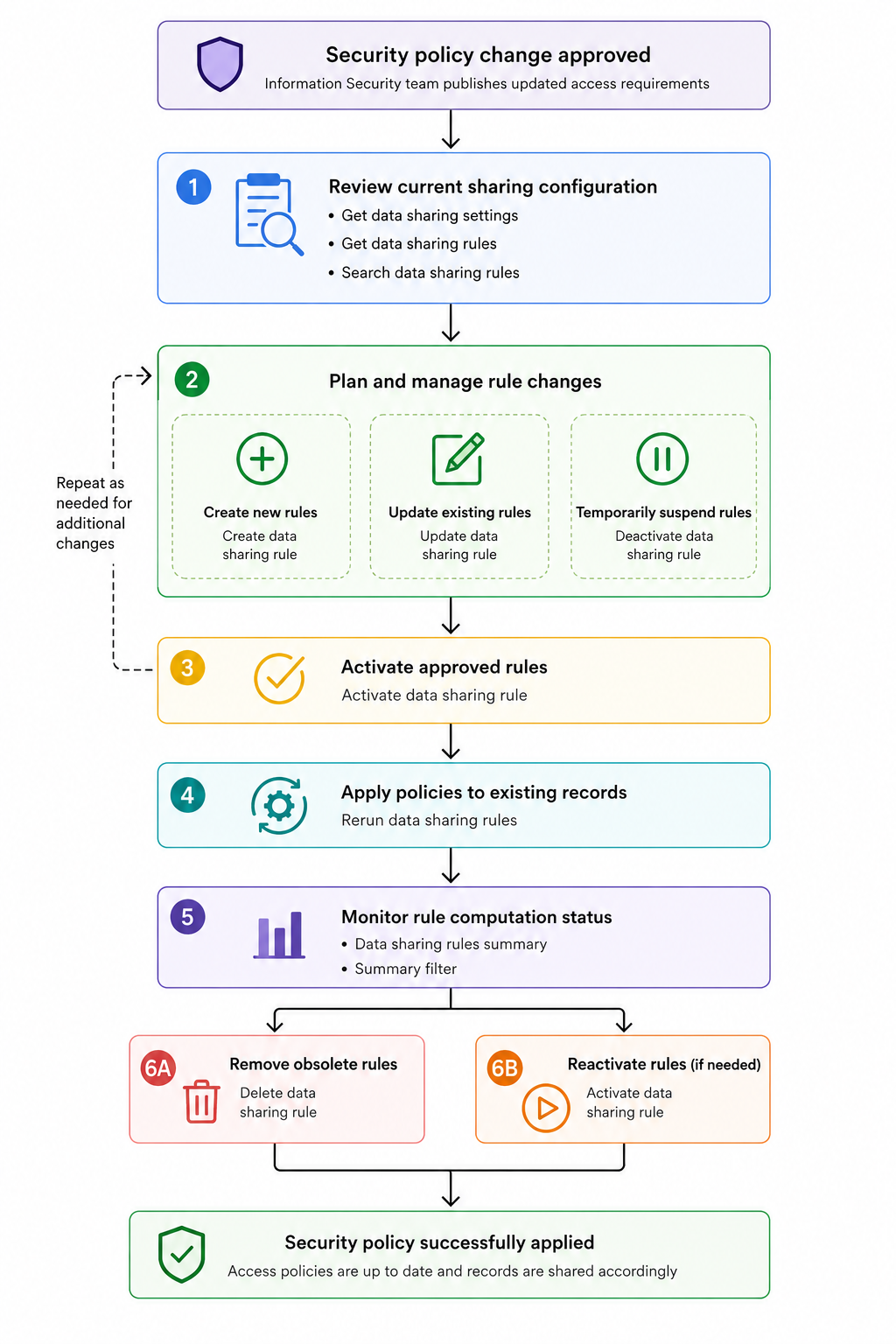
Before administrators can deploy a new sharing rule, they need to review the existing configuration. Once the required rules are created or updated, they can activate or deactivate them as needed. Finally, they can monitor the computation status to confirm everything has completed successfully.
Each step in this workflow maps to one or more Data Sharing Rules APIs.
1. Reviewing the current sharing configuration
Before deploying a new sharing rule, administrators need to understand the organization's current configuration. The portal retrieves the module's sharing settings and existing sharing rules, allowing administrators to review the current configuration and locate specific rules using three APIs.
1.1 Get Data Sharing settings
The Get Data Sharing Settings API retrieves the default sharing model configured for each module in the org, both standard and custom.
Endpoint : GET {api-domain}/crm/v8/settings/data_sharing
Sharing rules only apply to modules set to private. If a module is already public, all users can access its records regardless of any rules.
Sample Response:
{ "data_sharing": [ { "public_in_portals": false, "share_type": "private", "module": { "api_name": "Leads", "id": "4876876000000002175" }, "rule_computation_running": false }, { "public_in_portals": false, "share_type": "private", "module": { "api_name": "Accounts", "id": "4876876000000002177" }, "rule_computation_running": false }, ..... ]} |
The share_type property indicates the module's default sharing model. rule_computation_running indicates whether a Rerun is currently in progress for that module.
1.2 Get Data Sharing Rules
After retrieving the sharing settings, the portal fetches the data sharing rules configured for the Deals module using the Get Data Sharing Rules API.
Endpoint: GET {api-domain}/crm/v8/settings/data_sharing/rules?module=Deals
Sample Response:
{ "sharing_rules": [ { "module": { "api_name": "Deals", "name": "Deals" }, "name": "Enterprise Sales to Corporate Finance", "type": "Record_Owner_Based", "shared_from": { "resource": { "name": "Enterprise Sales" }, "type": "roles" }, "shared_to": { "resource": { "name": "Corporate Finance" }, "type": "roles" }, "permission_type": "read", "superiors_allowed": true, "status": "active" }, { "module": { "api_name": "Deals", "name": "Deals" }, "name": "High Value Deals Review", "type": "Criteria_Based", "shared_to": { "resource": { "name": "Risk Assessment Team" }, "type": "groups" }, "permission_type": "read", "superiors_allowed": true, "status": "active" }, .... ], "info": { "count": 5, "more_records": false } } |
For Criteria Based rules, shared_from is absent. These rules share records based on field conditions, not ownership, so there is no source role. superiors_allowed controls whether users in roles above the shared_to role also receive access.
1.3 Search Data Sharing Rules
Administrators often need to locate rules that match specific criteria. For example, every active rule that shares records owned by the Enterprise Sales role, or every rule that grants access to a specific group.
The Search Data Sharing Rules API lets you filter rules by status, permission type, shared-to role or group, shared-from role or group, superiors allowed, and rule name. Refer to the API documentation for the full list of supported fields and operators.
Endpoint: POST {api-domain}/crm/v8/settings/data_sharing/rules/search
The sample request below searches for all active rules in the Deals module where the shared_from role is Enterprise Sales:
{ "page": 1, "module": "Deals", "filters": [ { "group_operator": "and", "group": [ { "group_operator": "or", "group": [ { "group_operator": "and", "group": [ { "field": { "api_name": "shared_from.resource.id" }, "value": ["4876876000024524004"], "comparator": "in" }, { "field": { "api_name": "shared_from.type" }, "value": "R", "comparator": "equal" } ] } ] }, { "field": { "api_name": "status" }, "value": "active", "comparator": "equal" } ] } ] } |
The response contains only the rules that match the specified filters. shared_from.type uses short codes: R for roles, RS for roles and subordinates, and G for groups.
Sample Response:
{ "sharing_rules": [ { "module": { "api_name": "Deals", "name": "Deals", "id": "4876876000000002181" }, "superiors_allowed": true, "type": "Record_Owner_Based", "shared_to": { "resource": { "name": "Service Team", "id": "4876876000024524086" }, "type": "roles", "subordinates": false }, "shared_from": { "resource": { "name": "Enterprise Sales", "id": "4876876000024524004" }, "type": "roles", "subordinates": false }, "permission_type": "read", "name": "Sales to Service", "id": "4876876000024524103", "status": "active", "match_limit_exceeded": false }, .... ], "info": { "per_page": 200, "count": 2, "page": 1, "more_records": false } } |
With the current configuration loaded, administrators can now begin deploying new or updated sharing policies.
2. Deploying new sharing policies
Once administrators have reviewed the current configuration, they can begin deploying new or updated sharing policies.
Suppose Zylker expands its operations into North America. As part of the new governance rule, every Deal owned by the North America Sales team must also be accessible to the Legal Reviewers group for contract verification. Since no such sharing rule exists yet, the administrator creates it from the portal by selecting the module, rule type, source role, target group, and permission level. When they click Deploy, the portal calls the Create Data Sharing Rule API.
Endpoint: POST {api-domain}/crm/v8/settings/data_sharing/rules?module=Deals
The request body defines the new sharing rule.
{ "sharing_rules": [ { "name": "North America Sales to Legal Reviewers", "type": "Record_Owner_Based", "shared_from": { "resource": { "id": "4876876000067394753" }, "type": "roles", "subordinates": false }, "shared_to": { "resource": { "id": "4876876000029463849" }, "type": "roles", "subordinates": false }, "permission_type": "read_write", "superiors_allowed": true } ] } |
A few things to note about this request.
- permission_type accepts three values: read (read only), read_write (read/write), and read_write_delete (read/write/delete).
- Do not include the status key in the request body. Rules created via API are automatically set to active, and passing status will return a NOT_ALLOWED error.
For a Criteria Based rule, shared_from is omitted and a criteria object is added instead:
{ "sharing_rules": [ { "name": "High Value Deals - Review", "type": "Criteria_Based", "criteria": { "group_operator": "AND", "group": [ { "comparator": "greater_than", "field": { "api_name": "Amount" }, "type": "value", "value": "500000" } ] }, "shared_to": { "resource": { "id": "4876876000008680002" }, "type": "groups", "subordinates": false }, "shared_from": null, "permission_type": "read", "superiors_allowed": false } ] } |
Updating Existing Policies
Not every rule change requires creating a new rule. Sometimes an existing rule simply needs to be modified. For example, suppose Corporate Finance already has access to Deals, but only with Read Only permission. The new compliance rule now requires Read/Write access. Instead of deleting the rule and creating another one, the administrator edits the existing rule from the portal. The portal calls the Update Data Sharing Rule API.
Endpoint: PUT {api-domain}/crm/v8/settings/data_sharing/rules?module=Deals
Only the specified properties are updated; the rule itself remains unchanged. The API accepts partial updates. Include only the fields you want to change, along with id, type, and name.
shared_from, shared_to, permission_type, and superiors_allowed can all be updated independently.
shared_from, shared_to, permission_type, and superiors_allowed can all be updated independently.
Sample Request:
{ "sharing_rules": [ { "id": "4876876000024554001", "type": "Record_Owner_Based", "name": "Enterprise Sales to Corporate Finance", "shared_from": { "resource": { "id": "4876876000024524004" }, "type": "roles", "subordinates": false }, "shared_to": { "resource": { "id": "4876876000024524034" }, "type": "roles", "subordinates": false }, "permission_type": "read_write", "superiors_allowed": true } ] } |

Every Create and Update automatically triggers a background execution for that module. Zoho CRM sends an email notification when the execution completes. Until then, no other Create, Update, or Delete operations can be performed on rules for that module. Attempting to do so returns CANNOT_PROCESS. If you are deploying multiple rules, wait for the email confirmation before proceeding with the next one.
3. Managing existing Data Sharing Rules
Sharing policies evolve continuously. Departments are reorganized, projects end, business units merge. The APIs provide separate operations for temporarily suspending a rule and permanently removing one.
Temporarily suspending and reactivating a Rule
Suppose Zylker is restructuring its Customer Success department. The governance team decides to suspend their access to Deals until the new reporting structure is finalized. Since this is temporary, deleting the rule is unnecessary.
The administrator deactivates it using the Deactivate Data Sharing Rule API. The rule still exists in CRM but stops participating in record sharing until reactivated. No request body is needed.
Deactivate Endpoint: DELETE {api-domain}/crm/v8/settings/data_sharing/rules/{rule_id}/actions/deactivate?module=Deals
Activate Endpoint: PUT {api-domain}/crm/v8/settings/data_sharing/rules/{rule_id}/actions/activate?module=Deals
Permanently removing a rule
Sometimes a sharing rule is no longer required. For example, suppose Zylker retires an old Sales Operations department after migrating its responsibilities elsewhere. Since the department no longer exists, its sharing rules should be removed permanently. In this case, the administrator deletes the rule from the portal, using the Delete Data Sharing Rule API.
Endpoint: DELETE {api-domain}/crm/v8/settings/data_sharing/rules/{rule_id}?module=Deals
Unlike deactivation, deletion permanently removes the rule from CRM. Use Delete only when the rule is genuinely obsolete.
4. Applying the rule to existing records
When a rule is created or updated, Zoho CRM automatically triggers a background execution for that module and sends an email notification when it completes. This applies the new rule to records going forward.
However, if the background execution fails for any reason, existing records may not reflect the updated rule. The Rerun Data Sharing Rules API lets administrators manually trigger the sharing rule computation for a module, reprocessing all existing records against the current active rules. The portal exposes this as a manual option for when the automatic execution does not complete successfully.
Endpoint: POST {api-domain}/crm/v8/settings/data_sharing/rules/actions/run?module=Deals
Sample Response:
{ "sharing_rules": [ { "code": "SCHEDULED", "details": {}, "message": "Rerun successfully scheduled", "status": "success" } ] } |
The Rerun API is asynchronous. When called, it schedules a rule computation job that runs in the background, applying all active rules across all records in the module. The response returns SCHEDULED to confirm the job has been queued. To check whether the computation has completed, use the Data Sharing Rules Summary API.
Monitoring Status
The Data Sharing Rules Summary API provides a snapshot of the sharing rule configuration across all modules in the org. For each module, it returns rule_computation_status, which indicates whether a computation is currently running, and rule_count, which is the total number of rules configured for that module including both active and inactive ones. Zylker's admin portal uses this to check whether a computation is running before allowing administrators to create, update, or delete rules, and to confirm whether a scheduled Rerun has completed.
Endpoint: GET {api-domain}/crm/v8/settings/data_sharing/rules/actions/summary
Sample Response:
{ "sharing_rules_summary": [ { "module": { "api_name": "Deals" }, "rule_computation_status": false, "rule_count": 5 }, { "module": { "api_name": "Leads" }, "rule_computation_status": false, "rule_count": 0 }, ... ] } |
Data Sharing Rules summary filter
The Data Sharing Rules Summary Filter API accepts a filter body to get module-wise data on the number and running status of a filtered set of data sharing rules. For example, you can use this API to check how many rules involve a specific role in a given module, without fetching all rules and counting them manually.
Endpoint: POST {api-domain}/crm/v8/settings/data_sharing/rules/actions/summary?module=Deals
Sample Input:
{ "filters": [ { "group_operator": "and", "group": [ { "field": { "api_name": "shared_from.resource.id" }, "value": [ "4876876000024524004" ], "comparator": "in" }, { "field": { "api_name": "shared_from.type" }, "value": "R", "comparator": "equal" } ] } ] } |
Sample Response:
{ "sharing_rules_summary": [ { "module": { "api_name": "Deals", "id": "4876876000000002181" }, "rule_computation_status": false, "rule_count": 2 } ] } |
We hope this gives you a clear picture of the Data Sharing Rules APIs and how they fit together. If you are building administration tools around sharing policies or integrating them into your existing workflows, these APIs cover the complete lifecycle from configuration to monitoring.
If you have questions, drop them in the comments below, or write to us at support@zohocrm.com. We will be happy to help you with your queries.
Happy coding!
Previous Kaizen : From Campaign Leads to Sales Orders with Zoho CRM Mass Action APIs | Kaizen Directory