Kaizen #59 - Creating alerts and custom messages using Client Script

Kaizen #59 - Creating alerts and custom messages using Client Script

Hello everyone! 
We are happy to resume our Zoho CRM Developer Community series - The Kaizen series!
Welcome back to the new start of Kaizen!
This post is about Client Script and its simple use cases involving ZDK Client functions.

What is Client Script?

The Client Script feature gives you a seamless platform for achieving and extending your business cases in Zoho CRM by allowing Java Script code execution in your browser. It enables you to configure events for the UI components and define the actions once those events are triggered. 

The ZDK Client Functions available in Client Script are,

ZDK Client Function
Description
showMessage 
To display a text message on create/clone/edit/detail(canvas) page.
showConfirmation
To display a confirmation box with accept and reject message on  create/clone/edit/detail(canvas) page.  
showAlert 
To show alert message on create/clone/edit/detail(canvas) page.
openMailer
To open mailer component from detail(canvas) page.

Use Case

Let us consider that you want to achieve the following using Client Script.
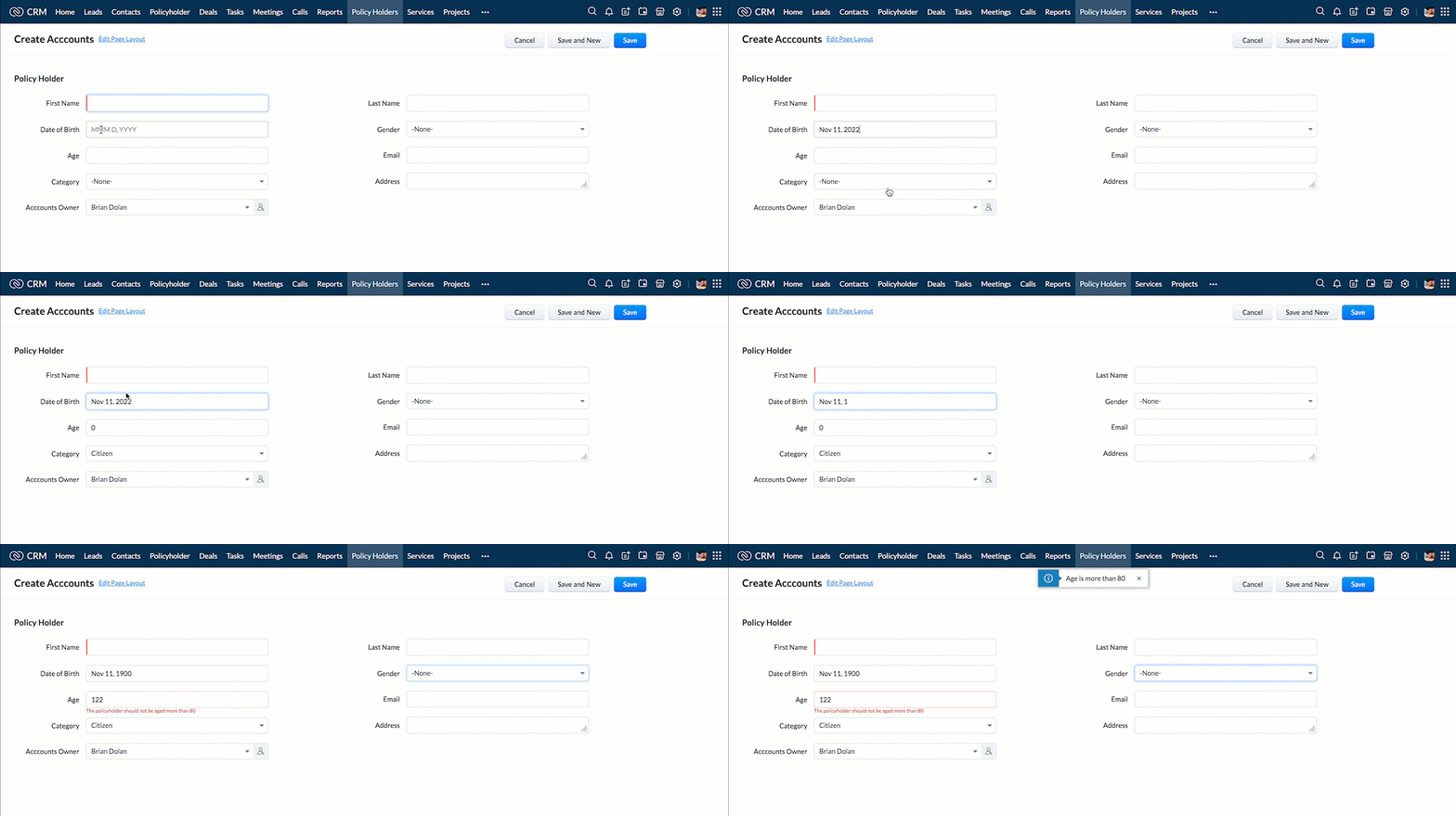
  1. Calculate age based on Date of Birth and display the message "Age is more than 80" whenever the age is above 80 in create page of Policyholder module.
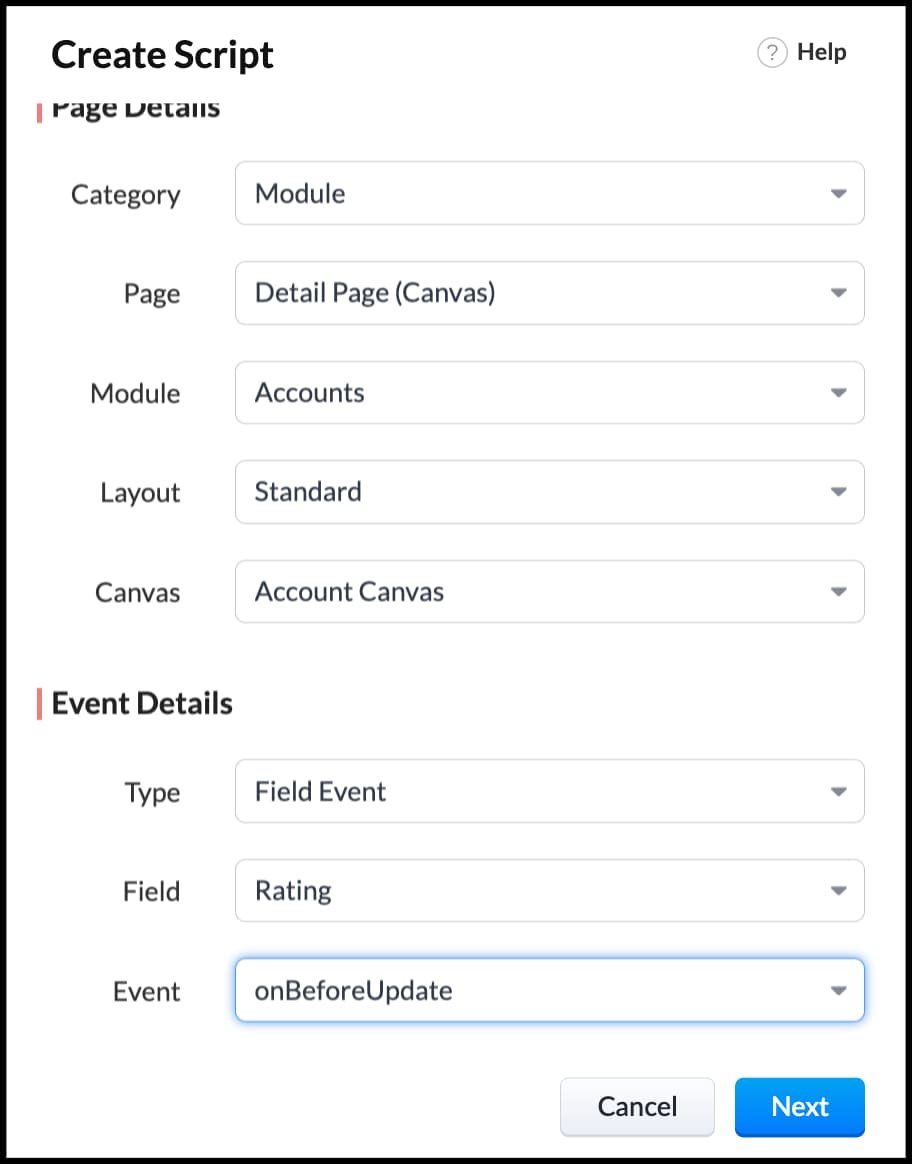
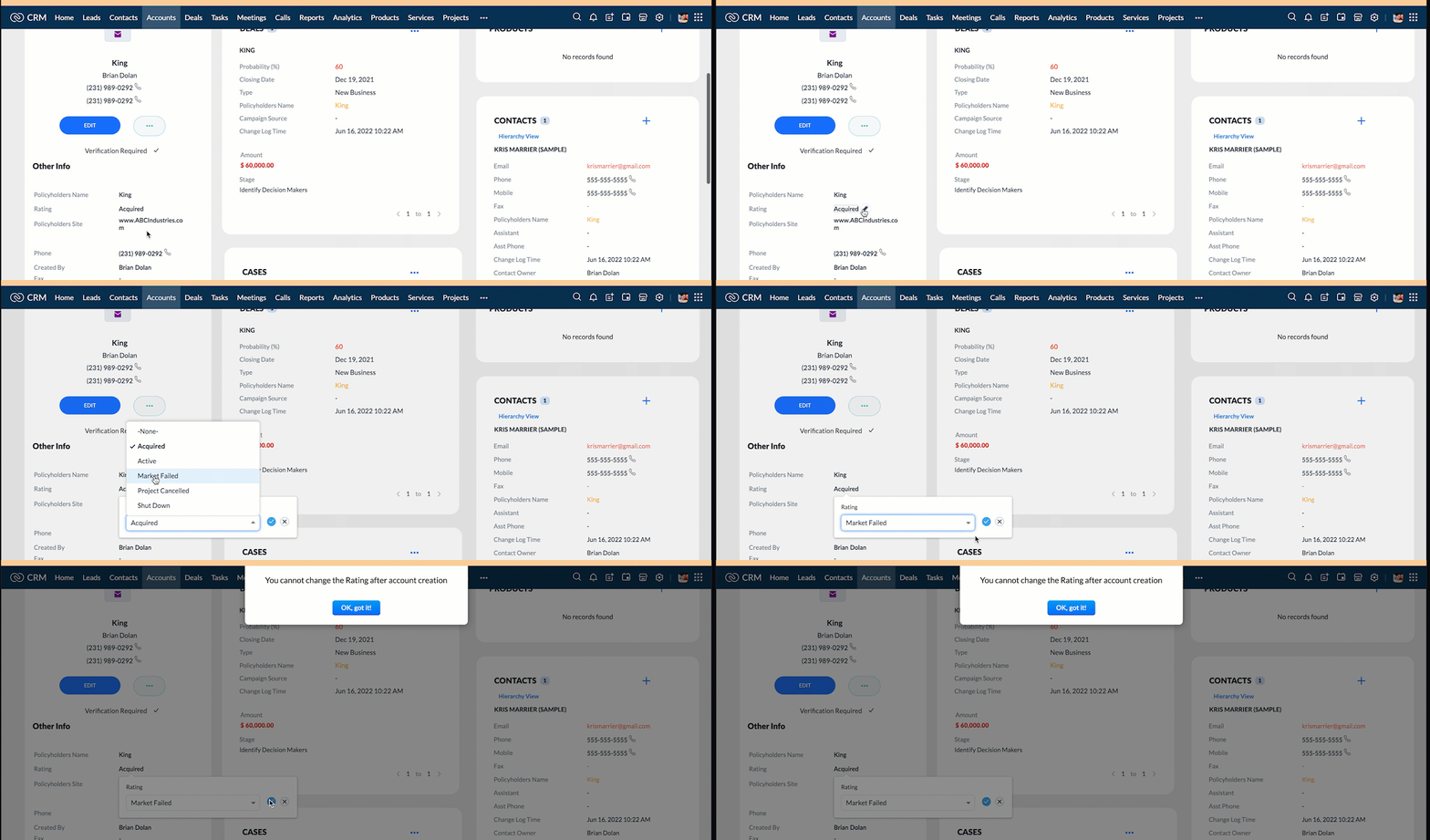
  2. Show the alert message "You cannot change the Rating of a verified account" whenever you try to update the field Rating in Accounts module.
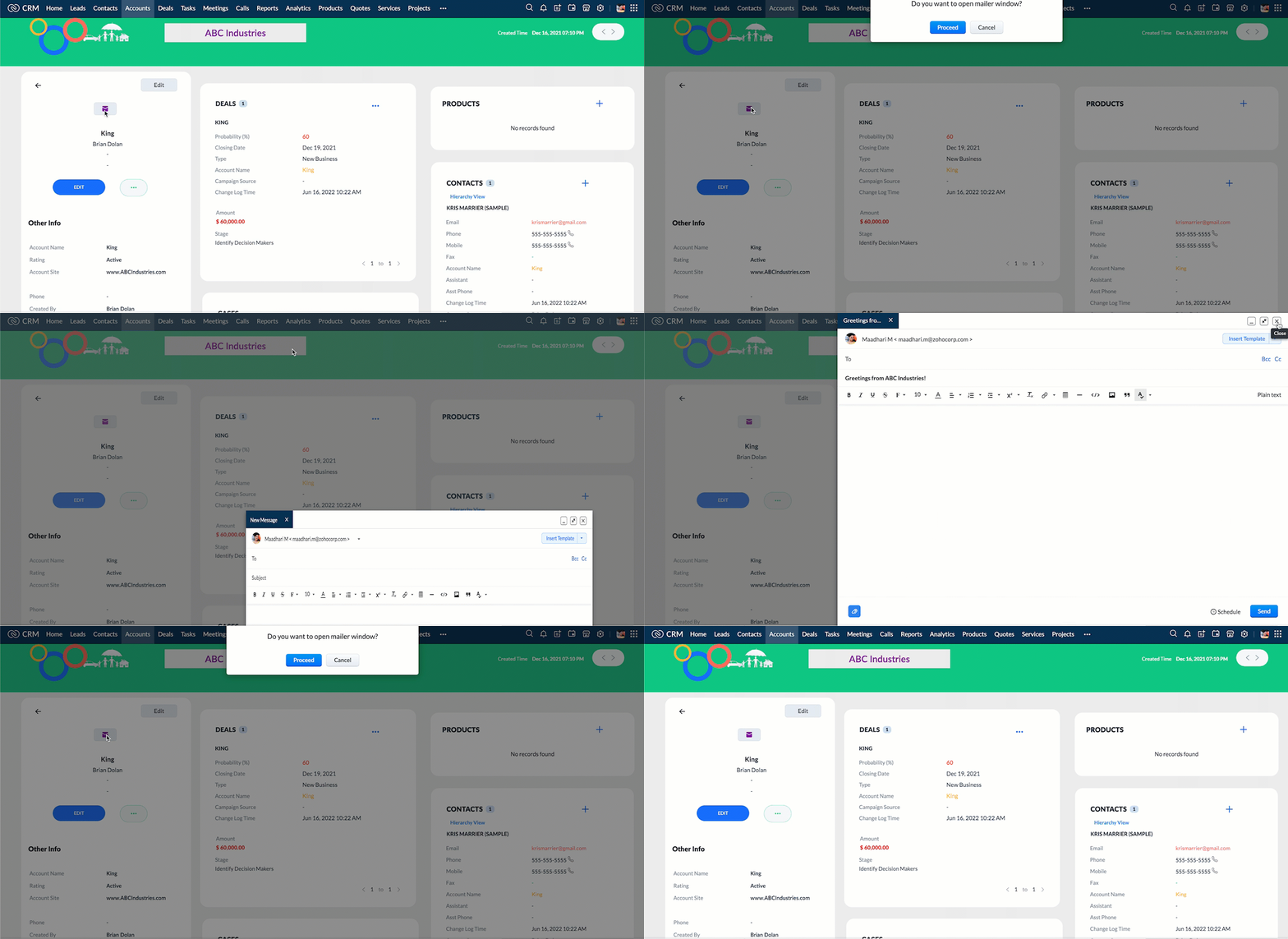
  3.  When you click the mail button on detail(canvas) page, ask for confirmation and open a mailer window.

Solution using Client Script

Note:

The solution listed in this post includes detail(canvas) page and create page.
To create a canvas page, 
  • Go to Setup > Customization > Canvas
  • Click Create Record Detail Page. 
  • On the Create a Custom Record pop up that appears, select the module as "Accounts" and select the required layout for the canvas page
  • Choose a template from the gallery and click Select.
  • Enter a name and save the canvas page.
  • Click Canvas Assignment and assign the page to the required profiles.
  •  Click here for more details on creating a canvas page(Customizing the record detail page).
1. Calculate age based on Date of Birth and display the message "Age is more than 80" whenever the age is above 80 in create page of Policyholder module

  • Go to Setup > Developer Space > Client Script. Click +New Script.
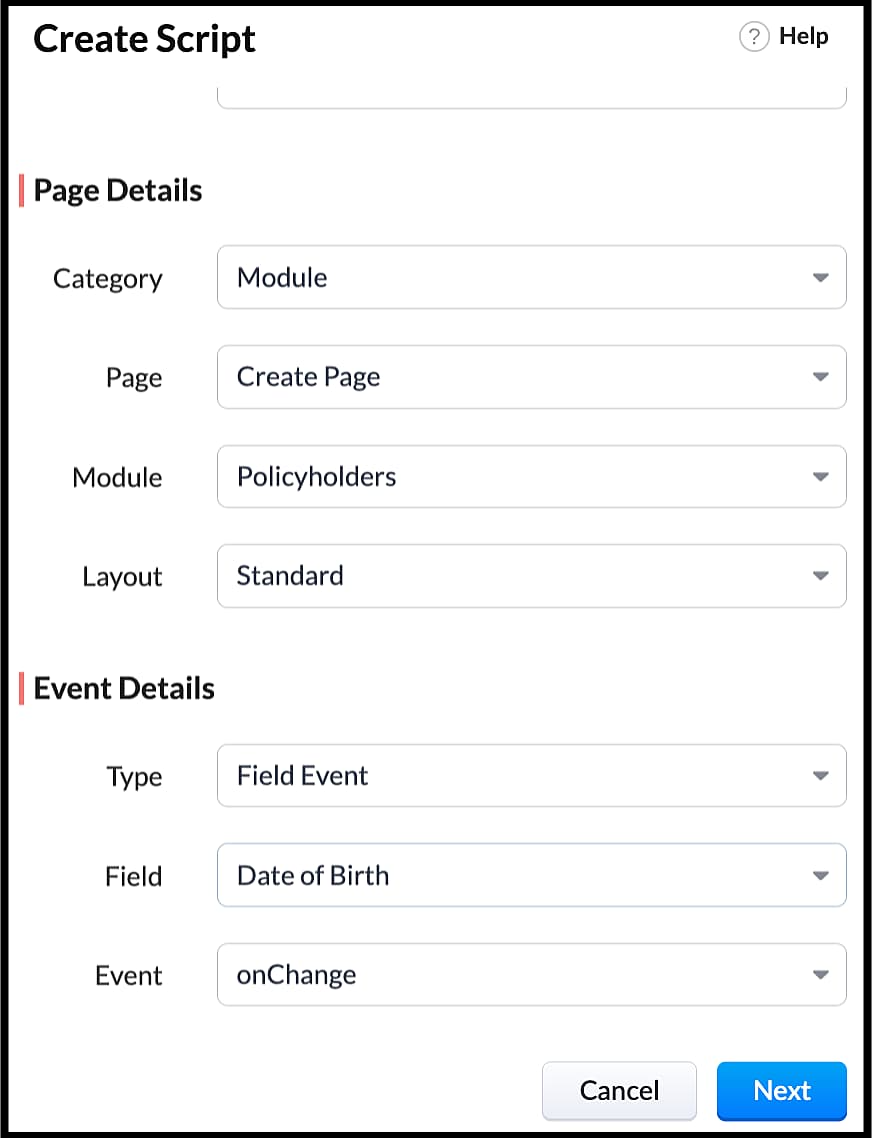
  • Specify the details to create a script and click Next.
  • Enter the following script in the Client Script IDE and click save.
  1. function  getAge(dateString) 
  2. {
  3. var today = new Date();
  4.  var birthDate = new Date(dateString);
  5. var age = today.getFullYear() - birthDate.getFullYear();
  6.  var m = today.getMonth() - birthDate.getMonth();
  7.  if (m < 0 || (m === 0 && today.getDate() < birthDate.getDate())) 
  8. {
  9.    age--;
  10. }
  11.  return age;
  12. }
  13. let age = getAge(value);
  14. var age_field = ZDK.Page.getField("Age");
  15. var category_field = await ZDK.Page.getField("Category");
  16. age_field.setValue(age);
  17. if (age > 80) {
  18. ZDK.Client.showMessage('Age is more than 80', { type: 'info' });
  19. }
  • You can see the code working from the create page.  You can also see how the client script works using the Run component of the Client Script IDE.
  • You can use any of the following types in showMessage() function
Possible 'type'
Script
info
ZDK.Client.showMessage('message', { type: 'info' });


warning
ZDK.Client.showMessage('message', { type: warning });

error
ZDK.Client.showMessage('message', { type: error });

success
ZDK.Client.showMessage('message', { type: success });

2. Show the alert message whenever you try to update the field Rating

  • Go to Setup > Developer Space > Client Script. Click +New Script.
  • Specify the details to create a script and click Next.
  1. ZDK.Client.showAlert('You cannot change the Rating after account creation');
  • Here is how the Client Script works. You can also see how the client script works using the Run component of the Client Script IDE.
3. Configure the mailer box with the click of a button

First of all, you need to add the button to the detail(canvas) page.
  • Go to Setup > Customization > Canvas.
  • Right click on the Canvas page for Accounts module and click Edit.
  • Click Elements, drag and drop the button wherever required and specify a label for the button.
  • Right click on the button, select Add Element ID and enter the ID of the button in the pop up that appears.
  • Once the button is created, you can configure Client Script in two ways:
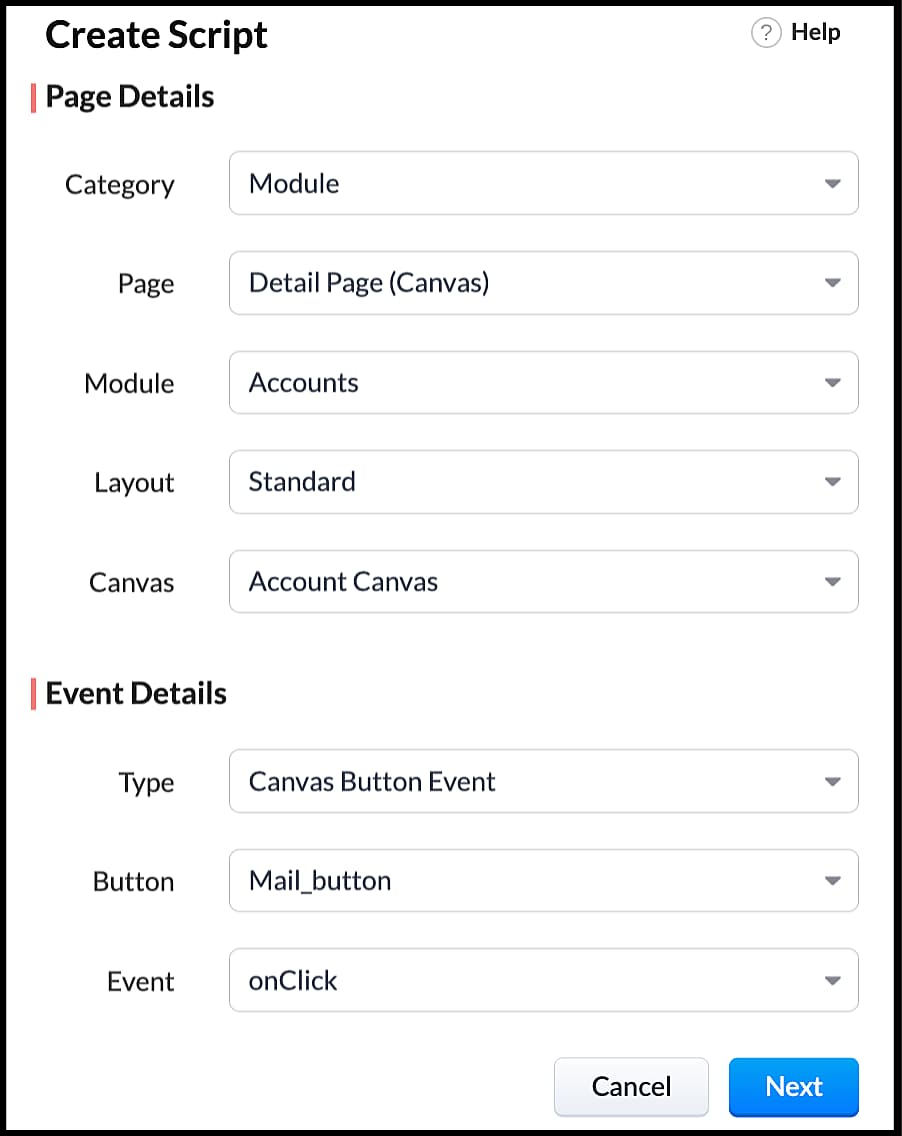
  • Right click on the button--> Add Client Script-->onClick. The Client Script IDE appears with the event type as Canvas Button Event.
                                                             (or)
  • Go to Setup > Developer Space > Client Script. Click +New Script.
  • Specify the details to create a script and click Next.
  • Enter the following script and click save.
  1. var isProceed = ZDK.Client.showConfirmation('Do you want to open the mailer window?','Proceed','Cancel');
  2. //If user clicks Proceed button
  3. if (isProceed) {
  4. ZDK.Client.openMailer({ from: '', to: [{ email: '', label: 'ABC Industries' }], cc: [{ email: '', label: 'ABC Industries' }], subject: 'Greetings from ABC Industries!', body: ' ' });
  5. }
  • The showConfirmation() function will return a boolean value based on the user selection. You should capture this boolean value using a variable and write the actions based on the boolean value returned. Here the variable isProceed will capture the user response and based on that boolean value, the mailer box will get displayed.
  • Here is how the client Script works,

We hope you found this post useful. We will meet you next week with another interesting topic!
If you have any questions let us know in the comment section.
Cheers!

Click here for more details on Client Script in Zoho CRM.

Related Links


    • Sticky Posts

    • How to reach the official Zoho Support channels and avoid fake ones.

      Dear Customers, Thanks a lot for choosing Zoho! Our applications are built to help achieve your day-to-day business goals. We are committed to engaging with you, to understand and develop solutions that enhance your productivity.  We are happy and ready to help you use our services effectively. Understanding and avoiding fake support Just like using popular bank names and financial applications for phishing purposes, using Zoho and claiming to be providing Zoho Support or services with false numbers
    • Function #35: Close all tasks associated with a lead and create a new task.

      Welcome back everyone! Last week, we learnt how to close all tasks of a deal depending upon the deal stage. This week, let's look at a custom function that lets you close all of the tasks associated with a lead while simultaneously creating a new task, like when you need to halt all progress towards a lead while the lead is not available at the moment but create a reminder task. Business scenario: The success of a company, in one way or another, is determined by the leads it gets. Each lead is just
    • Zoho CRM Webinar - Redesigning Daily User Experiences with Canvas

      &lt;br&gt; Your users across roles use the CRM for day-to-day tasks that are necessary. Whether they perform their tasks on time, the right way, or at all depends on a lot of factors, including User Experience. Many businesses struggle with rigid layouts,
    • Join us at the Canada ZUG Meetup: What’s New in Zoho CRM

      Hello Zoho Community! Start your year with fresh insights into Zoho CRM’s latest updates and tools. Whether you're a CRM beginner or a experienced user, this meetup is crafted to help you optimise your processes and leverage new features. Explore practical
    • CRM Hack #2: Automate sending of birthday greetings to your customers.

        Hello everyone! What sets you apart as a sales person is your ability to add that personal touch to your business relationship with your customers. Sending a gift on a special day, or leaving a note wishing them on their birthdays, are small, yet significant actions that show your customers that you care. And these are actions done without any expectations :) You must be engaging with a lot of customers and it is highly unlikely that they all are your friends on Facebook or some social channel,
      • Recent Topics

      • Ticket Status email

        Good day, This was discussed in the past, but it would be helpful if we could have the system assign a custom response to a status. We have various statuses for tickets, e.g. "closed due to no response", or "Pending Status", it would be helpful for the
      • Customer ticket creation via Microsoft Teams

        Hi all, I'm looking to see if someone could point me in the right direction. I'd love to make it so my customers/ end users can make tickets, see responses and respond within microsoft teams. As Admin and an Agent i've installed the zoho assist app within
      • Holidays

        Hi; For defining Holidays, you need to add logic to handle the year as well as the month & day. We need to be able to enter Holidays for the next year. I need to add a holiday for January 2, 2017, but I can't until January 1st, which is a Sunday and we
      • Can I use a Standalone CRM Function as the Callback URL For Async Export Data API?

        I am creating an export job using this API https://www.zoho.com/analytics/api/v2/bulk-api/export-data-async/create-export/view-id.html There is a "callbackUrl" key in the CONFIG object. I tried copying the URL for a standalone function in CRM which can
      • Future Orders - Due Date

        Hi In my role, I can receive tickets where the work required is requested months in advance. Using a Future Orders option, which I believe was setup under the On Hold status type, hides the Due Date, in all views/ticket etc. Whilst I understand the reasoning
      • Introducing Withdrawal Reasons for Offers

        We’re excited to introduce a new enhancement to the Offer module that brings more clarity and accountability to every withdrawn offer. The Withdrawal Reason update ensures that each withdrawal — manual or automatic — is backed by a clear explanation,
      • Zoho Creator customer portal users

        Hi, I'm in a Zoho One subscription with our company. I'm running a project now that involves creating a Zoho Creater application and using the Zoho Creator Customer Portal.  At most we need 25 customer portal users. In our Zoho One plan we only get 3
      • GPS tracking only or Check out facility

        Dear Team, Zoho CRM is quite robust CRM but till date i was waiting for the feature of having GPS tracking of Sales employees which is a common demand by all customers for thier field sales executives. We cover them by saying that CRM provides Checkin
      • HTML Tags added to Reports with Notes

        Recently Zoho added the ability to markup text within notes. That way, users can change font size, colors, etc. It's a great change. However, since the change, reports that include a column for "Note Content" are printing HTML tags within the report.
      • In App Auto Refresh/Update Features

        Hi,    I am trying to use Zoho Creator for Restaurant management. While using the android apps, I reliased the apps would not auto refresh if there is new entries i.e new kitchen order ticket (KOT) from other users.   The apps does received notification but would not auto refresh, users required to refresh the apps manually in order to see the new KOT in the apps.    I am wondering why this features is not implemented? Or is this feature being considered to be implemented in the future? With the
      • Appraisals on Employee Information Profile

        Is it possible to show completed appraisals on each employee's "Employee Information" page? I would presume at the bottom - similar to the "Related Lists" concept in Zoho CRM. Obviously view access would be limited to employee and appropriate other roles
      • AI Interview Insights: Turn Recorded Interviews into Quick Transcripts & Summaries

        Evaluating interviews shouldn’t require replaying long recordings or taking manual notes. With AI Interview Insights, you can now review complete transcripts and AI-generated summaries of your One-way (Recorded) interviews right inside Zoho Recruit. This
      • Kaizen #220: Actions API - Webhooks APIs - Part 2

        Hello all!! Welcome back to the follow-up Kaizen post of Kaizen #219: Actions API - Webhooks APIs - Part 1. In the previous week, we covered how to configure a basic Webhook and how to include Headers, Body, and URL Parameters using both the POST Webhook
      • Standard Payment Term is not pulled from account to quotation

        Hey Team There seems to be something off. I do have "Net 30" as my default payment term in Zoho Books for my customers. If, from the customer overview or quote section, I create a new Quotation, the payment terms field stays blank and doesn't get the
      • Request for Auto PO - Min–Max based Automated Purchase Feature

        Dear Zoho POS Team, I’m writing to request a feature enhancement that would significantly streamline inventory management for businesses using Zoho POS — particularly supermarkets, FMCG retail, and multi-store operations like ours. Feature Requested:
      • Canva Integration

        Hello! As many marketing departments are streamlining their teams, many have begun utilizing Canva for all design mockups and approvals prior to its integration into Marketing automation software. While Zoho Social has this integration already accomplished,
      • Manage your invoices from Bigin's mobile app (iOS)

        Hello everyone! We're happy to announce that users can now integrate Zoho Books with the latest version of Bigin's iOS app. Zoho Books can be integrated with Bigin only via the web application. Users can view the Zoho Books tab in the detail pages of
      • HubSpot CRM to Zoho Creator Integration

        I'm trying to create an integration between HubSpot CRM and Zoho Creator with HubSpot being the push source (if a contact is created or updated in HubSpot, it pushes the information to Zoho Creator). I have two questions: 1- Is it best to use Zoho Flow
      • Systematic SPF alignment issues with Zoho subdomains

        Analysis Period: August 19 - September 1, 2025 PROBLEM SUMMARY Multiple Zoho services are causing systematic SPF authentication failures in DMARC reports from major email providers (Google, Microsoft, Zoho). While emails are successfully delivered due
      • Accessibility controls and multilingual captcha authorization for Help Center users ​

        Hello everyone, As part of our ongoing effort to improve user experience, we are excited about the accessibility controls and predefined accessibility personas added in the Help Center, similar to what is already available in Zoho Desk. Help Center users
      • Gain control over record sharing with portal users through our new enhancement: criteria-based data exposure

        Dear Customers, We hope you're well! Portals is a self-service avenue through which your clients can access and manage their direct and related data in Zoho CRM. This empowers them to be more independent and enables them to experience a sense of transparency
      • Zoho Sign + Zoho CRM : la solution pour simplifier vos accords de vente

        La conclusion d’un contrat de vente nécessite de nombreuses étapes : préparation de documents, validations successives et collecte des signatures. Les équipes commerciales passent souvent par plusieurs cycles de collaboration et de révision, tout en assurant
      • Zoho Desk Limitations

        Good day, all, I would like to know whether others share my frustration with some of Zoho's limitations. Don't get me wrong, I like Desk (and I also have a subscription for Analytics), I have been with them for close to 10 years, and unfortunately, I
      • Item/service subtotal

        Just discovered & really pleased that we can drag to re-order the line items in Sales orders & Invoices, a very nice feature which doesn't seem to be documented? It would be nice to be able to insert a subtotal as a line item to complete this great feature
      • Converting Sales Order to Purchase Order

        Hi All, Firstly, this code works to convert a sales order(SO) to a purchase order (PO) via a button, however I am running into an issue when I convert the SO where the values from the line items are not pulled across from the SO to the PO. The ones in
      • how to Solve Conflict Invoices in Zoho POS

        Hello Team, I am facing a repeated issue in Zoho POS while saving a sale that contains service-based items. My products are intentionally created as Service (Non-Inventory) items because I do not want to track stock for them. However, every time I try
      • All new Address Field in Zoho CRM: maintain structured and accurate address inputs

        The address field will be available exclusively for IN DC users. We'll keep you updated on the DC-specific rollout soon. It's currently available for all new sign-ups and for existing Zoho CRM orgs which are in the Professional edition. Latest update
      • Copy, Paste, Highlighted text

        when i copy paste text it gets highlighted. Fix this.  WTF is with this black highlight ? Fix copy pasting. Some people pay for using this mail service. 
      • Pricing Strategies: #6 Common Mistakes while Configuring Pricing

        "Why does this month's billing feel messy again?" That was the exact line Priya muttered while staring at the spreadsheet full of edited pricing, one-off discounts and mismatched subscription details. Her business was growing, but the pricing machine
      • Publish to LinkedIn via API

        Hi, Is it possible to publish a job opening to LinkedIn (paid job slots) if creating a job opening via api / deluge function? Or is the user required to manually publish via the job boards process? Many Thanks Adrian
      • FSM - Associating and selecting Contacts based on Service Addresses

        Hi FSM team, I've come across an FSM limitation I wanted to share for improvement. I'm currently configuring FSM for a client who provides heating system install and maintenance services. The are often sub contracted by building management companies to
      • 日本語フォントの選択肢拡充についての要望

        日本語フォントの選択肢がとても少ないと感じたことはありませんか? 多くのアプリ(たとえば Invoice)ではフォントが1種類しかなく、正直あまり使いやすい・見た目が良いとも言えません。 そろそろ、もっと多くの日本語フォントを追加してほしい、そしてすべてのアプリで同じフォント選択肢を使えるようにしてほしいと、私たちユーザーが声を上げる時期だと思います。 ご存じのとおり、現状ではアプリごとにフォント周りの仕様にほとんど一貫性がありません。 みなさん、一緒に要望を出していきましょう!
      • Do Unpublished Products in Shopify Sync to Zoho POS?

        Will an unpublished product in Shopify sync to Zoho POS? I would like to know how Zoho POS handles products that are in draft/unpublished status in Shopify.
      • Problem in Zoho POS frontend ERP.

        We are facing some difficulties in our billing and inventory processes and require your support to resolve them at the earliest. Customer Advance Payments We receive advance payments from customers for upcoming sales. Please guide us on how to record
      • How to create estimates/Invoices with sub-totals

        Every other accounting package can create estimates and invoices with Sub-totals. How can I do that in ZohoBooks?
      • Categorize Items with Item Headers

        Hello customers, Did you ever want to classify items based on specific categories to help your customers understand your invoice better? With the new Item Header feature, you can easily categorize items in your invoices and estimates and give them a common title.  Item Headers are available in the Invoices, the Recurring Invoices and the Estimates module. It can be carried forward from estimates to invoices at the time of converting the estimates.  To add an item header: Go to the Estimates, Invoices
      • Emails sent through Bigin are not posting in IMAP Sent folder

        I have set up my email to work from within Bigin using IMAP.  I am using IMAP so I can sync my email across multiple devices - phone / laptop / desktop / iPad / etc.  I want all my emails to populate my email client (outlook & iphone email) whether or
      • Ask the Experts 26: Brighten every customer interaction with Zoho Desk all year long

        Hello everyone, Greetings and welcome to Ask the Experts 26. As we wrap up 2025, we are excited to invite you to the 26th episode of our Ask the Expert series. 🎄The Merry Metrics Edition = Best of Zoho Desk [Best Practices + Holiday Automation + Year-End
      • Painfully Slow Zoho mail

        Since yesterday Zoho Mail seems to have starting functioning very slowly and having a few bugs. It's slow to open mails, slow to send, slow to change between email accounts. Sometimes clicking on a particular folder (eg Sent folder) stops working and
      • Discount on the transaction level in POS

        "Is it possible to apply a discount on the total bill before tax in Zoho POS?" I want to apply a discount on the total transaction amount in Zoho POS, but the discount should be calculated before the taxes are applied. Is there an option to do this in
      • Next Page