Tip #27: Keeping your notes private in Writer documents

Tip #27: Keeping your notes private in Writer documents

Hello,
 
While creating a document, you would have often felt the need to add notes that you wished should be visible only to you. For example, you would have wanted to add a note to add more details to a section, to quote the source of a data, to verify a statement with your team, to use a table from the document in your presentation, and so on.
 
Many a time, while coauthoring or collaborating on a document with your team, you might have wanted to jot down a few points to add in your part of the document, add a note to remind you to ask the author to check a specific statement, etc.
 

Why private notes?

Notes are usually for personal consumption. So, when you are collaborating on a document or working on a document that you will share with your team, you generally don't want your notes to be visible to others. To keep them private, the only option that you had was to jot them down in a separate document that isn't shared with anyone. And, you might also have been wondering if there will be a way to create private notes, within a document.
 
Rest easy for you can now add private notes in any document, even if it is a shared one, with the Visibility option in Writer's Comments.
 

How to add a private note?

  1. In the document that you are working on, switch to REVIEW mode by clicking the COMPOSE option in the top right corner, and choosing REVIEW.
  2. Highlight the sentence or portion of the text for which you wish to add a private note.
  3. Click the Add Comment button.
  4. Enter your note in the comment box.
  5. Click the  icon located at the bottom of the comment box and choose Only me.
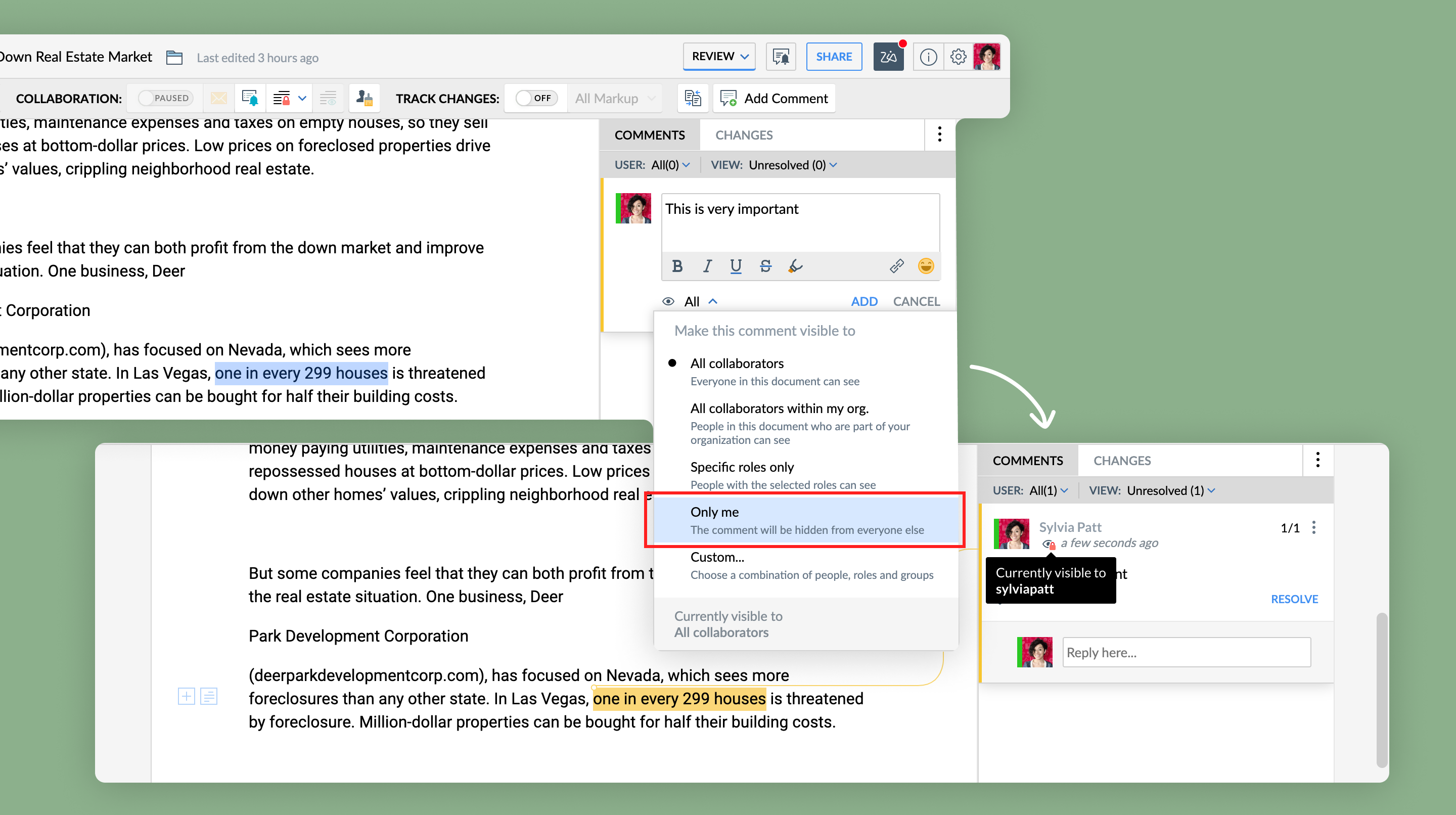


    Note: In case you want to keep this note to be private or visible to not only you but also a few of your team members or peers, click the Custom option instead of Only me and add the required users.
  6. Click Add. You will see the  icon in your comment, indicating that it is private and will be visible only to you.
 
Keep following this space for more articles on the many hidden gems in Writer. Need any assistance or info, just drop an email to support@zohowriter.com


Happy Writing!

    • Sticky Posts

    • 8 Neat Tricks in Writer You Should Know About

      Want to get the most out of Writer and speed up your work? You've come to the right place. We've compiled some productive shortcuts in Writer that can help you get work done more quickly: 1. Look up synonyms   No more need for a bulky thesaurus! Use Writer's synonym suggestions to explore different word choices, and find the one that fits your style and tone the best. All you have to do is right-click on a word, and select Synonyms from the dropdown list.  2. Insert images, tables and more   Typing
    • Tip #26: Filter your records before merging a document

      Tom is an HR executive who has to send onboarding emails every month to newly joined employees. He has a master spreadsheet with all the employee details, and new employees are added to them as they join. It's the month of March and Tom has to send onboarding emails to employees who've joined this month. But, how is Tom going to go through a big spreadsheet with multiple new and past information, and send onboarding emails to the set of newly joined employees?     Simple, by filtering and merging
    • Tip: #11 Collaboratively fill documents with your colleagues and clients

      Last week we talked about how Fillable Fields can help you create contracts and proposal templates you can repurpose across your processes. This week, we'll talk in detail about how to collaboratively fill those templates with your clients and team.    Say you've entered into a contract with multiple clients but the final contract amount is still under negotiation. Using fillable fields, partners can quote their contract fee directly in the template document without affecting other areas of the document. You
    • Tip #07: Five best defaults in Writer you can change to complement the way you work

      Find yourself adjusting settings to the way you like every time you create a new document? Try tweaking the default settings instead.  From font styles to auto correct options and more, here are the five best defaults settings you can control.   1. Default font style   Use your favorite typography across all your documents. You can customize a font style by adding a color, adjusting its size and more, and then set it as default.    To do this, go to More Options > Format > Font. Choose a font style
    • Tip #06: Make the best use of Zia in Writer

      About to share your work with your team? Looking to get a second opinion quickly before that? Let Zia do it.    Zia, Zoho's AI-powered intelligent assistant is now part of Writer. She's trained to check and polish your work. She doesn't just read, she understands. So apart from grammar and spelling checks, she'll let you know when you've used a wrong adjective, or have missed out words based on the context of your piece.   Every time you write, Zia makes a scorecard after carefully assessing your
      • Recent Topics

      • Cannot find zpuid for Zoho Projects user

        I'm using the Zoho Projects v3 API to create a task. The task is created successfully, but in order to assign the task owner, the "Create a Task" API also requires the zpuid of the task owner. Unfortunately I cannot find any user-related API calls that
      • Devis et factures multipage coupées

        Bonjour, je suis sur Zoho invoice et je rencontre un problème sur mes devis et factures lorsqu'ils dépassent 1 page. je me retrouve souvent avec des lignes coupées ou le sous total page 1 et le total page 2. j'aimerai savoir s'il existe une possibilité
      • Zoho Desk View Open Tickets and Open Shared Tickets

        Hi, I would like to create a custom view so that an agent can view all the open tickets he has access to, including the shared tickets created by a different department. Currently my team has to swich between two views (Open Tickets and Shared Open Tickets).
      • Custom Related List Inside Zoho Books

        Hello, We can create the Related list inside the zoho books by the deluge code, I am sharing the reference code Please have a look may be it will help you. //..........Get Org Details organizationID = organization.get("organization_id"); Recordid = cm_g_a_data.get("module_record_id");
      • Add the same FROM email to multiple department

        Hi, We have several agents who work with multiple departments and we'd like to be able to select their names on the FROM field (sender), but apparently it's not possible to add a FROM address to multiple departments. Is there any way around this? Thanks.
      • How does SKU work when selling products in parts in Zoho Inventory

        Hello everyone, Zoho Inventory does not understand the physical cutting of the piece.. It only tracks quantities of the unit (like feet ). So when you sell part of an item, the system simply reduces quantity for that SKU. Assume that i have a 50 ft long
      • Zoho Meeting - Feature Request - Introduce an option to use local date and time formating

        Hi Zoho Meeting Team, My feature request is to add an option for dates to be displayed in the users local format. This is common practice across Zoho applications and particularly relevant to an application like Zoho Meeting which revolves around date
      • Incorrect Functioning of Time Logs API (Version 3)

        We need to fetch the list of time logs for each task for our company internal usage. We are trying to achieve it by using the next endpoint: https://projects.zoho.com/api-docs#bulk-time-logs#get-all-project-time-logs Firstly, in the documentation the
      • System Components menu not available for Tablet to select language

        I have attached a screenshot of my desktop, mobile, and tablet menu builder options. I am using 2 languages in my application. Language Selection is an option under the System Components part of the menu, but only for my desktop and phone(mobile). My
      • Cannot give public access to Html Snippet in Zoho Creator Page

        Hi, I created a form in Zoho Creator and published it. The permalink works but I want to override the css of the form. (style based URL parameters is not good enough) So I created a page and added an Html snippet. I can now override the css, which is
      • How can Outlook 365 link back into Zoho Projects so meetings and events in Outlook calendar show in Zoho?

        We use Outlook 365 for our emails and diaries and have integrated Zoho Projects with Office 365. One challenge we face is getting Zoho Projects to recognise when we have meetings and events in Outlook and not allow project managers to assign tasks over that period. Is there a way to resolve this? Thanks
      • IMPORTANT: It doens´t show full article name on search - Should add line break

        When we search for articles, it doesn´t show the full name. There should be a line break so the user can see the full article name, otherwise the user can´t know if that´s the article he/she is looking for. This is very important, otherwise the user has
      • IMPORTANT: It doesn´t search for letters with portuguese characters.

        Some of my articles have for example the word "vídeo". But if I search for "vídeo" it doesn´t find them. If I search for "video" it does find them. Idealy, it should find the articles either way. But if I have to choose, it would be better to find the
      • On Edit Validation Blueprint

        Hello, I have a notes field and a signature field. When the Approve button is clicked, the Signature field will appear and must be filled in. When the Reject button is clicked, the Notes field will appear and must be filled in. Question: Blueprint will
      • Zoho Invoice en Navarra (Spain)

        Hola, ¿Alguien usa Zoho Invoice en la Comunidad Foral de Navarra? En Navarra tenemos un sistema tributario diferente y no aplica Verifactu (la Hacienda Foral de Navarra ha anunciado su alternativa, NaTicket, pero no ha informado cuándo entrará en vigor).
      • Conect chat of salesiq with zoho cliq

        Is there any way to answer from zoho cliq the chat of salesiq initiated by customers?
      • Emails from Zoho are getting blocked due to Zoho IP address being blacklisted

        This is the info I got from my hosting provider – please address this issue immediately. I don’t expect this from such a big household name. Every single invoice I have sernt it not being received by my clients, all being blocked. All of a sudden. As
      • agentid : Where to find?

        I've been looking around for this agenId to check for the total ticket assigned on a specific agent url :"https://desk.zoho.com/api/v1/ticketsCountByFieldValues?departmentId=351081000000155331&agentId=35108xxxxxx132009&field=statusType,status" type :GET
      • Zoho DataPrep integration with OpenAI (beta)

        We are thrilled to announce Zoho DataPrep's integration with OpenAI. The public beta roll-out opens up three features. Users who configure their OpenAI Organizational ID and ChatGPT API key (Find out how) will be able access the features. The features
      • Ability to Attach Record-Specific Files Automatically in Workflow Email Templates

        Currently in Zoho CRM, email templates allow attachments to be added, but these attachments are static and remain the same for every recipient. There is no straightforward option to automatically attach a file that is stored within the specific CRM record
      • Restrict employees to take only one day holiday from a multi-day festival holiday

        Hi everyone, I have a requirement related to Optional/Festival Holidays in Zoho People. For example, in the month of May there are three optional holiday dates: May 11, May 12, and May 13. Employees can choose one of these days as their optional holiday.
      • AI Bot and Advanced Automation for WhatsApp

        Most small businesses "live" on WhatsApp, and while Bigin’s current integration is helpful, users need more automation to keep up with volume. We are requesting features based on our customer Feedbacks AI Bot: For auto-replying to FAQs. Keyword Triggers:
      • Related lists New option in missing

        hi I have created quite a few modules and added as related lists to my main module. Some have new, some dont I can not see why?
      • Setting total budget hours for a specific project

        Hi there, I work on a lot of projects that have fixed budget hours. Is there a way to enter the total budgeted hours so i can track progress and identify when hours have been exceeded. I see in the projects dashboard there is a greyed out text saying
      • Clone entire dashboards

        If users want to customize a dashboard that is used by other team members, they can't clone it in order to customize the copy. Instead they have to create the same dashboard again manually from scratch. Suggestion: Let users copy the entire dashboard
      • Introducing Formula Fields for performing dynamic calculations

        Greetings, With the Formula Field, you can generate numerical calculations using provided functions and available fields, enabling you to derive dynamic data. You can utilize mathematical formulas to populate results based on the provided inputs. This
      • Getting started with Zoho PDF Editor

        Hello users, If you are new to Zoho PDF Editor or aren't sure of its full potential, then this article is for you. Zoho PDF Editor is a free online PDF editing tool, that allows you to upload and edit PDFs, insert text and images, add fillable and e-signature
      • Zoho Projects - Cloning a task does not trigger task workflow when created

        Hello! I have a Project where my team uses a set of tasks from a tasklist as templates, so we could simply clone it and drag it to another list in kanban view to avoid creating a new one from scratch. The process works well, but after cloning it the new
      • Purchase Orders not in sequence

        I am unable to sort by Purchase Order Numbers. I can only sort by date; however, the PO numbers aren't in the order they were entered. This was not the case prior to today.
      • Sharing Tickets to a team within a department

        Hi there, We have a need for one department to be able to share tickets to a specific team within a department, I'm wondering if this is possible? All the shared tickets are going into the 'Shared Tickets' view for the whole department but is there a
      • Placeholder format in Number field does not reflect Max Digits configuration

        When the Max Digits (Maximum digits of number) property is set to a smaller value (for example, 2 digits), the placeholder in the input field still displays a 7-digit format (#######). The same behavior can also be observed in Decimal and Currency field
      • Internal Fillable Contract with Zoho Writer (Before Sending to Client)

        Hi everyone, I’m trying to automate the following process in Zoho CRM and would appreciate some guidance. Process: When a Deal moves to a specific stage, CRM triggers an automation. CRM sends a contract template to an internal team member so they can
      • Date/time displayed in ZohoCRM does not match date/time of entries in ZohoForm

        Hello there, we use a ZohoForm as a worksheet, i.e. users use it to track start time, break and stop time for every working day. The ZohoCRM org time zone is set on GM -4, so is the Time Zone in the Date&Time section in ZohoForm (see attachment). Despite
      • Update Existing Records greyed out in Free Version

        Trying to update records from an Excel sheet, and not getting the option to update. Only option is to add as new accounts. All documentation I can see says update should be an option! Accounts, Leads, Contacts, all the same.
      • Dynamically Populate Picklist Values from Another Module Using Client Script

        I am working in Zoho CRM and trying to dynamically populate a picklist field in the Partners module using values stored in another custom module. I have two modules: 1. Partners Module Field: Partner_Type_Pick Field Type: Picklist 2. Partners_Type Module
      • Add zoho calendar to google calendar

        Hi I keep seeing instructions on how to sync Zoho CRM calendar with google calendar but no instructions on how to view Zoho calendar in my google calendar.
      • Zoho Community Digest : Jan 2026 | Part 1

        Hello Everyone! Staying in the loop with Zoho's latest product updates and features across the vast Zoho Community Forums can be a real challenge. We get it. With over 50+ applications, each with its dedicated forum, it's easy to miss out on important
      • World date & time format

        Hello, Is there a timeline to get the worldwide used date and time format ? I mean not the american one... I mean day month year, and 24 hours clock. Regards
      • Nimble enhancements to WhatsApp for Business integration in Zoho CRM: Enjoy context and clarity in business messaging

        Dear Customers, We hope you're well! WhatsApp for business is a renowned business messaging platform that takes your business closer to your customers; it gives your business the power of personalized outreach. Using the WhatsApp for Business integration
      • How Zoho Desk contributes to the art of savings

        Remember the first time your grandmother gave you cash for a birthday or New Year's gift, Christmas gift, or any special day? You probably tucked that money safely into a piggy bank, waiting for the day you could buy something precious or something you
      • Next Page