Latest updates in Zoho Meeting | Calendar view, Zia integration with OpenAI, edit the recurring pattern in a recurring meeting, device error notifications revamp, and more.

Latest updates in Zoho Meeting | Calendar view, Zia integration with OpenAI, edit the recurring pattern in a recurring meeting, device error notifications revamp, and more.

Hello everyone,


We’re glad to share a few updates and enhancements in Zoho Meeting, including the Calendar view, being able to edit the recurring pattern in a recurring meeting, revamped device error notifications, and other enhancements that you’ll find useful.


Calendar view 
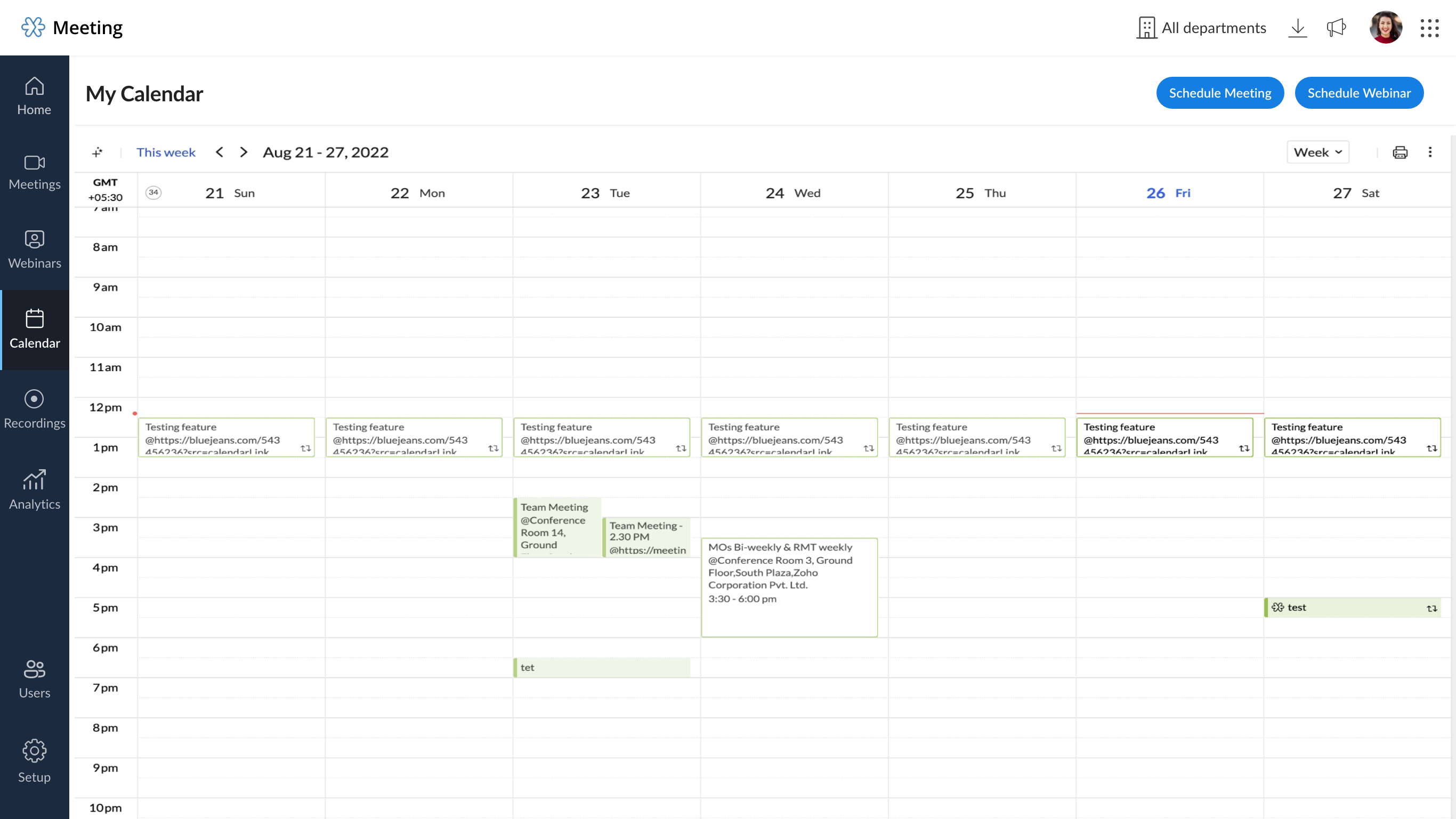
Manage your online meetings with ease using Zoho Meeting Calendar. Check your upcoming events, schedule new meetings and webinars, and stay organized with all of your sessions, all from one place.


Zia integration with OpenAI

Zoho Meeting's Zia integration, in collaboration with Open AI's ChatGPT, helps analyze and condense meeting transcripts into brief, easy-to-read keynotes. This Zia integration will help you increase your productivity with short and quick keynotes generated using the Meeting session's recording transcripts. Learn more

Edit the recurring pattern in a recurring meeting 

You can now change the recurring pattern or add more specifics to recurring meetings, such as new days or sessions.


Revamped device error notifications 

We've worked on enhancing our user interface for device errors, and we'll now notify the meeting host and participants of errors in their microphone and camera devices and walk through solutions during the event.


Other Meeting updates 

Faster reconnection  

We made some enhancements to the connectivity, hence session re-connections will be faster and should only take a few seconds.


Muted and talking notification UI revamp 

We've placed the muted and talking notifications closer to the toolbar mic icon for better usability. It will no longer conceal screen share materials.  


We hope you'll enjoy these updates from Zoho Meeting. If you have any questions or would like to give us some feedback, write to us at support@zohomeeting.com.


Stay tuned with our social handles to get the latest updates: Twitter | LinkedIn

    • Sticky Posts

    • Zoho Meeting is included in Zoho One now!

      Hello Everyone, For those who waited for the integration of Zoho Meeting with Zoho One, here is the good news. The integration has been completed and you can now add the Zoho Meeting application in your Zoho One portal. Edition included in Zoho One License You will get Enterprise plan of Zoho Meeting, using which you can host online meetings with up to 100 participants and webinars with up to 100 attendees. You will also get the cloud storage for 25 session recordings/user. Adding Zoho Meeting application
    • Zoho Meeting Updates: Bug Fixes in Meetings and Webinars, and Desktop App Enhancements

      Hi there, We hope you are all safe and well. Following our previous feature release, we have added some enhancements and bug fixes for the improved functioning of Zoho Meeting. Let's take a look at last month's updates: Online meeting updates The microphone button remained active even when a user switched to phone audio. This issue has been fixed. An error caused the microphone status of participants to be wrongly displayed in the meeting toolbar and the attendees list.This issue has been fixed.
    • V2.7: Introducing webinar co-organizers, enhanced screen sharing quality, choosing external webcam, region based dial-in number display and more.

      Dear All, Here comes the new updates from Zoho Meeting that are recently rolled out! We 're introducing co-organizers in the webinar, done major improvements in screen sharing quality and more.   Introducing co-organizers in the webinar You can now invite co-organizers to help you manage your webinar. Co-organizer can launch polls, answer questions, change presenters during the webinar, record webinar, view all attendees/staff and more. Learn more. Webinar CoOrganizers   Enhanced screen sharing quality
    • Live webinar: A complete overview of Zoho Meeting

      Are you looking for ways to engage and communicate with large audiences? Learn how Zoho Meeting can empower you from conducting online meetings with your team to hosting webinars for your sales leads. Join us for a live webinar this Thursday at 8:30 to 9:00 AM PDT.   In this webinar, you will learn how to: Organize and host webinars Engage your audience with polls and Q&A Generate analytical reports Schedule and attend online meetings Record and share meetings and webinars Co-branding and user management
    • Live webinar: A complete overview of Zoho Meeting

      Are you looking for ways to engage and communicate with large audiences? Learn how Zoho Meeting can empower you from conducting online meetings with your team to hosting webinars for your sales leads. Join us for a live webinar this Thursday. Here's what you can learn: Webinar scheduling and preparation Attendee interaction and engagement In-depth post webinar analytics Scheduling and hosting online meetings Managing your recordings Co-branding and user management Date: Thursday, March 29th, 2018
      • Recent Topics

      • Zoho Books (and other Finance Suite Apps) - Clickable Item Name on Invoices and Reports

        Hi Zoho Books team, It would be really helpful if the Item Name on Reports were clicable to take me to the item. The same on Invoices, often I am looking at an invoice and I want to look at the deails of a product. A link here would be helpful to jump
      • Zoho Books - Payment Gateway - Revolut

        Hi Books Team, My feature request if to include the popular platform Revolut as a payment collection option on invoices in Zoho Books. Please upvote if you are also looking for this option.
      • Searching for an item from within an invoice should show any item containing the string, not just those that begin with the string.

        Hello, I've found myself becoming increasingly frustrated with the limited line-item seach when adding new items to an invoice. The problem is that the characters being typed are only being matched from the beginning of the item name.  This might be usable
      • Deluge scripts

        Why is there not a search function to make it easier to find the script of interest when modifications are required.
      • How to Rank Tables by Row Count in Descending Order

        I am trying to understand the consume of lines that grow up so fast in the last week. Is there any way to create a pivot table or query to get TABLE NAME LINES in descending order?
      • Dealing With One-Time Customers on Zoho Books

        Hello there! I am trying to figure out a way to handle One-Time customers without having to create multiple accounts for every single one on Zoho Books. I understand that I can create a placeholder account called "Walk-In Customer", for example, but I
      • Marking a meeting 'done'.

        I would like to somehow mark a meeting 'done' and placed under the contact's page rather than deleting it and having no record of it. Am I missing a button that does this?
      • Feature Request: Render Markdown (.md) files in Zoho Cliq

        Hi, We regularly share Markdown (.md) files in Zoho Cliq. However, when we open these files in Cliq, the content does not render as Markdown—it displays as plain text. This forces us to copy/paste the content into an external Markdown viewer to read it
      • Zoho Desk EU slow/unresponsive

        Has anyone else got issues with ZohoDesk today in the EU? It takes an age to come back and if you do start typing something and try and send or save it looks like it times out. We are also getting this pic. ot I can't see anything on https://status.zoho.eu/
      • EU DC Partial Outage Resolved: A Detailed RCA

        Incident Summary Due to an overload on one of the nodes in the EU DC for Zoho Desk, the system was unable to handle the heavy load, causing a slowdown in requests and resulting in a partial outage for customers with data residing in that node. On May
      • CRM Percent custom fields: When will it show the % symbol and behave like %?

        1. Actually Percent custom fields fail to show the % symbol. 2. When in formulas Percent fields work like number: 100 x 5% = 5 ideal world 100 x 5% = 500 what happens actually 3. When importing Percent fields the % symbol has to be removed and the data
      • How to use OR when filtering using two fields

        I want to create return a list of Account Names by filtering on Field1 = "yes" OR Field 2 = "no" I can't see how to use the OR in the filter.
      • Subforms and automation

        If a user updates a field how do we create an automation etc. We have a field for returned parts and i want to get an email when that field is ticked. How please as Zoho tells me no automation on subforms. The Reason- Why having waited for ever for FSM
      • Xero Billing Data (22 instances) - Zoho (CRM) - Single Source of Truth For Client Data & Notes

        Hi - I’m trying to build out a CRM for a Single Source of Truth Currently I have 22 Instances of Xero (for legal entity purposes - can’t consolidate to one) How would I be best placed to do this? Is it possible to have all the Xero instances (22) → Consolidated
      • Select CRM Custom Module in Zoho Creator

        I have a custom module added in Zoho CRM that I would like to link in Zoho creator.  When I add the Zoho CRM field it does not show the new module.  Is this possible?  Do i need to change something in CRM to make it accesible in Creator?
      • New 2026 Application Themes

        Love the new themes - shame you can't get a little more granular with the colours, ie 3 different colours so one for the dropdown menu background. Also, I did have our logo above the application name but it appears you can't change logo placement position
      • Zoho Expense - Bi-Weekly Report Automation

        Hi Zoho Expense Team, My feature request is to please include an option to automate creation of reports bi-weekly (every 2 weeks)
      • Introducing Workqueue: your all-in-one view to manage daily work

        Hello all, We’re excited to introduce a major productivity boost to your CRM experience: Workqueue, a dynamic, all-in-one workspace that brings every important sales activity, approval, and follow-up right to your fingertips. What is Workqueue? Sales
      • PDF Generator Upgrade

        Hi Team, What will happen if I don't make any changes for existing template. Zoho just ask us upgrade but haven't tell the benefit. Zoho Corporation
      • Zoho CRM Case Notes - Share to Customer

        Hi team does anyone know the Api to set a note, against a case, to shared with customer? i cant seem to find it  cheers 
      • 500 internal server error on opening an iframe through a deluge script

        Hi Team I am trying to open an external url in an iframe through my deluge script which is associated to a custom button . By doing this i am getting an "Internal Server Error" . Please can you help me with this.
      • Zoho CRM Quotes – Subform and PDF/Writer Limitations

        Hello, I am encountering the following limitations in Zoho CRM Quotes: Custom product images cannot be uploaded in the subform – the image upload field cannot be added; only the file upload field is available. File upload placeholders cannot be used in
      • Strange behavior in CRM Number Field – Characters allowed but not "e"?

        Hi everyone, Has anyone faced this strange issue in Zoho CRM? In a Number field, it is possible to type some characters, but the character "e" cannot be entered. This was really surprising to me. Normally, a number field should restrict all characters
      • No background for video recordings, no playback speed, can't even playback longer recordings - have to download…

        Hi. We utilize heavily video messages on Slack, but wanted to migrate to Cliq with Zoho One, however very basic yet very frequently used feature is missing: backgrounds for video recordings and playback speed. We were not happy with Slack's 5 minute limits
      • Support inefficiency

        We have been asking for support for a minor adjustment for 12 days now and we haven't got a single viable resolution from support team despite there are 19 emails going between our HR team and various support emails from Zoho. 1. they do not understand
      • Can I export to PDF in Zoho Learn

        I have seen help pages where export to pdf options are available but I do not see that option available from the application. I see that exprt is available in my free trial version but that is only to html pages. I need to be able to export my manuals
      • Zia capabilities now available in the Professional edition announcement

        Hello all! The Professional edition now supports a broader set of Zia capabilities, enabling teams to bring AI into more of their everyday CRM work. From writing assistance and summaries to setup support, predictions, and recommendations, Zia can now
      • Perfomance Management - Zoho People

        Hi team, I am looking for performance management data such as KRA, goals, feedback, appraisals, etc., in Zoho Analytics. However, I am unable to find these metrics while editing the setup. Could you please confirm whether these fields are available in
      • Where Do I set 24h time format in Cliq?

        Where Do I set 24h time format? Thanks
      • Send out follow-up email in the same thread (threaded conversations in individual emails) from Zoho CRM

        Hi, I'm new to Zoho. I'm trying to send individual emails to my leads one by one. And I'll send out follow up email if I don't hear back from them later. However, instead of sending a new email, I want to reply in the same email thread so that the recipients
      • This will be long, Please bear with me - Next Gen Layout - Search

        In general, I think that Zoho are going in the right direction with the Next Gen UI. The latest update brings some nice improvements and all-in-all from a user's perspective I think the improvements are generally very good. However, there are some areas
      • Selecting all notes in a notebook

        In Windows11, I select a notebook and I get a list of notes, but only 30 notes. If I scroll down to the end, I get an additional 30 notes (and at the top it now shows 60 notes). I can keep doing this to eventually see all my notes but this is a real pain.
      • Update latitude & longitude address field API

        How do I update the coordinates of an address field from a widget? I can't modify the latitude and longitude of the address field. I think the problem is how I'm writing formdata variable. zoho_init.then(function (data) { var queryParams = ZOHO.CREATOR.UTIL.getQueryParams();
      • Filter Records in CRM API

        Hi Team, I’m currently working on a task to retrieve expired deals from the CRM. By “expired deals,” I mean deals where the closing date has already passed and the stage is not “Closed Won” or “Closed Lost” (i.e., all other stages). I tried using both
      • User Name in Zoho Cliq Not Updating Across Apps?

        We updated the name of a user in Zoho. (From Sue to Taylor) Her name has not been updated in Cliq on all apps. When in Zoho One, if I go to Cliq directly, it is correct, but if I am in another app, and the Cliq bar pops up on the bottom, it will be the
      • Ability to Use Both AND and OR When Creating Rules (Advanced Conditions)

        I'd like to be able to use more complicated logic when setting up rules. E.g. in Zoho Mail, I can choose "Advanced conditions (AND/OR) to create a rule that can be applied to multiple subject lines from the same sender. But in Zoho TeamInbox, I will have
      • Attaching files to emails within CRM Deals.

        Hello, We have recently started using the extension "Workdrive for CRM" (Related List) to view/store our documents for each Deal, instead of using Attachments. Overall it feels like a better way to go but the user experience is not so great when it comes
      • Why I can't map Account Name from lead module to Account module?

        When I qualify a lead in the bluerprint, I use automated conversion in Blueprint to automatically create Contact, Account and Deal. the Deal record and contact record has been successfully created automatically as I expect, but I can't see any account
      • Pause(1);

        I'm using scheduler to invoke an interaction via http post with an external service. The schedule code uses a for-each loop that runs so fast my external application's log files get messed-up (they are named by date-time stamp). What I'm suggesting is
      • Release Notes | February 2026

        We have rolled out another set of enhancements in Vertical Studio during February 2026, bringing improvements to Canvas customization, reporting capabilities, and data access controls. Here is a summary of what was released during February 2026: Canvas
      • Next Page