Latest updates in Zoho Meeting | New top bar video layout, a revamp of our in-session settings and now import webinar registrations with a CSV file

Latest updates in Zoho Meeting | New top bar video layout, a revamp of our in-session settings and now import webinar registrations with a CSV file

Hello everyone,

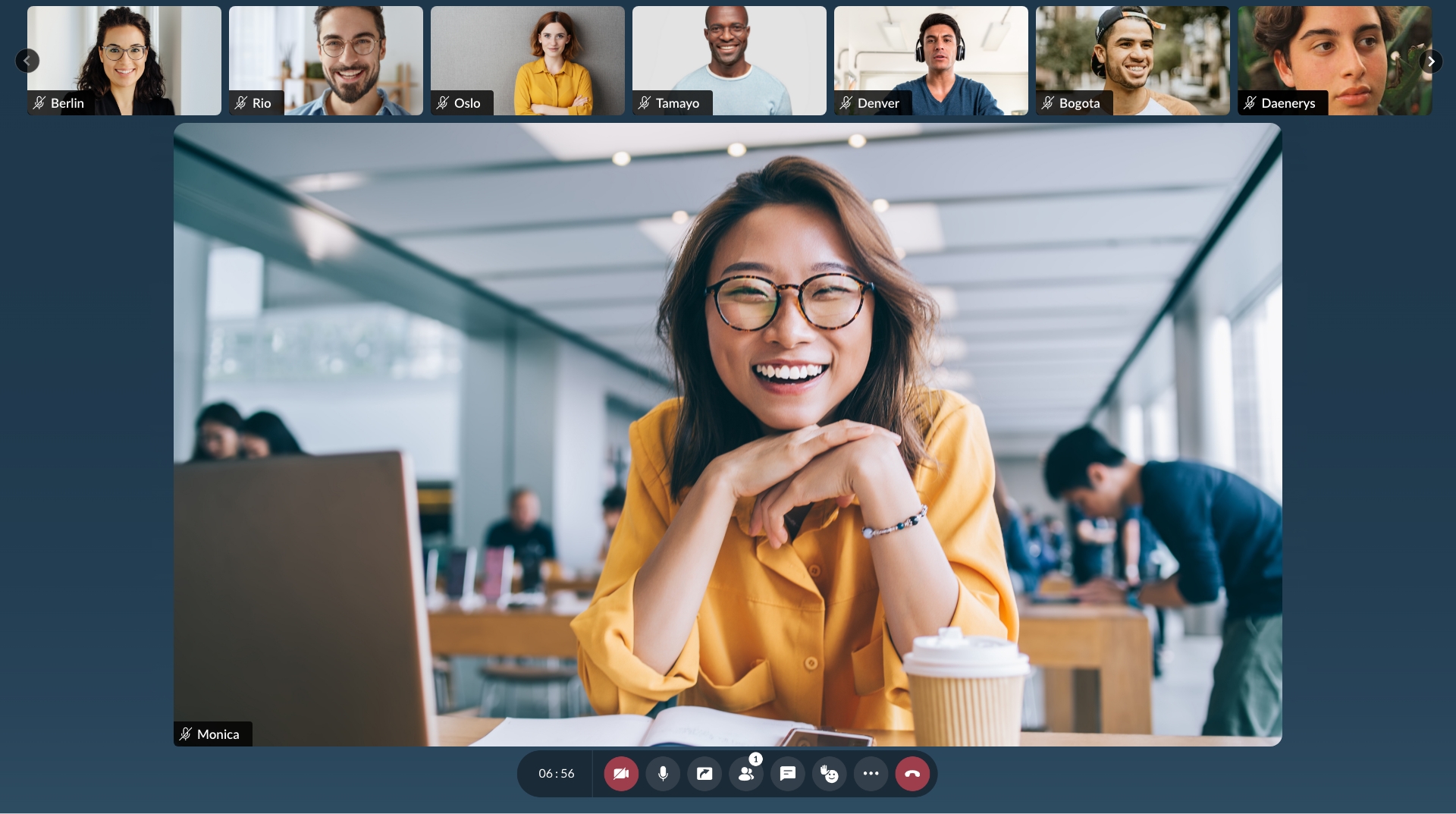
We’re excited to share a few updates for Zoho Meeting. Here's are some of them : We have moved audio, video, virtual background and preferences under a single settings pop-up for better user navigation. You can now upload a CSV file containing the attendees name and Email to import webinar registrations easily.  Plus experience our new top bar layout during your meetings!

Top Bar Layout : 


Import registration with a CSV :

Streamline your registration process by uploading a CSV file containing attendee names and emails, you can effortlessly import your webinar registrations, saving time and simplifying the process.
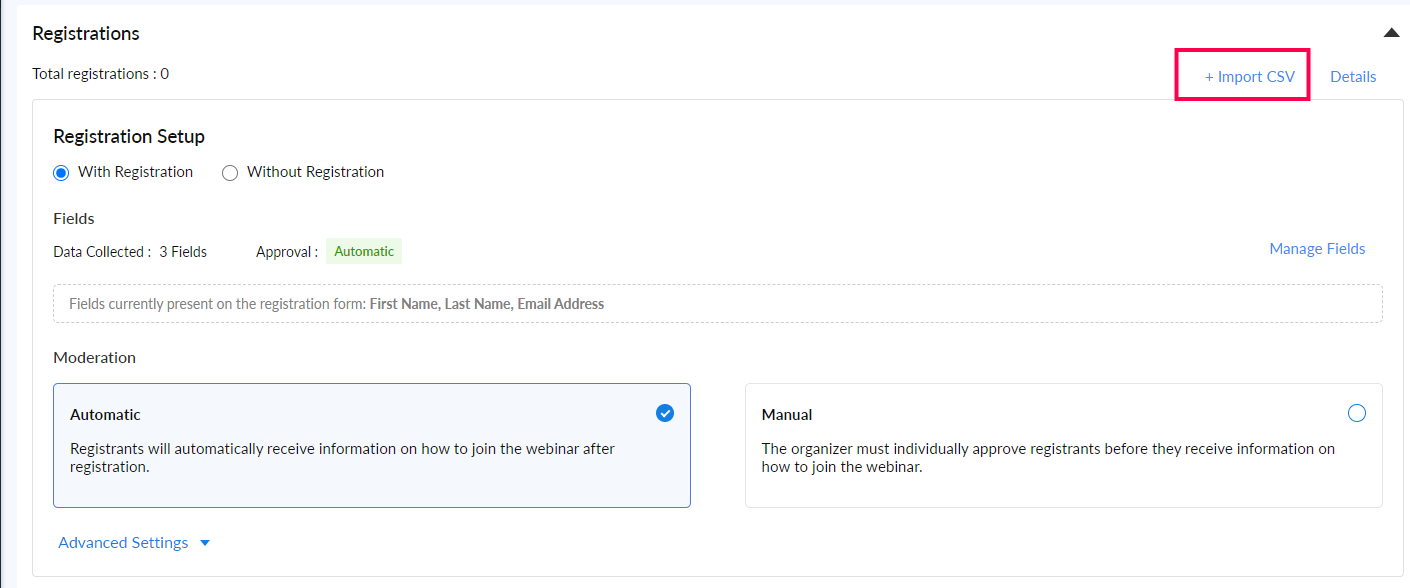
To import registrations, navigate to the registrations tab of the scheduled webinar and click Import CSV on the top right corner.

New settings pop-up :

We have moved audio, video, virtual background and preferences under a single settings pop-up for better user navigation.


We’ve also collected all the help videos here for you as an easy resource. We hope you'll enjoy these updates from Zoho Meeting. If you have any questions or would like to give us some feedback, write to us at support@zohomeeting.com.


    • Sticky Posts

    • Zoho Meeting is included in Zoho One now!

      Hello Everyone, For those who waited for the integration of Zoho Meeting with Zoho One, here is the good news. The integration has been completed and you can now add the Zoho Meeting application in your Zoho One portal. Edition included in Zoho One License You will get Enterprise plan of Zoho Meeting, using which you can host online meetings with up to 100 participants and webinars with up to 100 attendees. You will also get the cloud storage for 25 session recordings/user. Adding Zoho Meeting application
    • Zoho Meeting Updates: Bug Fixes in Meetings and Webinars, and Desktop App Enhancements

      Hi there, We hope you are all safe and well. Following our previous feature release, we have added some enhancements and bug fixes for the improved functioning of Zoho Meeting. Let's take a look at last month's updates: Online meeting updates The microphone button remained active even when a user switched to phone audio. This issue has been fixed. An error caused the microphone status of participants to be wrongly displayed in the meeting toolbar and the attendees list.This issue has been fixed.
    • V2.7: Introducing webinar co-organizers, enhanced screen sharing quality, choosing external webcam, region based dial-in number display and more.

      Dear All, Here comes the new updates from Zoho Meeting that are recently rolled out! We 're introducing co-organizers in the webinar, done major improvements in screen sharing quality and more.   Introducing co-organizers in the webinar You can now invite co-organizers to help you manage your webinar. Co-organizer can launch polls, answer questions, change presenters during the webinar, record webinar, view all attendees/staff and more. Learn more. Webinar CoOrganizers   Enhanced screen sharing quality
    • Live webinar: A complete overview of Zoho Meeting

      Are you looking for ways to engage and communicate with large audiences? Learn how Zoho Meeting can empower you from conducting online meetings with your team to hosting webinars for your sales leads. Join us for a live webinar this Thursday at 8:30 to 9:00 AM PDT.   In this webinar, you will learn how to: Organize and host webinars Engage your audience with polls and Q&A Generate analytical reports Schedule and attend online meetings Record and share meetings and webinars Co-branding and user management
    • Live webinar: A complete overview of Zoho Meeting

      Are you looking for ways to engage and communicate with large audiences? Learn how Zoho Meeting can empower you from conducting online meetings with your team to hosting webinars for your sales leads. Join us for a live webinar this Thursday. Here's what you can learn: Webinar scheduling and preparation Attendee interaction and engagement In-depth post webinar analytics Scheduling and hosting online meetings Managing your recordings Co-branding and user management Date: Thursday, March 29th, 2018
      • Recent Topics

      • E-Mail Blacklist via GUI

        Hello, It would be helpful if the GUI included an option to block specific email addresses (both incoming and outgoing). I want a setting where I can completely block certain email addresses. This means that no tickets can be opened from those addresses,
      • 【開催報告】Zoho Championに学ぶ!Zoho Campaigns メール配信の基礎・活用勉強会

        Zoho ユーザーの皆さま、こんにちは。 コミュニティグループの中野です。 10月15日(木)、Zoho ユーザーコミュニティ初となる「Zoho Campaigns メール配信の基礎・活用勉強会」をオンラインで開催しました。 今回は、Zoho Campaignsの導入を検討している方から、一斉メールを配信しているものの 現在の設定や運用にを見直したい方まで、28名のユーザーさまにご参加いただきました。 本投稿では、当日のセッション内容をご紹介します。 (セッション資料については登録者限定公開となります)
      • Integration

        Can Zoho noted about to get an integration with Dext? I believe will be helpful at least in UK. thanks
      • Deleted Module

        I accidentally deleted a module and its fields. Im trying to get it back. Thanks to Youtubers flooding the internet with out of date videos I can't find how to get deleted modules back. The Recycle Bin doesn't have modules. Anyone know how to do thi
      • Creating packages according to actual shipping processes

        Hi community. I would like to ask a question to see if there's a better method or workflow for the creation of packages in Zoho Inventory. There is a little confusion in some of Zoho's language relating to the use of term Packing Slip when connected to
      • E-invoicing setup not completed in Zoho Books

        My status on the EmaraTax portal appears as linked with Zoho. However, when I try to complete the setup on the E-invoicing tab in Zoho Books settings, I receive an error saying: "E-Invoicing could not be enabled as the FTA portal is currently unreachable.
      • Bank Feeds - Again

        Bank feeds broken again for me. I don't see other recent posts on this, so maybe it's just us? Tried: refresh update cred/ deact./react. feeds chat support Nothing. On day 2 without zoho as a result, which is crippling for us. We've used zoho for a year
      • Widget Height were destroyed

        All widget heights in the Details Canvas view are broken.
      • Set same ticket Threshold for Agent-Level Thresholds

        I am creating Agent-Level Thresholds for agents to auto-assign tickets in a Load-based Round Robin rule. I am unable to set the same number of Open tickets for agents when setting their Thresholds. For exampel: Agent 1 = 10 Agent 2 = 25 Agent 3 = SHOULD
      • Grouping by Stage *type* in widgets

        Hi Can I ask for a new feature? I'd like to be able to group by stage type in a Deal widget. That is by whether the Deal is in an Open Stage, a Closed Won Stage, or a Lost stage. Currently I can group by Stage, but if we have 10 open stages and one Closed
      • Sharing View Only Portal

        Im looking at Youtube videos on how to share a view only link to my projects. Everyone has the screen with Manage Users. I don't have it. Is that an old version or new version? I can't see how to send a view only link to clients. There is a Profiles and
      • Issue with QES via Smart-ID/eParaksts

        Zoho Sign support is completely unresponsive, so I will try to post the problem here. Our account settings have LTA disabled, but when processing QES via Smart-ID/eParaksts, the engine forces a PAdES-BASELINE-LTA format using a full PDF Uanataca timestamp.
      • Zoho Mail MCP connector

        Issue: Zoho Mail MCP connector (https://mail-organization-930963415.zohomcp.com/mcp/.../message) — OAuth authorization completes successfully in-browser ("Authentication successful"), but the issued token is rejected when the MCP client reconnects to
      • Sales Returns - Repairand Return

        Hi Inventory Team, I'm working with a client on an Inventory implementation project and they have shared this use case with me. Some items may be returned by the customer, then returned to the vendor for repairs, received from the vendor and shipped back
      • Multiple criteria in searchRecords

        Hi, is it possible to search with multiple criteria in zoho.crm.searchRecords? I have tried several variations of the following without much success. CustomerRecord = zoho.crm.searchRecords("Contacts", "(First Name|=| lee)" && "(Last Name|=| spencer)"); Thanks. Chris
      • Plans to make "Generate Presentation with Zia AI" available as API endpoint?

        This 'Generate Presentation with Zia' feature has great potential, and we would like to be able to trigger it automatically from a workflow. https://show.zoho.com/home/ziaai/generate Is there already a way to trigger this via API? If not, is there any
      • How to setup noreply@ example.com

        How do I setup noreply@example.com so the mail never gets delivered. I currently have a catchall setup aswell.
      • Pleas unblock E-Mail-Adress service@montana-energie.de / kontakt@montana-energie.de

        Dear Zoho Support, Could you please unblock service@montana-energie.de / kontakt@montana-energie.de which belongs to a regular customer with whom we are having frequent business-related conversations. Thank you very much in advance, Erdem Kar homewise
      • Unable to change alias in the from field on the ZOHO mac app

        I have 1 main mail address, and 3 alias's. on the web mailbox when I create a new email, I can select the alias's from the dropdown in the from field. On the app no dropdown is available.
      • Zmail mobile application

        ho do i remove people from this app
      • My allies email (info@xxxx.com) was been deleted by system, and I can not build the same info allies email now

        Dear Zoho Mail Support Team, I am the super administrator of the Zoho organization 【Organization Name, as shown in Admin Console】. I am writing to report an urgent issue with two of our custom-domain email addresses and to request your help restoring
      • Cannot create mail account

        Hi, i have a problem, i can't create a mail account every time i try the error massage like this Oops! Something went wrong during mailbox creation. Please try again please help
      • Amazon.it always ends up in spam

        Emails from amazon.it always end up in the spam folder, even though I have added the domain and the various individual Amazon addresses for shipping, payments, and other matters to the trusted lists at the user administrator level. What should I che
      • Your Authenticate email domain (SPF, DKIM, DMARC) is bad to say the least

        How about actual instructions rather than vague generalities? There is no way to complete this with what is provided. Please provide specific verifiable steps.
      • Generate a Zoho Sign link

        From time to time I get a response "I never received your you e-document for electronic signature" is there a way to generate a Zoho Sign link to share.
      • ChatGPT Plugin / MCP Server auth error

        Hi all I'm trying to connect the ChatGPT plugin for Zoho CRM but after username stage of the auth process, I get this error from the URL https://mcp.zoho.eu/mcp-client/ {"error_description":"Invalid request url, Request is not as per defined in oauth
      • Zeptomail in the blacklists

        Hello, I noticed some hard bounces while sending emails, and upon checking the details, I see that we have been added to the blacklists of certain spam lists: Bounce category: Policy failure Reason: ip-issues Message: 5.7.1 Service unavailable; client
      • Possible to reorder Pipelines position?

        I have multiple Pipelines and want to reorder their positions, so that in the Deals module record for the Pipeline field, I have them ordered in a certain way. Is there a way to reorder the position of the Pipelines without deleting existing Pipelines
      • Categorize Items with Item Headers

        Hello customers, Did you ever want to classify items based on specific categories to help your customers understand your invoice better? With the new Item Header feature, you can easily categorize items in your invoices and estimates and give them a common title.  Item Headers are available in the Invoices, the Recurring Invoices and the Estimates module. It can be carried forward from estimates to invoices at the time of converting the estimates.  To add an item header: Go to the Estimates, Invoices
      • Gettting "You are Offline" Messages all the time

        Al of a sudden, a few days ago, I suddenly began getting a message on the bottom left side of the Mail App saying "You are Offline". Why? Does it mean I'm not getting incoming mails now? why is has started?
      • Zoho CRM Quotes – Subform and PDF/Writer Limitations

        Hello, I am encountering the following limitations in Zoho CRM Quotes: Custom product images cannot be uploaded in the subform – the image upload field cannot be added; only the file upload field is available. File upload placeholders cannot be used in
      • Invoice Only Shipped Items

        Dear Zoho, We are a company that deals with sales orders with 600-1000 lines We need to be able to do partial invoicing based on shipped items Right now when we click convert to invoice we can not only select items that have een shipped It takes hours
      • Alias Email Id already exists

        Hi, I just verified my domain sesque (dot) com and now I am trying to create the admin account using admin (at) sesque (dot) com, but I am getting an error saying "Alias Email Id already exists". I used to have another Zoho account with this email address,
      • Show backordered items on packing slip

        We send out a lot of large orders, and often there are one or two things backordered. How can I fix the packing slips to show quantity ordered  & quantity packed There should also be the ability to "ship" 0 of an item so the receiver knows that things
      • Make better hiring decisions with Compare Applications and Zia Insights (Beta)

        When multiple candidates apply for different job openings, evaluating each application against the right job requirements can take time. Reviewing resumes, candidate details, and interview feedback separately can make it harder to assess role fit and
      • Ad-hoc approvals are now available in CRM approval processes

        Released for all DCs. Hello everyone, We've introduced ad-hoc approvals in CRM approval processes. This enhancement lets approvers add additional approvers when needed, without changing the configured approval workflow. How the approval process works
      • Introducing PRM: Build, manage, and scale your partner ecosystem

        Growing a partner ecosystem is a good problem to have. What starts as a handful of partners can quickly turn into a maze of spreadsheets, emails, and disconnected processes. More partners mean more opportunities, greater reach, and new ways to grow
      • Data Subject Requests in Zoho Mail: Retrieve and export email data for legal and compliance needs

        Organizations are often required to retrieve specific email communication data in response to legal investigations or compliance audits. The Data Subject Requests (DSR) feature in the Zoho Mail Admin Console allows administrators to search for all email
      • Why are Contact Form 7 file uploads not reaching my Zoho CRM even though the form submits successfully?

        This can happen when Contact Form 7 successfully processes a submission, but the uploaded file isn't being transferred in the format Zoho CRM expects. Your other fields, such as name, email, and phone number, might reach Zoho while the attachment remains
      • Introducing live chat for Zoho CommunitySpaces

        Hello everyone, We’re happy to announce that your community members now have a direct line to you. Zoho CommunitySpaces now has a live chat widget, powered by Zoho SalesIQ, so a member can open a chat from your community and get a quick one-to-one answer
      • Next Page