Level up your data collection game with the intuitive Zoho Forms mobile app!
Level up your data collection game with the intuitive Zoho Forms mobile app!


In today's fast-paced world, mobility is essential for staying competitive. When it comes to collecting data, you need a tool that helps you gather and analyze essential information on the go. That's where Zoho Forms' mobile app comes in. With native applications for both Android and iOS, you can create and edit forms, collect data offline, scan codes and cards, and more—all from your mobile device. In this article, we'll share some tips and tricks for unlocking the full potential of Zoho Forms' mobile app. Let's dive in!
 
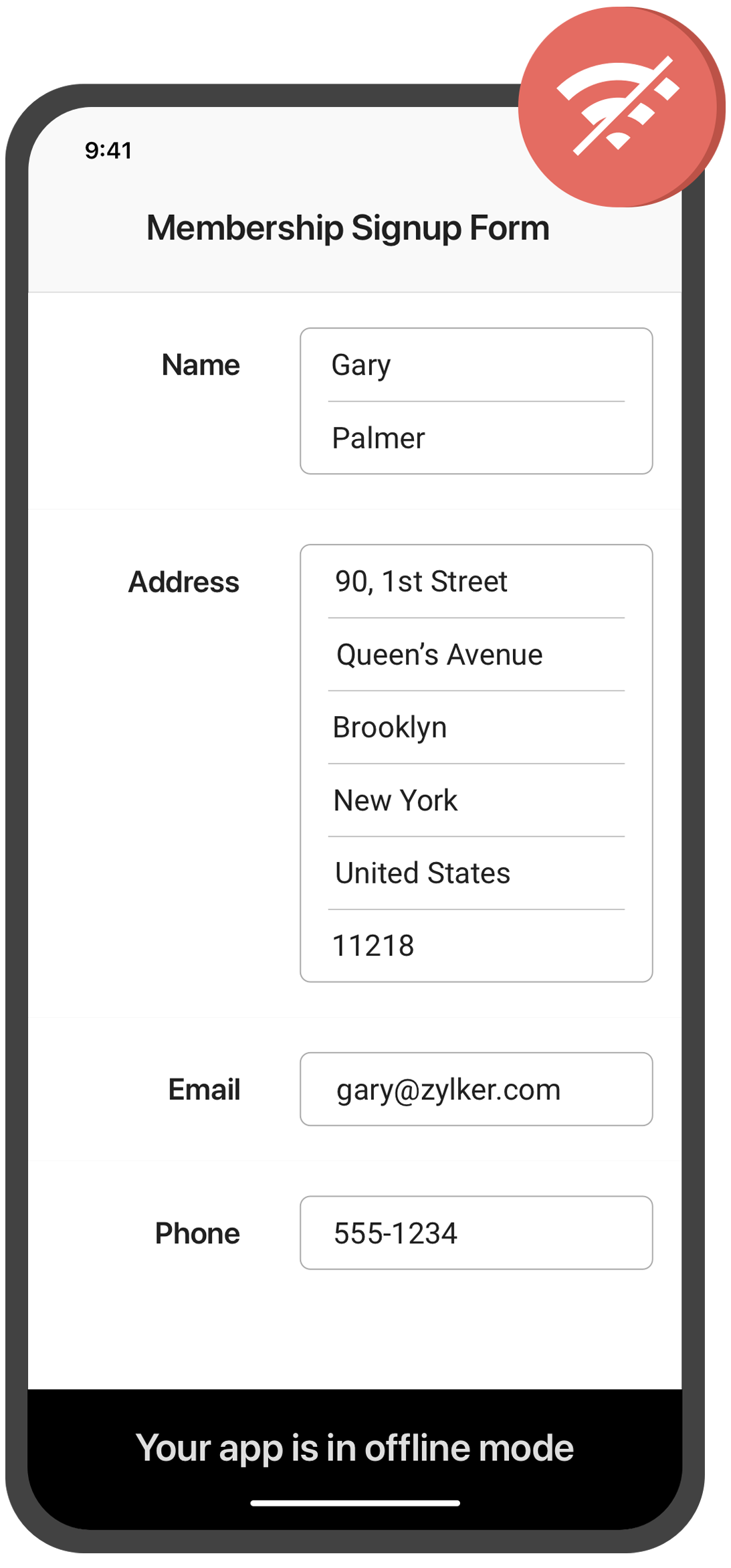
Collect data offline

Need to collect data in remote locations with no internet connection? With the Zoho Forms mobile app, you can fill out forms and collect data even when you're offline. This feature is especially useful for field workers, surveyors, and other professionals who work in areas with poor or no connectivity. Once you're back online, your data will automatically sync with your account.
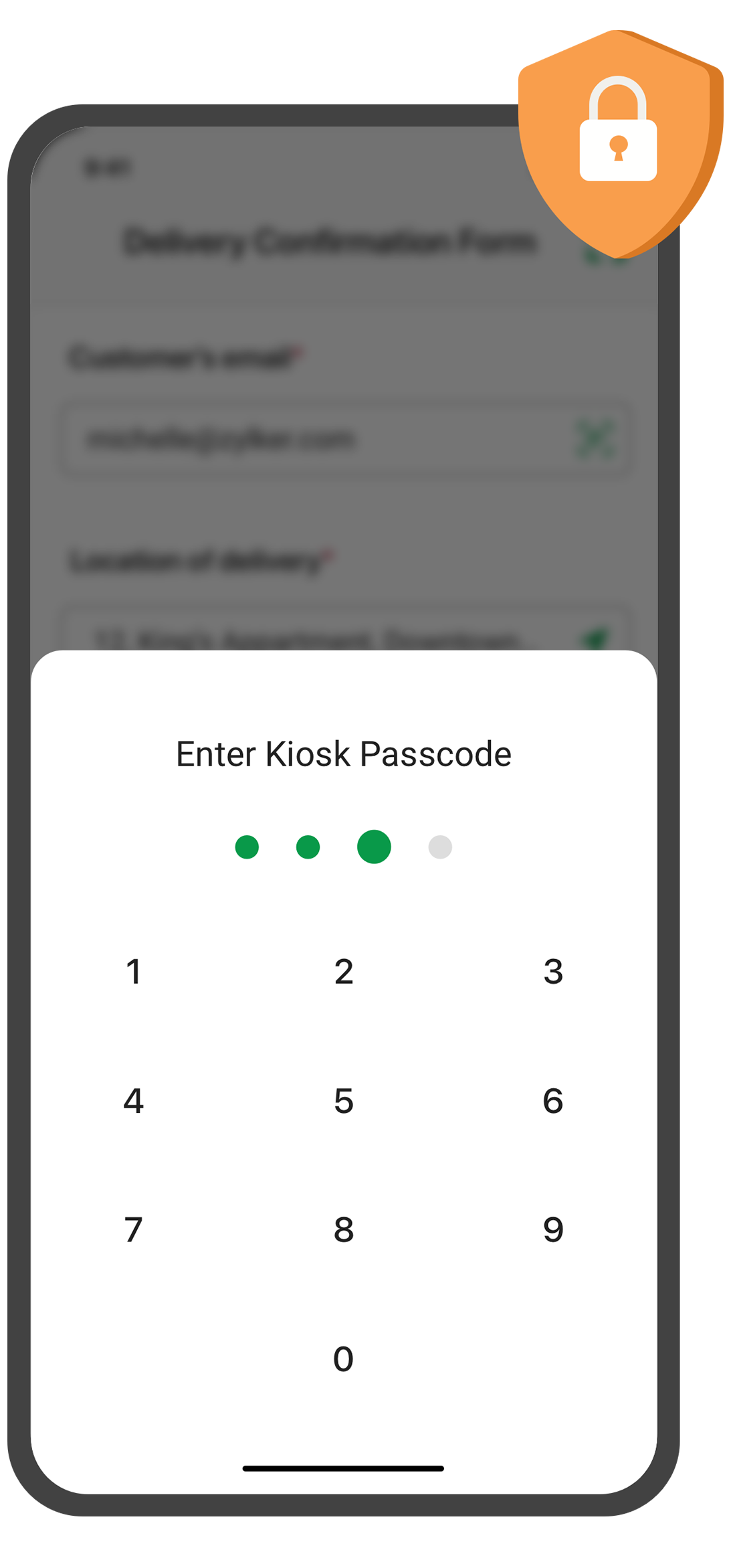
Create self-service kiosk
 
Looking for an easy way to collect data at events and trade shows, or in your store? With the Zoho Forms mobile app, you can turn your mobile device into a self-service kiosk with password protection. Effortlessly collect leads, contacts, and feedback! 
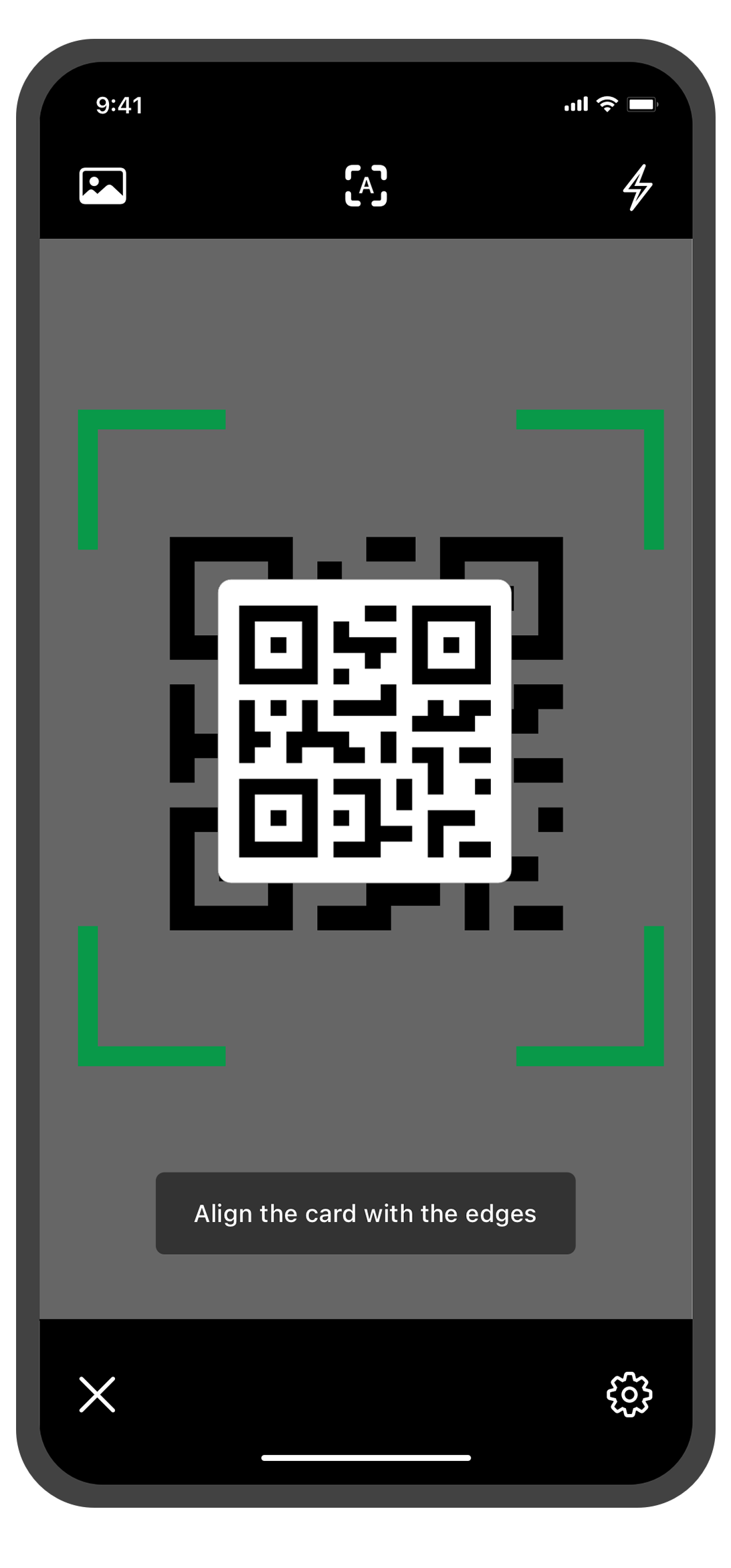
Scan QR codes and barcodes
 
Need to enter data quickly and accurately? The Zoho Forms mobile app lets you use your device's camera to scan QR codes and barcodes. No more manual data entry errors or wasted time! This feature is especially useful for inventory management, event registration. You can customize the form fields to more accurately reflect the data you want to collect from the codes.
 
Annotate images

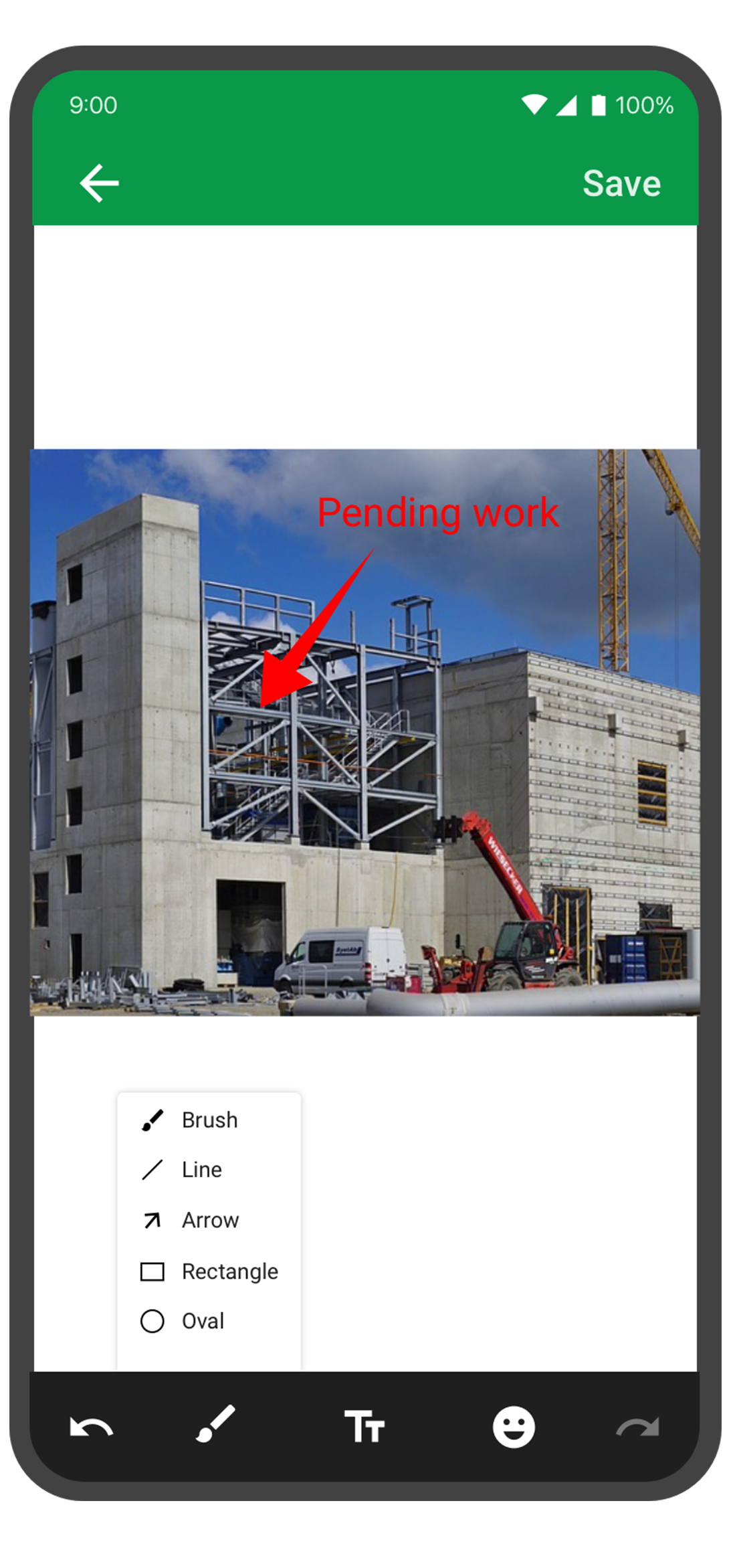
With the Forms mobile app, your team can capture and annotate images to make data collection more accurate and efficient. This feature is especially useful for field engineers, architects, and designers who need to capture and share information about a project. You can annotate images and mark areas of interest with text, arrows, shapes, and freehand drawings. Once the images are uploaded, you can view them under Form Submissions.


Draft entries

With this feature, you no longer have to worry about losing your progress if you need to pause or abandon filling in form. Should you experience an unexpected interruption, like a phone call or an app malfunction, the Zoho Forms app saves your progress as a draft entry. This way, you can easily pick up right where you left off at a later time without having to start from scratch. This feature can save you time and effort, and make the form-filling process more seamless and less stressful.
 
The Zoho Forms mobile app is a powerful tool that helps you collect data anytime, anyplace. With these tips and tricks, you can take full advantage of Forms' features and streamline your data collection process.

Try them out, and let me know how it goes! You can also send your thoughts and feedback to support@zohoforms.com.


Until next fortnight,
Niveditha
    • Sticky Posts

    • Easily track referrals with Zoho Forms

      Referral tracking can be a powerful way for businesses to understand where their leads are coming from. With Zoho Forms, tracking the referral sources of your leads is an easy and straightforward process. Here are some tips to help you make the most of
    • 9 Ways to use Zoho Forms this Navratri

      Hello form builders!Navratri is almost here! It is a time for celebration and culture in the Indian community, and organizing such a grand event can be overwhelming. But with the right tools, you can streamline the process and focus on creating unforgettable
    • The secret to collecting data from valid users

      Collecting accurate data is crucial for making informed decisions. Zoho Forms offers two efficient ways to validate user data and ensure that you collect entries exclusively from valid users. Double Opt-in: Double Opt-in is a privacy feature that ensures
    • Storage space in Zoho Forms: The ultimate guide to efficiently managing your data

      Are you using Zoho Forms for data collection? As with any data-intensive application, understanding how storage space is calculated is essential. That's why we've created this guide— to show you everything you need to know about managing storage space
    • Linking primary form submissions to a second form submission

      Let's imagine you have a form that you use to request a minimal amount of data from your users. To collect additional information, you redirect them to another form either automatically or based on a condition. During the course of redirection, you can
      • Recent Topics

      • Exporting All Custom Functions in ZohoCRM

        Hello, All I've been looking for a way to keep about 30 functions that I have written in Zoho CRM updated in my own repository to use elsewhere in other instances. A github integration would be great, but a way to export all custom functions or any way
      • Zoho Desk - Event Calendar View

        Hi Desk team, Are there any plans to introduce a calendar or timeline view for Events in Zoho Desk? It would be very helpful if we could see Events visually in a calendar and/or timeline. This is very helpful when desk side support activities need to
      • Cliq iOS can't see shared screen

        Hello, I had this morning a video call with a colleague. She is using Cliq Desktop MacOS and wanted to share her screen with me. I'm on iPad. I noticed, while she shared her screen, I could only see her video, but not the shared screen... Does Cliq iOS is able to display shared screen, or is it somewhere else to be found ? Regards
      • Plug Sample #15 - Enable Human-Like, Contextual Interactions in SalesIQ with Zia Agents

        Zia Agents are conversational AI assistants designed to understand user intent and respond intelligently, helping businesses automate conversations and offer personalized support at scale. While Zia Agents are yet to be publicly released, access is currently
      • 【Zoho CRM】キオスク機能のアップデート

        ユーザーの皆さま、こんにちは。コミュニティチームの藤澤です。 Zoho CRMのキオスク機能のアップデートを紹介します。これまで以上に柔軟性が増し、データ処理が高速化されたことで、リアルタイムのデータ取得が可能になりました。 目次 クライアントスクリプトで、キオスクをどこからでも起動が可能に 新規データ作成処理を使用してキオスク実行中にデータをリアルタイムで取得 データ取得画面における新しい機能強化 1. クライアントスクリプトで、キオスクをどこからでも起動が可能に キオスク向けクライアントスクリプトのサポート(第一段階)がリリースされました。これにより、Zoho
      • Re: Application Architecture in Zoho Creator — A Platform-Specific Deep Dive

        A recent community post on application architecture made some excellent points about planning architecture early in Zoho Creator projects. The core message is right — Creator applications have a habit of growing organically into maintenance nightmares,
      • Introducing SlyteUI : From Idea to a Working Interface in Minutes

        Hello everyone! Are you spending hours building basic UIs? Does even the smallest customization feel like a major task? CRM customization should feel intuitive and straightforward, not time consuming or exhausting. SlyteUI makes this possible by simplifying
      • Standard view for every agent

        Hello there, I am facing the following challenge. I would like to provide a standardised view for all agents. This view should not be editable by the user. It would be nice for the users if the tickets were divided into columns (like prio work mode).
      • Mapping a new Ticket in Zoho Desk to an Account or Deal in Zoho CRM manually

        Is there any way for me to map an existing ticket in Zoho desk to an account or Deal within Zoho CRM? Sometimes people use different email to put in a ticket than the one that we have in the CRM, but it's still the same person. We would like to be able
      • Create a Custom view that displays the current signed on support reps Tickets

        Is there a way to create a custom view that has criteria that says Ticket Owner = [Current Signed on Support rep]?
      • Trying to validate user's age through DoB

        We have a form where a user enters their birthdate. We'd like a rule that counts whether the user is over or under 25 years of age. This amounts to 9125 days elapsed between today and an easy way to do this would be to use conditional rule Is Before [x]
      • Zoho Desk - Trial Extension Error - Insufficient Privileges to perform this operation. Contact your Administrator.

        Zoho Desk - Trial Extension Error - "Insufficient Privileges to perform this operation. Contact your Administrator." I am receiving this error above when trying to extend my trial, and I am the Administrator. Please advise on how to bypass.
      • filter on sheets mobile (iOS, iPadOS) does not work

        re-posting this as a question because reporting as a problem netted zero responses... I have this issue on every spreadsheet, whether imported or created natively in Zoho Sheets. I can use on desktop without issue: but on iOS the filter dropdowns are
      • Creating packages according to actual shipping processes

        Hi community. I would like to ask a question to see if there's a better method or workflow for the creation of packages in Zoho Inventory. There is a little confusion in some of Zoho's language relating to the use of term Packing Slip when connected to
      • Announcing Zoho Sheet desktop app for macOS and Windows (Beta)

        Hello Sheet users, We know you’ve been waiting for this one. It has always been the top priority on our roadmap to provide a single native desktop app for macOS and Windows that works both online and offline. Today, we are excited to announce that the
      • Business Day Logic Update: More Accurate Scheduling for Your Workflows

        Hello everyone, We’re improving how business-day calculations work in workflows, especially when triggers happen on weekends. This update ensures that offsets like +0, +1, and +2 business days behave exactly as intended, giving you clearer and more predictable
      • Territories as filters

        The territory function within the CRM is great for controlling record access and managing a sales organization however, territories are not available as a filter options within the CRM when creating reports or dashboard components. Adding the ability
      • What's new in Zoho Social - Q1 recap

        Hello everyone, We’ve rolled out a bunch of updates in Q1, and we’re excited to walk you through them. To help you explore these features in detail, we’re hosting a Q1 recap webinar where we’ll show you how to make the most of each update. Q1 recap webinar
      • Payment Card or Identity form-fill from Vault?

        Hello! I'm working on replacing Bitwarden with Vault and one issue I've run into is that I can't find any option to fill address and payment forms from Payment Card or Identity info that has been saved in Vault. Is there a way to do this? Is it a planned
      • Query on Tracking Visitor Activity with Zoho Forms & SalesIQ

        I have a query regarding Zoho Forms, Zoho SalesIQ, and Zoho CRM. I have embedded a Zoho Forms form on my website, and I’m trying to understand if it’s possible to capture a user’s website activity (such as pages visited, visit count, etc.) when they submit
      • Merging Photos from Subforms into Writer

        I've got a subform that contains uploadable photos. Im trying to merge them into a template but there is no option to pull them in. Is this possible? We are creating an inspection module where we can take photos and make notes and export to a report.
      • Bank Feeds

        Since Friday my bank feeds wont work. I have refreshed feeds, deactivate and reactivate and nothing is working
      • Add Unified Project-Wide Development & Release GitHub Dashboard

        Hi Zoho Projects Team, I am writing to submit a feature request for a Unified Development & Release GitHub Dashboard that provides centralized GitHub visibility at both the Project and Milestone levels. The Vision: We need a single "Command Center" that
      • RouteIQ user Licensefor Non–Zoho One User

        Zoho RouteIQ needs to be purchased for Zoho CRM. The current setup uses the Zoho One plan, but RouteIQ is required for a different user who is not part of Zoho One. However, they need access to routes and customer details within RouteIQ for planning their
      • Private Contacts & Tasks

        What is the timeframe for being able to filter Activities and Contacts from being viewed by the rest of my team? I sync with Outlook and the ability to create a task that is private would be of great help. I have to take my dog to the vet this morning and because I put it in my Outlook calendar, now my whole team is aware of it because I had no way to mark it "private" in zoho. A simple checkbox would be great! I would be more than happy to provide examples of how ACT does this. For each event or
      • Cross Module Filtering – Use Fields from Lookup modules in Custom Views criteria and Advanced Filters

        Hello everyone, Zoho CRM now enables you to achieve deeper filtering of records in a module, using fields of a lookup, thereby enhancing your data management experience manifold. This filtering based on lookup module fields is now available in advanced
      • Super Admin Logging in as another User

        How can a Super Admin login as another user. For example, I have a sales rep that is having issues with their Accounts and I want to view their Zoho Account with out having to do a GTM and sharing screens. Moderation Update (8th Aug 2025): We are working
      • WhatsApp Calling Integration via Zoho Desk

        Dear Zoho Desk Team, I would like to request a feature that allows users to call WhatsApp numbers directly via Zoho Desk. This integration would enable sending and receiving calls to and from WhatsApp numbers over the internet, without the need for traditional
      • Update to CRM Custom Buttons: Collect Users' Location

        Hello everyone! Buttons in Zoho CRM allow you to extend the default CRM capabilities for your bespoke business needs. It provides the flexibility to connect to any third-party application to perform necessary actions. Wouldn't it be better, if those buttons
      • Printing invoices using templates

        Hello. I have a sales application and i need to print invoices, delivery ntoes etc and i'm trying to use the record template feature which allow you to use all of the fields from a report. My question is how do i make calculated fields which are not in
      • Sum over

        Hi, Is there an equivalent in Zoho (Aggregated Formula) to SQL’s SUM() OVER (PARTITION BY ...)? I’m looking for a way to calculate a sum within a group (partition) without collapsing the data, so that the result is still available at the row level. Has
      • Api Version 2 Refresh Token invalid_code

        While Refresh token i am always getting Error {     "error": "invalid_code" } i am trying to pass all parameter as per this https://www.zoho.com/crm/developer/docs/api/refresh.html still non of things working any one have idea whats the reason for same ... please help due to this i stuck since last one week
      • Is it possible to clone my Lead module layout to Customer and Potential layouts?

        I've customized all fields and their order for Leads module and I would like to know if I'm able to clone those fields into another modules, only to avoid repeated work. Awaiting.
      • Invoice date is incorrect

        I'm trying to pull a report of Sales Orders and filter by Invoice Date. (ex: all of 2025) Unfortunately, the filter still returns lots of SO's from other years including 2026 which would be impossible to have an invoice in 2025 from a 2026 order. It's
      • DYK 2 - Filter Columns in List View

        Did You Know you could filter columns across lists in Zoho Projects ? This allows you to quickly narrow down large datasets without navigating to the filter panel from time to time, making it easier to focus on what matters right from where you are working.
      • Sync Enable issue Between Zoho FSM and Invoice

        Hello Latha, I hope you are doing well. I am trying to enable synchronization between Zoho FSM (Org ID: 170000078905) and Zoho Invoice (Org ID: 170000079301). However, when I attempt to do so, I receive an “Internal error” message. Could you please assist
      • Introducing Auto-trigger for Screening Bot

        Still manually sending screening tests after every application? Not anymore. With Auto-trigger for Screening Bot, screening now begins automatically. When a candidate applies for a job that has an attached assessment, Recruit checks whether the test has
      • Canvas templates can now be shared with different CRM organizations

        Moderated on 14th February, 2023: Dear all, This feature is now open for all users in all DCs. To learn more about importing and exporting canvas templates, read our help doc -Customizing Record Detail Page Using Canvas Dear All, We hope you're well!
      • Zoho Mail Android app update: UI revamp

        Hello everyone! We are excited to share that the first phase of the Zoho Mail Android UI revamp is now live. In this update, we have redesigned navigation bar at the bottom to quickly access the Email, Calendar, Contacts, and Settings modules. Also, the
      • CRM x WorkDrive: We're rolling out the WorkDrive-powered file storage experience for existing users

        Release plan: Gradual rollout to customers without file storage add-ons, in this order: 1. Standalone CRM 2. CRM Plus and Zoho One DCs: All | Editions: All Available now for: - Standalone CRM accounts in Free and Standard editions without file storage
      • Next Page