Provide a standard structure to your content using article templates

Provide a standard structure to your content using article templates

Hello everyone,

When multiple writers work on different documents, maintaining a standard structure can be challenging as each of the writer follows a different writing style. However, when the structure, tone, and format of every document is different, it can make the content difficult for readers to comprehend. 

Article templates bring uniformity to content structure, save time, and provide a great platform for smoother onboarding of new writers. 

What is an article template?
An article template is a predefined content structure that can be reused across categories during article creation. It helps ensure that all documents within a category follow a uniform layout and style.

Templates can include elements such as headings, subheadings, images, tables, bullets, numbering, accordions, and tabs.

For example, a product assembly guide will have a list of included parts, required tools, product details, measurements, and step-by-step instructions to assemble a product. This structure can be created as a template so that other writers can reuse the same structure when creating similar manuals.

Having templates in place:
  1. Promotes content consistency across articles
  2. Reduces the time spent creating articles from scratch
  3. Makes it easier to maintain and update articles
How to create templates and use them in articles
Templates can be created for a specific category from the Template section in the Knowledge Base module.


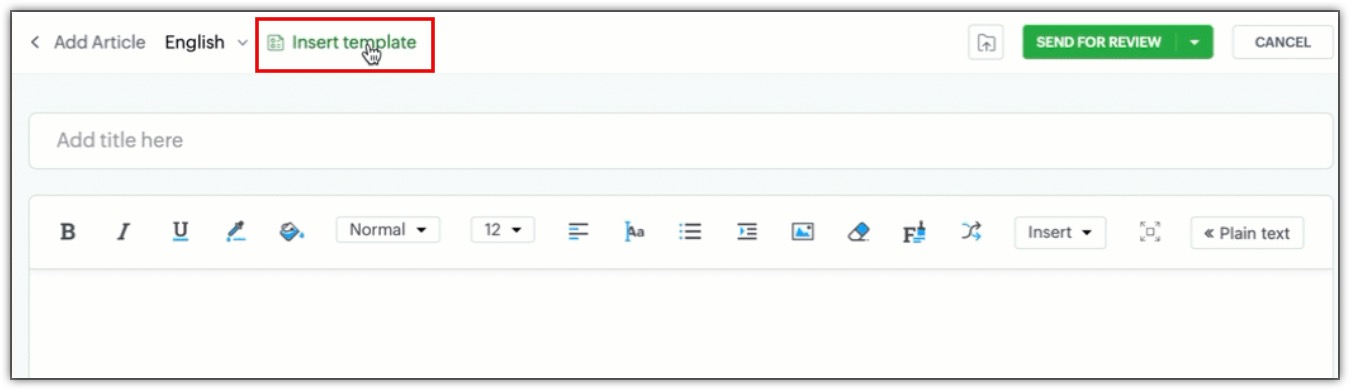
Once a template has been created, users can select the Insert Template option during article creation to use the saved template for structure. 
Start exploring article templates now to make the documentation process faster, easier, and consistent.

This feature is now available for all users across data centers. 

Kindly refer to the help doc for more information: Setting Content Standardization with Article Templates

PM: @Rajaram Iyyankalai 

Regards, 
B. Akshaya | Zoho Desk - User Education
    • Sticky Posts

    • 2024 Email Authentication Standards: Elevating Security with Google and Yahoo

      In contemporary email communication, email authentication plays a pivotal role in mitigating email fraud, spam, and phishing attacks. Brace yourself for a new level of security. Starting February 2024, Gmail and Yahoo will be implementing robust email
    • Using Agent Email Address as From Address

      Currently, while replying to a ticket, it is possible for agents to choose their own email addresses as 'from' addresses. Although we built this just for that little extra flexibility, in hindsight, it hasn't figured much in conventional usage.  Almost all businesses prefer that responses to their customers' tickets be sent from the common support/service email address and NOT from those of individual agents. During personal interactions at events, some of you have even made passing mentions about
    • Edit and Delete options in Comments

      A lot of teams have been using ticket comments extensively to collaborate everyday. Notification Center further improved this experience by bringing real-time updates. As we continue to build more improvements to this experience, we've shipped a small-yet-important
    • Webinar 2: Supercharged customer support for growing business

      Join us for this webinar and learn how to step up your support game using a real-time communication platform to generate happier, more successful customers. In this live webinar, we will will discuss the importance of SalesIQ for your support team and how it can help you:  Understand your customers better and their journeys to proactively support and engage them even before they ask for help.  Integrating real time conversations into Zoho Desk’s Support, providing a conversational customer service
    • Customize Colors of your Customer Self Service Portal

      You asked for it. We heard you. We're happy to roll out the most sought after feature request, Customizing the Colors of your Customer Self-service Portal. Now you can set the color of your customer portal to mimic your company's web site, so that your customers visiting the portal will not feel alienated by the default theme.  Go ahead and configure the color of the header, tabs, fonts and background according to your needs. You can either choose between default color themes like Blue, Grey, Green
      • Recent Topics

      • Super Admin Logging in as another User

        How can a Super Admin login as another user. For example, I have a sales rep that is having issues with their Accounts and I want to view their Zoho Account with out having to do a GTM and sharing screens. Moderation Update (8th Aug 2025): We are working
      • A2P 10DLC Opt-in Rejection Issue with Zoho Creator Public Form

        Hi everyone, I’m working on an A2P 10DLC SMS campaign and running into repeated rejections due to opt-in issues. I’m using Zoho Creator for the registration flow. The form is public (no login required). Users enter their phone number and there is an unchecked
      • Introducing Zoho Sprints 3.0

        Zoho Sprints is consistently evolving in steady increments. The introduction of the latest version, with its enterprise level solutions, brings to you advanced capabilities that propel your agile efforts in the right direction. Here's a quick glimpse
      • Es posible cambiar el lenguaje de los modulos del ASAP?

        Es posible cambiar el lenguaje de estos textos? Tengo Zoho configurado en español pero aun así me muestra estos textos en ingles:
      • Option to Automatically Publish Job Openings to the Career Website via API or Workflow

        Currently, when creating Job Openings using the Zoho Recruit API, the records are successfully inserted into the system. However, there is no way to automatically publish these Job Openings to the Career Website. In the Job Opening field data, there are
      • Evaluate applicants faster: Profile Summary and Skill Sets now in Applications

        Evaluating applicants often requires switching between modules to understand their skills and background. With this update, we’ve extended two capabilities directly to the Applications module: Skill Sets and Profile Summary. You can now review applicants
      • Free webinar: How to use passkeys with Zoho Vault

        Hi everyone! Passkeys are transforming the way we sign in—making authentication safer, faster, and completely passwordless. No more memorizing complex passwords or worrying about credential theft. With Zoho Vault, you can securely manage both passwords
      • Adding Markdown text using Zoho Desk API into the Knowledge Base

        Hi Zoho Community members, We currently maintain the documentation of out company in its website. This documentation is written in markdown text format and we would like to add it in Zoho Knowledge Base. Do you know if there is REST API functionality
      • Is it possible to embed Zoho Bookmarks in the Cliq sidebar?

        Is there any way that each Zoho user can access their bookmarks (that live in https://bookmarks.zoho.eu/ which is technically a part of Zoho Mail) directly within Cliq? As a widget, or an item in the sidebar? My team does not use Mail, it uses Cliq all
      • Enhancing Zia's service with better contextual responses and article generation

        Hello everyone, We are enhancing Zia's Generative AI service to make your support experience smarter. Here's how: Increased accuracy with Qwen One of the key challenges in AI is delivering responses that are both contextually accurate and empathetic while
      • Let us add Lookup fields in the Blueprint Transitions

        We are unable to add Lookup Fields in the blueprint transitions in Zoho Desk, we wanted to make it a requirement for our workflow but since it's not available in the transition we cannot. The lookup field exists in the Layout: But it cannot be added/selected
      • Countries List Global Set- Complete with Phone Country Code and Continent.

        Dear Zoho Team I saw your recent addition to the Global Sets regarding the Countries list and states. While working on it, why didn't you also add things like Continent and Phone Country Code? Also, some ISO codes from some Countries/regions are mis
      • How can we clear a signature field with deluge?

        I would like to clear a signature field in the Edit -> On Load. I have tried input.signature = ""; input.signature = null; clear input.signature; None of the above is working. is there any other way I am missing?
      • Online PDF Editor

        Hello Team, There is a small glitch i found when i was using your online software called "PDF Editor", There is a menu bar on right side comes when we click on 3 dots for any pdf, but that entire menu has no options to choose, that is totally blank, please
      • How do you print a refund check to customer?

        Maybe this is a dumb question, but how does anyone print a refund check to a customer? We cant find anywhere to either just print a check and pick a customer, or where to do so from a credit note.
      • From Zoho CRM to Paper : Design & Print Data Directly using Canvas Print View

        Hello Everyone, We are excited to announce a new addition to your Canvas in Zoho CRM - Print View. Canvas print view helps you transform your custom CRM layouts into print-ready documents, so you can bring your digital data to the physical world with
      • Client and Vendor portal at the same time

        We have companies that serve both as clients and vendors and they are linked. However, we have a problem giving them access to the vendor/client portal. If they accept the invitation from the client portal, when we try to invite them to the vendor portal
      • Customize Sign-out Button

        Are there some url parameters I can use to make a form button sign-out the user from the app? The sign-out link on the top right is small. Here's and example of the url for the top right sign-out: https://creator.zoho.com/logoutpage.jsp?sharedBy=niskypto&appID=212085000006568003&appLinkName=MYAPP&signOutUrl=niskypto/MYAPP/view-login/SOMEPAGE Note: In my account, the sign-out is set to redirect users to my website. Can I also override this with some url parameters? John M. Whitney
      • Zoho Recruit - Email Relay

        Good day, Has anyone succeeded in setting up an email relay for Office 365? If I add the details from https://support.microsoft.com/en-us/office/pop-imap-and-smtp-settings-8361e398-8af4-4e97-b147-6c6c4ac95353, I get the connection error. Regards, Eka
      • Zoho Recruit -> Exchange Online Relay

        HI! I have tried to connect Recruit to our MS 365 Exchange Online without any luck. I use this guide https://help.zoho.com/portal/en/kb/recruit/outreach/email-relay/articles/email-relay-zoho-recruit#Configuring_Email_Relay_Settings Do anyone have the
      • Zoho Sprints iOS app update: Global view, screen capture control, file encryption, tags enhancement

        Hello everyone! We are excited to introduce new features in the latest version(v2.1) of the Zoho Sprints iOS app update. Let’s take a quick look at what’s new. 1. Global view Global view brings all your project items into one centralised space. You can
      • Error AS101 when adding new email alias

        Hi, I am trying to add apple@(mydomain).com The error AS101 is shown while I try to add the alias.
      • CRM x WorkDrive: We're rolling out the WorkDrive-powered file storage experience for existing users

        Release plan: Gradual rollout to customers without file storage add-ons, in this order: 1. Standalone CRM 2. CRM Plus and Zoho One DCs: All | Editions: All Available now for: - Standalone CRM accounts in Free and Standard editions without file storage
      • Dynamic image in form works in the app but not on the customer portal.

        img = frm_Fichas[ID == input.Nombre].Foto; imgno = Nophoto[ID2 = 1].Image; if(len(img) > 1) { img = img.replaceAll("/sharedBy/appLinkName/",zoho.appuri); img = img.replaceAll("viewLinkName","Fichas_de_personal_public"); img = img.replaceAll("fieldName","Foto");
      • Custom Display Field for Lookup Dropdowns in Zoho CRM

        Could Zoho CRM support changing the display field in lookup dropdowns, like Zoho Creator does? This would make it much easier to select the right record by showing a more useful field instead of only the default one. It would improve speed, clarity, and
      • Real signature in Zoho Expense PDF report ?

        Hello ! Is there a way to put a real signature on the signature line when a PDF report is generated in Zoho Expense? Through Zoho Sign or another way? Can't seem to make it work.
      • Books <-> CRM synchronisation with custom Fields

        Hello, We are synchronising Books Customers with CRM Accounts. In CRM Accounts I set up last year a "segments" multiselect field shown below In Books, I set up a custom multi-select field with the same value as in the CRM And set up the synchronisation inside Books. Want to synchronise the Books Segments with the CRM Segments, but the later doesn't exist, and another non-existing is there ?! First, I don't understand where the field Segmentation is coming from. Second, I set CRM Segmentation to sync
      • Income not showing in direct bank feed

        Hi, I am trying to enter income without knowing or mentioning customer, as i am told, my client wants single or cash basis accounting but i seriously struggling......................
      • I am not able to check in and checkout in zoho people even location access allowed

        This issue i am facing in mackbook air m1, I allowed location in chrome browser and i also tried in safari but getting similar issue. Please have a look ASAP.
      • Preview future shift rotation in Shift Schedule

        Hi, What if, instead of the current behavior, the Shift Rotation feature in Zoho People allowed users to preview future shift schedules before the scheduler execution? Currently, when a shift rotation is configured (for example, monthly rotation), the
      • Automatically Update Ticket Status in Zoho Desk Based on Actions in Zoho Projects

        Hi Zoho Desk Team, Hope you’re doing well. We’re using the Zoho Desk–Zoho Projects integration to manage tasks related to customer tickets, and it works well for linking and tracking progress. However, there are a few important automation capabilities
      • Announcing Kiosk 1.1 - Customize screen titles, configure new fields & actions, use values from your Kiosk to update fields, and more.

        Hello all We are back again with more enhancements to Kiosk. So what's new? Enhancements made to the Components Add titles for your Kiosk screens and adjust its width to suit your viewing preferences. Three new fields can be added to your screen: Percentage,
      • Please can the open tasks be shown in each customer account at the top.

        Hi there This has happened before, where the open tasks are no longer visible at the top of the page for each customer in the CRM. They have gone missing previously and were reinstated when I asked so I think it's just after an update that this feature
      • Sign Out

        Hello, I have a doubt with Permalink. I have a view created with critera to show only the records belonging to the user who has sign in. The problem is that the different users use the same computer and some times the user login keep signed, and when I send the permalink (by email) of the view, the users enter with other login signed. Moreover the permalink view doesn�t allow to do a log out. May I add something in the permalink to request always sign in? Sorry for my English. Many thanks! Regards
      • Announcing new features in Trident for Windows (v.1.39.4.0)

        Hello Community! Trident for Windows just received a major update, with a range of capabilities that focuses on strengthening communication and simplifying workflows. Let’s dive into what’s new! Upload email attachments to WorkDrive. Until now, you could
      • Notification of Interaction Assignment

        If a user is assigned an interaction, they should be notified via email. These are almost useless because if I assign an interaction for someone to respond to, they dont know that I assigned it to them without me telling them or them logging in and discovering
      • Introducing Automatic Field Addition (Text Tags) in Zoho Sign

        Hello, Today we are excited to announce the general availability of automatic field addition (text tags) feature in Zoho Sign. Now, you can now add text tags in the content of your documents and Zoho Sign will automatically add the corresponding fields when they are uploaded for the signing process. For example: when you add text tags to your sales orders, new employee contracts, and NDAs, Zoho Sign will add the corresponding fields when these documents are uploaded for the signing process. If you
      • Introducing Built-in Telephony in Zoho Recruit

        We’re excited to introduce Built-in Telephony in Zoho Recruit, designed to make recruiter–candidate communication faster, simpler, and fully traceable. These capabilities help you reduce app switching, handle inbound calls efficiently, and keep every
      • Write-Off multiple invoices and tax calculation

        Good evening, I have many invoices which are long overdue and I do not expect them to be paid. I believe I should write them off. I did some tests and I have some questions:  - I cannot find a way to write off several invoices together. How can I do that,
      • Splitting Transactions in Zoho Books

        I have read in past forum posts that the ability to split bank transactions would likely be implemented - it's definitely a typical accounting program feature.  I'm new to Zoho and thought I'd found nirvana until I realized this feature doesn't seem to
      • Next Page