Recurring Tasks and Reminders in Projects

Recurring Tasks and Reminders in Projects

Recurring tasks are tasks that are created once, and then recreated automatically after a designated time period. For example, the invoice for your billable tasks is due every week. You can set that task to recreate itself every week. Also, the future recurring task is not created if the previous one is not completed. Here's how it works. 

Creating recurring tasks
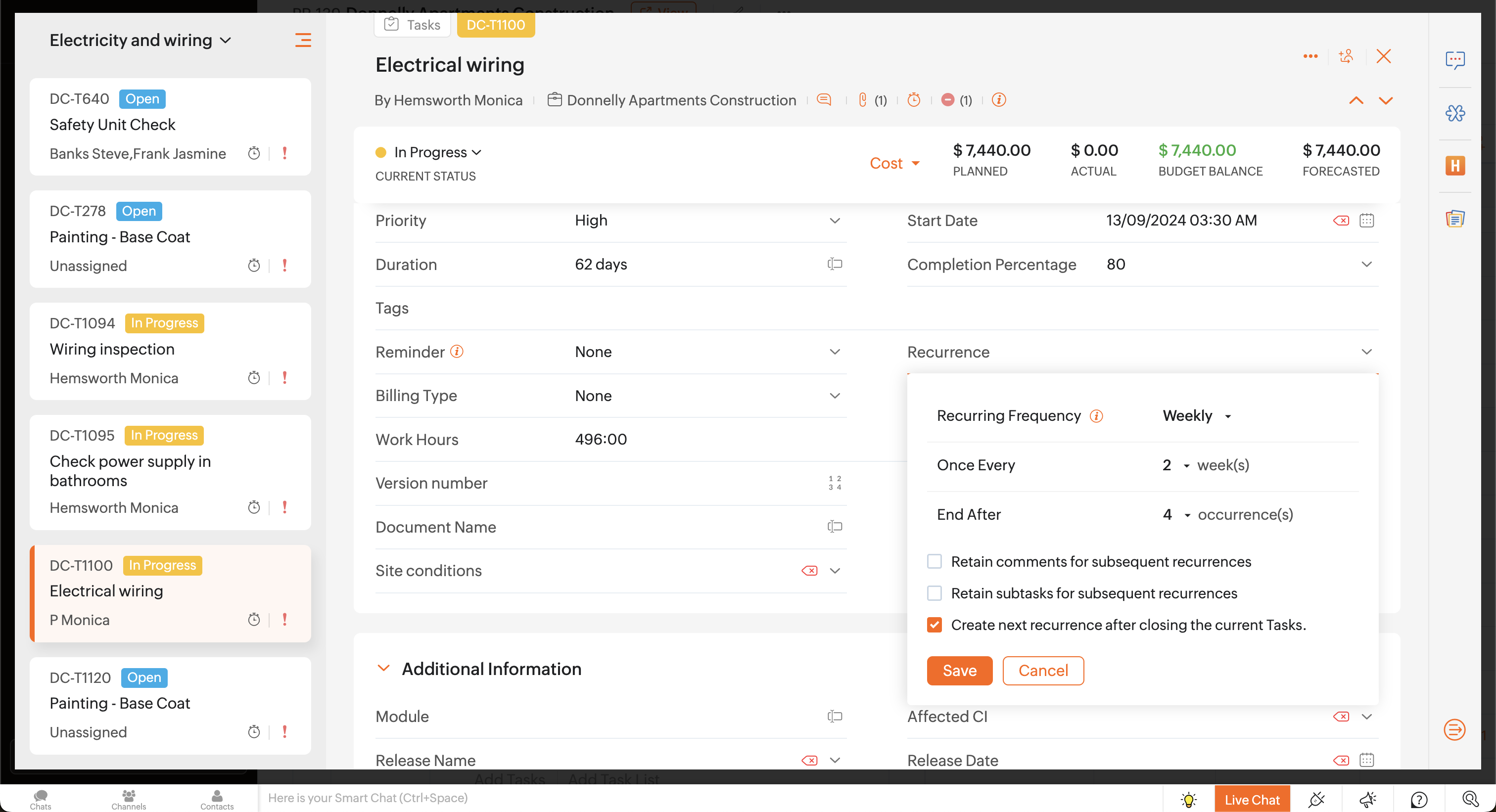
Click on an existing task or create a new task. And then click Make it Recurring to set the recurring frequency. You can set it to repeat daily, weekly, monthly, or yearly. You can also choose to end the task after a specific number of occurrences or repeat the task forever, without an end date.


How are recurring tasks differentiated from the other tasks?

Recurring tasks are highlighted with the recurring icon.

Where can you view the recurring tasks?

You'll see the recurring tasks on the Calendar, Gantt Chart, and Resource Utilization Chart. Although, the future recurring tasks are not created until the previous one is completed, you can view them virtually.  

Future instances of recurring tasks are displayed virtually based on their recurring frequency. In the Calendar, you can open and edit only the active recurring task; the virtual recurring tasks cannot be edited. Neither can you perform any action on those virtual tasks, they just serve as a reminder for your convenience about the project schedule.

Future instances of recurring tasks are also displayed virtually in both the Gantt and Resource utilization charts. Only the active recurring task is displayed as task bar, whereas the future instances of recurring tasks are displayed as dotted lines, just as a reminder.

Reminders

You can also set reminders for your tasks, to manage your project schedule. 


Set reminders for tasks

Click on an existing task or create a new task to set the reminder.  Click Remind on and then select the desired option to set reminders. 

 In Remind on, if you select:

  • None : There will be no reminder mails for tasks.
  • Daily : Reminder mails are triggered daily from the scheduled date in Start Date until the Due on date. (Mail notification is sent every day, from the selected start date until its due date.) Also, based on Business Hours settings, reminder mails are sent even if the task Start Date and End Date falls on a weekend or holiday.
  • On the same day : Reminder mails are triggered only on the scheduled Due on date. (Mail notification is sent only on the due date of the task.) Also, based on Business Hours settings, reminder mails are sent even if the task Due on date falls on a weekend or holiday.
  • day(s) : You can set reminder mails to be triggered for any desired number of days, ahead of the scheduled  Due on date. For example, you can set reminder mails to be triggered 3 days before the Due on date. Also, based on Business Hours settings, if you have skipped weekends in you settings, reminder mails are calculated and sent skipping the weekend or holiday.
The reminder for the task is then successfully updated. And an email is also automatically triggered for the set time period. However, you cannot set reminders for elapsed dates.

Let us know, for what events you have created recurring tasks in your project.

Regards,
Mughil David

    • Sticky Posts

    • Four types of task dependencies

      "Nothing is particularly hard if you divide it into small jobs."                                                                                                                  - Henry Ford Projects, small or large, are driven by simple work units called tasks. Monitoring standalone tasks might look simple but as the workflow becomes elaborate, tasks may start relying on one another. In project management, this relationship between tasks is termed as "Task Dependencies". Dependency between tasks arise
    • Tip: How to print the Gantt View

      Though we move from the traditional project management system (using papers) to an online project management system, we still prefer to have a printed copy of the activities/tasks that are to be done in the project. This way, we can carry the to-do lists with us for the meetings and refer when we are offline. The print option, available at the right side of the page, allows the users to print the project information across all the modules. However, this option failed to print all the tasks & milestones
    • Task and Project numbering

      Zoho Projects now generates a unique number for each project, task, and issue added. The auto-generated ID is a combination of a prefix and a number which is assigned by Zoho Projects. The unique IDs for projects, tasks, and issues will be useful to track, identify, and search easily. You can modify the settings to enable or disable the Project and Task IDs.  Learn more on how to modify Prefix & ID settings for projects and tasks. Issue IDs cannot be disabled, only its prefix can be changed (tasks
    • Task Inline Editing Enhancement

      Hi All, Today, we have made an enhancement in task inline editing. In 4.0, task edit is moved in a single screen in a pop-up. We designed this in-order to make the task edit across the product to be the same. Let it be in Feeds, Tasks & My Tasks tab, Calendar & My Calendar tab, a click on the task title will open the popup and user can edit the values. Customers pointed us the inline editing was very useful to them & how much they miss that in 4.0. Based on the feedback, we have rolled out this enhancement.
    • Blueprint in Zoho Projects

      Often, we stumble upon tasks having the same status workflow. Repetitive task processes are tedious to handle, right? That’s why we have introduced Blueprint for task automation. Blueprint is a tool to organize tasks and automate them based on the workflow you design and the criteria you define.    How do I associate tasks with a blueprint? You can set the criteria while creating the blueprint such that when you publish a blueprint, the tasks that satisfy the criteria will be associated with the
      • Recent Topics

      • Zoho → ShipStation Integration – Sales Order–Driven Fulfilment Workflow

        Hello All, I’m reaching out to explore the best way to integrate a shipping tool into our inventory which will speed our process up. We are looking to integrate ShipStation into our existing order-to-fulfilment workflow, as we’re keen to standardise on
      • Is there an equivalent to the radius search in RECRUIT available in the CRM

        We have a need to find all Leads and/or Contacts within a given radius of a given location (most likely postcode) but also possibly an address. I was wondering whether anyone has found a way to achieve this in the CRM much as the radius search in RECRUIT
      • Sub-Form Padding in CSV Export

        Hi, When you use the Sub-Form, and for example you have a Date Field on the Main Page, then Option 1 and Option 2 fields on the Subform, when you export this to CSV the Date column will only have the Date in 1 row, the first row, it would be nice to pad
      • CRM gets location smart with the all new Map View: visualize records, locate records within any radius, and more

        Hello all, We've introduced a new way to work with location data in Zoho CRM: the Map View. Instead of scrolling through endless lists, your records now appear as pins on a map. Built on top of the all-new address field and powered by Mappls (MapMyIndia),
      • Allow Text within a Formula

        Hi, I would like to be able to use this for others things like taking an existing Date Field and copying its value, so by entering getDay(Date)&"-"&getMonth(Date)&"-"&getYear(Date) it results in 01-02-2026. And then when the Date is changed so is this
      • Change Number Field to Decimal Field

        Hi, It would be nice to be able to change the field type without having to delete it and create a new one, messing up the database and history. Thanks Dan
      • Pipeline.Company Name field shows up as numbers! [Bigin Developer Console > Component > URL]

        Hi there, I am setting up to invoke URL to send infromation zoho bigin > zoho forms with company name pre-fill in the form. however when I use : ${Pipelines.Company Name} field it shows up as a string of number instead of words. Help.
      • Ability to Edit YouTube Video Title, Description & Thumbnail After Publishing

        Hi Zoho Social Team, How are you? We would like to request an enhancement to Zoho Social that enables users to edit YouTube video details after the video has already been published. Your team confirmed that while Zoho Social currently allows editing the
      • Add specific field value to URL

        Hi Everyone. I have the following code which is set to run from a subform when the user selects a value from a lookup field "Plant_Key" the URL opens a report but i want the report to be filtered on the matching field/value. so in the report there is
      • Print Sales Orders, Purchase Orders or Invoices from API

        Hello, Is it possible to use the print option that is available in Sales Orders Purchase Orders and Invoices with the API?. I don't see any information in the docs about this. Thanks
      • How to show a hided report??

        in CRM Report , I clicked Hide incidently , how to show the floder again? Nowhere I can find the hided report floder...
      • How to Move Behavior, Acquisition, Polls & Forms Data from Zoho PageSense to Zoho Analytics?

        Hi Zoho Community, I'm looking for a way to transfer data from Zoho PageSense to Zoho Analytics, specifically: Behavioral data (clicks, scrolls, heatmaps, etc.) Acquisition data (traffic sources, campaigns, etc.) Polls and forms data As far as I can tell:
      • How create a draft via workflow?

        I wish to create a workflow rule for specific emails that creates a draft response - not an automatic email reply, but just a draft with a set response ready to be verified by an agent who can then manually select recipients. Alternatively, the workflow
      • Zoho Social - Feature Request - Non-US Date Format

        Hi Social Team, I have noticed that there is no option to change the date format from US mm/dd/yyyy to others like dd/mm/yyyy. It would be great to see this added as the platform matures. Thanks for considering this feedback.
      • Google Fonts Integration in Pagesense Popup Editor

        Hello Zoho Pagesense Team, We hope you're doing well. We’d like to submit a feature request to enhance Zoho Pagesense’s popup editor with Google Fonts support. Current Limitation: Currently, Pagesense offers a limited set of default fonts. Google Fonts
      • Zoho vault instal on windows

        I am trying to use Zoho Vault Desktop for Windows, but I am unable to complete the sign-in process. Problem description After logging in to my Zoho account and clicking Accept on the authorization page, nothing happens. The application does not proceed
      • Dependent / Dynamic DropDown in ZohoSheets

        Has anyone figured out a way to create a Dropdown, the values of which is dependent on Values entered in the other cell ?
      • In arattai received message can't be deleted

        The issue has been noticed in following: arattai app (Android) arattai app (Window) arattai web While the message posted by me may be deleted, the ones received from others can't be. The item <Delete> change to <Report> when the message is a received
      • Zoho CRM Community Digest - December 2025 | Part 1

        Hello Everyone! In the first half of December, Zoho CRM rolled out auto-invite for portals, smarter CPQ with Zia suggestions and price rules, and Query Workbench for faster query building. We also highlight other noteworthy conversations you shouldn’t
      • Create static subforms in Zoho CRM: streamline data entry with pre-defined values

        Last modified on (9 July, 2025): This feature was available in early access and is currently being rolled out to customers in phases. Currently available for users in the the AU, CA, and SA DCs. It will be enabled for the remaining DCs in the next couple
      • Marketing Tip #15: Rank better with keyword-rich URLs for product pages

        Your product page URL is a small detail that can make a surprisingly big difference. Clean, readable URLs help in two ways: They’re easier for customers to trust and remember (no one likes clicking a link that looks messy or random). They help search
      • Zoho Flow Credits

        Hi , I would like to ask the reason why every time I added plus credit but few days later I will return back to default? (as below I add credit to 3000 but today It change back to 1000) Most important is, when the credit fully used, not any reminder to
      • Custom Module Send Email not filling To automatically after adding Email field also

        I create custom module in zohoCRM but problem is in custom module when i click send email there in popup To is filling automatic its coming empty which i need to manually add an email there. How can I fix it? I already added the Email field there, but
      • Introducing Intake Forms

        We are excited to announce the release of Intake Forms, a new feature in Zoho Contracts designed to make contract requests simple, structured, and efficient. Intake Forms allow organization members to request new contracts through a web form instead of
      • Manage control over Microsoft Office 365 integrations with profile-based sync permissions

        Greetings all, Previously, all users in Zoho CRM had access to enable Microsoft integrations (Calendar, Contacts, and Tasks) in their accounts, regardless of their profile type. Users with administrator profiles can now manage profile-based permissions
      • Date Filters in Zoho Desk Dashboard

        Hello Team, Currently, in the Zoho Desk dashboard, the date filter is available only for daily, weekly, and monthly views. Could we also add a yearly date filter to allow filtering by an entire year? Additionally, in the custom date filter, it is currently
      • eIDAS 2.0: What's changed for digital trust in Europe, and where Zoho Sign stands

        Hi there! It's that time of year when many of us get our ducks in a row. A new year often makes us reassess priorities, and for businesses in the EU, it means taking a closer look at how digital identities and electronic signatures work across borders,
      • Directly Edit, Filter, and Sort Subforms on the Details Page

        Hello everyone, As you know, subforms allow you to associate multiple line items with a single record, greatly enhancing your data organization. For example, a sales order subform neatly lists all products, their quantities, amounts, and other relevant
      • Zoho CRM for Gmail Extension Not Working in Brave Browser?

        Is anyone able to get the Zoho CRM Chrome Extension working in the Brave browser? They're both built on the Chromium platform and every other Chrome Extension works with the exception of Zoho CRM for Gmail so any ideas here?
      • Add Israel & Jewish Holidays to Zoho People Holidays Gallery

        Greetings, We hope you are doing well. This feature request is related to Zoho People - please don't move it to zoho one! We are writing to request an enhancement to the Holidays Gallery in Zoho People. Currently, there are several holidays available,
      • How to track a contact or customer's past product purchases in Bigin Premiere?

        Hello there. I am the sole user of Bigin for a small company (chess club), and would like to track current and past purchases made by a contact (player) or company (family which includes the player). Players may register for multiple tournaments, take
      • Any update on much requested feature, to delete attachments without deleting the e-mail body?

        People have been requesting the ability to delete e-mail attachments without deleting the e-mail for more than ten years now. The latest I see is marked "Working On It" and a year ago it was supposedly being added, see here: https://help.zoho.com/portal/en/community/topic/is-there-a-way-to-delete-mail-attachments-without-deleting-the-text
      • How to delete attachments form Zoho mail accounts

        I can't find a way to delete attachments from Zoho mail messages, either individually or in bulk. Searches here are providing conflicting results and often talk about workspace, whereas I am only interested in how to delete attachments that are seen with
      • Unable to fetch ticket by custom field value

        I'm trying to set up a Flow to fetch a ticket based on a custom field value. This seems like it should be pretty straightforward, but it's not working for me. I keep getting an error saying Zoho Desk says "Extra query parameter 'cf_creator_record_id'
      • Client Portal ZOHO ONE

        Dear Zoho one is fantastic option for companies but it seems to me that it is still an aggregation of aps let me explain I have zoho books with client portal so client access their invoice then I have zoho project with client portal so they can access their project but not their invoice without another URL another LOGIN Are you planning in creating a beautiful UI portal for client so we can control access to client in one location to multiple aps at least unify project and invoice aps that would
      • Issues with Zoho Sheet in Mac

        I have downloaded the Zoho App from App Store but It is failing to Save As, Open & Download Operations. App Store
      • IA ou je peux trouver comment utiliser IA

        Je voudrais utiliser IA dans l'interface zoho pour m'aider quand j'ai des questions de rôle partage ou autre configuration d'automatisation, j'utiliser ChatGPT externe mais il ne connait pas toujours l'interface zoho et les réponses sont parfois longue
      • Zoho Inventory - Composite Items - Assembly - Single Line Item Quantity of One

        Hi Zoho Inventory Team, Please consider relaxing the system rules which prevent an assembly items from consisting of a single line item and outputting a quantity of 1. A client I'm currently working with sells cosmetics and offers testers of their products
      • Editing the Ticket Properties column

        This is going to sound like a dumb question, but I cannot figure out how to configure/edit the sections (and their fields) in this column: For example, we have a custom "Resolution" field, which parked itself in the "Ticket Information" section of this
      • Cliq iOS can't see shared screen

        Hello, I had this morning a video call with a colleague. She is using Cliq Desktop MacOS and wanted to share her screen with me. I'm on iPad. I noticed, while she shared her screen, I could only see her video, but not the shared screen... Does Cliq iOS is able to display shared screen, or is it somewhere else to be found ? Regards
      • Next Page