Revenue Management: #3 Revenue Recognition Simplified

Revenue Management: #3 Revenue Recognition Simplified


In continuation of the previous post on how to compute revenue recognition, let's explore a solution that helps businesses handle real-world complexities. While the Accounting Standards provide a clear framework for recognizing revenue, the real challenge lies in implementing that guidance in daily practice. Managing multiple contracts, bundled offerings, and varying billing models can quickly complicate things and delay financial reporting.


To bridge the gap between the guidelines and the actual business routine, you need a tool that can automate the entire process. Zoho Billing brings the five-step model to life through its full-fledged, automated revenue reporting. 

Zoho Billing flexes into Revenue Recognition reporting by adopting the Accounting Standards of IFRS 15 and ASC 606. With Zoho Billing, one can define when and how revenue can be recognized. Its reporting provides businesses with a detailed breakdown of when revenue is recognized, when it is kept as deferred, and its projections.


What do you configure?

In Zoho Billing, you can define a  "Recognition Rule" where you can create and assign different rules for your services. The attributes, while configuring the rules, are:


Recognition Period:

Define how often you wish to recognize your revenue.

  • Monthly: The revenue will be recognized every month. This is ideal for subscription-based services that offer monthly or weekly renewals.

  • Quarterly: Revenue will be recognized every three months, which aligns with most businesses' standard financial reporting cycle.

  • Yearly: The revenue will be recognized after every year. This is suitable for long-term contracts and high-value payments.

  • Once: The revenue will be recognized once and for all. This is suitable for milestone-based businesses or one-time service deliveries.


Recognition Method:

This will help you determine what and how revenue is recognized. For your simple understanding, we will provide one example for each of these recognition methods.

  • Daily: Total revenue is divided over the service period and recognized based on the number of days in the service period.

  • Evenly Distributed: Total revenue is divided evenly across the subscription or recognition period.

  • Evenly Distributed (with Prorated Values): Revenue that is recognized will be prorated based on the start date of the subscription.


Recognition Time:

Businesses need to define when to recognize revenue. You can determine whether revenue is recognized at the period's start or end.

If you choose,

  • Period Start: Revenue will be recognized when the service period begins. Prepaid subscription-based services commonly follow this. In this way of recognition, January's revenue is recognized in January itself.

  • Period End: Revenue will be recognized when the service period ends. This is suitable for contacts who bill quarterly.

These rules ensure that the revenue is recognized automatically and periodically as and when the service is delivered.


What do you get?

Zoho Billing automatically allocates the revenue between Recognized Revenue and Deferred Revenue. Over the contract term, the deferred revenue decreases as recognized revenue increases. The system will auto-generate:


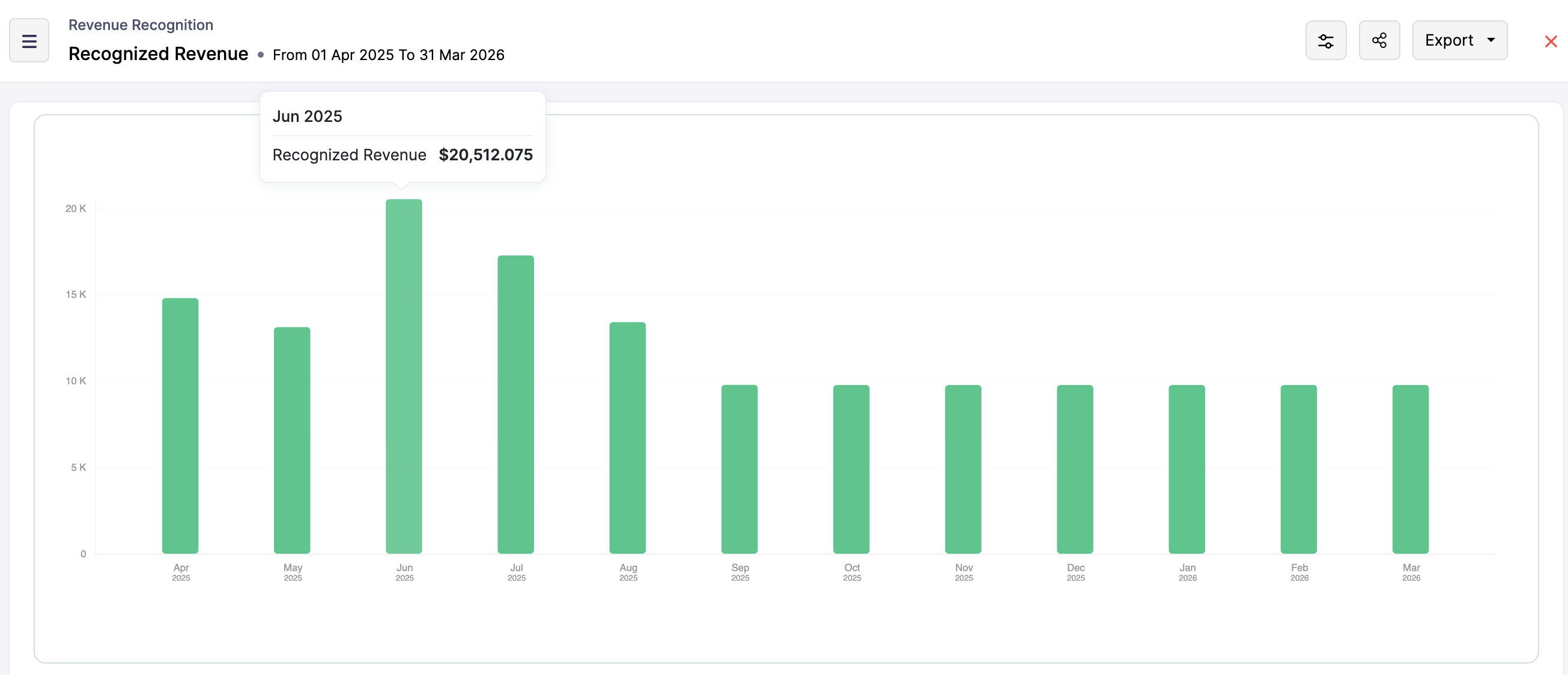
Recognized Revenue Report: This report reflects income from completed performance obligations, providing insights into current financial performance. We have narrowed it down to give recognized revenue by customers as well as items.


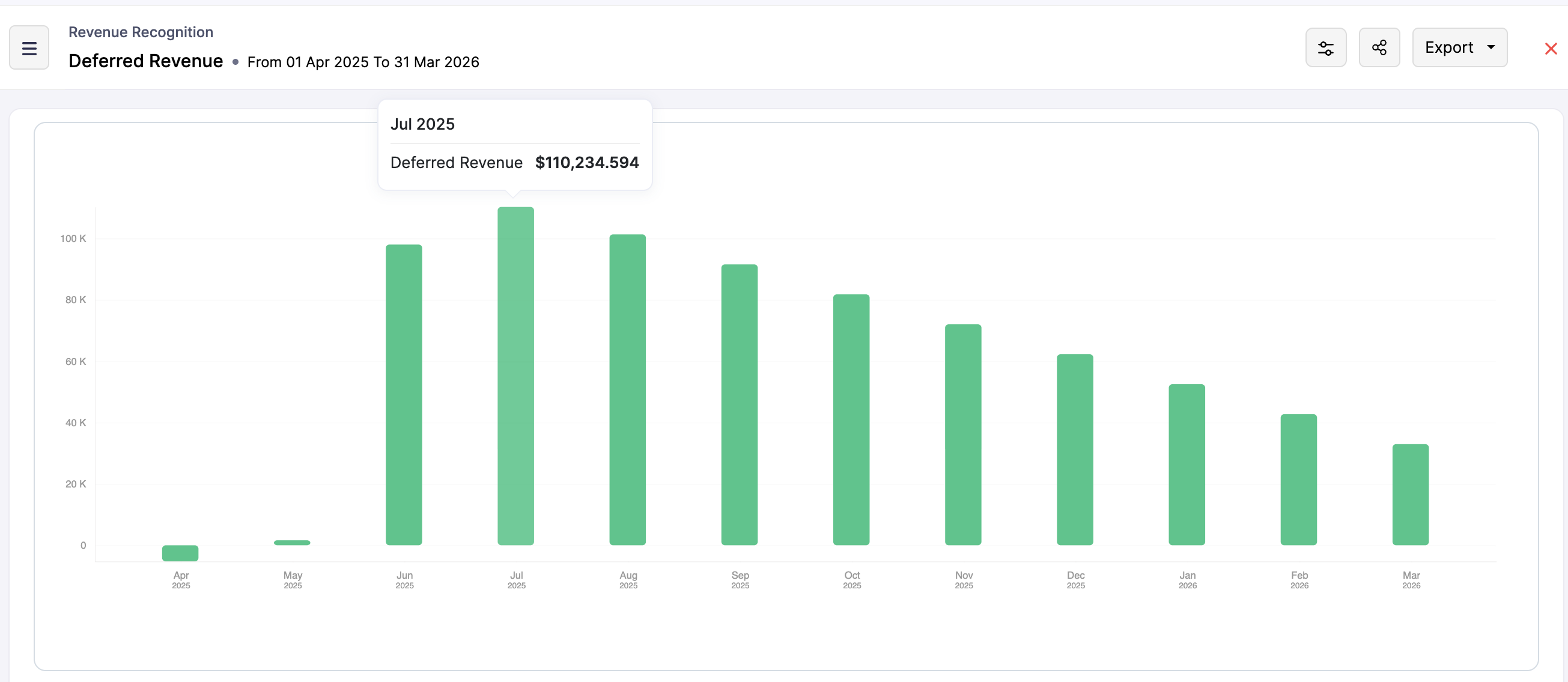
Deferred Revenue Report: This report tracks revenue that has been invoiced or received in advance but not yet earned. It highlights liabilities on the balance sheet and represents future revenue to be recognized as obligations are fulfilled.


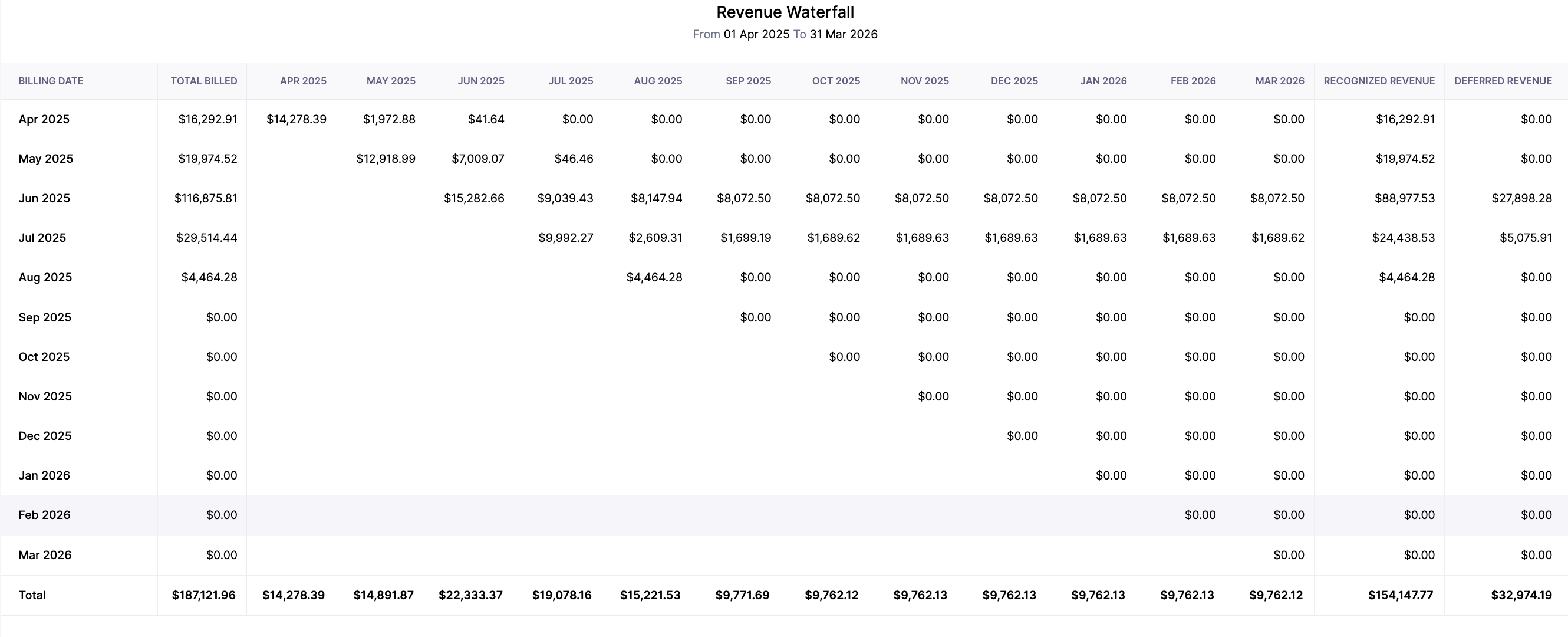
Revenue Waterfall Report: This report visualizes the flow of revenue over time, showing how deferred revenue transitions to recognized revenue. It provides a timeline of revenue recognition, offering insights into trends and future earnings.


These reports are export-ready and built to support audits and stakeholder reporting.


Zoho Billing simplifies revenue recognition by transferring complex accounting standards into practical, automated processes. With configurable rules, flexible methods, and in-depth reporting, businesses can ensure that their recognized and deferred revenue is tracked accurately and transparently. This automated process removes guesswork for a subscription-based model and helps the finance team stay on top of their revenue reporting.


Alert
But automation is not always the answer. In industries that work on projects, they are often tied to irregular milestones and unpredictable timelines. In such cases, automated recognition rules may not fully capture the reality of the project delivery. Guess what! Zoho Billing keeps you covered if you are into such businesses.

In the next post, we will understand the logic behind the Manual Revenue Recognition that Zoho Billing offers. 


    • Sticky Posts

    • Community Learning Series | Digest #5 — September 2020

      Dear customers, We're happy to bring you the September edition of our #CommunityDigest! Keep track of your subscription KPIs right from your smartphone: Last month, we enhanced our Android mobile app to help our customers get daily updates on their business health. We got to know from a lot of customers that this has made their job much more easier because they no longer have to keep a reminder to manually check on the previous day's revenue or activations. If you have not downloaded it yet, here's
    • Community Learning Series | Digest #4 - August 2020

      Dear customers, We hope you're staying safe and healthy. I'm happy to bring you the fourth edition of our #CommunityDigest with some brand-new updates from us. 1. Daily Business Updates (for Android users) The Zoho Subscriptions Android app has got a cool new update: You can now get a push notification to your smartphone that lets you know how many activations and cancellations have taken place, and what's the net revenue for the previous day. The best part is, you can tell the app when exactly you
    • Community Learning Series | Digest #3 - July 2020

      Dear customers, We hope you're staying safe and healthy. We're glad to bring you the July edition of our #CommunityDigest. New community members can view our previous newsletters here. This time, we have two major updates and three interesting topics for you: 1. Zoho Subscriptions Developer Community Since the inception of Zoho Subscriptions, our team believed that the recurring billing platform we provide should be able to offer an extensive API library that empowers businesses to automate most
    • Introducing: Community Learning Series | Digest #1 - May 2020

      Dear customers, We hope you are staying safe and healthy. Helping businesses manage their customer subscriptions more efficiently has always been, and always will be, our goal at Zoho Subscriptions. We strongly believe this is possible if we grow together as a community and share what we know with each other. To nurture this shared learning experience, here is our brand-new Community Learning Series! ​ Welcome to the first edition of our digest! Each edition of our community digest includes guides
      • Recent Topics

      • Primary / Other Billing Contacts

        If you add an additional contact to a Zoho Billing Customer record, and then mark this new contact as the primary contact, will both the new primary and old primary still receive notifications? Can you stop notifications from going to the additional contacts
      • Missing Import Options

        Hello, do I miss something or is there no space import option inside of this application? In ClickUp, you can import from every common application. We don't want to go through every page and export them one by one. That wastes time. We want to centralize
      • CRM x WorkDrive: File storage for new CRM signups is now powered by WorkDrive

        Availability Editions: All DCs: All Release plan: Released for new signups in all DCs. It will be enabled for existing users in a phased manner in the upcoming months. Help documentation: Documents in Zoho CRM Manage folders in Documents tab Manage files
      • Is it possible to enforce a single default task for all users in a Zoho Projects ?

        In Zoho Projects, the Tasks module provides multiple views, including List, Gantt, and Kanban. Additionally, users can create and switch to their own custom views. During project review meetings, this flexibility creates confusion because different users
      • Admin asked me for Backend Details when I wanted to verify my ZeptoMail Account

        Please provide the backend details where you will be adding the SMTP/API information of ZeptoMail Who knows what this means?
      • Timeline Tracker

        Hi Team, I am currently using Zoho Creator – Blueprint Workflows, and I would like to know if there is a way to track a timeline of the approval process within a Blueprint. Specifically, I am looking for details such as: Who submitted the record Who clicked
      • [Free Webinar] Zoho Creator webinars - Learning Table and Creator Tech Connect Series in 2026

        Hello everyone, Wishing you all a wonderful new year! May 2026 and the years ahead bring more opportunities, growth, and learning your way 🙂 We’re excited to kick off the 2026 edition of the Learning Table Series and Creator Tech Connect Series ! Learning
      • Reply and react to comments

        Hi everyone! We're excited to bring to you a couple of new features that'll make your sprint process simpler. A cloud application brings with it an array of social media features that can be efficiently used in your organizational setup. As an agile scrum
      • Restrict Users access to login into CRM?

        I’m wanting my employees to be able to utilize the Zoho CRM Lookup field within Zoho Forms. For them to use lookup field in Zoho Forms it is my understanding that they need to be licensed for Forms and the CRM. However, I don’t want them to be able to
      • How to set page defaults in zoho writer?

        hi, everytime i open the zoho writer i have to change the default page settings to - A4 from letter, margins to narrow and header and footer to 0. I cannot set this as default as that option is grayed out! so I am unable to click it. I saved the document
      • Where is the settings option in zoho writer?

        hi, my zoho writer on windows has menu fonts too large. where do i find the settings to change this option? my screen resolution is correct and other apps/softwares in windows have no issues. regards
      • Module Customisation - Lookup function not available

        Good evening, Within my business, I can have multiple customers, who have multiple mobile assets. When I set these assets up, I enter information such as vehicle registration, Vehicle identification number (VIN), Unit number, YOM, in addition to others.
      • zoho click, and nord VPN

        Unfortunately, we've been having problems with Zoho Click, where essentially the line cuts off after about a minute's worth of conversation every time we are on VPN. Is there a way we can change this within the settings so it does not cut the line off
      • Zoho Calender

        a) does the clanender in zoho project allow you to see the name of the event in the celnder view, it currently says either "Task (1) or "Milestoen (1)" b) Alternatively does the calender in Zoho project integrate with zoho calender?
      • I Need Help Verifying Ownership of My Zoho Help Desk on Google Search Console

        I added my Zoho desk portal to Google Search Console, but since i do not have access to the html code of my theme, i could not verify ownership of my portal on Google search console. I want you to help me place the html code given to me from Google search
      • Matching ZOHO Payments in Banking

        Our company has recently integrated ZOHO Payments into our system. This seemed really convenient at first because our customers could pay their account balance by clicking on a link imbedded in the emailed invoice. Unfortunately, we can't figure out how
      • Team Gamification

        Would love to motivate, engage and encourage our team with our social media posts. Would like to include Gamification features of Social Media in Zoho Social or Marketing Automation. And also bring in Social Advocacy tools/tracking/management to these,
      • Power up your Kiosk Studio with Real-Time Data Capture, Client Scripts & More!

        Hello Everyone, We’re thrilled to announce a powerful set of enhancements to Kiosk Studio in Zoho CRM. These new updates give you more flexibility, faster record handling, and real-time data capture, making your Kiosk flows smarter and more efficient
      • New Enhancements to Zoho CRM and Zoho Creator Integration

        Hello Everyone, We’ve rolled out enhancements to the Zoho Creator and Zoho CRM integration to align with recent updates made to the Zoho Creator platform. With enhancements to both the UI and functionality, This update also tightens access control by
      • Work Type - Limitation

        Hello, I'm setting up work types and have noticed, a limitation on the parts area to 10 lines. Can this be increased to 20 or greater? In addition to this, when I attempt to add the work type to a work order, the correct labour hours doesn't flow through.
      • Emails sent through Bigin are not posting in IMAP Sent folder

        I have set up my email to work from within Bigin using IMAP.  I am using IMAP so I can sync my email across multiple devices - phone / laptop / desktop / iPad / etc.  I want all my emails to populate my email client (outlook & iphone email) whether or
      • Adding Default Module Image into mail merge field

        As with most people finding their way to these forums i have a specific requirement that doesn't seem to be supported by Zoho I have created 2 custom modules to suit my purpose 1 is an inventory type module that lists aluminium extrusions, and all relevant
      • Turning the page for Zoho SalesIQ: 2025 to 2026

        As we wrap up 2025, we would like to take a moment to reflect on what we set out to achieve this year, what we’ve delivered, and where we’re headed next. What we focused on in 2025 This year was all about strengthening the core of engagement and AI, making
      • Stage-probability mapping feature in custom module

        Hi, I'm building a custom module for manage projects. I would like to implement the stage-probability feature that Potentials has. Is this possible?
      • Temporary Outage in Zoho Cliq Affecting US Users – July 23, 2025

        We experienced a service disruption in Zoho Cliq that impacted core functionality for users in the US region. The issue occurred between Jul 23, 2025, 06:54:00 PM IST and 07:13:13 PM IST, lasting approximately 19 minutes. To restore service stability,
      • Why Sharing Rules do Not support relative date comparison???

        I am creating a Sharing Rule and simply want to share where "Last Day of Coverage" (Date field) is Greater than TODAY (Starting Tomorrow). However, sharing rules don't have the option to compare a date field to a relative date (like today), only to Static
      • Zoho Cliq not working on airplanes

        Hi, My team and I have been having this constant issue of cliq not working when connected to an airplane's wifi. Is there a reason for this? We have tried on different Airlines and it doesn't work on any of them. We need assistance here since we are constantly
      • Problem with Workdrive folders

        I'm having a problem a problem accessing files in a Zoho work drive folder when using the Zoho writer app. The problem folder appears grayed out in the Zoho work drive window in both the online and writer application. However I can open the folder in
      • Send Supervisor Rule Emails Within Ticket Context in Zoho Desk

        Dear Zoho Desk Team, I hope this message finds you well. Currently, emails sent via Supervisor Rules in Zoho Desk are sent outside of the ticket context. As a result, if a client replies to such emails, their response creates a new ticket instead of appending
      • Multi-currency and Products

        One of the main reasons I have gone down the Zoho route is because I need multi-currency support.  However, I find that products can only be priced in the home currency, We sell to the US and UK.  However, we maintain different price lists for each. 
      • Create an Eye-Catching Announcement Widget for Your Help Center

        Hello Everyone! In this week’s edition, let’s explore how to keep your customers updated with exciting news in the Help Center. See how ZylkerMobile wowed their customers by bringing updates right to their portal. ZylkerMobile, the renowned brand for
      • Send Whatsapp with API including custom placeholders

        Is is possible to initiate a session on whatsapp IM channel with a template that includes params (placeholders) that are passed on the API call? This is very usefull to send a Utility message for a transactional notification including an order number
      • Customer Management: #6 Common Mistakes in Customer Handling

        Managing customers doesn't usually fall apart overnight. More often, slight gaps in the process slowly become bigger problems. Incidents like missed follow-ups, billing confusion, and unhappy customers will lead to revenue loss. Many businesses don't
      • Zoho Desk iOS app update: UI enhancement of picklist and multi picklist fields

        Hello everyone! We have enhanced the UI of the picklist and multiselect picklist fields on the Zoho Desk iOS app to provide a more refined, efficient, and user-friendly experience. We have now supported an option to Search within the picklist and multiselect
      • Zoho Desk iOS app update: Revamped scribbles with Apple pencil kit

        Hello everyone! We’re excited to introduce a revamped Scribble experience, rebuilt from the ground up using Apple PencilKit for smooth strokes, proper scaling, and seamless image uploads. Please update the app to the latest version directly from the App
      • Zoho Desk Android app update: Norwegian language support

        Hello everyone! In the most recent Android version of the Zoho Desk app update, we have brought in support to access the app in Norwegian language. We have introduced the Norwegian language on the IM module of the Zoho Desk app as well. Please update
      • Field Description is very small

        Hello, The field Description in the activity is very small. Why don't try open a new window, or a bigger popup, or increase the width of the "popup".  Example:
      • Is it possible to roll up all Contact emails to the Account view?

        Is there a way to track all emails associated with an Account in one single view? Currently, email history is visible when opening an individual Contact record. However, since multiple Contacts are often associated with a single Account, it would be beneficial
      • Function #53: Transaction Level Profitability for Invoices

        Hello everyone, and welcome back to our series! We have previously provided custom functions for calculating the profitability of a quote and a sales order. There may be instances where the invoice may differ from its corresponding quote or sales order.
      • Payment Vouchers

        Is there any Payment Vouchers in Zoho? How can we create payment for non-trade vendors, i.e. professional fees, rent, and payment to commissioner income tax?
      • Next Page