Spotlight series #4: Efficiently collaborate with your team using Zoho Show

Spotlight series #4: Efficiently collaborate with your team using Zoho Show

Hello everyone!


We're back with another Zoho Show feature in the spotlight.


Online collaboration has become a necessity. Even with the way the pandemic has changed working environments, collaboration helps save time and ensure that tasks are completed seamlessly. With Zoho Show you can work with your team on presentations in real time. Show's "Invite Collaborator" feature helps you overcome the limitations of your work environment and efficiently create slide decks with your team.


What is Invite Collaborator?


The Invite Collaborator feature helps you share your presentation with your team so you can work on it together, at the same time, regardless of where you're located.


How do you share a presentation with your team?


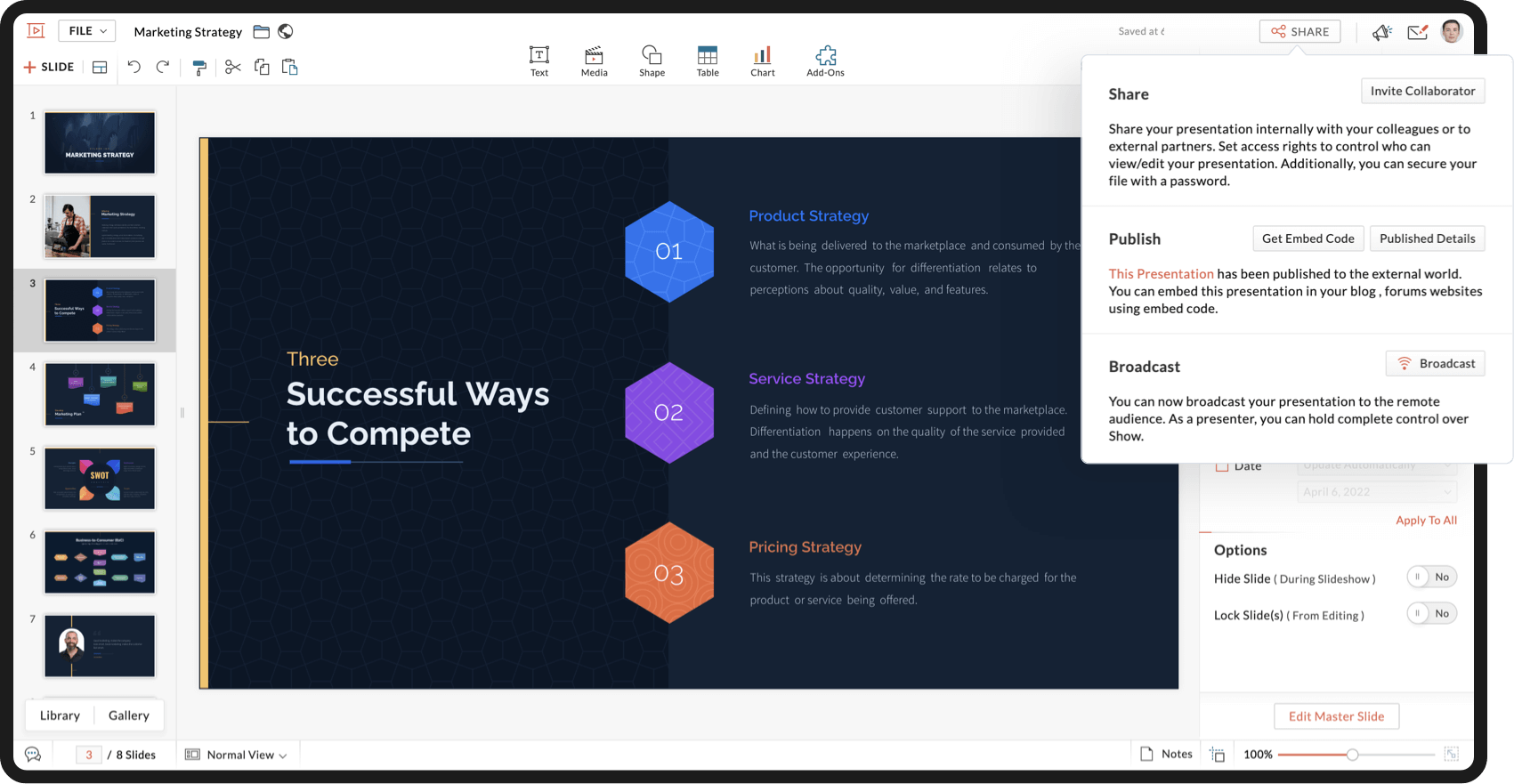
Open the presentation. From the top right of the main interface click Share, and select Invite Collaborator. You can either add the email addresses of your team members or copy the permalink and share it with them. They will now be able to access your presentation.


Can you set permissions for your team?


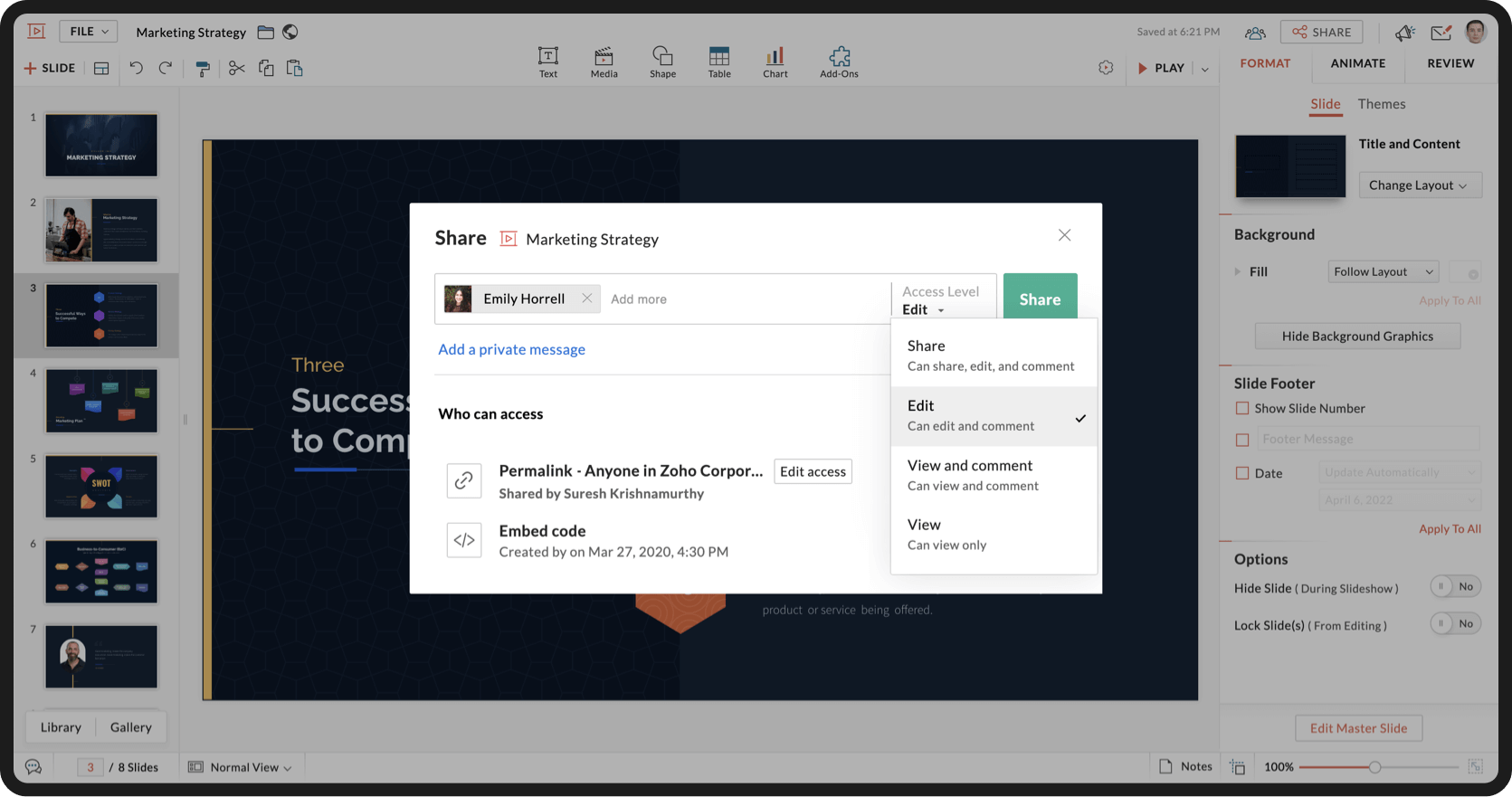
With Show, you can assign different access levels to collaborators at the time of sharing your presentation. The access levels are:


Share: The collaborator can share, edit, and comment on the presentation.

Edit: The collaborator can edit and comment on the presentation.

View and comment: The collaborator can view and comment on the presentation.

View: The collaborator can only view the presentation.


How do you know who is working on a slide?


Zoho Show offers real-time collaboration. You'll be able to view changes as they're made by collaborators.


Can you have discussions about a slide?

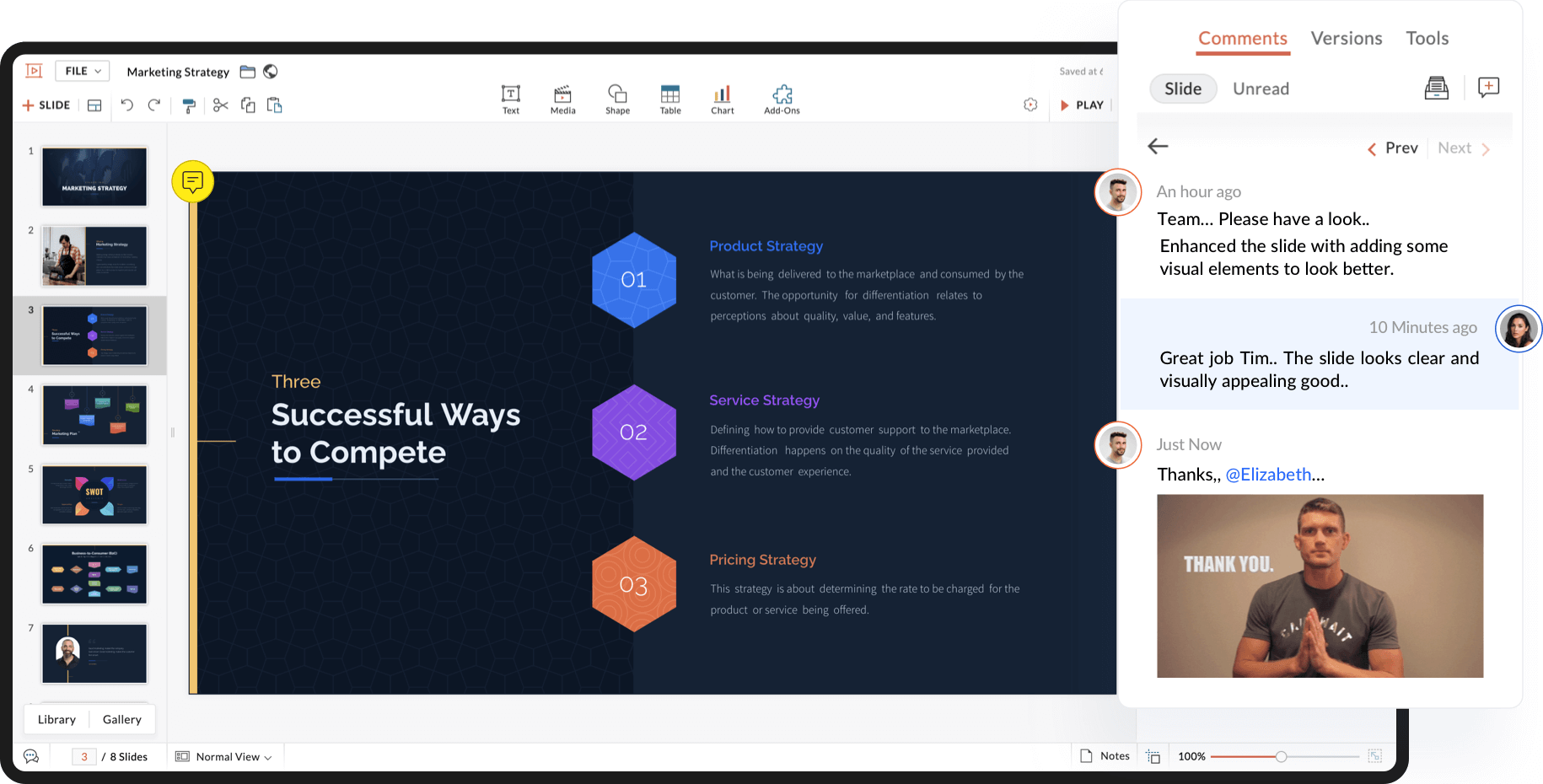
You can discuss ideas and suggest changes for every element of a slide with Show's contextual commenting.


Let's say you want to recommend changes to a certain image on a slide. You can either:


  1. Click the image, choose REVIEW from the right pane, and select Comments (or)

  2. Click the REVIEW tab, choose Comments, and click on the image (or)

  3. Right click the image and select Add Comment.


You can notify your collaborators using the @ symbol followed by their name or email address. You can change your font color and add emojis to your comments.


What if you do not want your team to access a slide that you are working on?


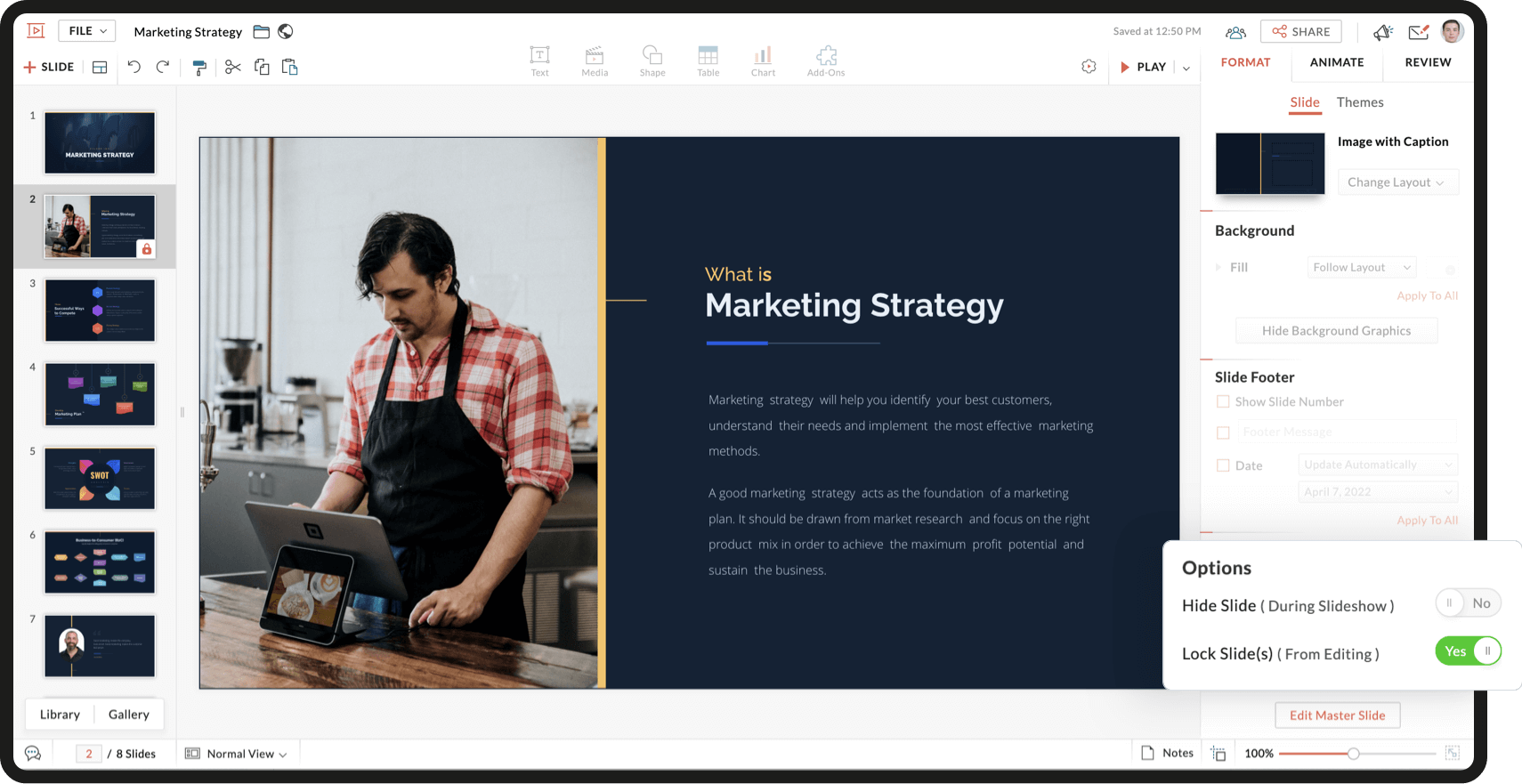
You can lock your slide! Collaborators will not have access to the slide until you choose to unlock it.


In the left pane of the editor interface, you will be able to view the slides as thumbnails. Right click on a thumbnail and choose Lock Slide. To unlock it, click on the lock icon in the bottom-right corner of the thumbnail.


You can also go to the right pane, select FORMAT, and check the Lock Slide switch to lock and unlock the selected slide. 


Can you lock an entire presentation?


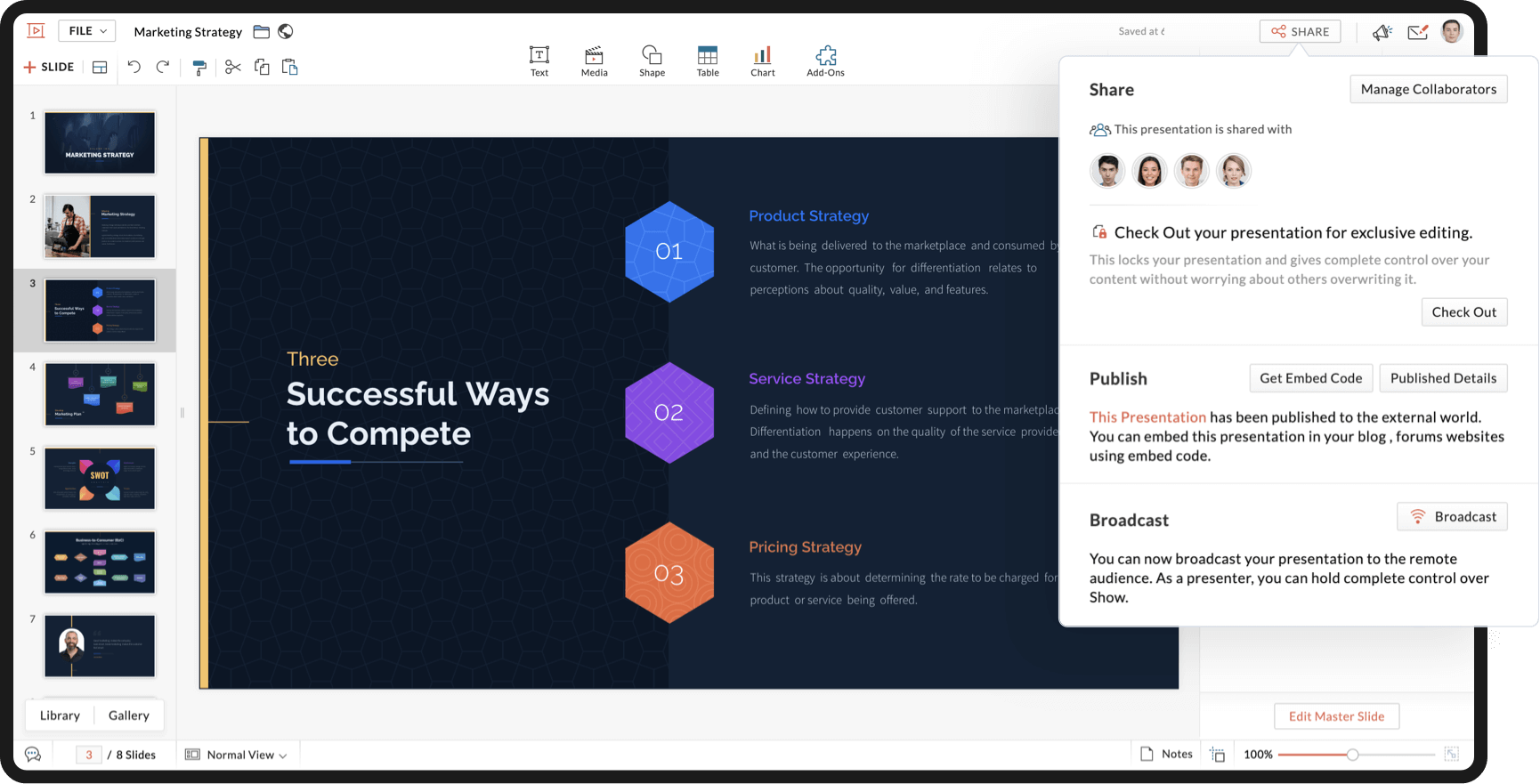
Collaborators with Share access can lock an entire presentation with the Check Out option. When you check out, your collaborators will be able to view the latest version of your presentation, but not make changes. You can use the Check In option to make the presentation available for collaborators to work on.


To lock and unlock your presentation, select Share and choose Check Out to lock your presentation and Check In to unlock it.


When collaborators open a presentation, they will receive an alert if it is locked, and another alert when it is made available for collaboration.


Is there anything else you should know?


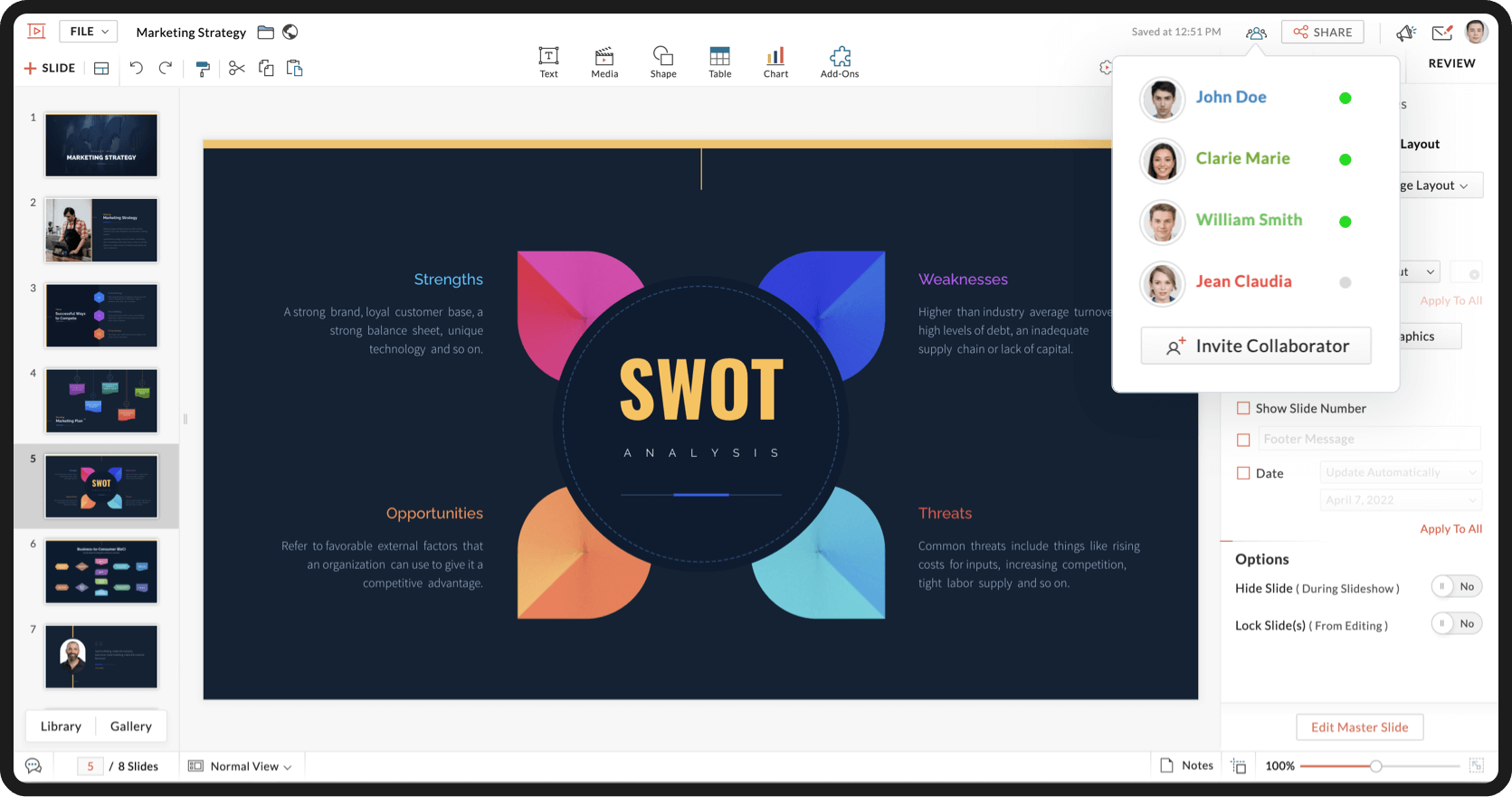
To see if your team members are online or offline, click the Collaborators icon next to SHARE.


When you work together, you work faster!


We hope you found this article helpful. Watch this space for interesting product updates, tips and tricks, and more!


To create engaging slides with Zoho Show, click here.


      • Recent Topics

      • Spotlight #7 - Automatic Transitions in Blueprint

        Previously, records could not be moved from one state to another without user intervention. With automatic transitions, move records from one state to another automatically, when it elapses its pre-defined time. This Spotlight discusses how automatic
      • Whatsapp Connection Status still "Pending" after migration

        Hello, I migrated my WhatsApp API to Zoho from another provider a day ago. So far the connection status is still “Pending”. There is a problem? How long does it usually take?
      • Adding Multiple Files to a Zoho Vault Entry

        There is a old blog post talking about adding multiple file attachments to one Zoho Vault Secret: https://www.zoho.com/blog/vault/introducing-new-features-in-zoho-vault-powerful-password-sharing-wider-storing.html Is that still possible, I can see how
      • Get user last login

        1. Is there a way to programmatically get the last user login to trigger certain workflows? 2. Is there a way to programmatically access the custom fields on a user's account?
      • Dropshipping Address - Does Not Show on Invoice Correctly

        When a dropshipping address is used for a customer, the correct ship-to address does not seem to show on the Invoice. It shows correctly on the Sales Order, Shipment Order, and Package, just not the Invoice. This is a problem, because the company being
      • Add Attachment Support to Zoho Flow Mailhook / Email Trigger Module

        Dear Zoho Support Team, We hope you are well. We would like to kindly request a feature enhancement for the Mailhook module in Zoho Flow. Currently, the email trigger in Zoho Flow provides access to the message body, subject, from address, and to address,
      • Zoho Invoice Customer Login Portal

        Are there any plans for a customer portal to Zoho Invoice, ala Freshbooks?  I would like customers that I invoice to be able to login to review invoices and invoice history.  I have not switched from Freshbooks for this very reason.
      • the custom domain forwards by default to the old career site / how to switch it off??

        dear friends, how to switch off the old version of the career site?? The set up custom domain forwards directly to the old site, so that I cant publish it... Any ideas? Thank you! KR, Victoria
      • Partner with HDFC And Sbi Bank.

        Hdfc and sbi both are very popular bank if zoho books become partner with this banks then many of the zoho books users will benefit premium features of partnered banks.
      • Can Zoho Flows repeat Actions more than once?

        I'm attempting to make an intentional Zoho Flow loop using the below layout. However, when "WithinLimit" condition is met, the program fails to execute the action "Get & Add Request Co..." again. Is this by design? Is Zoho Flows unable to repeat actions
      • What KPIs Do You Use to Measure Your Support Team’s Performance in Zoho Desk?

        Hi everyone, We hope you’re all doing well. We are trying to improve how we measure the performance and effectiveness of our support department, and we would really appreciate learning from the community. We assume there are several common and widely-used
      • Preserve Ticket Issue Mapping When Migrating from Jira to Zoho Projects

        Hello Zoho Projects Team, We hope you are doing well. We are currently exploring a full migration from Jira to Zoho Projects, and we identified a critical limitation during the migration process involving Zoho Desk integration. Current Situation: We use
      • Resend Client Portal Invitation + View Email Delivery Status

        Hi Zoho Team, We hope you are doing well. We would like to request two important enhancements related to the Zoho Creator Client Portal invitation process. At the moment, when we add a user to the Client Portal, Zoho Creator automatically sends an invitation
      • CRM iOS App Missing Tags support

        Hi, I remember reading either a tread on iOS (Maybe Later) & Android (i believe Now Supported) regarding “Tags” in the mobile apps unfortunately I can’t seem to find either. Could we clarify are “Tags” support coming to CRM iOS app as searching the forums
      • Imported contacts succesful but contacts do not show up in Contacts

        I imported +300 contacts. I can see them in import history. When clicking on a contact in import history I see all the imported contact details for any given contact. So import seems to be successful.   However the imported contacts do not show up in the contacts tab. Not in All contacts, and not in a filtered view where they absolutely should show up. The search function also does not find any imported contact.   Help?
      • Hotmail is STILL blocking the zoho mail IP

        Greetings, as I already mentioned in my last message, my Zoho IP has been blocked by Hotmail for more than 15 days. Although someone said that the issue was "solved," it still isn't, and this amount of time seems neither normal for a "serious" company,
      • Pre-fill webforms in Recruit

        I don't want to use the career site portal (as I have my own already), but I would like to direct users to the application forms for each role, from my website job pages. Is there a way to pre-fill fields in Recruit application forms, so that I only have
      • Zia Actions: AI-powered Workflow Automation for Faster and Smarter Execution

        Hello everyone, Workflows got a notch better with AI-based actions. Actions such as field extraction, prediction, auto reply, and content generation facilitate quick execution with improved speed and accuracy. Zia can intercept useful details in newly
      • Import KB template OR Export template for zoho desk?

        Greetings. Can you tell me if there is a way to get an EXPORT of my KB articles? OR is there a template you supply for importing KB articles into my zoho desk? I am looking for a method of understanding what fields can be imported, and what their possible
      • This user is not allowed to add in Zoho. Please contact support-as@zohocorp.com for further details

        Hello, Just signed up to ZOHO on a friend's recommendation. Got the TXT part (verified my domain), but whenever I try to add ANY user, I get the error: This user is not allowed to add in Zoho. Please contact support-as@zohocorp.com for further details I have emailed as well and writing here as well because when I searched, I saw many people faced the same issue and instead of email, they got a faster response here. My domain is: raisingreaderspk . com Hope this can be resolved.  Thank you
      • XML format to import knowledgebase into Zoho Desk

        Hi, We just started to use Zoho Desk and want to import our knowledgebase from our old support system (Freshdesk) to Zoho Desk. Can anyone give us information about the format of xml file to import? There is no explanation on the related page.
      • Can we add custom fields to portal community profiles?

        How do we add custom fields to our profile pages in our portal community? If we have the ability to add custom fields, will we be able to access those fields via API? We want to use our Desk community in our help portal as our primary community and would
      • Weekly Sales Summary

        Is it possible to generate a weekly report in Zoho Books to show -$$ amount of estimates generated -# of estimates generated by Salesperson -$$ amount of Sales Orders created -$$ amount of Invoices generated
      • Client Portal ZOHO ONE

        Dear Zoho one is fantastic option for companies but it seems to me that it is still an aggregation of aps let me explain I have zoho books with client portal so client access their invoice then I have zoho project with client portal so they can access their project but not their invoice without another URL another LOGIN Are you planning in creating a beautiful UI portal for client so we can control access to client in one location to multiple aps at least unify project and invoice aps that would
      • Restrict Addresses in Zoho Forms?

        In the address field, is there a way to restrict the addresses that auto populate (via Zoho Maps or Google Maps) to a specific state (I know it's possible with the country). Additionally, how often does the address in Zoho Maps get updated? Certain addresses
      • Do Individual Forums within Categories, in Desk Community, Produce Their Own RSS Feed?

        Do Individual Forums within Categories, in Desk Community, Produce Their Own RSS Feed? If not, can anyone share a work-around that could help me get an RSS feed for individual category forums?
      • ASAP Widget Not showing "My Tickets"ed

        Hello Team, I have created a ZOHO ASAP Widget and embedded to my portal app.clearvuiq.com , widget renders ok and I can open tickets from widget. However I want my opened tickets to be visible in the widget. How can I achieve that?
      • Add Zoho Forms to Zoho CRM Plus bundle

        Great Zoho apps like CRM and Desk have very limited form builders when it comes to form and field rules, design, integration and deployment options. Many of my clients who use Zoho CRM Plus often hit limitations with the built in forms in CRM or Desk and are then disappointed to hear that they have to additionally pay for Zoho Forms to get all these great forms functionalities. Please consider adding Zoho Forms in the Zoho CRM Plus bundle. Best regards, Mladen Svraka Zoho Certified Consultant and
      • How to view CRM Sales Orders in Desk

        What's the usual way to view all CRM sales orders linked to a contact, when viewing a ticket in Desk? I don't want to have to open a new tab to see the order in CRM. And the Desk CRM sidebar doesn't seem to be configurable. Would I have to use an extension
      • Kaizen #219: Actions API - Webhooks APIs - Part 1

        Hello all!! Welcome back to a fresh Kaizen week. In the previous weeks, we covered Workflow Rules APIs, Actions APIs - Email Notification APIs, Tasks Update API, and Field Update API. This week, we will continue with another Actions API - Webhooks API
      • Pricing Strategies: #3 Services never Stop with just Plans

        "Hey, while you're here, could you also take a look at the vegetable patch?" Aaron hears that line almost every week. He runs a small gardening service, the kind where customers subscribe to a simple monthly plan that includes basic maintenance, mowing,
      • Presenting ABM for Zoho CRM: Expand and retain your customers with precision

        Picture this scenario: You're a growing SaaS company ready to launch a powerful business suite, and are looking to gain traction and momentum. But as a business with a tight budget, you know acquiring new customers is slow, expensive, and often delivers
      • Lead Blueprint transition in custom list view

        Hi, Is It possible to insert the Blueprint transition label in a custom Canvas list view? I am using Lead module. I see the status, but it would be great if our users could execute the Blueprint right from the list view without having to enter the detailed
      • Cropping Photos for Zoho Sites

        Hi, I'm wondering if there is a built in crop tool for zoho sites for my photos so I can crop them and see what the crop looks like on the site?
      • Deluge scripts

        Why is there not a search function to make it easier to find the script of interest when modifications are required.
      • WorkDrive and CRM not in sync

        1/ There is a CRM file upload field with WorkDrive file set as the source: 2/ Then the file is renamed in WorkDrive (outside CRM): 3/ The File in CRM is not synced after the change in WorkDrive; the file name (reference) in CRM record is not updated (here
      • zoho sheet stuck

        I Need help. ZOHO sheets stuck on the loading screen. I've already deleted the system cache and cookies of my browser (google chrome) but it's still not opening. 
      • bulk edit records and run internal logic

        hi there is few logics in manner "it this than that" logics work well when i edit entry openning it one by one (via workflow "on add/edit - on success" , for custom field "on update/on user input") but when i try bulk edit records - logic does not work.  how can i turn on logic to work as programmed - for mass editing records via bulk edit?
      • Duplicate Accounts

        Hi There, I am looking for a solution, script, workflow or anything to solve an issue we have - in our customers section we have a rule that doesn't allow duplicates, however Zoho will allow customers with xxxxx and xxxxx PLC or LTD so effectivley we
      • Invoice Ref. Field

        Hello Team, Currently, the Invoice Ref. field is set to a Number type with a maximum limit of 9 digits. However, we often receive customer invoices that contain up to 12 digits. In some cases, the invoice reference includes not only numbers but also letters
      • Next Page