Tip #1: Cómo importar tus contactos a Bigin
 Tips and Tricks #1 para Bigin by Zoho CRM, por Alejandro Mora
¡Hola usuarios!
Hoy iniciamos una nueva serie de Tips and Tricks, esta vez sobre uno de nuestros productos más intuitivos, Bigin. ¡Bienvenidos a los Tips and Tricks de Bigin by Zoho CRM!
El uso de herramientas de gestión de clientes, oportunidades y procesos de venta se ha convertido en una parte esencial y fundamental dentro del buen funcionamiento de cualquier empresa que desee comercializar sus productos. Normalmente, este tipo de herramientas suele recibir el nombre común de CRM (Customer Relationship Management).
No todos los CRM son iguales ni todos los CRM solucionan los mismos retos que como empresa te puedes llegar a plantear durante tu actividad. Es por ello que, a la hora de elegir una herramienta, es importante que conozcas bien en detalle todos los aspectos que puede ofrecerte, cómo se compenetra con tus objetivos y cómo los puede potenciar para asegurar el éxito de tu organización.
Tip #0 ¿Qué pasa con mis clientes?
Para poder alcanzar los éxitos de tu empresa tenemos que empezar por la génesis de todo, tus clientes. Sin ellos nada es posible y sin ellos poco puedes hacer como compañía.
Existen infinidad de métodos para conseguir nuevos clientes y potenciales clientes con sus contactos correspondientes. Y aunque a primera vista parece algo positivo es en cierta medida un regalo envenenado. Tarjetas de presentación, correos electrónicos, contactos en LinkedIn, llamadas telefónicas, reuniones en eventos, seminarios, amigos de amigos... Todo esto son fuentes diferentes de información con las que poco a poco vas construyendo tu cartera de clientes pero observarás que cada uno puede venir de una parte muy diferente. Esto puede hacer que acabes teniendo decenas de ficheros con contactos que en muchos casos puede que estén duplicados y te acabe restando eficiencia en tus negocios. Otro problema es que con diferentes archivos no tendrás una imagen completa de cuál es la situación del cliente y si tienes algún acuerdo próximo a cerrar.
Tip #1 Cómo importar mis clientes a Bigin
Para ello, Bigin by Zoho CRM es una de las mejores soluciones en el mercado. Con su capacidad de poder importar contactos desde prácticamente cualquier fuente de origen, Bigin te permite tener centralizados todos tus contactos y poder establecer un seguimiento de los mismos para poder cerrar tratos (pero esto te lo explicaremos en el siguiente Tip).
Para poder importar los contactos primero de todo debemos ir a la sección de contactos y en la esquina derecha pinchar en la flecha y seleccionar la opción Importar Contactos.
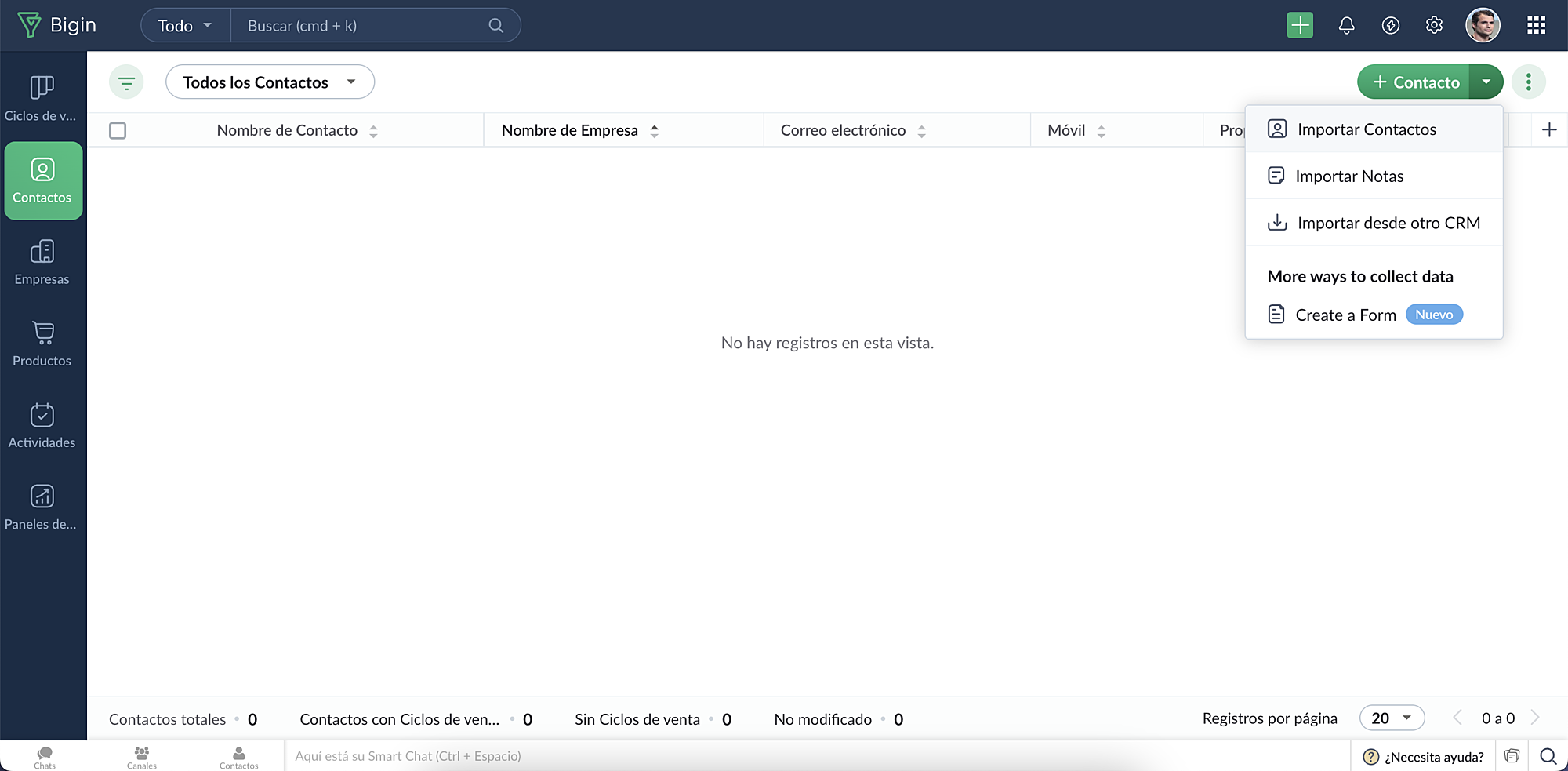
Aquí tendrás que subir todos los archivos en hojas de cálculo en los que tienes tus contactos. Si este no es el caso, no te preocupes, ya que te facilitamos un fichero de ejemplo para que puedas llevar a cabo la importación de manera óptima.
Una vez completado el proceso, podrás personalizar los últimos detalles para tener todo listo para ponerte manos a la obra.
Esperamos que os haya gustado este primer Tip y la serie de consejos sobre cómo utilizar Bigin by Zoho CRM que empezamos hoy. Esperemos que os sorprendan. ¡Nos vemos en los comentarios!
Topic Participants
Elsa Perpiñá Subiñas
Recent Topics
I can't set office hours in SalesIQ.
I can't find the option to enable business hours in SalesIQ. Can someone please help me? Thank you.Tip#45: Custom Tags and Cluster Tags
Tagging your work items helps categorize and label work items within your Zoho Sprints workspace. Now, this feature is expanded across multiple modules, along with the introduction of cluster tags that offer an advanced tagging mechanism. Manage Tags[Free Webinar] User Management in Zoho Creator - Creator Tech Connect
Hello Everyone! We welcome you all to the upcoming free webinar on the Creator Tech Connect Series. The Creator Tech Connect series is a free monthly webinar that runs for around 45 minutes. It comprises technical sessions in which we delve deep intoA couple of minor enhancements to Workflows
Last updated on September 17, 2024: These enhancements were initially available for early access, and we've now enabled them for all users. We are elated to announce a couple of enhancements to custom functions in our Workflows! Say hello to: "Source"Business Continuity - Disaster Recovery
I know about the Zoho CRM backup .zip files, however, this doesn't include any of the infrastructure with like custom fields or custom modules. I am curious on what everyone has in place for a true backup or what your plan is if your Zoho instance wereNarrative 11: Are your customers happy?
Behind the scenes of a successful ticketing system: BTS Series Narrative 11: Are your customers happy? Happiness isn't just something you experience; it's something you remember. Hear your customers' voices by enabling customer happiness ratings in ZohoDon't understand INVALID_REQUEST_METHOD when I try to post up an attachment
When I make the POST request (using python requests.post() for files): https://www.zohoapis.com/crm/v8/Calls/***************01/Attachments I get this response: r:{ "code": "INVALID_REQUEST_METHOD", "details": {}, "message": "The http request method typeSignature field is showing black
Hello, When customer signed the service form, it is showing as below picture Phone model: iPhone 16 Pro We tried delete and install application, but it not solved. This has on phone of a few person. There is any advice to solve this?Zoho CRM Android app updates: record sharing, user image upload, Zoho Survey integration, and more
Hello everyone, We've made some important improvements to Zoho CRM's Android app, and we'd like to walk you through the latest updates. Here's what's new: Record sharing with org users User image upload Zoho Survey integration support Venue preferenceHow to Delete/hide Google adwords section from Layout?
Hi people, maybe someone can tell me how to remove or hide the Google adwords section from my layout? Im not using it and it takes too much space.WIDGET in related record list ZOHO CRM; how to get and put data to subform custom fields?
he need: Read and write two custom subform line-item fields on Quotes: Segment_wyceny (picklist/text) and W_pakiecie (number). Write works; read does not return these fields via SDK. Environment Zoho CRM Widget Zoho Embedded App SDK v1.2 Module: QuotesOutgoing emails to btinternet blocked.
ERROR_CODE :421, ERROR_CODE :Too many messages (1.5.6.1) from 74.201.84.163I have been having problems sending to btinternet.com and btopenworld.com for the past week. First 'email delayed' message, and then 'delivery failed', as above. Looks as though someone is spamming from the ZOHO email server 'sender163-mail.zoho.com' Surely this is abuse of your system, and you should be able to trace who it is (if it is a registered user of Zoho mail?) and block their account. An email system is really noWay to update CRM records in quik view
I have custom module in zoho crm and that module have 500 records. I want a quick way or UI so that user can easily update the record information in quick view without going to record detail view or edit view. I tried zoho sheet option but in zoho sheetWhere to integrate Price Book and Product List Price
Hello, We sync zoho crm all modules with all data to zoho analytics. In zoho crm, we have "Price Books" and "Products" modules, where each product is assigned to a few price books with different list prices. From zoho crm, I am able to export a datasetForm / CRM Integration Not entering into workflow
I have a simple form setup with company name, first name, last name and lead source. Each of the fields are mapped to CRM Leads module. When the form is submitted, the lead is populated properly. I also have a workflow created that when the lead sourceZoho Slowness - Workarounds
Hi all, We've been having intermittent slowness and Zoho just asks for same stuff each time but never fix it. It usually just goes away on it's own after a couple weeks. Given that speed is a very important thing for companies to be able to keep up withDon't understand why Forms Mobile Scan and Fill not working
I have configure enabled mobile scan and fill, I have enabled QR and Bar code on two fields name and position, I have mapped seq 1 to Name and seq 2 to position, I have created a 2d QR code with the person names and position, seperated by a comma. WhenRecurring Supervisor Rule Reminders for Open/In-Progress Tickets
Hello Zoho Support Team, I would like to suggest a potential improvement regarding reminders for tickets and activities in Zoho Desk. Currently, it is possible to set reminders only once. In the Supervisor Rules section, it is possible to configure remindersTemplate usage
Hi, We are using some templates as a response to customer questions. Is it possible to analyze the usage of these templates? We want to know if the use of our templates has increased over timeTicket Status Colors
Can i change the colors of Ticket Status in the admin panel? Or even change the background of the entire cell of a Critical ticket? This way its easy for my agents to see a urgent ticket when it comes in. Right now everything is black text. Here RightSync Lookup Fields from Zoho CRM
HI Team, I have synced a lookup field from my CRM data to Campaigns. When I view the synced data the field appears to display a Zoho CRM record ID rather than the text value. Is it possible to get the sync to import the text value rather than the CRMNew From Address cannot verify
I have created a new From Address, which is the support@ address for my domain, that forwards to the default support mailbox. Presumably then, the verification email that is sent, should turn up as a ticket, but it does not. How can I verify my from address so that I can use my own domain?issue with image thumbnails not showing in Image Selector
We have been using Zoho Campaigns for over a year, maybe close to two years, and this issue just started happening in the last month. I wanted to wait to see if it would resolve on it's own, and it doesn't seem to be. The thumbnail images for all newDeluge Script for adding tag
Trying to create a custom function where a tag is added to a record - but for the life of me, I cannot figure out how. Help please! Moderation Update: Adding the help doc and sample to add Tags to records via deluge here for everyone's benefit. tag1 =Unlock your Zoho Vault with OneAuth, Windows Hello, TouchID, YubiKey, and many more!
Hello everyone, We are thrilled to introduce one of the most highly requested features – the ability to unlock your Zoho Vault using various authenticators. The primary purpose of a password manager is to remember just one master password and securelyCreator roadmap for the rest of 2022
Hi everyone, Hope you're all good! Thanks for continuing to make this community engaging and informative. Today we'd like to share with you our plans for the near future of Creator. We always strive to strike a good balance of features and enhancementsHow can I get base64 string from filecontent in widget
Hi, I have a react js widget which has the signature pad. Now, I am saving the signature in signature field in zoho creator form. If I open the edit report record in widget then I want to display the Signature back in signature field. I am using readFileAdd Setting Values to the Rules
Hi, It would be great to use the rules to set values in fields for submission, such as if a Type is X then set the Field Y to 10. Thanks DanSo we ran with it for the week
In our company i bit the bullet and ran with FSM for a whole week. Service calls, deliveries and surveys. Covering about 30-120 miles a day to domestic properties. Loved the appointment list and satnav integration. Loved the timer to measure the appointments.Is there a way to set Document Owner/Sender via the API
When sending requests for zoho sign, it would seem zoho uses the id of the person that created the zoho api cred to determine the owner_id, is there a way to set a default for this?What's New - September 2025 | Zoho Backstage
September has been a different month for Zoho Backstage. Instead of rolling out a long list of new features, we focused on something just as important: Performance, reliability, and stability The event season is in full swing, and organizers are runningPrevent stripping of custom CSS when creating an email template?
Anyone have a workaround for this? Zoho really needs to hire new designers - templates are terrible. A custom template has been created, but every time we try to use it, it strips out all the CSS from the head. IE, we'll define the styles right in the <head> (simple example below) and everything gets stripped (initially, it saves fine, but when you browse away and come back to the template, all the custom css is removed). <style type="text/css"> .footerContent a{display:block !important;} </style>Stock Quotes/Spreadsheet
It would be nice if we could download security and mutual fund prices from Yahoo Finance (or?) in order to maintain an up to date investment portfolio on Zoho. Any chance?link to any Belgian bookkeeping software?
Hello, Does anyone on this Forum can help me with the question whether the ZOHO CRM (Invoices) or ZOHO Book can be linked to software that is used for Belgian Bookkeeping/accountancy? By linking, I mean either with the help of a middleware program or either by the ability to export the custom made reports as CSV-files... If someone has an experience with online CRM-Accountancy in Belgium, with ZOHO (or other), it would be great to read it... Thank youmarketing automation
wants to know about the zoho marketing automationProblems with email templates (HTML - Outlook)
Hi there, I've been trying to create a newsletter from the template "Business 4". Everything looks great in the preview, but when I send it to my Outlook inbox, the layout doesn't seems to stick. More particularly: - The line-height is way more reduced, even though I used the line-height tool from the template - Columns but they are sometimes misaligned - Font size is not always the one I've selected. Could you help? Thanks!How to create a drop down menu in Zoho Sheets
I am trying to find out, how do I create a drop down option in Zoho sheet. I tried Data--> Data Validation --> Criteria --> Text --> Contains. But that is not working, is there any other way to do it. Thanks in Advance.Introducing Keyboard Shortcuts for Zoho CRM
Dear Customers, We're happy to introduce keyboard shortcuts for Zoho CRM features! Until now, you might have been navigating to modules manually using the mouse, and at times, it could be tedious, especially when you had to search for specific modulesZoho CRM's custom views are now deployable from sandboxes
This feature is now available for users in the AU, JP, and CN DCs. This feature is now available for users in CA and SA DCs. New update: This feature is now available for users in all DCs. Hello everyone, We're excited to announce that you can now deployZoho One - Syncing Merchants and Vendors Between Zoho Expense and Zoho Books
Hi, I'm exploring the features of Zoho One under the trial subscription and have encountered an issue with syncing Merchant information between Zoho Expense and Zoho Books. While utilizing Zoho Expense to capture receipts, I noticed that when I submitNext Page