Tip #17: How to mandate partial payment for your appointments
Tip #17: How to mandate partial payment for your appointments


When you require partial payments during the booking process, customers can only schedule with you after paying a certain amount in advance. This deposit acts as a commitment between both parties. Apart from that, it has many more advantages.


Benefits of mandating partial payment

  • Reduced no-shows and cancellations: As the customer has made a deposit, it's less likely that they'll cancel or not show up for the appointment.

  • Only serious inquiries: When people have to invest financially, they will book only when they are sure about proceeding. This filters out customers who book casually with the intention of canceling later.

  • Streamlined processes: Implementing the collection of partial payment through an online scheduler reduces the time and effort needed for follow-up and manual invoicing.

  • Stable revenue: Since only serious customers pop in and book appointments, revenue will be stable for your business.

  • Better time management: As most of the bookings happen without cancellation, you can efficiently manage the time slots for staff members and resources.

Use case

Consider an event management company that has an online scheduler embedded into its website. When clients book event services, such as catering, venue rentals, event decorations, and more, a partial payment requirement ensures commitment and helps cover initial expenses. In certain industries, such as event planning, customers often explore multiple options, which indicates uncertainty about committing to a particular service provider. By mandating partial payment, event planners or service providers can safeguard themselves against last-minute cancellations. Collecting a portion upfront allows event planners to proceed confidently with organizing the events, knowing that the client is invested in the process.


Zoho Bookings allows you to set the deposit amount to be paid while booking an appointment. It provides detailed customization by allowing you to configure different partial payment costs for different services (i.e., each services can have its own deposit amount).


Steps to set up partial payment

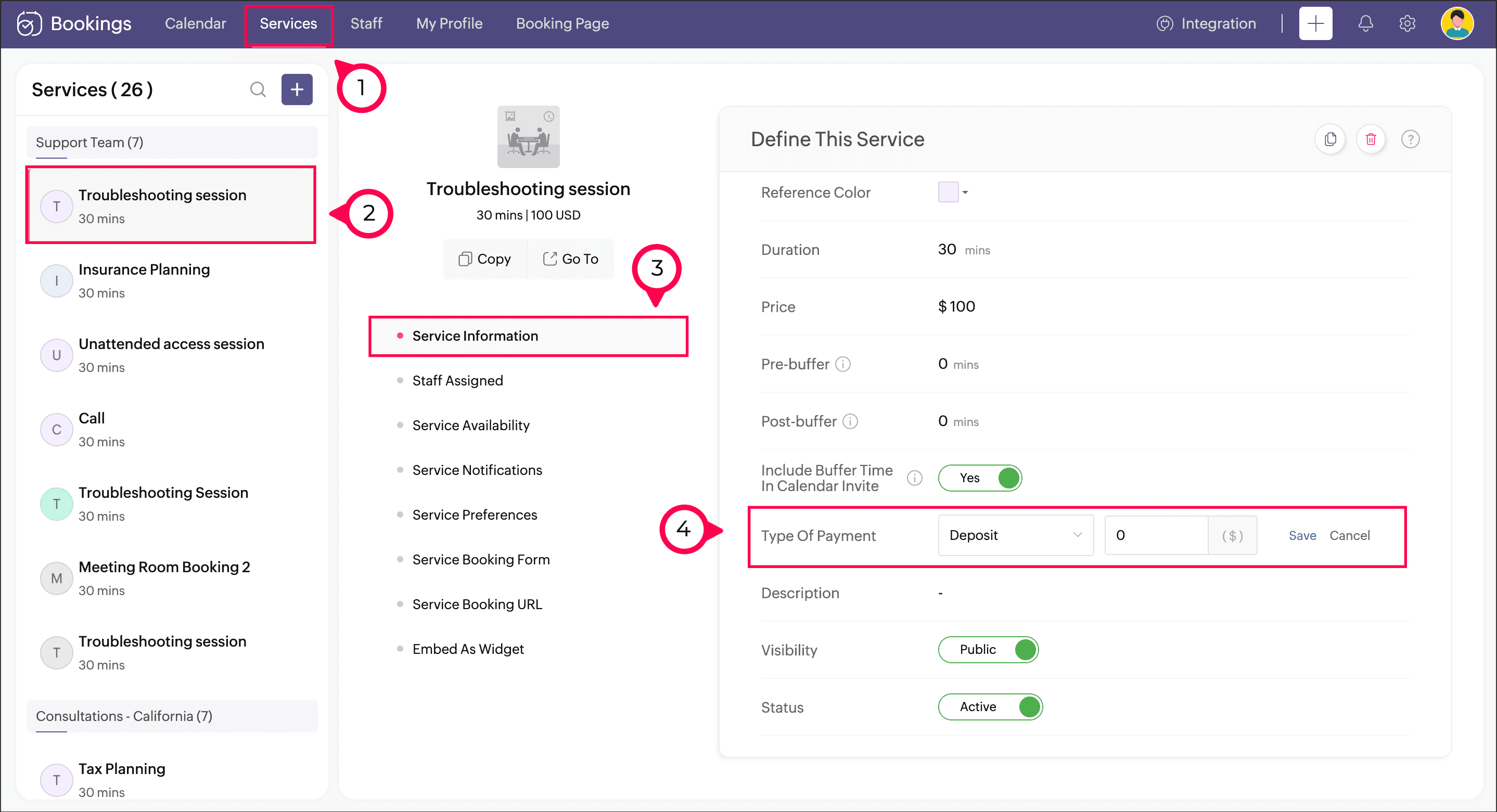
  1. Click Services on the Bookings menu bar, then select the required service on the left pane.

  1. Click Service Information in the middle pane.

  2. In the Type of Payment dropdown, select the option Deposit. A textbox will appear; enter the payment amount that should be paid in advance in the text box and click Save.


Now, when the customer tries to book a service with you, they'll be prompted to pay this deposit amount. But for this to work as intended, you'll need to configure a payment gateway:

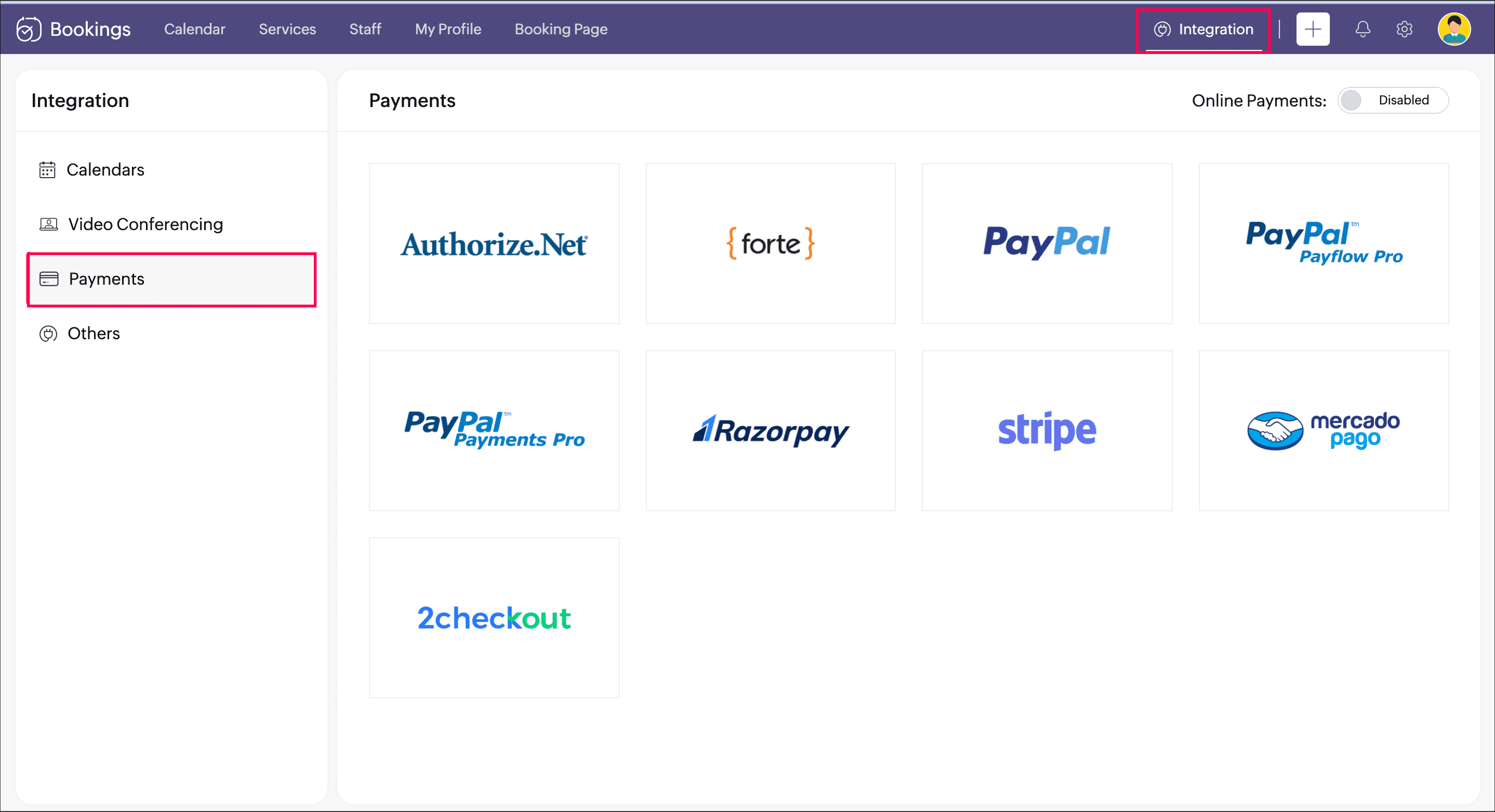
  1. Navigate to Integrations > Payments and configure any one of the payment gateways available. Refer to this help page for more details about adding a payment gateway.


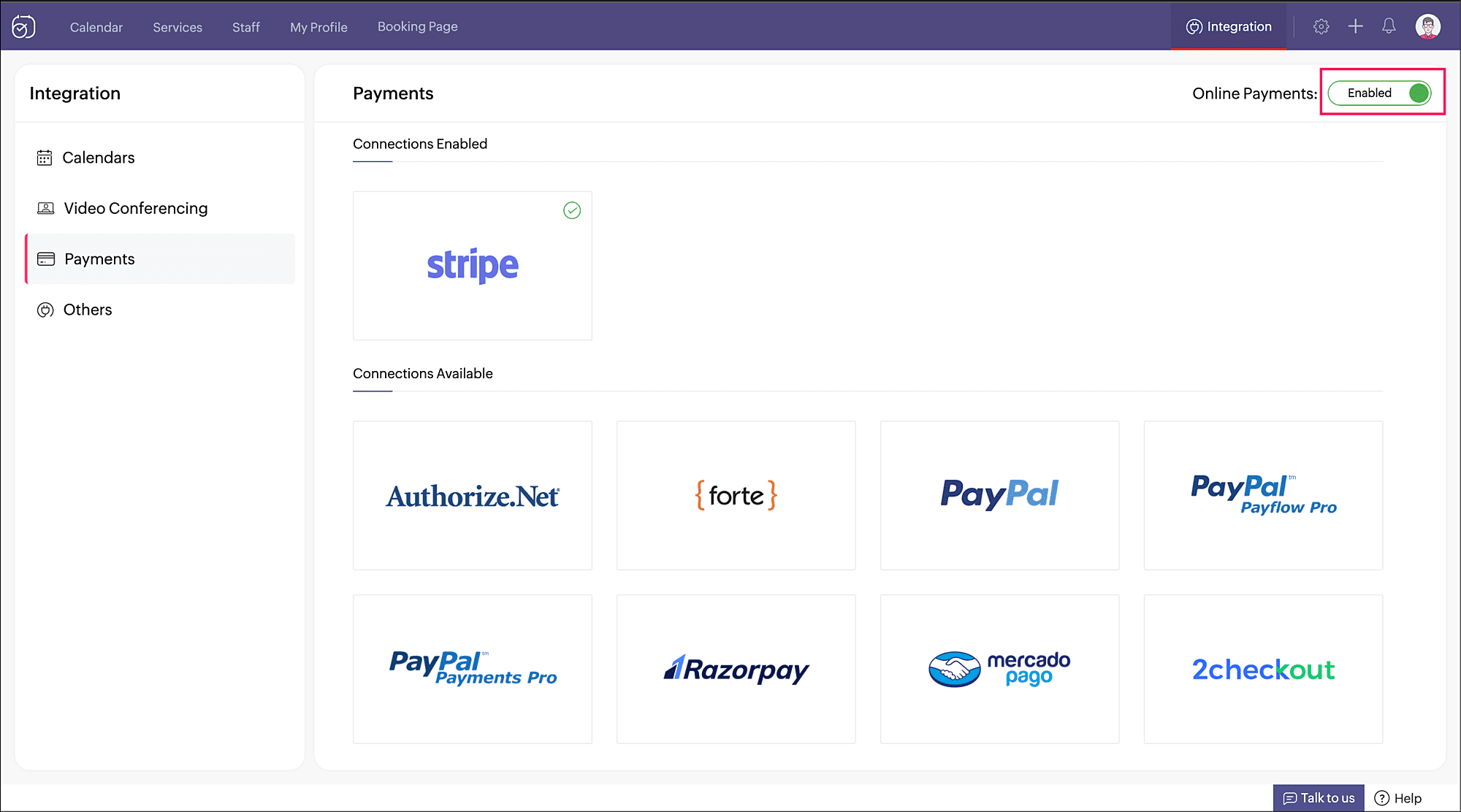
  2. After adding a payment gateway, enable the toggle beside Online Payments.


The setup is done; your booking page will allow appointments only when this deposit amount is paid.


Although implementing a partial deposit is necessary in many cases, it's also imperative that you stay flexible to show that you understand reasonable requests. This helps maintain good client relations.


Thank you for checking out this post. Please leave you questions and feedback in the comments section, or write to us at support@zohobookings.com.


Regards,

The Zoho Bookings Team


Related articles

  1. Configure Payments
  2. Payment Integration

    • Sticky Posts

    • Tip #13: Identify where your bookings come from with Source Tracking

      Source tracking is the practice of identifying where your bookings originated. This is important, because online bookings come from a wide variety of sources like social media platforms, your website, email and ad campaigns, partner websites, organic
    • Tip #17: How to mandate partial payment for your appointments

      When you require partial payments during the booking process, customers can only schedule with you after paying a certain amount in advance. This deposit acts as a commitment between both parties. Apart from that, it has many more advantages. Benefits
    • Tip #18: Organize a group workshop in a few steps

      It's the season for workshops—they're everywhere, catering to diverse interests and needs. Whether for more professional goals like leadership development or creative endeavors like painting, there's an abundance of workshops offered every day. A scheduler
    • Tip #16: Custom labels for staff, service, and resources

      Every industry uses its own jargon. Take healthcare, for example; when you visit a doctor, it's not just an appointment, it's a consultation. The people who provide consultations are the providers. Similarly, in the tranquil world of a spa, a massage
    • Tip #15: Customize service prices for each staff member

      It's common practice for a service to be priced differently based on the staff member providing it. For example, an experienced hair stylist may charge more for a haircut compared to the other stylists. This pricing strategy allows businesses to charge
      • Recent Topics

      • All new Address Field in Zoho CRM: maintain structured and accurate address inputs

        The address field will be available exclusively for IN DC users. We'll keep you updated on the DC-specific rollout soon. It's currently available for all new sign-ups and for existing Zoho CRM orgs which are in the Professional edition. Latest update
      • Detect and ignore bots in visitors

        The SalesIQ visitor numbers are basically useless to us because there is no bot detection. We get the same bots coming in from the same countries looking at the same pages every day. It can't be that difficult to tell the difference between an actual
      • Zoho Webinar + HubSpot : Simplifiez la gestion de vos données de webinaires

        Les webinaires sont aujourd’hui essentiels pour interagir avec vos prospects et vos clients. Cependant, la gestion des données entre plusieurs plateformes peut vite devenir complexe. Grâce à la nouvelle intégration entre Zoho Webinar et HubSpot, vos outils
      • Function #53: Transaction Level Profitability for Invoices

        Hello everyone, and welcome back to our series! We have previously provided custom functions for calculating the profitability of a quote and a sales order. There may be instances where the invoice may differ from its corresponding quote or sales order.
      • I am trying to give access to one of our educators access to 3 forms in Zoho and she is not able to view the data - Access issue

        Hi Team, When I try to provide read access to one of our educators on Zoho for Pre-training , post training and Impact survey forms submit form access which also allows them to read , it does not show them data
      • How to book GST paid in zoho books

        hi, i am a new user to Zoho books and not able to book GST paid in books, kindly suggest how i can book it in books. thanks, siddharth
      • Enable Screen Recording in Zoho WorkDrive Mobile Apps (Android & iOS)

        Hi Zoho WorkDrive Team, How are you? We are enthusiastic Zoho One users and rely heavily on Zoho WorkDrive for internal collaboration and content sharing. The screen-recording feature in the WorkDrive web app (similar to Loom) is extremely useful- however,
      • PUNJAB NATIONAL BANK (CORPORATE) INDIA - NOT AVAILABLE IN BANKING

        Dear sir, Kindly fix it. PUNJAB NATIONAL BANK (INDIA) is available but PUNJAB NATIONAL BANK (CORPORATE) is not available. Kindly enable this banking since we need to categorize the entries. Regards, Sanjay Jena email id/ user id : travewithmerchant@
      • Employment Contract / HRMS Documents - Zoho People

        How do I create customized HR documents for disbursal from Zoho People ? Example, say offer letters ? appointment letters ? Memos ? We want to be able to preset these in one or ther other form and issue them to employees who are in Zoho People.
      • Is it possible to create a word cloud chart in ZoHo Analystics?

        Hi there, I have a volume of transaction text that I would like to analyse using word cloud (or other approcah to detect and present word frequency in a dataset). For example, I have 50,000 records describing menu items in restaurants. I want to be able
      • Playback and Management Enhancements for Zoho Quartz Recordings

        Hello Zoho Team, We hope you're all doing well. We would like to submit a feature request related to Zoho Quartz, the tool used to record and share browser sessions with Zoho Support. 🎯 Current Functionality As of now, Zoho Quartz allows users to record
      • Zia Profile Summary now supports six languages and responds faster

        After numerous customer requests, we’ve expanded Zia Profile Summary to do more than just summarize resumes quickly. It can now summarize them in six different languages and deliver results even faster. What’s New 1. Extended language support Zia can
      • Kaizen #216 - Actions APIs : Email Notifications

        Welcome to another week of Kaizen! For the last three weeks, we have been discussing Zylker's workflows. We successfully updated a dormant workflow, built a new one from the ground up and more. But our work is not finished—these automated processes are
      • Facturation électronique 2026 - obligation dès le 1er septembre 2026

        Bonjour, Je me permets de réagir à divers posts publiés ici et là concernant le projet de E-Invoicing, dans le cadre de la facturation électronique prévue très prochainement. Dans le cadre du passage à la facturation électronique pour les entreprises,
      • Your bot just got smarter: AI-Powered routing that reads between the lines

        What if your bot could tell the difference? Between a visitor who just needs a quick answer, someone actively comparing options, and a frustrated customer one click away from leaving? Most bots can't. They deliver the same response to everyone, missing
      • Weekly Tips : Master Keyboard Shortcuts in Zoho Mail

        If you spend a lot of time managing emails, switching between your mouse and keyboard can slow you down. Whether you are replying to clients, organizing your inbox, or searching for messages, every second counts. So, how can you streamline your email
      • Introducing custom lookup fields in the Tickets, Contacts, and Accounts modules

        Hello all, We are excited to announce a new enhancement that will empower you to further customize the Tickets, Contacts, and Accounts modules. Now, you will be able to create custom lookup fields in your Tickets, Contacts, and Accounts layouts for more
      • Contacts per department

        Hello, Is it possible to limit Contacts to a Department? Thanks
      • How to restrict user/portal user change canvas view

        Hi , I would like to restrict user / portal user change their canvas view because I hide some sensitive field for them. I dont want my user switch the canvas view that do not belong to them But seems Zoho do not provide this setting?
      • Draft & Schedule Emails Directly in Bigin

        Greetings, I hope all of you are doing well. We're happy to announce a few recent enhancements we've made to email in Bigin. We'll go over each one in detail, but here's a quick overview: Previously, you couldn't draft or schedule emails in Bigin, but
      • Collections Management: #3 Tackling Payment Failures

        Sam refreshed the dashboard. "Payment failed". Same customer. Same subscription. This is happening for the third time. He sends a usual email: "Your renewal payment failed again. Could you please check and retry?" A couple of days passed, and there was
      • How do I increase the email attachment size in Zoho CRM ?

        It looks like I'm limited to 10MB when sending an attachment using the email widget on a record in Zoho CRM. Is there a way to increase the size? Or can I use some other tool? From what I'm reading online, I'm maxed out at 10MB. Any insight would be greatly
      • Custom Field in Zoho Projects pulling into Analytics

        We have a client that we have built our their new business process using Zoho Projects, and we have build a lot of custom fields with their their Projects where they are capturing specific data points that we want to be able to track and pull data, as
      • WhatsApp Channels in Zoho Campaigns

        Now that Meta has opened WhatsApp Channels globally, will you add it to Zoho Campaigns? It's another top channel for marketing communications as email and SMS. Thanks.
      • Zoho sign and creator error message {"code":9043,"error_param":"Checked by","message":"Extra key found","status":"failure"}

        Good day, I receive the error message: {"code":9043,"error_param":"Checked by","message":"Extra key found","status":"failure"} when running below code from creator to sign, void TestForSign(int ID) { //Fetch Template Details (Optional, for dynamic mapping)
      • Download a writer template as .docx instead of .pdf.

        I have been trying to implement a feature to download a writer template as a .docx and got it working partly but it isn't good. Earlier I checked our code and I saw openurl("https://crm.zoho.com/crm/org121314/specific/Template.do?action=print&step=pdfPreview&id="
      • Allow the usage of Multi-Select fields as the primary field on "Layout Rules"

        We want to force our users to enter some explanation strings when a multi-select field has been utilized. I can't understand the reason for the usage restriction of Multi-Select fields as a primary field. This is a simple "Display hidden mandatory field
      • Ask the Experts 25: Experience the full spectrum of Zoho Desk’s autumn and spring releases for 2025

        Hello Everyone, We’re on the 25th episode of our ATE series! It's a true milestone in our live community interactions! It’s been an amazing journey since we started in October 2018. Zoho Desk has come a long way, evolving with the support of a wonderful
      • WriterTh

        After every space Writer goes to capital letters mode in my Android tablet. The cap mode stays till the second letter is typed in the word then it comes to normal mode.
      • Extract Archived Projects using Zoho Projects API

        In my organization we archive the projects when they are already completed, charged, invoiced, so that only those that are still pending process remain active. I need to access all projects (active and archived) from an external system, but the API v3
      • Pincode based Product Restriction

        we have different types of products. 1) Very bulky items like plywood. 2) Too delicate items like glass These type of products we want to sell to local customers. Other products we want to supply all over India. There should be an option to restrict products
      • Ask the Experts: Five-hour live Q&A session with Zoho WorkDrive product experts

        Have questions about WorkDrive 5.0? Let’s talk! We recently launched Zoho WorkDrive 5.0, packed with powerful updates to help your team work smarter, stay secure, and get more value from your business content. From content-centric workflows and AI-powered
      • File upload support for subforms

        Dear All, Subforms help you add and track data related to your CRM records. We've always supported most of the commonly used field types in subforms, so as to cater to your business requirements. Now we're happy to extend support to file upload fields.
      • Circular record relationship in CRM

        Given there is a lookup in custom module Transactions creating a related list on the chosen Contact record. I. e. a lookup field on Transactions module points to Contacts. The related list on a Contact record can thus have have many transaction records.
      • Multi-currency and Products

        One of the main reasons I have gone down the Zoho route is because I need multi-currency support.  However, I find that products can only be priced in the home currency, We sell to the US and UK.  However, we maintain different price lists for each. 
      • Is it possible to pull the Zoho desk data into Zoho analytics in real time

        Hi - I am looking to add more dashboards and reports of Zoho Desk in analytics. I see there is a schedule to pull the data into analytics, but I'm wondering if there is an option to pull the data in real time instead of a specific interval?
      • Enhance productivity with the revamped Zoho Sheet View

        Hello folks, For some time now, you've been able to use the Zoho Sheet View to quickly edit multiple records or to insert a batch of new records. Its tabular interface allows users to engage in these tasks productively. Despite this, the existing Sheet
      • How to set value of dropdown field to variable

        For the life of me, I can't figure out why the following code won't set input.status to the previousSelection. Steps to reproduce: 1. Click input.complete 2. input.status dropdown updates from '1-Backlog' to '4-Done' 3. Click input.complete again to deselect
      • [Product Update] TimeSheets module is now renamed as Time Logs in Zoho Projects.

        Dear Zoho Analytics customers, As part of the ongoing enhancements in Zoho Projects, the Timesheets module has been renamed to Time Logs. However, the module name will continue to be displayed as Timesheets in Zoho Analytics until the relevant APIs are
      • Issue in Annual Leave

        We created a policy to credit 21 days at the Start of the Year An employee has taken 16 days of leaves thought the year, so we expect to see 5 Leaves remaining right? But Zoho People is Showing 12 Days of Leave Balance Available If we check the Leave
      • Next Page