Tips & Tricks #10 Automatiseren met Zoho Desk Deel 2

Tips & Tricks #10 Automatiseren met Zoho Desk Deel 2


In deel 1 van het automatiseren met Zoho Desk las je een use case over een probleem in een appartementencomplex en hoe dit door gebruik te maken van Zoho Forms en Zoho Desk kan worden opgelost. In deel 2 lees je meer over het integreren van Zoho Forms met Zoho Desk.

Zoho Forms integreren met Zoho Desk

Wanneer je meerdere klantvragen en support verzoeken van huurders ontvangt, kan het handmatig aanmaken van support tickets in de helpdesk vervelend worden en veel tijd kosten, die anders gebruikt kan worden om je huurders te helpen. Als Zoho Desk wordt gebruikt om support tickets te beheren, kun je de Zoho Forms - Zoho Desk integratie gebruiken om de ingevoerde formulieren automatisch als support tickets naar je Desk portal te pushen. Je kunt een beschrijving toevoegen en door de huurders geüploade bestanden en afbeeldingen toevoegen aan de tickets die via deze integratie zijn aangemaakt.
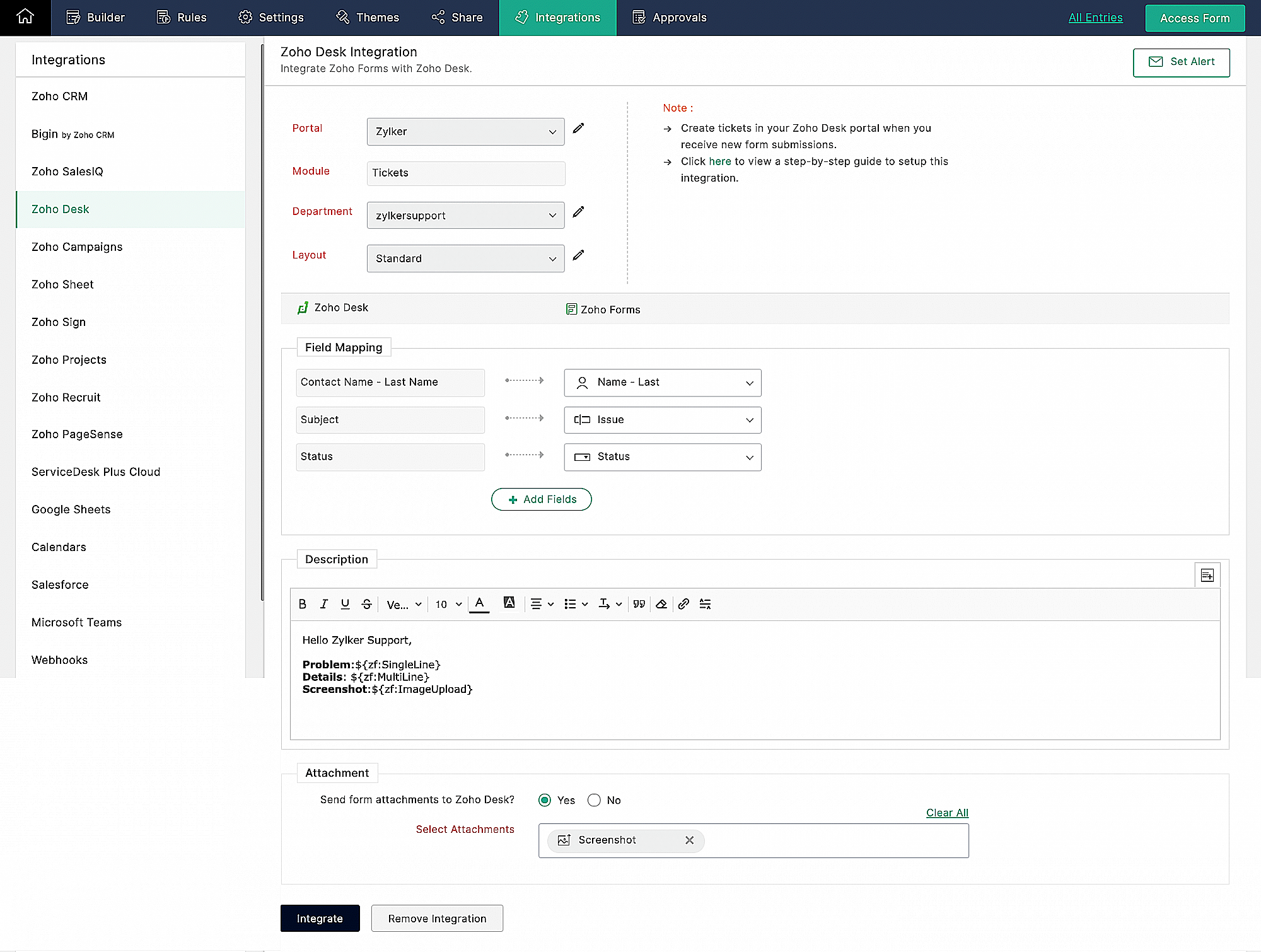


Klachtenmanagement

Zoho Desk, een Omnichannel Customer Service Software, is de eerste contextbewuste helpdesk software die bedrijven helpt zich te focussen op de klant. Met Zoho Desk kun je eenvoudig helpdesk tickets toewijzen, volgen en meldingen instellen. Je kunt Zoho Desk aanpassen aan je behoeften en zorgen voor tevredenheid bij de support van je huurders.
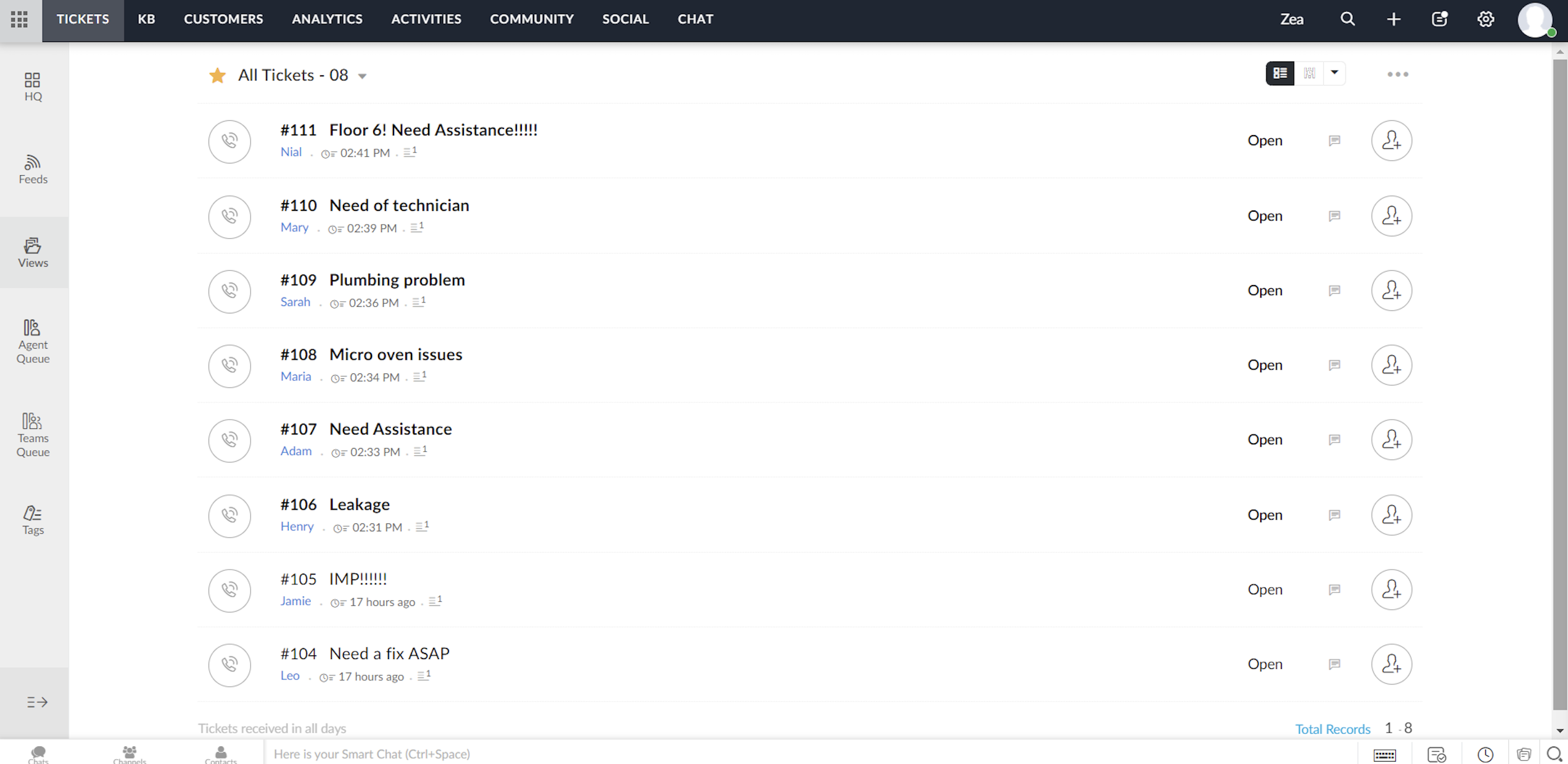


Elk ticket dat wordt ingediend door huurders die het klachtenformulier invullen, wordt toegewezen aan één van de agenten in Zoho Desk, waar het probleem wordt aangepakt en de nodige acties voor het probleem worden ondernomen.


Toewijzingsregel

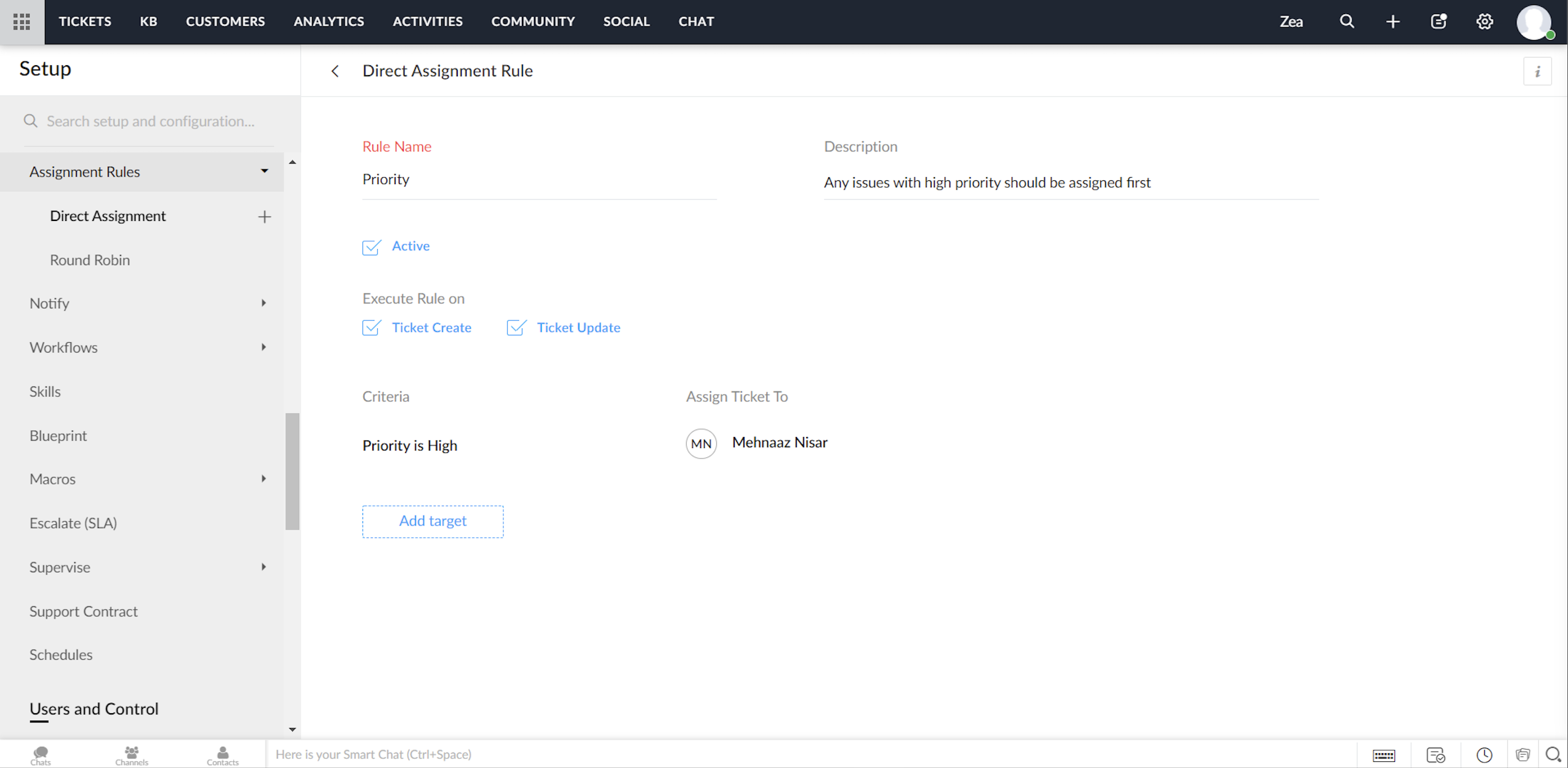
Ga tot in de fijnste details van ticketbeheer door, via het instellen van toewijzingsregels. Op deze manier hoef je niet elke keer dat er tickets binnenkomen handmatig tickets/klachten toe te wijzen aan agents. Het geeft je meer controle, en je team meer autonomie. Met behulp van toewijzingsregels wijs je automatisch de Tickets/Klachten toe die via Zoho Desk binnenkomen.


Directe toewijzing

De regel op basis van bepaalde gespecificeerde voorwaarden kan Tickets / Klachten naar de juiste afdeling leiden en er verder eigendomsrechten aan toekennen. Hoewel dit zinvol is voor nieuwe Tickets / Klachten, kun je ook een toewijzingsregel activeren wanneer Tickets / Klachten worden bijgewerkt in je helpdesk.


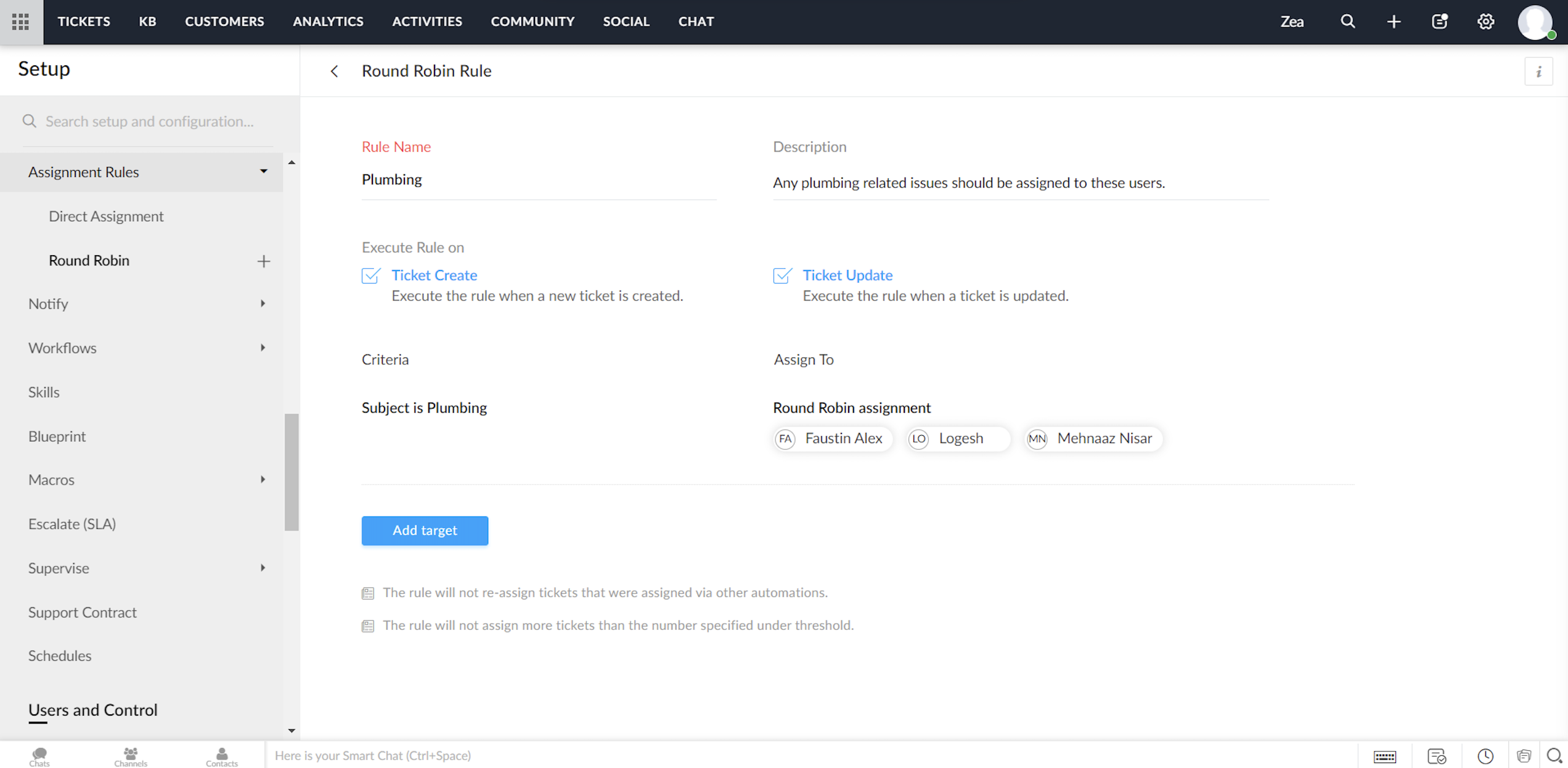
Round Robin

Round Robin is de eenvoudigste vorm van het automatisch toewijzen van tickets. Het verdeelt tickets/klachten gelijkmatig over al je agents op basis van het limiet dat je instelt. Met een minimale tussenkomst zorgt Round Robin ervoor dat geen enkel ticket niet wordt toegewezen. Ook zorgt de Round Robin regel ervoor dat de werkdruk van je agents in Zoho Desk in balans is. Dat wil zeggen, dat Tickets / Klachten eerst worden toegewezen aan de minst belaste agent.


Service Level Agreement (SLA)

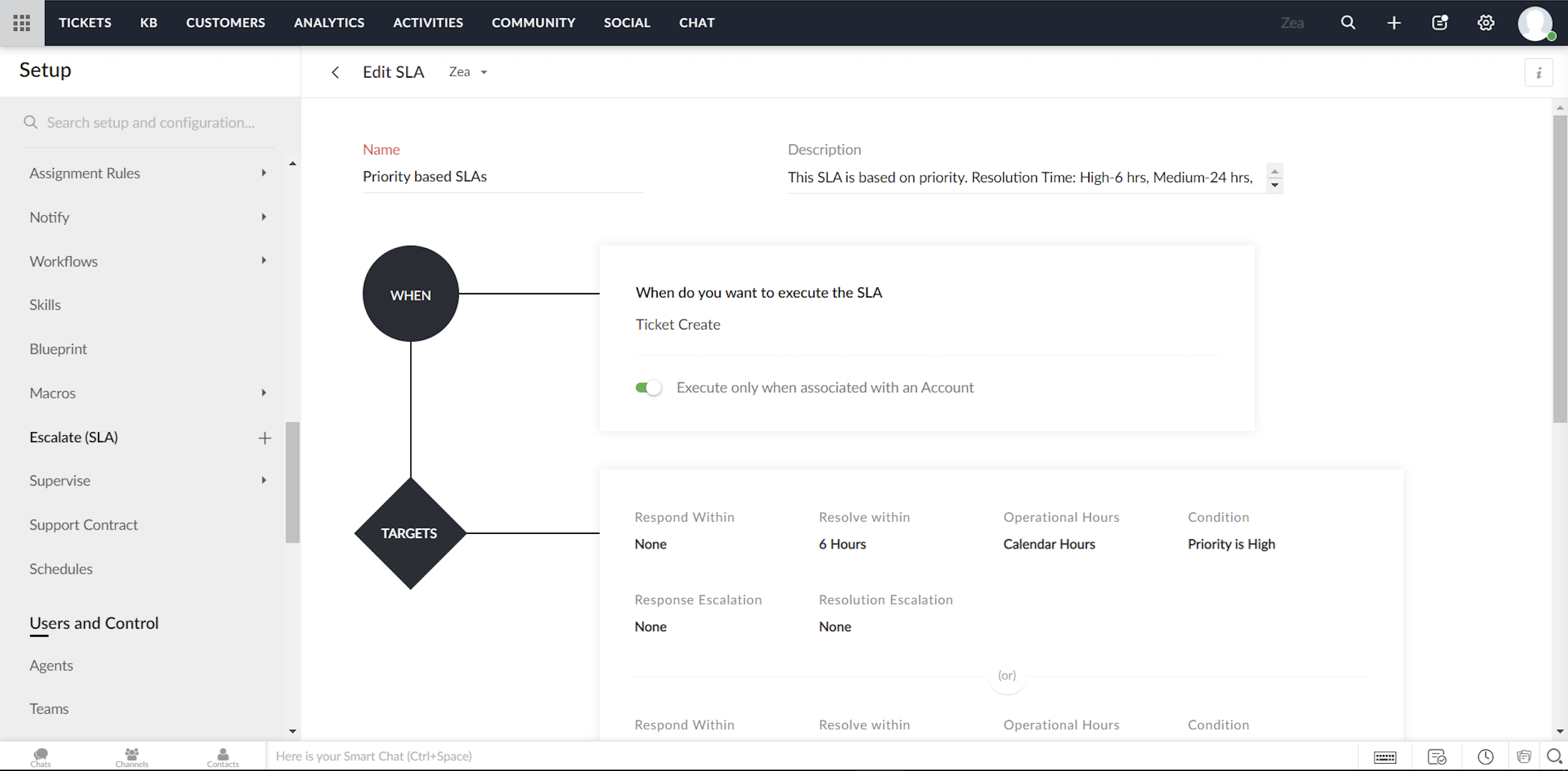
Een Service Level Agreement, of SLA, is de servicestandaard die je hebt afgesproken om aan je klanten te leveren. De serviceovereenkomst geeft de responstijden en de oplostijden weer die door je medewerkers worden aangeboden. Meestal bevat een SLA de uitvoeringscriteria en een reeks vooraf bepaalde voorwaarden of doelstellingen. Terwijl de uitvoeringscriteria bepalen wanneer een SLA moet worden geactiveerd, bevat het doel de acties die zullen worden uitgevoerd op de trigger. Je kunt acties configureren zoals reactietijd, oplostijd, het sturen van escalaties, het opnieuw toewijzen van Tickets/Klachten en het bijwerken van de prioriteit.                                                                                                   


Om te beginnen kunt je met Zoho Desk twee modellen van service level agreements volgen:

  • Je kunt SLA's maken voor individuele accounts in Zoho Desk

  • Je kunt een aantal SLA's maken (zoals Standard Support en Priority Support etc.) en deze delen over meerdere accounts.


Notificatie regels/Triggers beheren in Zoho Desk

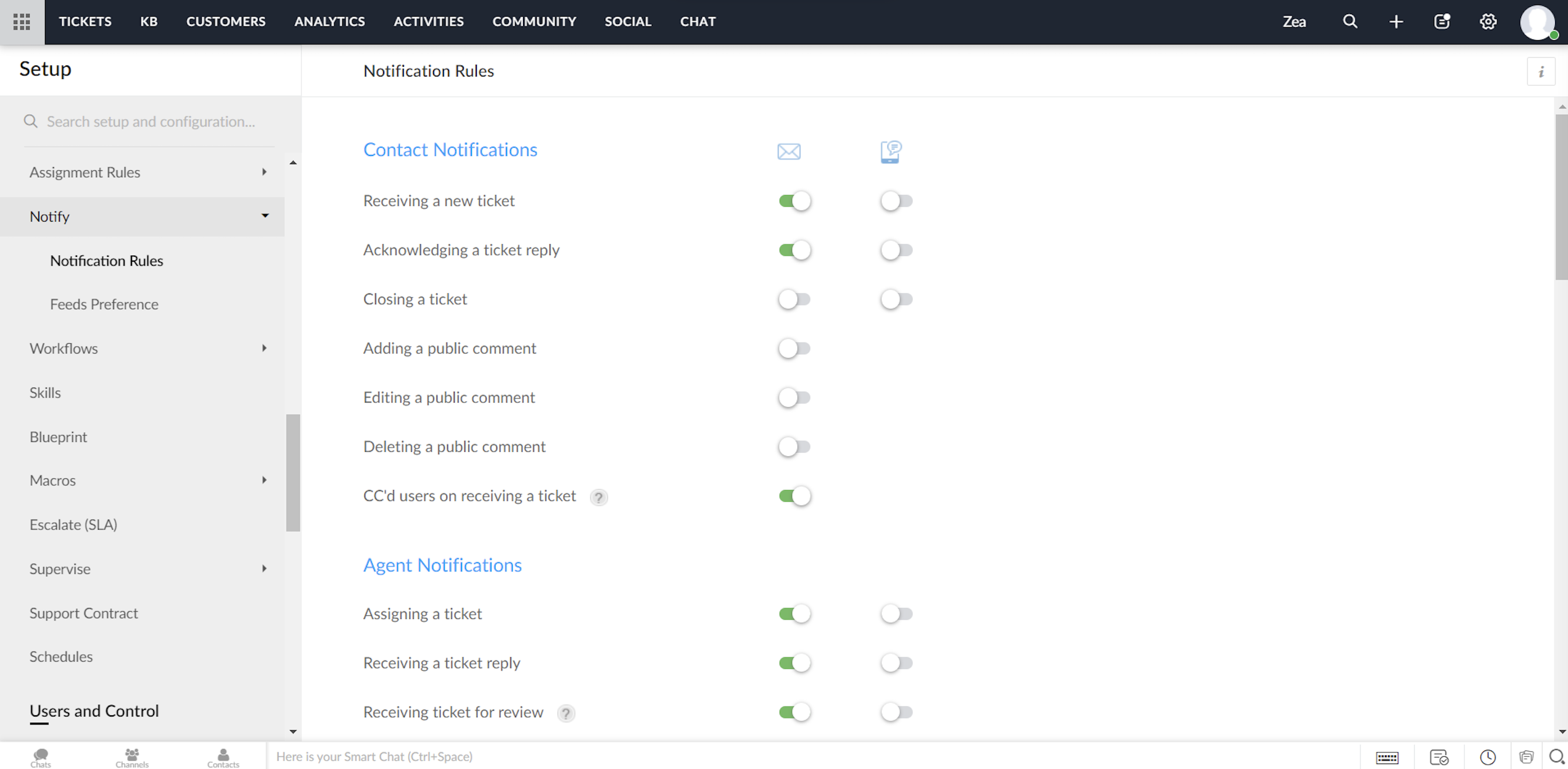
Zoho Desk biedt een standaardset meldingsregels die kunnen worden gebruikt om je klanten en agents te notificeren. Je kunt deze regels indien nodig activeren of deactiveren. Ook kunnen meldingen via e-mail of SMS worden verzonden.


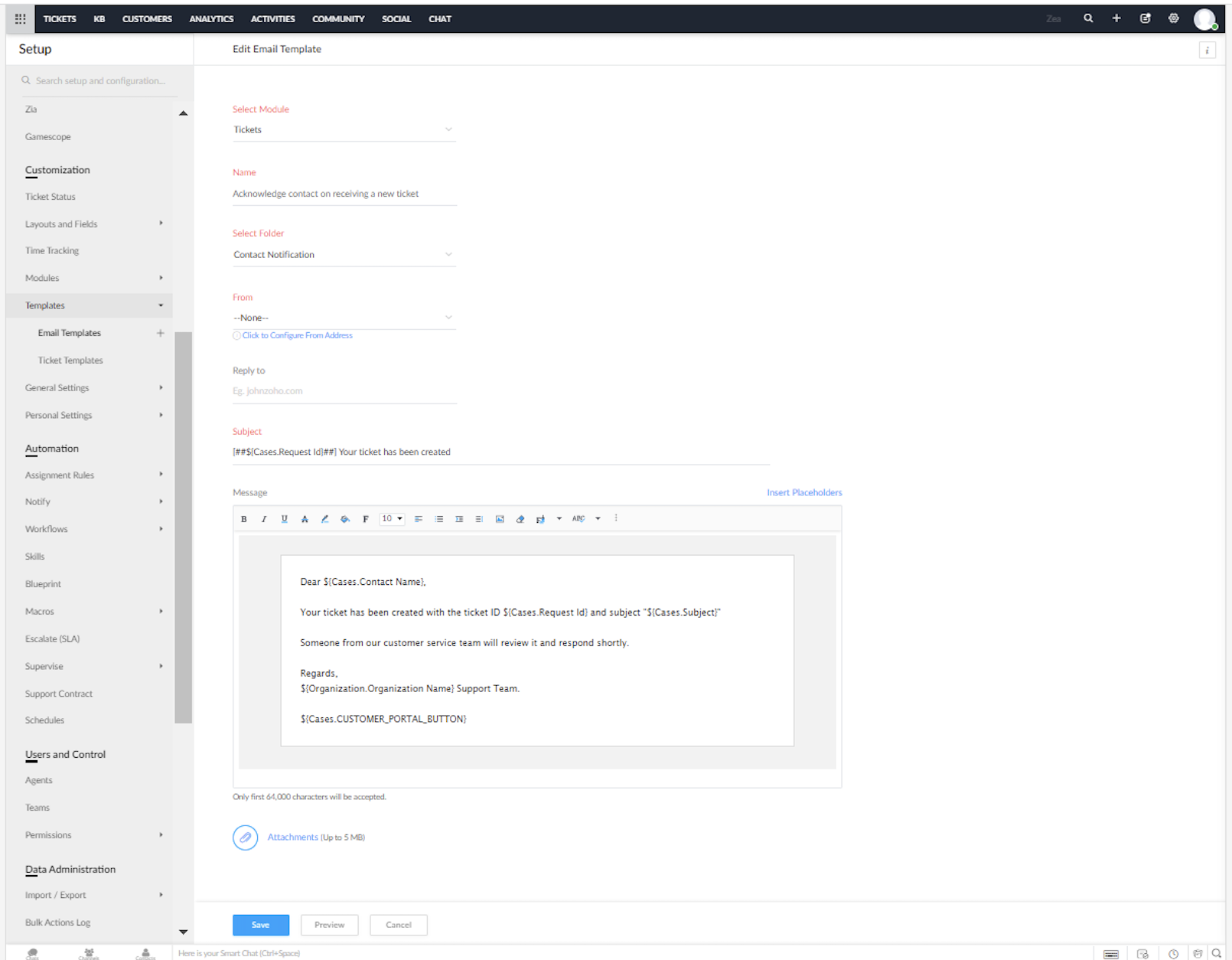
Je kunt de vooraf opgestelde e-mail en SMS sjablonen voor de meldingen in Zoho Desk aanpassen.


Heeft dit jou ook een beter beeld gegeven van het inzetten van Zoho Desk in combinatie met Zoho Forms? We lezen het graag in de opmerkingen hieronder.


Met vriendelijke groet,


    • Sticky Posts

    • Doe mee aan de Zoho Desk Meetup op 7 maart in Antwerpen

      Beste Community leden, Wij nodigen jullie graag uit voor de Community Meetup van Zoho Desk! Op 7 maart komen we bij elkaar in Antwerpen, samen met een klant en de Zoho Experts van Brainsolutions. Onze experts zullen een live demo presenteren en jouw vragen
    • Doe mee aan de Zoho Desk Meetup op 16 Februari in Utrecht

      Beste Community leden, Wij nodigen jullie graag uit voor de Community Meetup voor Zoho Desk! Op 16 februari komen we bij elkaar in Utrecht, samen met Fleetkennis en de Zoho Expert van Mobile XL. Onze experts zullen een live demo presenteren en jouw vragen
    • Wat is er nieuw in Zoho Desk 2023

      Beste Community leden, Hoeveel je ook van je klanten en je werk houdt, als klantenservice medewerker zul je zeker een aantal zware dagen tegenkomen. We hebben het dan over de dagen dat je een paar keer op de snooze-knop drukt, koffie morst op je favoriete
    • Tips & Tricks #10 Automatiseren met Zoho Desk Deel 2

      In deel 1 van het automatiseren met Zoho Desk las je een use case over een probleem in een appartementencomplex en hoe dit door gebruik te maken van Zoho Forms en Zoho Desk kan worden opgelost. In deel 2 lees je meer over het integreren van Zoho Forms
    • Tips & Tricks #09 Automatiseren met Zoho Desk Deel 1

      Beste Community leden, Zoals jullie weten hebben we in Nederland een woningtekort. Een oplossing hiervoor is de hoogbouw. Echter, om de de hoogte in te gaan moet er ook voor de juiste faciliteiten in flats worden gezorgd. Problemen kunnen we allemaal
      • Recent Topics

      • Seeking Zoho Creator Expert (Delivery Management App / Logistics Ops) — Built & Deployed Before

        Hi everyone, We’re building a Delivery Management App (focused on delivery operations for now) using Zoho Creator. We’re looking for a Zoho Creator expert who has already developed and deployed a similar delivery/workflow system and can assist us with
      • Cliq iOS can't see shared screen

        Hello, I had this morning a video call with a colleague. She is using Cliq Desktop MacOS and wanted to share her screen with me. I'm on iPad. I noticed, while she shared her screen, I could only see her video, but not the shared screen... Does Cliq iOS is able to display shared screen, or is it somewhere else to be found ? Regards
      • Spotlight #7 - Automatic Transitions in Blueprint

        Previously, records could not be moved from one state to another without user intervention. With automatic transitions, move records from one state to another automatically, when it elapses its pre-defined time. This Spotlight discusses how automatic
      • Whatsapp Connection Status still "Pending" after migration

        Hello, I migrated my WhatsApp API to Zoho from another provider a day ago. So far the connection status is still “Pending”. There is a problem? How long does it usually take?
      • Adding Multiple Files to a Zoho Vault Entry

        There is a old blog post talking about adding multiple file attachments to one Zoho Vault Secret: https://www.zoho.com/blog/vault/introducing-new-features-in-zoho-vault-powerful-password-sharing-wider-storing.html Is that still possible, I can see how
      • Get user last login

        1. Is there a way to programmatically get the last user login to trigger certain workflows? 2. Is there a way to programmatically access the custom fields on a user's account?
      • Dropshipping Address - Does Not Show on Invoice Correctly

        When a dropshipping address is used for a customer, the correct ship-to address does not seem to show on the Invoice. It shows correctly on the Sales Order, Shipment Order, and Package, just not the Invoice. This is a problem, because the company being
      • Add Attachment Support to Zoho Flow Mailhook / Email Trigger Module

        Dear Zoho Support Team, We hope you are well. We would like to kindly request a feature enhancement for the Mailhook module in Zoho Flow. Currently, the email trigger in Zoho Flow provides access to the message body, subject, from address, and to address,
      • Zoho Invoice Customer Login Portal

        Are there any plans for a customer portal to Zoho Invoice, ala Freshbooks?  I would like customers that I invoice to be able to login to review invoices and invoice history.  I have not switched from Freshbooks for this very reason.
      • the custom domain forwards by default to the old career site / how to switch it off??

        dear friends, how to switch off the old version of the career site?? The set up custom domain forwards directly to the old site, so that I cant publish it... Any ideas? Thank you! KR, Victoria
      • Partner with HDFC And Sbi Bank.

        Hdfc and sbi both are very popular bank if zoho books become partner with this banks then many of the zoho books users will benefit premium features of partnered banks.
      • Can Zoho Flows repeat Actions more than once?

        I'm attempting to make an intentional Zoho Flow loop using the below layout. However, when "WithinLimit" condition is met, the program fails to execute the action "Get & Add Request Co..." again. Is this by design? Is Zoho Flows unable to repeat actions
      • What KPIs Do You Use to Measure Your Support Team’s Performance in Zoho Desk?

        Hi everyone, We hope you’re all doing well. We are trying to improve how we measure the performance and effectiveness of our support department, and we would really appreciate learning from the community. We assume there are several common and widely-used
      • Preserve Ticket Issue Mapping When Migrating from Jira to Zoho Projects

        Hello Zoho Projects Team, We hope you are doing well. We are currently exploring a full migration from Jira to Zoho Projects, and we identified a critical limitation during the migration process involving Zoho Desk integration. Current Situation: We use
      • Resend Client Portal Invitation + View Email Delivery Status

        Hi Zoho Team, We hope you are doing well. We would like to request two important enhancements related to the Zoho Creator Client Portal invitation process. At the moment, when we add a user to the Client Portal, Zoho Creator automatically sends an invitation
      • CRM iOS App Missing Tags support

        Hi, I remember reading either a tread on iOS (Maybe Later) & Android (i believe Now Supported) regarding “Tags” in the mobile apps unfortunately I can’t seem to find either. Could we clarify are “Tags” support coming to CRM iOS app as searching the forums
      • Imported contacts succesful but contacts do not show up in Contacts

        I imported +300 contacts. I can see them in import history. When clicking on a contact in import history I see all the imported contact details for any given contact. So import seems to be successful.   However the imported contacts do not show up in the contacts tab. Not in All contacts, and not in a filtered view where they absolutely should show up. The search function also does not find any imported contact.   Help?
      • Hotmail is STILL blocking the zoho mail IP

        Greetings, as I already mentioned in my last message, my Zoho IP has been blocked by Hotmail for more than 15 days. Although someone said that the issue was "solved," it still isn't, and this amount of time seems neither normal for a "serious" company,
      • Pre-fill webforms in Recruit

        I don't want to use the career site portal (as I have my own already), but I would like to direct users to the application forms for each role, from my website job pages. Is there a way to pre-fill fields in Recruit application forms, so that I only have
      • Zia Actions: AI-powered Workflow Automation for Faster and Smarter Execution

        Hello everyone, Workflows got a notch better with AI-based actions. Actions such as field extraction, prediction, auto reply, and content generation facilitate quick execution with improved speed and accuracy. Zia can intercept useful details in newly
      • Import KB template OR Export template for zoho desk?

        Greetings. Can you tell me if there is a way to get an EXPORT of my KB articles? OR is there a template you supply for importing KB articles into my zoho desk? I am looking for a method of understanding what fields can be imported, and what their possible
      • This user is not allowed to add in Zoho. Please contact support-as@zohocorp.com for further details

        Hello, Just signed up to ZOHO on a friend's recommendation. Got the TXT part (verified my domain), but whenever I try to add ANY user, I get the error: This user is not allowed to add in Zoho. Please contact support-as@zohocorp.com for further details I have emailed as well and writing here as well because when I searched, I saw many people faced the same issue and instead of email, they got a faster response here. My domain is: raisingreaderspk . com Hope this can be resolved.  Thank you
      • XML format to import knowledgebase into Zoho Desk

        Hi, We just started to use Zoho Desk and want to import our knowledgebase from our old support system (Freshdesk) to Zoho Desk. Can anyone give us information about the format of xml file to import? There is no explanation on the related page.
      • Can we add custom fields to portal community profiles?

        How do we add custom fields to our profile pages in our portal community? If we have the ability to add custom fields, will we be able to access those fields via API? We want to use our Desk community in our help portal as our primary community and would
      • Weekly Sales Summary

        Is it possible to generate a weekly report in Zoho Books to show -$$ amount of estimates generated -# of estimates generated by Salesperson -$$ amount of Sales Orders created -$$ amount of Invoices generated
      • Client Portal ZOHO ONE

        Dear Zoho one is fantastic option for companies but it seems to me that it is still an aggregation of aps let me explain I have zoho books with client portal so client access their invoice then I have zoho project with client portal so they can access their project but not their invoice without another URL another LOGIN Are you planning in creating a beautiful UI portal for client so we can control access to client in one location to multiple aps at least unify project and invoice aps that would
      • Restrict Addresses in Zoho Forms?

        In the address field, is there a way to restrict the addresses that auto populate (via Zoho Maps or Google Maps) to a specific state (I know it's possible with the country). Additionally, how often does the address in Zoho Maps get updated? Certain addresses
      • Do Individual Forums within Categories, in Desk Community, Produce Their Own RSS Feed?

        Do Individual Forums within Categories, in Desk Community, Produce Their Own RSS Feed? If not, can anyone share a work-around that could help me get an RSS feed for individual category forums?
      • ASAP Widget Not showing "My Tickets"ed

        Hello Team, I have created a ZOHO ASAP Widget and embedded to my portal app.clearvuiq.com , widget renders ok and I can open tickets from widget. However I want my opened tickets to be visible in the widget. How can I achieve that?
      • Add Zoho Forms to Zoho CRM Plus bundle

        Great Zoho apps like CRM and Desk have very limited form builders when it comes to form and field rules, design, integration and deployment options. Many of my clients who use Zoho CRM Plus often hit limitations with the built in forms in CRM or Desk and are then disappointed to hear that they have to additionally pay for Zoho Forms to get all these great forms functionalities. Please consider adding Zoho Forms in the Zoho CRM Plus bundle. Best regards, Mladen Svraka Zoho Certified Consultant and
      • How to view CRM Sales Orders in Desk

        What's the usual way to view all CRM sales orders linked to a contact, when viewing a ticket in Desk? I don't want to have to open a new tab to see the order in CRM. And the Desk CRM sidebar doesn't seem to be configurable. Would I have to use an extension
      • Kaizen #219: Actions API - Webhooks APIs - Part 1

        Hello all!! Welcome back to a fresh Kaizen week. In the previous weeks, we covered Workflow Rules APIs, Actions APIs - Email Notification APIs, Tasks Update API, and Field Update API. This week, we will continue with another Actions API - Webhooks API
      • Pricing Strategies: #3 Services never Stop with just Plans

        "Hey, while you're here, could you also take a look at the vegetable patch?" Aaron hears that line almost every week. He runs a small gardening service, the kind where customers subscribe to a simple monthly plan that includes basic maintenance, mowing,
      • Presenting ABM for Zoho CRM: Expand and retain your customers with precision

        Picture this scenario: You're a growing SaaS company ready to launch a powerful business suite, and are looking to gain traction and momentum. But as a business with a tight budget, you know acquiring new customers is slow, expensive, and often delivers
      • Lead Blueprint transition in custom list view

        Hi, Is It possible to insert the Blueprint transition label in a custom Canvas list view? I am using Lead module. I see the status, but it would be great if our users could execute the Blueprint right from the list view without having to enter the detailed
      • Cropping Photos for Zoho Sites

        Hi, I'm wondering if there is a built in crop tool for zoho sites for my photos so I can crop them and see what the crop looks like on the site?
      • Deluge scripts

        Why is there not a search function to make it easier to find the script of interest when modifications are required.
      • WorkDrive and CRM not in sync

        1/ There is a CRM file upload field with WorkDrive file set as the source: 2/ Then the file is renamed in WorkDrive (outside CRM): 3/ The File in CRM is not synced after the change in WorkDrive; the file name (reference) in CRM record is not updated (here
      • zoho sheet stuck

        I Need help. ZOHO sheets stuck on the loading screen. I've already deleted the system cache and cookies of my browser (google chrome) but it's still not opening. 
      • bulk edit records and run internal logic

        hi there is few logics in manner "it this than that" logics work well when i edit entry openning it one by one (via workflow "on add/edit - on success" , for custom field "on update/on user input") but when i try bulk edit records - logic does not work.  how can i turn on logic to work as programmed - for mass editing records via bulk edit?
      • Next Page