Trigger WhatsApp Template Messages Using Webhooks | Zoho Tables
What if updating a record in Zoho Tables could automatically trigger a WhatsApp message to your customer?
You can make this happen using Webhooks in Zoho Tables Automations and the WhatsApp Business Platform API.
Here’s a simple use case: Order Status Updates
Imagine you maintain an Orders table with customer details, order numbers, and delivery status. Whenever an order reaches a particular stage, you want to send the customer a WhatsApp template message.
How it works
1. Set up an automation in Zoho Tables
Choose a trigger based on your workflow, such as a record being created or updated.
2. Add the Call a Webhook action
Configure the webhook to send a request to the WhatsApp Business Platform API endpoint.
3. Configure the request
Method: POST
URL: Your WhatsApp API endpoint
Headers: Add the required authentication token and content type.
You can use the + button beside the payload value fields to insert dynamic values from the triggered record.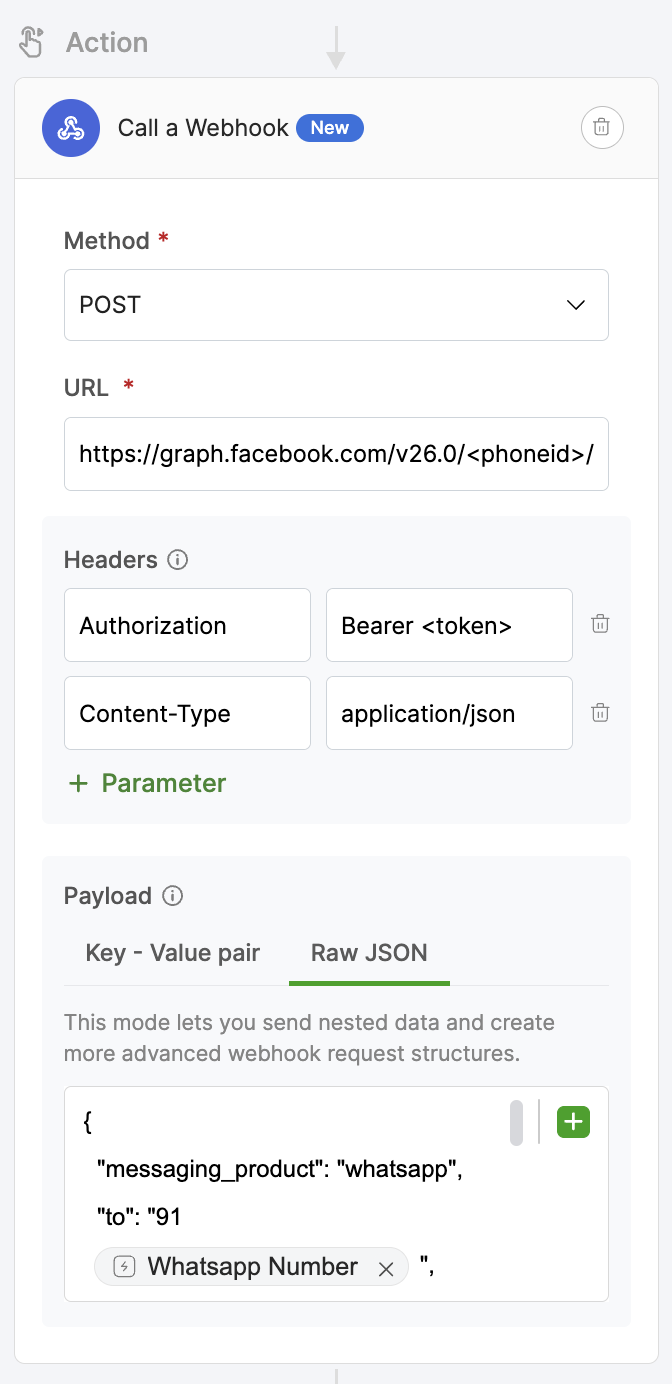
WhatsApp template messages require a structured JSON request, often with nested objects and arrays. In Zoho Tables, you can use the Raw JSON option in the webhook payload to define this structure.
Here's a sample payload for an order delivery notification:
{  "messaging_product": "whatsapp",
  "to": "919876543210",
  "type": "template",
  "template": {
    "name": "order_delivery_update",
    "language": {
      "code": "en"
    },
    "components": [
      {
        "type": "body",
        "parameters": [
          {
            "type": "text",
            "text": "Kumar"
          },
          {
            "type": "text",
            "text": "ORD-1025"
          },
          {
            "type": "text",
            "text": "22 October 2026"
          }
        ]
      }
    ]
  }
}
This payload corresponds to an approved WhatsApp template with a message such as:
Hi {{1}}, your order {{2}} is on its way! Expected delivery: {{3}}.
The values represent the customer's name, order number, and expected delivery date. You can use the + button beside the payload value fields, where supported, to insert dynamic values from the triggered record.
You can use the + icon at the top-right corner of the Raw JSON editor to insert dynamic values from the triggered record directly into your JSON payload. This lets you personalize WhatsApp template messages with values such as the customer's name, order number, and delivery date without manually entering them.
Payment reminders
Appointment confirmations
Delivery notifications
Lead follow-ups
Service renewal reminders
One table. One automation. Countless possibilities.
Have you tried connecting Zoho Tables with WhatsApp or other external services using webhooks? Share your use cases with us!
- Notes:
You’ll need a WhatsApp Business Platform setup, an approved message template where required, and the appropriate API permissions. Configure the payload according to the API you’re using. - Attachments cannot currently be sent to WhatsApp using this webhook setup. Tighter integration with Whatsapp is in works to support attachments.