Unfurling Unlimited Possibilities in Zoho Cliq đź”—

Unfurling Unlimited Possibilities in Zoho Cliq đź”—

Are you tired of your app links looking plain? Imagine if the shared links came to life with custom previews, organized data, and one-click actions, making chats more interactive. With the Cliq platform's unfurl handlers, let's see how developers can enhance links shared from their apps or tools, allow automatic display of relevant details and metadata, and add intuitive buttons and forms to streamline workflows.

Meeting links with action buttons to add Cliq reminders

When sharing meeting links in any channel, instead of showing a basic preview, you can provide a detailed response via preview handler that includes the meeting title, date, time, description, agenda, and an action button to set a Cliq reminder.

This can be implemented by setting the button type to "system.api" and using the action value 'set_reminder' along with the parameters below.

Attribute
Type
Description
date_time*
String
Mandatory
To specify the date and time of the Cliq reminder in yyyy-MM-ddTHH:mm format.


Refer to applicable date-time literals
content*
String
Title of the reminder to be set.
 
Syntax
  1. reminderParams = Map();
  2. reminderParams.put("date_time",$DATE_TIME);
  3. reminderParams.put("content",$CONTENT);
  4.  
  5. setReminderButton = {"type":"system.api","action":"set_reminder","label":$BUTTON_LABEL,"hint":$HINT,"params":reminderParams};


With the Arattai extension, you can expand Arattai links within your Zoho Cliq conversations, access meeting links interactively to schedule Cliq reminders, and see a detailed preview of channel links, group invitations, and user contacts.


 File sharing with post-action access controls 


  • When a file or attachment is shared in a channel, display a response that shows the metadata (title, type, and size) and prompt a follow-up form to manage access control for the attachment.
  • The form can be configured to ask whether the sender wants to share the attachment with all participants in the channel or with specific individuals and the type of access they wish to grant, such as view, edit, or comment.
  • This can be implemented using the after-send action handler, ensuring secure file access and eliminating awkward "I'm unable to open this file" follow-ups. 
Go ahead and share a Zoho Writer document or a Zoho WorkDrive file in any Cliq channel to witness the benefits of the after-send action handler in action!

Task management without tab switching


  • When managing tasks, it’s important to configure how task links are shared in channels or chat. The preview should display key information, including the task name, due date, and status. Additionally, include intuitive buttons such as "Complete," "Edit," and "Delete."
  • The responses for these buttons can be managed in the action handler. The action handler is responsible for executing actions when any of the buttons on the unfurled card are clicked.
  • This enables real-time task management directly from chat. Team members can quickly update or complete tasks without switching apps or losing chat context
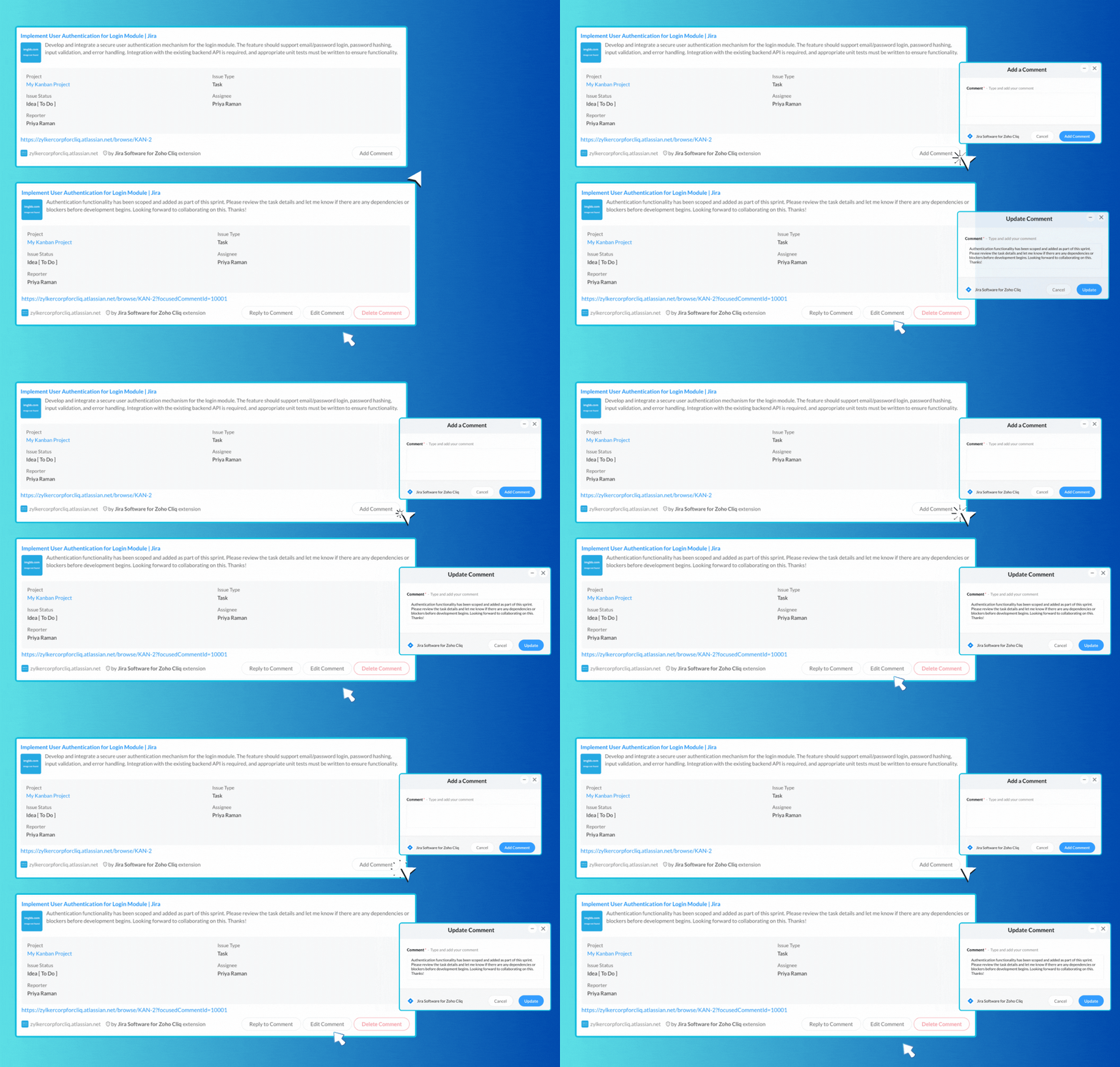
The Jira Software extension for Cliq allows you to share task links in any chat easily, providing a rich and interactive overview of tasks along with buttons for adding comments. You can enhance collaboration by sharing links to task comments, enabling you to reply, edit, or delete them effortlessly.


​
Say goodbye to dull app links! With Cliq’s unfurl handlers, you can create engaging previews that energize your workflow. Streamline automation and centralize tasks, allowing your teams to collaborate efficiently and respond faster, whether it’s for scheduling ,task management or file sharing.

We're here to help, so don't hesitate to reach out to support@zohocliq.com with any questions or if you need assistance in crafting even more tailored workflows.


    • Sticky Posts

    • Customer payment alerts in Zoho Cliq

      For businesses that depend on cash flow, payment updates are essential for operational decision-making and go beyond simple accounting entries. The sales team needs to be notified when invoices are cleared so that upcoming orders can be released. In contrast,
    • Automating Employee Birthday Notifications in Zoho Cliq

      Have you ever missed a birthday and felt like the office Grinch? Fear not, the Cliq Developer Platform has got your back! With Zoho Cliq's Schedulers, you can be the office party-cipant who never forgets a single cake, balloon, or awkward rendition of
    • Accelerate Github code reviews with Zoho Cliq Platform's link handlers

      Code reviews are critical, and they can get buried in conversations or lost when using multiple tools. With the Cliq Platform's link handlers, let's transform shared Github pull request links into interactive, real-time code reviews on channels. Share
    • App Spotlight : PagerDuty for Zoho Cliq

      App Spotlight brings you hand-picked apps to enhance the power of your Zoho apps and tools. Visit the Zoho Marketplace to explore all of our apps, integrations, and extensions. In today's fast-paced world, seizing every moment is essential for operational
    • Automate your status with Cliq Schedulers

      Imagine enjoying your favorite homemade meal during a peaceful lunch break, when suddenly there's a PING! A notification pops up and ruins your moment of zen. Even worse, you might be in a vital product development sprint, only to be derailed by a "quick
      • Recent Topics

      • Calendar not working

        Are we the only ones. On any browser we cannot click on any of our calendar appointments and get them to open. They just make the browser loop. WE have reached out and have been told they are working on it. The office staff are really stuck. The point
      • Modifying iframe data of Zoho booking iframe

        Hello, I have integrated a Zoho Bookings embedded iframe into my website. Currently, I am pre-filling the booking form with default values as part of our process flow. However, I want to ensure that if an input field is already populated with a default
      • Apply Payment Received Amount Zoho Books Invoice

        Hello team here is the sample code How can apply the payment received record over a unpaid zoho books invoice. //......................... paymentID = customer_payment.get("payment_id"); organizationID = organization.get("organization_id"); paymentmaplist
      • Enhance Sign CRM integration

        Hello all, I'm working on a custom Deluge script to enhance the integration between Zoho CRM and Sign by using a writer merge template for additional flexibility. I want to replicate the post-sign document integration that exists between CRM and Sign
      • Zoho Books Finance Modules Not Accessible in Zoho CRM Mobile App

        We have integrated Zoho CRM with Zoho Books using the Zoho Finance Suite integration. In the CRM web version, we can see the Finance modules (Estimates/Quotes, Invoices, Sales Orders, Items, Payments) and are able to create invoices and quotes directly
      • Paste issues in ZOHO crm notes

        Hi, since a week or so I have issues with the paste function in ZOHO CRM. I use "notes" to copy paste texts from Outlook emails and since a week or so, the pasting doesnt function as it should: some text just disappears and it gives a lot of empty lines/enters.....
      • Does Zoho offer a full WhatsApp Marketing Platform (like WATI / GallaBox)?

        lm exploring WhatsApp marketing and I’d like to understand what options are available within the Zoho ecosystem. Currently, I see: Zoho SalesIQ has a broadcast option, but it seems very limited — for example, it doesn’t support uploading contacts via
      • Is it really true that I can't set the default 'deposit to' account in 2025?

        I've been using Books for 7 years and the default account has never been a problem. I usually manually reconcile invoices and have never had a thought about which account. It has always been my account. However, I recently noticed that for the past 4
      • Cliq iOS can't see shared screen

        Hello, I had this morning a video call with a colleague. She is using Cliq Desktop MacOS and wanted to share her screen with me. I'm on iPad. I noticed, while she shared her screen, I could only see her video, but not the shared screen... Does Cliq iOS is able to display shared screen, or is it somewhere else to be found ? Regards
      • [Live Webinar] New in Zoho WorkDrive: AI enhancements, Data Loss Prevention, Version Controls, and more

        Hello everyone, We're excited to bring you another round of powerful updates in Zoho WorkDrive! Join us on May 15 for an exclusive live webinar where we’ll unveil the latest features designed to enhance your team’s productivity, collaboration, and data
      • Live webinar: Streamlining legal operations: Leveraging Zoho WorkDrive for law firm success

        Hello everyone, Managing legal documents across departments and jurisdictions can be complex, but it doesn’t have to be. Join us on March 6 for an exclusive webinar where we’ll show you how Zoho WorkDrive empowers legal teams to stay compliant, organized,
      • Live Webinar: Optimizing back-office operations in the manufacturing industry to maximize profitability

        Hello everyone, We’re excited to invite you to our upcoming live webinar on February 6! Discover how Zoho WorkDrive can help manufacturing businesses optimize back-office operations, improve efficiency, and boost profitability. Our product experts will
      • Live webinar: 2024 recap of Zoho WorkDrive

        Hello everyone, We’re excited to invite you to our year-end live webinar! This session will take you through the transformative features and updates we’ve introduced in Zoho WorkDrive this year, helping you streamline document management like never before.
      • Live webinar: Explore WorkDrive's seamless integrations with key Zoho apps

        Hello everyone, We’re excited to invite you to our upcoming live webinar, where we'll delve into the seamless integration of WorkDrive with other key Zoho applications! This is a fantastic opportunity to enhance your productivity and streamline your workflows
      • Live webinar: Getting the most out of WorkDrive in Zoho Workplace

        Hello everyone, We’re excited to invite you to our upcoming live webinar, where we’ll explore how to maximize your use of WorkDrive as part of the Zoho Workplace bundle. This is a fantastic opportunity to elevate your productivity and streamline your
      • Live webinar: Mastering data migration, organization, and team collaboration

        Hello everyone, We’re excited to invite you to our upcoming live webinar! Discover how to seamlessly migrate your data, optimize file organization, and boost team collaboration using Zoho WorkDrive’s powerful features. This is a fantastic opportunity
      • BARCODE PICKLIST

        Hello! Does anyone know how the Picklist module works? I tried scanning the barcode using the UPC and EAN codes I added to the item, but it doesn’t work. Which barcode format does this module use for scanning?
      • Join our live webinar: Explore the WorkDrive TrueSync application!

        Hello everyone, We are thrilled to invite you to a live webinar focused on mastering the WorkDrive TrueSync application. Discover how to seamlessly sync your content between the cloud and your computer, ensuring smooth and efficient file management. Our
      • Bug tracking

        Hi, does anyone know how to track errors during picking or packing? This way I can keep track and see how to improve and prevent errors in this area.
      • Can the Product Image on the Quote Template be enlarged

        Hello, I am editing the Quote Template and added ${Products.Product Image} to the line item and the image comes up but it is very tiny. Is there anyway that you can resize this to be larger? Any help would be great! Thanks
      • Zoho Creator customer portal limitation | Zoho One

        I'm asking you all for any feedback as to the logic or reasoning behind drastically limiting portal users when Zoho already meters based on number of records. I'm a single-seat, Zoho One Enterprise license holder. If my portal users are going to add records, wouldn't that increase revenue for Zoho as that is how Creator is monetized? Why limit my customer portal to only THREE external users when more users would equate to more records being entered into the database?!? (See help ticket reply below.)
      • Script Editor not an option

        I am trying to apply a script to a sheet and Script Editor is not an option. I don't want to go outside Sheets to do this (like Creator) if it can be done inside Sheets.
      • Send Automated WhatsApp Messages and Leverage the Improved WhatsApp Templates

        Greetings, I hope all of you are doing well. We're excited to announce a major upgrade to Bigin's WhatsApp integration that brings more flexibility, interactivity, and automation to your customer messaging. WhatsApp message automation You can now use
      • Envio de mails

        Hola! No puedo enviar mails pero si recibirlos. No se como solucionarlo! Mi dominio es chidobebes.com.ar
      • ERROR CODE :554 - Your access to this mail system has been rejected due to poor reputation of a domain used in message transfer

        In my email configuration: The domain's MX Records are pointed to Zoho The domain's SPF Records have been pointed out successfully DKIM is enabled. DMARC Record is pointed for the domain. The domain name is digioorja.in. Still facing the issue of Error:
      • This Operation has been restricted. Please contact support-as@zohocorp.com for further details

        l tried to verify my domain (casalimpaeperfumada.com.br) and its shows this error: This Operation has been restricted. Please contact support-as@zohocorp.com for further details.
      • SLOW EMAILS

        Is there an issue with the Zoho server? For two days now I've been having issues with very long buffering. Please advise. Thank you.
      • POP3 authentication error - SOLVED

        Just in case others are as forgetful as me ... As Zoho has changed the POP server for personal and free organisational users, I needed to change the POP server on my email client. This failed persistently but eventually I remembered that I had chosen
      • Solution to Import PST File into Office 365.

        MailsDaddy OST to Office 365 Migration Tool is an outstanding solution to recover OST files and migrate them into Office 365 without any hassle. Using this software users can multiple OST files into Office 365 with complete data security. It offers users
      • Add Zoho One Groups/Departments to Shared Mailbox Access

        Hi, I hope you're doing well. Currently, in Zoho Mail, I can manually add specific users or the entire organization to a shared mailbox. However, there is no option to add Zoho One groups or departments. Feature Request: We would like the ability to assign
      • Allow Filters with Only Special Characters in Zoho Mail

        Hi Zoho Mail Team, I hope you're doing well. We have noticed that currently, Zoho Mail does not allow creating filter criteria using only special characters, such as = or #. However, there are scenarios where such a filter is necessary. For example: Filtering
      • How to save email as PDF?

        I saw 2 previous threads about this. One is from 14 years ago. The other was closed as "answered" a year ago but the feature was never implemented: https://help.zoho.com/portal/en/community/topic/how-to-download-save-emails-as-pdf Is the "save as PDF"
      • Flexible plans

        Hi, I have a Workplace Standard subscription. On Zoho's website, it mentions that with the annual plan it's possible to have multiple plans under the same organization—for example, Workplace Standard and Mail Lite. However, I can’t find a way to do this
      • Weekly Tips : Teamwork made easy with Multiple Assignees

        Let's say you are working on a big project where different parts of a single task need attention from several people at the same time—like reviewing a proposal that requires input from sales, legal, and finance teams. Instead of sending separate reminders
      • Cannot give public access to Html Snippet in Zoho Creator Page

        Hi, I created a form in Zoho Creator and published it. The permalink works but I want to override the css of the form. (style based URL parameters is not good enough) So I created a page and added an Html snippet. I can now override the css, which is
      • Weekly Tips : Customize your Compose for a smoother workflow

        You are someone who sends a lot of emails, but half the sections in the composer just get in your way — like fields you never use or sections that clutter the space. You find yourself always hunting for the same few formatting tools, and the layout just
      • Unable to confirm Super Admin assignment — confirmation button not working

        I’m trying to change the roles within my organization. I am currently a super admin and would like to add another user as a super admin. When I attempt to confirm the action, a screen appears asking for my password to verify my identity. However, when
      • Installing EMAIL Setup in New Domain

        Respected Support team, I'm facing an issue with cloudflare in Pakistan, I want to setup Zoho Mail Setup but I Don't know how to enable Zoho mail setup without cloudflare. My Website https://stumbleguyzzapk.com/, https://fakservices.com/ is using CF,
      • Will I Get a Refund If I Downgrade Zoho Mail?

        Hello, We upgraded an email account for our new employee. However, the employee left after one month, and now I've reduced the number of Zoho Mail users from 7 to 6. Can we get a refund for the remaining portion of our annual payment?
      • Accounting on the Go Series-43:Enhancing Your Reporting Efficiency with Dashboard Filter State Retention

        Hello everyone! Welcome back to our series on Zoho Books mobile app features. Today, we will talk about a feature that yet again helps you focus on work that really matters-Dashboard Filter State Retention. Imagine you're working on your Zoho Books dashboard,
      • Next Page