Uplifted homepage experience

Uplifted homepage experience


Alert
Editions: All editions.

Info
Availability update:
17th February 2026: All editions in the CA and SA DC | JP DC (Free, Standard and Professional editions)
23 February 2026: JP (All Editions) | AU, CN (Free, Standard, Professional editions)
27 February 2026: EU (Free, Standard, Professional editions)

Hello everyone,

Creating your homepage is now much easier, more visual, and more impactful. Until now, your homepage allowed you to display custom views, widgets, analytic components, and Kiosk. With the following improvements, the homepage is now a smarter, more action-driven workspace:

  • Drag-and-drop functionality that enables quick custom designs
  • Rich text to help convey important information and make announcements with polished, flexible formatting
  • Quick links that direct users to essential external or internal resources instantly.
  • Reports that display key performance metrics so users can monitor trends effortlessly

Together, these enhancements transform the homepage from a static landing screen to a dynamic one. Admins can now design their homepages with intention by blending data, communication, and navigation.


Info
Benefits
  1. Every user logs in to a homepage that's clear, clutter-free, and relevant.
  2. With reports brought to the forefront, users can track performance and act immediately without having to navigate through multiple tabs.
  3. Rich text and quick links on the homepage help reduce information gaps.
  4. With fewer clicks and less searching, users can focus more on actions that drive results.

What's new

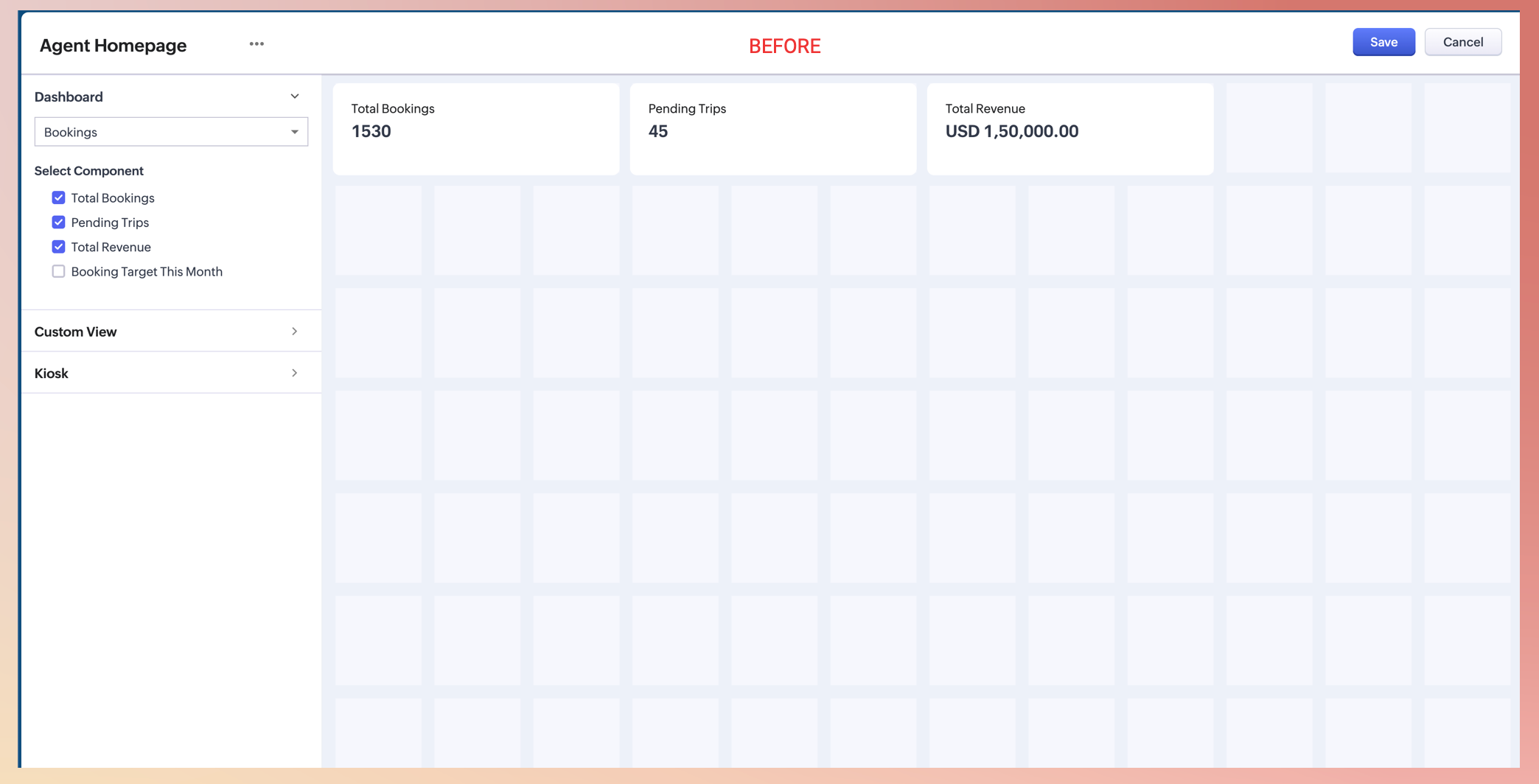
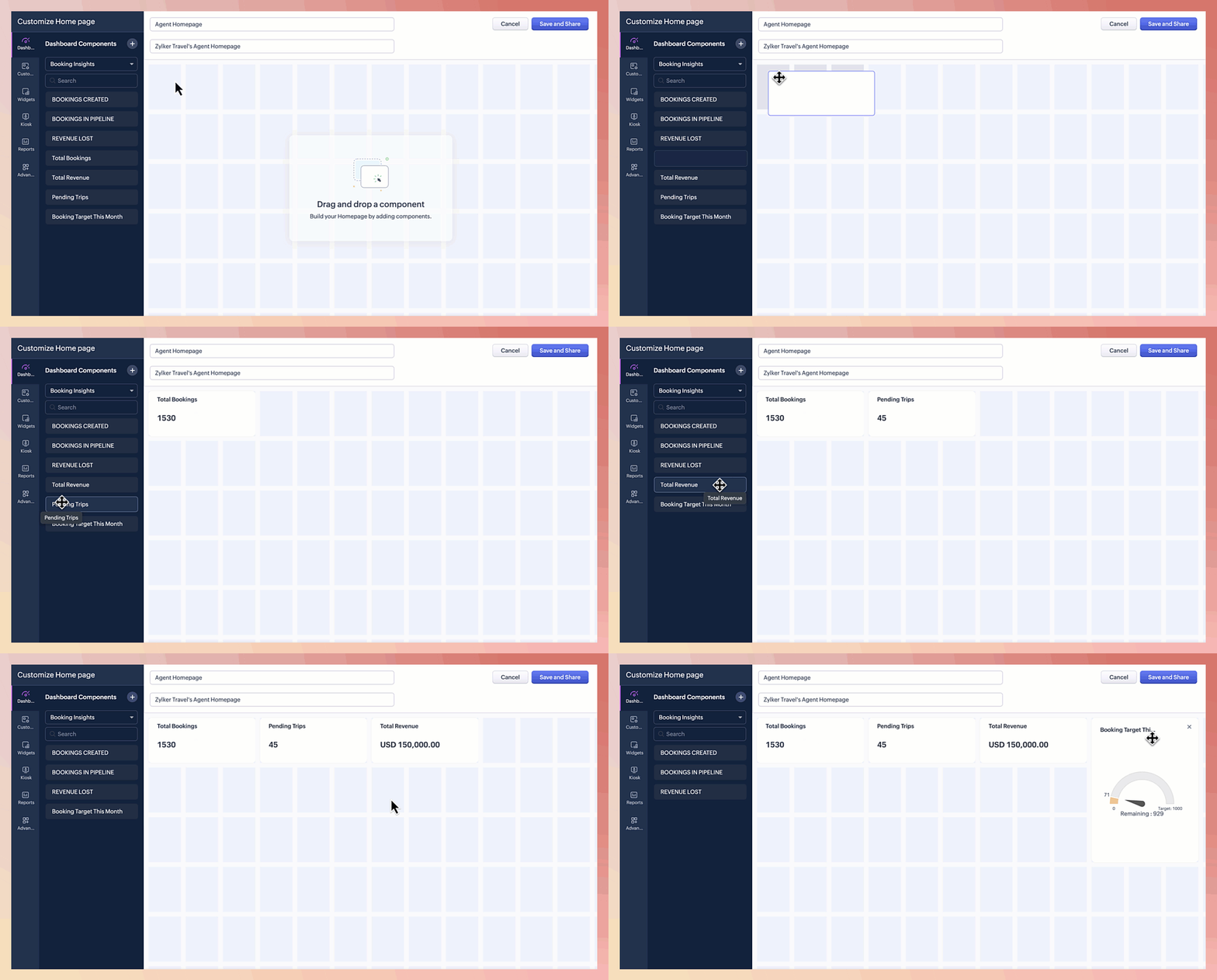
  • Drag-and-drop components - Build your homepage your way. This drag-and-drop functionality enables you to configure the layout the way you want.


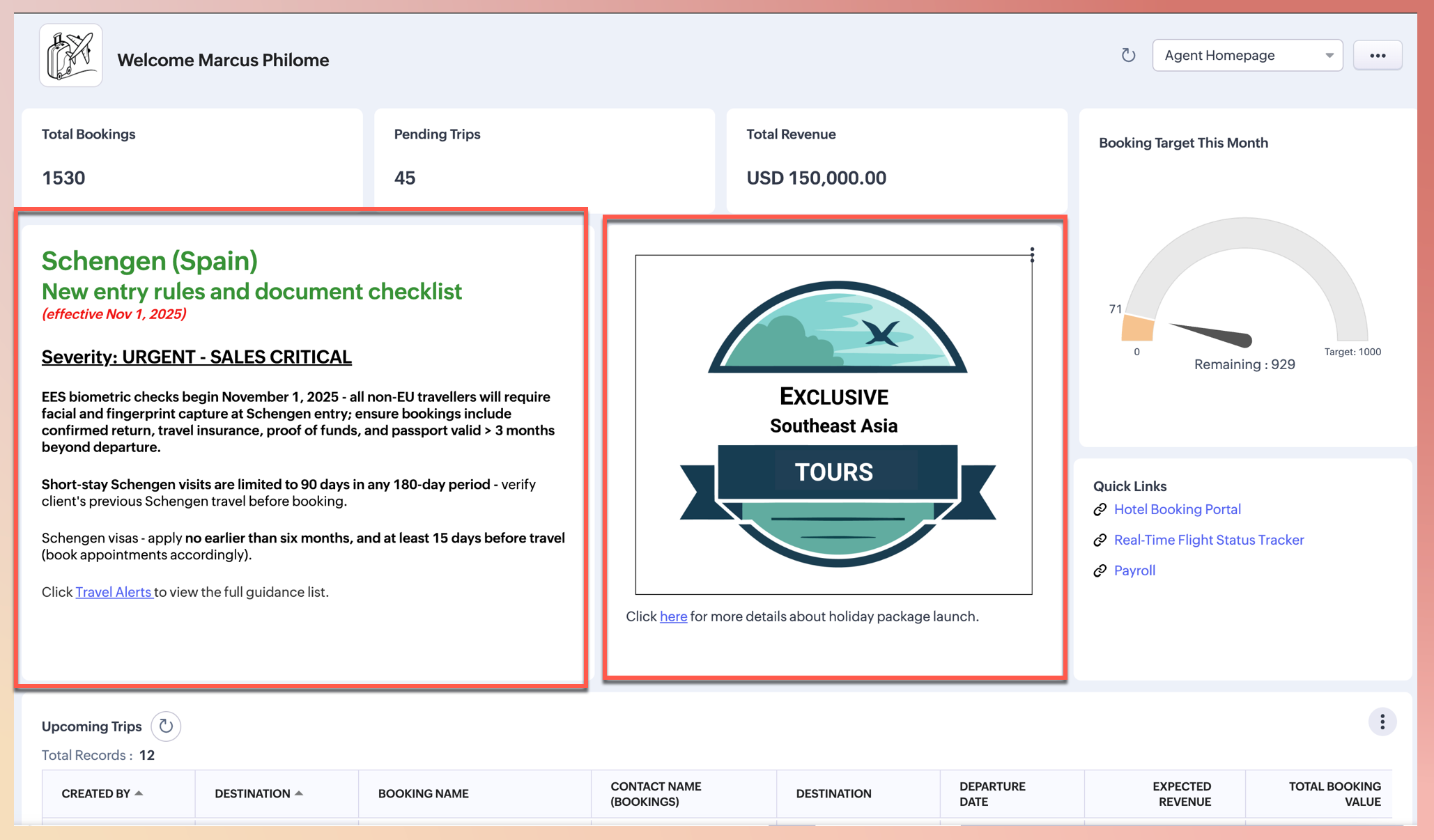
  • Rich text components - Ensure critical information is seen immediately. This content block allows you to create and format text to share important announcements, policy updates, and operational reminders directly on the homepage. You can make the content bold, highlight it, or even add bullet points and images.

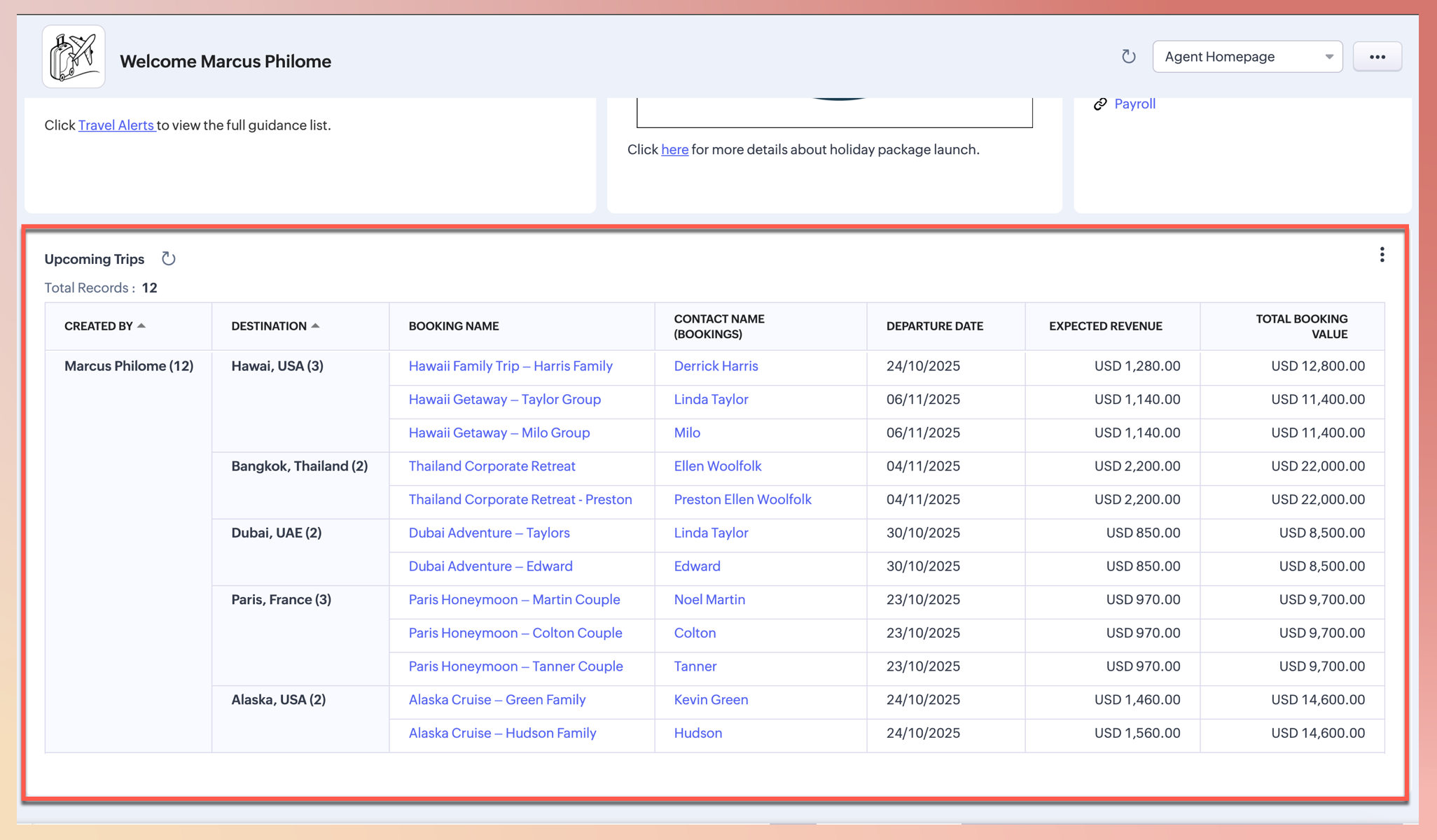
    For instance, the admin for a travel company's CRM account might use the rich text component to announce a new holiday package launch, such as Exclusive Southeast Asia Tours. They might also use it to announce updated visa guidelines for a popular destination and ensure all agents receive and acknowledge time-sensitive, sales-critical information immediately upon login.


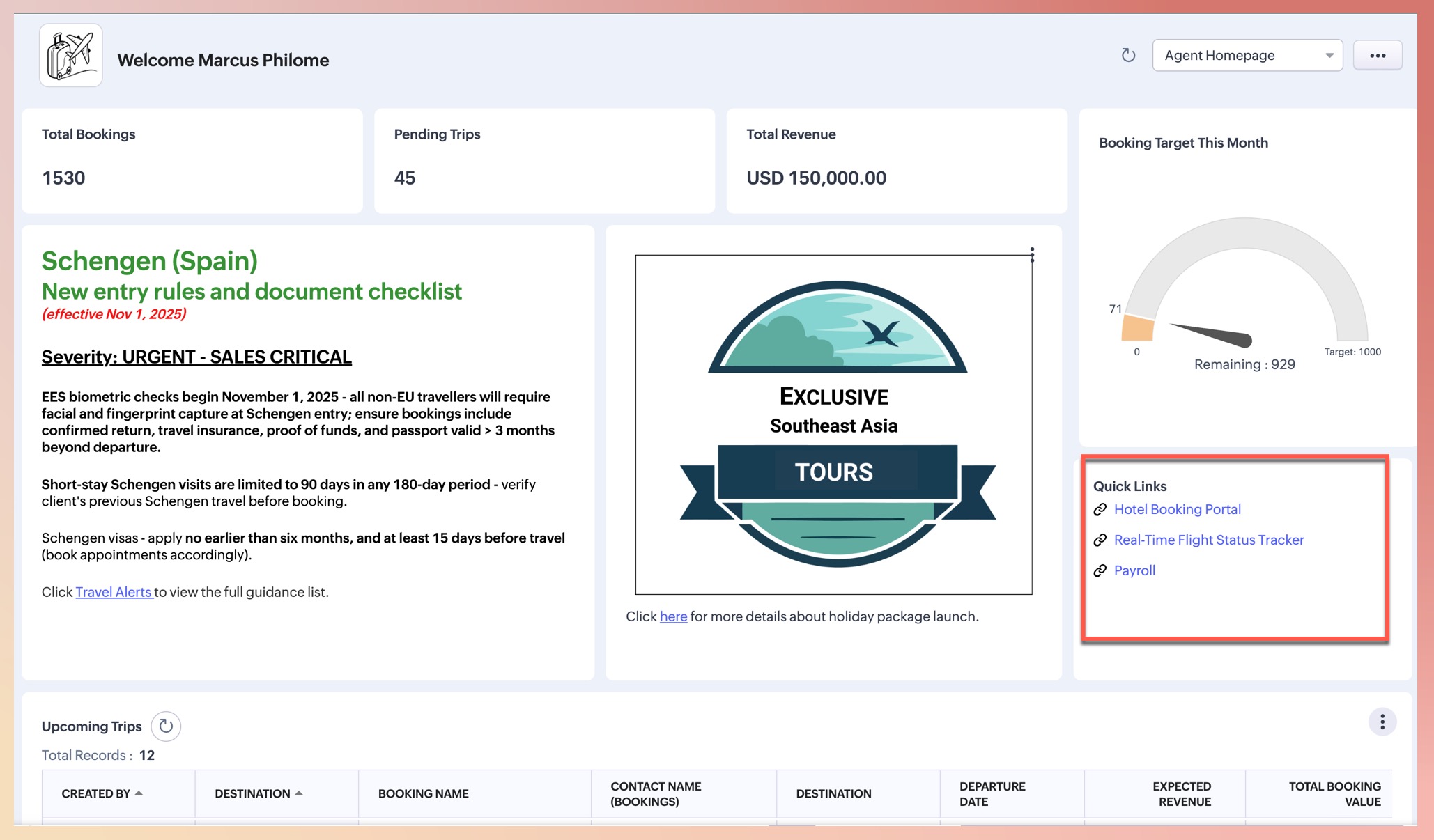
  • Quick links - Reduce clicks and save your agents' time. This component enables you to configure a set of clickable links directly on the homepage that provide instant access to frequently used internal or external resources.

    For example, the admin can display a quick links component titled Agent Resources on the homepage that gives agents instant, one-click access to critical operational tools like the Hotel Booking Portal, the Agent Commission Claim Form, and the Real-Time Flight Status Tracker—thus eliminating the need to run searches or navigate through multiple menus.
        

  • Report support
    Reports enable you to turn sales data into actionable, detailed insights and make data-driven business decisions. This functionality was previously unavailable on the homepage, but is now supported with filters and advanced controls.
    For example, the admin of our travel agency can display the Upcoming Trips and Commission Forecast report component on the agent homepage layout so agents can view upcoming trips and the total commission pipeline effortlessly and instantly upon logging in—without navigating to the dedicated Reports module.
        

Notes
Note: There's now a separate permission available for Homepage Customization. Previously, it was combined with the Customize Modules permission.

Upgrades
  • More controls in custom views - Enjoy full control over how your data is presented. Manage columns with new personalized resizing capabilities. Everything from your custom views is now supported on the homepage—except for record selection.


  • Extended sharing capabilities - We've extended the sharing capability of your homepage configurations. Previously, sharing was limited to only Users. Now, you can share your homepage with:
    - Groups
    - Roles and Subordinates
    - Profiles
    - Territories and Subordinates
      • Recent Topics

      • Select forwarding

        For Zoho mail online on PC in web browser: I had forwarding enabled in section "Mail accounts / Forwards", and I also have some filters that send emails from some unwanted senders to Archive. But it doesn't work as intended, it forwards everything (obviously
      • Custom view inconsistencies

        Why is "is not" missing from criteria, along with other comparison operators ??? It makes it almost impossible to build required custom views, I don't want "void" invoices listed & why on earth would "Void" invoices be showing when the criteria includes
      • Cliq iOS can't see shared screen

        Hello, I had this morning a video call with a colleague. She is using Cliq Desktop MacOS and wanted to share her screen with me. I'm on iPad. I noticed, while she shared her screen, I could only see her video, but not the shared screen... Does Cliq iOS is able to display shared screen, or is it somewhere else to be found ? Regards
      • system not picking my default custom service report template

        Can you tell me why when we create a service report always pick the (standard old) template? Even when I have a custom service report selected as Default.
      • Restrict Appointment Booking to Approved Clients

        Dear Zoho Bookings Support Team, We'd like to propose a feature enhancement for managing appointments within Zoho Bookings. This feature would ensure only pre-approved clients can schedule meetings. Desired Functionality: We propose the introduction of
      • Automate Credit Card Surcharge

        Is there a way to create an automation that will add a 3.0% credit card surcharge to a subscription whenever a customer pays via credit card?
      • Product Request: Send email to Secondary email

        Guys, we should be able to send the campaign to the secondary email too.  Is this on the plans for Zoho Campaign? It looks like I can map the secondary email from the CRM to the Campaigs, but can not send the message.  
      • I have the item field and Quantity field in the sub form , on the submit of the form if the quantity is grater than inventory means show alert on submit validation only for item type goods ,

        I have the item field and Quantity field in the sub form , on the submit of the form if the quantity is grater than inventory means show alert on submit validation . Stock Check Validation only for item type goods , not for item type service . For the
      • CRM notes

        I want to be able to add notes to a task that do not necessarily get rolled up into an account or contact.   For example, I tasks to work on a Court Order for John Doe divorce account.  There might be lots of updates (in the form of notes) that employees
      • Disappearance of all articles in the knowledge base

        Hi there! It seems like all of our articles have disappeared from the knowledge base: However, the names still appear in the "sort articles" section:
      • Logic for sending to a non-primary email address

        Hi, I have a scenario where contacts are able to sign up for emails with 2 different email addresses (example: work, personal). I've mapped both to Campaigns from Zoho CRM, but when I go to target an email only the primary email addresses are pulling in. How can I update this to look at both of the email addresses - or specifically the secondary email address in Campaigns? Thanks, Jenny
      • Apple Messages for Business in Omnichannel communications?

        Hello, Apple launched "Apple Messages for Business" but Zoho CRM or Zoho Desk don't appear in the list of possible integrators. Zoho already promotes https://www.zoho.com/crm/omnichannel.html Omni Channel integration, but Apple Messages does not yet appear.
      • Add "Reset MFA" Option for Zoho Creator Client Portal Users

        Hello Zoho Creator Team, We hope you are doing well. We would like to request an important enhancement related to Multi-Factor Authentication (MFA) for client portal users in Zoho Creator. Currently, Creator allows us to enforce MFA for portal users,
      • Tables for Europe Datacenter customers?

        It's been over a year now for the launch of Zoho Tables - and still not available für EU DC customers. When will it be available?
      • Does Zoho has chatroom/chatbot url feature?

        Hi Zoho community! I’m looking for a quick "Yes/No" answer for my dev team regarding Zoho’s capabilities. We currently use Zoho Desk for our Service Team and Zoho CRM for our Marketing Team to bring both functions under one platform. Our question: Does
      • One Support Email Managed By Multiple Departments

        Hello, We use one support email (support@company.com). Incoming emails come to the "Support Department" and based on what the customer is asking, we route that ticket to different departments (billing, technical support, etc.). When users in these different
      • What's New in Zoho Analytics - February 2026

        Hello Users! We're back with another round of updates for Zoho Analytics. This month's release focuses on giving you greater flexibility in how you visualize, manage, and act on your data - with new features like custom visualizations, remote MCP server,
      • Is it Possible to Modify Standard Report Urls

        Is there a way to permanently modify standard report Urls? Use case: Suppose I have a Products report. Showing list as timeline, calendar, or kanban doesn't make sense. Want to hide that from users by adding #Report:Products?zc_ShowAs=false&zc_Print=false
      • Updated font library: New font styles and custom font options in Zoho Sheet

        Zoho Sheet's font library now supports 500+ font styles in 60+ languages! The updated font library is stacked with new font styles, and some of the previously available font styles have been replaced with equivalent options. There are two ways you can
      • scope for phonebridge in CRM and phonebridge API documentation

        Hi I cannot find the scope to be used for phonebridge in CRM API V2 calls. I am getting OAUTH_SCOPE_MISMATCH for scope group ZohoCRM.modules.ALL,ZohoCRM.setttings.ALL Also I am not able to locate the documentation for the same, All I have is phonebridge
      • Create custom rollup summary fields in Zoho CRM

        Hello everyone, In Zoho CRM, rollup summary fields have been essential tools for summarizing data across related records and enabling users to gain quick insights without having to jump across modules. Previously, only predefined summary functions were
      • Job Alerts for Candidates

        hi All, I have 2 questions relating to sharing job details with candidates. 1. is there a way to notify candidates that meet certain criteria of current jobs available? eg. I run a candidate search, and identify 50 candidates that might be suitable. Can
      • Zoho Wiki or new Zoho Learn

        We are currently evaluating if we should move off confluence. At present in Confluence we have multiple levels within our documentation but with learn it looks like you can only have Space       - Manual             - Chapter Is it possible to have levels below Chapter? Also the same question for the existing wiki, can I have more sub-levels?
      • Fix image at bottom of a page fot automatic proposal creation

        I'm working on a proposal document to automate our proposal creation process. So far it works fine, but I experience some problems with an image I want to have fixed at the bottom of the page AND above the footer. This section of the document consists
      • Can't scroll the page down unless I refresh the page

        Hello, This issue has been going on with me and a lot of other users in my organization, we can't scroll down! the scrolling side bar doesn't appear and scrolling down through mouse or keyboard keys doesn't work, it seems that the page just ends in the
      • Price List

        II want to restrict the items to display in sales, quote, etc for which custom rates are added in price list. How I can do the same in Zoho books
      • Let’s Talk Recruit: Still switching tabs to source?

        Welcome back to the Let’s Talk Recruit series. Let’s talk about how you actually source talent. Do you open multiple job boards every single time a role opens? Run the same keyword searches you ran yesterday? Download, upload, rename, and then do it again
      • Kaizen #231 - Embedding Zoho Desk Tickets in Zoho CRM

        Hello, CRM Wizards! This week, let us enhance cross-team visibility between Zoho CRM and Zoho Desk. We will use the Zoho Request Client inside a Related List widget to display open Zoho Desk tickets directly within the Contact record in Zoho CRM. This
      • EU Problem

        Hi all, we've been facing issues with the Europe data center for two days. It's starting to disrupt our daily workflow. Any word on when this will be resolved?
      • Introducing a smarter, faster, and more flexible charting experience

        Hello Zoho Sheet users, We're delighted to share the latest news about a major update to charts in Zoho Sheet! The new version supports dynamic data ranges, granular styling options, faster loading, and other interesting enhancements that allow you to
      • Introducing Job Alerts

        Keeping candidates engaged beyond their first application is one of the most consistent hiring challenges. Many interested candidates simply do not revisit career sites regularly, which can result in missed opportunities and reduced re-applications. To
      • Where is the settings option in zoho writer?

        hi, my zoho writer on windows has menu fonts too large. where do i find the settings to change this option? my screen resolution is correct and other apps/softwares in windows have no issues. regards
      • Client Script | Update - Client Script Support For Custom Buttons

        Hello everyone! We are excited to announce one of the most requested features - Client Script support for Custom Buttons. This enhancement lets you run custom logic on button actions, giving you greater flexibility and control over your user interactions.
      • Enhance Sign CRM integration

        Hello all, I'm working on a custom Deluge script to enhance the integration between Zoho CRM and Sign by using a writer merge template for additional flexibility. I want to replicate the post-sign document integration that exists between CRM and Sign
      • Task status - completed - other options

        I have a dumb question I know i can make custom statuses for the tasks - but is there anyway to make additional "completed" statuses like for instance if i have a task "call back customer" and i leave a vm for them to call back marking it "completed -
      • Bank feed integration First Abu Dhabi Bank (FAB) to Zoho? (UAE)

        Hello everyone, Is First Abu Dhabi Bank in the list of banks available for bank feed integration with Zoho Books? Thank you.
      • How to Export Filtered List of Contacts?

        This seems like it should be simple, but I'm stymied. I'm trying to export a filtered list of my Contacts for analysis in a spreadsheet. The use case is that I'm an ecom business based in the US. The bulk of our customers are individuals stored as Contacts.
      • Possible to Turn Off Automatic Notifications for Approvals?

        Hello, This is another question regarding the approval process. First a bit of background: Each of our accounts is assigned a rank based on potential sales. In Zoho, the account rank field is a drop-down with the 5 rank levels and is located on the account
      • Quick Create needs Client Script support

        As per the title. We need client scripts to apply at a Quick Create level. We enforce logic on the form to ensure data quality, automate field values, etc. However, all this is lost when a user attempts a "Quick Create". It is disappointing because, from
      • can we add product images in Zoho CRM Quote PDF template?

        I want to create a quotation format in Zoho CRM similar to the attached PDF, where each product is displayed in a table with rpoduct image I need the product image to appear inside the line items section of the quote. However, while checking the Quote
      • Next Page