Uploaded files are not included when using "Include user submitted data" in Email Notification
In Send Email notification workflow in Zoho Creator, there is an option called "Include user submitted data" which allows the email to contain all the form submission details.
However, when this option is enabled, files or images uploaded through File Upload or Image fields are not included in the email.
Additionally, when attempting to manually add fields using the Insert fields option in the email editor, File Upload or Image fields are not available to insert into the email content.
For example, in a Student Assignment Submission form, there are fields such as Image and Files that allow users to upload images or documents.
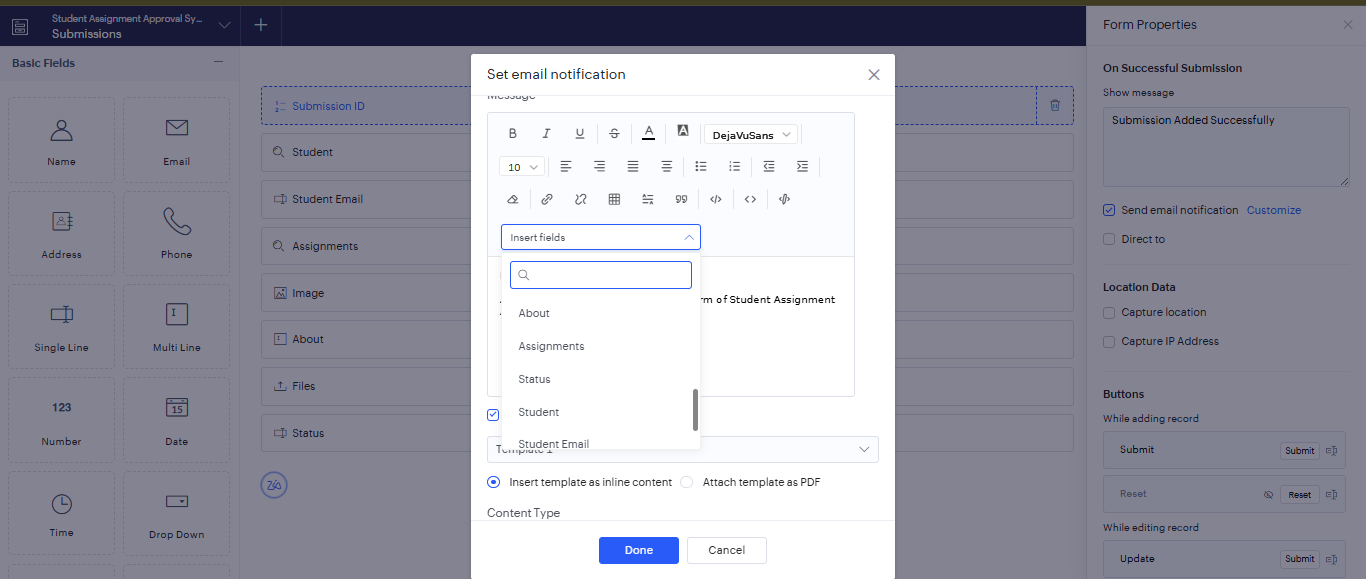
When configuring the Email Notification for this form, there is an option in the message editor called Insert fields, which allows form fields to be inserted into the email content. However, in this list, the Image and File Upload fields do not appear as selectable options, even though they are part of the form and contain submitted data.
Ideally, when Include user submitted data is selected, all submitted data including uploaded files or images should also be included or attached in the email, as they are part of the form submission.
Currently:
- Uploaded files are not automatically attached to the email.
- File/Image fields are not available in the Insert Fields list.
- The only way to send them is by using Deluge scripting (send mail task with attachments)
It would be helpful if uploaded files or images were also automatically included or attached in the email when "Include user submitted data" is enabled, since they are part of the submitted form data.