What's New in the Trips Experience
We've redesigned the Trips module to make trip management simpler and more intuitive. Here's a quick look at what's changed.
Simplified Trip Creation and Itinerary Management
Flexible Trip Creation: You can now create and save a trip without adding itineraries right away. Itineraries can be added later from the trip's detail screen, giving your employees the flexibility to set up trips in stages rather than all at once.
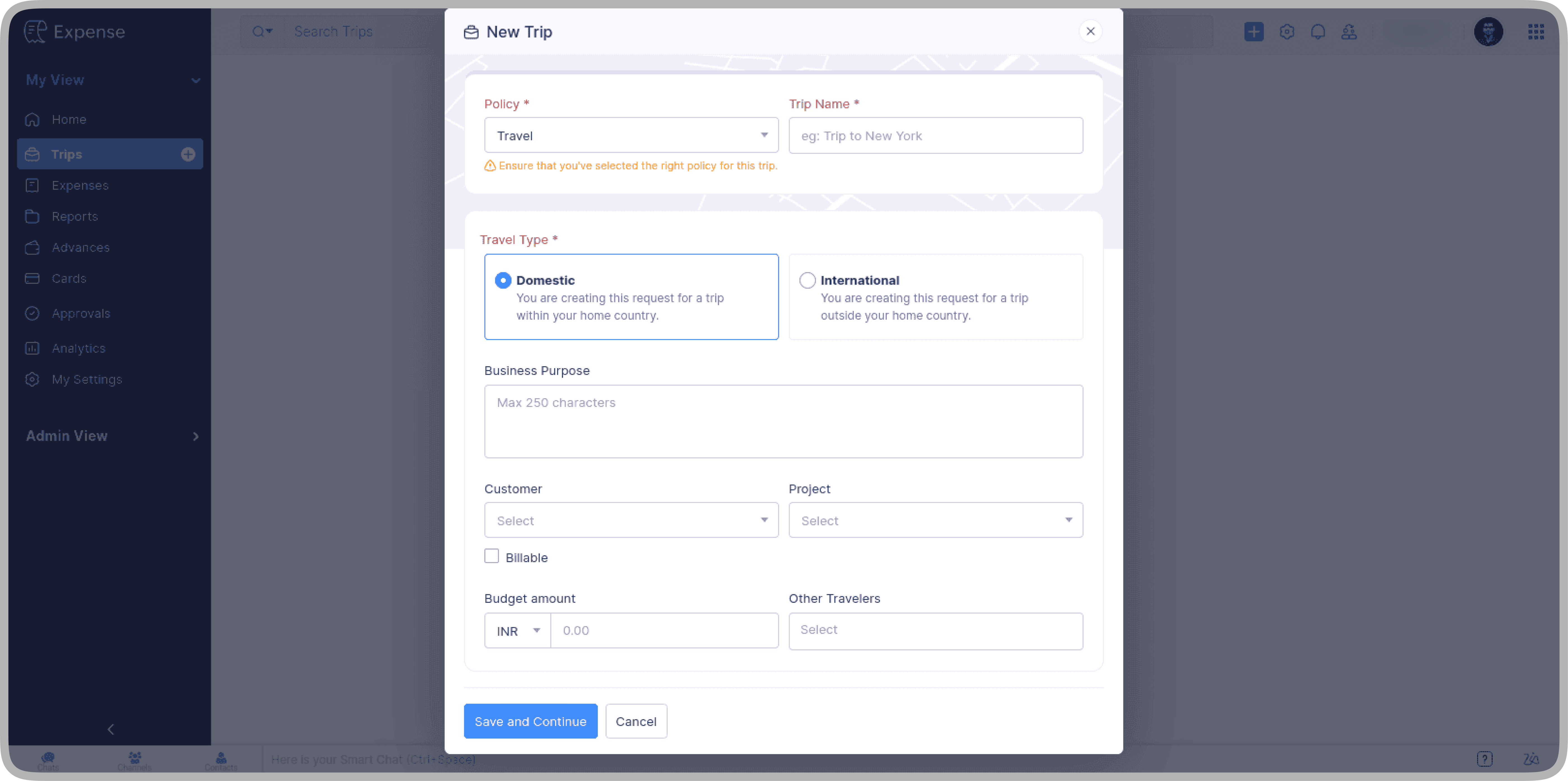
Simplified Itinerary Addition: When you're ready to add itineraries, dedicated buttons, like Add Flight, Add Hotel, and similar buttons, are available directly under the Itinerary tab, so you no longer have to navigate through a dropdown to find them.

Streamlined Edit Access: The Edit/Update dropdown has also been replaced with a an Edit icon.
Quicker Access to Comments and History
Comments and History are now separate and easier to reach.
Comments: Click the Comments icon on the trip's details page to add or view trip-level comments.
History: A new History tab, located next to the Advances tab, lets you view a trip's full activity log.

Smarter Itinerary Tab
All your itineraries are now in a single, scrollable list with no tabs to switch between. Scan through your bookings and select any one to view its details instantly.
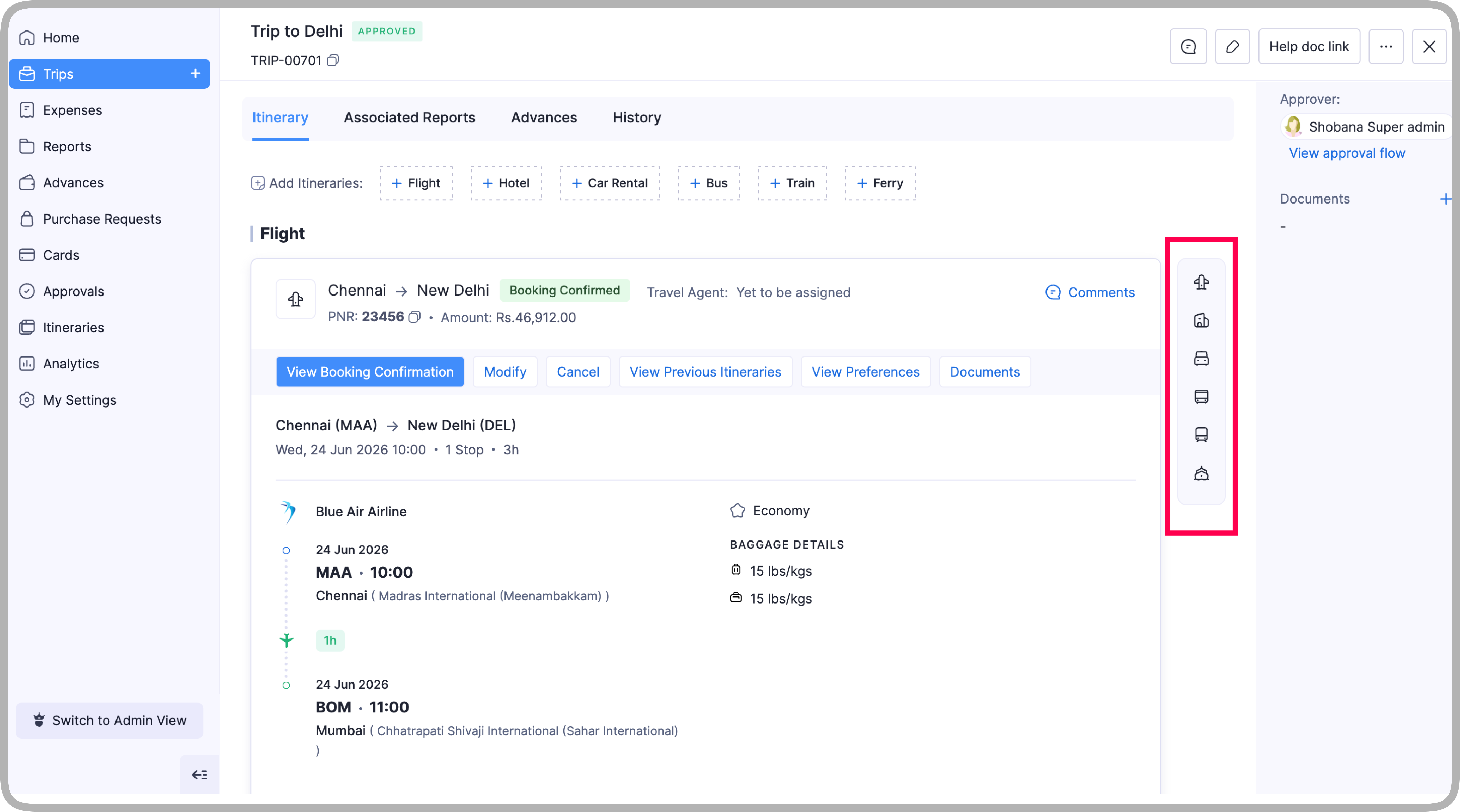
Redesigned Itinerary Cards
Each travel mode now has a refreshed card layout. Here are the key improvements.
Inline Actions: All booking-level actions including Edit, Delete, and the like, are now visible directly on the itinerary card. You no longer need to open a separate page or expand a More actions menu.

Full Segment Details: For flights with multiple segments, all segment details are shown directly on the card.
Improvements to Option Addition
A few updates have been made to the option addition flow.
Baggage split into two sections: Check-in baggage and cabin baggage are now configured separately for more clarity.
Bulk addition now pre-fills all selected itineraries: Previously, only the first itinerary was prefilled. Now, all selected itineraries are prefilled.
Itinerary headers in bulk addition: Section headers help you clearly organize and assign flight segments to the right itinerary.

GDS selection is now required: When using the option parser, you must select a GDS (Global Distribution System), a platform used to source flight inventory that helps the parser identify the data format and extract flight details accurately. If your organization has configured a default GDS, it will be prefilled automatically, though you can change it at any time.
Consistent Flight Segment UI: The flight segment layout in the option selection modal has been updated to match the design used in the itinerary cards, giving you a consistent experience across the module.
Standardized Booking Confirmation
Consistent Labels: The label for adding booking confirmations is now consistent across all travel modes. Previously it was Add Ticket for some modes and Add Booking Confirmation for others. It's now Add Booking Confirmation everywhere.
Edit Options on the Go: Travel agents can now edit selected option details directly while creating a booking confirmation, without having to go back to update the itinerary.

If you have any questions about these updates, feel free to write to us at support@zohoexpense.com; we'd be happy to help.
Topic Participants
Geethanjali R K
Vivek Rai
Sticky Posts
Zoho Finance Workshop 2023 is coming to the USA. Meet the experts, get exclusive training on Zoho Finance apps and more.
Hello all, We'd like to invite you to our biggest Zoho Finance workshop in the United States. After a brief break, we are excited to be back. This year, we're bringing together our customers and community members for two days of curated hands-on sessions,
Recent Topics
Duplicate Record Creation
Hello Team, I would like to check whether there are any options available in Zoho FSM to prevent duplicate record creation in the following modules: Assets Companies Contacts Ideally, we would like the system to check for existing records before allowingChange default "Sort by"
Is there a way to change the default "sort by" when searching across modules?" in Zoho CRM? Currently the default sort method is "Modified time" but i would like to utilize the second option of "relevance" as the sort by default and not have to changeEnhanced access controls and smoother authentication for organization emails
Available to customers in all DCs. Hello everyone, We've improved how organization emails work in Zoho CRM, which are used when multiple users need to send emails from a common address, like sales@company.com or support@company.com. Admins can set upNew Search Function
Hey Team, The search function updated in our CRM about a week ago, so I assume it was an automated update across Zoho. It no longer displays leads/deals etc in Chronological order so that the most recently created or updated is the first to display whichError AS101 when adding new email alias
Hi, I am trying to add apple@(mydomain).com The error AS101 is shown while I try to add the alias.VENDORS ARE NOT SYNCHED WITH CONTACTS IN CRM
Hello, While the ACCOUNTS and CONTACTS (Including the primary contact) are synced with the CONTACTS module in CRM, the vendor's CONTACTS are not synced with CRM - which basically forces the users to re-enter all vendor's contacts twice and then updateTransaction rules for "Owner's Contribution" ?
I have a bank account where a lot of the deposits are "Owner's Contributions" (i.e., the business owner investing money in the company). Is it possible to create a Transaction Rule to automatically recognize these? They all have the same verbiage fromPrint a price list or price book
Hi Community. Am I right in concluding that Zoho has no functionality to print a price list from either Zoho CRM, Zoho Inventory or Zoho Books? I won't get stuck on the fact that Zoho doesn't sync price books between Zoho CRM and Books/Inventory (moreThe Social Wall: October 2026
Hello everyone This month, we're making it easier to organize your monitoring workspace with Monitor Groups in Zoho Social. Organize your monitor columns into groups You can now organize your monitor columns into custom groups based on your preferences.Field of Lookup - 5 Field Association Limit.
This query relates to the post at: https://help.zoho.com/portal/en/community/topic/introducing-the-field-of-lookup-in-crm-public-early-access-2023 My simple (and common) scenario: I select an account / customer lookup and want their address pulled intoFeature Request - Electronic submission of tax returns in Canada
Allow the user to submit Canada Revenue Agency GST/HST returns with NETFILE. Provide the same functionality for provincial revenue agencies for PST/RST remittances. Today Zoho Books only provides the math required to calculate each line, requiring theAbility to translate Zoho CRM Kiosks
Hi team, Is support for translating kiosk text and screen names in the Zoho CRM translation tool planned on the roadmap? Thanks,Files in Teamspaces: keep your team's documents where the work happens
Release Note: This feature is available for all accounts across all DCs Hello Everyone, A Teamspace is built around a specific team and a shared objective, and it holds the modules and projects that team works with every day. The document that team dependsRequest for Zoho Desk Version and Module Details
Kindly help us confirm the version of Zoho Desk currently being used in our portal, along with the module/edition name. We require this information urgently for our internal documentation.ZohoMail_get_mail_attachment corrupts binary attachments (PDFs) over MCP
Hi all, The Zoho Mail MCP tool ZohoMail_get_mail_attachment returns binary attachments as UTF-8 text, so PDFs come back corrupted and an AI client can't read or save them. What we see: - The response header is content-type: application/octet-stream;charset=UTF-8.Request: Custom CSS Theme
I would really like a custom CSS theme that enables me to completely customize the look and feel of the survey page based on the typography of my company brand. Unfortunately, there does not appear to be complete customization with existing themes. ThisKB Articles - Can't See Content or Trigger Immediate Sync
Once a file has been submitted to the KB, there's no way to check what it actually contains. There's also no way to force an immediate sync with the source document. These are issues when one is developing and testing an agent. It makes troubleshootingRebrand your CRM with the all-new custom domain mapping setup
UPDATES TO THIS FEATURE! 19th Jan, 2024 — Custom domain mapping has been made available for portal users in Zoho One and CRM Plus. 23rd June, 2023 — Custom domain mapping has been made available for all users, in all DCs. Hello everyone! We are elatedDécouvrez le nouveau Zoho Analytics : l’analytique agentique pour toutes les entreprises
Nous sommes ravis de vous annoncer le lancement du tout nouveau Zoho Analytics ! Cette nouvelle version marque un tournant majeur dans l’évolution de la plateforme. Initialement conçue comme une solution de BI en libre-service permettant de créer desZia Agents in Zoho CRM: a better way to set up digital employees
Hello everyone, If you've been using Zia Agents in Zoho CRM, so far using Connections was the only deployment method you're familiar with. You create an agent in Zia Agents (define its objective, write instructions, use tools, add knowledge base) andKeeping phone number text format exporting from Books to Sheet
We have a custom function that copies data from our customers in Books to Sheets. In the process the customers' phone numbers (unless they contain a space) get treated as numeric values, so leading zeros get stripped off, and in some cases scientificAdmin Logging in as another User
How can a Super Admin login as another user. For example, I have a sales rep that is having issues with their Accounts and I want to view their Zoho Account with out having to do a GTM and sharing screens. Latest Update (27th April 2026): With the earlyTool Parameter UI - Freeze Header
When one has a number of tools with a number of parameters, scrolling down hides the heading information, forcing one to scroll back up to get confirmation which radio button is which: Seems like simply freezing the header would eliminate that issue.Cannot replace custom tools
This is so incredibly frustrating. Create a tool group. Add your custom schema to create your custom tools. Attach to an Agent. Now you need to update your schema to make an adjustment? You can't edit the schema or even re-upload a new schema. It blocksTesting Tools - Can't View Response
When adding a custom tool and trying to test it, one can see whether or not the test has a successful http response, but the actual payload cannot be viewed to verify the tool's performance. I thought that's what the little hover link was for, but mousingmore native app support for linux
Dear zoho,pls build additional apps like zoho valt,zoho sheets,zoho show,zoho authenticator apps for linux ,because more and more people are increasing switching to linux this days,Unbundle feature for composite items
We receive composite items from our vendors and sell them either individually or create other composite items out of them. So, there is a lot of bundling and unbundling involved with our composite items. Previously, this feature was supported in formQuick Reference Guide on join.zoho.com
Joining a remote session can be difficult for the people who need it the most. Please add a quick reference guide and better documentation that my Grandma can read on the join.zoho.com site. It's not uncommon to spend 10minutes or longer in a sessionZoho Projects - Auto Populate Project on Project Invoices
Hi Projects team, I noticed that when creating an invoice from a Project in Zoho Projects, the project is not selected on the invoice. Is this something which you would consider as a feature request? It seems silly that when you create an invoice fromTimes prepopulating in Date/Time field on deal records
Support tells me that there is no workaround to having the time auto-fill on a date/time field in our deal records -- that is HUGELY inconvenient and creates massive opportunity for error. Our deals involve several parts over various days/times, noneEmail-Data Synchronization with Zoho Analytics
Hello, Enterprise Support Community! We're excited to announce the availability of Email Data Synchronization with Zoho Analytics! This highly requested enhancement allows you to sync email data from Zoho CRM into Zoho Analytics, making it easier to analyzeMulti-Day Installations
We schedule technicians on multi-day installations. A single appointment from Monday 8 AM through Friday 5 PM counts as 105 working hours, causing false overbooking. We need one appointment spanning five days but only 40 hours counted toward technicianMaking shared forms available offline
Hi, We used to be able to have our forms available offline even if it was a shared form. now we can't. Is this a new bug?Zoho Forms API
Is there any way to get all form entry list using API? Looking forward to hear from youDocuments greater than 40MB Preview
hello, Documents bigger than 40 MB cannot be previewed in WorkDrive Web App or Mobile App. would it be resolved in future?Calendar Booking - Related Deal
Is it possible to automatically associate a Calendar Booking with an existing Deal in Zoho CRM? We're trying to use the native Calendar Booking feature. Our goal is to send a booking link to a customer from an existing Deal record, so that when the customerApproval Process configuration is now more flexible and fully customizable
Hello everyone! Approval Process is back with a better user experience that makes it easier to add rules to your processes. This enhancement includes some UI updates that help you create highly structured approval stages—and more. Let's look at the enhancementsKaizen #268: Using Zoho MCP to Build and Configure Zoho CRM Cadences
Hi everyone! Welcome back to the Kaizen series! In the previous Kaizen posts, Kaizen #265 and Kaizen #266, we explored how Zoho MCP can be used to work with Zoho CRM records, retrieve metadata, customize CRM, configure automation, and even coordinateDeliverability Update: Impact of the Ongoing Microsoft 365 Service Disruption on Email Delivery
Update (November 16, 2026): This incident is resolved. In its final update on November 14, Microsoft confirmed that all affected services have fully recovered and the backlog of email messages has been processed. Microsoft lists the end of impact as NovemberTrigger a Workflow Function if an Attachment (Related List) has been added
Hello, I have a Case Module with a related list which is Attachment. I want to trigger a workflow if I added an attachment. I've seen some topics about this in zoho community that was posted few months ago and based on the answers, there is no triggerNext Page