What's New in Zoho Analytics - August 2026

What's New in Zoho Analytics - August 2026

Hello Users!


This month puts you in control of how your analytics moves: promote content safely between workspaces with Deployment Management, govern data access and sign-in more precisely, and make your forecasts smarter with external drivers. There's also faster live data, new connectors, and finer scheduling across the board.


Administration & platform

Bigger control over how your analytics content is built, promoted, and accessed.

Deployment Management 

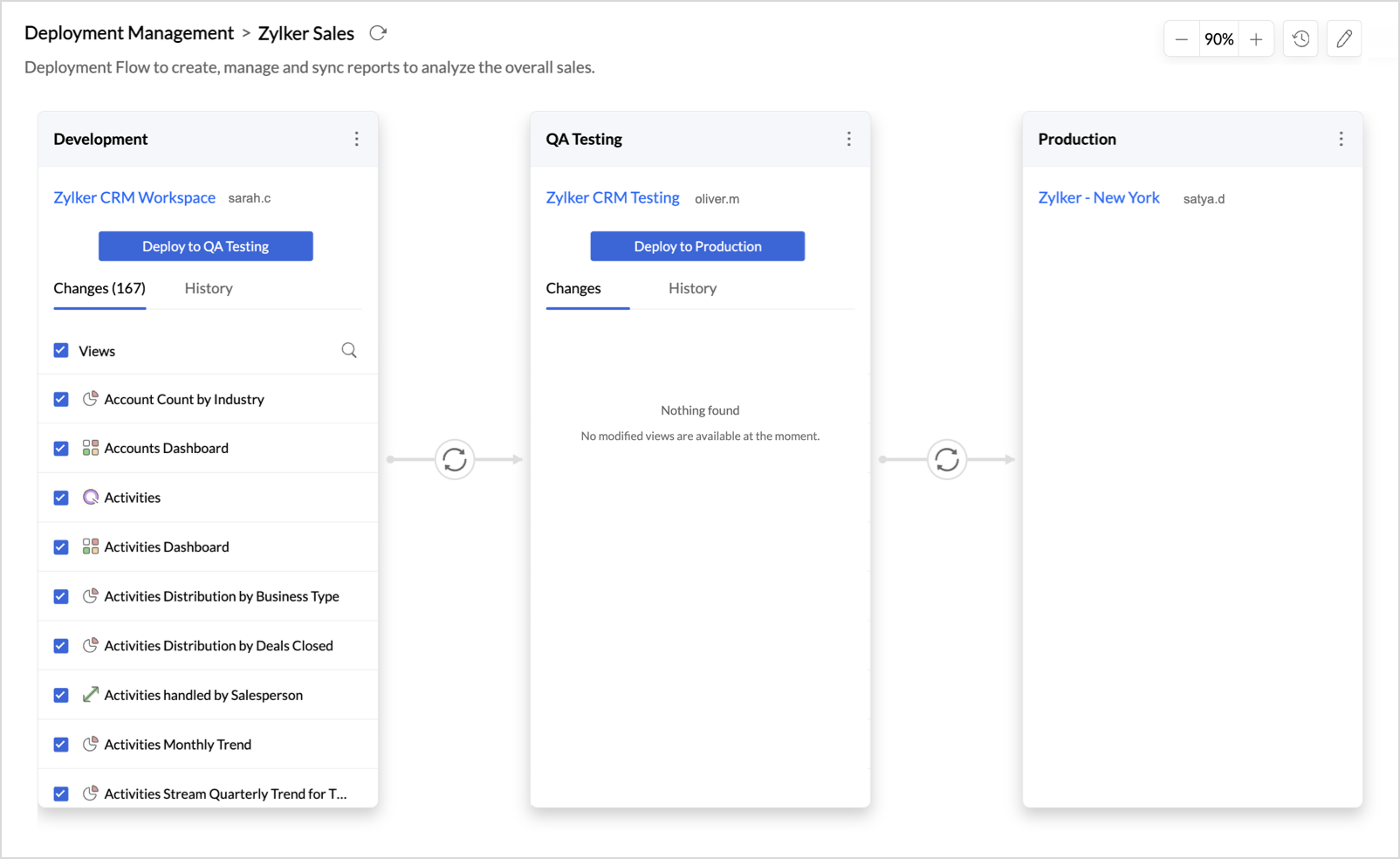
Your analytics content now gets a release pipeline of its own, so you never have to edit reports in a live workspace and hope nothing breaks. Deployment Management connects your workspaces as ordered stages, such as Development, Testing, and Production, letting you build freely, validate at every step, and see exactly what changed before you promote anything. Push to production only when it is ready. Deployments carry only the metadata from one stage to the next, so your live data is never touched, and the full history stays one click away. Head to Organization Settings and create your first deployment flow.

For more information, visit the Deployment Management help document.
Data source permissions for custom roles

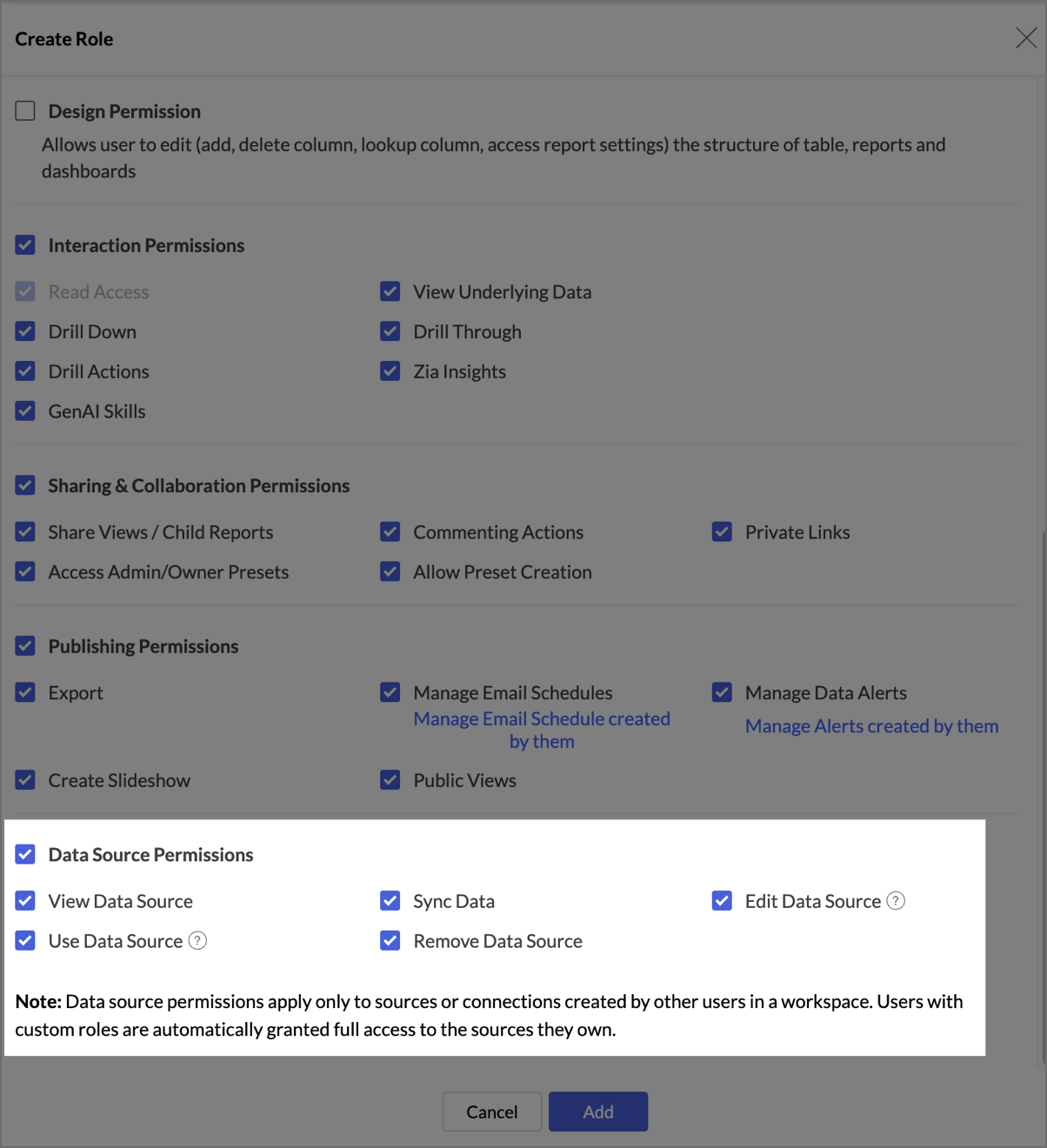
Custom roles with the All Data, Reports And Dashboards access type now include a dedicated set of data source permissions: View, Use, Sync, Edit, and Remove Data Source. Grant exactly the level of data source access each role needs; these permissions apply to essential connectors and to sources created by other users, while users always keep full access to the sources they own.
For more information, visit the Manage custom roles help document.

New sign-in methods for white label portal users

Zoho Analytics now supports social sign-in for your white label portal. Configure Google, Facebook, LinkedIn, or Microsoft from the new Sign-in Methods tab in White Label Settings, and let your users sign in with an account they already use instead of setting up a new password. For more information, visit the Manage Configuration help document.

Multilevel subfolders

You can now nest subfolders deeper within your workspace folders, giving you improved flexibility to organize reports and dashboards the way your team actually works.
For more information, visit the Viewing Workspace help document.

Advanced Analytics

Multivariate forecasting: exogenous variable support

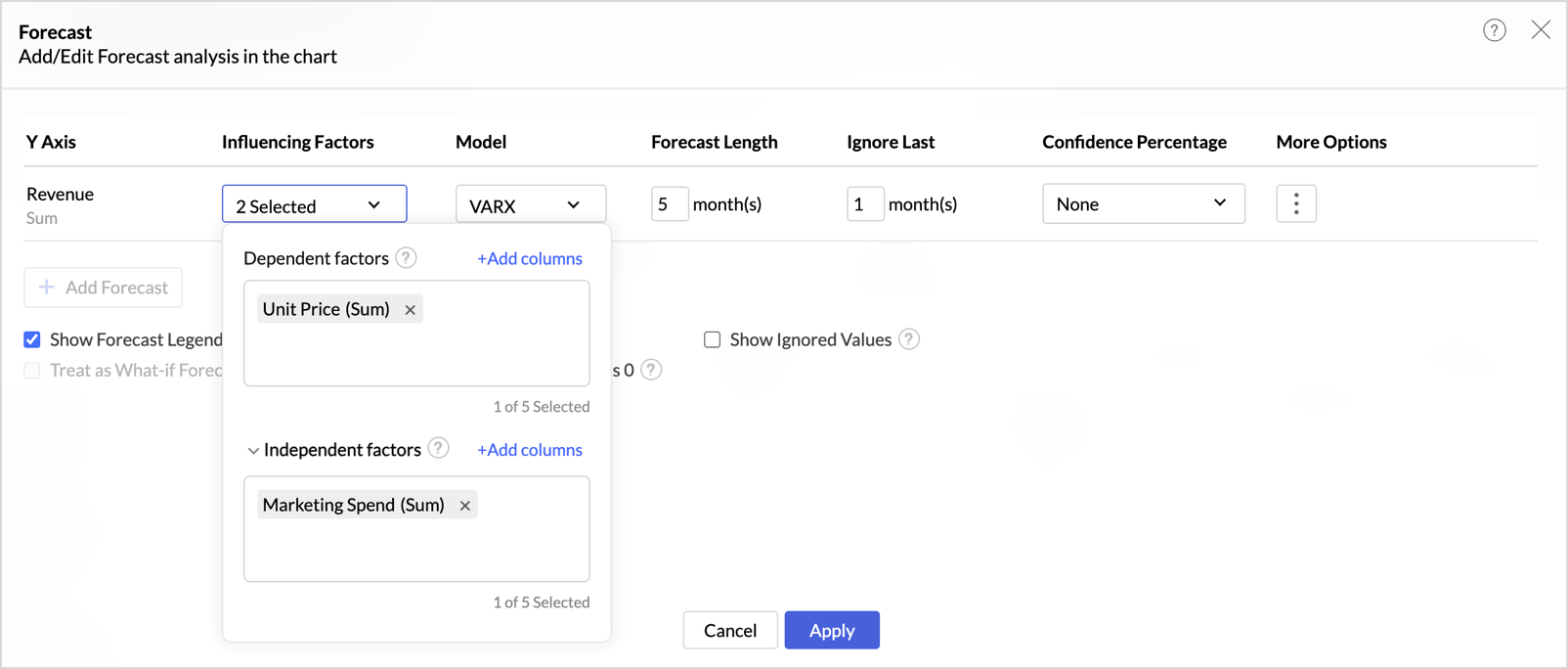
Forecasts can now account for external drivers that influence your metric without being driven by it. When adding influencing factors, you can group them as dependent and independent factors, up to five in total. Dependent factors are endogenous variables that move together with your target, such as revenue or demand when forecasting sales. Independent factors are exogenous variables, such as marketing spend, discounts, or campaign budget, which influence sales but are not driven by it. With dependent factors alone, the VAR model is applied; adding independent factors switches the forecast to VARX (Vector Auto Regression with exogenous variables). The Forecast Model dialog names the model applied and lists the factors used.

For more information, visit the Forecasting help document.

Data import & connectivity

New sources to connect, and faster access to the ones you already have.

Data Cache for Live Connect

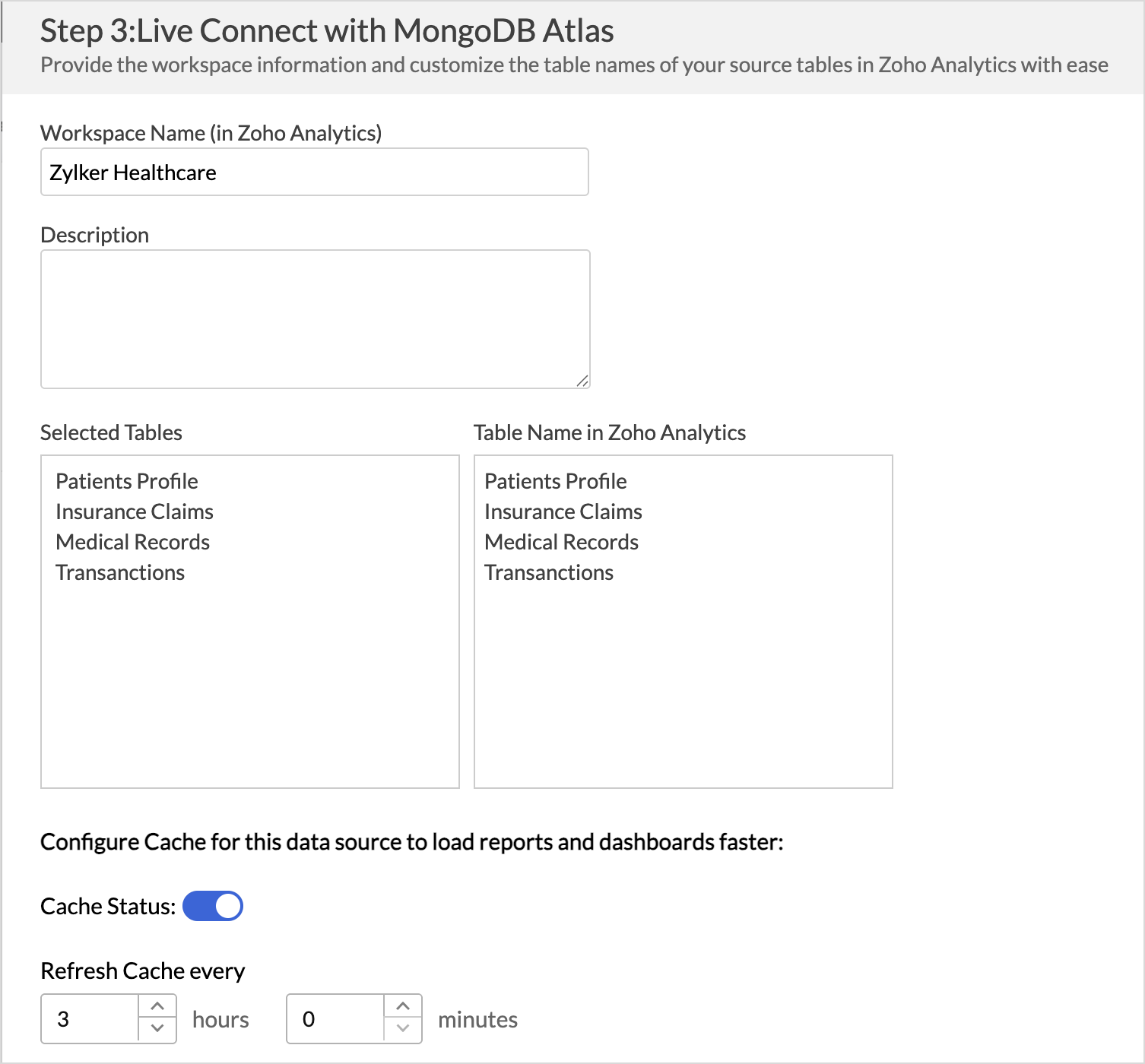
Speed up report and dashboard loading with Data Cache for Live Connect. Zoho Analytics can now cache summary values from your live data source and refresh the cache at an interval you configure, reducing the need to fetch data from the live source for every request. When you need up-to-the-minute numbers, you can still fetch the latest data live whenever needed. For more information, visit the Data Cache for Live Connect help document.

New Connectors

More business apps and databases you can connect to Zoho Analytics this month:
  • Chargebee: Connect your Chargebee data to analyze your subscription billing and revenue. For more information, visit the Chargebee connector help document.
  • Help Scout: Bring in your Help Scout data to report on your customer support performance. For more information, visit the Help Scout connector help documentument.
  • Supabase: Connect to Supabase as a new database source in Zoho Analytics. For more information, visit the Supabase help document.

Reporting & usability

Compare two metrics in a single widget

You can now bring two metrics into the same KPI widget. Until now, each widget paired a single metric with a dimension or date; now two metrics (like say, Sales and Cost) can sit together in one view, saving you from building and reading two separate widgets. Try it on any KPI widget and see the comparison for yourself.

For more information, visit the KPI Widgets help document.

Flexible schedules for Data Alerts

You now have finer control over when Zoho Analytics checks your alert conditions. Monthly schedules let you set an interval of 1 to 12 months, so checks can run monthly, once in two months, or on any longer cycle, and a new Yearly frequency covers annual checks. You can also pick relative-day patterns such as the 1st Sunday or the Last Friday of the month, skip weekends on Hourly and Daily schedules, and set a time zone for each alert.

For more information, visit the Data Alerts help document.

Developer platform

New Action APIs for Custom Visualizations

Four new Action APIs are now available in the Custom Visualizations JS API: invokeViewUnderlyingData, invokeExplainData, invokeDrillThrough, and invokeDrillAction. Each directly invokes the corresponding action for a clicked data point, so your custom visuals can trigger underlying data, explain data, drill through, and drill actions without opening the interaction menu.

For more information, visit the Custom Visualizations page.

That's everything new in Zoho Analytics this August. For the complete list of updates, visit our What's New page.

    • Sticky Posts

    • What's New in Zoho Analytics - August 2026

      Hello Users! This month puts you in control of how your analytics moves: promote content safely between workspaces with Deployment Management, govern data access and sign-in more precisely, and make your forecasts smarter with external drivers. There's
    • What's New in Zoho Analytics - June 2026

      Hello Users! This month is about meeting your data wherever it lives: reaching it from AI assistants, bringing it in from more sources, and keeping it flowing with less manual effort. Here's what's new across Ask Zia and AI, data import, integrations,
    • What's New in Zoho Analytics - February 2026

      Hello Users! We're back with another round of updates for Zoho Analytics. This month's release focuses on giving you greater flexibility in how you visualize, manage, and act on your data - with new features like custom visualizations, remote MCP server,
    • What's New in Zoho Analytics - May 2026

      Hello Users! We're back with another round of updates for Zoho Analytics. This month's release focuses on giving you greater flexibility in how you visualize, manage, and act on your data. We are introducing richer data visualizations, smarter AI-powered
    • What's New in Zoho Analytics - January 2026

      Hello Users! We are starting the year with a strong lineup of updates, marking the beginning of many improvements planned to enhance your analytics experience. Explore the latest improvements built to boost performance, simplify analysis, and help you
      • Recent Topics

      • How can I add a Custom Field (or Customer_name) to a picklist?

        Our workflow is Shopify-->SO -->Picklist-->Package-->Shipment. We would like to have the Picklist template to include a custom field "Customer_Notes" (we have created this field already). This way we get alerted when a customer has notes on their account.
      • Can't copy and paste from email in Zoho email client

        I don't know what happened, but I have lost the ability to cut and paste information from an email.
      • Which Zoho CRM tasks would you want an AI assistant to handle?

        I’ve started delegating my Zoho CRM work to AI – and many tasks now take me half the time. It has been so useful that we’re now working to make it available to everyone. Instead of clicking through records and tabs, I simply describe what needs to be
      • What's New in Zoho Inventory | July & August 2026

        Hello users, The July and August 2026 releases bring a range of new features and improvements across the product. From the Nigeria Edition and Super Admin enhancements to Sri Lanka IRD-compliant invoicing, Loyalty Program Management, and improvements
      • Hide Inactive Social Sign-In Providers from Login Screen

        Hello Zoho Team, We hope you are doing well. Currently, Zoho One allows admins to configure security policies and enable or disable Social Sign-In options for third-party providers such as Apple, Google, Microsoft, LinkedIn, Yahoo, Twitter, Facebook,
      • Forms data export bug

        The export csv with a password has changed for the worst. It is less secure by not allowing complex passwords. Just last week and the last year (at least) I was able to use a complex, secure password. Export CSV moreover doesn't even work if I use a simple
      • How does Zoho handle the daylight savings time change in Alberta?

        Alberta has just made the decision to get rid of daylight savings. This means that as of November 1, 2026 we remain on UTC-6 year-round. We have timing errors in meetings scheduled after that For example, we scheduled meetings in late November at 9:00
      • Zoho Projects - Linking CRM Deals to Projects via API without sending customer contact email invitation to project portal

        We are using the Zoho CRM and Zoho Projects APIs to automatically create a project in Zoho Projects and then associate that project with the relevant Deal in Zoho CRM. The API process is working in that the project is created successfully and appears
      • Shared Mailbox in iOS app

        Hi, On the desktop I am using a Shared mailbox for our company's general mailbox that somebody else should be able to view. In the iOS app however I can't find it? Old sources on the internet says this isn't possible but that can't be right? Somebody
      • Issues with Zoho Insights and email template web links

        Is anyone else out there having the same issue we're experiencing? When we send out an email template, Zoho insights is converting the URLs from the URL we insert in to the template in to one of the form https://mailer1.zohoinsights.com/ocgeturl/2d6f.327230a?l=0ed7f050-5b31-11eb-a1a...
      • UCP: Why We Killed the Multi-Portal Mess and Simplified Customer Self-Service

        Let's talk about the multi-portal mess nobody wants to admit that it exists. Your customer needs an invoice from one app, wants a ticket update from another, and has a project waiting in a third, each behind its own login, its own UI, its own "was it
      • Object-level edit permissions

        Hi, we are currently running into a limitation with permissions inside larger workspaces. Our use case is a central Analytics workspace that contains many tables, Query Tables, reports and dashboards used by different teams. We would like to allow certain
      • inventory removal at packing list or shipment.

        currently our system is set to remove inventory at invoice. This is creating an inventory nightmare? Is it possible to change the settings to remove the item from inventory at either the packing slip stage or shipping the item.
      • Item description is not displayed

        I added the item description while importing the new item through the bulk item Excel sheet, and the import was completed successfully. However, I cannot see the description in the item details under Inventory. Could anyone please advise how to make the
      • Shared inbox unable to see replies

        Hi we are a small company me and someone else, we have a shared inbox for our sale@ and contact@ however we have this issue where by if i reply to an email or the other person reply to the email, it does not show it to them and therefore we end up replying
      • Record Payment - Auto Populate Amount as payments are selected

        When recording payments you have the option of clicking on "Pay in Full" next to the bill which automatically adds the total at the bottom of the page next to "Amount used for payments" but this should also auto populate / update the total at the top
      • Can't set conditional layout rule on lookup field in Zoho CRM

        Namaskaram Zoho CRM team, Usually any fields of module except mandatory fields can be hide using conditional layout rules. But that can't be set on lookup fields event that is not a mandatory fields. Many users are in need of that. Crafted with ❤️ Zoho
      • [Request] Pivot filter date option : from set date to relative value ie from 01Jan to LastMonth

        I don't think I can currently do this... but it's worth asking if it's possible. My use case is concerning annual leave which is calculated from the beginning of the calendar year (01Jan) then each month I want to have details of leave taken etc... In
      • Need to be able to apply layout rules to 'Multi Pick List'

        Currently, we are unable to apply layout rules to fields that are 'Multi Pick List'. This means we have to instead use checkbox fields, but they are inefficient. For example, we use the Multi Pick List to list our products. However, we're unable to apply
      • Announcing the new SKILL.md for Zoho CRM and the updated OAS repository!

        We are introducing a new zoho-crm skill to make working with Zoho CRM Developer tools (like APIs, functions, widgets, client scripts, queries etc) easier and faster, with the help of AI in your preferred AI harness like Claude Code, Codex, Cursor, VSCode
      • My "trigger" panel disappear from my workflow ...

        Hello, I want to add a trigger to an email sequence, but the "trigger" panel has disappeared when I want to modify ...I used a predefined template to create this sequence, is that because of that? Thank you. I have attached a screenshot to you
      • Workflow Automation Not Triggering

        My Zoho CRM workflow sometimes doesn’t trigger when a record is updated, even though the workflow criteria appear to be met. What should I check to find out why the workflow is being skipped?
      • AI Calling

        Hi, does anyone have experience or any thoughts on AI Calling. Getting AI to make calls on behalf of your company. We are looking into it, but are finding it difficult to get info and providers that can assist.
      • Zoho Sheet as KB Document

        It would be nice if Zia Agents could take Zoho Sheets as part of the knowledge base. The use case here is that it's infinitely easier for humans to maintain a spreadsheet table than any .md / TAML / JSON document. For situations where humans are responsible
      • Ask the Experts: Five-hour live Q&A session with Zoho WorkDrive product experts

        Have questions about WorkDrive 5.0? Let’s talk! We recently launched Zoho WorkDrive 5.0, packed with powerful updates to help your team work smarter, stay secure, and get more value from your business content. From content-centric workflows and AI-powered
      • Automating CRM backup storage?

        Hi there, We've recently set up automatic backups for our Zoho CRM account. We were hoping that the backup functionality would not require any manual work on our end, but it seems that we are always required to download the backups ourselves, store them,
      • Zoho Community Digest - September 2026 | Part 3

        Hi everyone, and welcome back! Zoho CRM launches PRM for partner management, Bigin builds this year's Apple AI updates into the app, and Snapchat is now a connected channel in Zoho Social. There are also three notices worth reading, including WhatsApp
      • Change from OST to PST on Windows 10/11 Using Free Method

        There is an advantage in converting OST files to PST format if you need to access your Outlook data on a different computer, want to keep a local copy, or are trying to recover items from an old Outlook profile. The good point is that users of Windows
      • ERROR: This user is not allowed to add in Zoho. Please contact support-as@zohocorp.com for further details

        I can add new user for mail, i received message error about; This user is not allowed to add in Zoho. Please contact support-as@zohocorp.com for further details Try creating user name; instagram@eficaztecnologia.com.br
      • Support for Custom Fonts in Zoho Recruit Career Site and Candidate Portal

        Dear Zoho Recruit Team, I hope you're doing well. We would like to request the ability to use custom fonts in the Zoho Recruit Career Site and Candidate Portal. Currently only the default fonts (Roboto, Lato, and Montserrat) are available. While these
      • Ability to filter services and parts based on a field in the Work Order

        Hell FSM team, We have a customer with 2 value streams using Zoho FSM. Each value stream uses different products, at different price point. Currently, all of the products are accessible when creating a work order and modifying a service appointment, which
      • SubTotaks for Item Headers in Estimates

        Hi, Apparently, one can add Item Headers in Estimates in Zoho Books. Is this feature like an Estimate section with a SubTotals for each Item Header/Section? Or is the Item Header just a Title and cannot be SubTotalized? Thank You
      • Sync of products and orders between Zoho Inventory, Zoho Books and Shopify

        Good Day I migrated from QuickBooks to Zoho Books and Zoho Inventory at the beginning of this year. The migration team assisted with importing my data, but I am currently experiencing multiple issues affecting syncing between Shopify and Zoho. 1. SKU
      • Best practices for importing phone numbers

        I've recently found a problem with my phone provider, integrated with Zoho CRM, where a phone number that starts with 00 instead of + won't work. The problem has no solution: they tell me to replace all 00 with + I've always preferred using 00 instead
      • Copy + Paste in Notes: Text color and text background are not retained

        I've recently started using Zoho Notebook as an Evernote replacement. When copying and pasting text within Zoho Notes, I notice that the formatting of the text (text color and background color) is not retained when pasting. Only the attributes "Bold"
      • Add Comprehensive Accessibility Features to Zoho Writer

        Hello Zoho Writer Team, We hope you are doing well. We would like to submit a feature request to enhance Zoho Writer with a full set of accessibility tools, similar to the accessibility options already available in the Zoho Desk agent interface. 🚧 Current
      • MAKING ENTRY TIME MORE USER FRIENDLY AND FASTER O PREVENT TAB TIME

        I AM CURIOUS TO KNOW IF WE CAN MAKE IT MORE USER FRIENDLY WHILE MAKING BILLS , I MAJORLY USE OVER DESKTOP SO I AM SUGGESTING TO REMOVE TAB TIME WHILE ENTERING BILL OR MAKING INVOICE DIRECT JUMP TO ONLY REGULAR PARTS OF THE BILL . YOURS RAKESH 782866
      • Email Forwarding to Zoho Desk Failing After Migration from Gmail to Outlook (Microsoft)

        We recently migrated from Gmail to Microsoft Outlook. Since the migration date, emails sent by our customers are no longer being received by Zoho Desk. I tried setting up the email forwarding rules in Outlook similar to what we had in Gmail, but it still
      • Shopify B2B Integration: Option to Match Customers by Company Name

        It would be great if the Shopify integration could include Company Name as a customer matching option. At the moment customers can only be matched by: Email Name Email and Name Phone For businesses using Shopify B2B, the company is often the customer
      • Free Methods to Convert PST to MBOX on Mac & Windows

        Converting PST files to MBOX is often needed when moving Outlook mailbox data to email clients such as Thunderbird, Apple Mail, or other MBOX-supported applications. The process can be different on Windows and macOS, and free methods may involve several
      • Next Page