What's New in Zoho Billing | Q3 2025

What's New in Zoho Billing | Q3 2025

Hello everyone, 

We are excited to share the latest set of updates and enhancements made to Zoho Billing in Q3 2025. From the latest GST updates to multi-level discounting, Zia-powered report summaries, and customizable web forms, these updates are designed to make your billing operations faster and more intuitive.

If you missed the previous updates, you can check out What's New in Zoho Billing Q2 2025.

Scan To Add Items in Invoices

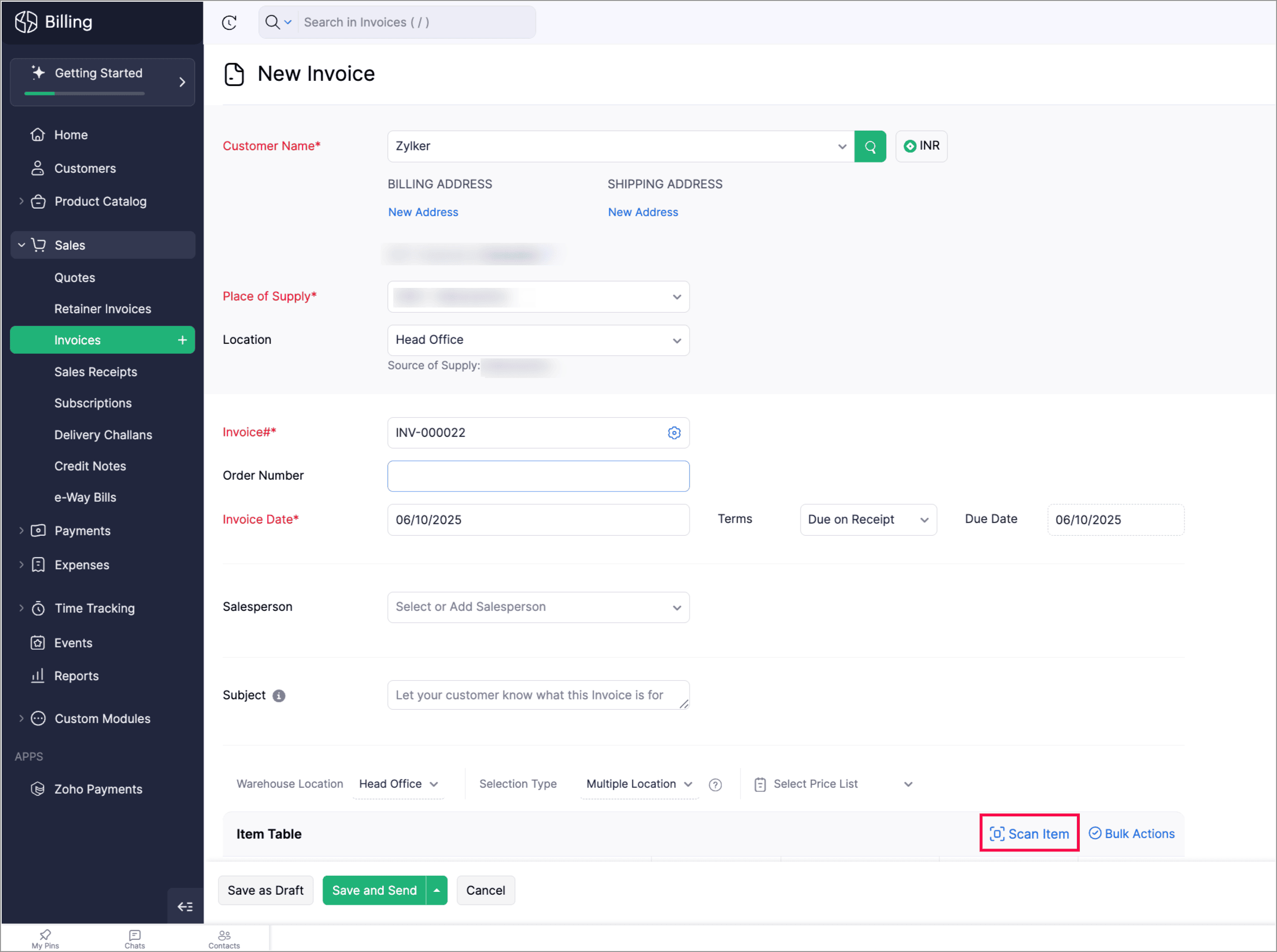
Zoho Billing now supports the Scan Items option in invoices, allowing you to quickly scan and add them to invoices. You can also scan an item multiple times to increase its quantity in the existing line item.

You can find it in: Sales > Invoices > Edit or create an invoice > Scan items. 


Apply Multi-Level Discount to Transactions

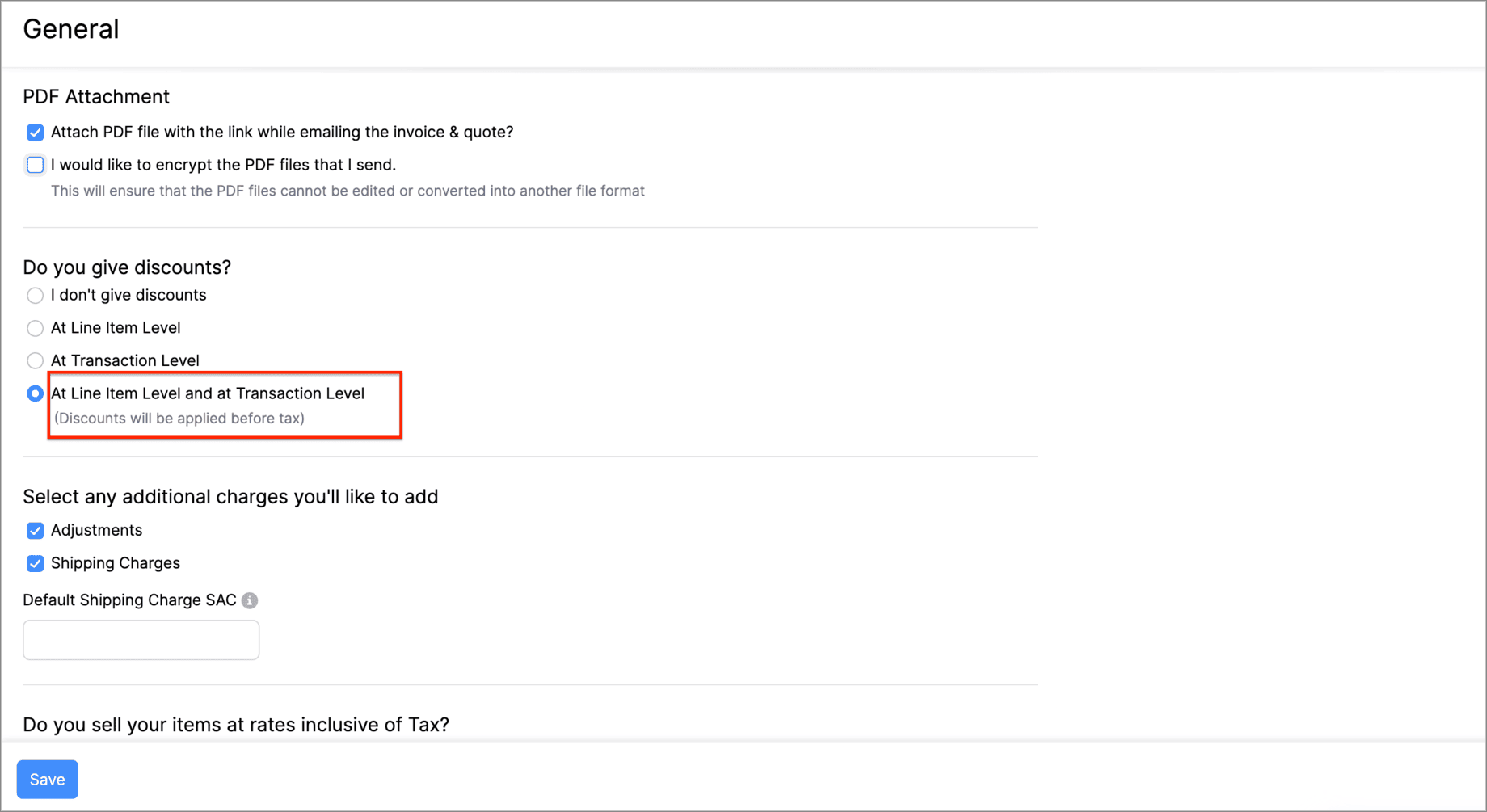
You can now apply discounts at both the line-item level and the transaction-level simultaneously. This means that you can offer specific discounts on individual items or services while also applying an overall discount to the entire transaction. 

Let's say you run a weekend sale and would like to provide a 10% discount for some items and offer a 5% transaction level discount as a part of your weekend sale. You can do this using the Multi-Level Discount option.

Go to Settings > General > Do you give discounts? > At Line Item Level and at Transaction level.


Gold Movements is Now Supported in e-Way Bills [India Edition]

You can now generate e-way bills for gold intra-state movements in Zoho Billing.  

Set the threshold value for generating e-way bills when transporting gold items within the same state. You can then start creating e-way bills for gold movements from the e-Way Bills module under Sales on the left side bar.
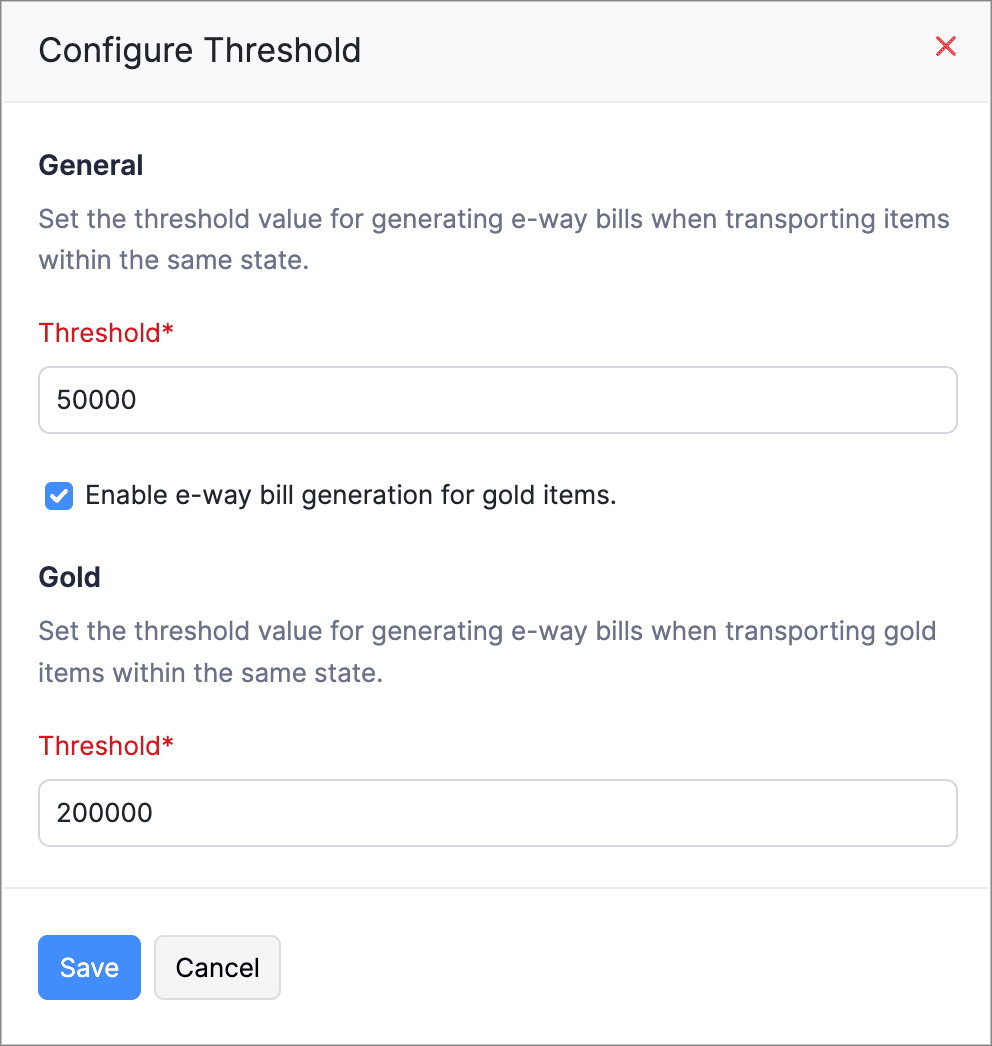
Here's how you can configure the threshold: Go to Settings > e-Way Bills > GSTIN which is connected to the e-Way Bill portal > Configure Threshold.


Access Widgets in Your Preferred Language

We’ve enhanced language customization to help you have a localized experience when accessing widgets.

You can define key–value pairs in language-specific JSON files (for example, en.json, ta.json, etc.) and display the widget content based on your organization’s language.
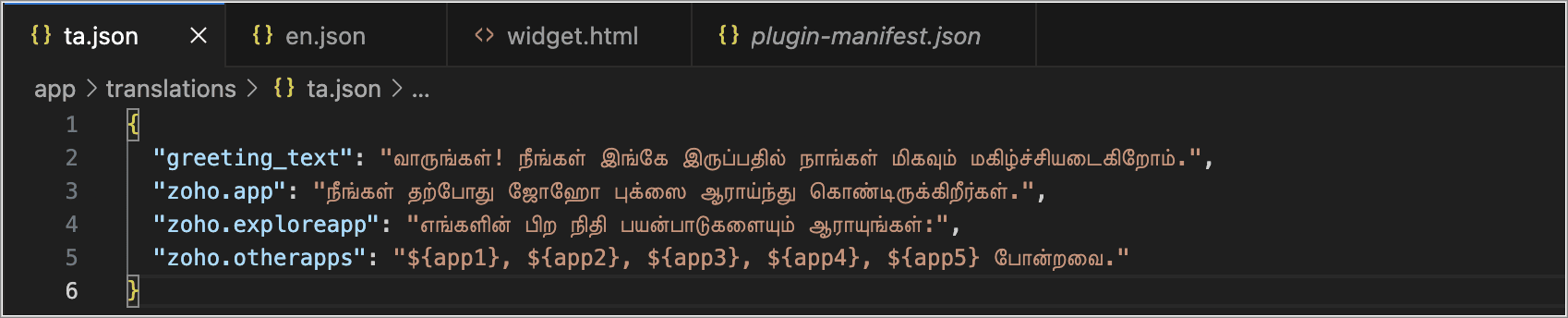
Create language-specific JSON files with key–value pairs and upload them into your widget when you access the widget, and the content in your widgets will automatically appear in that language.


Postpone Subscriptions' Billing Date

You can now change the Next Billing Date of subscriptions. When you change, it you can view the charges for the extended period and choose how you would like to handle the charges.

You can:

  • Choose to charge for the extension; a prorated child invoice will be generated based on the length of the extension.

  • Or, you can choose only to change the billing date. This will add the prorated amount to the invoice generated on the next billing date.
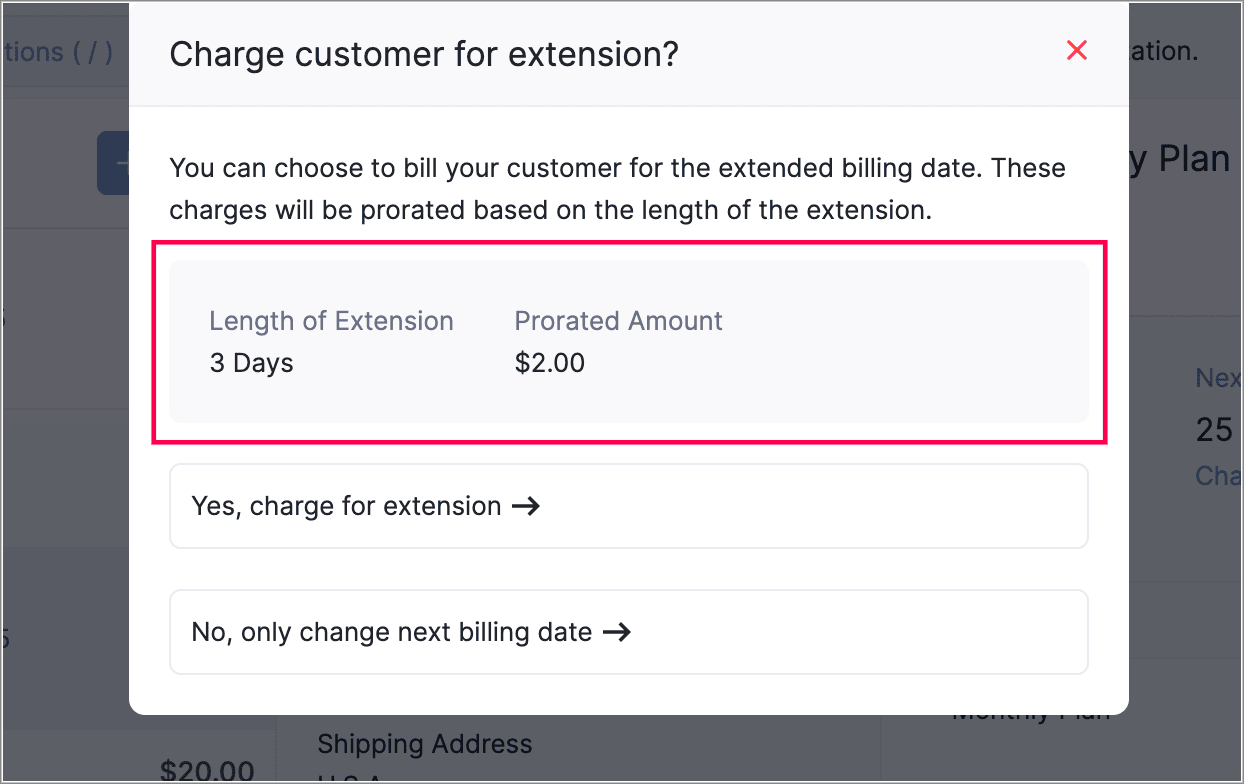
This gives you more flexibility in managing billing dates. You can also view the prorated amount for the adjusted days before charging your customers.


View Proration Break-Up in Subscription Summary
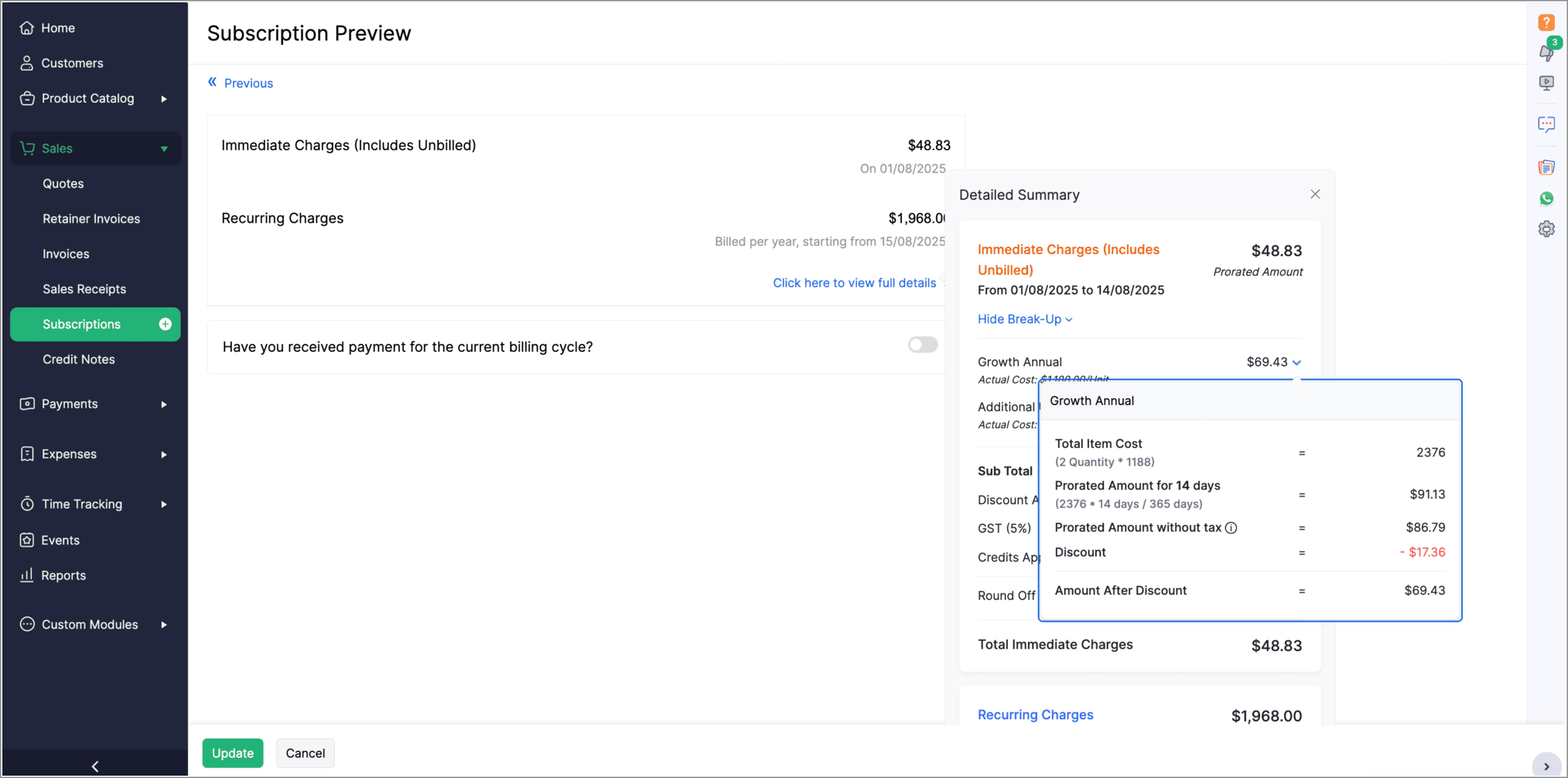
The Subscription Preview page has been enhanced to give a clearer view of prorated charges for plans and addons. The summary section now shows the detailed proration break-up for each plan and addon. To see this, go to the view full details in the Subscription Preview page.


Introducing PayNow Payment Method

We now support PayNow as a payment method via Stripe integration. PayNow is a Singapore-based payment option that lets your customers pay in SGD by scanning a QR code through supported banks and non-bank financial institutions.

Note: This payment method is not supported in the India edition of Zoho Billing.

Generate AI Summaries with Zia Insights

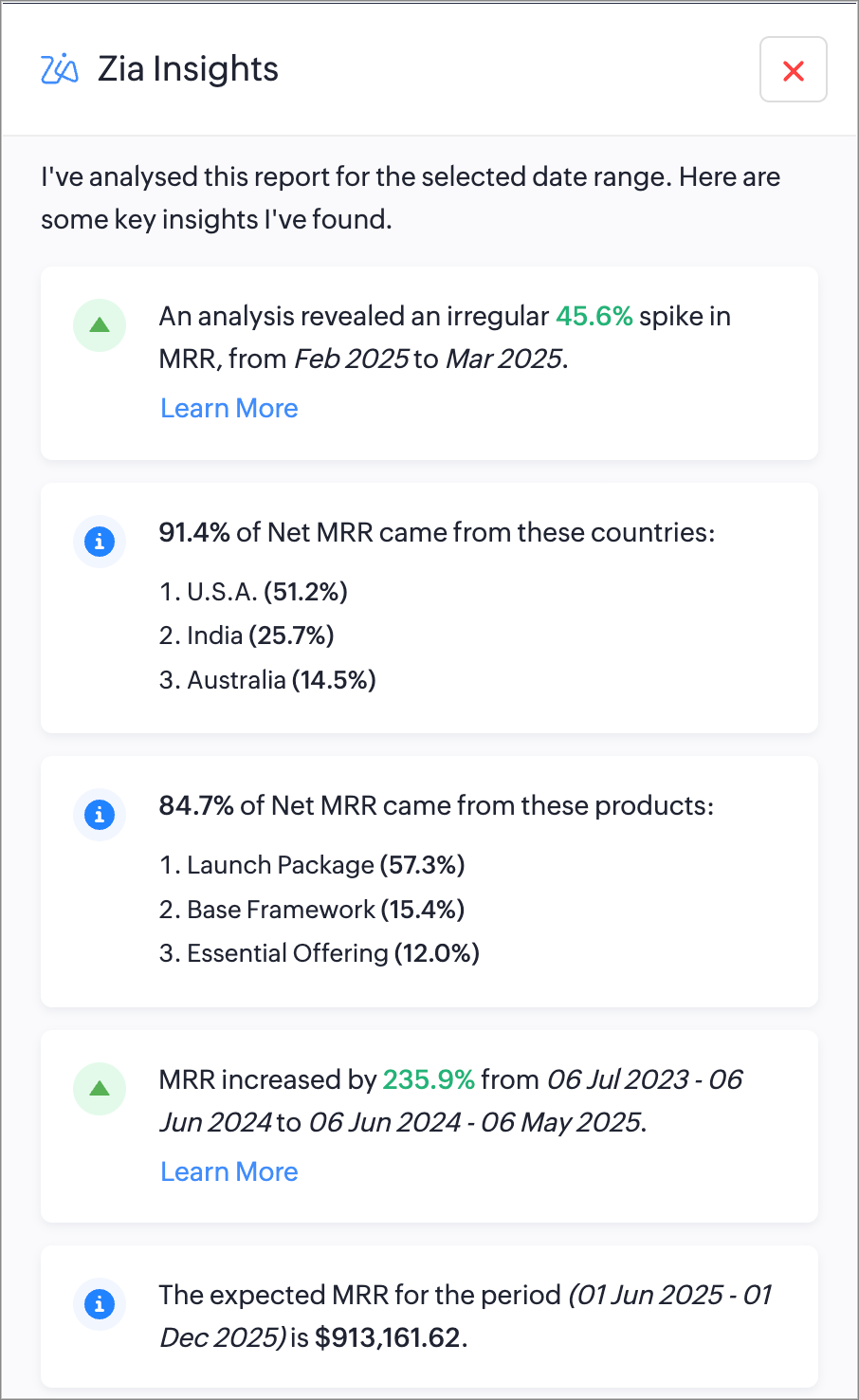
You can now use Zia Insights to generate AI-powered summaries, detect anomalies, spot top contributors, compare performance over time, and forecast trends within reports. Zia Insights can identify any unusual spike or dip in your reports, highlight the possible cause, give region-specific analysis, and can also predict future trends based on your organzation's records. Learn More

Increase API Limits From the API Dashboard

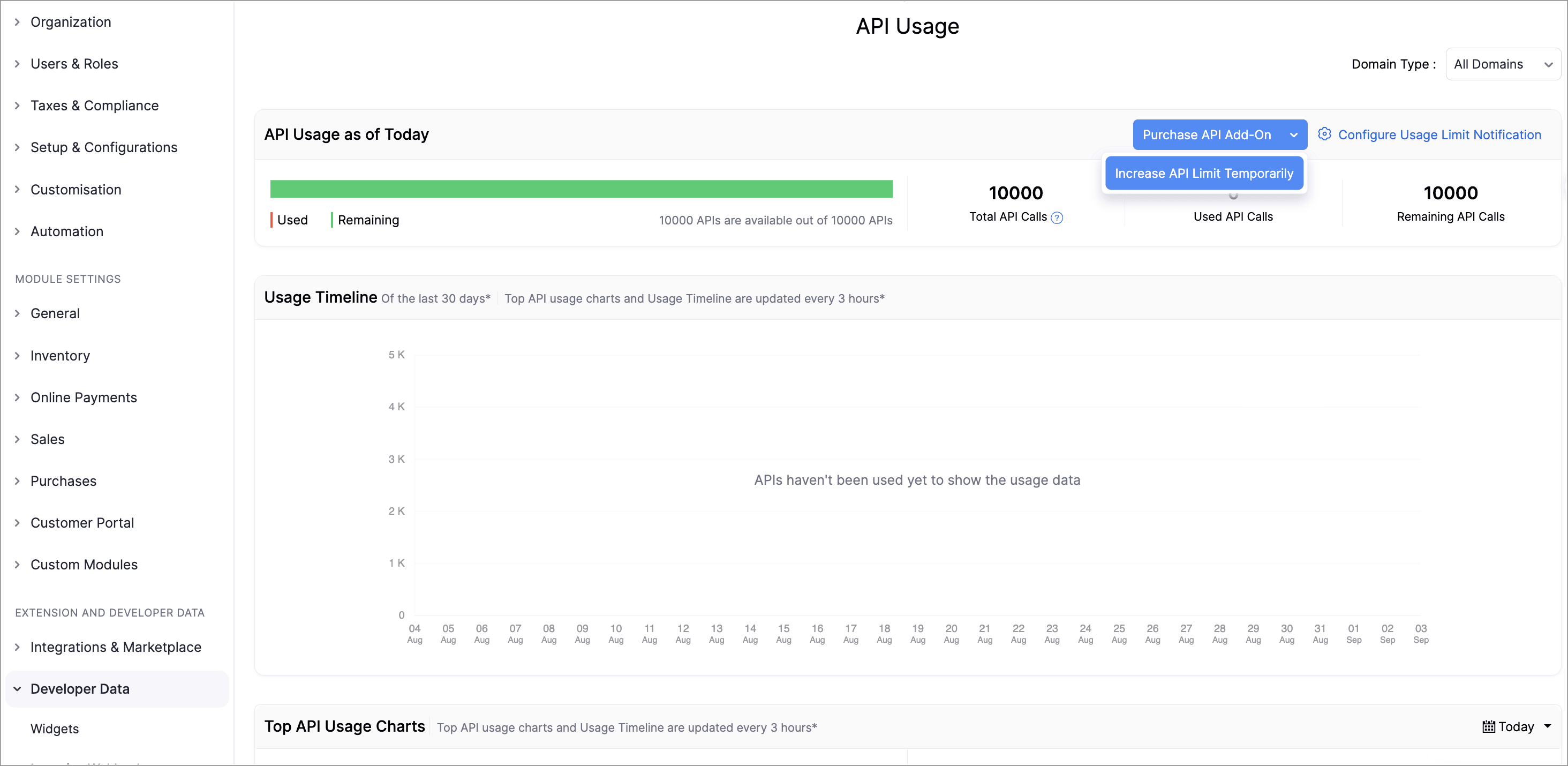
Admins can now temporarily increase API limits directly from the API Dashboard. You can boost your API limit by 50% of your current plan for one week, with automatic reset afterward. You can request multiple boosts consecutively once the previous one expires and can also purchase additional API addons directly from the dashboard.

This enhancement provides greater control, faster response to usage surges, and a streamlined workflow to keep your operations running smoothly.

To increase your API limits, go to Settings > API usage > Purchase API Add-on or Increase API Limit Temporarily.
Lookup Custom Fields Support for Locations

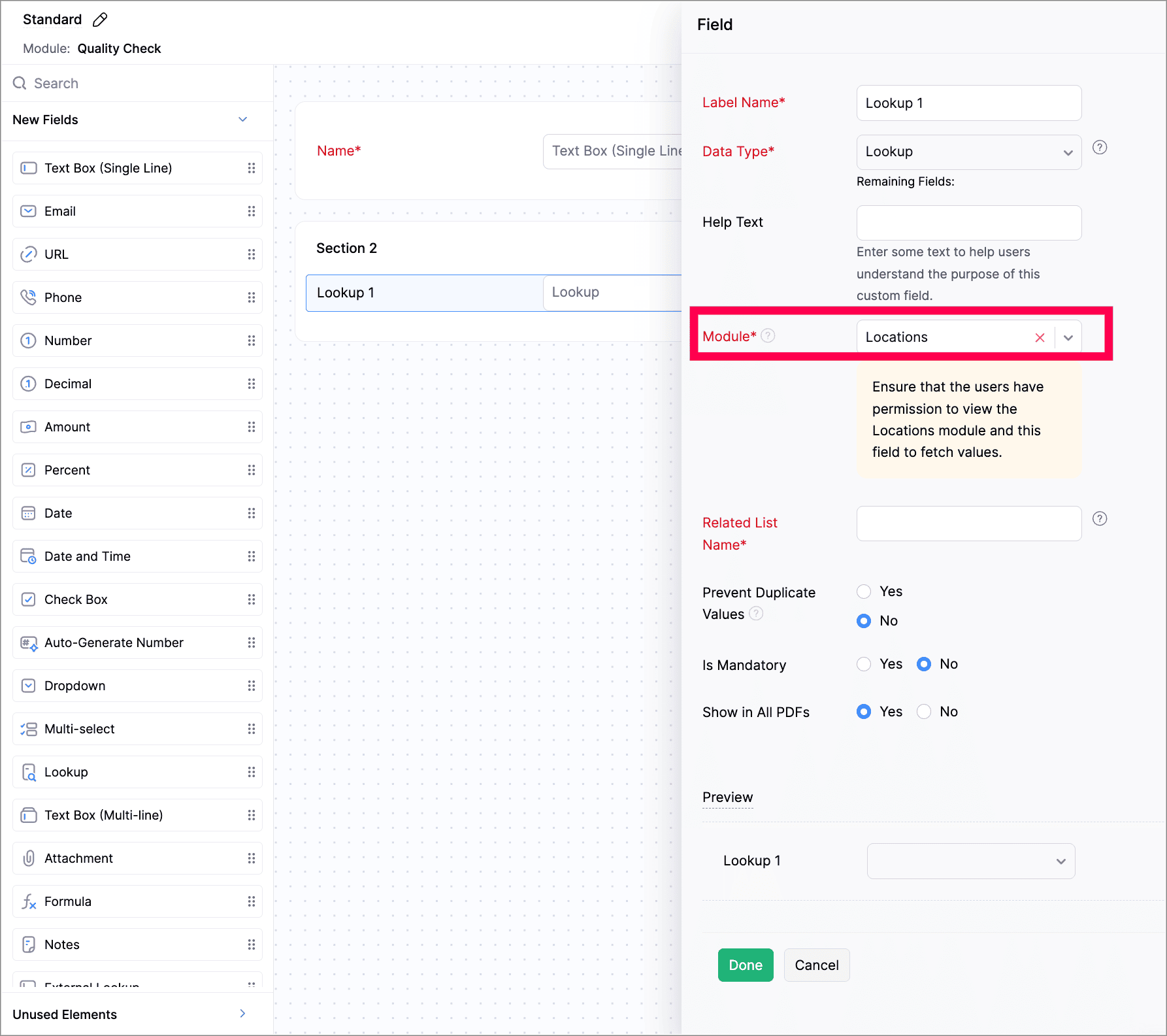
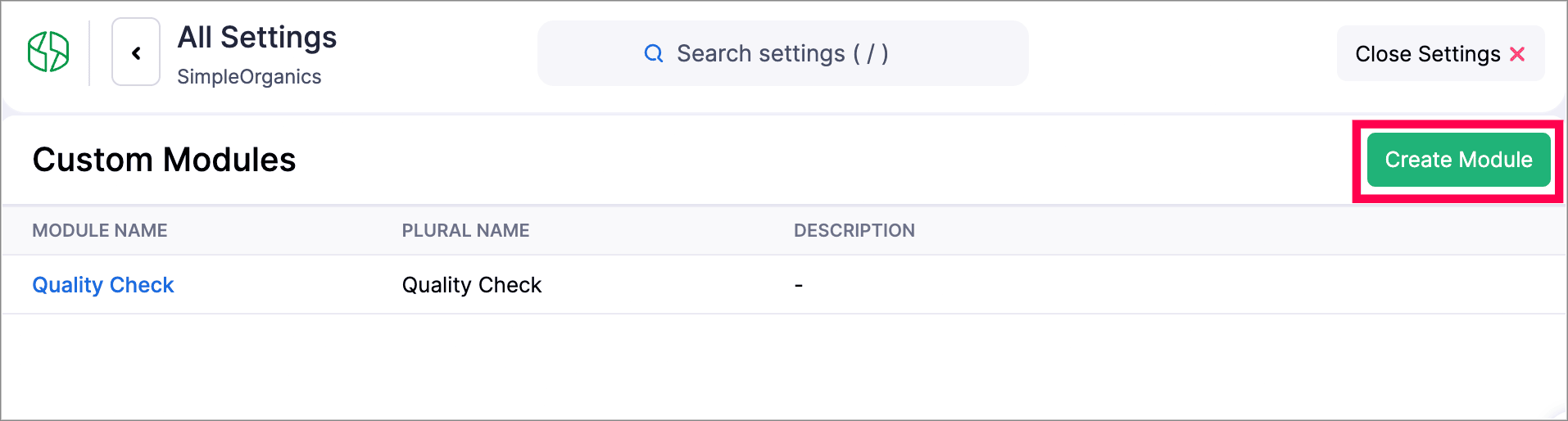
We've now introduced lookup custom fields for Locations. You can now use lookup custom fields for Locations in both Custom Fields and Custom Modules.

While creating a new custom field, select Lookup as the data type and select Locations from the Module dropdown. While creating a custom module, add a section to your module and select Locations.

Customize PDF File Names

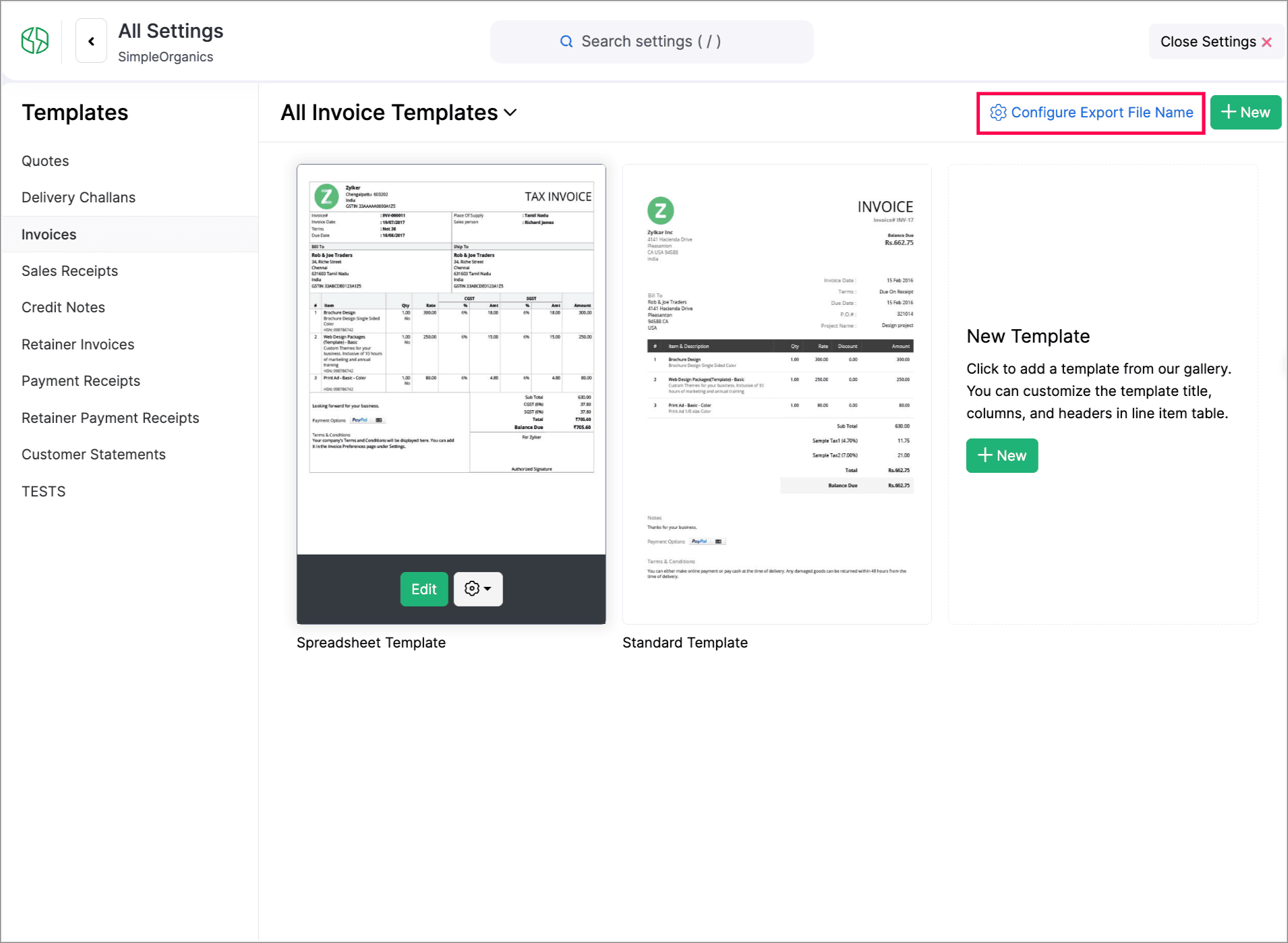
You can now customize PDF file names during export. You can set how your PDFs should be named using placeholders of transaction numbers, dates, customer names, organization names, and salesperson names.

To do this, go to Settings > Customization > PDF Templates > Configure Export File Name to set it up.


Create Web Forms for Custom Modules

We have introduced Web forms to collect and create records directly in a custom module via a unique link. You can configure layouts, success actions, and CAPTCHA. Once the web form is created and the unique link is generated, users can access and submit data. The submitted data will be stored in the module upon approval. Learn More
Navigate to Settings > Developer & Data > Web Forms to create a new Web form.


Other Feature Enhancements

  • Zoho Billing now supports the new GST slabs. Migrate to the revised 18%, 5%, and 40% slab, using the banner of your organization to update rates (via HSN/SAC), preview changes, schedule migration, track progress, and download audit-ready files.

  • You can now use the column customization and custom views in Timesheet, allowing users to select preferred columns and create personalized views for easier timesheet management.

  • We have enhanced our Custom Modules, you can now attach up to 10 documents for each record in your custom modules. Learn how it works.

  • Zoho Billing now supports custom views for Sales Receipts, allowing you to personalize and organize your sales receipt list view.


We hope you enjoy exploring these new features and enhancements in Zoho Billing! Each update is designed to make your billing experience simpler, smarter, and more efficient.


We’ll be back with even more improvements as we continue to elevate your billing and subscription management experience.


You can also visit the What's New timeline for bite-sized information about our previous feature updates and enhancements. If you require any assistance, please write to our dedicated support team at support@zohobilling.com – we'd be happy to help!


    • Sticky Posts

    • What's New in Zoho Billing - February 2024

      Hello everyone, We are excited to share the first set of updates for Zoho Billing in 2024. Read along to know more about a wide range of updates, from the Aging Summary in customer statements to Apple Pay support in Stripe. One-Time Invoice with Plans
    • Zoho Finance Workshop 2023 is coming to the USA. Get exclusive training on Zoho Finance apps, one-on-ones, and more.

      Hello all, We'd like to invite you to our biggest Zoho Finance workshop in the United States. After a brief break, we are excited to be back. This year, we're bringing together our customers and community members for two days of curated hands-on sessions,
    • Zoho Subscriptions wins IDC's 2020 SaaS CSAT Award for Subscription Billing

      Dear customers, We're excited to share that Zoho Subscriptions has won IDC's 2020 SaaS Customer Satisfaction Award! As a team, we cherish each and every milestone with our customer community. And this particular award, focusing on customer satisfaction,
    • Introducing: SMS notifications via Zoho Subscriptions

      Dear customers, We hope you are doing well! We are happy to announce that you can now send SMS notifications to your customers right from Zoho Subscriptions. To facilitate this, we've integrated with Twilio, a leader in the business communication space.
    • What's new this December in Zoho Subscriptions

      The year is almost over and we here at Zoho Subscriptions have released new features and updates on the month of November. Let's take a look at the features we have worked on in the past month. Zendesk Integration The Zoho Subscriptions app for Zendesk allows your customer support executive to access customer details in an instant. You will be able to view the customer information from Zoho Subscriptions right from your ticket view. On enabling the integration, you will be able to: Get your customer
      • Recent Topics

      • Samsung Keyboard Issues with Notebook

        Dear Users, We're sorry to inform you that some of our users are experiencing certain issues like scrolling, delay/lag, cursor placement especially within the text notes. This occurs mainly due to Samsung Keyboard compatibility with Android 13 and some
      • Mind mapping in Zoho Projects

        Good morning,   I would like to congratulate the Zoho team for building such an inovative and responsive application that fits in the daily challenges of so many work groups. I would like suggest you another functionality that helps a lot in project planning and development: mind mapping. Mind mapping would be of great help for brianstorming, knowledge management and other needs in online collaboration.   Thanks and wish you all the best! George Maha Empresa Júnior Multidisciplinar do Instituto de
      • Trying to show the actual Terms & Conditions on PDF

        Hi, On Zoho forms I am trying to have the actual terms and conditions that the user needs to accept also show on the pdf that they receive after. Right now it only says "Agreed". Please help.
      • Retainer invoice in Zoho Finance modlue

        Hello, Is there a way of creating retainer invoices in the Zoho Finance module? If not can I request this is considered for future updates please.
      • Introducing the revamped What's New page

        Hello everyone! We're happy to announce that Zoho Campaigns' What's New page has undergone a complete revamp. We've bid the old page adieu after a long time and have introduced a new, sleeker-looking page. Without further ado, let's dive into the main
      • What's New in Zoho Inventory | August – October 2025

        Hello customers, The last quarter has been incredibly productive! We've released a powerful slate of new features and enhancements in Zoho Inventory designed to give you better control, greater efficiency, and expanded functionality across your inventory
      • Documents don't sync properly

        Hello, My team recently moved to Zoho workDrive, some of my team, work remotely so we believed Zoho would be the best way to share and edit files as well as access files withing the team. However we are experiencing sync issues, when a file is uploaded in the file explorer and shows sync complete, same file can be seen on the Zoho web app but other team members can't see the said file because it is not syncing properly. i figured out that if i were to go to preferences in settings and resync the
      • BMI formula

        I've been trying for hours to calculate BMI using height and weight as my only inputs. It's a simple calculation and I even went to ChatGPT to help me figure this out in Zoho Forms, but it led me down a path of "try this" and "try this". None of my attempts
      • We are looking for an experienced Zoho Developer

        Hi Everyone! We’re on the lookout for a skilled Zoho Developer with hands-on experience in the Zoho Developer Platform (The Vertical CRM Platform) and if you don't know what that is, then you are not the person we are looking for. You would also need
      • Initiate approval workflow after "on edit --> on success"

        Dear Community,  currently I am working on a initiative tracker which should handle approval workflows based on different initiative status. As far as I understand, an approval workflow can be triggered (only?) when data is entered for the input form to the database.  Example: A new initiative is created and submitted. --> Approval Workflow triggered Here comes my question: Is it also possible to trigger an approval workflow if the form was "simply" updated? (on edit --> on success) Imagine the initiative
      • Tax Deductible Donations to a Charity Organisation

        For Australia, what's the best/proper method for entering an expense that is a tax deductible donation to a charitable organisation. And thus is appears correctly in Accounts and BAS as a GST payable deduction?
      • Enhancing Zia's service with better contextual responses and article generation

        Hello everyone, We are enhancing Zia's Generative AI service to make your support experience smarter. Here's how: Increased accuracy with Qwen One of the key challenges in AI is delivering responses that are both contextually accurate and empathetic while
      • Simultaneous use of WhatsApp Account in SalesIQ and ZohoDesk

        Hi, We have only one number registered in Meta, it's possible use same account for two apps? All times here we try is stopping in SalesIQ. Regards,
      • External lookup fields to synchronise with Analytics

        Hello. I suggest adding external lookup custom fields to the Zoho Analytics integration settings. Currently, these types of fields are not available for synchronisation, so they cannot be used to generate reports with related tables in Analytics. Thank
      • Can we create Sprint with tasks from Multiple projects?

        Hi Team, We were using Zoho Sprints for quite sometime. Currently we have started the process of Sprint method. We couldnt create the active sprint board with the tasks from multiple projects. I would like to know whether this is possible or Any timeline
      • We should have an option to Toggle Off KB Article Links in AI Answer Bot Replies

        Hi everyone, I'm creating this topic to share a feature idea that I think would improve the customer experience when using the AI Answer Bot for self-service. The Current Behavior (The Problem) Currently, when the AI Answer Bot generates a summary or
      • Boot Loop After Removing Service from Client via Admin

        We have multiple laptops experiencing a boot loop / unable to login after the Zoho Remote service was removed from their machine remotely via the desktop client. The Windows sign-in screen is not available, and users are unable to login. This seems like
      • Request Backend Correction — Domains Mapped to Same Help Center (Multi-Brand Setup Failure)

        Hello Zoho Desk Support Team, I need assistance correcting a domain-to-brand mapping issue in our Zoho Desk instance (The Blue Ribbon Project). Both of our verified domains currently point to the same Help Center instead of separate brand portals. Current
      • is there any option to enable the participants interact - can write on the screen, while the screen is shared by the host?

        this is most expected features - for teaching children. is there any option to enable the participants interact - can write on the screen, while the screen is shared by the host?
      • How to disable the Login button in Desk Helpcenter

        Hey there, I'm testing out whether the help center within Zoho Desk could replace our existing Customer FAQ. I tried to customize the themes for the public help center frontend, but stumbled across the login button in the navigation bar. Is there any
      • Very long loading times | bad performance [ZOHO DC: EU]

        Hello there, we have recently noticed that the loading times have become extremely long when retrieving tickets and ticket details. For example, I open any ticket and get the following view. The subject and standard information (ticket owner, status etc.)
      • Client Portal ZOHO ONE

        Dear Zoho one is fantastic option for companies but it seems to me that it is still an aggregation of aps let me explain I have zoho books with client portal so client access their invoice then I have zoho project with client portal so they can access their project but not their invoice without another URL another LOGIN Are you planning in creating a beautiful UI portal for client so we can control access to client in one location to multiple aps at least unify project and invoice aps that would
      • Introducing the locking option for CRM records

        Last modified on 06/04/2023: Record locking option in CRM is now available for all Zoho CRM users in all DCs. Note that it was an early access feature available only upon request. Hello All, Hope you're doing well! We're thrilled to introduce our latest
      • Create custom rollup summary fields in Zoho CRM

        Hello everyone, In Zoho CRM, rollup summary fields have been essential tools for summarizing data across related records and enabling users to gain quick insights without having to jump across modules. Previously, only predefined summary functions were
      • Remembrance Day to Remember – Recalling Values

        The phrase “at the eleventh hour” refers to the 11th hour of the 11th day of the 11th month in 1918, when the hostilities of World War I came to an end—but it still holds meaning today. Remembrance Day (Veterans Day in the US) is observed on November
      • CRM x WorkDrive: File storage for new CRM signups is now powered by WorkDrive

        Availability Editions: All DCs: All Release plan: Released for new signups in all DCs. It will be enabled for existing users in a phased manner in the upcoming months. Help documentation: Documents in Zoho CRM Manage folders in Documents tab Manage files
      • Subforms in stateless forms

        I think the title says it all. We need to be able to add subforms to stateless forms. Currently the only workaround is to create a Form and delete each record upon submission of the form. I need to build an interface to update our inventory. Basically
      • Paste issues in ZOHO crm notes

        Hi, since a week or so I have issues with the paste function in ZOHO CRM. I use "notes" to copy paste texts from Outlook emails and since a week or so, the pasting doesnt function as it should: some text just disappears and it gives a lot of empty lines/enters.....
      • Standard Payment Term is not pulled from account to quotation

        Hey Team There seems to be something off. I do have "Net 30" as my default payment term in Zoho Books for my customers. If, from the customer overview or quote section, I create a new Quotation, the payment terms field stays blank and doesn't get the
      • Zoho Analytics Export API

        Hi Team, I’m working on some integration tasks and wanted to confirm if it’s possible to retrieve a Zoho Analytics table as JSON data using a Deluge script. I’ve already stored my custom data from multiple sources and combined it into a single source.
      • Best way to display complex Bookings Consultation Descriptions on Zoho Site?

        I am a new user so apologies if this has been asked before. I couldn't find any answers in the forum. We offer 18 complex Consultations to our subscribers. Our current platform lets me put detail on these Consultations thoroughly (200-300 words) during
      • Gmail is ramping up its email sender policy as of November 2025

        Hello marketers, As you may be aware, Gmail introduced a guideline for bulk senders starting February 2024. If not, here's a quick refresher straight from Google: After this policy was announced first in 2023 and soft-implemented in February 2024, we
      • Modifying iframe data of Zoho booking iframe

        Hello, I have integrated a Zoho Bookings embedded iframe into my website. Currently, I am pre-filling the booking form with default values as part of our process flow. However, I want to ensure that if an input field is already populated with a default
      • Zoho CRM Workflow and Function Backup Options

        Hi everyone! I have been able to make several backups of my CRM data and noticed that the Workflows and Functions are not included in these backups. To my knowledge, there is no backup feature for workflows and functions, which is problematic in of itself.
      • Enhance Sign CRM integration

        Hello all, I'm working on a custom Deluge script to enhance the integration between Zoho CRM and Sign by using a writer merge template for additional flexibility. I want to replicate the post-sign document integration that exists between CRM and Sign
      • YouTube Live streaming? how to? Zoom has this feature, built-in. Can't find it on zoho meetings.

        YouTube Live streaming? how to? Zoom has this feature, built-in. Can't find it on zoho meetings.
      • Is or will be possible to associate meeting transcription and summary, made by Zia, to meeting/contact/account record in CRM?

        Would be useful to keep context and track jobs, better if it will be auto
      • Zoho API to create ticket

        I'm developing an integration to create tickets via API, but, locally it works (send and recieve requests). In production it also works sending requests, but, my file don't recieve any response data. My URL is available in Zoho API Console and I have
      • Desk Field Not Showing in Analytics

        Hi there, I recently added a field to our Zoho Desk Ticket Information. I went and added the data retrospectively to the tickets. It is also marked as required, so all new tickets cannot be closed off without it being filled in. When I try to run a report
      • Export data using advanced export options and customizable settings

        Hello everyone, The user interface for exporting data has been revamped with updates to make data exports more flexible and efficient for users. These updates not only enhance usability but also bring advanced capabilities to help users extract precise
      • Next Page