What's New in Zoho Inventory | January - March 2025
Hello users,
We are back with exciting new enhancements in Zoho Inventory to make managing your inventory smoother than ever! Check out the latest features for the first quarter of 2025. Watch out for this space for even more updates.
Email Insights for Sales Orders
We have introduced the Email Insights feature for Sales Orders in Zoho Inventory. With this feature, you can track emails sent for Sales Orders and view when the email was opened. The 'Client Viewed' filter allows you to find Sales Orders that have been viewed via email by the recipient.

Stock Availability Filter in Stock Counts
We have added a Stock Availability Filter to Stock Counts. This filter allows you to filter and add items to a stock count based on their stock availability, making the counting process more efficient.
View and Customize Stock Status in Transactions
When creating a transaction, you can now see both the Stock on Hand and the Available for Sale quantity for each item. The displayed quantity will depend on the selected View option.

Export Bin Locations Report
You can now export the Bin Locations Details Report and Bin Location Transaction Summary Report in your preferred format such as PDF, XLS, or XLSX. This enhancement makes it easier to analyze your bin-level inventory data.
To export a bin locations report, go to Reports > Bin Locations Details Report under Inventory
Add Dropshipping Address in Sales Orders
You can now add a dropship address in your Sales Orders. This address is used exclusively for the specific transaction and will not be saved to the customer's additional address list. You can also view and copy addresses from existing customers when setting the dropship address.
To add a dropshipping address, go to Sales > Sales Orders, edit/create a sales order, and click + Dropshipping Address.

New & Improved Zoho Inventory Reports
Introducing enhancements to Inventory reports for better control and visibility. The Stock Summary Report now supports custom reports, amount columns, and a stock tracking mode filter. Bulk export is available for up to 500,000 records (based on your plan) for key reports like Inventory Summary and FIFO Cost Lot Tracking. Purchase Order Reports now offer detailed columns such as Quantity Ordered, Received, In Transit, and Late By Date. Custom reports, Show/Hide Columns, and advanced filters are now supported across various reports including Inventory Aging, ABC Classification, Committed Stock, Product Sales, Valuation, Landed Cost, and Active Purchase Orders. The Sales by Item Report adds a Report Basis filter, while the Sales Return History Report gets a complete revamp with status tracking, return reasons, grouping, customizations, and scheduled exports. The Inventory Valuation Summary includes a new Stock Account column with filters, and you can now exclude transfer orders in Inventory and Stock Summary reports. These changes will provide a more flexible and insightful reporting experience.
Display Type for Lookup Custom Fields
We now support different display types for lookup custom fields. You can choose between a List view and a Dropdown view. This feature is currently available for specific lookup modules, like items, vendors, purchase orders, and customers.
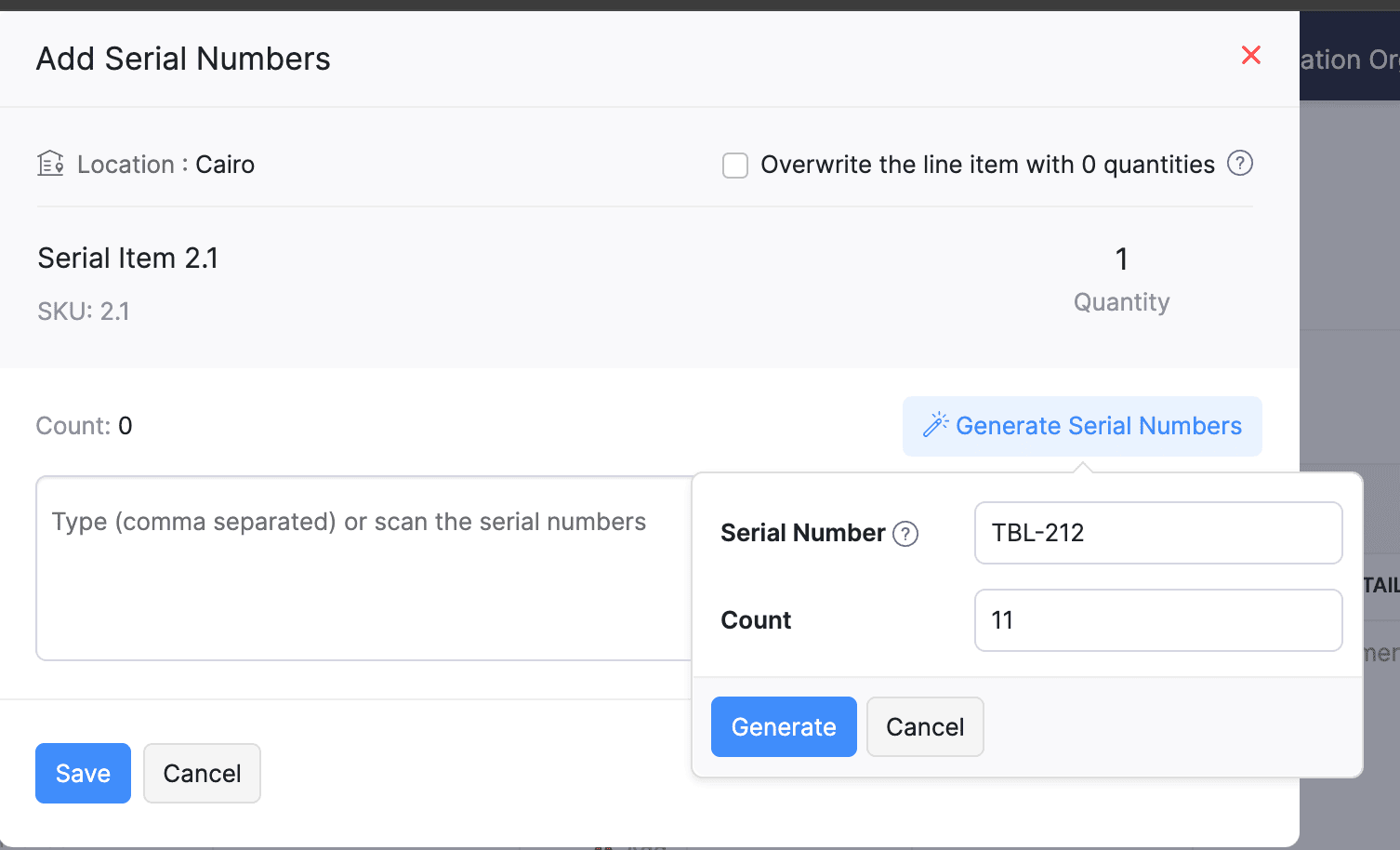
Generate Serial Numbers in Inward Transactions
Introducing support serial number generation for inward transactions. You can set a starting serial number and specify the required count to ensure precise inventory tracking and save time.
Note: The starting serial number must always end with a numeric value.
To generate serial numbers, select an item from the item table, click Add Serial Numbers, then select Generate Serial Numbers. Enter the starting value and count, then click Generate.
Note: The starting serial number must always end with a numeric value.
To generate serial numbers, select an item from the item table, click Add Serial Numbers, then select Generate Serial Numbers. Enter the starting value and count, then click Generate.
Batch Tracking Enhancements
Batch Tracking just got more powerful and flexible with some major enhancements. You can now create and edit batches directly from the item details page, making management easier. A new return option allows items to be returned to the same sold batch, improving stock accuracy. You can also use the same batch across multiple line items in purchase transactions. Batch status control lets you mark batches as Inactive, keeping them out of transactions while retaining them for reports. Plus, all batch activity including creation, edits, restocks, and transfers is now visible in the Audit Trail report.
Item Description for UPS Line Items
We have improved the UPS Paperless Invoice feature by introducing the ability to add and edit item descriptions and unit prices individually for each line item within a package. Previously, a single description was applied to all items in a package, limiting the level of detail you could provide. With this update, you now have more control and flexibility.

Enhanced Shopify Integration
We have improved the shopify integration. You can now set sync frequency and mapping options for each store separately. Item sync runs every 24 hours by default, but you can also set it up manually if needed. Non-taxable items are now created with the correct tax exemption. When setting up Sales Order sync, you’ll pick a start date and can set how often it runs. Each store can now sync independently. You can also decide if sales orders should be fetched to Zoho Inventory under a single customer or create new customers using fields like email or name. Now, sync history includes filters for sync type and status, making it easier to show both successful and failed sync.
To integrate Shopify with Zoho Inventory, go to Settings > Integrations & Marketplaces > Shopify
Pin Columns in Transaction List Page
You can now pin up to two columns in the transaction list page in both default and custom views to keep key information visible while scrolling. This feature is available when a view contains more than eight columns.
To pin columns, go to any module, click the Customize Columns icon, hover over the fields, click the Pin icon, and then click Save.

Edit Etsy Orders
You can now edit orders fetched from Etsy with ease. Previously, Etsy orders were imported with non-editable details and tax. Now, you can edit these orders and override the tax applied based on the tax rate configured at your organization level.
To integrate Etsy, go to Settings > Integrations & Marketplaces > Etsy
Clone Delivery Challans
You can now duplicate delivery challans by cloning the existing ones, thereby saving time.
To clone a delivery challan, go to Delivery Challans, select a challan, click the More icon, and select Clone from the dropdown.

Enhanced Export and Print Preferences for Reports
We have added new customization options for report exports and print preferences. You can now set custom file names for exported reports, display column headers on each PDF page, and organize report data into separate pages based on the group by field.
Multi-Factor Authentication (MFA) for Portals
We are improving security by adding Multi-Factor Authentication (MFA) to both Customer and Vendor Portals. This extra security step requires users to enter a Time-Based One-Time Password (TOTP) along with their login credentials.
Admins can turn on MFA in the Customer Portal settings, making it mandatory for customers and vendors to set it up using an authenticator app. Once enabled, users will need to enter a TOTP code each time they log in. If needed, admins can reset MFA for users.
Note that even if MFA is disabled later, users that have already set it up will still need to enter the TOTP code. If they lose access to their authenticator app, they should contact an admin for a reset.
To enable multi-factor authentication for your customers and vendors, go to Settings > Preferences > Customer Portal. Check the Enable multi-factor authentication (MFA) option.

Import Move Orders and Putaways
We have introduced import option for the Move Orders and PutAway modules. You can now seamlessly import data for these, making bulk updates and record creation faster and more efficient.
To import move orders and putaways, go to Transfer Orders/Putaways under Inventory > Click More in the top right corner > Import Transfer Orders/Putaways.
Attach Documents in Purchase Receives
You can now upload, attach, and manage documents directly from the Purchase Receive creation and edit page.
To attach a document in purchase receive, go to Purchases > Purchase Receives > + New > Upload File.

Print & PDF Support for Purchase Receives
You can now generate and print or download your purchase receives. We have also supported a standard template with which you can view the PDF of your purchase receives to simplify record-keeping.
To print or download a purchase receive, go to Purchases > Purchase Receives. Select the purchase receive and click PDF/Print.
To view the PDF of a purchase receive, go to Purchases > Purchase Receives. Select the purchase receive and enable the Show PDF View option on its details page.

Filter Lookup Custom Fields
You can now filter your lookup custom fields by using custom views and setting criteria. The records will be shown based on the chosen custom view and the rules set by you, making sure all the conditions are met.

Leave Organization Option
We have introduced the option to leave an organization from the Manage Organizations page. However, if you are the admin who created the organization or the only admin, you will need to delete the organization instead. Additionally, before you leave, ensure the integrations are disabled, if any.

That's all for now, folks! Try these new features and share your feedback. If you need assistance, reach out to us at support@zohoinventory.com.
Best Regards,
The Zoho Inventory Team
Topic Participants
Akshin Eniyavel S
Jahmonesalmon
Roshin Uchakavil
Marie Sharps Canada
Tocayah
Recent Topics
Mobile Chat Window - Full Screen
Hello, The mobile chat window takes up the full screen, which is highly confusing for most customers! Using a desktop machine, I see the same happens when reducing the browser width to 800px or below. This suggests that it responsive web design, causing the switch to full screen. Can we fix this very annoying behaviour ourselves using a custom css file? If so, can you please let me know how? ThanksIs it possible to customize ZC Themes?
I understand you can choose a layout and customize Brand Color, App Header, Menu, and Sub-Menu components, but can you override some of the default theme settings with CSS or a config file? For example, - Table highlight color - Listview auto filter highlightIs it possible to create Custom function-based Lookup field in Zoho CRM
Is it possible to create a custom function-based lookup field in Zoho CRM? If so, how? Use case: Need to fetch users from Zoho Projects into a dropdown field in Zoho CRM.@mention in comments no notification
Hi, hope someone can help. When we @mention someone in the comments in Zoho Creator, how is that user notifed as we don't get anything on email or in the app notifications.Add "Running Balance" column to Account Transaction Reports
Hello, Currently Zoho Account Transaction Reports give you the opening balance, then lists the transactions, then provides the closing balance. It would be great if you could add a column on the far right that shows the "Running Balance" on the account after each transaction. There are many times when analyzing or tie-ing out transactions that this would be very helpful. I currently have to frequently run a tape on my adding machine to get balance totals after a specific transaction on the list.how to differentiate if whatsapp comes from certain landing page?
I create a Zobot in SalesIQ to create a Whatsapp bot to capture the lead. I have 2 landing pages, one is SEO optimized and the other want is optimized for leads comes from Google Ads. I want to know from which landing page this lead came through WhatsApperror : Object code : 6500
b3 = map(); b3.put("name", "Test Project Name"); updateprojects2 = invokeurl [ url :"https://projectsapi.zoho.eu/restapi/portal/era0130/projects/169495000000928007/" type :PUT parameters: b3 connection:"in2" ]; info b3 ; info updateprojects2; ------------I got unknown charge from Zoho
Good day, I need help disputing a charge I don't know from, zoho. I have ZohoMail and ZeptoMail. I purchase credits for ZeptoMail, and for ZohoMail I am not subcribed.Zoho Folder Creation in Sharepoint with Sub Folders [Tutorial]
During a recent ZUG meetup in Auckland, New Zealand, I shared how I could use Zoho Flow to create a folder in Microsoft SharePoint, along with its subfolders. As I am not a developer, I thought it would be helpful to post a guide for users who want toFunction 56: Automatically enable the option for customers to pay via bank account
Hello everyone and welcome back to our series! One of the key features of Zoho Books is its integration with multiple payment gateways, allowing you to receive online payments for your invoices. This ensures faster payments, automates payment trackingAttach Files to Your Notecards and share them on the go!
Hey everyone! We’re excited to share a feature many of you have been asking for — you can now attach files directly to your text notecards and share with ease! 🙌 This update was built with your feedback in mind, especially for those who wanted a simpleHow to searchByCriteria records that are under approval?
I need to search for both approved and pending approval records Is that possible with this method? Or I need to a different method? var priceReqID = $Page.record_id; log(priceReqID); var records = ZDK.Apps.CRM.Price_List_Item.searchByCriteria("Price_Request:equals:"How to add Simple Analytics to Zoho Pages?
I have a website with Zoho Pages, how do I add Simple Analytics on it? They seem to have code they need to be embedded https://docs.simpleanalytics.com/scriptCant seem to delete an email account
Hello, I have researching for 4 days how to delete an email account and I am absolutely without a clue. The email account I am trying to delete is support<AT>fyshoes<dot>com. It's the first email account I made and it (is???) was associated with the super user (me). I have since changed it to adming<AT>fychoes<dot>com and I see the support email in my list but I just cant seem to get rid of it. Ultimately I want to associate that email account with another user that I want to add. This is reallyImport data into Multi-Select lookup field from CSV/Excel
How to import data into a multi-select lookup field from the CSV/Excel Sheet? Let's say I have an Accounts multi-select lookup field in the Deals module and I want to import the Deals with Accounts field. Steps:- 1. Create/edit a multi-select lookup fieldScript that deletes a record?
We're using WP Plugin "Integration for WooCommerce and Zoho Pro", and have created a couple of Feeds to send data to Zoho. We are trying to create Contact records, but only based upon condition. Tried to make it with small Deluge function and Workflow,A formula that capitalises the first letter of each word
Hi all, is there a zoho formula that can capitalise the first letter of each word in a string? INITCAP only capitalises the first letter of the first word.Quotes in Commerce?
In Zoho Ecommerce, I need to be able to generate quotes, negotiate with customers, and then generate invoices. Currently, I plan to integrate Zoho CRM to generate quotes. After negotiation and confirmation, I will push the details to Zoho Ecommerce toZoho Commerce - Mobile Application
Does Zoho Commerce have a mobile application for customers to place an order?Register user through Phone Number by Generating OTP
In zoho commerce , I am developing website on online food store Inilialy the user get verification code to their email for registering there account for login. But I need to login using phone number by generating OTP automatically rather than verificationCustom Buttons for Mass Actions
Hello everyone, We’ve just made Custom Buttons in Zoho Recruit even more powerful! You can now create Bulk Action Buttons that let you perform actions on multiple records at once, directly from the List View. What’s new? Until now, custom buttons wereZoho Vault Passwords
Is there a way to consume Zoho Vault Manager passwords using the API? Thanks in advance.Is the ChatGPT Assistant integration capable of recognizing WhatsApp voice messages?
I was wondering: if a visitor sends me a voice message on WhatsApp, would the assistant be able to transcribe it and reply to them?【Zoho CRM】レポート機能のアップデート
ユーザーの皆さま、こんにちは。コミュニティチームの藤澤です。 今回は「Zoho CRM アップデート情報」の中から、レポート機能のアップデートをご紹介します。 目次 1. レポートのエクスポート時のレコードIDの表示について 2. 通貨項目の表示について 3. レポートの削除の監査ログへの反映について 1. レポートのエクスポート時のレコードIDの表示について これまで、レポートをエクスポートするとファイルにレコードIDが必ず含まれていました。レコードIDが識別子として役立つ場合もありますが、実際には多くの企業で参照されることはありません。Translation in zoho bookings
We cant translate zoho booking emails. The general text we can change. But what about text like: ""Here a link to join the meeting online:"" and "Add to Zoho Calendar" and "Add to Google Calendar"? No professional business have mixed languages. Its lookingIs there any way to bill one client in different currencies on different invoices?
I have some customers who have their currency set as USD and most of their billing is done in USD. However, from time to time I have a need to bill them in my base currency GBP for some specific invoices, but there seems to be no way of doing this that I can see. The only workaround that I can see is to create two client records for the same client, one for USD billing and one for GBP billing, but this is not an ideal situation. Is it likely that the (hopefully!) soon to arrive multi-currency supportAPI name for all fields in Zoho Project (Standard or custom)
Hi! I struggle to find easily all API name of all field in Zoho Project to build my API rest with other services. We can find them very fast in CRM but not in PRoject. Could you share a function to get the list of all API Name of any field of an AppDisappearing Mouse cursor in Zoho Mail / Windows 11 (Chrome + Edge)
I'm seeing an issue when writing mails with the light theme with the mouse cursor being white and the document area also being white - making it nearly impossible to see the mouse cursor. I see the problem on Windows 11 under Chrome and Edge. (Yet toZoho Assist not rendering NinjaTrader chart properly
Hi everyone. Just installed and testing Zoho Assist. I want to display my laptop' screen (Windows 11) on a monitor connected to my Mac mini. The laptop is running a stock trading program called NinjaTrader. Basically, when running, this program displaysLink(s) between Notes
Hello Everyone, It would be great if links could be created between notes. Let's say we have 5 Notes A, B, C , D, E. I would like to be able to link Note A to Note B but not in other way, so no link appears in Note B linking to Note A. An so on, linkingFeature Request: Assign Documents to Already Entered Bills, Expenses, Invoices, etc.
Hi Zoho Team, We are regular users of the Documents module in Zoho Books and appreciate its ability to keep financial records well-organized. However, we’ve noticed a limitation: There is no way to attach a document from the "Documents > Files" sectionI don't see any WITHDRAWL transaction at all
Hi I manually imported my bank statement to Zoho books today and I am a complete newbie. I have been reading the knowledgebase but unable to fix this. I only see "Uncategorized 91 DEPOSIT transactions". I don't see any WITHDRAWL transaction at all. Also,Shared inbox unable to see replies
Hi we are a small company me and someone else, we have a shared inbox for our sale@ and contact@ however we have this issue where by if i reply to an email or the other person reply to the email, it does not show it to them and therefore we end up replying404 error at checkout
Our customers are getting a 404 error at checkout. Anyone else with the same problem?FONT Sizing in Notebook
Hi Kishore - What is the status of adding font sizing to the application? I have several things that I have pasted directly into Notebook and the fonts are HUGE! I would like the ability to highlight them and reduce the font to a legible size. NothingCan managers Upload documents to their direct rapports?
Admin employees have the ability to upload documents to employees' files; however, managers do not have add/manage button - is it possible for managers to upload their direct reports' documents, such as absence documents or 121 documents. Is there somethingLeave balance display for next year
Is there a way to not have a rollover or not limit the leave balance depending on the date. For example an employee has 10 days leave balance and wants to apply for January leave in December. They cant because the rollover doesnt show the leave balancePlease add an “Auto-Apply Unused Credits” toggle
Hello — please add a simple org-level option to automatically apply unused credits (credit notes, excess payments, retainers) to new invoices and/or bills. An ON/OFF toggle with choices “invoices”, “bills”, or “both” would save lots of manual work forZoho Books not working/loading
Hi! I haven't been able to access/load Zoho Books for the past hours. I get a time out (and it is not due to my internet connection). Could you please check this asap? Thank you!Custom Fields with Data Types for Expense and Payments Received in Zoho Books
Hi all, We are glad to present to you, the option to create Custom Fields for the Expense and Payments received modules in Zoho Books. This also comes with an icing on top of it - Yes, the custom fields can now be created with different data types. Types like Text, Number, Decimal, Amount, Auto Number and Check Box are supported as of now. Rush to the gear icon at the top right corner, select 'More Settings', choose 'Preferences' in the left pane. Click the Expense/Payment preferences where you canNext Page