What's New in Zoho Inventory | January - March 2025
Hello users,
We are back with exciting new enhancements in Zoho Inventory to make managing your inventory smoother than ever! Check out the latest features for the first quarter of 2025. Watch out for this space for even more updates.
Email Insights for Sales Orders
We have introduced the Email Insights feature for Sales Orders in Zoho Inventory. With this feature, you can track emails sent for Sales Orders and view when the email was opened. The 'Client Viewed' filter allows you to find Sales Orders that have been viewed via email by the recipient.

Stock Availability Filter in Stock Counts
We have added a Stock Availability Filter to Stock Counts. This filter allows you to filter and add items to a stock count based on their stock availability, making the counting process more efficient.
View and Customize Stock Status in Transactions
When creating a transaction, you can now see both the Stock on Hand and the Available for Sale quantity for each item. The displayed quantity will depend on the selected View option.

Export Bin Locations Report
You can now export the Bin Locations Details Report and Bin Location Transaction Summary Report in your preferred format such as PDF, XLS, or XLSX. This enhancement makes it easier to analyze your bin-level inventory data.
To export a bin locations report, go to Reports > Bin Locations Details Report under Inventory
Add Dropshipping Address in Sales Orders
You can now add a dropship address in your Sales Orders. This address is used exclusively for the specific transaction and will not be saved to the customer's additional address list. You can also view and copy addresses from existing customers when setting the dropship address.
To add a dropshipping address, go to Sales > Sales Orders, edit/create a sales order, and click + Dropshipping Address.

New & Improved Zoho Inventory Reports
Introducing enhancements to Inventory reports for better control and visibility. The Stock Summary Report now supports custom reports, amount columns, and a stock tracking mode filter. Bulk export is available for up to 500,000 records (based on your plan) for key reports like Inventory Summary and FIFO Cost Lot Tracking. Purchase Order Reports now offer detailed columns such as Quantity Ordered, Received, In Transit, and Late By Date. Custom reports, Show/Hide Columns, and advanced filters are now supported across various reports including Inventory Aging, ABC Classification, Committed Stock, Product Sales, Valuation, Landed Cost, and Active Purchase Orders. The Sales by Item Report adds a Report Basis filter, while the Sales Return History Report gets a complete revamp with status tracking, return reasons, grouping, customizations, and scheduled exports. The Inventory Valuation Summary includes a new Stock Account column with filters, and you can now exclude transfer orders in Inventory and Stock Summary reports. These changes will provide a more flexible and insightful reporting experience.
Display Type for Lookup Custom Fields
We now support different display types for lookup custom fields. You can choose between a List view and a Dropdown view. This feature is currently available for specific lookup modules, like items, vendors, purchase orders, and customers.
Generate Serial Numbers in Inward Transactions
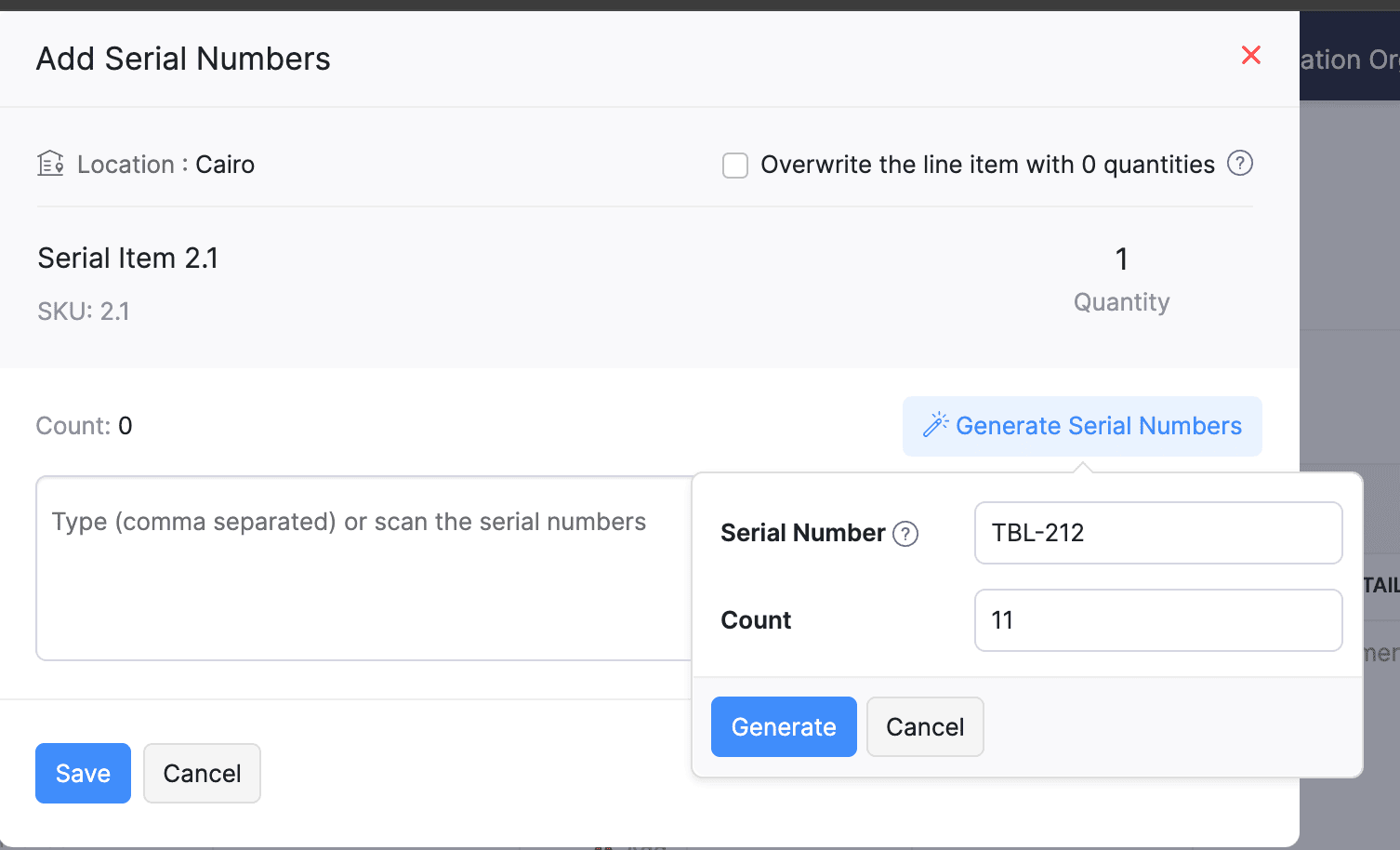
Introducing support serial number generation for inward transactions. You can set a starting serial number and specify the required count to ensure precise inventory tracking and save time.
Note: The starting serial number must always end with a numeric value.
To generate serial numbers, select an item from the item table, click Add Serial Numbers, then select Generate Serial Numbers. Enter the starting value and count, then click Generate.
Note: The starting serial number must always end with a numeric value.
To generate serial numbers, select an item from the item table, click Add Serial Numbers, then select Generate Serial Numbers. Enter the starting value and count, then click Generate.
Batch Tracking Enhancements
Batch Tracking just got more powerful and flexible with some major enhancements. You can now create and edit batches directly from the item details page, making management easier. A new return option allows items to be returned to the same sold batch, improving stock accuracy. You can also use the same batch across multiple line items in purchase transactions. Batch status control lets you mark batches as Inactive, keeping them out of transactions while retaining them for reports. Plus, all batch activity including creation, edits, restocks, and transfers is now visible in the Audit Trail report.
Item Description for UPS Line Items
We have improved the UPS Paperless Invoice feature by introducing the ability to add and edit item descriptions and unit prices individually for each line item within a package. Previously, a single description was applied to all items in a package, limiting the level of detail you could provide. With this update, you now have more control and flexibility.

Enhanced Shopify Integration
We have improved the shopify integration. You can now set sync frequency and mapping options for each store separately. Item sync runs every 24 hours by default, but you can also set it up manually if needed. Non-taxable items are now created with the correct tax exemption. When setting up Sales Order sync, you’ll pick a start date and can set how often it runs. Each store can now sync independently. You can also decide if sales orders should be fetched to Zoho Inventory under a single customer or create new customers using fields like email or name. Now, sync history includes filters for sync type and status, making it easier to show both successful and failed sync.
To integrate Shopify with Zoho Inventory, go to Settings > Integrations & Marketplaces > Shopify
Pin Columns in Transaction List Page
You can now pin up to two columns in the transaction list page in both default and custom views to keep key information visible while scrolling. This feature is available when a view contains more than eight columns.
To pin columns, go to any module, click the Customize Columns icon, hover over the fields, click the Pin icon, and then click Save.

Edit Etsy Orders
You can now edit orders fetched from Etsy with ease. Previously, Etsy orders were imported with non-editable details and tax. Now, you can edit these orders and override the tax applied based on the tax rate configured at your organization level.
To integrate Etsy, go to Settings > Integrations & Marketplaces > Etsy
Clone Delivery Challans
You can now duplicate delivery challans by cloning the existing ones, thereby saving time.
To clone a delivery challan, go to Delivery Challans, select a challan, click the More icon, and select Clone from the dropdown.

Enhanced Export and Print Preferences for Reports
We have added new customization options for report exports and print preferences. You can now set custom file names for exported reports, display column headers on each PDF page, and organize report data into separate pages based on the group by field.
Multi-Factor Authentication (MFA) for Portals
We are improving security by adding Multi-Factor Authentication (MFA) to both Customer and Vendor Portals. This extra security step requires users to enter a Time-Based One-Time Password (TOTP) along with their login credentials.
Admins can turn on MFA in the Customer Portal settings, making it mandatory for customers and vendors to set it up using an authenticator app. Once enabled, users will need to enter a TOTP code each time they log in. If needed, admins can reset MFA for users.
Note that even if MFA is disabled later, users that have already set it up will still need to enter the TOTP code. If they lose access to their authenticator app, they should contact an admin for a reset.
To enable multi-factor authentication for your customers and vendors, go to Settings > Preferences > Customer Portal. Check the Enable multi-factor authentication (MFA) option.

Import Move Orders and Putaways
We have introduced import option for the Move Orders and PutAway modules. You can now seamlessly import data for these, making bulk updates and record creation faster and more efficient.
To import move orders and putaways, go to Transfer Orders/Putaways under Inventory > Click More in the top right corner > Import Transfer Orders/Putaways.
Attach Documents in Purchase Receives
You can now upload, attach, and manage documents directly from the Purchase Receive creation and edit page.
To attach a document in purchase receive, go to Purchases > Purchase Receives > + New > Upload File.

Print & PDF Support for Purchase Receives
You can now generate and print or download your purchase receives. We have also supported a standard template with which you can view the PDF of your purchase receives to simplify record-keeping.
To print or download a purchase receive, go to Purchases > Purchase Receives. Select the purchase receive and click PDF/Print.
To view the PDF of a purchase receive, go to Purchases > Purchase Receives. Select the purchase receive and enable the Show PDF View option on its details page.

Filter Lookup Custom Fields
You can now filter your lookup custom fields by using custom views and setting criteria. The records will be shown based on the chosen custom view and the rules set by you, making sure all the conditions are met.

Leave Organization Option
We have introduced the option to leave an organization from the Manage Organizations page. However, if you are the admin who created the organization or the only admin, you will need to delete the organization instead. Additionally, before you leave, ensure the integrations are disabled, if any.

That's all for now, folks! Try these new features and share your feedback. If you need assistance, reach out to us at support@zohoinventory.com.
Best Regards,
The Zoho Inventory Team
Topic Participants
Akshin Eniyavel S
Jahmonesalmon
Roshin Uchakavil
Marie Sharps Canada
Tocayah
Recent Topics
How to prevent users from editing mail merge templates from Zoho crm
We want users to use public mail merge templates. They should not be able to edit templates but only preview data merge and send emails. We did prohibit "manage mail merge template" in the user profile. But they can still edit the template in the zohoCustomer Addresses cannot be edited/deleted in invoices
In the invoices we have an option to change the customer address and add a new address Now I dont know why for some reason if we add an address through this field, the address doesn't appear in the customer module We cannot delete the addresses addedCustom Fields connected to Invoices, Customers, Quotes, CRM
I created the exact same custom fields in Books: Invoices, Customer, Quotes, and in CRM but they don't seem to have a relationship to one another. How do I connect these fields so that the data is mapped across transactions?Accelerate Github code reviews with Zoho Cliq Platform's link handlers
Code reviews are critical, and they can get buried in conversations or lost when using multiple tools. With the Cliq Platform's link handlers, let's transform shared Github pull request links into interactive, real-time code reviews on channels. ShareHeads up: We're going to update the VAT Summary table's visibility (UK and Germany Editions)
Hello users, Note: This change only applies to organisations using the UK and Germany editions of Zoho Books. Currently, if you've enabled the VAT Summary table in a template, it will be displayed only in PDFs sent to your customers whose default currencyPartial payment invoicing
Greetings I have questions related to payments and retainer invoices: 1. When I want to issue a partial payment invoice, I can't specify the portion to be paid or already paid, then balance to be shown as Due. 2. Retainer invoice is only available asInputting VAT Pre-Registration expenses for first VAT Return
Hi Zoho, I've just registered for VAT and am setting up Zoho to handle calculations and VAT return submissions. I'm struggling to figure out how to input the last 4 years worth of expenses into Zoho so that they're calculated in the VAT module. When IAnyone else experiencing very slow loading of pages in Zoho Projects?
I reported this yesterday only to be told there are no issues but is anyone else experiencing stupidly slow loading of pages. On our loading screen, it is taking often as long as 60 seconds to load a page and just stays on this screen for ages! OtherZoho Desk Lookup Field Reporting
Thank you for adding the ability to add additional lookup fields for desk tickets. My question is how do you report against these fields? For example: Associating related accounts to the primary desk ticket account, I am not able to add the lookup fieldsIntegrating asana will cause notification messages to pop up continuously
When I create or edit a task in Asana, the Asana bot keeps updating messages to group chat, which causes the cliq to keep popping up notifications.Entire notebook that had notes has disappeared
I don't know how tf this happened. All I did was uninstall and reinstall the mobile app after fixing a bug I had. After I reinstalled the app, everything was synced back except for one folder which had a bunch of notes in it. None of those notes are inMy site has disappeared from web builder
www.mproperties.uk My site above is still working. However it has completely disappeared from my Zoho sites' web builder. I am therefore unable to edit my site whatsoever. Please help.Trying to trigger email notification based on rollup summary field
Hi there, I'm trying to trigger an email notification via Workflow Rules wherever the rollup summary field "Total Shipments" goes from empty to not empty. However this field is not available from the picklist of options in the Workflow rule. Can anyonezia data enrichment - switch to webamigo Extension
Hello, I have so far used data enrichment via Zia. Now I have installed the Webamigo extension to expand personal data. Unfortunately, nothing has changed after the installation; are there any additional steps needed to switch from the previous methodExport Timeline
With the new Timeline features, it would be really helpful to have the option to export a timeline. When handling customer complaints, having the full breakdown of everything that happens on a module is great but we usually have to send this to anotherInteractions Tab in Zoho CRM: A 360° Omnichannel View of Every Customer Touchpoint
Hello Everyone, Hope you are well! We are here today with yet another announcement in our series for the revamped Zoho CRM. Today, we introduce Interactions Tab a new way to view all customer interactions from one place inside your CRM account. CustomersHow to resubscribe a contact marked as "Unsubscribed (Marked by Recipient)" without using a form?
Hello, I have a question regarding Zoho Marketing Automation functionality. Is there a way for an administrator to change the subscription status of a contact marked as "Unsubscribed (Marked by Recipient)" back to "Subscribed" without using a form? Ideally,Linkedin: when Zoho Social is going serious with it?
Hi, it's been said in the past that Linkedin related features in Zoho Social were well behind those of other social networks because of limitations imposed by the platform. Now that we see around my tools (take taplio.com) frankly outpacing ZSocial on5名限定 課題解決型ワークショップイベント Zoho ワークアウト開催のお知らせ(7/24)
ユーザーの皆さま、こんにちは。Zoho ユーザーコミュニティチームの藤澤です。 7月開催のZoho ワークアウトについてお知らせします。 2ヶ月ぶりに、渋谷にて「リアル開催」します! ▷▷詳細はこちら:https://www.zohomeetups.com/20250724Zoho ━━━━━━━━━━━━━━━━━━━━━━━━ Zoho ワークアウトとは? Zoho ユーザー同士で交流しながら、サービスに関する疑問や不明点の解消を目的とした「Zoho ワークアウト」を開催します。 Zoho サービスで完了させたい設定やカスタマイズ、環境の整備など……各自で決めた目標達成に向け、How to get fields centered in a form?
Is it possible to center fields in a form? Some of my forms do some don't and it is really not aestheticly pleasing? Any help would be greatly appricated. Thanks, Michael McNeillWebhooks and Integration
Hey, I was looking to create automation using webhooks or something equivalent of a trigger based mechanism, to connect it as an integration. But I don't find any relevant APIs to setup these webhooks/notifcations for the "Zoho Books". Can anyone pleaseZoho Books X Zoho Expense
Hello there, Please can you tell me if it is possible to sync from Books to Expense? I much prefer the Expense reports to that of Books and the Credit Card feeds work via expense and not Books for me. However I find books is much better to deal with theABILITY TO LOG INTO CUSTOMER PORTAL
I think it would be very helpful to have a button in Zoho Books to be able to see the customer portal so we can see what they see to help them navigate through the portal. Many times, the customer will call about the portal, but without visibility intoSort, filter & save views for BOOKS PROJECTS
Thanks for all the updates. Our firm uses the module for simple internal project accountancy. This means we do everything from the Projects Section but this isn't user friendly at all. You can't do anything with customized your own fields which basicallyedit input format in custom field - sales order
hi, I want to integrate a custom field (multi line text box) in our sales order. It needs to show upper case and lower case letters, numbers, spaces, hyphens and "/". What do I need to put in the custom format to configure these signs? Thanks, TinaThis transaction type cannot be matched with a line on the statement.
When using the books API https://www.zohoapis.com/books/v3/banktransactions/uncategorized/${transaction.transaction_id}/match I get this error "This transaction type cannot be matched with a line on the statement." What I'm doing is for the uncategorizedTimesheets
I wanted to create the timesheets remainder for our team mates who miss out the weekly timesheet entries. While creating the email templates, I couldn't see anything related to timesheets. Since it shows projects Can you help me find and build a oneCan we embed a Kanban Type of report using iframe too?
I tried embedding a report as iFrame but it only appear as List View. It would be helpful if can also embed a Kanban Type of report.Weekly Tips : Save Time with Saved Search
Let's assume your work requires you to regularly check emails from important clients that have attachments and were sent within a specific time period. Instead of entering the same conditions every time—like sender, date range, and attachments included—youHidden Fields with Data Pre-Population and Notification Integration in Zoho Bookings Forms
Dear Zoho Bookings Support Team, We'd like to propose a feature enhancement for Zoho Bookings forms that would improve data management and workflow efficiency: the ability to create hidden fields with pre-populated data. Current Functionality: Zoho BookingsTip #37 – How to ensure compliance and accountability using Advanced Session Audit – ‘Insider Insights’
Hello Zoho Assist Community! This week we will be discussing how to strengthen your remote support operations with better visibility and control. Let’s say your support team handles a growing number of remote sessions each day. At the end of the week,Replace an existing zoho show file with an uploaded one.
For Zoho WorkDrive Upload API method, I have override-name-exist option, which I can use like this: curl https://www.zohoapis.eu/workdrive/api/v1/upload \ -F "filename=mypres.pptx" \ -F "parent_id=j3tzq1ae09c0cd91540df8d01670af05b657e" \ -F "override-name-exist=true"Tip of the Week #66– Use internal comments to collaborate and resolve issues faster!
Ever found yourself stuck on a customer query because you needed inputs from your teammate? Or sent a reply too soon and realized later that someone else on your team had a better context? When you rely on back-and-forth messages in external chats orUsing Zoho One to manage two (or more) businesses
We are one company that operates two business, a scenario that Zoho One doesn't really seem to handle very well, and one which I can't imagine is at all unique to us! (It is basically designed to facilitate branding and use for one business only per subscription).Skip order confirmation step in commerce?
We have a store to sell products that are not shipped to a customer. Right now, when the order is placed, we have to manually 'confirm' the order so the sales order can convert to an invoice and charge the customer. Is there a way to skip the manualFree Shipping Coupon - Zoho Commerce
I love the Zoho platform. Zoho Commerce is no exception; however, I'm struggling with a few common features I cannot find or are missing that I hope someone can help me with. Is there a way to create a coupon code for free shipping?Is there a way to link an item to a liability account?
I collect customer deposits for certain services and hold them in a liability account. However, Zoho Books doesn't let you create an item and assign it to a liability account so how do I create an invoice with an item that records it as a deposit intoSelect a balance sheet account when creating an invoice
Hi, it would be very helpfull to be able to select a balance sheet account when invoicing clients. We bill 30% of the job at signing and we would like to add to deferred revenues. I have to create a transit revenue account and then tranfer to the rightHow to work out commission in zoho commerce based on coupons
HI There Is there any way to produce report based on coupon name in zoho commerce We need to pay commission to various channels who are helping us to increase the online sales so we have number dedicated coupons assigned to the above mentioned channelsRequest for Subform Styling Feature in Zoho CRM Canvas
Dear Zoho CRM Team, We have observed that in the Zoho CRM Canvas view, it is currently not possible to set presets or manage the styles of subform fields. Additionally, the ability to edit subform data directly within the Canvas view appears to be limitedNext Page