What's New in Zoho Inventory | July & August 2026
Hello users,
The July and August 2026 releases bring a range of new features and improvements across the product. From the Nigeria Edition and Super Admin enhancements to Sri Lanka IRD-compliant invoicing, Loyalty Program Management, and improvements to the Android app, there’s plenty to explore in this release.
New Releases
Nigerian Edition of Zoho Inventory Is Now Live
We’re excited to announce the successful launch of the Nigerian Edition of Zoho Inventory, expanding our inventory management solution to businesses in Nigeria. With this launch, Zoho Inventory continues to expand its regional availability and provide businesses with inventory management capabilities tailored to their local requirements. Explore the help documentations
Custom Dashboards for Zoho Inventory
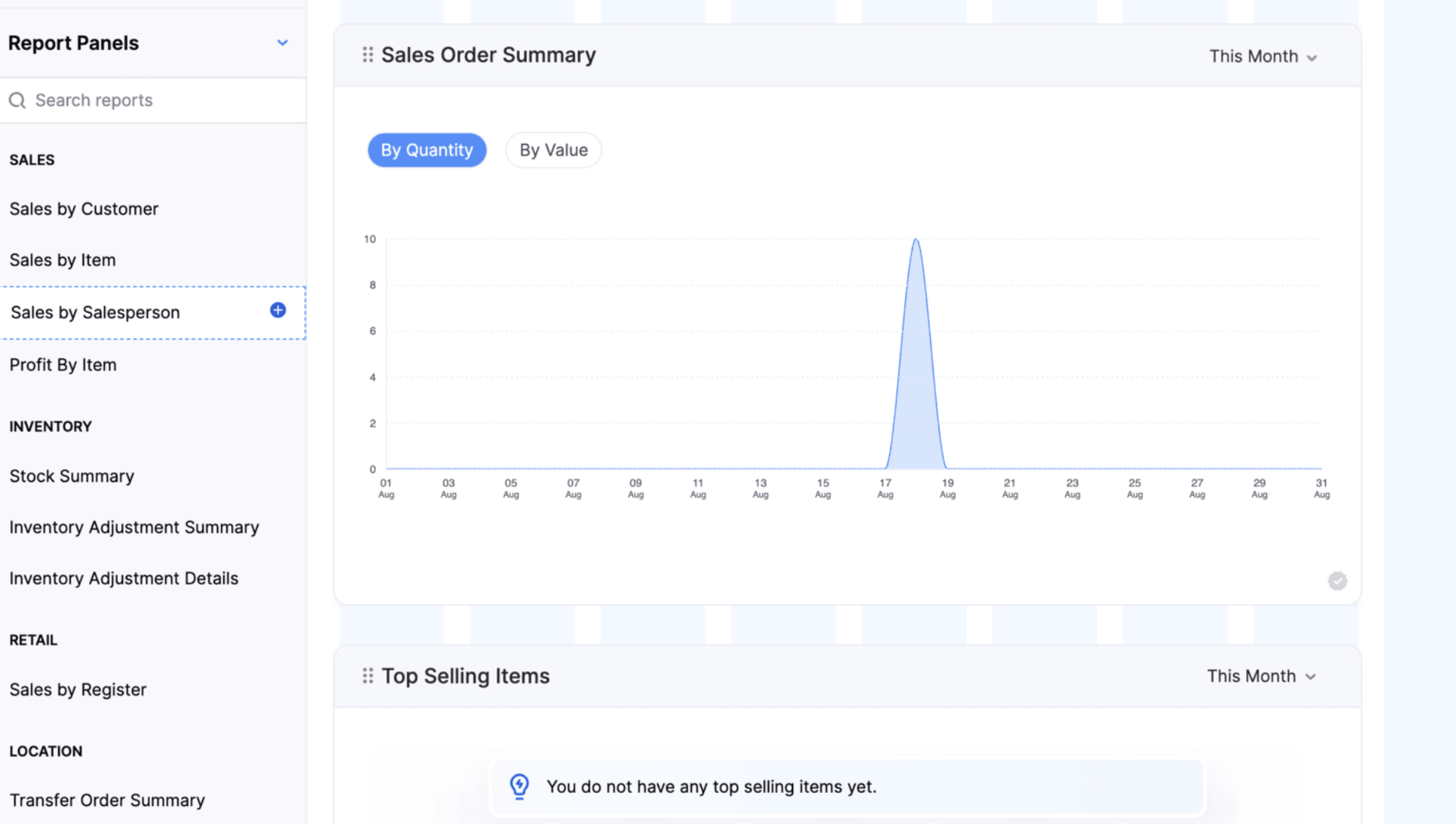
Custom Dashboards are now available in Zoho Inventory, along with entity-level permissions for Reports within Roles. Users can personalize their dashboards by adding the required predefined panels and report panels, while role-based permissions ensure they can access only the reports and data they’re authorized to view. This provides a more flexible dashboard experience, giving users faster access to the inventory insights most relevant to their day-to-day operations.
Note: This feature is available only on the Enterprise plan.
Introducing Super Admin
Super Admin is a high-level privilege assigned to an administrator, giving them exclusive control over other admins and the ability to set up and manage the organization across all Zoho Finance applications. Learn More
Customer & Users Management
Loyalty Program Management
Create and manage loyalty programs and associate them with customers to reward purchases with loyalty points. Customers can earn and redeem points across supported sales channels, helping businesses improve customer retention and engagement.
Configure organization-wide loyalty preferences, including point adjustments, rounding rules, redemption behavior, return handling, and the loyalty points tracking account. Set up individual programs with earning and redemption rules, schedules, minimum redemption points, and redemption windows. Customers earn points automatically on eligible sales based on their associated loyalty program. Points earned from the original sale are automatically reversed when a Credit Note is created for a return. Customers can redeem available points partially or fully on invoices and during Retail Store checkout, and pay the remaining balance using other payment methods.
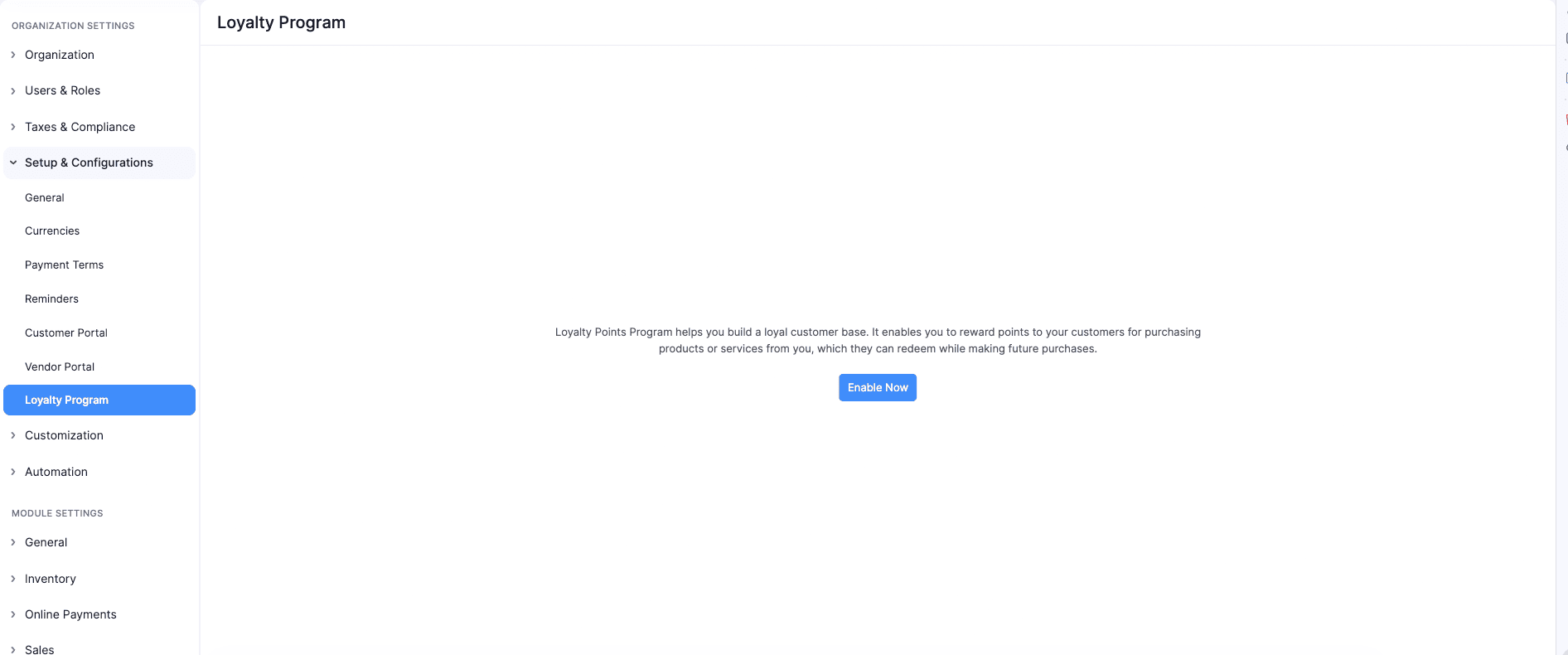
To enable Loyalty Program Management > Go to Settings > Navigate to Setup & Configurations > Click Loyalty Program > Click Enable Now.
Role-Based Access for Extension Installations
You can now control which user roles can access an extension during installation. Administrators can select the roles that can access the extension components and restrict access for others. Access can also be modified later from the extension details page. Organization-wide backend components are not covered by role-based access.
Vendor Hierarchy
You can now organize related vendors into a hierarchy by associating sub-vendors with a parent vendor. This makes it easier to manage and track transactions across vendors from a single parent vendor.
Note: Vendor Hierarchy is available in Early Access on the Enterprise plan. Contact support@zohoinventory.com to enable it for your organization.
Contact Person Custom Fields
You can now create custom fields for Contact Persons to capture additional information specific to your business needs. Custom fields can be created and managed from the Customer and Vendor Custom Fields page and are available for both primary and other contact Persons. You can also display Contact Person custom fields on the Customers and Vendors details page, list view page, and portals.
The custom fields are also supported in Contact Person import and export, audit trails, and integrations with Zoho Analytics, Microsoft, Zoho CRM, and Bigin.
Items & Item Setup
Create and Sell Item Groups [Early Access]
Create Item Groups to combine individual items that are commonly sold together. Add the group to sales transactions to automatically include its components with predefined quantities.
Item Groups do not have standalone pricing, taxes, inventory tracking, or accounting. These are managed for individual components. You can add or remove components, edit their quantities, rates, taxes, and discounts, and rearrange them during transaction creation. In packages, picklists, purchase returns, backorders, dropshipments, and reports, only the individual components are considered. You can display group components in transaction PDFs using the Show Item Components option in PDF customization.
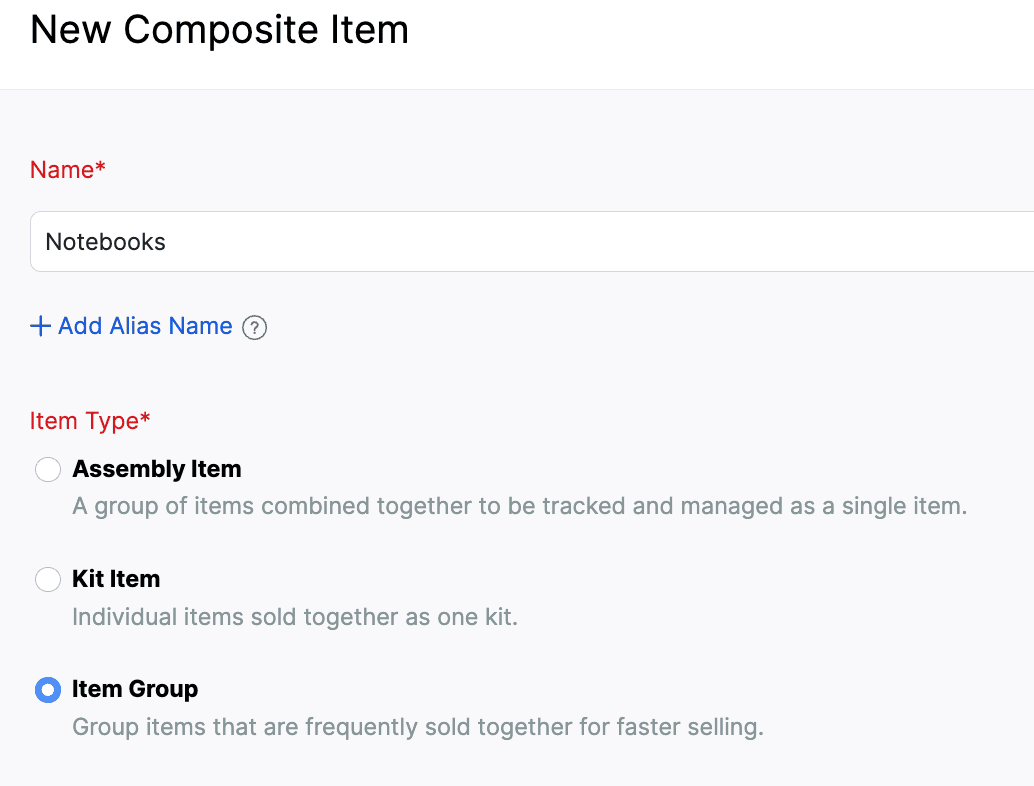
To create an Item Group > Go to Inventory > Composite Items > Click + New > Select Item Group > Enter the group details and add component items > Click Save.
Create and Manage Item Modifiers
We’ve introduced a new Item Modifiers module that lets you customize items during transactions using predefined options. Create reusable modifier groups, configure selection rules and additional prices, and associate them with one or more items.
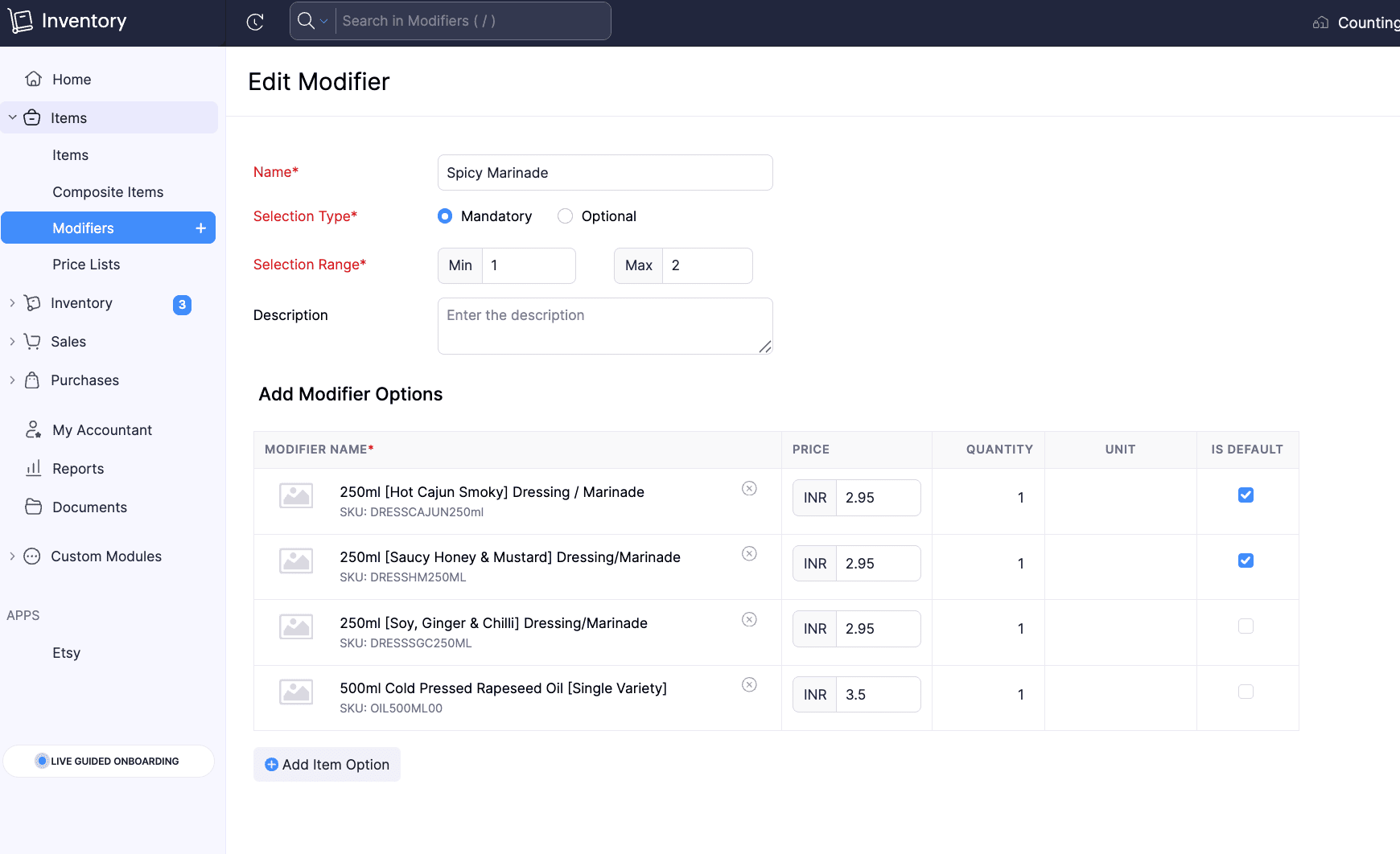
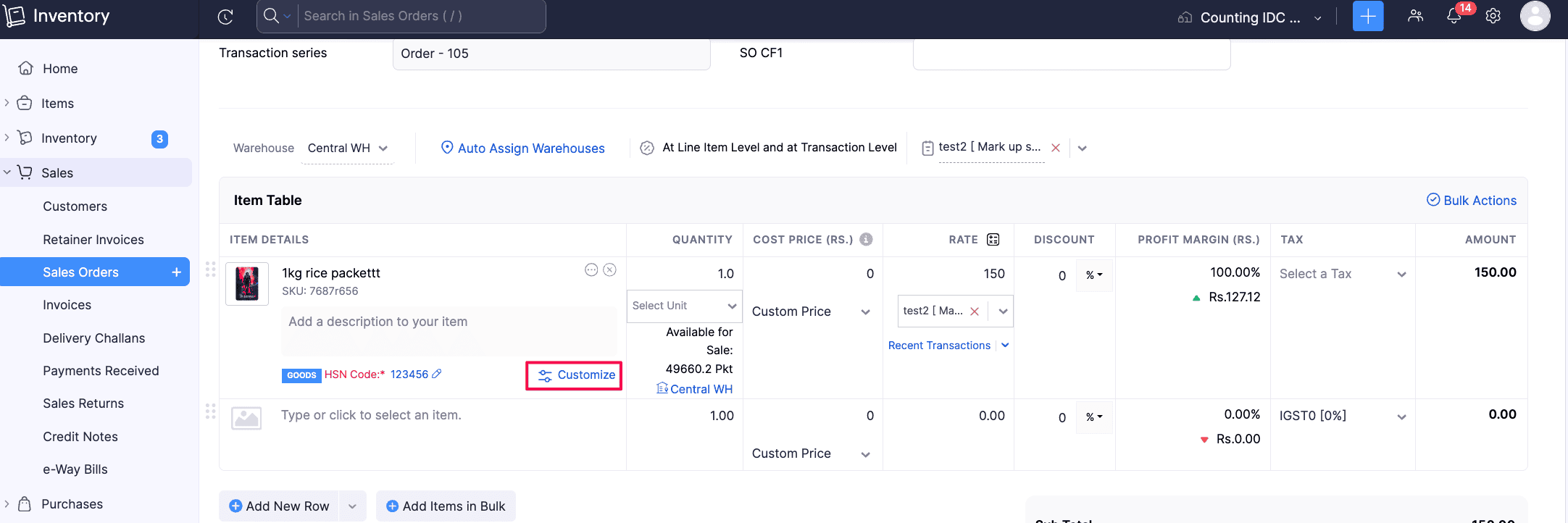
Selected modifiers are displayed under the parent item and are included separately in packages, picklists, returns, PDFs, and the Sales by Item report.
To create Item Modifiers: Go to Items > Click Modifiers > + New, configure the modifier group and options, associate it with items, and save.
Note: This feature is in Early Access and is available only to users on the Enterprise plan. Contact support@zohoinventory.com to enable it for your organization.
Customize Item Identifier Fields and Access
Customize the UPC, EAN, MPN, and ISBN item identifier fields, including their display names. Configure each field to be mandatory, active, or inactive, and set role-based access to show or hide them. The SKU field is also included in this customization framework.
To customize item identifier fields > Go to Settings > Module Settings > General > Items > Navigate to Item Identifier Fields (UPC, EAN, MPN, ISBN, SKU) > Mark fields as Mandatory
Introducing Combo Items [Early Access]
You can now create Combo Items, a new Composite Item Type that lets you sell multiple products together while providing flexibility in the components included. Unlike Kits, where all components are predefined, Combo Items allow you to configure multiple component groups with different options. During a transaction, you can select one option from each group to create the combo. You can also customize the selected components, manage their quantities and tracking details, and handle packing, backorders, returns, PDFs, and reports for Combo Items.
Note: This feature is in Early Access and is available only to users on the Enterprise plan. Contact support@zohoinventory.com to enable it for your organization.
Purchases
Create Purchase Returns [All Editions]
The Purchase Returns module is now available for all editions. Create returns as standalone documents or directly from existing Purchase Orders with pre-filled details. Once confirmed, generate picklists, packages, shipments, and vendor credits to track physical movement and financial adjustments. The Purchase Return Summary and Purchase Return Details reports provide visibility into return transactions and item-level data. Learn More
To enable the Purchase Returns module: Go to Settings > Click General under Setup & Configurations > Enable Purchase Returns
Filter Purchase Receives by Approval Status
Filter Purchase Receives by their approval status to quickly locate and manage records. You can filter records by Draft, Pending Approval, Approved, In Transit, Billed or Rejected status from the Purchase Receive list page, custom views, advanced search, Item transaction details, and Vendor transaction details.
Sales & Returns
Configure Approval Workflows for Sales Returns
Configure simple multilevel and custom approval workflows for sales returns to control their status changes. Set approvers, manage the movement of returns to Accepted or Declined status, and filter the Sales Returns lists view page and history reports by approval status. Users with the necessary permissions can save, submit, or accept returns based on the configured workflow.
To configure Sales Return approvals > Go to Settings > Preferences > Approvals > Select Sales Returns > Choose Simple, Multi-Level, or Custom workflow > Add approvers and conditions > Save and Enable
Allocate Stock to Sales Orders [Early Access]
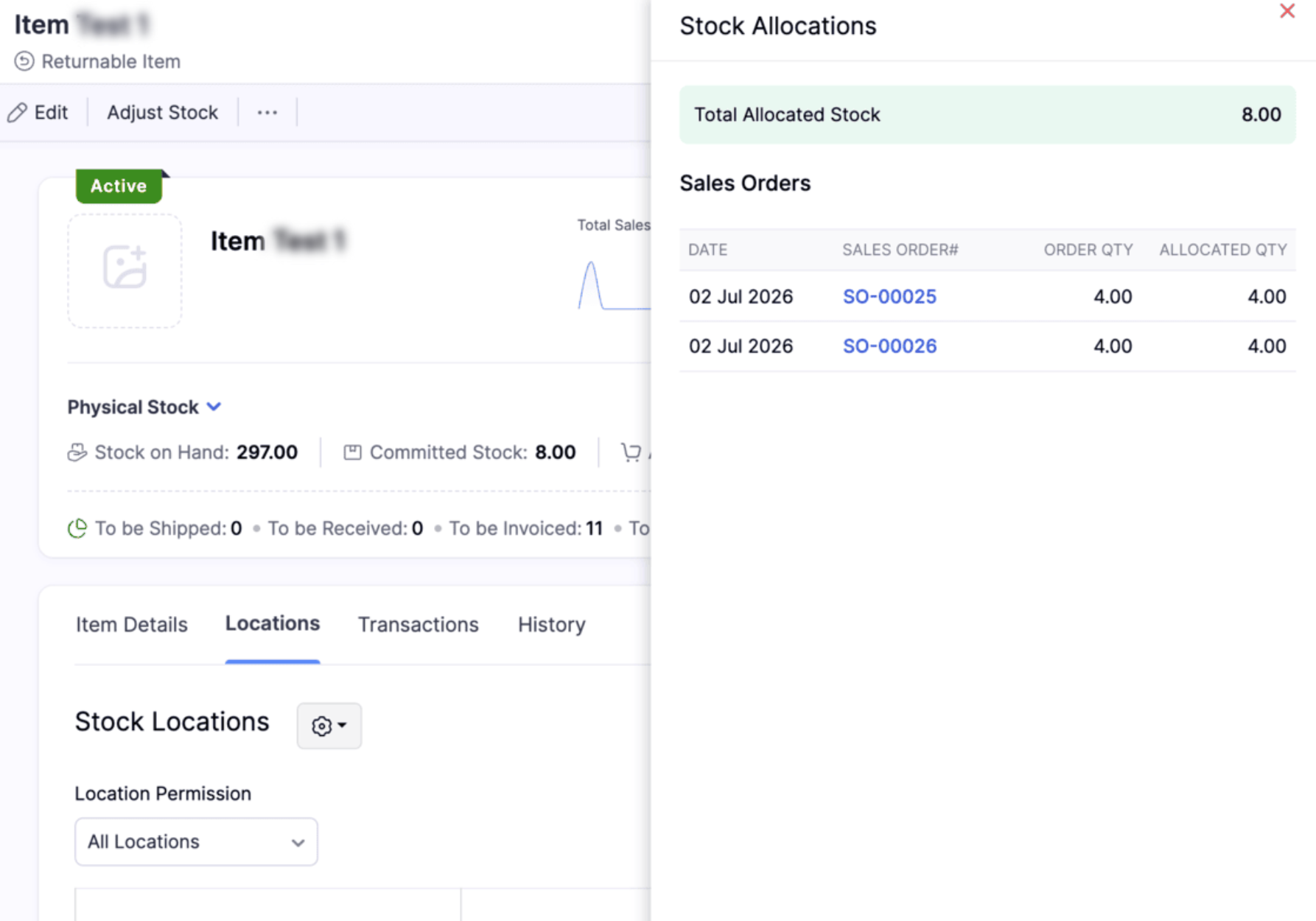
Allocate available inventory to confirmed sales orders to reserve stock for specific customers. This prevents the same stock from being allocated to multiple sales orders. You can track allocated quantities for each order and item, including batch and serial-tracked items. Allocated stock remains available in your physical inventory until it is shipped. Allocations are automatically updated as items are fulfilled, and you can remove allocations before picking or packing starts. You can also filter Sales Orders by allocation status and view allocation details by item and location.
To view the available stocks for an item, Go to Items > Select the item > Click Allocated Stock in the details page
Inventory Operations and AI Enhancements
Adjust Inventory Value to Zero
You can now adjust an item's total stock value to zero using Value Adjustment. Previously, adjusted values of zero or below were restricted. With this enhancement, only negative values are restricted, allowing you to accurately reflect inventory with no remaining financial value, such as damaged, obsolete, expired, or fully written-off stock.
Role Permissions for Assemblies
Assembly permissions are now available as a separate entity under Roles & Permissions. Admins can now manage access to each Assembly action separately instead of assigning all Assembly permissions together under the Composite Items module.
Manage Inventory with CoCreate Agent
We’ve introduced the CoCreate Agent, which helps you create sales transactions such as sales orders, invoices, and credit notes using simple prompts. Instead of entering details in each field manually, you can describe the transaction in simple English, and the agent creates it for you. Learn More
Note: This feature is available only on the Enterprise plan.
Templates & Customization
Sri Lanka IRD-Compliant Invoice Template [Global Edition]
You can now generate Sri Lanka IRD-compliant invoices from the Templates Gallery under the Global Edition. The template reflects the mandatory Tax Invoice requirements set by the Sri Lanka Inland Revenue Department and includes supplier and purchaser details, invoice serial number, date of supply, tax values, and total consideration in Sri Lankan Rupees.
Create Custom Barcode Templates
Create fully customizable barcode labels using HTML and CSS. Design flexible layouts, define custom label sizes, and use placeholders to display organization details, item custom fields, batch custom fields, and serial custom fields. Create separate templates for item, batch, and serial number barcodes based on your requirements.
To create a custom barcode template > Go to Settings > PDF Templates > Item Barcodes > Click New Template > Select Build from Scratch > Open the Code Editor
Note: This feature is available only for the Premium and Enterprise plans
Currency Support in Oman
Currency symbol support is now available for the Omani Rial (OMR) or transactions with up to 200 line items, the respective currency symbol will be displayed automatically. For transactions exceeding 200 line items, the currency codes SAR, AED, and OMR will continue to be displayed.
Enhanced Zoho Analytics Integration
Enable Weighted Average Cost Module in Zoho Analytics
Enable the Weighted Average Cost (WAC) module in Zoho Analytics to access inventory transaction valuation details. The module includes a Current WAC column that provides the valuation cost of outward inventory transactions for custom reports and queries. Organizations using the WAC valuation method can use this data for accurate Profit and Loss, inventory valuation, and other accounting reports.
To enable the WAC module: Go to Settings > Integrations & Marketplace > Zoho Apps > Zoho Analytics > Click Edit for the Analytics configuration > Select the Weighted Average Cost module > Click Save.
Sync Picklists, Move Orders, and Putaways with Zoho Analytics
Sync picklists, move orders, and putaways with Zoho Analytics to access and analyze their data in custom reports and dashboards.
Report Enhancements
Purchase Order By Item Report
The new Purchase Order By Item report provides an overview of purchase order data by item for a selected date range. Use customizable columns, advanced filters, multi-level grouping, and export options to analyze purchase order details. You can also create custom reports and schedule the report for automatic delivery.
View In-Transit Quantities in Inventory Summary Report
View the quantity of purchase receives that are in transit in the In-Transit column of the Inventory Summary Report. When the Shipment and Receipts filter is selected, this column displays the combined quantity of in-transit purchase receives and Transfer Order stock.
Minor Enhancements
Include Credit Notes in the Profit by Item Report using the Report By filter. This ensures that returns are considered when calculating item-level profit.
Select months or years as the time interval in the Inventory Aging Summary Report to analyze inventory age over longer periods.
Schedule the Batch Details Report to generate and send automatically at your preferred intervals. Set a recurring frequency schedule and select the recipients for report delivery.
The Order Fulfillment by Item Report now includes Sales Order Number, Customer Name, and Sales Order Custom Fields in the Advanced Filters. Users can apply specific filters to quickly identify and analyze order fulfillment data based on sales orders, customers, and business-specific custom fields.
The FIFO Cost Lot Tracking Report now includes an Age column under the Product In section. It shows how long each stock has been held based on its received date, providing better visibility into stock age under the FIFO valuation method.
Taxes & Payments
Terminal Payments
Terminal Payments via Zoho Payments are now available in the India edition. You can accept customer payments through supported terminal devices directly from the web, Windows app, and Retail app.
Import and Export TDS Rates
Import and export TDS and TDS Group tax rates to manage tax rates more efficiently.
To import or export TDS rates > Go to Settings > Direct Taxes > Income TDS Rates > Import or Export the required tax rates
TDS Summary in Invoice and Bill PDFs [IN Edition]
Invoice and Bill PDFs can now include a dedicated TDS Summary table, displaying the TDS rate, taxable amount, TDS amount, and total taxable & TDS amount. The table appears when Show TDS Summary is enabled in the PDF template and the transaction contains TDS, making it easier to view the complete TDS breakdown directly in the generated PDF.
E-Way Bill Support for Purchase Transactions [IN Edition]
E-Way Bills can now be created for Bills and Vendor Credits in the India edition, including purchase transactions that exceed the applicable threshold. You can also select the required address while generating the E-Way Bill, making it easier to create and manage E-Way Bills for purchase transactions.
Direct Avalara Integration Updates [US & CA Editions]
The direct Avalara integration now supports customer codes. You can use customer codes to match the correct customer record in Avalara when customers have branches, partner customers, or naming differences across systems. This ensures the correct exemption certificate is applied during tax calculation without manual adjustments.
Android App Updates
Picklist Item Grouping: The Picklist module now supports item grouping, so users can view items grouped by sales order and filter by sales order or assignee.
Credit Note Template Selection: Users can now change the template directly in the Credit Notes module, making it easier to align templates with their document needs.
Alias Name for Items: Items can now include an alias name, and that value can be used during item search for quicker lookups.
Onboarding Dashboard Order: The onboarding dashboard now follows the sequence of sales order, package, shipment, and purchase order for a clearer workflow view.
That's a wrap for now, folks! We hope these updates make your inventory management smoother and more powerful. Try these features out and let us know what you think in the comments below. If you have any questions, feel free to reach out to us at support@zohoinventory.com.
Best regards,
The Zoho Inventory Team
Topic Participants
Rithiga devi S
jason
Sonny Jelinek
Ashley Bell
Dinesh
Recent Topics
Times prepopulating in Date/Time field on deal records
Support tells me that there is no workaround to having the time auto-fill on a date/time field in our deal records -- that is HUGELY inconvenient and creates massive opportunity for error. Our deals involve several parts over various days/times, noneMulti-Day Installations
We schedule technicians on multi-day installations. A single appointment from Monday 8 AM through Friday 5 PM counts as 105 working hours, causing false overbooking. We need one appointment spanning five days but only 40 hours counted toward technicianMaking shared forms available offline
Hi, We used to be able to have our forms available offline even if it was a shared form. now we can't. Is this a new bug?Zoho Forms API
Is there any way to get all form entry list using API? Looking forward to hear from youDocuments greater than 40MB Preview
hello, Documents bigger than 40 MB cannot be previewed in WorkDrive Web App or Mobile App. would it be resolved in future?Calendar Booking - Related Deal
Is it possible to automatically associate a Calendar Booking with an existing Deal in Zoho CRM? We're trying to use the native Calendar Booking feature. Our goal is to send a booking link to a customer from an existing Deal record, so that when the customerApproval Process configuration is now more flexible and fully customizable
Hello everyone! Approval Process is back with a better user experience that makes it easier to add rules to your processes. This enhancement includes some UI updates that help you create highly structured approval stages—and more. Let's look at the enhancementsKaizen #268: Using Zoho MCP to Build and Configure Zoho CRM Cadences
Hi everyone! Welcome back to the Kaizen series! In the previous Kaizen posts, Kaizen #265 and Kaizen #266, we explored how Zoho MCP can be used to work with Zoho CRM records, retrieve metadata, customize CRM, configure automation, and even coordinateDeliverability Update: Impact of the Ongoing Microsoft 365 Service Disruption on Email Delivery
Zoho Campaigns is operating normally. Microsoft is still recovering from a global incident that affects multiple Microsoft 365 services, including Exchange Online and Outlook. If your mailing lists include Microsoft-hosted addresses (@outlook.com, @hotmail.com,Duplicate Record Creation
Hello Team, I would like to check whether there are any options available in Zoho FSM to prevent duplicate record creation in the following modules: Assets Companies Contacts Ideally, we would like the system to check for existing records before allowingTrigger a Workflow Function if an Attachment (Related List) has been added
Hello, I have a Case Module with a related list which is Attachment. I want to trigger a workflow if I added an attachment. I've seen some topics about this in zoho community that was posted few months ago and based on the answers, there is no triggerZoho Inventory - Imporoved Order Fulfillment Reporting
Hi Inventory Team, i've tried to contact you through support@eu.zohoinventory.com but haven't received a response. I am contacting you on behalf of a client. Our client is a car parts wholesale business and we set them up on Zoho Inventory earlier thisSay Hello to Telephony in Zoho FSM
Zoho FSM now brings complete telephony support so your team can manage inbound and outbound calls without switching tabs. Faster responses, smarter routing, and total call visibility—all in one place. Choose the telephony setup that works for you Zoho’sIncreasing API Credits
Hello everyone! Organizations consume Zoho CRM APIs for various business needs, and it's a show-stopper when you exhaust your API credits before the 24-hour rolling window replenishes your credits. To meet your growing needs and help you keep your business[Online Training] Zoho RPA masterclass: Fundamentals, SAP® automation, & AI workflows
Hello everyone! Greetings from the Zoho RPA Training Team! We're excited to announce our upcoming Online Training on Zoho RPA. Manual, repetitive tasks like entering data, updating spreadsheets, managing files, and extracting information from documentsZoho Inventory | Can't uncheck/turn off Advance Tracking
Hi, I wanted to know if there's a way to turn off Advanced Tracking (such as Serial Number or Batch Tracking) for an item in Zoho Inventory. I’ve read that you might need to delete associated transactions and clear the opening stock to disable these features.CNIL - Suivi de Pixel
Bonjour à tous, À la suite de la nouvelle recommandation de la CNIL sur les pixels de suivi dans les e-mails, savez-vous si Zoho Campaigns permet : de conditionner le suivi des ouvertures au consentement de chaque contact ; de proposer un lien permettantJoin Zoho Meeting only via Web browser and not with Zoho Meeting App
Dear Zoho team, according to the documentation [1], Zoho Meeting only offers web view for Chrome and Firefox on a desktop. For other browsers and devices, participants can only join a Zoho Meaning with the Zoho Meeting App installed. This is a big hurdleGetting an error when trying to use the Zoho Desk Resources with our Zobot chat
Hello, When I try to set our Zobot AI Card Training to Zoho Desk resources I get an error when testing it and it bypasses the bot completely. When I try to switch it to the Zoho SalesIQ resources option in there it will list some articles but not giveKB Articles from Zoho Learn - Import as .md
I love the concept of being able to use articles from Zoho Learn as knowledge base articles for Zia Agents. This will absolutely help with proper documentation and organization of company processes and SOPs. This was a great concept. However, even whenRequest for Zoho Desk Version and Module Details
Kindly help us confirm the version of Zoho Desk currently being used in our portal, along with the module/edition name. We require this information urgently for our internal documentation.Cannot reorder fields in Page Layout in Expenses and Purchase Requests
It is very inconvenient that the custom fields in Page Layout cannot be re-ordered. The only way is to remove the fields and re-create them; however, it is impractical. This would affect the reports and dashboards we are having. Not able to re-order thePurchase Requisition in Zoho Books
I want to understand if Zoho Books is having the following workflow: PR ( Purchase Requisition ) >> PO ( Purchase order) >> GRN/SRN ( Goods/Services receipt note) >> BillTips & Tricks #8 | Zoho Mail: Seguridad, privacidad y control para tu empresa
El correo electrónico sigue siendo una herramienta fundamental para cualquier organización. Por él circulan comunicaciones internas, información de clientes, documentos confidenciales y datos esenciales para el negocio. Por eso, elegir un proveedor dePersonalize Email Campaigns using CRM Data
Recently, few of our CRM users wanted to send an email campaign with personalized sender details and signature so that recipients can instantly recognize the sender. We are happy to announce the new enhancement in campaign creation through which you can personalize your email campaign using CRM Contact/Lead Owner's data. Let’s see how we can use those data to send emails. Personalize sender details Using Zoho Campaigns, you can send an email campaign with a personalized sender name and email address集めて終わりにしない。― Zoho FormsからCRMへデータをつなぐ
ユーザーの皆さま、こんにちは。ゾーホージャパンの友田です。 Zoho Formsで問い合わせや資料請求を受け付けた後、その情報をどうしていますか? 例えば、 フォームから届いた氏名や会社名、メールアドレスを確認して、Zoho CRMにも同じ情報を入力している。 そんな作業が発生している場合、FormsとCRMをつなぐことで、その手間を減らせるかもしれません。 Formsに入力された情報をCRMへ Zoho Formsは、Zoho CRMと連携できます。 例えば、Webサイトから資料請求を受け付ける場合、Sheet co-edit: no live presence — also on Collaborate demo?
Two Sheet co-edit sessions open OK (same document_id, document.edit: true), but there’s no real-time collaboration: no cell highlights, Group Chat → Users stays empty. Writer co-edit works on the same Office Integrator setup. We see the same on the officialShort product videos on Zoho Commerce product pages: what works?
Short product videos are becoming a normal part of online store pages, and I have been thinking about how to use them well on a Zoho Commerce store. A few points that seem to matter: Keep them short. 6 to 15 seconds showing the product from a few anglesHow to embed Google Analytics GA4 tracking on a standalone Public Page (outside Customer Portal)?
Hi, Is there an official or recommended way to embed Google Analytics (GA4) tracking directly onto a standalone public Zoho Creator Page (outside of a Customer Portal)? I’m considering using an invisible Custom JS Widget as a workaround, but I’d loveUnable to integrate Whatsapp Messaging into Zoho CRM - Business Messaging
Hello, I want to set up Business Messaging in our Zoho CRM and am struggling to set it up. I have logged into the account and our facebook business page, our business shows in the dropdown for WhatsApp Business Account but does not for WhatsApp BusinessZoho CRM calendar merge with outlook
Hi Zoho team! I did the steps for syncing the zoho CRM calendar with outlook. Everything works well as long as the user creates meetings inside the newly created Zoho CRM calendar in outlook, but I need a way to also display the meetings which are receivedThunderbird cannot authenticate Zoho on android
I keep getting a message from Thunderbird on Android that it could not authenticate for my account, dadashton@zoho.com., and to update my server settings. Now the settings are exactly the same for my other devices (1 Windows, 1 Mac and 2 Linux) Can anybodyBills import rejects the Account column (The account does not exist), although the accounts exist in the Chart of Accounts
Hello Zoho Books Team, I am unable to import bills into my Zoho Books. The import keeps rejecting the Account column, even though the accounts exist and work when I create a bill manually. What I am doing Bills > Import Bills, CSV/XLSX file, 145 rows,How do I reorder the item table columns in my invoice template?
There must be a way I just cannot find it. Anyone?Zoho Desk API returning 403 SCOPE_MISMATCH for Ticket Search API
Hello Zoho Support Team, We are experiencing an authorization issue with the Zoho Desk Ticket Search API. Our integration was working correctly yesterday, but we are now receiving the following error when calling the Search Tickets endpoint: API: GETFree webinar: Zoho Sign in Q3 2026
Hi there! From smarter signing on your Apple devices to new ways to verify and personalize your documents, Zoho Sign had a busy Q3—and we're bringing it all together in one session. Join us for a complete walkthrough of everything new this quarter, plusZoho Desk - Delete an email conversation
When using Zoho support desk I see an option to delete and edit conversations that are comments, BUT if the conversation was automatically added as a conversation from an email, then the option to delete it seems not to be available. Is there a way toMessages do not open and I cannot reply to messages in Zohodesk
Hi, this is an unusual behaviour. I cannot reply to messages: Accessing a draft message - runs endlessly. Sending Emails fail:Link item in purchase order to Customer
Is it possible to link each item in purchase order to a customer which would create an associated list, so I can easily find where, when and what my customer have order from us. Thanks!Passing the CRM
Hi, I am hoping someone can help. I have a zoho form that has a CRM lookup field. I was hoping to send this to my publicly to clients via a text message and the form then attaches the signed form back to the custom module. This work absolutely fine whenNext Page